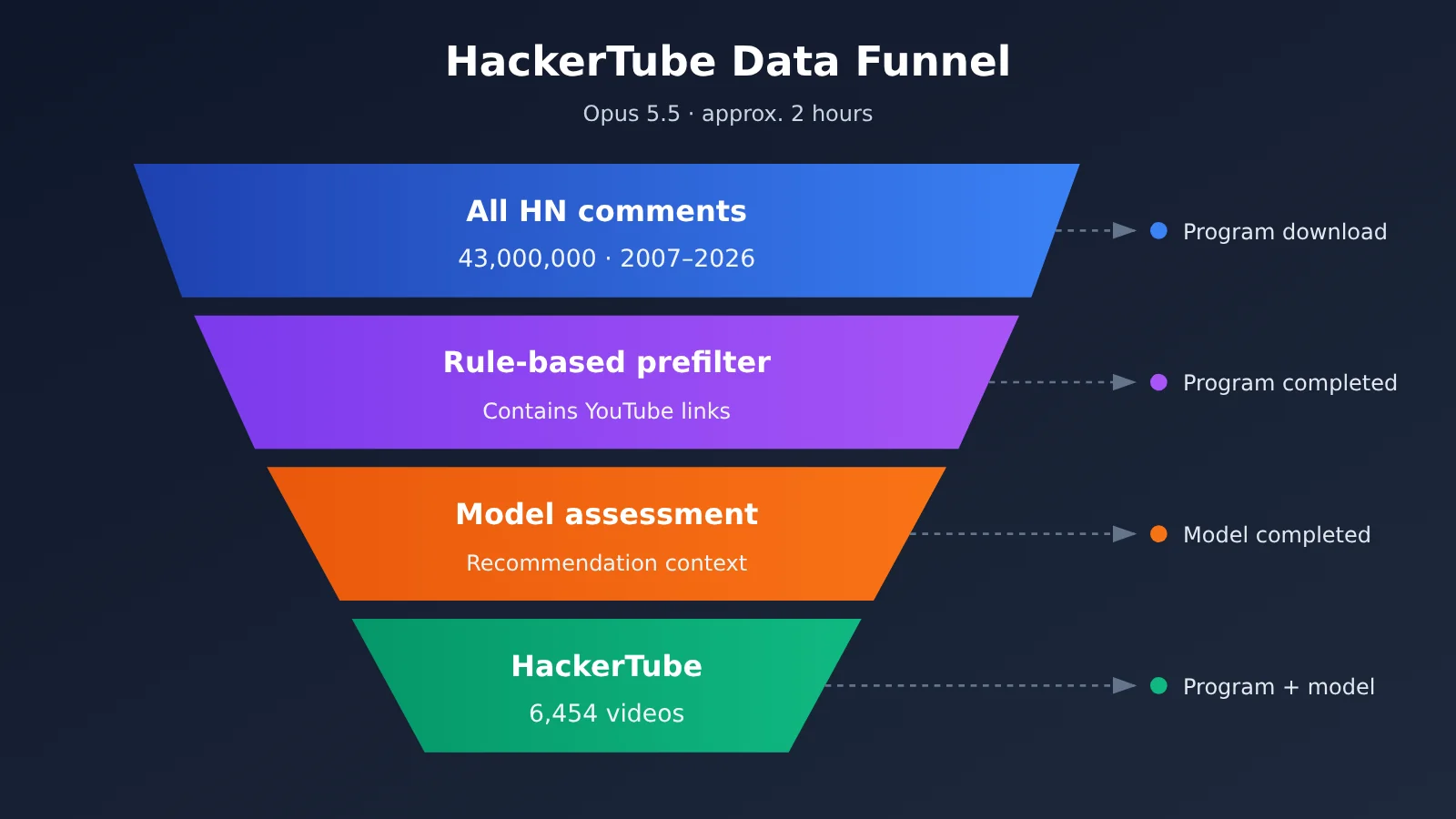
Andrej Karpathy spent about two hours one weekend building HackerTube, a video site. He had Claude sift through roughly 43 million comments from 20 years of Hacker News and find 6,454 YouTube videos that had been recommended repeatedly. Most of the work happened through conversations with Claude. As Karpathy put it on X (2026-11-01): “~2 hours with Opus 5.5”.
Based on Karpathy’s original post, the HackerTube site, and public community accounts, this article breaks the project into 6 steps any developer can follow and highlights the 3 places where you’re most likely to get stuck.
What you’ll get: A 6-step workflow that spells out what the human, the program, and the model each do; a cost estimate with its assumptions clearly stated; and the shortest path to accessing Claude Code through APIYI at apiyi.com.
What Karpathy’s HackerTube Actually Does
In short, he turned 20 years of Hacker News users telling each other “you have to watch this video” into a browsable video site.
Here’s Karpathy’s full post on X (2026-11-01 18:14 UTC):
「Weekend hack: HackerTube. I was annoyed with YouTube’s recommendations so I had Claude filter down 43M comments over 20 years of HN to 6,454 videos that keep being recommended. Significantly better viewing experience, ~2 hours with Opus 5.5」
The description on hackertube.org reads: “The YouTube videos that Hacker News keeps telling each other to watch.” The site’s core isn’t a recommendation algorithm—it’s semantic filtering of existing community discussions.
| Key point | Public information | Source |
|---|---|---|
| Data scale | Approximately 43 million HN comments over 20 years, narrowed down to 6,454 videos | Karpathy’s original post (2026-11-01) |
| Time and model | Approximately 2 hours, using Opus 5.5 | Karpathy’s original post (2026-11-01) |
| Tool environment | Claude Code desktop app | Community reports |
| Manual work | Only three things done manually: get a YouTube API key, set up a server, and buy a domain | Community reports |
| Site format | Approximately 150 topics, spanning 2007–2026, with no login required | Community tallies |
How HackerTube Works
According to community reports, Karpathy said, “I only talk to Claude and have it do everything.” In other words, Claude handled most of the work in Claude Code: downloading the data, writing filtering scripts, calling the model to make judgments, and generating the pages. Karpathy mainly defined the requirements and handled steps that needed accounts or payments.
This is different from “having AI write a web page template.” The hard part is the data: you can’t fit 43 million comments into the context window at once, and the appearance of a link doesn’t necessarily mean it’s a recommendation. So the project is more like a data pipeline with a thin front end.
The 6-Step Process for Recreating HackerTube with Opus 5.5
The key takeaway: first use a program to cut down the data volume, then have the model make only the judgments that require understanding. The six steps below are in execution order, with who does each one and how to verify the result.
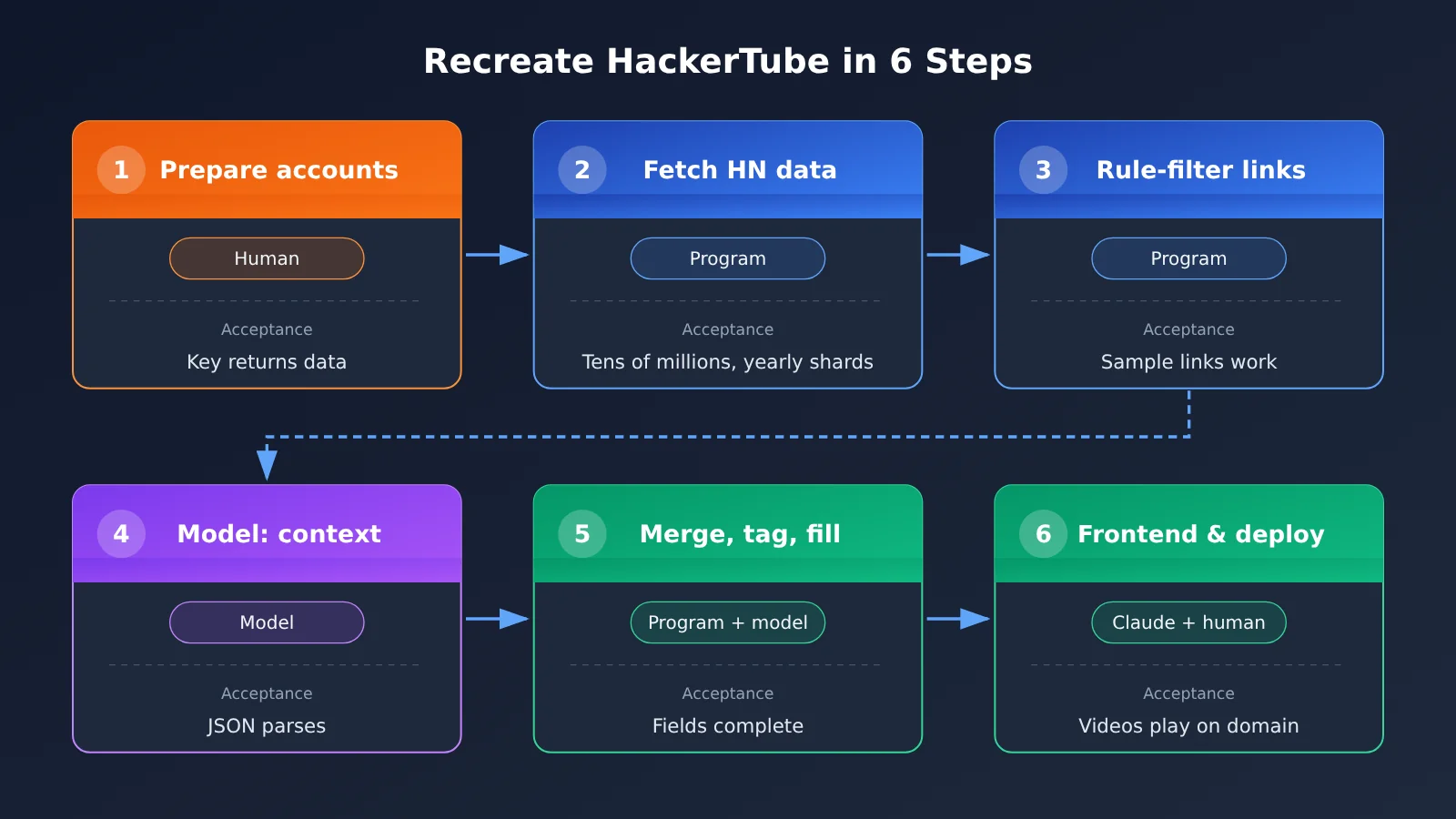
| Step | What to do | Who does it | How to verify |
|---|---|---|---|
| 1 | Get a YouTube API key, prepare a server, and buy a domain | Human | All three are accessible, and the key returns information for a video |
| 2 | Fetch all HN comments | Program (written by Claude) | Local files are organized by year, with record counts in the expected range |
| 3 | Use regex to extract comments containing YouTube links | Program | Sample 50 records and confirm each contains a valid video link |
| 4 | Have the model assess in batches whether each link is a recommendation, and output JSON | Model | The JSON parses directly; manually check a sample for accuracy |
| 5 | Aggregate counts by videoId, add topic tags, and fill in titles and channels | Program + model | Every video has all required fields, and the number of topics is manageable |
| 6 | Generate and deploy the frontend | Claude writes code; human connects the domain | Open the domain in a browser and verify you can browse by topic and play videos |
Steps 1–2: Prepare Resources and Retrieve HN Data
Step 1 is done by a person. Create a project in the Google Cloud console, enable the YouTube Data API, and generate an API key. The server can be any cloud host or static hosting service; buy a domain from a registrar and keep it ready. All three require accounts or payment, which is why, according to community accounts, Karpathy handled them himself.
Step 2 is handled by a program written by Claude. There are two public sources for HN data: the official Firebase API lets you retrieve items one at a time by item ID, and BigQuery has a public HN dataset you can query directly with SQL. For a full download, BigQuery is the recommended starting point, with exports split by year. Check two things: that the files are split by time period and that the total count is in the tens of millions.
Steps 3–4: Rule-Based Filtering and Semantic Evaluation with Opus 5.5
Step 3 is the key to saving money, and it’s handled entirely by code. Use regular expressions to match link formats such as youtube.com/watch and youtu.be/. Keep only comments containing video links, along with the comment ID, timestamp, and parent post title for context. You can describe what you need directly in Claude Code, for example: “Write a script that extracts comments containing YouTube links and saves them as JSONL.”
Step 4 is where the model makes the call. Give Opus 5.5 a few thousand comments per batch and ask it to return only structured results, including videoId, whether the video is recommended, the topic, and representative comment excerpts. Make it clear in the prompt that “This video is terrible” and “Don’t watch this” don’t count as recommendations—only comments expressing that a video is worth watching do. To check the results, manually review a random sample and decide whether the error rate is acceptable.
Steps 5–6: Aggregation, Tagging, and Frontend Deployment
Step 5 starts with rules, then uses a model. The program counts recommendations by videoId, then calls the YouTube Data API to fill in each video’s title and channel. The model consolidates topic tags to avoid overly fragmented labels like “Machine Learning,” “ML,” and “Introduction to Deep Learning.” According to community estimates, HackerTube ended up with around 150 topics—a useful reference point for granularity.
Step 6 separates the data from the page. The final output is a JSON data file and a static frontend that reads it. Videos are embedded using YouTube iframes and sorted by topic and popularity. When the data changes, you only need to regenerate the JSON; the page code stays untouched. You can deploy it to a static hosting service or your own server, then have someone point the domain to it.
🚀 Quick start: Steps 4 and 5 require frequent model calls. Connect Claude Code through APIYI at apiyi.com, and you can use the same API key to switch between Opus and Sonnet. Test the workflow on a small batch first, then decide which model to use for the full run.
Three Pitfalls That Can Really Stall a HackerTube Rebuild
Bottom line: the sticking points are almost all on the data side, not in building the website. Here are the three pitfalls in the order you’re likely to encounter them.
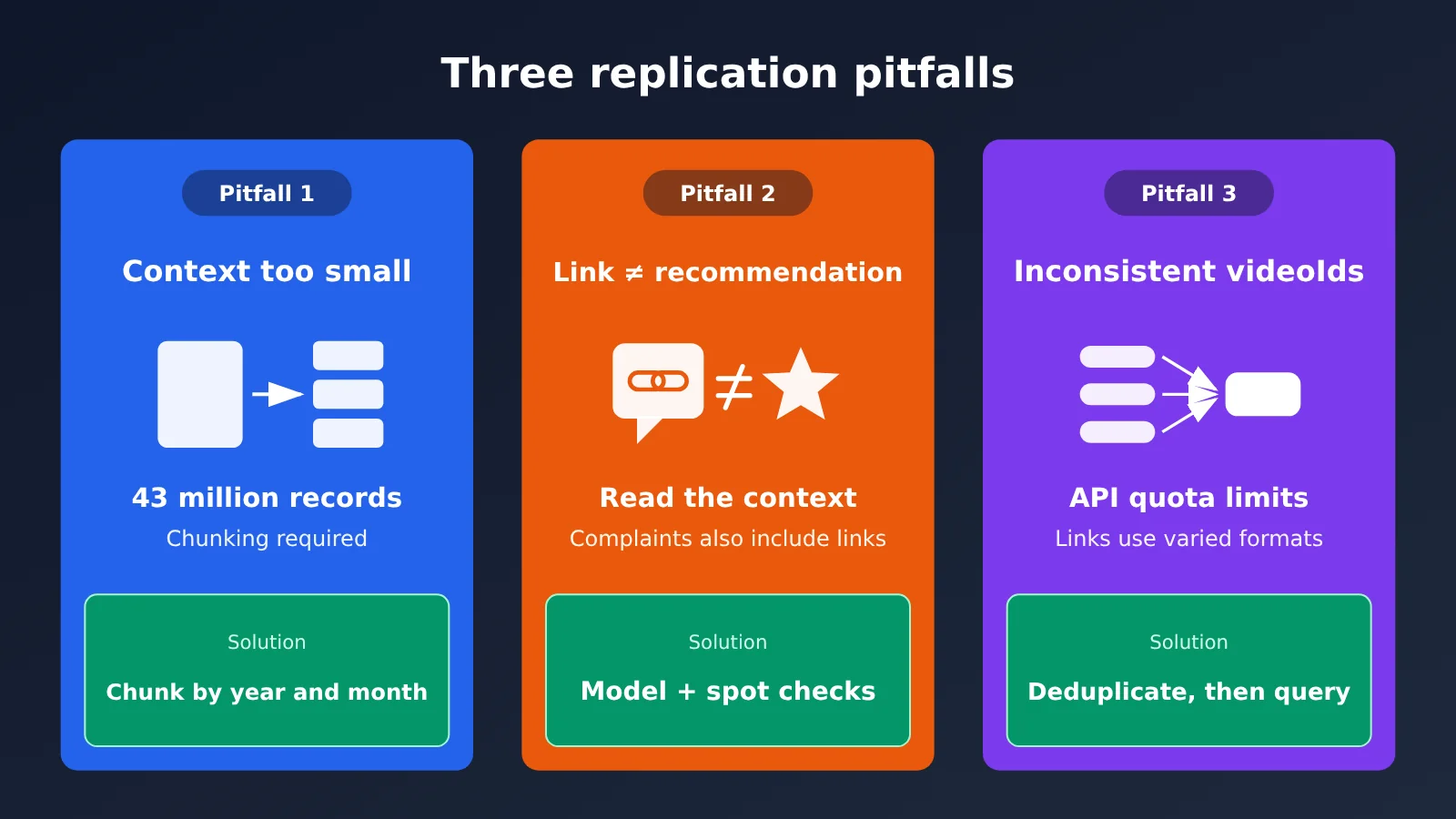
| Pitfall | Typical symptom | Solution |
|---|---|---|
| Context window too small | Asking the model to “read all the comments” produces a length error or truncated output | Split comments by year and month into batches of a few thousand, and output only structured JSON |
| Link ≠ recommendation | Links in complaints, sarcasm, or corrections are mistaken for recommendations | Have the model judge each link in context, then manually spot-check the results |
| Inconsistent IDs and quotas | The same video appears in multiple URL formats; videos have been deleted; API quota runs out | Normalize videoId values before aggregating, and query metadata only for deduplicated IDs |
Pitfall 1: Opus 5.5 Can’t Fit 43 Million Comments in Its Context Window
A common beginner mistake is to ask the model to “read all HN comments and find the videos people recommend.” No matter how large the context window is, it can’t hold more than a billion tokens of text in one go. Instead, have Claude write a script to split the data by year or month, keep each batch to a few thousand comments, and instruct the model to return JSON only, with no explanatory text.
You’ll also need a way to resume from where you left off. Save each batch’s results separately and record which batches have been processed. If something goes wrong halfway through, you only need to rerun the failed batches instead of starting over.
Pitfall 2: A YouTube Link Isn’t Necessarily a Recommendation
A YouTube link in an HN comment might be a recommendation, but it could also be a counterexample, a complaint, or a case of “this video got it wrong.” Matching URLs alone will introduce a lot of noise. The model needs to read the surrounding context to make that call—this is where a Large Language Model really earns its place in the workflow.
Include positive and negative examples in the prompt, and ask for a short supporting excerpt with each classification. That makes manual spot-checks faster because you can see why the model made its decision. The frontend can also use the excerpt directly as the “What HN Says” text on the video card.
Pitfall 3: Inconsistent videoId Formats and YouTube API Quotas
The same video can appear as youtube.com/watch?v=, youtu.be/, a mobile link, a link with a timestamp parameter, and so on. If you don’t normalize these to an 11-character videoId first, recommendation counts will be split across URLs and rankings will be skewed. Also, over 20 years, many videos have been deleted or made private, so they need to be flagged and filtered out separately.
The YouTube Data API has a daily quota. Deduplicate first, then query metadata in batches—don’t make a request for every comment. The batch endpoint can look up multiple IDs at once, which can significantly reduce quota usage.
How Much Would It Cost to Recreate HackerTube? (Estimate)
The short answer: processing everything with Opus 5.5 would cost thousands of dollars; filtering with rules first could bring that down to tens or hundreds of dollars. These are estimates, not actual charges.
First, the rates. The table below comes from the APIYI model pricing list, as of 2026-10-27 14:50 (UTC+8). Prices are in USD per million tokens.
| Model | Input | Output | Cache read | Available platforms |
|---|---|---|---|---|
| opus-5-5 | $4 | $20 | $0.2 | APIYI apiyi.com, official API |
| sonnet-5-5 | $2 | $10 | $0.1 | APIYI apiyi.com, official API |
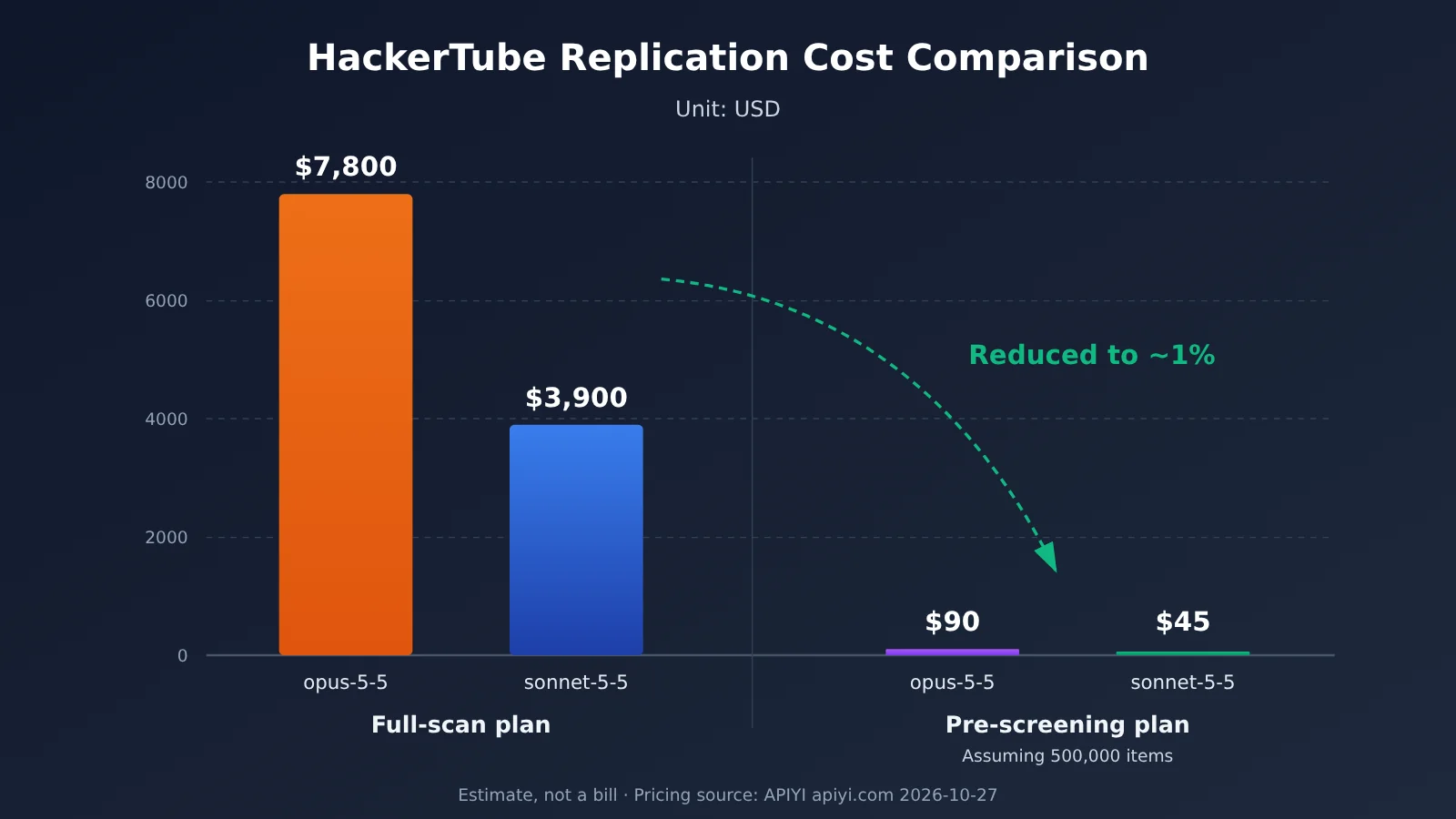
The estimates assume 43 million comments averaging 30 tokens each, for roughly 1.3 billion tokens total. Each batch has 50,000 input tokens and 5,000 output tokens, for approximately 26,000 batches. The “500,000 remaining comments” in the pre-filtering scenario is an assumption used to demonstrate the calculation, not an actual HN statistic. You won’t know the actual number until you’ve completed step 3.
| Approach | Input tokens | Output tokens | opus-5-5 estimate | sonnet-5-5 estimate |
|---|---|---|---|---|
| Send everything directly to the model | ~1.3 billion | ~130 million | ~$5,200 + $2,600 ≈ $7,800 | ~$2,600 + $1,300 ≈ $3,900 |
| Filter with rules first (assuming 500,000 remain) | ~15 million | ~1.5 million | ~$60 + $30 ≈ $90 | ~$30 + $15 ≈ $45 |
As the table shows, rule-based pre-filtering in step 3 determines the project’s overall cost range. The system prompt and positive and negative examples are also repeated in every request, so cache-read pricing can reduce that portion of the cost further. There’s also a community reference point: X user @thisiskp_ said they built a Show HN video site demo with Opus 5.5 in about 19 minutes for around $2. That’s just one example, though, and the scale and data volume are different, so it isn’t directly comparable.
💰 Cost tip: Before running the full dataset, test the workflow on one month of data, record the actual token usage, and multiply by the number of months to estimate the total. APIYI apiyi.com offers pay-as-you-go pricing with no fixed monthly fee, making it a good fit for testing a small batch before deciding on the scale.
Run the HackerTube Workflow with Claude Code and APIYI
The short version: set two environment variables, and Claude Code can call Opus 5.5 through APIYI. You can use the same key to switch between opus-5-5 and sonnet-5-5.
[Screenshot placeholder: APIYI Claude Code integration documentation]
Following the APIYI Claude Code integration documentation (docs.apiyi.com/scenarios/programming/claude-code), set these two variables in your terminal:
ANTHROPIC_BASE_URL=https://api.apiyi.comANTHROPIC_AUTH_TOKEN=<your APIYI Key>
Then start Claude Code and select opus-5-5 or sonnet-5-5 from the model options. In practice, you can use a stronger model for planning and a more economical model for execution:
- Use opus-5-5 for planning and coding: Have it design the partitioning approach, write the fetching and pre-screening scripts, and build the frontend. These tasks don’t use many tokens, but quality matters.
- Compare both models for batch evaluation: Run the same sample of a few hundred items through opus-5-5 and sonnet-5-5. Manually compare their judgment accuracy, then decide which model to use for the 26,000 batches or the batches that remain after pre-screening.
- Switch back to opus-5-5 for topic consolidation: Consolidating around 150 topics requires a global perspective. Since it takes relatively few calls, the stronger model is the safer choice.
🎯 Technical tip: After creating a key in the APIYI console at apiyi.com, set a separate spending limit for this project to prevent runaway costs if a batch script gets stuck in a loop. The free test credit for new users is enough to process one month of sample data.
Where Else Can You Apply Karpathy’s HackerTube Method?
The short answer: you can use the same pipeline wherever a large volume of community discussions contains recommendations for a particular type of resource.
- Technical subreddits: Find books, courses, or open-source repositories that are recommended repeatedly. The pipeline is almost identical; you just need to replace the link regex.
- GitHub Issues and Discussions: Extract frequently cited blog posts or solution links and turn them into a project’s “essential reading” list.
- Internal team chats or document comments: Content teams can find reference materials colleagues have shared repeatedly in past discussions, provided they have permission to use the data.
- Podcast and paper recommendations: Swap the link regex for arXiv or podcast platform formats to find the papers and episodes a community actually recommends.
When adapting the method, only two things need to change: the pre-filtering rules in step 3 and the positive and negative examples in the prompt in step 4. You can reuse the data pipeline, batch calls, JSON structure, and static frontend.
Frequently Asked Questions
Q1: Can I build a HackerTube-like site without a YouTube API key?
You can build the core functionality. The videoId is extracted from links in comments, and playback uses an embedded iframe, so neither requires an API key. What you’ll be missing is metadata such as titles and channels. To start, you can use the context in HN comments to have a model generate descriptions, then add a key later.
Q2: How do I get Hacker News comment data?
There are two options: the official HN Firebase API (github.com/HackerNews/API) lets you fetch items by ID and is suitable for incremental updates; the public HN dataset on BigQuery is better suited to a one-time full export. For a full recreation, the latter is the recommended starting point.
Q3: Why not just build a recommendation algorithm?
Karpathy’s original post was motivated by dissatisfaction with YouTube’s recommendations. HackerTube draws on 20 years of collective community judgment. It doesn’t need user behavior data, has no cold-start problem, and can be built in two hours. A recommendation algorithm, on the other hand, requires data to accumulate over time and ongoing tuning.
Q4: Was the “two-hour” build fully automated?
No. According to community accounts, Karpathy manually obtained a YouTube API key, prepared a server, and bought a domain; the rest was done through conversations with Claude. A person still needs to define the requirements, review the results, and handle steps that require accounts. If you’re recreating it yourself, also allow time to refine the prompts and manually spot-check the results.
Q5: Could the cost of this method get out of hand?
If you skip pre-filtering and send the entire dataset straight to a model, the estimated cost could reach thousands of dollars. There are three ways to keep it under control: pre-filter with rules, run a one-month sample to estimate costs, and set a spending limit for your API key on APIYI (apiyi.com). Check the platform’s model list for current models and pricing.
Summary
Karpathy’s HackerTube shows that, with Claude Code and Opus 5.5, one person can turn tens of millions of community discussions into a usable product over a weekend. But what really makes it work is the data pipeline design—not “AI automatically building a website.”
- Workflow: Prepare resources → fetch data → prefilter with rules → evaluate with a model → aggregate and tag → deploy. People, programs, and models each have a clear role.
- Challenges: Slicing context, identifying recommendation context, normalizing videoIds, and managing API quotas.
- Cost: Processing the full dataset costs thousands of dollars; prefiltering can bring that down to tens or hundreds of dollars. Either way, base your estimate on a small sample you’ve run yourself.
- Getting started: Just two environment variables let Claude Code call opus-5-5 and sonnet-5-5 through APIYI.
If you want to apply this approach to your own data, start with a one-month sample. Use the free allowance at APIYI, apiyi.com, to run the full workflow before deciding on the production scale.
References
- Karpathy’s original post (2026-11-01): HackerTube launch announcement
- Link:
x.com/karpathy/status/2116957135661945283 -
Notes: Firsthand source for data volume, time spent, and model information
-
HackerTube site: The finished project
- Link:
hackertube.org -
Notes: Browse the topic categories and page layouts
-
APIYI Claude Code integration docs: Environment variable configuration
- Link:
docs.apiyi.com/scenarios/programming/claude-code -
Notes: Steps for connecting Claude Code
-
APIYI model pricing list: Model pricing
- Link:
docs.apiyi.com/models -
Notes: Refer to this list for available models and pricing
-
Official Hacker News API documentation: Data retrieval
- Link:
github.com/HackerNews/API - Notes: Item structure and retrieval methods