Author’s note: Starting from the usage in a single Responses request, we’ll recompute GPT-6.2 Sol’s regular input, cache reads and writes, and reasoning output item by item, then explain how cache lifetime and request status change the bill for the same workflow.
GPT-6.2 Sol’s bill can be recomputed using a fixed method. The usage in the request record splits input into four mutually exclusive categories: regular input, cache reads, 30-minute cache writes, and 12-hour cache writes. Output is a separate category, and reasoning tokens are already counted in it. Multiply the token count in each category by the corresponding rate and add them up, and you get the model fee for that request. Tool fees are calculated separately.
Three conditions can change the result. The first is whether the total input for a single request exceeds 272K; once it does, the entire request switches to long-context rates. The second is cache lifetime and actual hit count: whether the same prefix is written as a 30-minute or 12-hour cache changes the break-even point. The third is request status: incomplete, retries, and background tasks all affect the total bill for a workflow.
OpenAI released GPT-6.2 Sol on November 17, 2026. Its API model ID is gpt-6.2-sol, and it can be called through Responses and Chat Completions; function calling and built-in tools use the Responses path. This article uses OpenAI’s official direct USD list prices as the benchmark, and also explains how this model is listed in APIYI apiyi.com’s public pricing API. All examples in this article are based on synthetic usage, not actual bills.
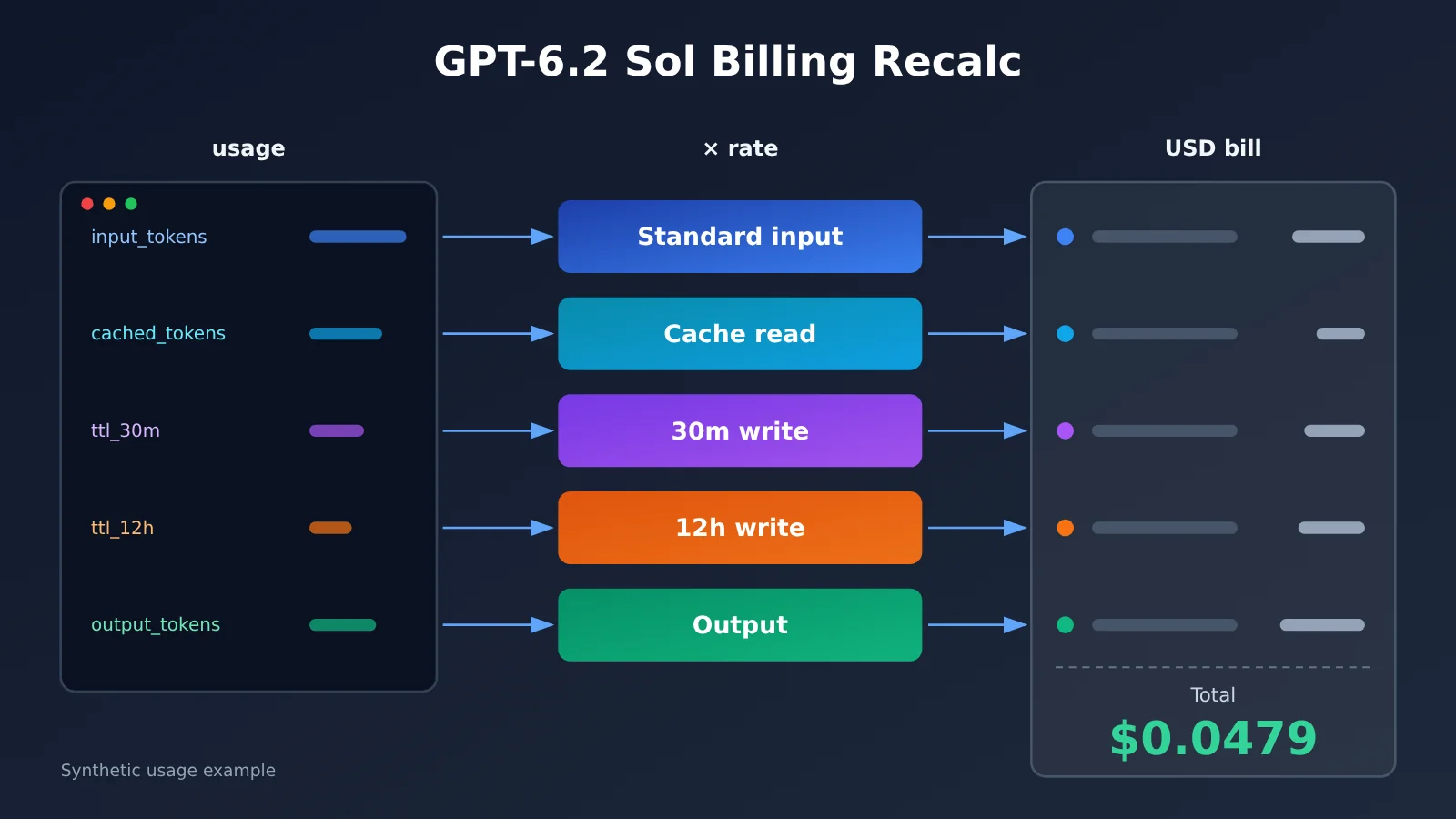
GPT-6.2 Sol Billing Knowledge Map and Reading Order
The article follows a single path: fields → dollars → cache decisions → workflow reconciliation. Each step’s output is the next step’s input — first you need to know which line items live inside usage, then you turn those into dollars, then you use that same math to compare caching options, and finally you roll individual requests up into a workflow cost.
Responses usage
 ├─ Input total input_tokens
 │   ├─ Cache read cached_tokens ────────────────────────┐
 │   ├─ 30m write ttl_30m_tokens ────────────────────────┤
 │   ├─ 12h write ttl_12h_tokens ────────────────────────┼─→ × matching rate → per-request model cost (Section 2)
 │   └─ Regular input = total − reads − all writes ──────┤
 └─ Output output_tokens (includes reasoning_tokens) ────┘
                                                         ↓
         Choosing a cache lifetime (Section 3) ← compare total price across multiple requests on the same prefix
                                                         ↓
         Workflow reconciliation (Section 4) ← tool fees + retries + incomplete + cost export
| No. | Question it answers | Builds on | What you can do after reading |
|---|---|---|---|
| 1 | Which numbers in usage are billable |
— | Break a single response into five billable usage items |
| 2 | What those usage numbers actually cost | The five usage items from Section 1 | Turn log numbers into dollars and see which tier applies |
| 3 | Whether to write cache for 30 minutes or 12 hours | The unit-price math from Section 2 | Pick a cache lifetime based on call interval and hit count |
| 4 | What a task really cost | The per-request accounting from Sections 2 and 3 | Build a minimal log table and trace billing discrepancies |
If all you want is to explain one charge discrepancy, Sections 1 and 2 are enough. If you own cache strategy or the cost ledger, read all four sections in order.
GPT-6.2 Sol Billing Terms to Know
| Term | Explanation |
|---|---|
| usage | The field in the API response that summarizes the token usage for the current request |
| Regular input | The usage left after deducting billed cache reads and all cache writes from total input |
| Cache read | The portion of input in the current request billed at the reuse rate |
| Cache breakpoint | The boundary that lets the cache store or reuse an input prefix |
| TTL | The configuration for the minimum billing coverage time of the cache; Sol supports 30-minute and 12-hour writes |
| Reasoning tokens | Tokens produced by the model during its thinking phase and included in the billable output total |
| Response ID | The identifier that links reconciliation logs, background polling, and the corresponding model response |
| Tool fee | A separate charge incurred by using specific hosted tools |
1 Finding the Five Billable Usage Items for GPT-6.2 Sol from Responses usage
1.1 Four Kinds of Input and One Kind of Output
The usage object in Responses records input and output for a single request separately. The input side gives a total plus several details, and the output side gives a total plus a reasoning sub-item. Here are the fields you need when recalculating a bill:
| Billing category | Field read | Notes |
|---|---|---|
| Total input | usage.input_tokens |
Sum of the four input categories; not multiplied by a rate directly |
| Cache read | input_tokens_details.cached_tokens |
Read volume in the billing sense |
| Total cache write | cache_write_tokens |
Sum of the two TTL writes |
| 30-minute write | cache_write_tokens_details.ttl_30m_tokens |
Used when TTL details are returned |
| 12-hour write | cache_write_tokens_details.ttl_12h_tokens |
Used when TTL details are returned |
| Output | usage.output_tokens |
Already includes reasoning tokens |
| Reasoning sub-item | output_tokens_details.reasoning_tokens |
For understanding output composition; not charged again separately |
1.2 The Formula for Regular Input
Regular input has no dedicated field in usage, so you get it by subtraction:
regular input = input_tokens − cached_tokens − cache_write_tokens
What you subtract here is all writes, meaning the sum of the 30-minute and 12-hour writes. The two kinds of writes, cache reads, and regular input are mutually exclusive — the same token falls into exactly one of these categories. Tokens written to the cache are billed at the write rate and never get the regular input price stacked on top. This is the easiest place to get it wrong: if you leave the write volume inside regular input and then charge the write fee separately, the total comes out too high.
Reasoning tokens on the output side are also easy to double count. reasoning_tokens is a subset of output_tokens, so when recalculating you only multiply output_tokens by the output rate. The reasoning sub-item is good for analyzing “why was this output so long this time,” but it isn’t something you add as a separate billing line.
1.3 Use Billing Fields for Recalculation, Diagnostic Fields Only for Troubleshooting
Prompt Caching diagnostics also surface numbers like “reusable volume” and “estimated misses.” They explain why a cache didn’t hit — for example, the prefix changed or the length was too short — but they don’t represent what actually gets billed. When recalculating an invoice, only use the actual billing fields in usage.
If a provider doesn’t return TTL details, or cache_write_tokens is missing, you shouldn’t infer the bill from the absent fields. In that case, go by that provider’s own billing records. The worked example in the next section uses synthetic usage with every field present, so it’s easy to demonstrate the full algorithm.
2 Converting GPT-6.2 Sol Log Numbers into Dollars
2.1 Official Standard Rate Table
The table below reflects OpenAI’s official direct-connection figures, in USD per million tokens. The short/long tier is determined by the total input of each request; once it exceeds 272K, the entire request switches to the long-context rates: input and all cache rates ×2, output ×1.5.
| Standard billing category | Short context (≤272K) | Long context (>272K) |
|---|---|---|
| Regular input | $2.00 | $4.00 |
| Cache read | $0.10 | $0.20 |
| 30-minute cache write | $2.50 | $5.00 |
| 12-hour cache write | $5.00 | $10.00 |
| Output (reasoning tokens included) | $10.00 | $15.00 |
The base list price for short context is the same as GPT-6.1 Sol. In addition, the model card lists a context window of 1,050,000 tokens, a maximum input of 922,000 tokens, and a maximum output of 128,000 tokens. “How much you can input at most” and “where long-tier billing kicks in” are two separate numbers—a request with 300K input is perfectly valid, but it’ll be billed entirely at the long tier.
2.2 Full Recalculation of Synthetic Usage
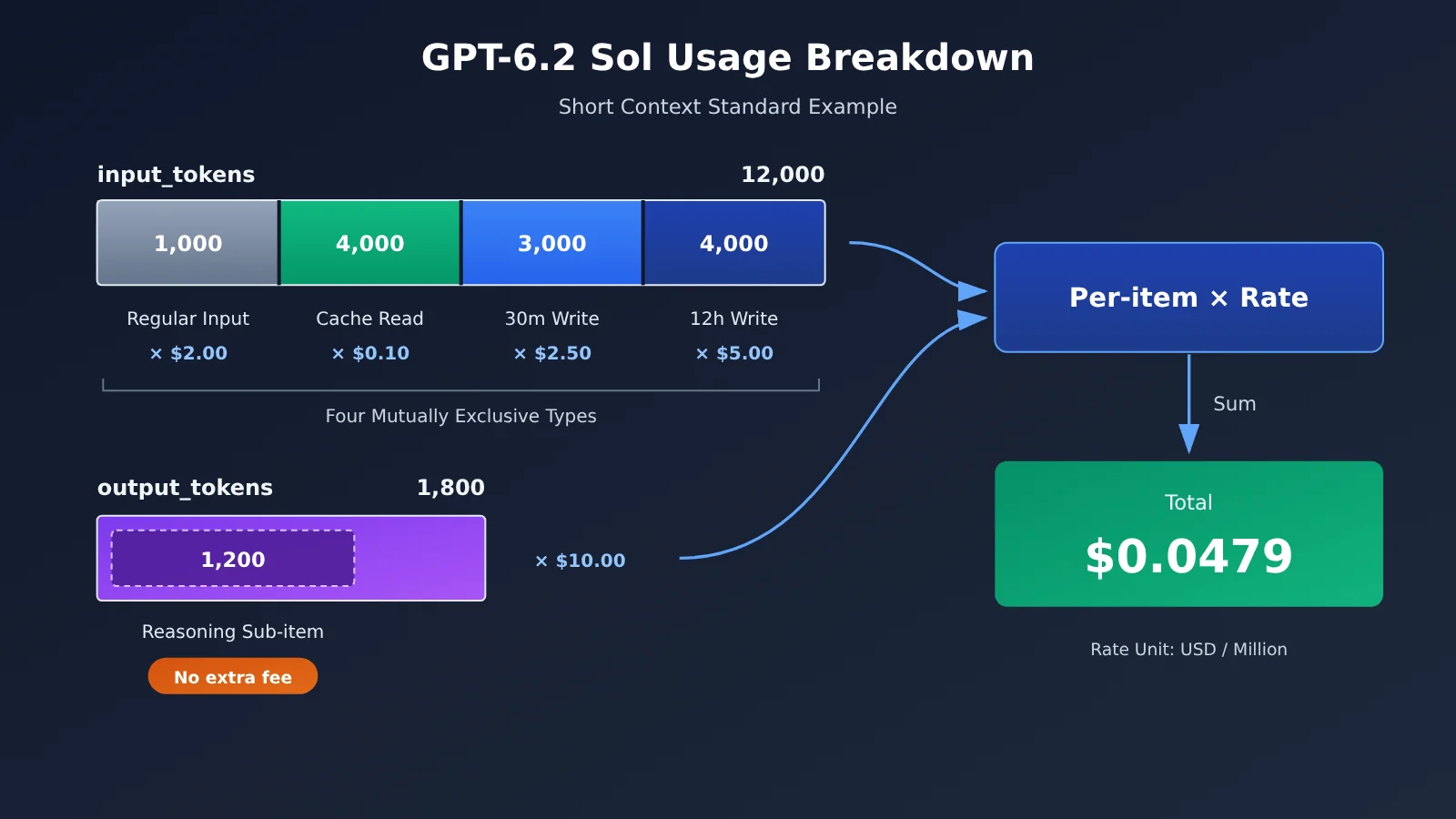
Suppose a short-context Standard request returns the following usage, with no tool use and no surcharges: total input 12,000, cache reads 4,000, 30-minute writes 3,000, 12-hour writes 4,000, and output 1,800 (including 1,200 reasoning tokens).
First calculate regular input: 12,000 − 4,000 − 3,000 − 4,000 = 1,000. Then multiply each item by its rate:
| Billing item | Tokens | Rate (USD/million) | Amount (USD) |
|---|---|---|---|
| Regular input | 1,000 | 2.00 | 0.0020 |
| Cache reads | 4,000 | 0.10 | 0.0004 |
| 30-minute writes | 3,000 | 2.50 | 0.0075 |
| 12-hour writes | 4,000 | 5.00 | 0.0200 |
| Output (including 1,200 reasoning) | 1,800 | 10.00 | 0.0180 |
| Total | — | — | 0.0479 |
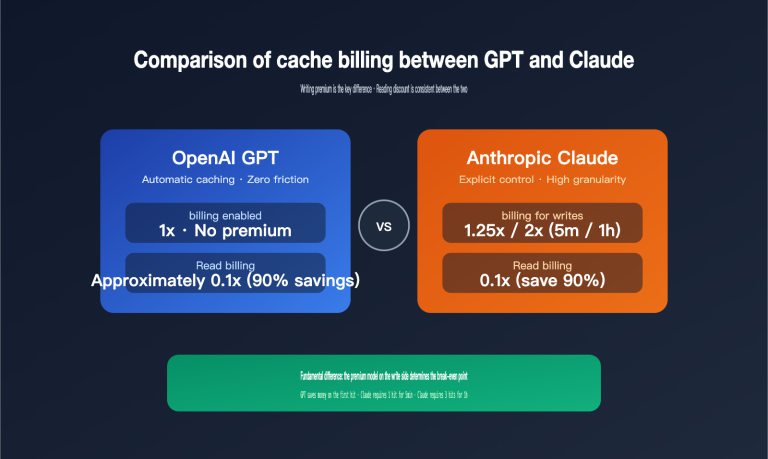
In this calculation, 12-hour writes account for only 4,000 tokens but contribute more than 40% of the total amount. That’s because their unit price is 2.5 times that of regular input. The write incurs cost at the time it happens, and the return only materializes when later cache hits occur. Section 3 will discuss this point in detail.
A good practice is to record the token count and rate for each billing item in your cost ledger, rather than storing only a single total amount. That way, when a cost variance appears, you can plug the actual values from the logs directly into the table above and pinpoint the source of the difference line by line.
2.3 For Long Context, Switch the Rates First, Then Apply the Same Formula
Once total input exceeds 272K, the math doesn’t change — you just swap the entire rate column from the table above for the long-context values. Keep in mind that the switch applies to the whole request: cache reads and writes double at the same time, and output is billed at 1.5×. So you have to decide which tier you’re in before you start multiplying item by item.
When you call through a third-party channel, you need to use that channel’s own rate card. Take APIYI (apiyi.com) as an example: reading its public pricing endpoint on 2026-11-20, gpt-6.2-sol‘s billing_expr also switches tiers at 272,000 input tokens — short tier: regular input $2, cache read $0.10, cache write $2.50, output $10; long tier: $3, $0.15, $3.75, $11.25 (USD per million tokens). As you can see, the long-tier multipliers differ from the official direct-connect pricing, and the endpoint expression only lists a single cache-write price. For actual projects, grouping, features, and billing are subject to the platform’s current configuration and invoices.
The code below sends a Responses request through APIYI’s OpenAI-compatible endpoint and prints the usage object as-is, so you can use it for recalculation later:
from openai import OpenAI

client = OpenAI(
    api_key="YOUR_API_KEY",
    base_url="https://api.apiyi.com/v1"  # APIYI OpenAI-compatible endpoint
)

resp = client.responses.create(
    model="gpt-6.2-sol",
    input=[
        {"role": "developer", "content": "固定规则与公共资料(放在前部便于缓存复用)"},
        {"role": "user", "content": "本次请求的具体问题"},
    ],
    max_output_tokens=4000,
)

print(resp.id, resp.status)
print(resp.usage.model_dump())
Once you have the usage object, a single function turns those five usage figures into money. Make the rate table a parameter, so switching between official and channel rates is just a config change:
View the full recalculation function
LONG_THRESHOLD = 272_000

# OpenAI official Standard rates, USD per million tokens
OFFICIAL_RATES = {
    "short": {"input": 2.00, "cached": 0.10, "w30m": 2.50, "w12h": 5.00, "output": 10.00},
    "long":  {"input": 4.00, "cached": 0.20, "w30m": 5.00, "w12h": 10.00, "output": 15.00},
}

def _get(d, *keys, default=None):
    for k in keys:
        if not isinstance(d, dict) or k not in d:
            return default
        d = d[k]
    return d

def recalc_cost(usage: dict, rates: dict = OFFICIAL_RATES) -> dict:
    total_in = usage["input_tokens"]
    details = usage.get("input_tokens_details") or {}
    cached = details.get("cached_tokens", 0) or 0

    # Where the write fields live depends on the actual response structure; check both spots here
    write_total = details.get("cache_write_tokens", usage.get("cache_write_tokens"))
    ttl = details.get("cache_write_tokens_details") or usage.get("cache_write_tokens_details")
    if write_total is None:
        raise ValueError("cache_write_tokens is missing; use the channel billing record instead of guessing")
    w30 = _get(ttl, "ttl_30m_tokens")
    w12 = _get(ttl, "ttl_12h_tokens")
    if write_total and (w30 is None or w12 is None):
        raise ValueError("cache write lifetime details are missing; can't tell the 30m/12h rates apart")
    w30, w12 = w30 or 0, w12 or 0

    plain = total_in - cached - write_total
    output = usage["output_tokens"]
    tier = "long" if total_in > LONG_THRESHOLD else "short"
    r = rates[tier]

    items = {
        "plain_input": plain * r["input"] / 1e6,
        "cache_read": cached * r["cached"] / 1e6,
        "write_30m": w30 * r["w30m"] / 1e6,
        "write_12h": w12 * r["w12h"] / 1e6,
        "output": output * r["output"] / 1e6,
    }
    items["tier"] = tier
    items["model_total"] = round(sum(v for k, v in items.items() if k != "tier"), 6)
    return items

# Validate with the synthetic usage from Section 2.2
demo = {
    "input_tokens": 12000,
    "input_tokens_details": {
        "cached_tokens": 4000,
        "cache_write_tokens": 7000,
        "cache_write_tokens_details": {"ttl_30m_tokens": 3000, "ttl_12h_tokens": 4000},
    },
    "output_tokens": 1800,
    "output_tokens_details": {"reasoning_tokens": 1200},
}
print(recalc_cost(demo))  # model_total: 0.0479
When the function runs into a missing field, it throws an error instead of treating it as 0. That’s intentional — it keeps a request that’s missing write details from being miscounted as “all plain input.”
🎯 Technical tip: When you’re building a cost ledger, run the recalculation function against synthetic usage first, then connect it to real logs. Through APIYI apiyi.com you can send low-volume test requests with the same API key, compare the returned usage against the platform billing record line by line, and only ship the reporting once you’ve confirmed what each field means.
3 Choosing GPT-6.2 Sol’s Cache Lifetime Based on Invocation Cadence
3.1 The Math for Two vs. Three Accesses with the Same Prefix
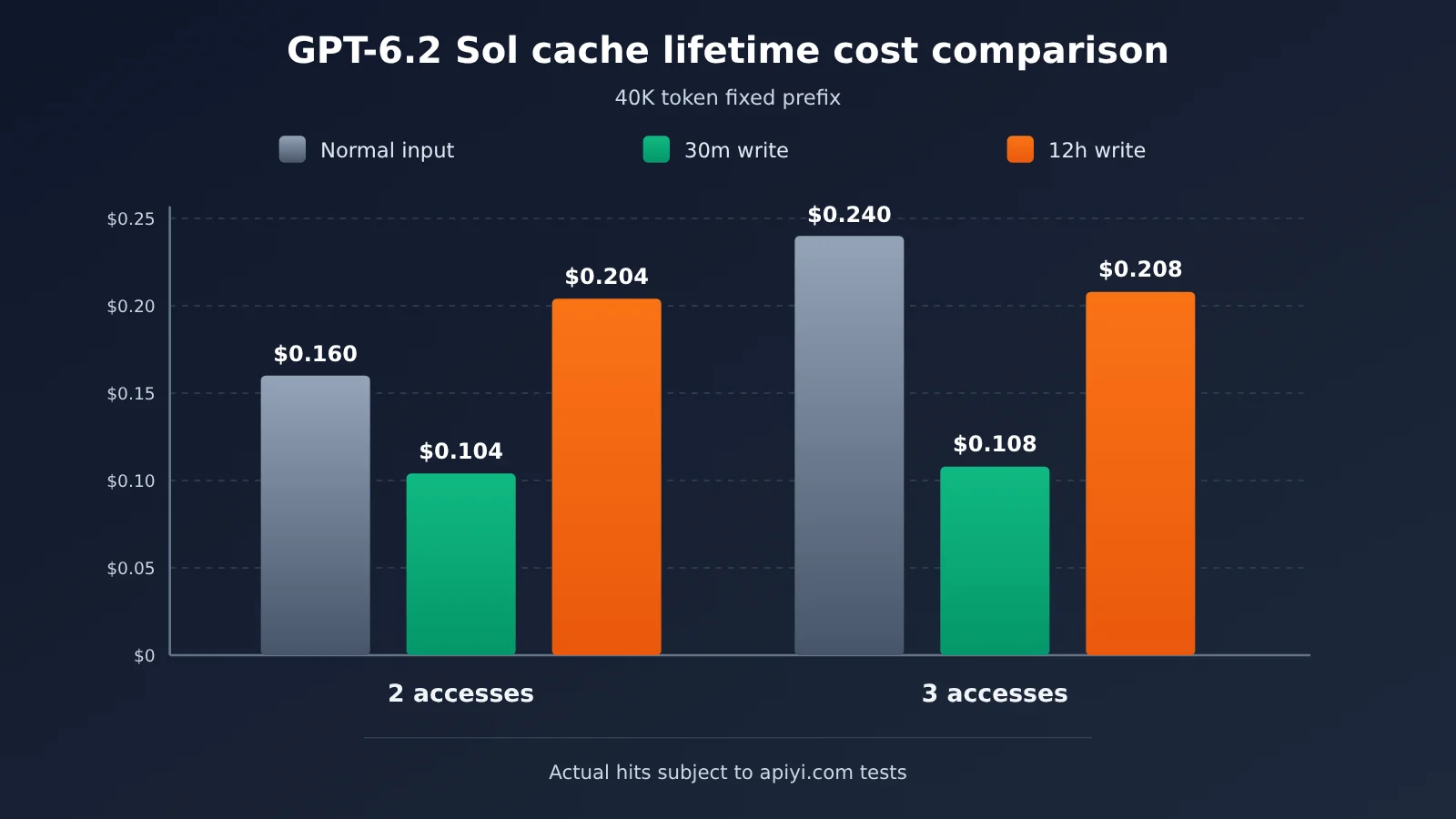
Assume a fixed 40,000-token prefix (system rules plus shared reference material), priced under short-context Standard. The per-use costs are as follows: regular input is $0.08 per request, a first write with the 30-minute cache is $0.10, a first write with the 12-hour cache is $0.20, and a full cache-hit read is $0.004. The table below compares only the fixed-prefix portion and excludes the variable content and output for each request.
| Access pattern | Regular input | 30m write plan | 12h write plan |
|---|---|---|---|
| Total 2 accesses (1 write + 1 read) | $0.160 | $0.104 | $0.204 |
| Total 3 accesses (1 write + 2 reads, all within the window) | $0.240 | $0.108 | $0.208 |
With two accesses, the 12-hour write costs $0.044 more than no caching at all. With three accesses, both caching options are cheaper than regular input, but the 30-minute option still costs about half as much as the 12-hour option. This assumes all of those accesses fall within the 30-minute window.
3.2 Break-even point: how many hits does it take to pay for itself?
Looking at the numbers above from another angle makes them more intuitive (the following estimates use M3 rates). Every full hit saves $0.076 compared with regular input. A 30-minute write costs $0.02 more than regular input, so one hit pays for it. A 12-hour write costs $0.12 more, so you need at least two hits within the window to break even.
So the value of a 12-hour write isn’t about “getting more hits within the same window” — it’s about still getting hits when calls are more than 30 minutes apart. If requests that share the same prefix usually arrive within a few minutes of each other, a 30-minute write is enough; choosing 12 hours would just mean paying more for writes. If requests come every hour or two, the 30-minute cache has long expired and you have to rewrite every time. In that case, a 12-hour write plus multiple hits may be the cheaper option.
Two other factors can change the decision. TTL is the minimum billing coverage period; it doesn’t mean the cache will necessarily stay alive that long. What ultimately matters is the actual read volume in usage. A 30-minute write has refresh rules on reads, so in high-frequency scenarios its actual coverage may last longer than the nominal 30 minutes. That’s why, after choosing a configuration, you should review real hit records rather than just looking at the settings.
3.3 Breakpoint layout: keep stable content up front
Caching only applies to prefixes, and the minimum cacheable prefix is 1,024 visible input tokens. In practice, you can set breakpoints in layers based on reuse cycle:
- Long-cycle shared material, such as product manuals and codebase summaries: put it first, and consider a 12-hour write.
- Short-cycle session records, such as the current conversation history: put it after that, and consider a 30-minute write.
- Immediate instructions that change every time: put them last, and keep them out of the cache.
GPT-6.2 has a placement detail that’s easy to get wrong: the top-level instructions sits after the cacheable breakpoint. If you put fixed rules in instructions, that part can’t be reused. Fixed rules are better placed in developer messages near the front of input, while instructions should be reserved for content that may change with every request.
💡 Recommendation: Cache lifetime should be chosen based on real traffic. We recommend first sending several rounds of requests with the same prefix at your actual cadence on APIYI apiyi.com, tracking the hit behavior of
cached_tokens, and then deciding which layer should use 30 minutes and which should use 12 hours. Different channels may price cache writes differently; refer to the platform bill.
4 Total GPT-6.2 Sol Costs by Workflow and Investigate Discrepancies
4.1 Three Request States That Can Make a Bill Differ from Expectations
Even if you calculate each individual request correctly, a workflow’s total bill can still fail to match. Common causes come from request states:
- incomplete: When output reaches
max_output_tokens, the response may end asincomplete. At that point, there may not be any visible text yet, but input and reasoning tokens have already been generated and billed. If you only count requests that “successfully returned content,” you’ll miss this cost. - Background tasks: For background tasks that already have a response ID, track them by the same ID when polling. Don’t treat every poll as a new request and record it twice.
- Retries: A new independent call made because of a timeout or
incompletecreates a new response and needs a separate entry. The more retries, the more times the same task’s input cost gets paid again.
4.2 Tool Fees and the Follow-on Tokens Tools Create
Responses supports tools such as file search, web search, code interpreter, and image generation. When image generation is used, Sol initiates a tool call within the flow; the image itself is produced by a separate image tool, and the fee is charged according to tool rules. Check tool fees by actual tool type. For example, web search is billed at $10 per thousand calls, and the content tokens returned by search are billed separately at the model rate.
When recalculating, confirm which tokens the usage covers. When tool results are fed back into the next round of model requests, they show up as more input in subsequent requests; this cost lands on the subsequent requests, not on the tool call itself. For a workflow with search, the bill usually consists of two parts: “tool call fees + multi-round model request fees.”
4.3 Minimum Log Fields
To make a workflow reconcilable, record at least the following fields for each model response:
| Log field | Purpose |
|---|---|
| Workflow ID | Group multiple requests under the same task |
| Response ID | Correlate background polling and distinguish retries from the same request |
| Model | Determine the rate table, such as gpt-6.2-sol |
| Service tier | Confirm whether it’s on the Standard basis |
| Final status | Identify completed, incomplete, etc. |
| Usage breakdown | Regular input, reads, 30m writes, 12h writes, output, reasoning |
| Tools | Tool type and number of calls |
| Cost | Amount recalculated from the breakdown, plus the long/short context tier marker |
With this table, grouping by workflow ID and summing gives you the cost of a single task. There’s also a clear order for investigating discrepancies: first look for incomplete and retries, then check whether cache reads are lower than expected, and finally verify tool call counts.
4.4 Cross-check Per-Request Estimates Against Official Exports
Per-request estimates are good for real-time budget control, but they can drift when there are multi-step tool calls, retries, or missing usage fields. It’s a good idea to periodically compare your estimate summary with the official usage or cost export, and when the discrepancy exceeds a set threshold, go back to the logs and check line by line. When requests go through a third-party channel, the comparison target should be that channel’s billing fields and rates.
💰 Cost tip: If your team is using multiple models at the same time, you can call them all through APIYI apiyi.com with a single API key, then store the data according to the minimum log fields in this article. A unified entry point keeps workflow IDs and cost accounting consistent, so month-end reconciliation needs one less channel conversion.
How to Verify a GPT-6.2 Sol Bill
Given any Sol request record, you can verify the bill in this order: first check whether the total input exceeds 272K and pick the matching rate column; then subtract the cache reads and all writes from input_tokens to get the regular input; finally multiply each of the five line items by its rate, add them up, and compare against the bill. If an individual request matches but the workflow total doesn’t, go through the logs looking for incomplete responses, retries, and tool calls.
Whether caching pays off ultimately comes down to the actual read volume in usage and the interval between calls. A 30-minute write breaks even after a single hit; a 12-hour write needs at least two hits within the window, and only shows an advantage when call intervals exceed 30 minutes.
When you need real traffic to validate these conclusions, apply for free test credits at APIYI apiyi.com and check each line of the platform bill using the recalculation function from this article.
📚 References
-
OpenAI GPT-6.2 Astra and Sol announcement: release timing and product positioning
- Link:
openai.com/index/introducing-gpt-6-2-astra-sol - Notes: understand where Sol fits for everyday work and multi-step agents
- Link:
-
GPT-6.2 Sol model card: context specs, rates, and long-context multipliers
- Link:
developers.openai.com/api/docs/models/gpt-6.2-sol - Notes: the source of this article’s rate table and 272K tier rule
- Link:
-
Prompt Caching guide and cache diagnostics: cache fields, TTL, and breakpoint rules
- Link:
developers.openai.com/api/docs/guides/prompt-caching - Notes: explains cached_tokens, write lifetime, and the minimum cacheable prefix
- Link:
-
Reasoning guide: reasoning tokens and the incomplete status
- Link:
developers.openai.com/api/docs/guides/reasoning - Notes: how reasoning usage counts toward output
- Link:
-
Per-run spending controller guide: aggregating Responses costs per workflow
- Link:
developers.openai.com/cookbook/articles/per_run_spending_controller_responses_api - Notes: a reference implementation for workflow-level budget control
- Link:
-
APIYI model catalog: channel listings and entry points
- Link:
docs.apiyi.com/models.md - Notes: see the available entry points and groups for gpt-6.2-sol
- Link:
Author: APIYI Tech Team
Contact: Reach us through the APIYI apiyi.com homepage — more integration docs at docs.apiyi.com