Author’s note: This article draws on OpenAI’s official Help Center, release notes, and pricing pages to cover the confirmed rules, open questions, and a checklist for the shared ChatGPT and Codex usage allowance starting in December.
Here’s the takeaway: Starting in December, ChatGPT product usage and Codex will share a single token-metered allowance pool on Plus, Pro, and Business plans. Instant Chat won’t count against that pool, though. The API and Codex when signed in with an API key are billed separately. And the increased Work/Codex allowance Pro received in late October doesn’t mean every Chat feature gets twice the usage.
This isn’t just a rumor. OpenAI’s Help Center explicitly says “Starting in December.” What hasn’t been announced yet is the exact switch date or a fixed token allowance for each plan. This article uses three labels—“Officially confirmed,” “Media reports,” and “Not yet announced”—to help you understand what’s known and how it might affect you.
What you’ll get: A “Product subscription pool / API billing pool” table to help you determine where your usage belongs, plus five checks to complete before December.
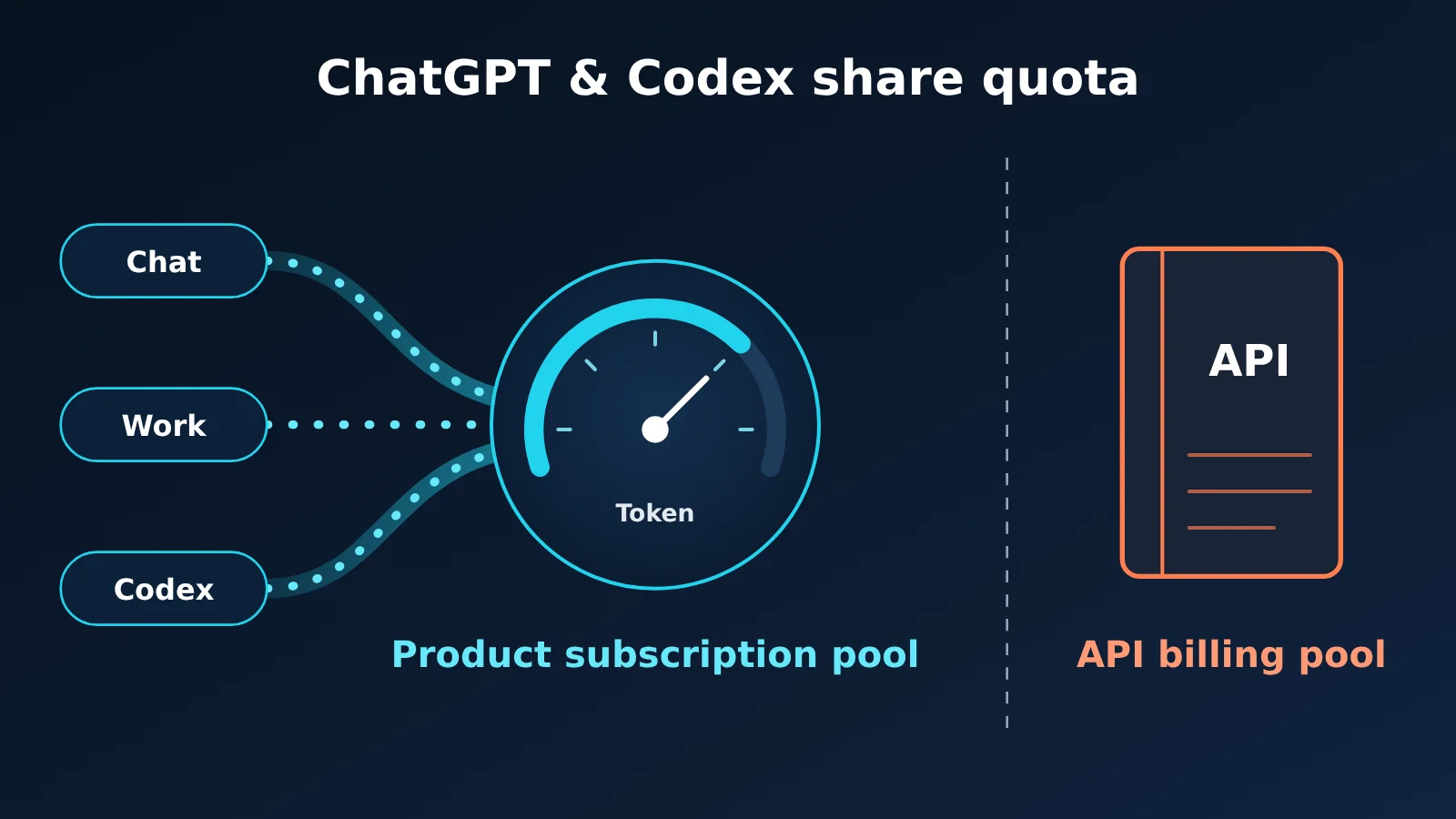
Shared ChatGPT and Codex Usage: Key Facts at a Glance
Let’s separate what’s confirmed from what’s still unknown. Three points are easy to mix up: whether sharing is confirmed, how usage is measured, and whether specific limits have been published.
| Item | Details | Status |
|---|---|---|
| Effective date | The official wording is “Starting in December”; no specific date was given | Officially confirmed (date not yet announced) |
| Eligible plans | Plus, Pro, Business | Officially confirmed |
| Shared usage | ChatGPT and Codex, as part of bringing Work’s agentic capabilities into the main ChatGPT experience | Officially confirmed |
| Measurement | Measured in tokens; advanced models and complex tasks typically consume more | Officially confirmed |
| Excluded usage | Instant chat doesn’t consume this allowance | Officially confirmed |
| Where to check | Settings → Usage shows the combined remaining allowance and reset time | Officially confirmed |
| Fixed limits by plan | Not published | Not yet announced |
| Rollout timeline | The combined Chat and Work experience will be tested with a small group first, then expanded | Media report (BleepingComputer) |
Key Change 1: The Shared Pool Is Token-Based, With No Fixed Message Count
OpenAI’s GPT-6 Astra usage guidance says there’s no fixed message count for Work and Codex. Actual consumption depends on the model, task type, context length, reasoning intensity, whether Fast/Ultrafast is enabled, the number of tool calls, and where the task runs.
That means two tasks can consume very different amounts of usage. A Codex task with a long context, intensive reasoning, and frequent tool calls will use significantly more than a simple question and answer. So estimating your remaining allowance by counting how many messages you send each day is no longer reliable.
Key Change 2: Three Options When You Reach Your Limit
OpenAI lists three options: wait for the reset, upgrade your plan, or buy credits for eligible features. The Codex help documentation also notes that if an in-progress turn hits the limit partway through, it can continue to completion within fair use limits.
Note that these credits are part of the ChatGPT product and are separate from the API credits discussed below.
Timeline: Shared Usage Limits for ChatGPT and Codex
A lot of discussions mix up three dates. Here’s what each date refers to, broken down by source.
| Date | Event | Source | Confirmation status |
|---|---|---|---|
| October 29 | The release note “More Work and Codex usage on Pro and Business Premium Plans” announced that included Work/Codex usage for Pro 100 and Pro 500 would double. A planned downgrade to Pro 200 was canceled, and lower-tier accounts had their usage limits doubled and raised to the same higher tier starting that day. | OpenAI release notes | Officially confirmed |
| October 29 | The same announcement said Business Premium would also get an increase, but didn’t specify a multiplier. | OpenAI release notes | Officially confirmed (multiplier not yet announced) |
| November 1 | BleepingComputer reported on the increased Pro usage limits and said Work features would be coming to Chat. | Date shown on the media page | Media report |
| December (exact date TBD) | A shared usage pool for ChatGPT and Codex will roll out for Plus, Pro, and Business. | OpenAI Help Center | Officially confirmed (date not yet announced) |
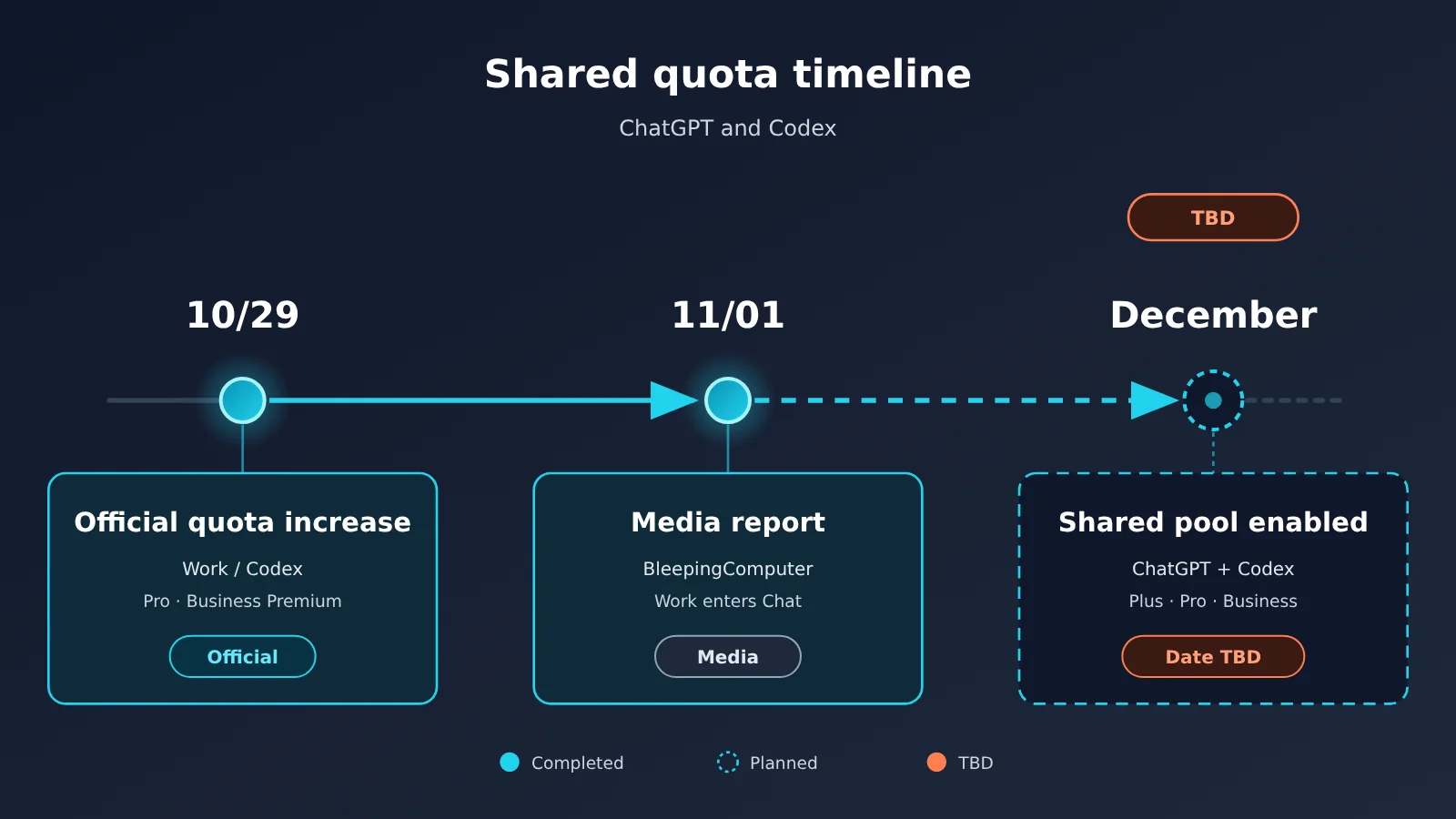
One point is worth emphasizing: “Business Premium gets an increase” doesn’t mean “all Business plans get double the usage.” The official announcement didn’t specify a multiplier for Business Premium, and it didn’t mention Standard Business at all.
Product Subscription Pool vs. API Billing Pool: How ChatGPT and Codex Usage Is Billed
This is the most important table in the article. To figure out which pool a task draws from, the key isn’t which model you use—it’s how you sign in and which billing path you use.
| Usage | Draws from the shared ChatGPT/Codex pool? | Basis |
|---|---|---|
| Instant Chat (regular instant chat) | No | Official: Instant chat will not draw from your usage |
| Chat Voice (regular voice chat) | No, it has separate limits | Official: doesn’t use Codex usage |
| ChatGPT Work | Yes | Official: Work and Codex share usage |
| Codex (signed in with a ChatGPT account) | Yes | Official: draws from the plan’s included usage |
| ChatGPT for Excel, Workspace Agents | Yes (on supported plans) | Official: uses the shared allowance/credit pool |
| GPT-6 Pro (in Chat) | Not currently; message limits are separate from the Work/Codex shared allowance | Current official guidance; the mapping after December hasn’t been announced |
| Codex (using your own API key) | No, billed at API pricing | Official: doesn’t use the plan’s included usage |
| Direct API Platform calls | No, billed separately at API prices | Official: API usage is billed separately |
| API credits provided to subscribers | No, they apply only to the associated API organization | Official: don’t increase limits for ChatGPT or Codex when signed in with a ChatGPT account |
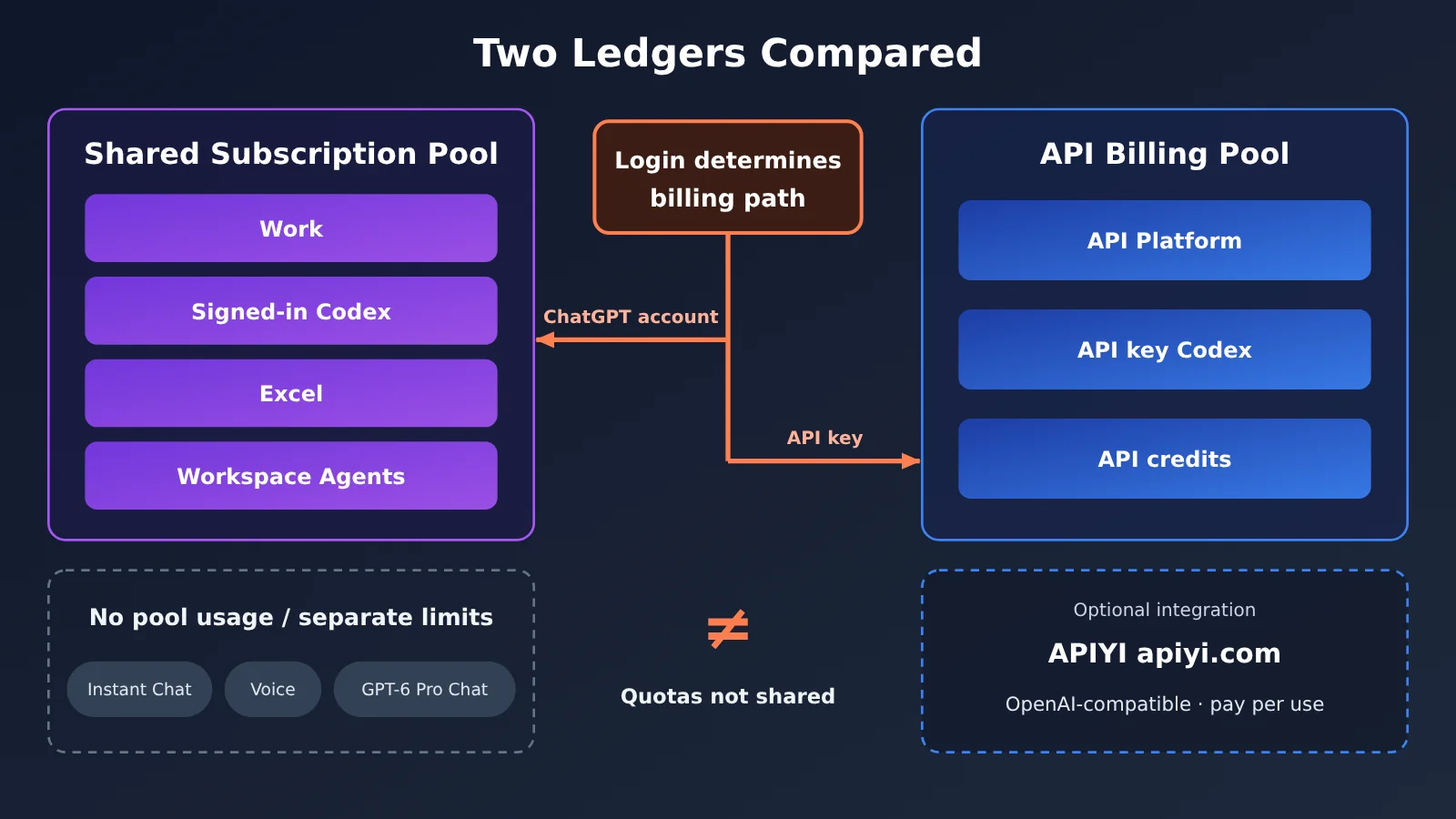
Two details are worth calling out. First, API credits included with a subscription apply only to the associated API organization. OpenAI explicitly says they can’t be used with Codex via an API key and don’t increase limits for ChatGPT or Codex when signed in with a ChatGPT account. So you can’t treat them as a “top-up” for the shared pool. Second, OpenAI’s pricing page points out that API token pricing and subscription usage are separate systems. Don’t use API unit prices to estimate how many tasks your plan can handle.
How Shared ChatGPT and Codex Usage Limits Affect Three Types of Users
Everyday ChatGPT Users
If you mainly use Instant Chat for everyday questions, writing, and translation, the impact should be limited. OpenAI has explicitly stated that Instant Chat doesn’t count against the shared pool. The main thing to watch is that, after Work’s agentic features move into the main Chat interface in December, they’ll be easier to access—and you might inadvertently trigger high-usage features you rarely used before.
Before December, get into the habit of opening Settings → Usage once a week to check your remaining allowance and reset time.
Heavy Codex and Work Users
This group will feel the most direct impact. You may have previously treated Work and Codex as separate products. After December, their usage and your advanced ChatGPT product usage will count against the same pool. Heavy usage on one side will leave less available for the other.
Under the current terms, Plus and Standard Business have both five-hour and weekly limits. Pro 100/200/500 plans currently don’t have a five-hour limit, but they’re still subject to an included usage allowance. OpenAI hasn’t announced whether reset cycles will change after December.
API Developers and Automation Teams
For teams using an API key to run scripts, CI pipelines, and backend services, the shared-pool rules don’t change billing: API usage and Codex usage with an API key are still billed separately at API rates. The real risk is internal: someone might sign in to Codex with a ChatGPT account to run batch jobs and use up a team member’s product allowance. Or, conversely, they might switch interactive development that should be covered by a subscription over to an API key.
On the server side, record token usage for each request so you have a clear account of API costs. Here’s a minimal approach in five steps, each involving just one line of code that you can add to your script in order:
- Import the SDK: Add
import openaiat the start of your script. You’ll need to install the package in your environment first. - Create a client: Initialize it with
client = openai.OpenAI(api_key=..., base_url=...). Set the first parameter to your API key and the second tohttps://api.apiyi.com/v1. This routes requests through APIYI’s OpenAI-compatible interface, with pay-as-you-go billing. - Send a request: Call
client.chat.completions.create(...), set the model togpt-4o-mini, and include a user message, such as “Summarize the cause of the error in this log.” - Read the response and usage: The response text is in
resp.choices[0].message.content, and usage is inresp.usage, which contains three fields:prompt_tokens,completion_tokens, andtotal_tokens. - Write usage to the log: Add the three numbers to the request log in the format
prompt=… completion=… total=…. At the end of the month, calculate the cost using the API rates.
🎯 Technical tip: API usage and ChatGPT/Codex subscription allowances are billed separately. If your team needs to call models from multiple providers for automation, you can use APIYI apiyi.com to access them with a single API key on a pay-as-you-go basis, then use the usage logs above to track costs separately. Note that this usage is entirely separate from OpenAI’s ChatGPT product allowance.
ChatGPT and Codex Shared Usage Limits: 5 Pre-Launch Checks
With December approaching, team leads should work through the checklist below.
| No. | Check | Action | Purpose |
|---|---|---|---|
| 1 | Check Settings → Usage | Record your remaining allowance and reset time, then compare again after the December switch | Establish a baseline for comparison |
| 2 | Review frequent tasks | List recurring weekly tasks across Work, Codex, Excel, and Workspace Agents | Identify the main sources of usage in the shared pool |
| 3 | Confirm login and billing paths | Check whether each Codex instance uses a ChatGPT account or an API key | Avoid confusion between subscription usage and API billing |
| 4 | Manage context and high-intensity modes | Trim context, enable high reasoning effort and Fast/Ultrafast only when needed, and reduce unnecessary tool calls | These are all usage factors listed by OpenAI |
| 5 | Set boundaries for credits | Agree on when credits can be purchased and who approves them | Prevent unbudgeted spending after the allowance runs out |
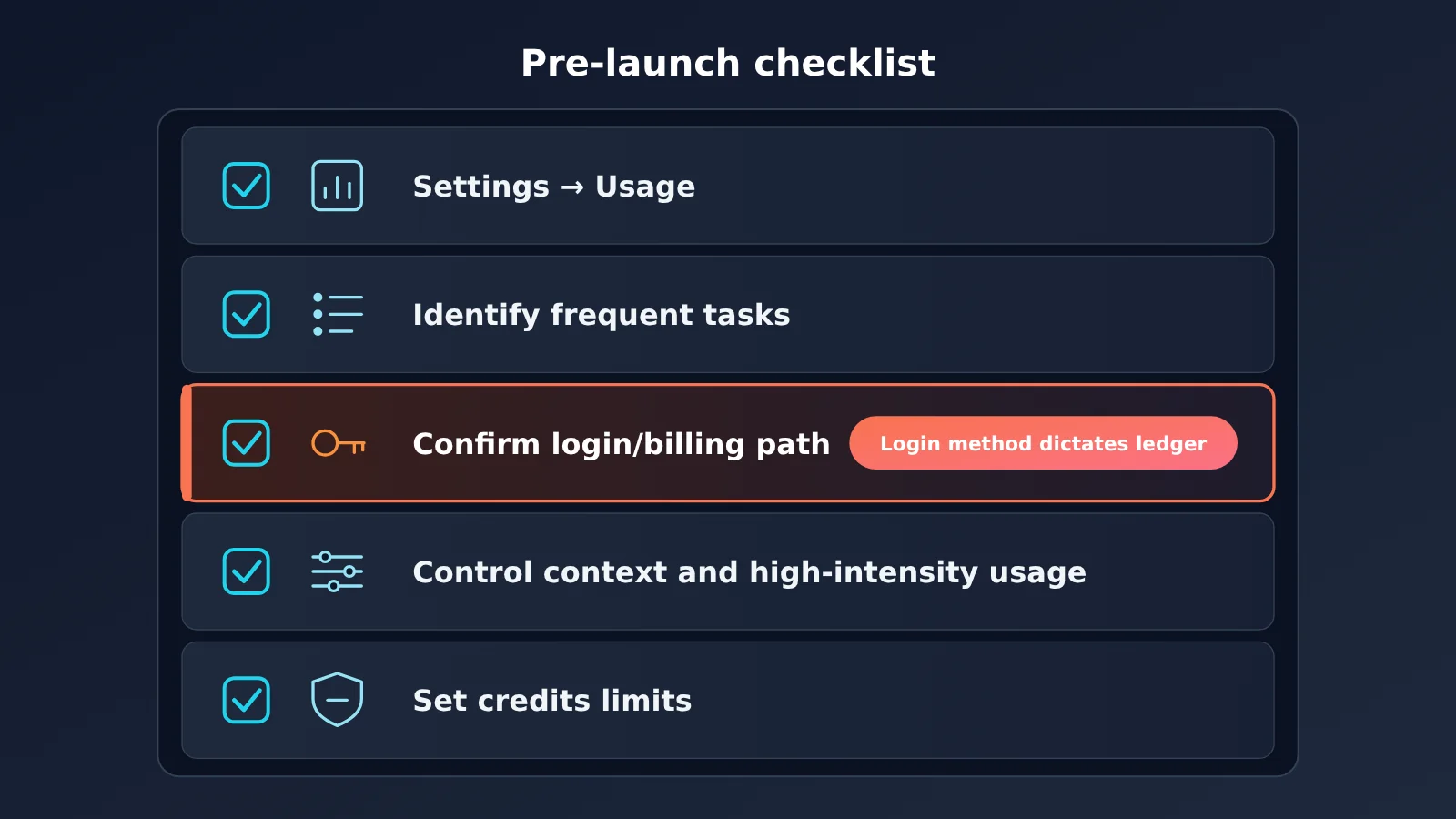
Item 3 is the easiest to overlook. The same Codex usage draws from your plan’s allowance when you log in with a ChatGPT account, but is billed at API rates when you use an API key. Many teams use different login methods in CI environments and on personal computers, so it’s worth reviewing them all before the change.
3 Common Misconceptions About ChatGPT and Codex’s Shared Usage Pool
| Misconception | What’s actually true | Source |
|---|---|---|
| All chats count against the shared pool | Instant Chat doesn’t; standard Voice has separate limits | Official Help Center |
| API usage is included in the plan’s pool | The API and Codex used with an API key are still billed separately under API pricing rules | Official Help Center and pricing page |
| Doubling Pro usage means doubling every feature | The October 29 increase applies only to Work/Codex; Chat features such as GPT-6 Pro have separate limits | Official release notes |
The claim that “heavy Codex use takes away from Instant Chat usage” doesn’t hold up either. Instant Chat isn’t part of the shared pool, so the two don’t compete for the same allowance.
What We Still Don’t Know
As of November 2, 2026, OpenAI hasn’t announced the following details, and this article won’t speculate about them:
- Shared pool capacity: How many tokens each plan will include after December.
- Reset cycles: Whether the existing five-hour and weekly limit structure will remain.
- How advanced Chat features map to the pool: Once Work capabilities are integrated into Chat, which advanced Chat features will count against the shared pool, and whether separate limits for features such as GPT-6 Pro will stay the same.
We’ll need to wait for OpenAI to announce all three before we can tell whether allowances will increase or shrink after December. Until then, treat claims about specific numbers with caution.
Frequently Asked Questions (FAQ)
Q1: When will ChatGPT and Codex start sharing a usage allowance?
OpenAI only says “Starting in December” and hasn’t given a specific date. According to BleepingComputer, the combined Chat and Work allowance will be tested on a small scale before gradually rolling out, so different accounts may see the change at different times.
Q2: If I run Codex with an API key, will it count against my ChatGPT plan’s allowance?
No. OpenAI says that when you use your own API key, Codex is billed at API pricing and doesn’t use your plan’s included usage. If your automated tasks already use the API, you can continue making pay-as-you-go calls through OpenAI directly or a compatible API like APIYI at apiyi.com. These costs are separate from your ChatGPT subscription allowance.
Q3: Can the API credits included with a subscription add to the shared allowance?
No. OpenAI says these API credits apply only to the associated API organization. They don’t support Codex when used with an API key, and they don’t increase limits for ChatGPT or Codex when you’re signed in.
Q4: Has the Work/Codex allowance for Business plans doubled too?
The October 29 release notes mention an increase for Business Premium, but they don’t specify a fixed multiplier or mention Standard Business. That’s not enough to conclude that “all Business allowances have doubled.”
Q5: How can teams manage product allowances and API costs separately?
For interactive development, sign in with a ChatGPT account and check usage under Settings → Usage. For backend scripts and CI, use an API key and log the token consumption of each request on the server. If you need to connect to models from multiple providers, APIYI at apiyi.com offers an OpenAI-compatible API and free testing credits for new users. You can test your integration before deciding whether to use it in production.
ChatGPT and Codex Shared Usage Limits: Key Takeaways
- Sharing starts in December: ChatGPT and Codex usage for Plus, Pro, and Business plans will draw from the same pool.
- Measured in tokens: There’s no fixed message count. Your model, context, and reasoning intensity all affect usage.
- Instant Chat doesn’t draw from the pool: Everyday instant chats aren’t affected by the shared limit.
- API usage is billed separately: API usage and Codex with an API key are charged separately at API rates.
- The Pro increase has limits: The October 29 doubling applies only to Work/Codex.
- Your sign-in method determines billing: For API usage, you can access models through APIYI at apiyi.com and track costs separately.
Summary
Here are the three main things to know about ChatGPT and Codex sharing usage limits in December:
- Sharing is confirmed, but the details aren’t: A token-based shared pool is coming, but the exact date, pool size, and reset cycle are still awaiting official confirmation.
- The two billing pools are separate: The product subscription pool covers Work, Codex when signed in, and related features. The API billing pool covers the API and Codex when using an API key.
- Start checking now: Review Usage, inventory your tasks, standardize sign-in methods, limit high-consumption modes, and set boundaries for credits.
For development teams, the safest approach is to track interactive development and automated calls separately. If you need unified API access to models from multiple providers, you can use APIYI at apiyi.com on a pay-as-you-go basis. Try the free credits first, then budget for API costs separately.
📚 Sources
- OpenAI Help Center: Understanding ChatGPT and Codex usage limits (official)
- Link:
help.openai.com/en/articles/20001625-understanding-chatgpt-and-codex-usage-limits -
Covers: December sharing rules, token-based usage, Instant Chat not counting against the shared pool, Settings → Usage
-
OpenAI Help Center: ChatGPT release notes (official, October 29 entry)
- Link:
help.openai.com/en/articles/6825453-chatgpt-release-notes -
Covers: Increased Work and Codex usage for Pro and Business Premium
-
OpenAI Help Center: Managing usage with GPT-6 Astra in Work and Codex (official)
- Link:
help.openai.com/en/articles/20001516-managing-usage-with-gpt-6-astra-in-work-and-codex -
Covers: Factors affecting usage, separate API billing, independent limits for GPT-6 Pro Chat, current five-hour and weekly limits
-
OpenAI Help Center: Using Codex with your ChatGPT plan (official)
- Link:
help.openai.com/en/articles/11369540-using-codex-with-your-chatgpt-plan -
Covers: Sign-in methods and billing paths, features covered by the shared pool, separate Voice limits
-
ChatGPT Pricing (official)
- Link:
learn.chatgpt.com/docs/pricing -
Covers: Shared usage between Work and Codex, API token pricing separate from subscription usage
-
OpenAI Developers: API credits for ChatGPT subscribers (official)
- Link:
developers.openai.com/api/docs/guides/chatgpt-api-credits -
Covers: Where API credits can be used and their limitations
-
BleepingComputer: OpenAI says it’s doubling Pro usage limits and bringing Work features to Chat (additional media coverage, dated November 1 on the page)
- Link:
www.bleepingcomputer.com/news/artificial-intelligence/openai-says-its-doubling-pro-usage-limits-and-bringing-work-features-to-chat/ - Covers: Small-scale testing timeline, Codex remaining a separate experience in the desktop app
Author: APIYI Technical Team
Technical discussions: Get in touch through the APIYI homepage at apiyi.com. For more integration resources, visit the documentation center at docs.apiyi.com.