
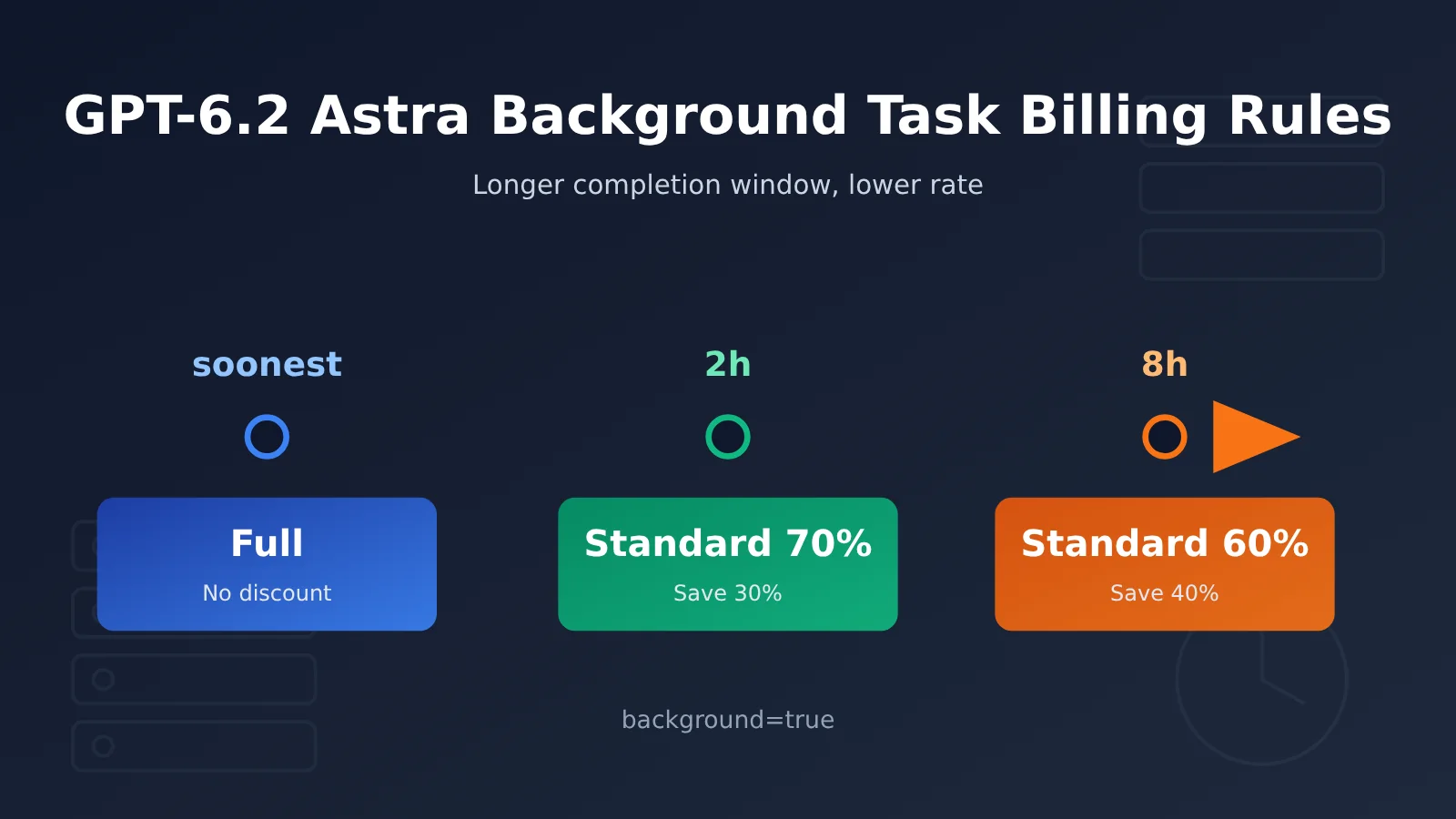
GPT-6.2 Astra’s background task billing rules can be summed up in one sentence: if you can wait, it’s cheaper. Starting November 17, 2026, the background completion windows for the Responses API enter public beta. The default soonest window is billed at the full price of the processing tier you use; qualifying requests that choose the 2h window are billed at 70% of the Standard model token rate, and those that choose the 8h window at 60%—30% and 40% cheaper, respectively.
Which tier to pick depends on two questions: when you need the result at the latest, and whether requests need to depend on intermediate results from a previous step. Answer those two questions first, then estimate cost from usage—that’s more reliable than comparing unit prices directly.
What will you learn from this article?
- The definitions, timing start points, and billing bases of the three completion windows: soonest, 2h, and 8h
- The exact cost of the same usage (100,000 input + 10,000 output tokens) across 7 modes
- The parameter conditions a request must meet to get the discount, plus the boundaries of queue quota and cache reuse
- Which submission method suits interactive Q&A, ticket summarization, overnight review, and independent classification tasks
Roadmap: We’ll start with a concept table and a quick impact overview to align terminology. The “Objective Facts” section explains, in order, the completion window rules, prices for each tier, discount conditions, and how continuation steps are handled in multi-step workflows. The “Analysis and Judgment” section discusses whether discounts can stack, time budgets for multi-step tasks, trade-offs introduced by caching and queue quota, and recommendations for choosing a tier based on workload.
GPT-6.2 Astra Background Task Billing To Know: Key Concepts
| Concept | Brief explanation |
|---|---|
| Standard | The OpenAI API’s standard processing tier; the discounts for the 2h and 8h background windows are calculated against its model rates |
| Fast | Astra’s current accelerated tier; model token rates are 2x Standard |
| Ultrafast | A faster processing tier; 3x Standard during the promotional period, then 6x at list price afterward |
| Background mode | The request returns a response ID first, and the app later queries the status and retrieves the result |
| Completion window | The completion target used for scheduling once a background response has been accepted; options are soonest, 2h, and 8h |
| soonest | The default window for background requests: run as soon as possible, using the model rates of the processing tier in use |
| Batch API | Pack independent requests into a JSONL file and run them asynchronously as a single job |
| continuation_id | An identifier the app assigns to the same background workflow, used to associate eligible follow-up requests |
| Model token rates | The unit price for each metered item, such as regular input, cache-hit input, and output |
GPT-6.2 Astra Background Task Billing Impact at a Glance
- API developers: Async tasks now come with two more discount options sitting between real-time calls and Batch — but you’ll need to adapt to background mode and handle polling or webhooks.
- Product managers: Requirements need to state “when the result must be available at the latest.” For features that can accept 2-hour or 8-hour delivery, model token costs drop by 30% or 40% respectively.
- Cost and operations leads: The 2h and 8h windows share a single queue quota with Batch, so large Batch jobs and discounted background tasks need to be planned together — you can’t estimate capacity for each of them in isolation.
The Facts: GPT-6.2 Astra Background Task Billing Rules
What Are the Three Completion Windows for GPT-6.2 Astra Background Tasks?
On November 17, 2026, OpenAI released GPT-6.2 Astra and GPT-6.2 Sol. Astra targets complex reasoning, coding, and professional work, and its API model ID is gpt-6.2-astra. That same day, the OpenAI API changelog noted that the Responses API background completion windows had entered public beta.
Asynchronous requests to Astra need to set background=true, and there are three window options:
- soonest (default): Run as soon as possible. Model tokens are billed at the processing tier actually used, with no discount.
- 2h: Eligible requests are billed at 70% of the Standard model token rate.
- 8h: Eligible requests are billed at 60% of the Standard model token rate.
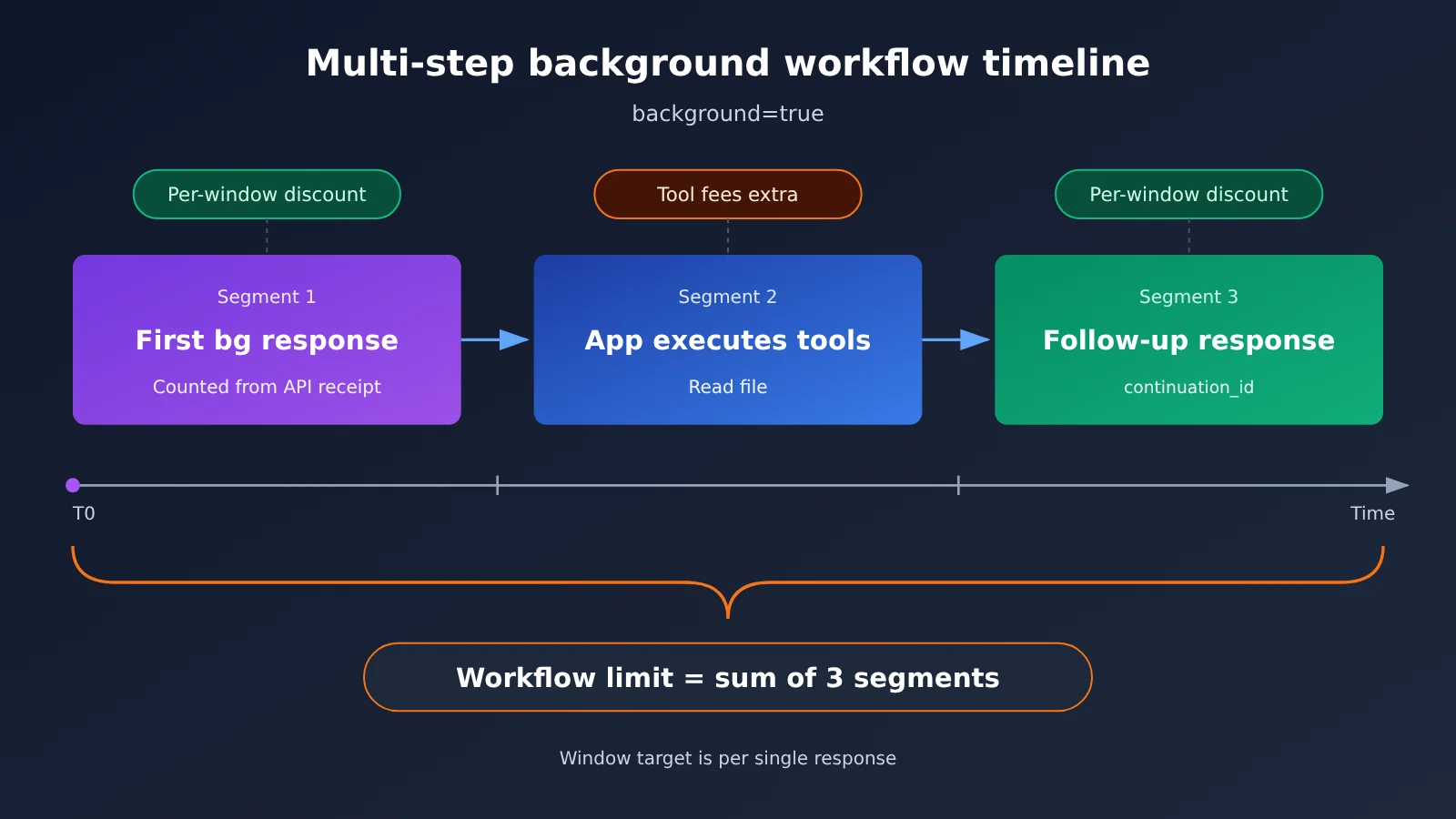
The clock starts when the API accepts the initial request, and the window applies only to that one response. If the task requires the application to execute a tool partway through and then issue the next response, that execution time and the follow-up step time must be counted separately within the overall workflow time limit.
Take a “check the file first, then continue the review” example: the first response completes within the window and returns a tool call that the application needs to execute. After the application reads the file, it submits the result as a follow-up request, and the model continues the review. The total time for the whole task is the sum of three segments—the first response, the tool execution, and the follow-up response—not just one window.
How Much Does the Same Request Cost Across GPT-6.2 Astra Tiers?
The table below shows GPT-6.2 Astra short-context rates in USD per million tokens. The 2h and 8h rows are derived from the official discount ratios; Ultrafast price dates are based on U.S. Pacific Time.
| Mode | Relative to Standard | Regular input | Cache-hit input | Output |
|---|---|---|---|---|
| Standard | 1x | $8.00 | $0.40 | $40.00 |
| Fast | 2x | $16.00 | $0.80 | $80.00 |
| Ultrafast (through 2027-02-28) | 3x | $24.00 | $1.20 | $120.00 |
| Ultrafast (from 2027-03-01) | 6x | $48.00 | $2.40 | $240.00 |
| Background 2h | 0.70x | $5.60 | $0.28 | $28.00 |
| Background 8h | 0.60x | $4.80 | $0.24 | $24.00 |
| Batch | 0.50x | $4.00 | $0.20 | $20.00 |
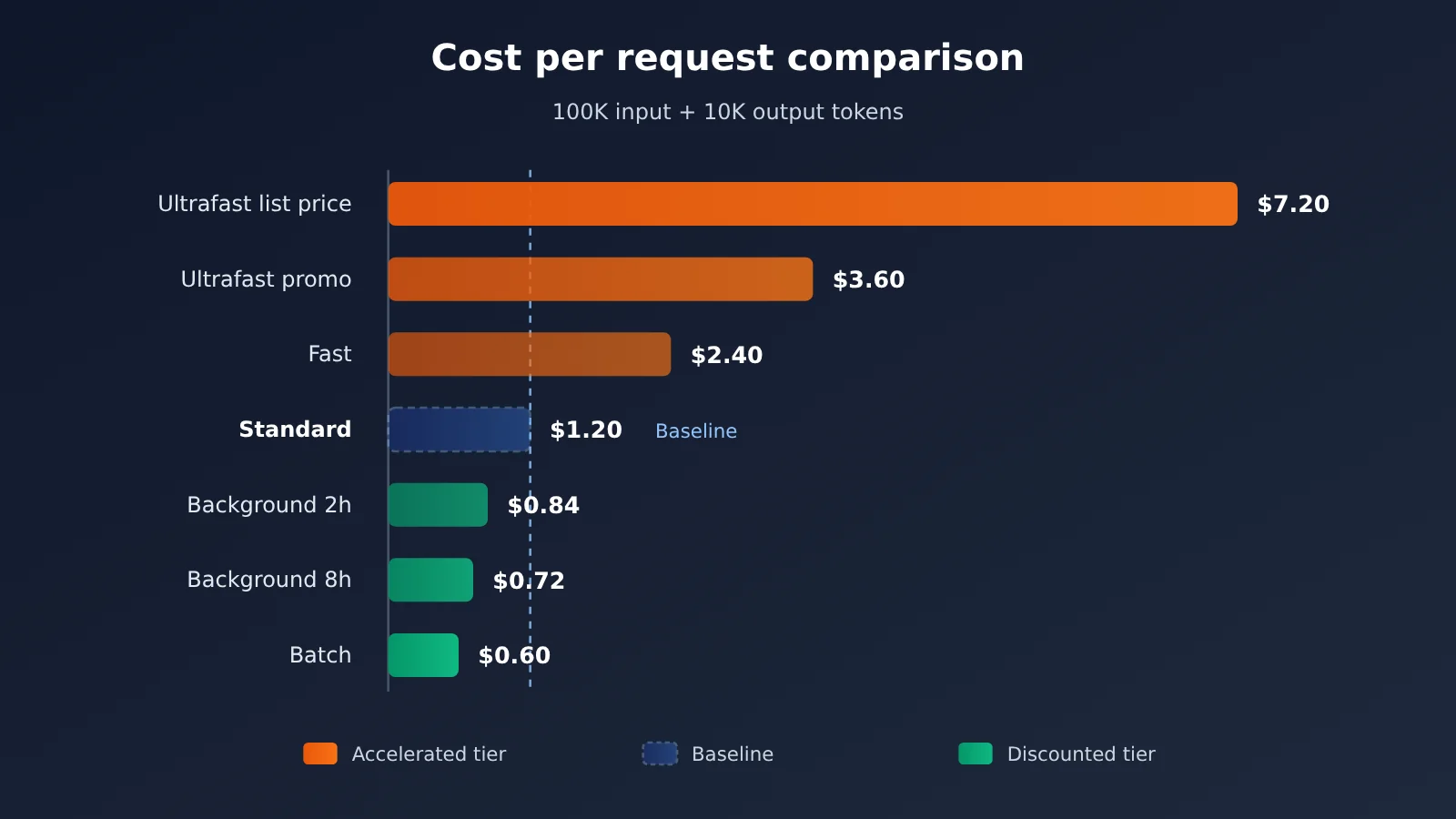
Let’s use a fixed usage for comparison: 100,000 regular input tokens + 10,000 billable output tokens. Standard is calculated as 0.1 × $8 + 0.01 × $40 = $1.20, and the other tiers are calculated the same way:
| Mode | Model token cost per request | Difference vs. Standard |
|---|---|---|
| Ultrafast list price | $7.20 | +$6.00 |
| Ultrafast promotional price | $3.60 | +$2.40 |
| Fast | $2.40 | +$1.20 |
| Standard | $1.20 | Baseline |
| Background 2h | $0.84 | −$0.36 |
| Background 8h | $0.72 | −$0.48 |
| Batch | $0.60 | −$0.60 |
This example only counts model tokens. Web Search calls, Shell / Code Interpreter container fees, and other charges are billed separately by line item; cache writes are also billed separately.
In addition, the model card notes that when input exceeds 272K tokens, the entire request is subject to long-context rates: input and cache prices are multiplied by 2, output price is multiplied by 1.5, and then the selected tier or eligible discount is applied. Under this rule, for a long-context request in the 8h window, regular input is $16 × 0.6 = $9.6 and output is $60 × 0.6 = $36 (per million tokens).
The rates above are converted from OpenAI’s official pricing and discount ratios. If you access the model through APIYI (apiyi.com), actual billing is subject to the platform’s billing page. We recommend first verifying your bill with a small amount of traffic before rolling out to production.
How to Make GPT-6.2 Astra Requests Qualify for Background Billing Discounts
Discounts don’t kick in automatically — all of the following conditions have to be met at the same time:
| Parameter / Condition | Qualifying Value | Notes |
|---|---|---|
| Endpoint | /v1/responses |
Background completion windows are determined by the Responses API |
background |
true |
Enters background mode, returning a response ID first |
background_options.completion_window |
2h or 8h |
The default soonest gets no discount |
service_tier |
default (Standard) |
auto only qualifies if the request ultimately lands on Standard |
stream |
Omitted or false |
Streaming output doesn’t qualify for the discount |
On quota: 2h, 8h, and Batch all share the Batch/Background queue quota, counted by input tokens at enqueue time. soonest uses the regular request-count and token limits. There’s one caching caveat: regular Standard requests can’t reuse prompt caches created by either of these discount windows. Also note that, per the model card, requests with reasoning.effort set to none will be rejected.
Here’s a minimal example. background_options isn’t necessarily included in the SDK’s type definitions yet, so pass it through extra_body:
from openai import OpenAI

client = OpenAI(
    api_key="YOUR_API_KEY",
    base_url="https://api.apiyi.com/v1"  # APIYI OpenAI-compatible endpoint
)

resp = client.responses.create(
    model="gpt-6.2-astra",
    input="请汇总以下 50 张支持工单的共性问题……",
    background=True,
    service_tier="default",          # Use Standard to qualify for the discount
    extra_body={"background_options": {"completion_window": "2h"}},
)
print(resp.id, resp.status)  # Save the response ID and retrieve it later
Once you have the response ID, you can read the status via webhook or polling. While the status is queued or in_progress, keep querying with the same ID; qualifying capacity errors are retried automatically by the API, so your application doesn’t need to resend them.
View the full polling and follow-up request example
import time
from openai import OpenAI

client = OpenAI(
    api_key="YOUR_API_KEY",
    base_url="https://api.apiyi.com/v1"  # Unified access via APIYI
)

WINDOW = "8h"

def submit(input_items, previous_id=None):
    """Submit a background discount request.
    For the exact parameter placement of continuation_id, refer to the OpenAI Background mode guide."""
    return client.responses.create(
        model="gpt-6.2-astra",
        input=input_items,
        background=True,
        service_tier="default",
        previous_response_id=previous_id,
        extra_body={
            "background_options": {"completion_window": WINDOW},
            # "continuation_id": "audit-2026-11-19-batch-01",  # Keep it consistent within the same workflow
        },
    )

def wait(response_id, interval=60):
    """Poll until completion; while queued / in_progress, keep querying with the same ID."""
    while True:
        r = client.responses.retrieve(response_id)
        if r.status not in ("queued", "in_progress"):
            return r
        time.sleep(interval)

first = wait(submit("审核合同,需要时调用 read_file 工具读取附件").id)

# If the returned output includes an application-handled tool call: the app runs the tool, then
# issues a follow-up request with the same project, model, service tier, window, and continuation_id.
# Qualified continuation steps get priority queueing
for item in first.output:
    if item.type == "function_call":
        tool_result = "……read_file 的实际返回内容……"
        follow = submit(
            [{"type": "function_call_output",
              "call_id": item.call_id,
              "output": tool_result}],
            previous_id=first.id,
        )
        print(wait(follow.id).output_text)
In multi-step workflows, continuation requests must use the same project, model, service tier, window, and continuation_id to qualify for priority queueing. Each qualifying follow-up request is billed at its corresponding discount rate.
🚀 Integration tip: The background completion window is currently a public beta feature of the OpenAI Responses API. When you call it through an aggregation platform like APIYI apiyi.com, we suggest starting with free test credits to confirm that the
backgroundandcompletion_windowparameters are passed through completely, and that billing is settled at the discounted rate, before you migrate production workloads.
Analysis and Assessment: How to Make the Most of GPT-6.2 Astra Background Task Billing
GPT-6.2 Astra: Backend Discounts and Acceleration Tiers Can’t Be Stacked
The discount requires service_tier to be default, or for auto to ultimately land on Standard. From this, you can infer that Fast and Ultrafast can’t enjoy the 2h and 8h discounts at the same time. The trade-off here is clear: acceleration tiers spend more money for shorter latency, while backend windows trade longer waiting for a lower price—these two pull in opposite directions.
There’s also a detail that’s easy to overlook: although soonest is also a backend mode, its price follows the processing tier. Pair soonest with Fast, and you’ll still pay the Fast price—only the interaction becomes asynchronous. The point of soonest is to hand control back to the user interface first; it doesn’t save you any money on its own.
Multi-step Tasks Need a Time Budget for the “Entire Workflow”
The window target only constrains a single response—it doesn’t cover the whole workflow. A review task that needs three rounds of tool calls could theoretically go through three window scheduling cycles, plus the time the application itself spends executing tools. If the business promises “results before 9 a.m.”, then when you use an 8h window to handle overnight tasks, the submission time needs to leave room for continuation steps—you can’t submit right at the 8-hour mark.
That’s where the value of continuation_id comes in. It doesn’t extend or merge windows, but it lets continuation steps get priority queuing, shortening the tail-end wait of multi-step flows. From an engineering standpoint, it’s a good idea to map continuation_id one-to-one with your business task IDs, which also makes log troubleshooting and cost allocation easier.
8h vs. Batch: A 10-Point Price Gap, Different Use Cases
At the example usage level, 8h costs $0.72 and Batch costs $0.60 — a difference of just $0.12. Batch is cheaper, but it requires that requests can be assembled into JSONL upfront, are independent of one another, and can tolerate a 24-hour delivery window. 8h, on the other hand, lets requests continue reasoning based on tool results.
So the deciding factor isn’t which one is cheaper — it’s the structure of your task:
- Requests depend on each other (the next step needs the previous step’s result): choose 8h or 2h
- Requests are independent and can be listed all at once: choose Batch
Batch’s 50% discount and the background window discount are two separate billing paths — they don’t stack.
Hidden Costs from Caching and Queue Quota
Prompt caches created in a discounted window can’t be reused by regular Standard requests. If the same long system prompt is used for both real-time Q&A and background batch processing, each side builds its own cache, and the cache write cost may be paid twice. Also, cache-hit input is already cheap on its own: $0.40 for Standard and $0.24 for 8h. For workloads with a high cache hit rate, the background discount will save a smaller percentage of the total bill than it does for output-heavy tasks.
Shared queue quota also needs planning ahead. 2h, 8h, and Batch all draw from the same Batch/Background quota, counted by input tokens enqueued. If you submit a large batch of Batch jobs and an 8h review pipeline at the same time overnight, the two will compete for that same quota.
💡 Cost tip: Before settling on a tier, estimate the cost of each tier using the token distribution of your real prompts (the ratio of regular input, cache-hit input, and output). With APIYI apiyi.com’s unified interface, the same code only needs parameter changes to compare billing differences between the real-time and asynchronous paths.
Putting GPT-6.2 Astra Service Tiers to Work in Real Workloads
Here’s a workload illustration. The decision criteria, in order, are: how long you can wait, whether you depend on intermediate results, and whether there are tool fees.
| Workload | Recommended submission method | Rationale |
|---|---|---|
| Real-time interactive Q&A, analysis with someone waiting | Start with Standard; only consider Fast / Ultrafast after validating latency and cost | Users are waiting—paying more for speed needs data to back it up |
| Async interfaces where you want to return first, then show results | soonest | Hands control back to you; the price follows the processing tier you use |
| Support ticket summaries due before the afternoon | Background 2h | Delivered within hours, model token cost drops 30% |
| Multi-step reviews that can run overnight and need to call tools | Background 8h + continuation_id | 40% cheaper, with time reserved for tool execution and continuation steps |
| Independent classification tasks that can be assembled in advance | Batch (JSONL) | Independent of each other and accepting a 24-hour window, 50% cheaper |
One thing to note: once a task uses Web Search or the Code Interpreter container, those costs don’t qualify for the model token discount. The higher the share of tool fees, the lower the overall savings from background windows.
🎯 Selection tip: First run the same batch of samples through Standard, 2h, and 8h on APIYI apiyi.com, record actual completion times and bills, then decide the default tier for each task type. This gets you much closer to real costs than looking at the per-unit price table alone.
Changes Worth Keeping an Eye On
The background completion window is still in public beta. Parameter names, eligibility conditions, and discount percentages could all change before general availability, so the official OpenAI guidelines should be your source of truth before launch. Two other dates are also worth noting: the Ultrafast promotional price is valid through February 28, 2027 (Pacific Time), and starting March 1 the rate jumps from 3x to 6x, meaning products that rely on Ultrafast long-term should reassess their budgets ahead of time. GPT-6.2 Astra and Sol currently have no Flex tier; if one ships later, async tasks will have more options.
For teams planning Astra async capabilities, a good first step is to use test credits on APIYI apiyi.com to get the background mode and polling logic working end to end, write deadlines and task dependencies into your requirements doc, and only then talk about which tier to use.
The Analects (Zi Lu chapter) says: “Haste makes waste.” On the GPT-6.2 Astra price list, that saying finally has a price tag: be willing to wait a few extra hours, and you can cut model costs by thirty to forty percent.
📚 References
-
OpenAI announcement: Introducing GPT-6.2 Astra and Sol (2026-11-17)
- Link:
openai.com/index/introducing-gpt-6-2-astra-sol/ - Notes: Model positioning and pricing adjustment details
- Link:
-
GPT-6.2 Astra model card: Specs, short-context and long-context rates
- Link:
developers.openai.com/api/docs/models/gpt-6.2-astra - Notes: Context length, 272K long-context pricing rules
- Link:
-
OpenAI API changelog: 2026-11-17 model release and background window entry
- Link:
developers.openai.com/api/docs/changelog - Notes: Background completion window public beta and discount percentages
- Link:
-
OpenAI API pricing table: Per-tier unit prices
- Link:
developers.openai.com/api/docs/pricing - Notes: Standard, Fast, Ultrafast, and Batch rates
- Link:
-
Background mode guide: Background mode, completion window, and follow-up requests
- Link:
developers.openai.com/api/docs/guides/background - Notes: Discount conditions, continuation_id, queue quota, and cache boundaries
- Link:
-
Batch API / Fast / Ultrafast guides
- Links:
developers.openai.com/api/docs/guides/batch,developers.openai.com/api/docs/guides/fast-mode,developers.openai.com/api/docs/guides/ultrafast-mode - Notes: Eligibility conditions for each submission method
- Links:
Author: APIYI Technical Team
Technical support: Feel free to reach us via the APIYI apiyi.com homepage. More integration resources are available at the docs.apiyi.com documentation center.