Summary: This article explains the nighttime 8% Credits discount for Qwen4-Max-Preview and compares three options—the Token Plan subscription package, the pay-as-you-go API for the official version, and a multi-model API aggregation platform—across scope of use, billing units, and total task cost.
Qwen4-Max-Preview 8% Credits: The Bottom Line
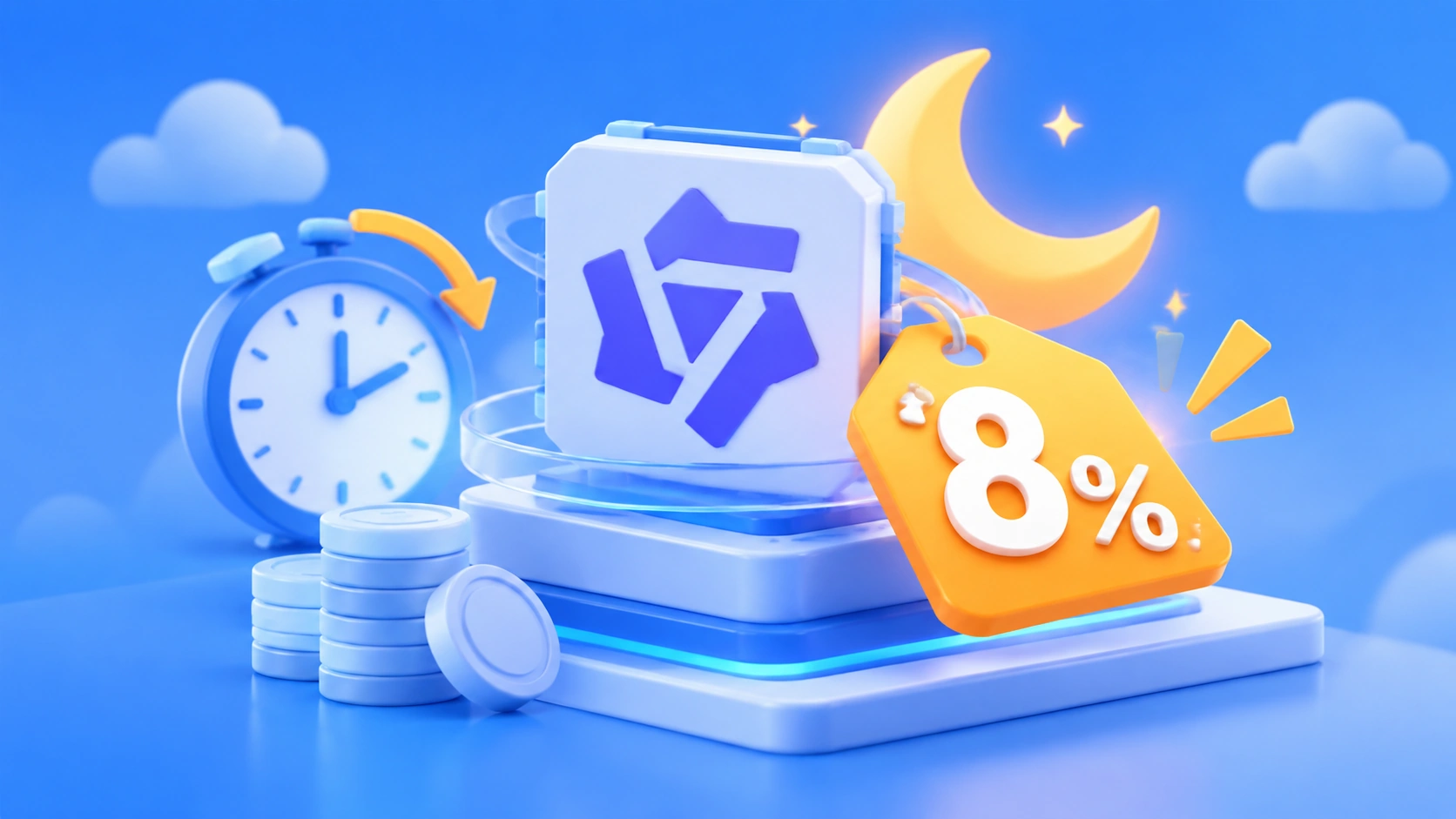
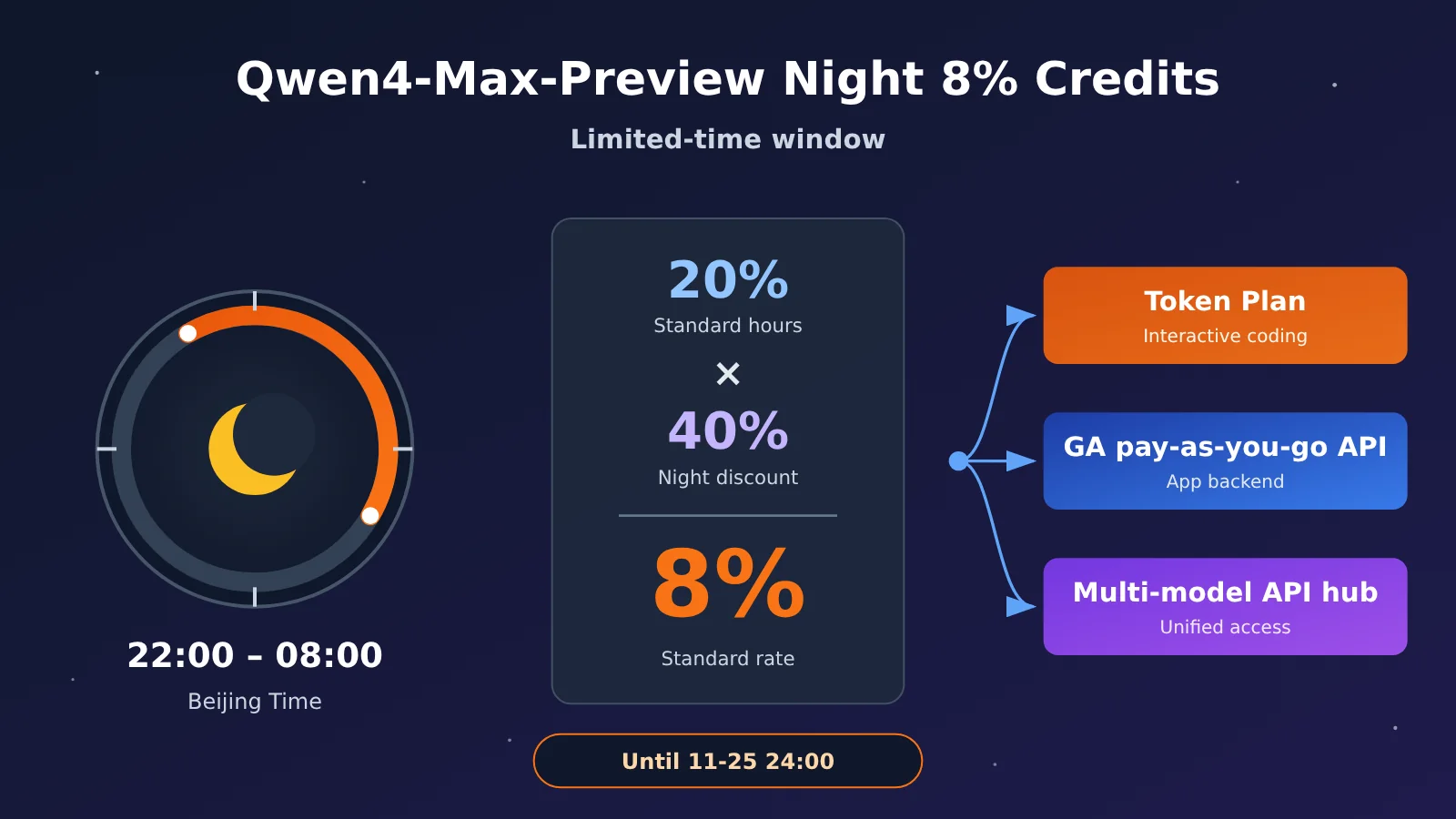
When you invoke Qwen4-Max-Preview through Token Plan, Credits consumed between 22:00 and 08:00 Beijing time each night are billed at 8% of the standard rate. That percentage comes from stacking two discounts: the normal-hours rate is 20% of the standard rate, and nighttime use gets an additional 40% of that rate (20% × 40% = 8%). The discount lasts until the Preview ends at 24:00 on November 25, 2026 (Beijing time), after which the model will be retired.
This discount only applies to scenarios permitted by Token Plan—that is, interactive use in coding tools and agent tools. If you want to connect the model to a self-hosted application backend or automated business workflows, you’ll need a pay-as-you-go API product that allows those use cases. The Qwen4-Max official version, launched on November 16, already offers standalone pay-as-you-go pricing and can serve these needs.
Below, we’ll first break down the 8% calculation and Token Plan package pricing, then explain the billing basis and caching mechanism for the official version’s pay-as-you-go API. Next, we’ll compare the three invocation approaches across four dimensions—applicable tasks, usage form, billing unit, and interface—and lay out a cost calculation framework that groups costs by task. Finally, we’ll give recommendations based on developers’ actual task types.
Things to Know: Qwen4-Max-Preview Billing Terms
| Term | Explanation |
|---|---|
| Credits | The deduction unit for Token Plan subscriptions. How much you use depends on the model and the specific makeup of the call. |
| Token | The unit for measuring model input, output, and reasoning content. |
| Token Plan | An Alibaba Cloud product that grants Credits benefits per subscription cycle, available in personal and team editions. |
| Pay-as-you-go API | A model service billed by actual usage, aimed at application integration. |
| Cache hit | When repeated input is reused by the server and billed according to the corresponding cache billing rules. |
| Reasoning Token | Tokens generated by the model’s reasoning process. They count against the output budget and are billed as output. |
| API aggregation platform | A service that offers multiple model invocations and usage management through one unified interface. |
| Unit task cost | The sum of all requests, retries, tool calls, and model consumption needed to complete the same goal. |
1 How the Qwen4-Max-Preview 8%-of-standard-rate discount comes about
1.1 Two discount layers stack: 20% × 40% = 8%
During the Preview promotion period, Token Plan applies two layers of Credits discounts to Qwen4-Max-Preview:
- Regular hours: Credits consumption is 20% of the standard rate. With the same Credits budget, you can theoretically make about 5 times as many calls as you could at the standard rate.
- Night hours: every day from 22:00 to 08:00 the next day, Beijing time, you pay 40% of that already-discounted 20% rate.
- Stacked result: 20% × 40% = 8%, meaning you pay 8% of the standard rate.
The official docs give a ratio example: if a call would consume 100 Credits at the standard rate, it actually consumes 20 Credits during regular hours and 8 Credits during night hours. This is just a math example to show the ratio. How many Credits a single call actually consumes depends on the usage details in the console. The official team also reserves the right to adjust the discounts based on operating conditions.
1.2 The time boundaries of the Qwen4-Max-Preview limited-time window
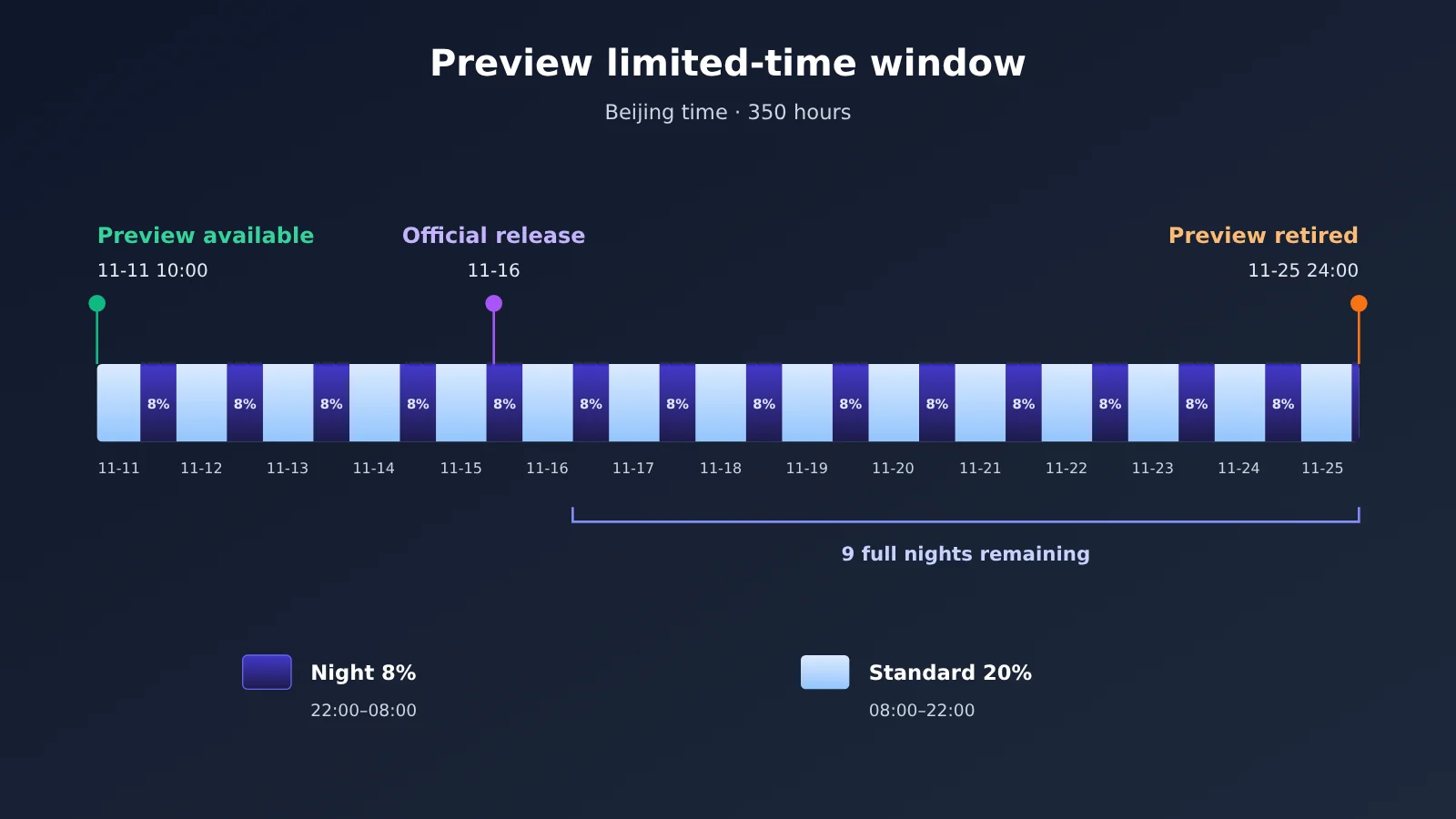
Preview opens at 10:00 on November 11, 2026, and ends at 24:00 on November 25 (both Beijing time), for a total of 350 hours. Counting from today, November 16, the remaining full night windows are the nine nights from the evening of November 16 to the morning of November 25. On the night of November 25 itself, the night window is only two hours, from 22:00 to 24:00, and then Preview goes offline.
After the official Qwen4-Max release goes live on November 16, Preview’s offline time stays the same. The official model docs already recommend using the official release, so any workflows you build during the Preview window should also be prepared for migration to qwen4-max.
2 How to Buy and Consume Credits in Token Plan
2.1 Token Plan Personal Edition Pricing and Quotas
As of November 16, 2026, the plans published on the official Alibaba Cloud Token Plan Personal Edition page are as follows. The monthly quotas and prices were adjusted on November 9, so earlier screenshots and prices quoted in older articles no longer apply.
| Plan | Monthly Price | Monthly Credits | Concurrent Agents | New User Price |
|---|---|---|---|---|
| Lite | 39 CNY | 20,000 | 1–2 | 19.5 CNY/month |
| Essential | 79 CNY | 45,000 | 2–3 | 39.5 CNY/month |
| Standard | 139 CNY | 80,000 | 3–4 | New user discount not listed on the page |
| Pro | 312 CNY | 200,000 | 6–8 | New user discount not listed on the page |
The new user pricing is valid until November 30, 2026, 23:59:59 (UTC+8), and only applies to accounts that have never purchased a Token Plan Personal Edition before. The new user discount lowers the subscription price of the plan; the Preview 2折 (80% off) and 0.8折 (92% off) discounts lower the Credits consumed during model invocation. The two act at different stages.
2.2 Rules for Token Plan Add-on Usage Packs
Once a plan’s quota runs out, you can buy add-on usage packs. Here’s how they work:
- Price is 100 CNY per pack per month, with 20,000 Credits per pack.
- You must already hold an active plan, and you can hold at most 5 packs at the same time.
- Each pack is valid for one month; unused quota expires at the end of that period.
- Pack quota is separate from the plan’s original monthly quota.
2.3 How Credits Relate to Tokens
Credits are the billing unit of Token Plan, while tokens are the model’s computation unit — the two can’t be converted one-to-one. According to the official documentation, how many Credits a single call deducts depends on:
- The model type and its billing coefficient;
- The number of input tokens, and how many of those tokens hit the cache;
- The number of output tokens, including reasoning tokens;
- The number of tool calls, plus the extra calls made by built-in tools and subtasks.
So you can’t work out Qwen4-Max-Preview’s per-million-token price from 39 CNY and 20,000 Credits. The official docs don’t publish standalone per-million-token pricing for Preview, and Preview doesn’t support pay-as-you-go. Here’s a real-world data point you can reference: a developer built a claw-machine interactive project in Qoder, which took about 75 minutes and is estimated to have consumed roughly 65 Credits. That’s a single task in a specific tool — use it only to get a sense of the order of magnitude.
3. Qwen4-Max-Preview vs. the official release: how billing works
3.1 Preview: Token Plan access only
The Preview model has a fixed way in: subscribe to an individual or team Token Plan, grab the plan-specific API key, point at the dedicated Base URL https://token-plan.cn-beijing.maas.aliyuncs.com, and set the model ID to qwen4-max-preview (alias qwen4.0-max-preview — which is what shows up on your bill). It’s compatible with the OpenAI Chat Completions, Responses, and Anthropic Messages API specs.
Preview has an output budget of 393,216 Tokens, shared between reasoning content and the final answer, with a default reasoning effort of xhigh. If you’re migrating from another model and only size max_tokens based on how long you expect the final answer to be, the answer may get truncated because reasoning content has eaten up the budget.
3.2 The official Qwen4-Max: pay-as-you-go API pricing
The official qwen4-max launched on November 16. You can use it through a Token Plan or call it pay-as-you-go. Below is the official per-token pricing for the official release, as listed on the model page (RMB, in yuan per million Tokens):
| Deployment region | Input | Output (including reasoning and answer) |
|---|---|---|
| Chinese mainland North China 2 (Beijing) | 10 yuan | 30 yuan |
| US Virginia | 10 yuan | 30 yuan |
| Germany Frankfurt | 10 yuan | 30 yuan |
| Japan Tokyo | 10 yuan | 30 yuan |
| Hong Kong, China | 10 yuan | 30 yuan |
| Singapore | 10.938 yuan | 32.813 yuan |
The Beijing region also comes with a free quota of 1 million Tokens, valid for 90 days starting from whenever the clock starts — account activation on Bailian, model release, or approval of your application. Check the official page rules for the exact details. These prices apply only to the official release; don’t use them to back out Preview’s standard Credits consumption.
The official release’s parameters differ from Preview’s too: same 1,000,000-Token context window, but max output is 262,144 Tokens in thinking mode and 131,072 Tokens in non-thinking mode; default reasoning effort is high, and the default thinking budget is 131,072. When migrating, re-check your output limit settings.
3.3 Explicit caching in the official Qwen4-Max
The official release supports explicit caching, which lets you reuse fixed input prefixes like system prompts, tool descriptions, and reference documents. Explicit caching works across all three interfaces — OpenAI Chat Completions, Responses, and Anthropic Messages — with a TTL of either 5 minutes or 1 hour.
Multi-turn agent tasks typically re-send the same system instructions and tool descriptions every turn, which is exactly where caching saves the most. Caching has its own billing rules, so check the model invocation pricing page for your region for the specific rates.
4 Who Each of the Three Qwen4-Max-Preview Invocation Methods Is For
4.1 Comparison of the Three Approaches
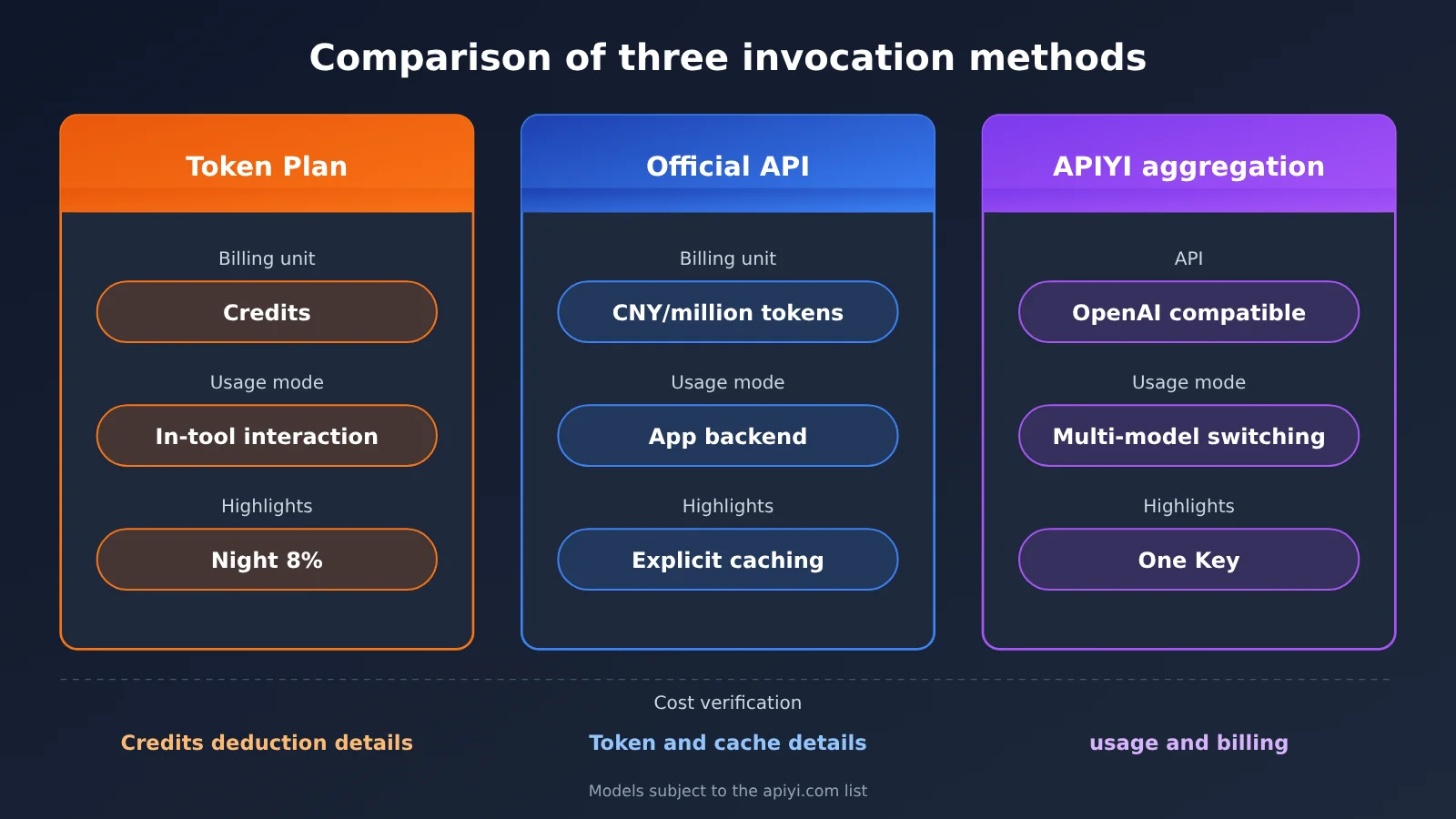
| Dimension | Token Plan Subscription | Official Pay-as-You-Go API | Multi-Model API Aggregation Platform |
|---|---|---|---|
| Suitable tasks | Interactive programming, Agent conversations | Self-built application backends, automated business workflows | Multi-model applications, model comparison and switching |
| Permitted usage forms | Interactive use only inside programming tools and agent tools | Application integration | Application integration, unified management of multiple models |
| Billing unit | Credits | Yuan per million tokens (varies by region) | Token unit price published on the platform’s pricing interface |
| Quota validity | Plans and usage packs are monthly and void upon expiry | Settled by usage; Beijing free quota lasts 90 days | Settled by usage |
| Interface | Dedicated Base URL and plan-specific key | Bailian official interface | OpenAI-compatible interface, e.g. APIYI apiyi.com |
| Cost verification method | Actual Credits deduction details in the console | Aggregated from Token details and cache billing | Aggregated from the request usage field and platform bills |
4.2 Token Plan subscription: suited for interactive coding inside tools
The Token Plan supports tools like Claude Code, Cursor, Qwen Code, Qoder, Qoder CN, and OpenClaw — check the official tool integration docs for specifics. When developers actively kick off tasks in these tools, Preview’s 8% nighttime discount applies directly, and the cost is locked in upfront in the form of Credits.
The usage boundaries are laid out in the official permission guidelines: no batch invocation via automation scripts, no putting the plan key into the backend of your own app, no non-interactive batch calls, and no using plan benefits through workflow platforms like Dify, n8n, or Coze, or through API testing tools like Postman or Insomnia. Going beyond that scope may result in the subscription being suspended or the key being banned. In addition, the individual subscription terms state that inputs and generated content during use will be used for service improvement and model optimization, so you need to review the agreement first before handling confidential material.
4.3 Official pay-as-you-go API: suited for production app integration
Backends for your own apps, batch jobs, and automated pipelines should use the pay-as-you-go API of the production qwen4-max. Billing is based on the publicly listed per-million-token unit price in yuan, and with explicit caching, costs can be verified request by request. This path doesn’t offer the steep discounts that Credits do, but the usage patterns and billing method are both clear and compliant.
4.4 Multi-Model API Aggregation Platforms: For Teams That Need a Unified Interface
If your app needs to call several models at once—OpenAI, Claude, Gemini, and others—an aggregation platform lets you make all those calls through a single API key and one OpenAI-compatible interface, with usage managed in one place. APIYI is one of these platforms. One thing worth noting: a November 13 article in the APIYI help center recorded that Qwen4 had not yet been added to the model list or pricing API, and a public article from November 16 likewise marked qwen4-max as not yet listed. Both are snapshots from those specific dates—so for whether it’s available now, please refer to the current model list and pricing API.
🎯 Technical tip: When building a multi-model app, you can start by using the same code on APIYI apiyi.com to compare how several already-listed models perform on your task. Once the target model is listed, all you need to do is change the
modelparameter to switch.
5 How Developers Can Calculate the Actual Cost of Qwen4-Max-Preview and the API
5.1 Cost Calculation Framework for Qwen4-Max Per-Task Cost
A low model unit price doesn’t necessarily mean a low total cost to complete a task. A single Agent task can involve dozens of requests, a large amount of repeated context, lengthy thinking output, and failed retries. When comparing options, treat “completing the same goal” as the unit and aggregate costs according to each product’s billing breakdown:
| Cost item | How it’s calculated for pay-as-you-go API | How it’s recorded for Credits plans |
|---|---|---|
| Uncached input | Uncached input volume × the corresponding input unit price | Directly record the Credits actually deducted in the console |
| Cache | Cache read, write, and storage fees, calculated per the rules for the corresponding region | Already included in the actual deduction |
| Output | Output volume (including billed thinking tokens) × output unit price | Already included in the actual deduction |
| Tools and retries | Tool call fees + all consumption from retry requests | Already included in the actual deduction |
Written as a formula: Task cost = uncached input volume × input price + cache read/write and storage fees + output (including billed thinking) volume × output price + tool/retry fees. Credits plans don’t convert tokens; you simply record the difference in Credits balance between the start and end of the task. The two kinds of results are in different units, so when comparing them you should separately evaluate “how much each task cost in yuan” and “how many Credits each task deducted,” then factor in the monthly plan fee to judge value for money.
5.2 Recording Token Usage for Each Request in Code
Reconciling pay-as-you-go billing depends on the usage field returned with each request. The minimal example below shows how to read usage from an OpenAI-compatible API. Replace the model ID with one that’s actually listed in the platform’s model catalog:
import openai

client = openai.OpenAI(
    api_key="YOUR_API_KEY",
    base_url="https://api.apiyi.com/v1"  # APIYI OpenAI-compatible API
)

resp = client.chat.completions.create(
    model="YOUR_MODEL_ID",  # Use a model ID that is available in the platform's model list
    messages=[{"role": "user", "content": "总结这段日志中的错误类型"}],
)
print(resp.usage)  # Record prompt_tokens / completion_tokens, etc., for cost allocation
View the full code for aggregating costs by task
import openai
from dataclasses import dataclass, field

@dataclass
class TaskLedger:
    """Aggregate Token usage by task; the caller passes in unit prices for the selected product and region."""
    input_price_per_m: float          # CNY per million Tokens, uncached input
    output_price_per_m: float         # CNY per million Tokens, output (including reasoning)
    cache_cost: float = 0.0           # Cache read/write and storage costs, entered manually from the billing details
    tool_cost: float = 0.0            # Tool invocation costs
    records: list = field(default_factory=list)

    def add(self, usage):
        cached = 0
        details = getattr(usage, "prompt_tokens_details", None)
        if details is not None:
            cached = getattr(details, "cached_tokens", 0) or 0
        self.records.append({
            "uncached_input": usage.prompt_tokens - cached,
            "output": usage.completion_tokens,
        })

    def total(self) -> float:
        inp = sum(r["uncached_input"] for r in self.records)
        out = sum(r["output"] for r in self.records)
        return (inp / 1e6 * self.input_price_per_m
                + out / 1e6 * self.output_price_per_m
                + self.cache_cost + self.tool_cost)

client = openai.OpenAI(
    api_key="YOUR_API_KEY",
    base_url="https://api.apiyi.com/v1"
)

# Fill in the unit prices based on the product and region you actually use
ledger = TaskLedger(input_price_per_m=0.0, output_price_per_m=0.0)

for attempt in range(3):  # Usage from retries is also included in the task cost
    resp = client.chat.completions.create(
        model="YOUR_MODEL_ID",
        messages=[{"role": "user", "content": "修复 query.py 中的分页错误"}],
    )
    ledger.add(resp.usage)
    if resp.choices[0].finish_reason == "stop":
        break

print(f"本任务请求数: {len(ledger.records)},合计成本: {ledger.total():.4f} 元")
5.3 Hypothetical Cost Calculation: One Agent Task in the Beijing Region on the General Availability Release
The following is a hypothetical calculation — the numbers are only there to demonstrate the formula. Suppose a task runs on the GA release of Qwen4-Max in the Beijing region under pay-as-you-go billing, with 2,000,000 Tokens of cumulative uncached input, 50,000 Tokens of output (including thinking), and no caching or billing tools:
- Input: 2 × 10 yuan = 20 yuan
- Output: 0.05 × 30 yuan = 1.5 yuan
- Total: 21.5 yuan
What this tells you is that the cost of long-context agent tasks comes mainly from input that gets passed in over and over. If you switch the fixed system prompt and tool descriptions over to explicit caching, the structure of the input side changes — how much you actually save depends on the cache hit rate and the cache unit price in that region. For the same task under the Credits plan, just record the actual amount deducted; don’t try to convert that 21.5 yuan into Credits.
💰 Cost check: If your business needs to compare the per-task cost of several already-listed models on the same task, you can read each model’s usage through APIYI apiyi.com’s unified interface and aggregate it with the TaskLedger above using the same accounting basis.
6 How to Choose an Invocation Approach During the Qwen4-Max-Preview Period
6.1 Interactive Coding: Use Token Plan for Long Tasks in the Nighttime Window
If you mostly write code in tools like Claude Code, Cursor, or Qoder, Token Plan and the Preview discount are the best fit. Here’s how to do it:
- Schedule the interactive tasks that need large context and long thinking between 22:00 and 08:00, and start and follow up on them yourself inside the tool — things like codebase comprehension, cross-module debugging, and long-document analysis.
- Reserve output budget for thinking; Preview’s 393,216 Tokens are shared between thinking and answers.
- Note your Credits balance at the start and end of each task so you build up your own per-task consumption data.
- On your first purchase, compare the two new-user prices — Lite at 19.5 yuan and Essential at 39.5 yuan — with the discount running until November 30.
- Before November 25, run your usual tasks once on the GA
qwen4-maxto confirm the output cap and reasoning effort settings.
6.2 Self-Built Apps and Automated Workloads: Choose a Pay-As-You-Go API or an Aggregation Platform
Backend services, scheduled jobs, batch data processing, and workflow platform integrations all fall inside the limits of the Token Plan personal edition, so you should go with a pay-as-you-go API that allows commercial backend calls. If you only use Tongyi-series models, you can connect straight to the official pay-as-you-go API of GA Qwen4-Max and use explicit caching to control input cost. When your app needs to combine models from several vendors, you can use a model API aggregation platform for a unified interface and a single bill.
💡 Recommendation: Which channel you connect through should follow the model’s actual availability. If your target model is already listed on APIYI apiyi.com, you can call it directly through the unified interface; if it isn’t listed yet, you can first build out the interface and cost-accounting flow on the platform using models that are listed, then switch the model parameter once it’s available.
6.3 Qwen4-Max-Preview Decision Cheat Sheet
- Individual developer working mainly inside coding tools: Token Plan plus the Preview nighttime window; after November 25, switch to the GA
qwen4-max. - Team building a self-hosted app: GA pay-as-you-go API, choose the unit price by region, and turn on explicit caching.
- Multi-model apps or the model selection phase: a multi-model API aggregation platform — one interface, cost aggregated per task.
- Handling confidential data: check the relevant product’s data usage terms first, then decide how to connect.
7 Summary: The Right Way to Use the Qwen4-Max-Preview 8% Credits Window
The Qwen4-Max-Preview nighttime 8% Credits rate is a limited-time offer within the Token Plan, valid until 24:00 on November 25, and it applies to interactive use in coding tools and agent tools. The official Qwen4-Max release went live on November 16, with Beijing region pay-as-you-go pricing at 10 yuan for input and 30 yuan per million tokens for output, making it suitable for application backends and automated business workloads. Credits and Tokens belong to two separate metering systems, so when comparing costs you should measure by per-task basis, tracking Credits deductions and Token-accumulated amounts separately.
When making a decision, work through this order: first determine whether the task is in-tool interactive use or a backend call, then identify the corresponding compliant product, and finally measure cost on the same task in practice. When you need to compare results and costs across several listed models, you can quickly validate through the unified interface at APIYI apiyi.com.
📚 References
-
Qwen4-Max-Preview Official Documentation: Model specs, availability dates, and access methods
- Link:
help.aliyun.com/zh/model-studio/qwen4-max-preview - Notes: Output budget, reasoning parameters, dedicated Base URL
- Link:
-
Qwen4-Max Official Release Documentation: Pay-as-you-go pricing and explicit caching
- Link:
help.aliyun.com/zh/model-studio/qwen4-max - Notes: Regional unit prices, output limits, cache TTL
- Link:
-
Token Plan Personal Subscription and Benefits: Plan pricing, Credits, and limited-time offers
- Link:
help.aliyun.com/zh/model-studio/token-plan-personal-overview - Notes: 20% off and nighttime 40% off rules, new user pricing, usage packages
- Link:
-
Token Plan Permissions and Usage Guidelines: Allowed and prohibited use cases
- Link:
help.aliyun.com/zh/model-studio/token-plan-permissions-and-usage - Notes: Scope of interactive usage and consequences of violations
- Link:
-
Token Plan Usage and Quota: Credits consumption mechanics
- Link:
help.aliyun.com/zh/model-studio/token-plan-usage-quota - Notes: Factors affecting Credits consumption
- Link:
-
Token Plan Feature Updates: Preview and official release records
- Link:
help.aliyun.com/zh/model-studio/token-plan-product-updates - Notes: Version events on November 11 and November 16
- Link:
Author: APIYI Technical Team
Technical Contact: Feel free to reach us through the APIYI apiyi.com homepage; for more integration materials, visit the docs.apiyi.com documentation center