Claude Fable 5.2 was released on November 9, 2026, with standard API pricing 20% lower than 5.1.
Many teams will naturally ask: now that it’s cheaper, can we just switch straight to max?
This article compares Fable 5.2 high and Fable 5.2 max using the same framework, looking at both quality and cost per task.
Key benefit: By the end, you’ll know when to use high versus max for Fable 5.2, and you’ll have a checklist you can use to evaluate an upgrade.
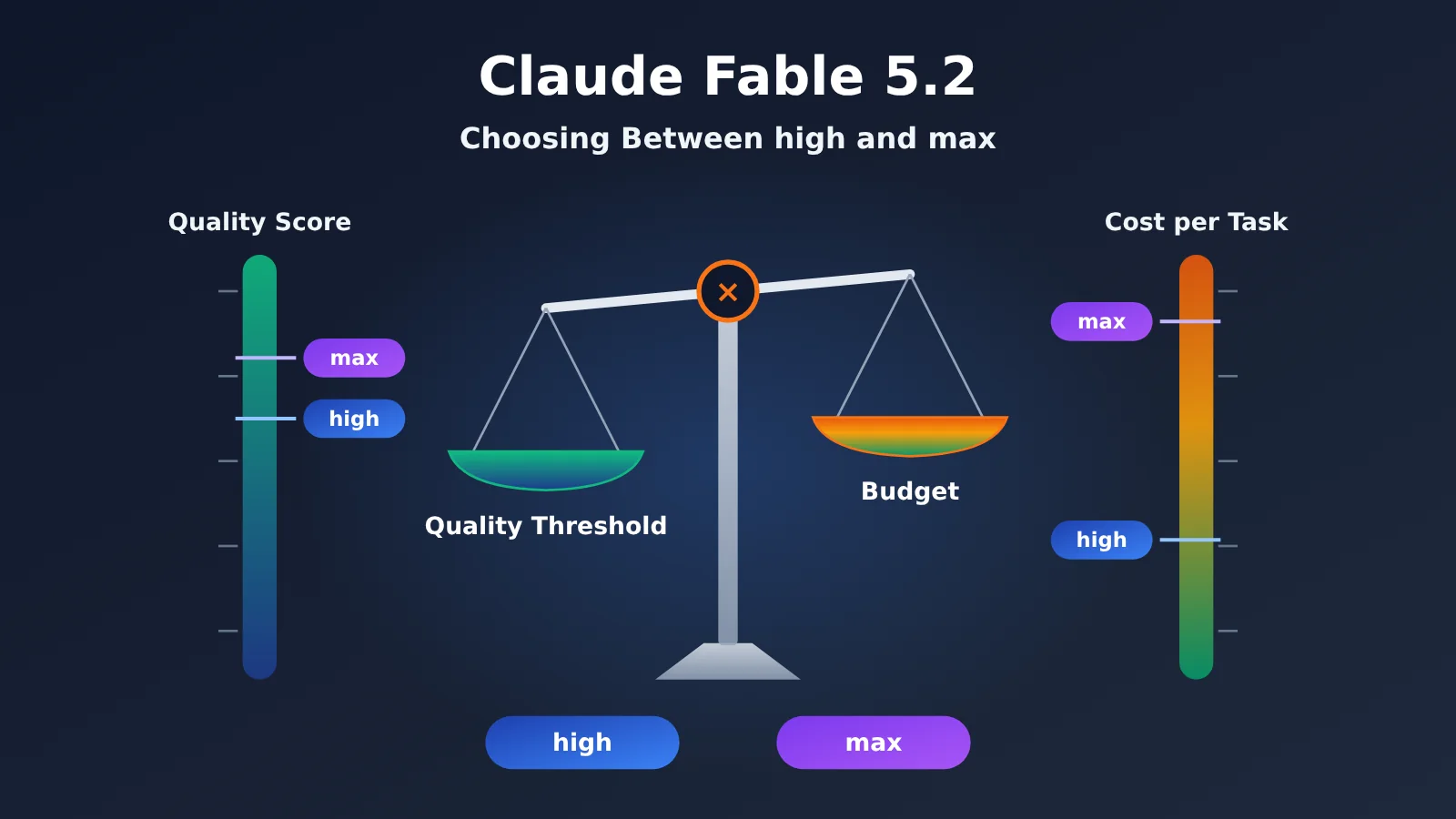
Table of Contents
- What to know: Terms related to choosing a Fable 5.2 tier
- 1 Fable 5.2 high and max don’t change the same unit price
- 2 Compare Fable 5.2 quality and cost in one table
- 3 Check Fable 5.2 tier trends using data from independent organizations
- 4 Choose a Fable 5.2 tier based on the task
- 5 Decide whether to upgrade Fable 5.2 to max using your own evaluation
- FAQ / Key Takeaways / Summary
Good to know
| Term | Meaning | What to keep in mind while reading |
|---|---|---|
| Effort | A setting that controls how much thinking the model invests | Fable 5.2’s API default is high |
| Adaptive thinking | A mechanism that lets the model allocate its own thinking budget | Always enabled in Fable 5.2 |
| Harness | The runtime environment that provides the model with tools, sessions, and execution rules | Cursor and AA use different harnesses |
| Intelligence Index | A composite index AA calculates by weighting multiple evaluations | It’s an index, not an accuracy rate |
| Percentage points | The absolute difference between two percentages | Going from 56.9% to 60.0% is a 3.1 percentage-point increase |
| Cost per task | The model cost allocated to a single task under specific test conditions | It’s not the same as your API bill |
| Acceptance threshold | The quality requirement a task must meet | Clear the threshold first, then compare budgets |
| Task tiering | Grouping tasks by difficulty and cost of failure | Different tiers call for different settings |
1. High and max change different things—not the unit price
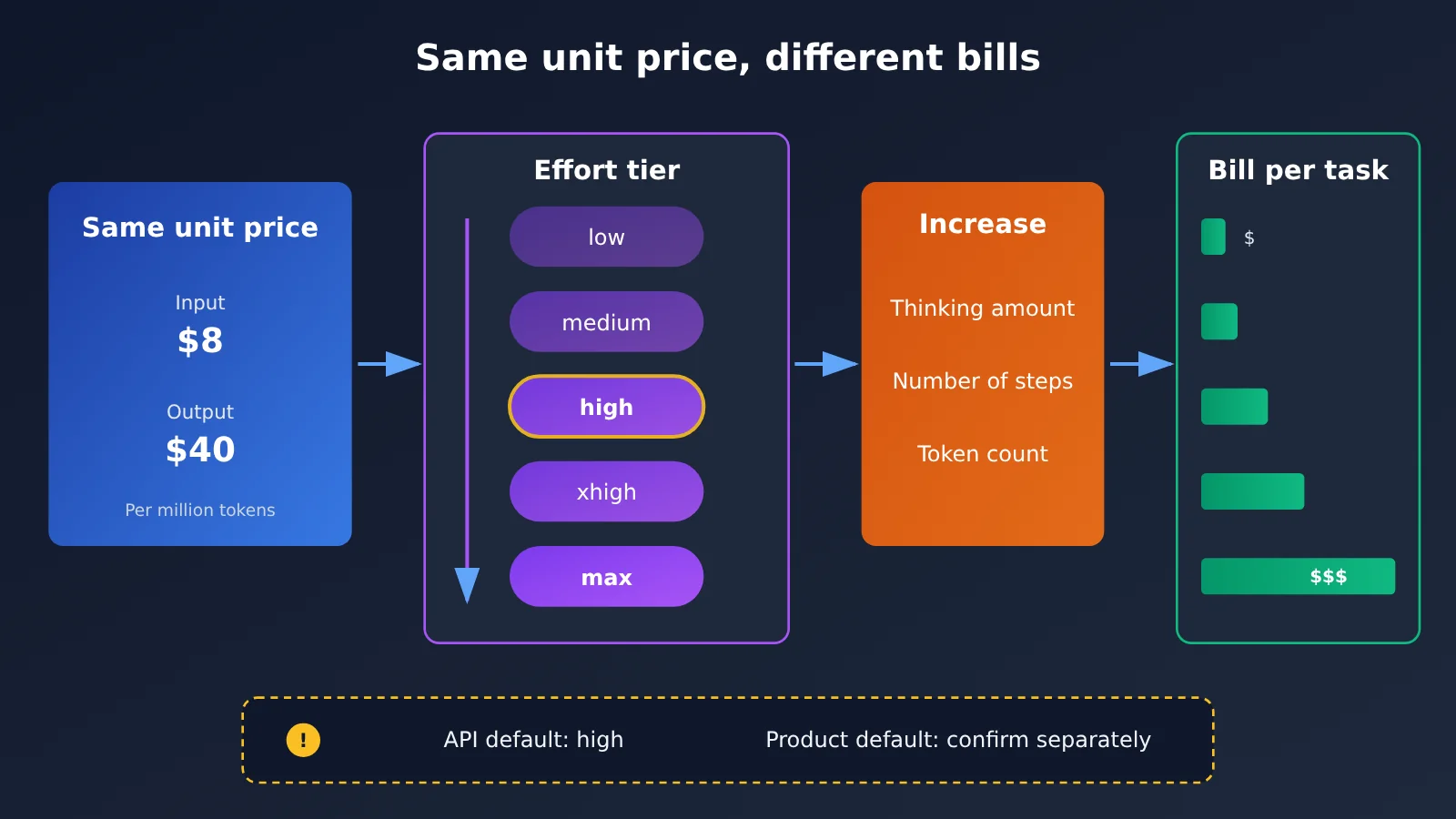
Many people assume that a higher setting means a higher unit price. In fact, at Anthropic’s standard rates, Fable 5.2 costs $8 per million input tokens and $40 per million output tokens, regardless of the setting.
Effort changes how much the model thinks through a task, how many steps it takes, how long it runs, and how many tokens it uses. So the unit price stays the same, but the bill for a task can vary severalfold.
How Fable 5.2 settings affect your bill
Adaptive thinking is always enabled in Fable 5.2. Effort sets the ceiling and influences how much thinking the model is likely to do. As you raise the setting, the model will typically do more reasoning and make more tool calls, increasing the number of billable tokens.
For the same 100,000 input tokens, if output increases from 20,000 tokens to 40,000 tokens, the cost in Fable 5.2 standard mode rises from $1.60 to $2.40—more than the $2 cost for the same token usage in 5.1.
It’s also important to distinguish between two kinds of “default.” The official model documentation states that the API default effort is high. Products like Cursor have their own configuration layers. For example, Cursor’s default context is 300K, which is a different layer from the 1M specification in the API documentation.
One more thing: the official prompting guide notes that settings with the same name may involve different amounts of thinking across versions. Don’t assume that what you learned about the settings in 5.1 applies unchanged to 5.2.
2 Compare Fable 5.2 Quality and Cost in One Table
CursorBench 4.0 is an evaluation Cursor runs in its own task and tool environment. It isn’t an independent, general-purpose benchmark, but it compares all five tiers under the same harness, making it useful for observing how they perform relative to one another. The data below was retrieved on November 10, 2026.
| Fable 5.2 tier | Score | Cost per task (USD) | Tokens (aggregated field) | Steps |
|---|---|---|---|---|
| Low | 53.2% | 3.94 | 36,616 | 30 |
| Medium | 54.8% | 4.66 | 44,103 | 35 |
| High | 56.9% | 9.70 | 99,259 | 69 |
| Extra High | 56.3% | 15.48 | 161,251 | 108 |
| Max | 60.0% | 32.79 | 352,794 | 218 |
Note: The tokens column is an aggregated field from the benchmark page; it shouldn’t be interpreted as output tokens alone. Source: CursorBench 4.0.
Fable 5.2 High to Max: 3.1 Percentage Points and About 3.38× the Cost
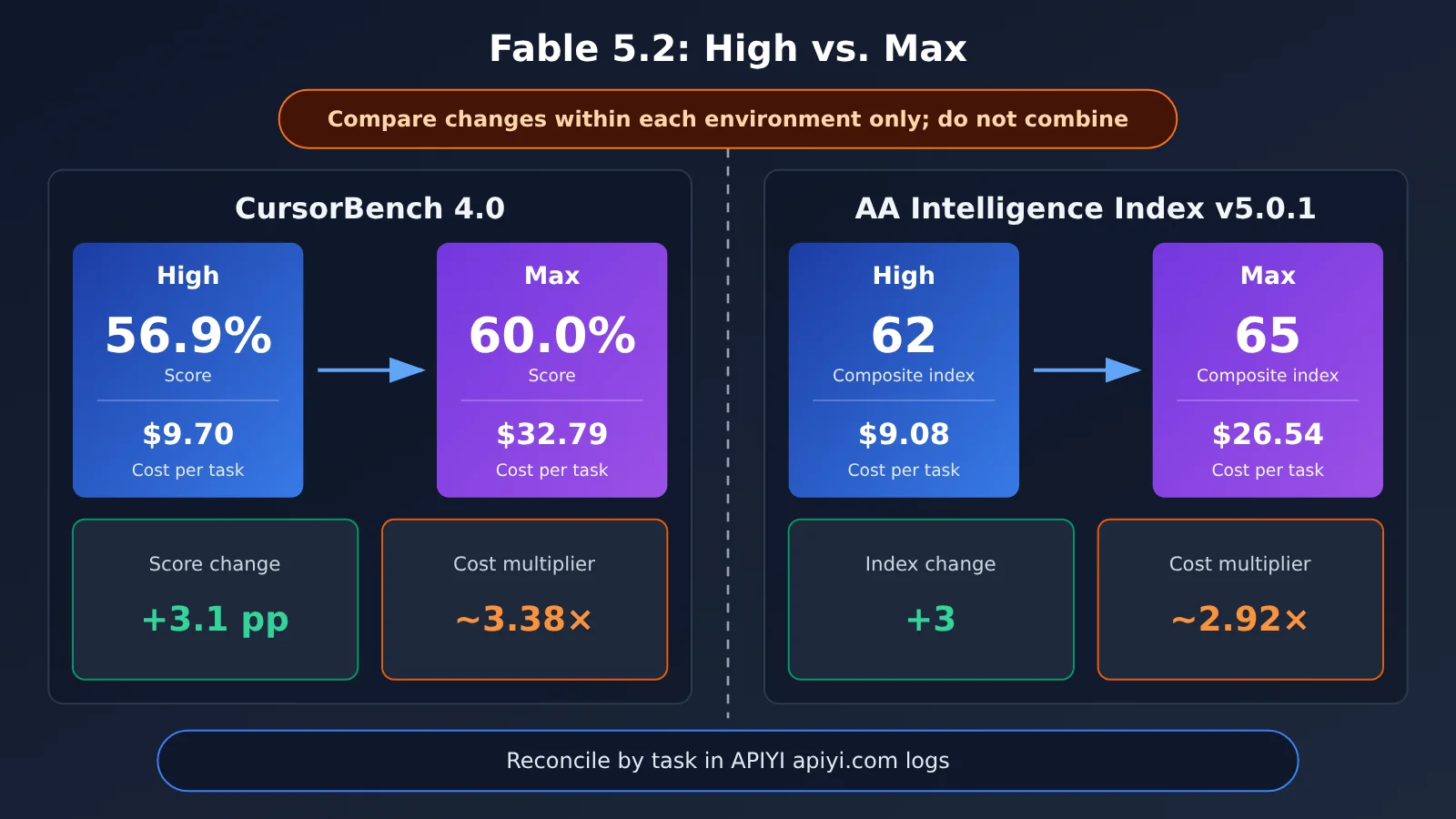
In this table, the score rises from 56.9% at High to 60.0% at Max, an increase of 3.1 percentage points. The cost per task goes from $9.70 to $32.79, or about 3.38× as much—an increase of roughly 238%.
By our calculations, the tokens field increases to about 3.55× its original value, while the number of steps rises from 69 to 218, or about 3.16×. The higher cost is mainly due to more reasoning and execution steps, not a change in unit pricing.
These figures only show that, in this environment, the higher score comes with a significantly higher cost.
How to Interpret Extra High’s Unexpected Result
There’s another notable result in the table: Extra High costs about 60% more than High, yet scores 0.6 percentage points lower.
💡 Recommendation: You can compare differences between tiers within the same table; don’t combine figures from different evaluations. If you want to reproduce a similar comparison on your own tasks, you can use APIYI apiyi.com’s unified interface and call logs to reconcile the results—but first confirm which model IDs and tiers the platform supports that day.
3 Check Fable 5.2 Tier Trends Against Data from an Independent Organization
Looking at just one evaluation environment can make conclusions susceptible to the quirks of that environment. AA is an independent evaluation organization, and its leaderboard can help us check whether the trends observed in Cursor also appear elsewhere. The following is a live snapshot from November 10, 2026, using method version Intelligence Index v5.0.1.
| Configuration | Intelligence Index | Cost per task (USD) |
|---|---|---|
| Fable 5.2 medium | 56 | 3.80 |
| Fable 5.2 high | 62 | 9.08 |
| Fable 5.2 xhigh | 62 | 14.83 |
| Fable 5.2 max | 65 | 26.54 |
| Opus 5.5 max | 59 | 10.04 |
65 Doesn’t Mean 65% Accuracy
AA’s methodology page explains that the v5.0.1 index is made up of nine evaluations, with four capability areas each accounting for 25%. So 65 is a composite index score, not 65% accuracy. In the AA environment, the index increases by 3 from high to max, while the cost per task is about 2.92 times higher. high and xhigh both score 62, which means their composite scores are the same—not that their behavior is identical on every task.
Compare Results Within Each Environment
Both environments show the same general trend: max scores higher, at roughly three times the cost of high. This provides some corroboration of the trend. But AA and Cursor use different tasks, scoring methods, and cost calculations, so you can’t combine AA’s 65 and Cursor’s 60.0% into a single accuracy score.
4 Choose a Fable 5.2 Effort Level Based on the Task
The official prompting guide offers a practical starting point: begin with the default high setting for API calls, then adjust based on your evaluation results. medium is geared toward interactive scenarios; reserve xhigh for difficult, long-running tasks where it’s proven to offer additional benefits; and use max to evaluate the model’s capability ceiling or for a small number of tasks where time and tokens aren’t a concern. With lower effort levels, also watch for the risk of tasks ending prematurely.
Fable 5.2 Scenario Recommendations
The three scenarios below are hypothetical and are intended to illustrate how to choose an effort level.
| Hypothetical scenario | Recommended starting point | When to consider moving up | What not to do |
|---|---|---|---|
| Requirement changes (modify fields, adjust APIs, add tests) | Evaluate with Medium; use High if needed | Medium ends prematurely or misses changes | Default to max for small changes |
| Complex fixes (cross-module bugs, concurrency issues) | High | High doesn’t meet the acceptance threshold | Jump straight to xhigh without testing |
| Long-running research (open-ended questions, exploring solutions) | Start with High | The problem is valuable, the cost of failure is high, and evaluations have shown that max helps | Set max as the default for all requests |
When to Choose Fable 5.2 High
- Most API tasks that require strong reasoning and have clear acceptance criteria;
- Teams that haven’t yet established an effort-level evaluation process and need a recommended starting point;
- Production workflows with high request volumes where per-task costs matter.
When to Choose Fable 5.2 Max
- Evaluating the model’s capability ceiling on a particular type of problem;
- A small number of open-ended problems where the cost of failure far outweighs the model’s cost;
- Your own evaluations have shown that max can raise the pass rate above the required threshold, while high cannot.
🎯 Technical recommendation: Choose effort levels by task category; you don’t need to make a separate decision for every request. The official best practice is to start by running a representative set of tasks with high. If you plan to route requests through APIYI apiyi.com, confirm the current model ID, group, endpoint, and supported effort levels on the platform before running in production.
5 Use Your Own Acceptance Tests to Decide Whether to Upgrade Fable 5.2 to max
Public benchmarks can show you the trends, but your own acceptance test results should determine whether an upgrade is worth it. You can use the checklist below as-is. The key principle is to change only one variable—the effort level—at a time.
| Record | Requirement |
|---|---|
| Task and input | Use the same batch of tasks, the same inputs, and the same system prompt |
| Tool permissions | Keep the toolset and permissions exactly the same |
| Model and effort | Record the model ID and effort; change only the effort level in each round |
| Pass criteria | Set acceptance thresholds in advance; don’t adjust them after seeing the results |
| Usage | Record input, cache writes/reads, and output separately |
| Time and retries | Record total time, number of retries, and number of early terminations |
| Actual charges | Use the actual charges in platform logs; don’t substitute estimates based on official rates |
| Failure cases | Keep the original outputs and analyze which issues max fixed |
Fable 5.2 Quick Start: Log Usage First
This minimal example shows only how to make a call and log usage. This article doesn’t show how to pass through the effort parameter: whether Fable 5.2 is available on the platform and whether effort can be passed through are both subject to the platform’s documentation as of the day you use it.
import openai

client = openai.OpenAI(
    api_key="YOUR_API_KEY",
    base_url="https://api.apiyi.com/v1"  # APIYI OpenAI-compatible interface
)

resp = client.chat.completions.create(
    model="YOUR_MODEL_ID",  # Enter a model ID confirmed to be available on the platform that day
    messages=[{"role": "user", "content": "按验收标准修复以下函数……"}]
)
print(resp.usage)  # Log usage for later reconciliation
View the full logging and reconciliation code
import time
import openai

client = openai.OpenAI(
    api_key="YOUR_API_KEY",
    base_url="https://api.apiyi.com/v1"
)

# Anthropic's official standard rates (USD per million tokens), for estimates only; these don't represent actual charges
RATE_IN, RATE_OUT = 8.0, 40.0

def run_task(task_id: str, prompt: str, model: str, effort_label: str, passed_fn):
    """Run a task and return an acceptance record. effort_label is just a label for logging."""
    start = time.time()
    resp = client.chat.completions.create(
        model=model,
        messages=[{"role": "user", "content": prompt}]
    )
    text = resp.choices[0].message.content
    u = resp.usage
    est_usd = u.prompt_tokens / 1e6 * RATE_IN + u.completion_tokens / 1e6 * RATE_OUT
    return {
        "task_id": task_id,
        "model": model,
        "effort": effort_label,
        "passed": passed_fn(text),          # A predefined acceptance function
        "prompt_tokens": u.prompt_tokens,
        "completion_tokens": u.completion_tokens,
        "est_usd": round(est_usd, 4),       # Estimated amount
        "seconds": round(time.time() - start, 1),
        "output": text,                     # Preserve the original output for failed cases
    }

def quota_to_usd(quota: int) -> float:
    """In platform logs, quota ÷ 500000 equals the actual charge in USD."""
    return quota / 500000
APIYI’s logging documentation lists fields such as model_name, prompt_tokens, completion_tokens, quota, duration_for_view, and request_id. The actual charge in USD is quota ÷ 500000, and the other field contains additional information such as group multipliers. Link acceptance records to logs using request_id to calculate the actual cost of tasks that passed, rather than looking only at the cost of individual requests.
🚀 Get started quickly: If you want to validate the workflow with a small sample first, register at APIYI apiyi.com and use the free testing credits for new users. Run through the “same task, one variable, record actual charges” approach, then decide whether to expand the sample.
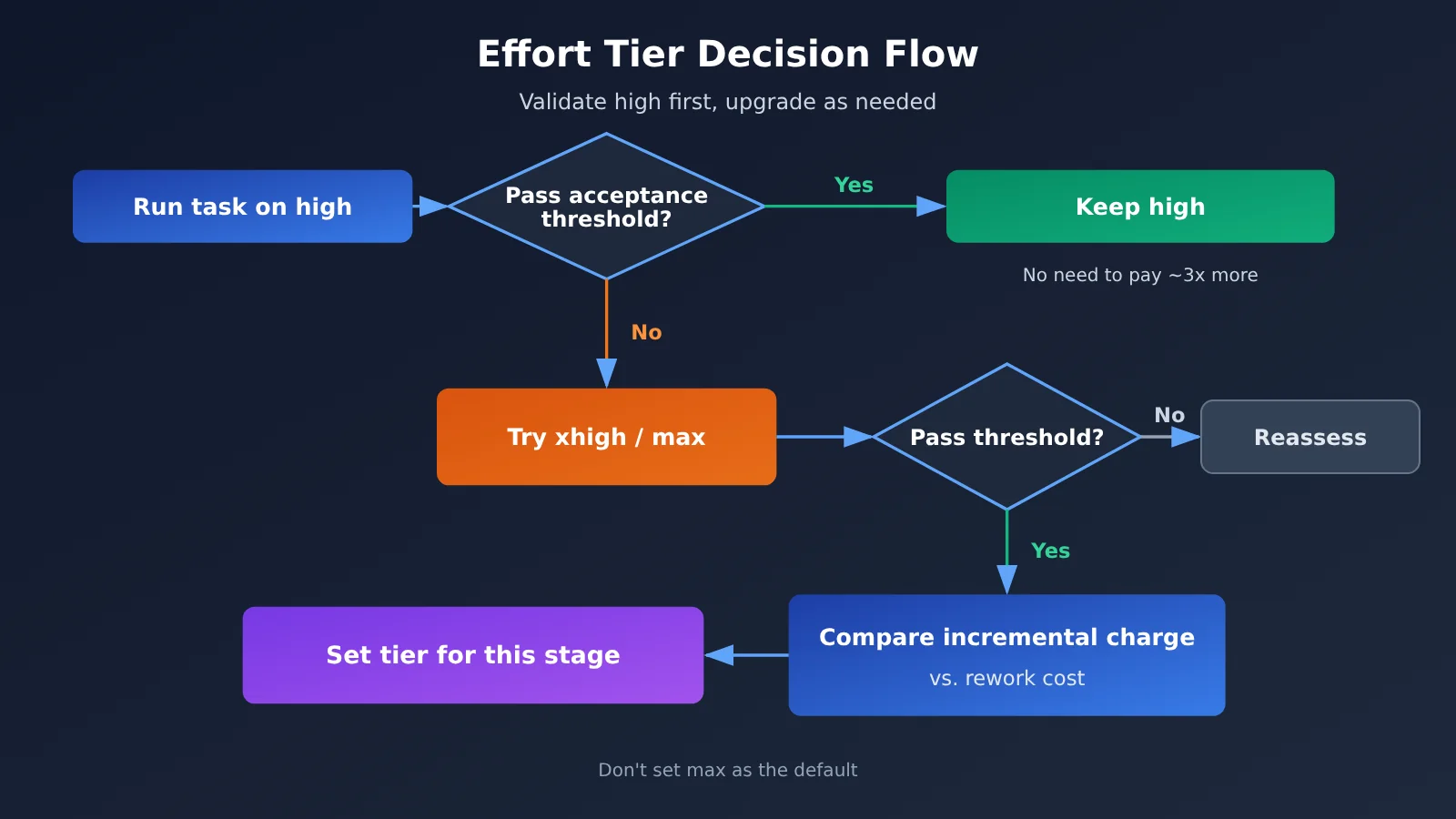
The guiding principle is: First check whether high meets the quality threshold. If it does, there’s no need to pay about three times as much for those few extra percentage points. Only compare the additional cost of max with the cost of failures or rework if high falls short and max meets the threshold. We don’t recommend setting max as the default for every request.
Frequently Asked Questions
Q1: What are the effort levels in Claude Fable 5.2?
Effort controls how much reasoning the model applies. The available levels range from low to max. It doesn’t change the price per token; it changes the amount of reasoning, number of steps, response time, and token usage. As a result, the bill for the same task can vary several-fold across levels. The API defaults to high.
Q2: How much more does Fable 5.2 max cost than high?
On CursorBench 4.0, high scored 56.9% at $9.70, while max scored 60.0% at $32.79—a difference of 3.1 percentage points, with max costing about 3.38 times as much. On AA, high scored 62 at $9.08, while max scored 65 at $26.54, with max costing about 2.92 times as much. Each pair of results can only be compared within its own environment.
Q3: When were these results recorded? Could they change?
Fable 5.2 was released on November 9, 2026. The data in this article is a snapshot taken on November 10. The AA and Cursor pages are updated dynamically, so the numbers may change as versions, task sets, or cost-calculation methods are updated. If you cite them, include the date they were accessed.
Q4: Extra High scored lower than High. Does that mean I shouldn’t use it?
These are results from a single run on CursorBench 4.0; they don’t show that xhigh performs worse on every task. The official recommendation is to reserve xhigh for difficult, long-running tasks where your own evaluations have shown a benefit. There’s no need to enable it by default unless you’ve measured a benefit.
Q5: How can I compare the cost of different Fable 5.2 effort levels through the API?
Use the same batch of tasks, change only the effort level, and record usage and the amount actually charged by the platform. When calling through APIYI’s unified interface at apiyi.com, you can convert the actual charge in the logs to dollars using quota ÷ 500000. Before running the test, check the platform’s current model ID, group, and effort support. This article doesn’t provide any unverified pass-through syntax.
Q6: What are the limitations of public benchmark results?
CursorBench is a benchmark run by a tool provider in its own environment, while the AA index is a weighted composite score. Neither is equivalent to your business’s task success rate, and a difference of around 3 percentage points isn’t enough to determine statistical significance. First-day reactions on social media can offer clues, but your final conclusions should come from your own acceptance test samples.
Q7: After the 20% API price cut, is using max a better deal?
Not necessarily. A price cut saves the same percentage only if usage stays constant. max may use more than three times as many tokens and steps as high, so increased usage can easily offset the lower price. Compare the amount actually charged per completed task, not just the unit price.
Fable 5.2 high and max: Key Takeaways
- The unit price stays the same, but the bill can change: Effort affects how much the model thinks and how many steps it takes, so task costs at the same price tier can differ severalfold.
- The API defaults to high: The official recommendation is to start with high, then move up or down based on your own evaluation results.
- Cursor comparison: Moving from high to max improves the score by 3.1 percentage points, at about 3.38 times the cost.
- AA comparison: The score rises from 62 to 65, at about 2.92 times the cost; 65 is not an accuracy rate.
- Don’t combine evaluation environments: Compare results only within each evaluation. They can’t be combined into a single value-for-money score.
- Reserve max for a few tasks: It’s suited to evaluating capability limits and tackling high-value, open-ended problems.
- Validate against actual charges: Use the same task, change one variable at a time, and record usage. You can reconcile the charges using APIYI (apiyi.com) logs.
Summary
The choice between Fable 5.2 high and max comes down to three points:
- Distinguish unit price from task costs: The tier doesn’t change the unit price; it changes how much the model uses.
- Read results within the same environment: Both Cursor and AA show slightly higher scores with max, at roughly three times the cost of high. But the results from the two environments can’t be compared directly.
- Use your acceptance threshold as the guide: Stick with high if it meets the threshold. Compare the incremental cost with the cost of rework only when high falls short and max meets the requirement.
For most teams, a sensible approach is to start with high, establish task tiers and acceptance records, then evaluate max separately for a small number of high-value tasks. We recommend using APIYI (apiyi.com) to validate your own samples quickly through a unified interface and call logs. Confirm that the model and tier are supported before scaling up.
📚 References
- Anthropic announcement: Release scope and vendor-reported evaluations for Fable and Mythos 5.2
- Link:
anthropic.com/claude-fable-and-mythos-5-2 -
Note: Published on 2026-11-09; includes speed metrics and evaluation tables
-
Claude API pricing: Official standard rates
- Link:
platform.claude.com/docs/en/about-claude/pricing -
Note: Fable 5.2 input/output pricing is $8 / $40 per million tokens
-
Fable 5.2 model specifications: Context window, output limit, and default effort
- Link:
platform.claude.com/docs/en/models/fable-5-2/overview -
Note: Adaptive thinking is always enabled; the API defaults to high
-
Fable 5.2 prompting guide: Official recommendations for choosing an effort level
- Link:
platform.claude.com/docs/en/build-with-claude/prompt-engineering/prompting-claude-fable-5-2 -
Note: Use cases for medium, high, xhigh, and max
-
CursorBench 4.0: Five-tier evaluation in Cursor’s own environment
- Link:
prod.cursor.com/evals -
Note: An evaluation conducted by the tool provider, not a general independent retest
-
Artificial Analysis model leaderboard: Dynamic rankings from an independent organization
- Link:
artificialanalysis.ai/leaderboards/models -
Note: Intelligence Index and cost per task
-
Artificial Analysis evaluation methodology: Components of Intelligence Index v5.0.1
- Link:
artificialanalysis.ai/methodology/intelligence-benchmarking -
Note: Nine evaluations across four capability categories, each weighted at 25%
-
How Cursor compares model quality: Methodology blog for an earlier benchmark
- Link:
prod.cursor.com/blog/cursorbench -
Note: Useful for understanding the design approach, but not applicable to CursorBench 4.0’s statistical findings
-
APIYI log query API: Log fields and actual charge calculation
- Link:
docs.apiyi.com/api-capabilities/log-query - Note:
quota ÷ 500000gives the actual charge in US dollars
Author: APIYI Technical Team
Technical inquiries: Get in touch with us on the APIYI apiyi.com homepage. For more resources, visit the docs center at docs.apiyi.com