Author’s note: Compare what the ChatGPT Dots subscription costs against what a self-hosted Agent costs — across models, infrastructure, maintenance, and human review — measured by cost per successful task at the same delivery standard.
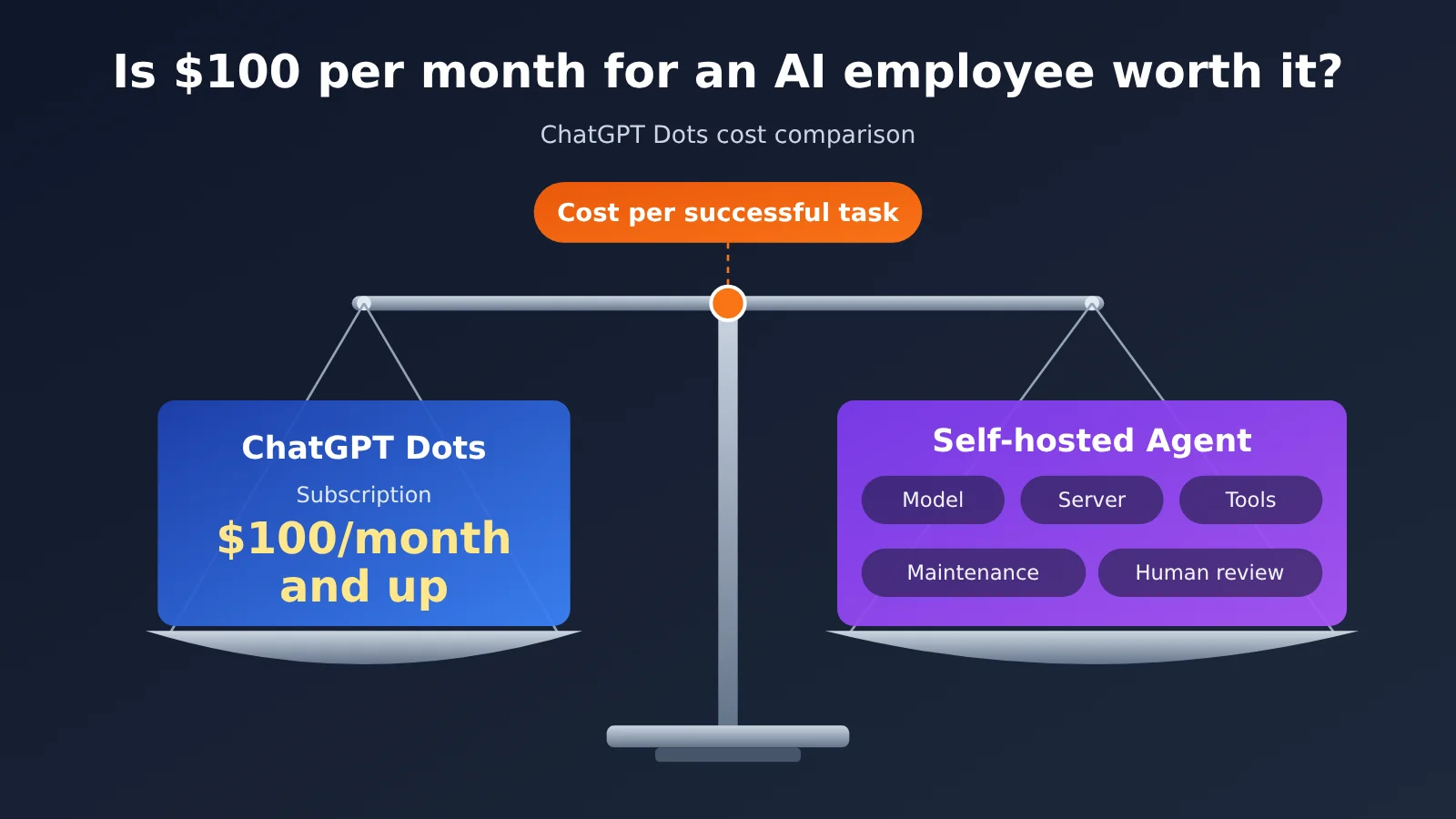
The short version: to decide whether “paying $100 a month for an AI employee” is worth it, you have to look at the total cost of completing one qualified task at a given delivery standard. The monthly fee and the per-token price are only part of that. According to official documentation as of November 16, 2026, the entry point for individual users to use ChatGPT Dots is Pro 100 ($100/month), and the subscription bundles a cloud computer, long-term context, task orchestration, and app connections. In one hypothetical sample, a self-hosted Agent running 300 tasks a month would cost roughly $33 to $66 in model fees — but that doesn’t yet include servers, tools, development and maintenance, failed retries, or human review. Which path is cheaper is something you can only settle by actually running the same batch of tasks through both.
This article starts by unpacking how Dots subscription pricing is structured and what it covers, then breaks self-hosted Agent costs into five categories: models, infrastructure, tools, development, and maintenance. It uses APIYI’s Claude pricing to demonstrate how to calculate per-task token cost. Next, it compares Dots, single-model Agents, and multi-model Agents across six dimensions, and lays out a controlled-experiment method built around “cost per successful task.” Finally, it offers recommendations for three types of needs — individual users, power developers, and enterprises — and covers cost-management approaches that mix subscriptions with APIs.
To Know: 8 Terms for Understanding AI Employee Costs
| Term | Explanation |
|---|---|
| Pro subscription | A monthly ChatGPT plan that includes the corresponding benefits and usage allowance. Pro 100, Pro 200, and Pro 500 can all use Dots. |
| Dot | A persistent personal Agent in ChatGPT Dots that has its own cloud computer and browser and can keep making progress on delegated tasks. |
| Token | The unit the model uses to measure input and output content; APIs are priced per million tokens. |
| Cache read | Repeated prefix content in a request (such as system prompts and tool definitions) reuses existing processing results, at a much lower unit price than regular input. |
| Cache write | The first time a reusable prefix is saved for later requests to read. Billing rules are governed by the platform console. |
| Infrastructure cost | The server, container, database, storage, and execution environment costs required to build your own Agent. |
| Task success rate | Under unified acceptance criteria, the share of tasks that are delivered as qualified after one or more runs. |
| Cost per successful task | Total spending across all runs (including failed retries), infrastructure, and manual review, divided by the number of qualified delivered tasks. |
1 What Do You Get for $100 a Month with ChatGPT Dots?
1.1 ChatGPT Dots: Personal Pro and Enterprise Pricing
ChatGPT Dots was officially launched by OpenAI on September 29, 2026. It’s positioned as an always-on personal AI agent: once you delegate a goal, the Dot can keep pushing the work forward in the cloud even while you’re away or your computer is off, and it hands things back to you when a decision is needed.
When discussing Dots pricing, you have to separate Personal Pro from Enterprise Dots. The table below is based on OpenAI’s official help documentation, retrieved on November 16, 2026.
| Eligibility | Pricing basis | Conditions | Billed separately |
|---|---|---|---|
| ChatGPT Pro 100 | $100/month | 18 and older; not available in the European Economic Area (EEA), the UK, or Switzerland; gradual rollout | Delegated Work/Codex tasks consume the corresponding product’s quota |
| ChatGPT Pro 200 | $200/month | Same as above | Same as above |
| ChatGPT Pro 500 | $500/month | Same as above | Same as above |
| Enterprise workspace | Fixed rate by work type or usage-based billing; amounts are set by the workspace contract or quote | Free admin preview from 2026-11-04 to 11-18; Dots enabled starting 11-18 begin incurring charges; each member can create 1 personal Dot | Tasks delegated to Work or Codex are billed separately at the applicable rates |
The Dots documentation for Personal Pro doesn’t list a separate monthly Dot subscription fee—the Pro monthly fee is the access threshold. The official docs also note that ChatGPT Work or Codex tasks delegated by a Dot are billed under the quota rules for those products, and consumption depends on factors like model, context, reasoning, tool calls, and retrieval. So $100/month buys a bounded set of usage quotas, and the official material doesn’t publish how many tasks that translates to for Personal Pro’s Dot deep work.
1.2 The AI Employee Capabilities Bundled Into a Dots Subscription
When you put Dots side by side with direct API calls, it’s easy to fixate on just the “model” part. In reality, the subscription bundles a whole runtime environment—and if you build it yourself, you have to implement every piece of it:
- Cloud computer and browser: Every Dot gets its own cloud computer. It can open websites, organize documents, and produce reports, and you can watch the work or take over the controls at any time.
- Long-term context: Pulls together ChatGPT Memory, the Dot’s own notes, materials for the current task, and data from authorized apps.
- Multi-project coordination: Splits complex tasks apart, spins up background research agents to work in parallel, aggregates the results, and asks you to step in when something gets blocked.
- Continuous working mode: Supports scheduled tasks and event monitoring—checking on competitors every week, for example, or watching for new bugs in Slack.
- Proactive research: When there’s no new message, it researches authorized data sources. That process is read-only, and any follow-up action has to go through normal approval.
- App connections and communication channels: At launch, the official materials described a plugin ecosystem of more than 4,000 connectable apps, and you can reach the Dot through ChatGPT, Slack, Microsoft Teams, and other channels.
- Permissions and security mechanisms: Custom Rules set the execution boundaries, Auto-review checks things before actions like sending email, and operations such as changing passwords or moving funds must be handed over to the user.
Third-party hands-on testing gives us a reference point for where the capability boundaries lie. In an Axios test on October 20, 2026, Dots produced a 38-page WNBA commemorative program and generated a 12-page photo album in 47 seconds—but the program contained statistics worth questioning, and the shopping portion required users to switch over to the Target app and finish it themselves. The author’s conclusion: this type of agent is well suited to research and prep work, but the output still needs human editing and fact-checking. That conclusion directly means the cost model later in this piece has to include human review.
2 The Full Cost of Building Your Own AI Employee Agent
2.1 The Five Cost Categories of a Self-Built Agent
When you build an agent that can keep working using APIs, the bill goes far beyond model invocations. You can break the costs into five categories:
- Model costs: input, output, cache reads and writes, and inference consumption, which scale linearly with task volume.
- Infrastructure costs: cloud servers, containers, databases, and storage — some fixed monthly fees and some usage-based.
- Tool costs: search APIs, headless browsers, third-party data interfaces, usually billed per call.
- Development costs: initial development, system integration, and permission design, with upfront investment concentrated early.
- Maintenance costs: monitoring and alerting, troubleshooting, and regression testing after model upgrades — these keep happening.
Written as a formula:
$$C_{self}=C_{API}+C_{infra}+C_{tools}+C_{dev}+C_{maintenance}$$
The cost structure of the subscription route is:
$$C_{subscription}=C_{plan}+C_{extra\ usage}+C_{human\ review}$$
Both routes must account for human time. In the self-built route, human time is spread across development, maintenance, and review; in the subscription route, human time is mainly spent on task delegation, result checking, and approval.
2.2 A Design Plan for a Self-Built AI Employee Agent
Below is a design plan for cost estimation. It explains which components a self-built agent needs. For the cost of each component, fill in the quote from the cloud service you actually use. This article has not run a deployment test on this plan.
- Scheduling layer: scheduled triggers or a message queue, responsible for recurring tasks such as “generate intelligence at 8 a.m. every day”.
- Orchestration layer: the agent framework handles step planning, tool calls, and saving intermediate state (such as LangGraph’s Checkpointer or OpenAI Agents SDK workflows).
- Model layer: call models through an OpenAI-compatible interface, routing to different models based on task difficulty.
- Tool layer: search, web scraping, headless browser, file generation.
- State layer: a database stores task records, long-term notes, and deduplication information.
- Approval layer: operations involving outbound sending, payment, or deletion enter a human approval queue.
- Observability layer: records token usage, latency, and failure reasons for each call, serving as the data source for cost accounting.
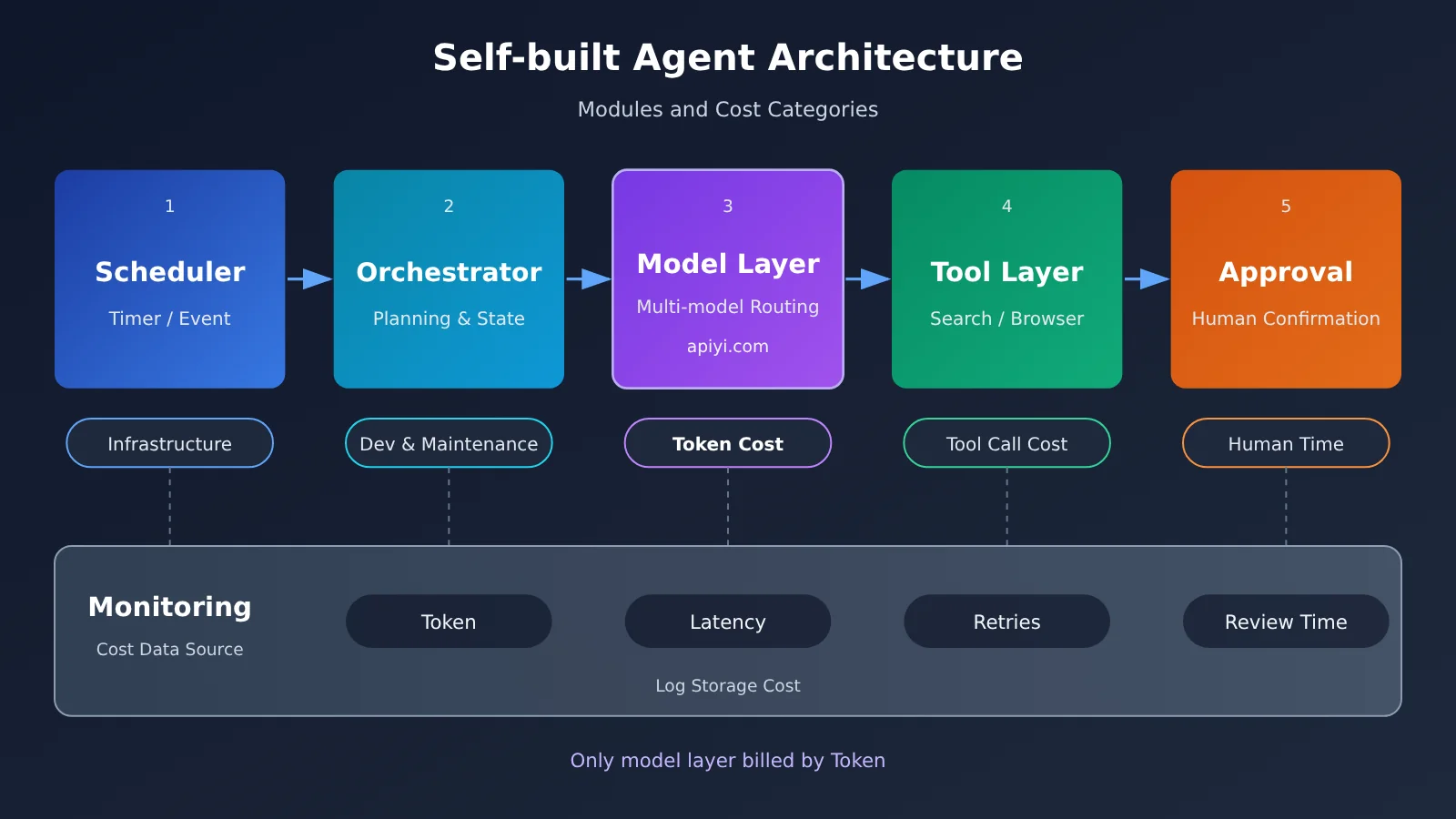
Of the seven components shown in this diagram, only the model layer’s cost can be calculated directly from token prices. The costs of the other components depend on architecture choices and team capabilities. That’s why token costs can only represent part of the cost of building in-house.
3 How Many Tokens Does One AI Employee Task Consume?
3.1 Billing Differences Between Input, Output, and Cache
An Agent task typically involves multiple rounds of model calls: one for planning, another round of reasoning after each tool call, and a final summary at the end. Each round re-sends the system prompt, tool definitions, and previous steps as input, so an Agent’s input tokens are often far greater than its output tokens.
This is exactly where caching comes in. The system prompt and tool definitions stay unchanged across multiple rounds, so once they hit the cache, they’re billed at the cache-read rate—roughly one-twentieth the price of regular input. Cache writes happen when the prefix is first saved, and their pricing is determined by the platform console; this article’s example doesn’t factor them in.
3.2 Calculating Per-Task Model Costs with APIYI Pricing
The prices below come from the Claude model pricing that APIYI published on November 13, 2026. For actual rates, always refer to the console and model list at the time of invocation. The task usage here is a hypothetical sample used to demonstrate the calculation method: each task takes 30,000 input tokens and produces 5,000 output tokens, with 300 tasks per month. This sample has nothing to do with the real average usage of Dots or any other platform.
| Calculation Item | Claude Opus 5.5 | Claude Sonnet 5.5 |
|---|---|---|
| Input price / output price / cache read price (per million tokens) | $4 / $20 / $0.20 | $2 / $10 / $0.10 |
| Cost per task (no caching) | 30,000×$4/10⁶ + 5,000×$20/10⁶ = $0.22 | 30,000×$2/10⁶ + 5,000×$10/10⁶ = $0.11 |
| Monthly cost for 300 tasks (no caching) | $66 | $33 |
| Cost per task (assuming 20,000 input tokens hit cache reads) | $0.04 + $0.004 + $0.10 = $0.144 | $0.02 + $0.002 + $0.05 = $0.072 |
| Monthly cost for 300 tasks (with cache read assumption) | $43.2 | $21.6 |
| Available platforms | APIYI, official API | APIYI, official API |
Under this assumption, the pure model cost comes in below Pro 100’s $100 monthly fee. This result only shows that the model layer is cheap. It doesn’t include infrastructure, tooling, development and maintenance, or human review, and it doesn’t account for reruns after failures.
3.3 Use Code to Record the Real Token Usage of AI Employee Tasks
Cost estimation needs real usage numbers to replace assumed values. The minimal example below calls the model once and reads the returned usage field:
import openai

client = openai.OpenAI(
    api_key="YOUR_API_KEY",
    base_url="https://api.apiyi.com/v1"  # APIYI OpenAI-compatible endpoint
)

resp = client.chat.completions.create(
    model="claude-sonnet-5.5",  # Use the actual name shown in APIYI's model list
    messages=[{"role": "user", "content": "Summarize today's key AI industry news"}]
)
print(resp.usage)  # Input and output token counts, used for cost accounting
See the full implementation: logging every run and calculating cost per successful task
import time
import openai
from dataclasses import dataclass, field

# Price per million tokens (USD); use the console values at call time
PRICES = {
    "claude-opus-5.5":   {"input": 4.0, "output": 20.0, "cache_read": 0.20},
    "claude-sonnet-5.5": {"input": 2.0, "output": 10.0, "cache_read": 0.10},
}

client = openai.OpenAI(
    api_key="YOUR_API_KEY",
    base_url="https://api.apiyi.com/v1"
)

@dataclass
class RunRecord:
    task_id: str
    model: str
    input_tokens: int
    output_tokens: int
    cached_tokens: int
    seconds: float
    cost: float
    passed: bool = False          # Manually judged against a unified acceptance standard
    review_minutes: float = 0.0   # Time spent on human review and corrections

@dataclass
class Ledger:
    runs: list = field(default_factory=list)

    def call(self, task_id: str, model: str, messages: list) -> str:
        start = time.time()
        resp = client.chat.completions.create(model=model, messages=messages)
        usage = resp.usage
        details = getattr(usage, "prompt_tokens_details", None)
        cached = getattr(details, "cached_tokens", 0) or 0
        p = PRICES[model]
        uncached_input = usage.prompt_tokens - cached
        cost = (uncached_input * p["input"]
                + cached * p["cache_read"]
                + usage.completion_tokens * p["output"]) / 1_000_000
        self.runs.append(RunRecord(task_id, model, usage.prompt_tokens,
                                   usage.completion_tokens, cached,
                                   time.time() - start, cost))
        return resp.choices[0].message.content

    def cost_per_success(self, hourly_rate: float, fixed_cost: float = 0.0) -> float:
        """(All run costs + fixed cost + review labor) / number of passing tasks"""
        api = sum(r.cost for r in self.runs)
        review = sum(r.review_minutes for r in self.runs) / 60 * hourly_rate
        passed_tasks = {r.task_id for r in self.runs if r.passed}
        if not passed_tasks:
            return float("inf")
        return (api + fixed_cost + review) / len(passed_tasks)

ledger = Ledger()
text = ledger.call("news-1116", "claude-sonnet-5.5",
                   [{"role": "user", "content": "Summarize today's key AI industry news"}])
ledger.runs[-1].passed = True
ledger.runs[-1].review_minutes = 8
print(ledger.cost_per_success(hourly_rate=30, fixed_cost=0))
🚀 Quick-start tip: When running a cost comparison experiment, you can first call Opus and Sonnet separately with the same API key on APIYI apiyi.com, hook the
Ledgerabove into your agent, and then look at the books after a full week of real tasks. The platform bills by usage and new users get free trial credits — a good way to get real token data before committing to development.
4 Why AI Employee Costs Diverge by Model
In the hypothetical sample from Section 3, Opus 5.5’s per-task model cost is twice that of Sonnet 5.5. Looking only at that column, Sonnet could save $33 a month. But the final cost of an Agent task is also affected by success rate and manual review, so let’s use a set of hypothetical parameters to show that impact.
Assume Opus has a 90% pass rate on a single run, while Sonnet has 60%, and failed tasks are rerun until they pass. On an expected-value basis, the model cost for each passing task is roughly $0.22÷0.9 ≈ $0.24 and $0.11÷0.6 ≈ $0.18, respectively. The success-rate gap has already eaten up much of the per-unit price advantage.
Manual time has an even bigger impact. Assume a reviewer’s hourly rate works out to $30, or about $0.5 per minute of manual work. As long as Sonnet’s output requires just 1 extra minute of correction per task on average, the added $0.5 exceeds the entire unit-price gap between the two models. For intelligence and reporting tasks that require checking data item by item, review time is often measured in minutes, and in these cases choosing the more stable model actually lowers total cost.
Conversely, for simple tasks with fixed formats and easy automated validation (such as classification, summarization, and field extraction), the lower-priced model’s success rate may be close to that of the higher-priced model. For these tasks, using Sonnet or an even cheaper model makes more sense. Both types of judgments can only be put into practice after measuring success rates on real tasks.
Six-Dimensional Comparison of AI Employees: 5 Dots, Single-Model Agent, and Multi-Model Agent
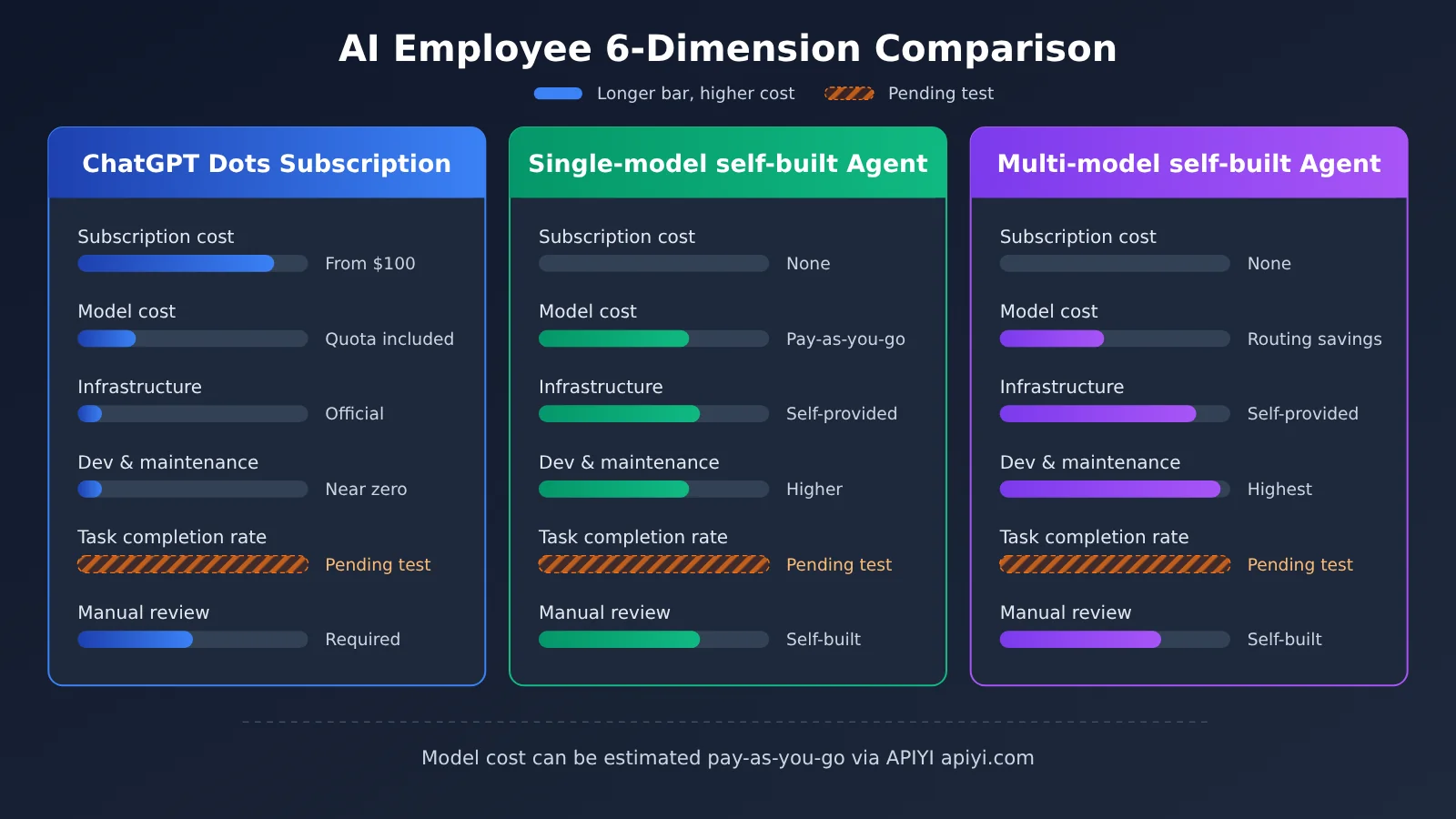
| Dimension | ChatGPT Dots | Single-model Agent (self-built) | Multi-model Agent (self-built) |
|---|---|---|---|
| Subscription cost | Individual Pro from $100/month; enterprise by contract | None | None |
| Model cost | Included in the subscription quota; delegating Work/Codex is billed separately | Billed per token, growing linearly with task volume | Billed per token; routing by difficulty can lower the average price |
| Infrastructure | Official cloud computer and browser provided | Self-provided servers, database, and browser environment | Same as single-model, plus routing and evaluation logic |
| Development and maintenance | Near-zero development, mainly configuring rules and permissions | High initial development investment, plus ongoing maintenance | Highest development and maintenance complexity |
| Task completion rate | Must be measured against your own tasks; third-party tests show human verification is still needed | Depends on model and engineering quality; needs measurement | Depends on routing strategy; needs measurement |
| Human review | Required; aided by Auto-review and approval mechanisms | Required; approval workflow must be built in-house | Required; approval workflow must be built in-house |
| Model access | Built into OpenAI products | Via APIYI’s unified interface | Via APIYI, calling multiple models with a single key |
Dots benchmarking analysis: Dots has clear advantages in out-of-the-box use, cross-app collaboration, and long-term context — the cloud computer, 4,000+ app ecosystem, and multi-channel communication all require no development. Its limits are that quota rules don’t make it clear down to the number of tasks, execution logic can’t be deeply customized, and individual Pro is still subject to regional and age restrictions.
Single-model Agent benchmarking analysis: The single-model Agent has the clearest cost structure — the tokens and cost of every call can be precisely recorded, and execution logic is fully controllable. The trade-off is that you have to build the browser, scheduling, state, and approval yourself, and the task completion rate depends entirely on the team’s engineering capability.
Multi-model Agent benchmarking analysis: The multi-model Agent assigns simple steps to low-cost models and key reasoning to strong models, giving it the best chance to lower the cost per successful task when volume is high. It has the highest demands on the evaluation system, requiring continuous monitoring of each model’s success rate on each type of step.
6 Measuring Whether an AI Employee Is Worth It by Cost per Successful Task
6.1 Cost per Successful Task and the ROI Formula
The unified measurement standard is:
$$C_{successful\ task}=\frac{C_{all\ runs}+C_{infrastructure}+C_{review}}{N_{successfully\ completed\ tasks}}$$
The numerator covers all runs (including failures and retries), infrastructure allocated to that period, and human review; the denominator counts only tasks that passed acceptance. For Dots, swap the “run cost” in the numerator for the monthly subscription fee plus extra usage.
On that basis, you can compute the return on investment:
$$ROI=\frac{V_{time\ saved}-C_{total}}{C_{total}}$$
For time savings, take the actual time a human would have needed to complete that task and multiply it by a reasonable labor cost. A model that generates a document in a few dozen seconds only reflects generation speed — the human time saved has to subtract the checking and fixing portion.
6.2 A Cost Comparison Experiment Across Three Task Types
I’d suggest picking three representative recurring tasks: daily AI news intelligence, weekly competitor monitoring, and monthly document analysis reports. Use the same input materials and the same delivery standards, and hand them to ChatGPT Dots, APIYI + single-model Agent, and APIYI + multi-model Agent respectively. For each run, log the items below:
| Recorded item | How to record | Purpose |
|---|---|---|
| Start and completion time | Task log timestamps | Calculate the actual delivery cycle |
| Model invocation count | Counted at the orchestration layer | Spot loops and excessive calls |
| Input / output / cached tokens | The usage field returned by the API | Calculate model cost and cache savings |
| Tool call count | Counted at the tool layer | Calculate search, browser, and other costs |
| Failures and retries | Failure reason categories | Calculate extra consumption |
| Human correction time | Timed by the reviewer | Calculate true human effort |
| Final acceptance result | Pass / fail against a predefined checklist | Calculate task success rate and the denominator |
On the Dots side you can’t get token-level detail, so record the subscription fee, quota consumption, completion time, human correction time, and acceptance results instead. In the end, all three routes convert to “how much money and how many human minutes each qualified task cost.” Run the experiment for at least one full monthly reporting cycle — with too small a sample, a single failure will badly skew the results.
7 When to Choose a Dots Subscription vs. Building Your Own AI Employee Agent
7.1 Individual Users: Prefer a Dots Subscription
- Everyday task delegation: For cross-app tasks like organizing your schedule, preparing for meetings, sorting email, and planning travel, Dots’ app connections and cloud computer are ready to use.
- You don’t want to maintain a system: Building your own agent means ongoing troubleshooting and upgrades, and for individual users the time cost is usually higher than the subscription fee.
- Requirements: You need to meet the age and region requirements and accept the Pro quota rules. If your monthly task volume is very low, you should evaluate the $100 threshold against your actual usage frequency.
7.2 Heavy Developers: Self-Building or a Hybrid Approach Works Better
- You need custom execution logic: Fixed-format intelligence gathering, monitoring specific data sources, and deep integration with internal systems.
- You need fine-grained cost control: Choosing models step by step, using caching, and accounting for every cent based on invocation records.
- You already have the technical skills: You can build scheduling, state management, and approvals yourself, and spread the development cost across long-term tasks.
7.3 Enterprise Teams: Look at Contract Pricing and Compliance Requirements
- You already have an Enterprise workspace: Dots can be configured centrally by administrators. Data in Business, Enterprise, and Edu workspaces is not used for model training by default, and billing needs to be calculated according to the workspace quote.
- You need to connect to internal systems or private workflows: A self-built agent gives you stronger control over the execution environment, data flow, and audit logs.
- Large-scale standardized tasks: When task volume is large enough and workflows are stable enough, a multi-model self-built agent has a better chance of lowering per-task costs, provided you validate it with controlled experiments.
8. Hybrid Approach for AI Employees: Combining Subscriptions with Pay-as-You-Go API Calls
Subscriptions and APIs can divide the work based on task characteristics, each handling what it does best:
- Everyday interaction and work that requires human judgment: Leave it to Dots or your existing ChatGPT subscription, taking advantage of its long-term context and approval mechanisms.
- Stable batch tasks that can be automatically verified: Use pay-as-you-go API calls and hand them to lower-cost models.
- High-difficulty reasoning and critical conclusions: Call more capable models, trading a higher unit price for a lower rework rate.
- Peak task periods: When subscription quota is tight, switch tasks that can be moved outside the subscription to pay-as-you-go calls.
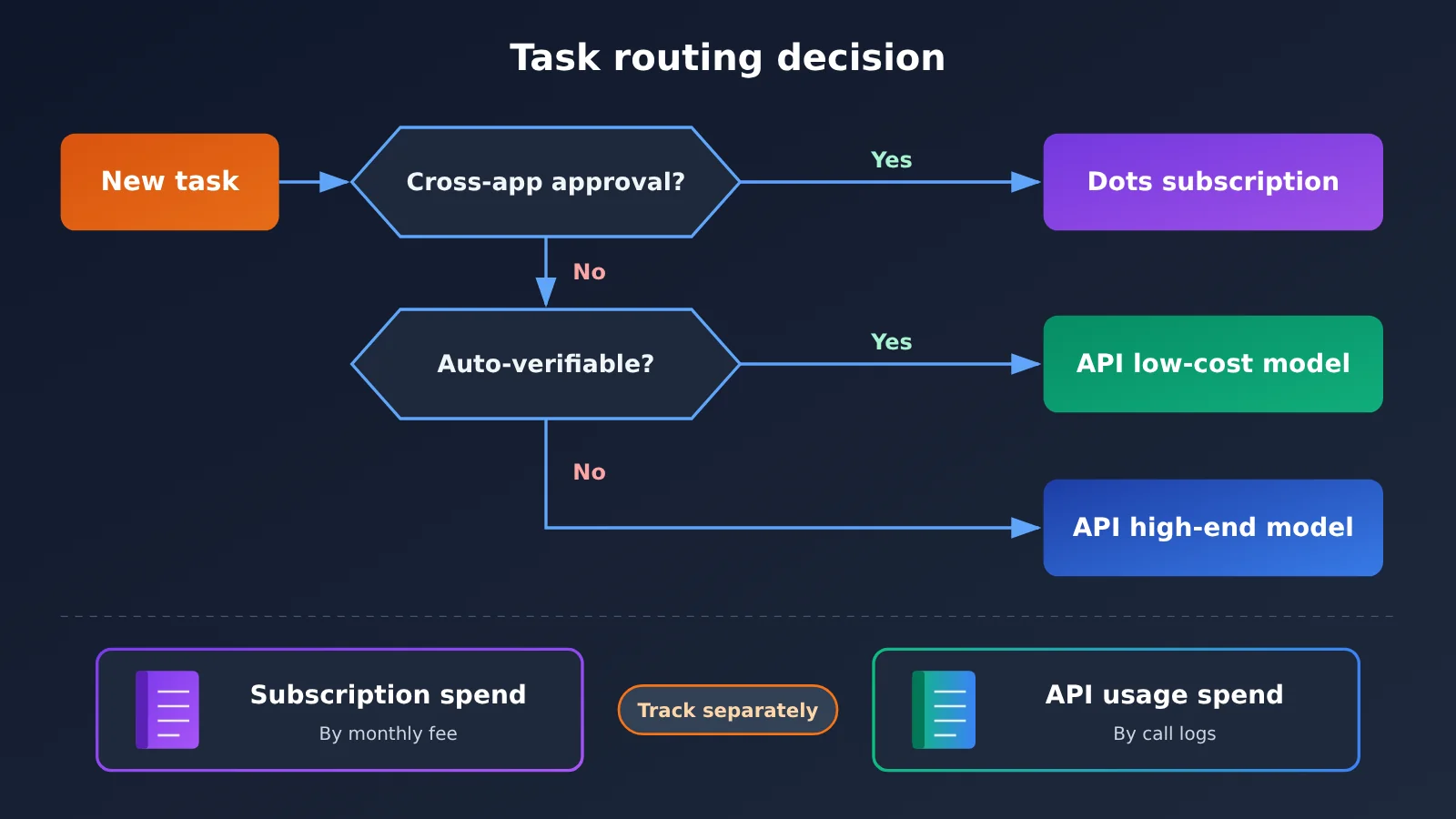
The key to a hybrid approach is keeping separate books: subscription spend is recorded as a monthly fee, API spend is recorded from call logs, and each task is counted only under the route that actually executed it, avoiding double counting.
💡 Decision recommendation: Start by using Dots or your existing subscription to handle daily work, while picking 1 to 2 types of standardized tasks and connecting multiple models through APIYI apiyi.com to run comparison experiments. Use one month of cost data from successful tasks to decide which tasks to move to the API and which to keep on the subscription. This is more reliable than choosing one option wholesale from the start.
FAQ
Q1: What is ChatGPT Dots?
ChatGPT Dots is a persistent personal AI Agent that OpenAI launched on September 29, 2026. It has its own cloud computer and browser, can keep pushing delegated tasks forward across sessions and across apps, and proactively hands control back to the user when a judgment call is needed.
Q2: How much does Dots cost per month for personal use?
As of November 16, 2026, individual users need a ChatGPT Pro subscription. Pro 100, Pro 200, and Pro 500 run $100, $200, and $500 per month respectively, and all three tiers can use Dots. The official materials don’t list a separate monthly fee for Dot. Work or Codex tasks that Dot delegates are billed against that product’s own quota.
Q3: How is enterprise Dots billed?
Eligible enterprise workspaces can choose either a flat rate per work type or usage-based billing, with the exact amount set by the contract or quote that applies to the workspace. November 4–18, 2026 is a free admin preview period. Dots enabled starting November 18 are billed from that point, and tasks delegated to Work or Codex are charged separately.
Q4: If a self-built Agent’s model cost is under $100, does that make it cheaper than Dots?
You still have to add in servers, databases, search and browser tools, development and maintenance, and human review, then subtract the impact of reruns after failures. Only when you compare cost per successful task on the same batch of tasks with the same acceptance criteria can you say which route is cheaper.
Q5: How can I quickly estimate a self-built Agent’s model cost with an API?
You can do it like this:
1. Sign up at APIYI apiyi.com, get an API key, and claim the new-user trial quota.
2. Set `base_url` in the code from this article to `https://api.apiyi.com/v1`, and wire up Ledger to record the tokens for every call.
3. Run real tasks against Opus 5.5 and Sonnet 5.5 separately, record the acceptance results and the human correction time, and compute the cost per successful task.
Q6: How much does caching affect Agent cost?
In multi-turn Agent calls, system prompts and tool definitions get sent over and over. When they hit the cache, they’re billed at the cache read price, and on the Claude 5.5 series that’s roughly one-twentieth of regular input. In the sample assumed in this article, when two-thirds of the input hits the cache, per-task model cost drops by about one-third. Cache write pricing is whatever the console says.
Q7: Can Dots fully replace humans?
Both official materials and third-party hands-on tests show that Dots’ output needs a human check. In an Axios test, the program booklet Dots produced contained questionable data, and operations touching accounts and funds still need the user to step in — so human review cost should always be counted in the total.
Q8: Can Dots handle tasks in unlimited parallel?
Dots supports multiple projects and background Agents running in parallel, but the execution environment and usage quota both have limits. One Reddit user reported hitting an unavailable execution environment when starting an independent task and only being able to continue after connecting a local Linux machine; they also noted they couldn’t confirm how quotas are calculated across the different execution paths.
Key Takeaways on AI Employee Costs
- Comparison basis: Measure by cost per successful task under the same delivery standard—monthly fees and per-token prices are just one piece of the puzzle.
- Calculate individuals and enterprises separately: Personal Pro starts at $100/month; enterprise Dot is billed by work type or usage, subject to the contract.
- The subscription bundles the environment: Cloud computers, long-term context, app connections, and approval mechanisms are all costs you’d have to cover if you built it yourself.
- Model fees are just one layer: Under the sample assumptions, 300 tasks per month cost $33–$66 in model fees, excluding infrastructure and labor.
- Success rate determines the real cost: Every extra minute of human correction can wipe out the entire price gap between the two models.
- Hybrid use is more flexible: Use the subscription for day-to-day delegation, and call standardized batch tasks through APIYI on a pay-as-you-go basis with separate accounting.
Summary
Whether it’s worth spending $100 a month to keep an AI employee depends on the tasks you assign it and your acceptance criteria:
- Dots’ value lies in out-of-the-box continuous working capability: Cloud computers, cross-app collaboration, and long-term context eliminate development and maintenance work, making it a good fit for individual users and teams that value low maintenance overhead.
- The advantage of building your own agent is control and accountability: Execution logic can be customized, and every call can be billed and tracked—ideal for teams with solid technical capabilities and highly standardized tasks.
- The final judgment rests on a controlled experiment: Use three types of real tasks to record tokens, retries, and human correction time, then compare the total cost per qualified task.
Our suggestion: keep your existing subscription for daily work, and at the same time pick one type of standardized task for an API comparison test. We recommend using APIYI apiyi.com to access multiple models with a single API key—pay-as-you-go billing with real usage tracking—so you can use data to decide which tasks are worth migrating.
📚 References
-
OpenAI: Introducing dots: The Dots launch announcement — product positioning, cloud computer, and app ecosystem
- Link:
openai.com/index/introducing-dots - Note: Official first-hand source published 2026-09-29
- Link:
-
ChatGPT Learn: Meet dots / Tasks and memory: Product overview, subscription eligibility, long-running tasks, and the memory mechanism
- Link:
learn.chatgpt.com/docs/dots - Note: The authoritative documentation on background agents, proactive research, and scheduled tasks
- Link:
-
ChatGPT Learn: Enterprise Dots Admin Guide: Enterprise workspace provisioning and billing methods
- Link:
learn.chatgpt.com/docs/enterprise/dots-admin-guide - Note: Current guidance on enterprise flat-rate and usage-based billing
- Link:
-
OpenAI Help Center: About ChatGPT Pro tiers: Pro 100 / 200 / 500 pricing and quota rules
- Link:
help.openai.com/en/articles/9793128-about-chatgpt-pro-tiers - Note: The official basis for individual subscription pricing
- Link:
-
OpenAI Help Center: Dots privacy, security, and safety FAQs: Permissions, approvals, Auto-review, and data policy
- Link:
help.openai.com/en/articles/20001529-dots-privacy-and-safety-faqs - Note: Essential reading for assessing human review and safety costs
- Link:
-
Axios: I tested Dots and Muse: Third-party hands-on testing of Dots and Meta Muse
- Link:
axios.com/2026/10/20/battle-of-bots-openai-meta-ai-agents-test - Note: Concrete task performance and failure cases
- Link:
-
APIYI: Token plan quotas can’t be compared directly: A five-step method for sizing up subscriptions vs. pay-as-you-go
- Link:
help.apiyi.com/token-plan-quota-subscription-vs-pay-as-you-go.html - Note: A framework for calculating equivalent per-task cost
- Link:
-
APIYI model price list: Current pricing for Claude and other models
- Link:
docs.apiyi.com/models - Note: Before making actual calls, always defer to this page and the console
- Link:
Author: APIYI Tech Team
Technical discussion: Feel free to reach out through the APIYI website homepage. For more model access and billing materials, visit the docs.apiyi.com documentation center.