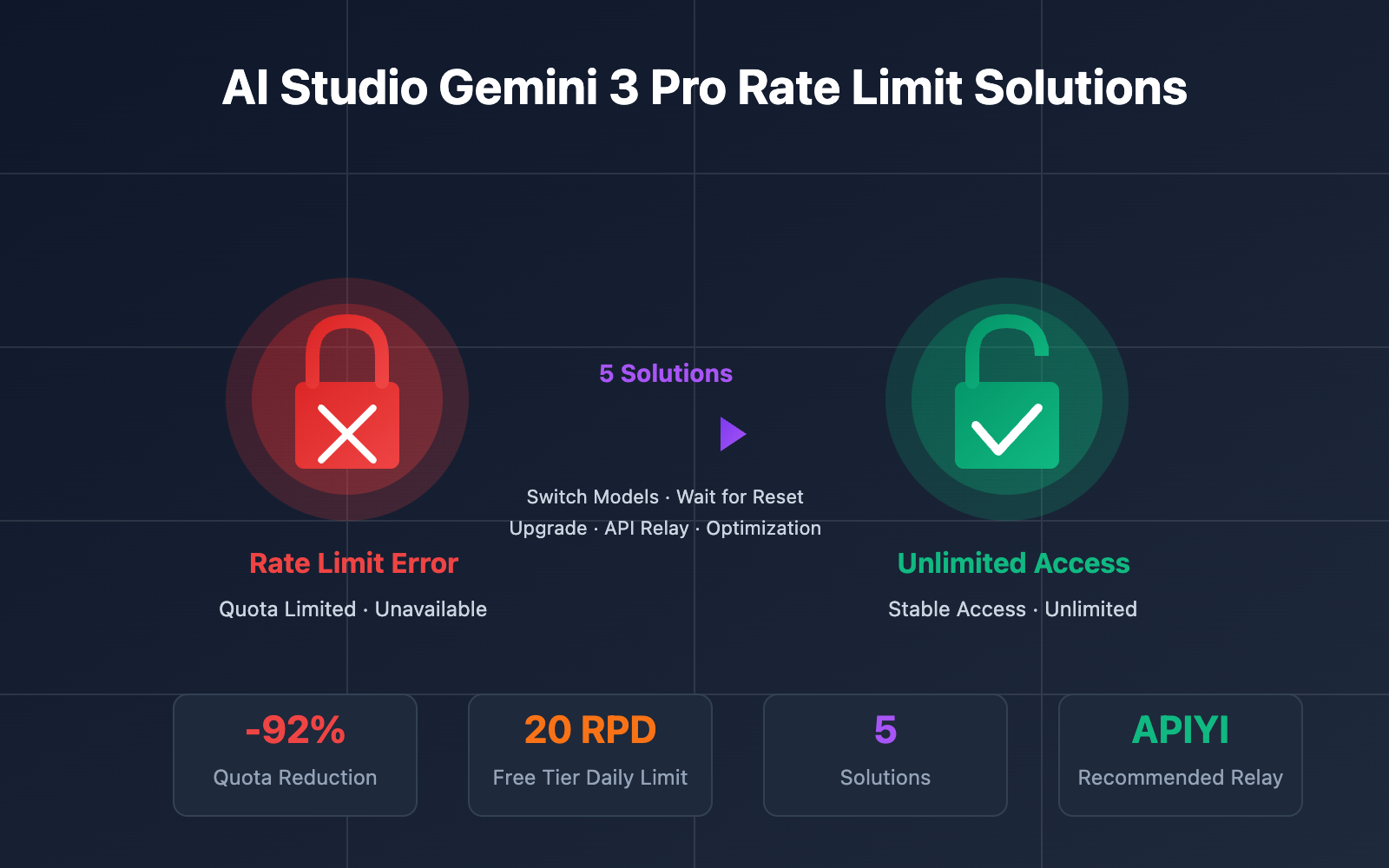
Encountering the "You've reached your rate limit. Please try again later." error? It's frustrating, isn't it? Everything was working perfectly fine just a moment ago, you haven't exceeded your token count, and yet suddenly, you're locked out.
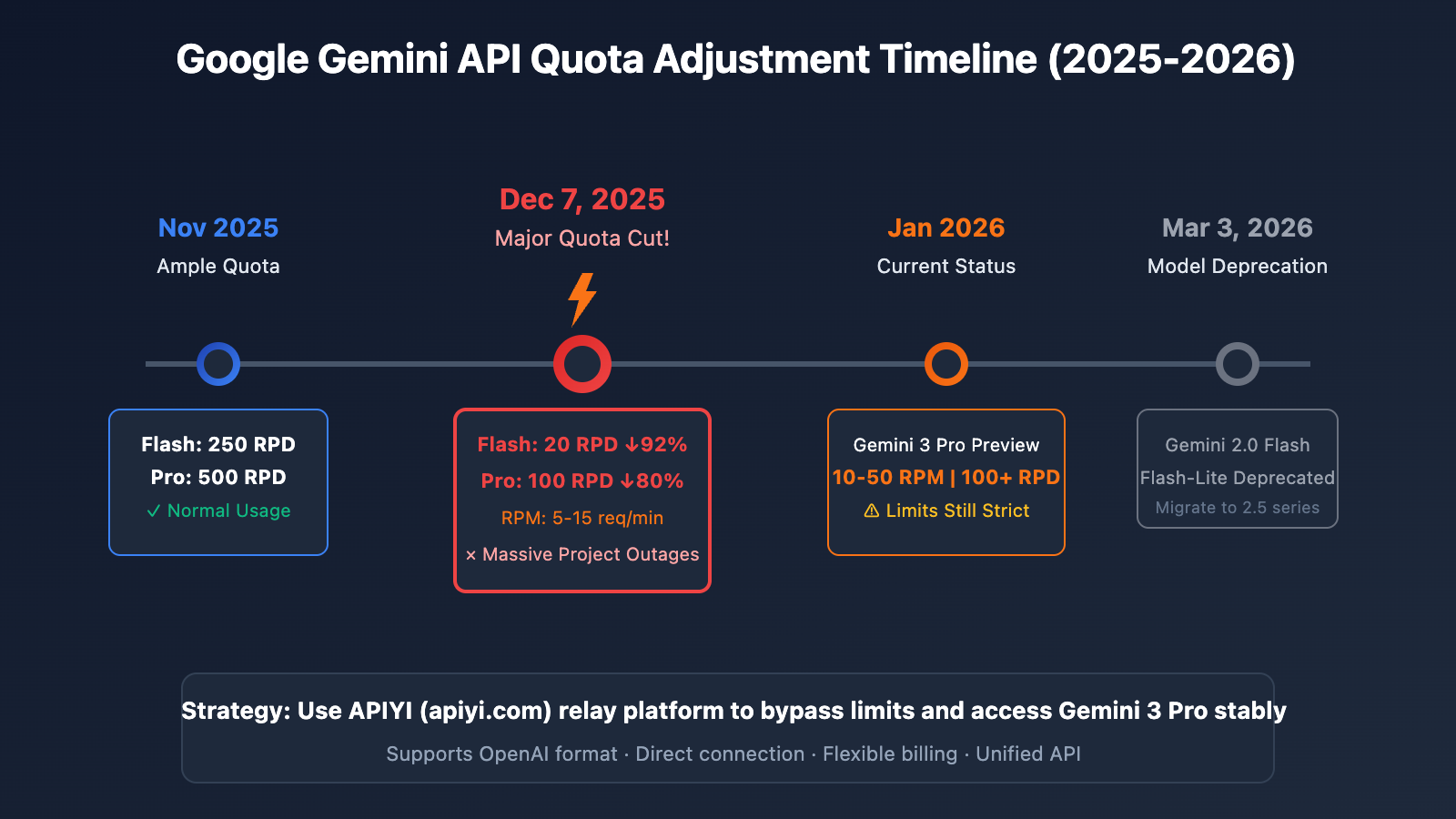
If you're an individual learner using Gemini 3 Pro for text generation in AI Studio, you're not alone. On December 7, 2025, Google quietly slashed the Gemini API free quota by 50%-92%, a change that caused tens of thousands of developer projects worldwide to grind to a halt overnight.
What you'll learn: By the end of this article, you'll understand the real reasons behind these quota cuts, master 5 ways to bypass rate limits, and learn how to use Gemini 3 Pro stably through an API relay platform.
Key Takeaways of Gemini 3 Pro Rate Limits
Before we solve the problem, we need to understand exactly what adjustments Google has made.
| Adjustment Item | Before (Nov 2025) | After (Dec 7, 2025) | Reduction |
|---|---|---|---|
| Flash Model RPD | 250 requests/day | 20 requests/day | -92% |
| Pro Model RPD | 500 requests/day | 100 requests/day | -80% |
| Pro Model RPM | 15 requests/min | 5 requests/min | -67% |
| Gemini 3 Pro Preview | Unlimited | 10-50 RPM, 100+ RPD | New Limits |
The 4 Dimensions of Gemini 3 Pro Rate Limits
Google's rate-limiting system controls usage across four dimensions:
| Metric | Full Name | Description | Current Free Tier Value |
|---|---|---|---|
| RPM | Requests Per Minute | Number of requests per minute | 5-15 |
| TPM | Tokens Per Minute | Number of tokens per minute | 250,000 |
| RPD | Requests Per Day | Number of requests per day | 20-100 |
| IPM | Images Per Minute | Number of images per minute | For multimodal use |
🔑 Key Info: As Gemini 3 Pro is currently in Preview, the free tier limits are roughly 10-50 RPM and 100+ RPD. However, many users report that the actual limits feel much stricter than what's documented.
Why Did Google Slash the Quota?
According to Google's official announcement, the quota adjustments were based on the following:
- Explosive Growth in Demand: With the AI application boom in 2025, API calls far exceeded expectations.
- Infrastructure Pressure: Gemini 2.0/3.0 models have extremely high computational requirements.
- Protecting Paid User Experience: Prioritizing service quality for those on paid tiers.
- Business Strategy Shift: Encouraging developers to transition toward paid plans.
5 Solutions for Gemini 3 Pro Rate Limits
Facing rate limit issues in AI Studio? Here are 5 proven solutions to get you back on track:
Option 1: Switch to Other Gemini Models
This is the easiest temporary fix. Different models come with different quota limits:
| Model | RPM | RPD | Recommended Use Case |
|---|---|---|---|
| Gemini 1.5 Flash-Lite | 15 | 1,000 | Best for lightweight tasks |
| Gemini 1.5 Flash | 10 | 500 | Balanced performance |
| Gemini 1.5 Pro | 5 | 100 | Complex reasoning |
| Gemini 3 Pro Preview | 10-50 | 100+ | Most powerful, but stricter limits |
💡 Pro Tip: If your task doesn't require the full power of Gemini 3 Pro, switching to Gemini 1.5 Flash-Lite gives you a quota of up to 1,000 RPD—plenty for daily learning and development.
Option 2: Wait for the Quota Reset
The RPD (Requests Per Day) quota for the Gemini API resets at midnight Pacific Time.
Quota Reset Time Reference:
- Beijing Time: 4:00 PM (DST) / 5:00 PM (Standard Time)
- Tokyo Time: 5:00 PM (DST) / 6:00 PM (Standard Time)
Option 3: Upgrade to a Paid Tier
If you need consistent, stable access to Gemini 3 Pro, upgrading to a paid tier is the officially recommended path:
| Tier | Requirement | RPM | RPD | Avg. Monthly Cost |
|---|---|---|---|---|
| Free Tier | None | 5-15 | 20-100 | $0 |
| Tier 1 | Link a credit card | 150-300 | Unlimited | Pay-as-you-go |
| Tier 2 | Spend $250 + 30 days | 1,000+ | Unlimited | Pay-as-you-go |
Gemini 3 Pro Pricing:
- Input: $2.00 / Million Tokens (≤200K context)
- Output: $12.00 / Million Tokens (≤200K context)
- Long Context (>200K): Price doubles
Option 4: Use an API Proxy Platform (Recommended)
For individual learners and small-to-medium teams, using an API proxy platform is the most cost-effective choice:
# Calling Gemini 3 Pro via APIYI - Simple Example
import openai

client = openai.OpenAI(
    api_key="your-apiyi-key",
    base_url="https://api.apiyi.com/v1"  # APIYI unified interface
)

response = client.chat.completions.create(
    model="gemini-3-pro-preview",
    messages=[
        {"role": "user", "content": "Please explain the Transformer architecture."}
    ],
    max_tokens=2000
)

print(response.choices[0].message.content)
🚀 Quick Start: We recommend using the APIYI (apiyi.com) platform for fast access to Gemini 3 Pro. It provides a unified OpenAI-style interface, so you don't have to worry about quotas, and you can finish integration in just 5 minutes.
View Full Code Example (with error handling)
# Full Gemini 3 Pro Call Example via APIYI
import openai
from openai import OpenAI
import time

def call_gemini_3_pro(prompt: str, max_retries: int = 3) -> str:
    """
    Calls the Gemini 3 Pro model.

    Args:
        prompt: User input
        max_retries: Maximum number of retries

    Returns:
        The model's response content
    """
    client = OpenAI(
        api_key="your-apiyi-key",
        base_url="https://api.apiyi.com/v1"  # APIYI unified interface
    )

    for attempt in range(max_retries):
        try:
            response = client.chat.completions.create(
                model="gemini-3-pro-preview",
                messages=[
                    {
                        "role": "system",
                        "content": "You are a professional AI assistant. Please answer in English."
                    },
                    {
                        "role": "user",
                        "content": prompt
                    }
                ],
                max_tokens=4000,
                temperature=0.7
            )
            return response.choices[0].message.content

        except openai.RateLimitError as e:
            print(f"Rate limit reached, retrying... ({attempt + 1}/{max_retries})")
            time.sleep(2 ** attempt)  # Exponential backoff

        except openai.APIError as e:
            print(f"API Error: {e}")
            raise

    raise Exception("Max retries exceeded")


# Usage Example
if __name__ == "__main__":
    result = call_gemini_3_pro("Explain how Large Language Models work in 100 words.")
    print(result)
Why use an API proxy platform?
| Feature | AI Studio Direct | APIYI Proxy |
|---|---|---|
| Rate Limits | Strict (20-100 RPD) | Flexible, pay-as-you-go |
| Network Stability | VPN/Global access required | Direct & stable local connection |
| API Format | Google Proprietary | OpenAI Compatible |
| Multi-Model Support | Gemini Series only | GPT/Claude/Gemini and more |
| Payment Method | Foreign credit card required | Alipay/WeChat supported |
Option 5: Plan Your Request Strategy Wisely
If you're sticking with the free tier, these strategies can help you maximize your quota:
1. Batch Your Requests
# Combine multiple small questions into a single prompt
combined_prompt = """
Please answer the following questions one by one:
1. What is the difference between a list and a tuple in Python?
2. What is a decorator?
3. How do you implement the Singleton pattern?
"""
2. Implement Caching
import hashlib
import json

# Simple local cache
cache = {}

def cached_query(prompt: str) -> str:
    cache_key = hashlib.md5(prompt.encode()).hexdigest()
    if cache_key in cache:
        return cache[cache_key]

    result = call_gemini_3_pro(prompt)  # Actual API call
    cache[cache_key] = result
    return result
3. Use Off-Peak Hours
- Avoid peak usage times (typically US business hours).
- Remember the quota resets right after midnight Pacific Time.
Gemini 3 Pro Rate Limit FAQ
Q1: Why was I rate limited after just a few messages?
This has been a common issue following the quota adjustments in December 2025. The current free tier limits for Gemini 3 Pro Preview are quite strict and might even be lower than what's stated in the official documentation. Some users have reported that the actual RPM (Requests Per Minute) is only about half of the documented value.
Solution: If you need consistent access, I'd suggest using a relay platform like APIYI (apiyi.com). It's a great way to call the model without hitting Google's free tier ceilings directly.
Q2: Does the paid tier completely solve the limit issues?
Upgrading to the paid tier (Tier 1) will bump your RPM to around 150-300, and the RPD (Requests Per Day) limit is essentially removed. However, keep a few things in mind:
- You'll need to bind an international credit card.
- It uses token-based billing (pay-as-you-go).
- Gemini 3 Pro is priced higher (roughly $2-12 per million tokens).
For individual learners, a platform like APIYI (apiyi.com) might be more cost-effective since it supports local payment methods and offers similar stability.
Q3: Is using an API relay/proxy safe?
Yes, as long as you choose a reputable platform. Taking APIYI as an example:
- They don't store your conversation content.
- They support HTTPS encrypted transmission.
- They provide full API call logs for transparency.
It's always a good idea to stick with platforms that have a solid reputation and a proven track record.
Q4: What’s the difference between Gemini 3 Pro and 2.5 Pro?
| Comparison | Gemini 3 Pro | Gemini 2.5 Pro |
|---|---|---|
| Reasoning | Best | Strong |
| Context Length | 200K+ | 1M |
| Multimodal | Enhanced | Standard |
| Free Tier Quota | Stricter | 100 RPD |
| Pricing | $2-12/M tokens | $1.25-5/M tokens |
If your task doesn't strictly require the latest "bleeding edge" capabilities, Gemini 2.5 Pro often offers much better value for your money.
Q5: Will quotas continue to change in 2026?
According to Google's announcements, the Gemini 2.0 Flash and Flash-Lite models will be retired on March 3, 2026. My advice is to:
- Start migrating to the Gemini 2.5 series early.
- Keep an eye on the Google AI Developers forum for updates.
- Consider using a multi-model platform like APIYI (apiyi.com) so you can switch between models quickly if limits change.
Comparison of Gemini 3 Pro Rate Limit Solutions
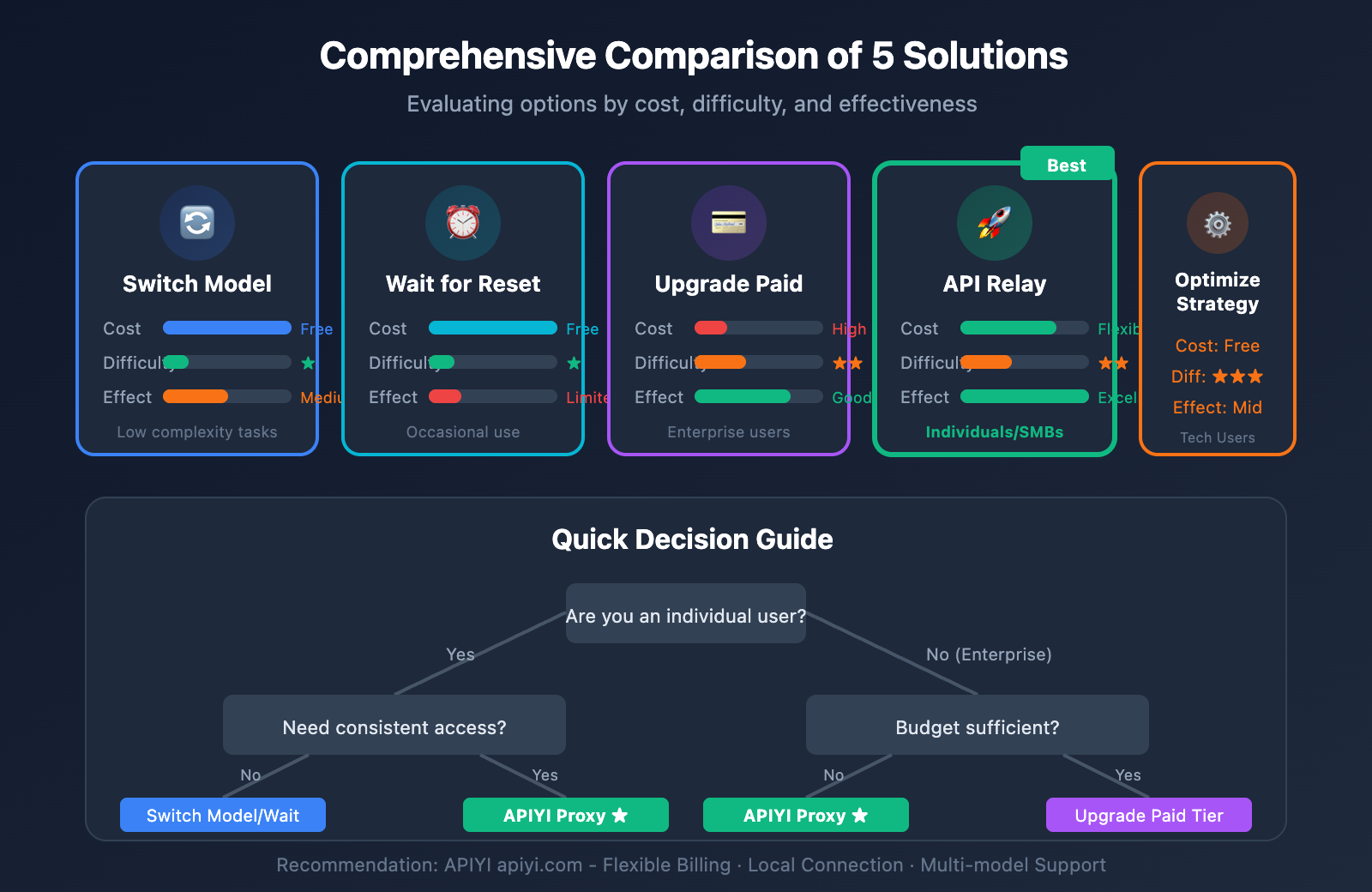
| Solution | Cost | Difficulty | Effect | Recommended Scenario |
|---|---|---|---|---|
| Switch Model | Free | ⭐ | Medium | Low complexity tasks |
| Wait for Reset | Free | ⭐ | Limited | Occasional use |
| Upgrade Paid Tier | High | ⭐⭐ | Good | Enterprise users |
| API Relay Platform | Flexible | ⭐⭐ | Excellent | Individuals/SMBs |
| Optimize Strategy | Free | ⭐⭐⭐ | Medium | Technical users |
💡 Recommendation: For individual users, I recommend starting by switching models or using an API relay platform. APIYI (apiyi.com) offers flexible pay-as-you-go billing, letting you use the model whenever you need without worrying about strict quota resets. It’s easily the most efficient way to bypass those annoying rate limits.
Summary
The "You've reached your rate limit" error in AI Studio stems from Google's significant cuts to free tier quotas in December 2025. Each of the five solutions we've discussed has its own pros and cons:
- Switch Models – The simplest method, best for temporary needs.
- Wait for Reset – Zero cost, but quite inefficient.
- Upgrade to Paid – Highly effective, but comes at a higher cost.
- API Proxy – Great value for the money; highly recommended for individual users.
- Optimization Strategies – Requires a bit more technical expertise.
For most individual learners, we recommend using APIYI (apiyi.com) to quickly resolve rate limit issues. The platform supports unified access to major Large Language Models like Gemini 3 Pro, GPT-4, and Claude 3.5, providing stable access and flexible payment options.
References
-
Google AI – Official Rate Limits Documentation
- Link:
ai.google.dev/gemini-api/docs/rate-limits - Description: Official explanation of Gemini API rate limits.
- Link:
-
Google AI Developers Forum – Rate Limit Discussion
- Link:
discuss.ai.google.dev/t/youve-reached-your-rate-limit/35201 - Description: Community discussions regarding rate limits.
- Link:
-
Gemini API Pricing – Official Pricing
- Link:
ai.google.dev/gemini-api/docs/pricing - Description: Pricing and quota information for various models.
- Link:
📝 Author: APIYI Team
🔗 Tech Support: APIYI apiyi.com – Your one-stop Large Language Model API relay platform
📅 Updated: 2026-01-24