Google's Veo 3.1 series offers two versions: Veo 3.1 (Standard) and Veo 3.1 Fast (Lightweight). Many users aren't clear on the specific differences between these two models, so this article provides a detailed comparison across three dimensions: quality, speed, and pricing.
Core Value: After reading this article, you'll know exactly which model to choose for different scenarios, avoiding unnecessary costs or quality sacrifices.
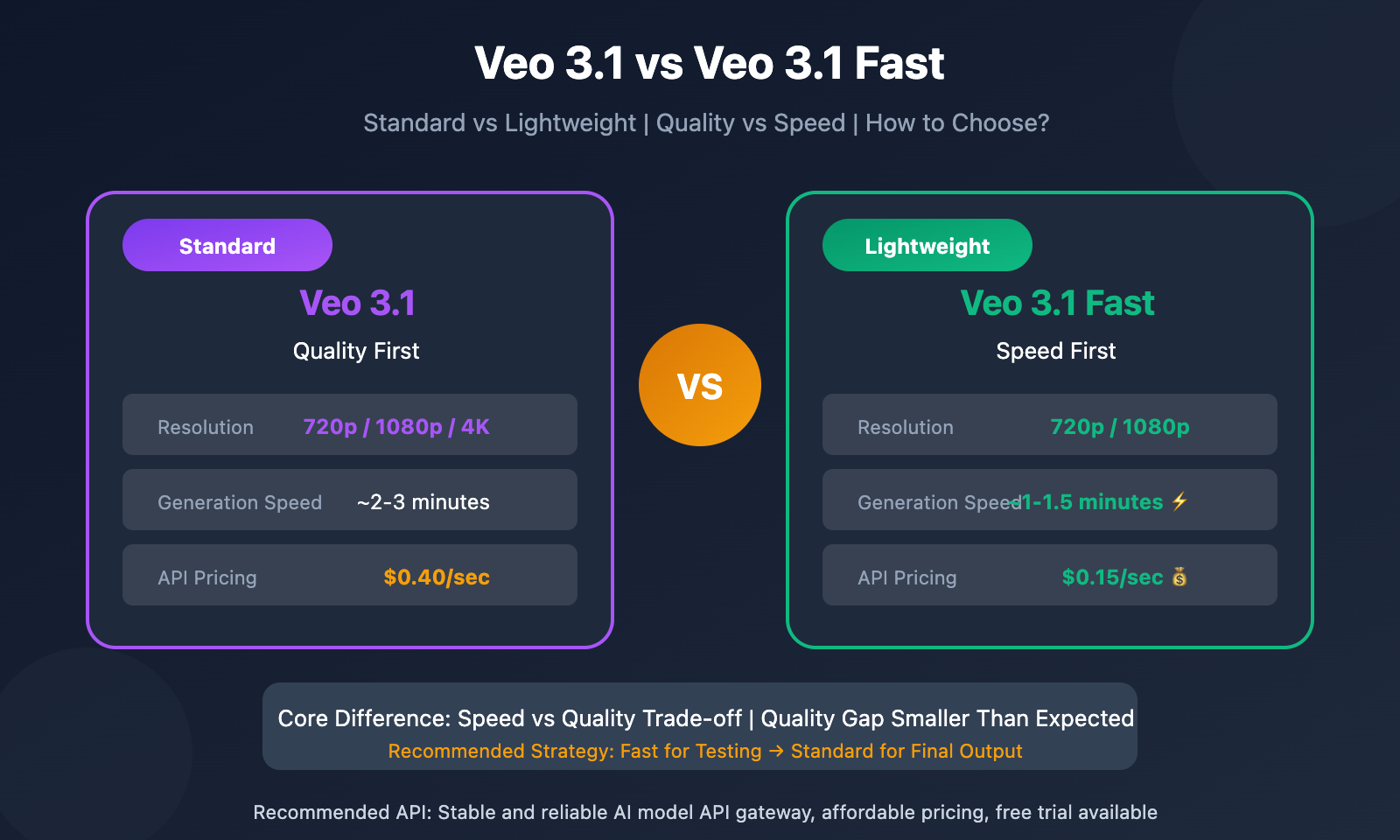
Veo 3.1 vs Veo 3.1 Fast Core Differences
| Comparison | Veo 3.1 (Standard) | Veo 3.1 Fast (Lightweight) |
|---|---|---|
| Positioning | Quality-focused | Speed-focused |
| Resolution | 720p / 1080p / 4K | 720p / 1080p |
| Video Length | Max 8 sec/generation | Max 8 sec/generation |
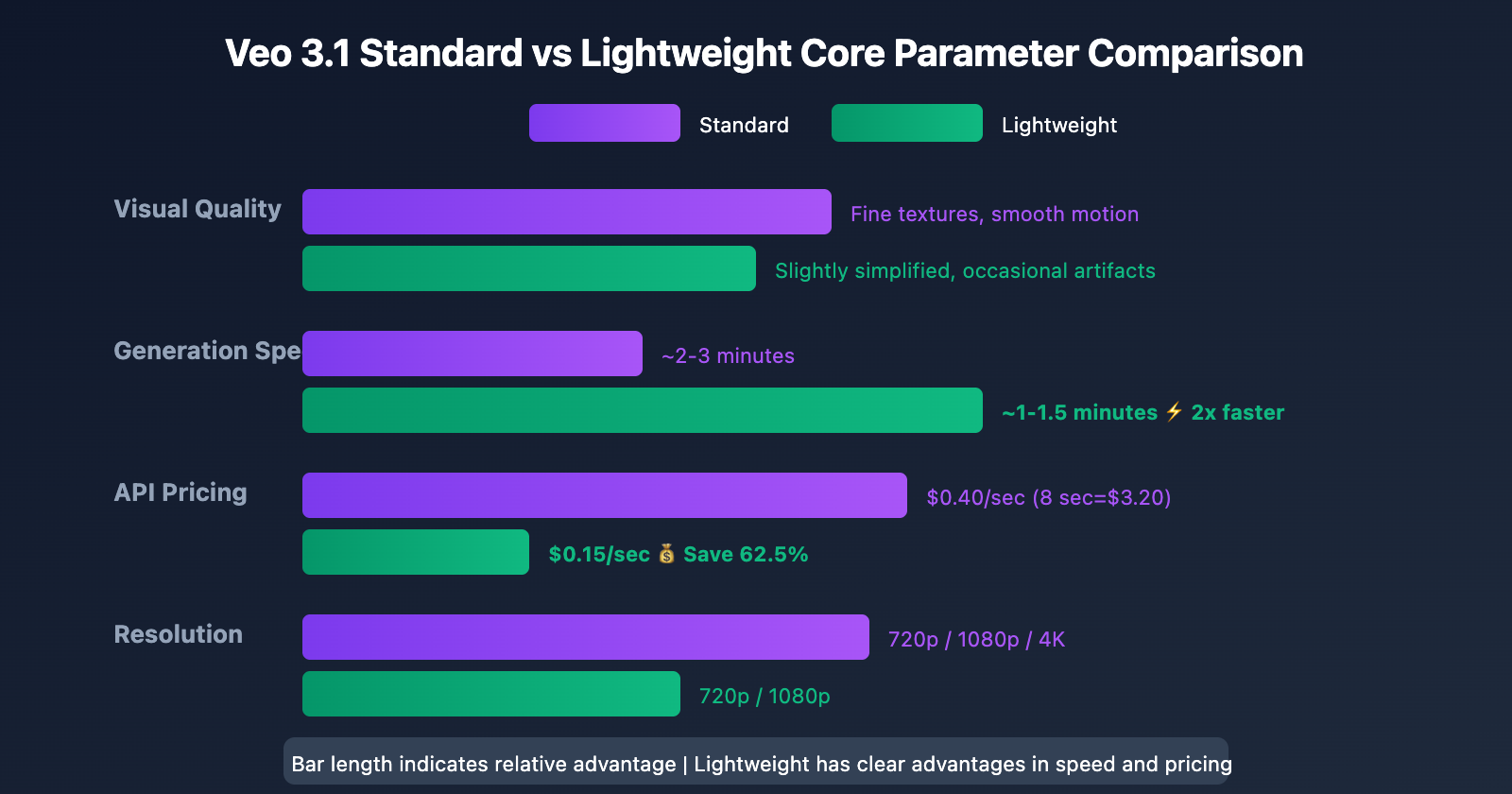
| Generation Speed | ~2-3 minutes | ~1-1.5 minutes |
| API Pricing | $0.40/sec | $0.15/sec |
| Visual Quality | Fine textures, smooth motion | Slightly simplified, occasional artifacts |
| Audio Quality | High-quality synced audio | Basic synced audio |
What is Veo 3.1 Fast?
Simply put, Veo 3.1 Fast is the lightweight version of Veo 3.1, trading some quality for faster generation speed and lower pricing.
The core difference can be summed up in one phrase: Speed vs quality trade-off.
- Veo 3.1 Standard: Longer rendering time in exchange for finer quality
- Veo 3.1 Fast Lightweight: Faster generation speed with slightly reduced quality
Veo 3.1 vs Veo 3.1 Fast: A Detailed Comparison
Quality Differences: Smaller Than You'd Think
Based on hands-on testing, the quality gap between the two models isn't as big as you might expect. The main differences show up in:
| Quality Aspect | Veo 3.1 Standard | Veo 3.1 Fast |
|---|---|---|
| Texture Detail | Rich, well-layered | Slightly simplified |
| Color Depth | Accurate reproduction, high contrast | Basically accurate |
| Motion Smoothness | Smooth and natural | May have slight artifacts in fast scenes |
| Edge Sharpness | Clear and sharp | Occasionally blurry |
| Lighting Effects | Realistic and natural | Good enough |
Key Findings:
- Small screens? Almost no difference: On phones, tablets, and similar devices, you'll be hard-pressed to tell them apart
- Large screens reveal the gap: The standard version's advantages become apparent on high-res monitors or TVs
- Pros notice more: Average users might not spot the difference, but professional creators will pick up on the finer details
Generation Speed: Fast is About 2x Quicker
| Test Scenario | Veo 3.1 Standard | Veo 3.1 Fast |
|---|---|---|
| 8-second video (720p) | ~2 min 40 sec | ~1 min 13 sec |
| 8-second video (1080p) | ~3-4 minutes | ~1.5-2 minutes |
| Speed Improvement | Baseline | ~2x faster |
Real-world testing shows Veo 3.1 Fast generates videos roughly 2x faster than the standard version. What this means:
- You can test way more creative directions in the same timeframe
- Quick iterations to validate your prompts
- Less stress when you're up against a deadline
Pricing Comparison: Fast is 62.5% Cheaper
| Pricing Item | Veo 3.1 Standard | Veo 3.1 Fast | Savings |
|---|---|---|---|
| API Price | $0.40/sec | $0.15/sec | 62.5% |
| 8-second video | $3.20 | $1.20 | 62.5% |
| No audio price | $0.30/sec | $0.10/sec | 66.7% |
| 8-sec no audio | $2.40 | $0.80 | 66.7% |
Cost Calculation Example:
Say you need to generate 100 8-second videos per month:
- All standard version: 100 × $3.20 = $320/month
- All fast version: 100 × $1.20 = $120/month
- Monthly savings: $200
Money-saving tip: Access Veo 3.1 API through apiyi.com for better pricing and free testing credits. Their official Veo 3.1 relay is launching soon, bringing even more stable service quality.
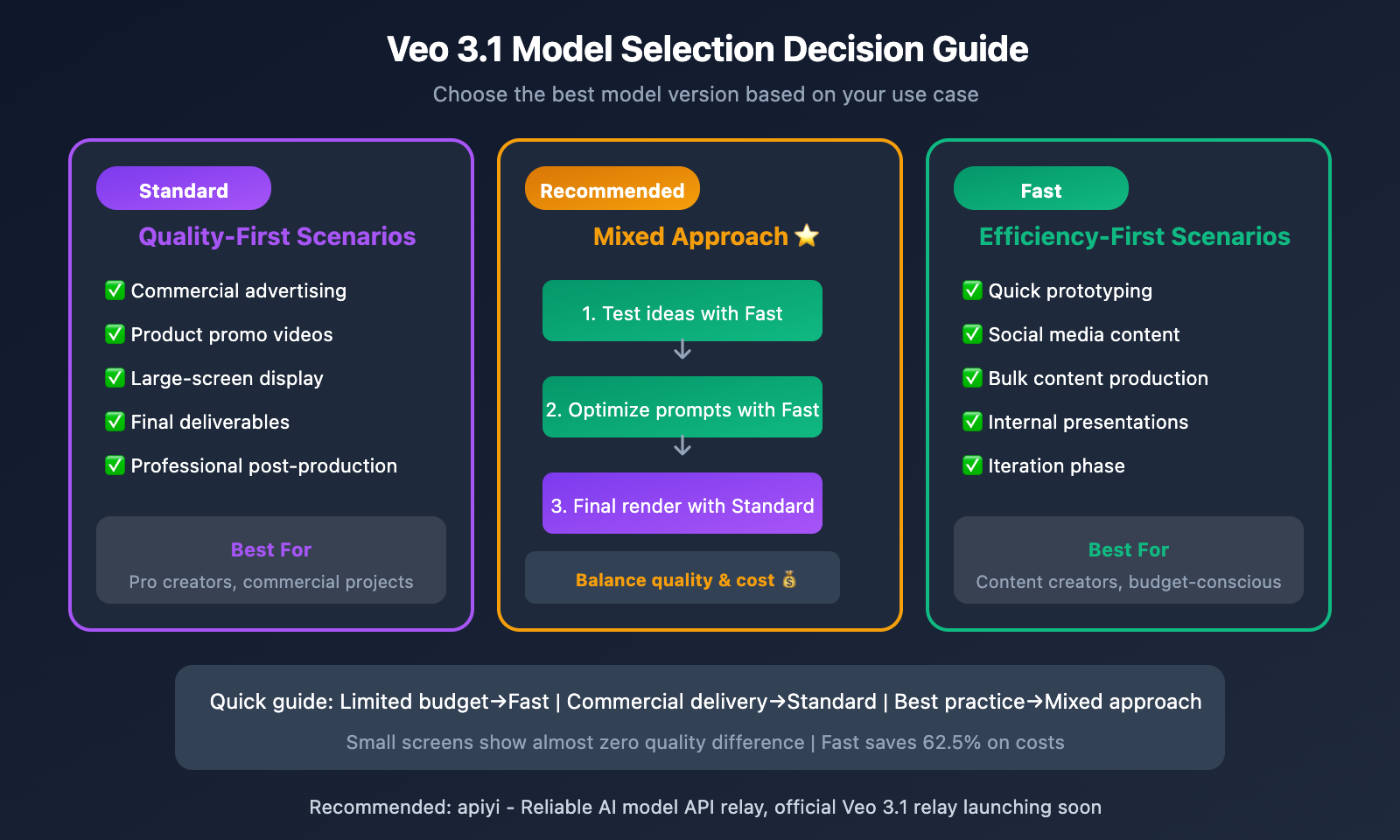
Veo 3.1 Model Selection Decision Guide
When to Use Veo 3.1 Standard
✅ Go with Standard when you need:
- Commercial advertising: Quality matters, details make or break it
- Product promo videos: Requires precise lighting and color reproduction
- Large-screen display: TV, projection, and other high-res scenarios
- Final deliverables: The finished product you hand to clients
- Professional post-production: Need high-quality footage for editing and color grading
When to Use Veo 3.1 Fast
✅ Go with Fast when you're:
- Quick prototyping: Testing creative directions and prompt effectiveness
- Making social media content: Short videos for TikTok, Instagram, etc.
- Bulk content production: Need lots of videos but budget's tight
- Internal presentations: Draft versions for team or management review
- In the iteration phase: Lock in the direction first, then use Standard for finals
Mixed Usage Strategy (Recommended)
The best approach? Use both models strategically:
| Stage | Recommended Model | Why |
|---|---|---|
| Creative validation | Fast | Quickly test multiple directions |
| Prompt optimization | Fast | Low-cost iteration and refinement |
| Effect preview | Fast | Initial review with clients/management |
| Final production | Standard | Ensure delivery quality |
This way you get the best of both worlds – top-notch final quality with significantly lower overall costs.
Pro tip: Access both models through apiyi.com for flexible switching. The platform supports unified API calls, so you can switch models without changing your code.
Veo 3.1 API Example
Standard Version Code
import google.generativeai as genai
from google.genai import types

# Get a stable API experience through APIyi
client = genai.Client(api_key="YOUR_API_KEY")

# Veo 3.1 Standard - Quality first
response = client.models.generate_videos(
    model="veo-3.1-generate-preview",  # Standard version
    prompt="A golden retriever running on the beach at sunset, cinematic quality",
    config=types.GenerateVideosConfig(
        aspect_ratio="16:9",
        duration_seconds=8,
        resolution="1080p"
    )
)
Fast Version Code
# Veo 3.1 Fast - Speed first
response = client.models.generate_videos(
    model="veo-3.1-fast-preview",  # Fast version
    prompt="A golden retriever running on the beach at sunset, cinematic quality",
    config=types.GenerateVideosConfig(
        aspect_ratio="16:9",
        duration_seconds=8,
        resolution="720p"  # 720p recommended for fast version
    )
)
View complete model switching wrapper code
import google.generativeai as genai
from google.genai import types
from enum import Enum

class VeoModel(Enum):
    STANDARD = "veo-3.1-generate-preview"
    FAST = "veo-3.1-fast-preview"

def generate_video(
    prompt: str,
    model: VeoModel = VeoModel.FAST,
    duration: int = 8,
    resolution: str = "720p",
    aspect_ratio: str = "16:9"
) -> str:
    """
    Unified video generation function with easy model switching

    Args:
        prompt: Video description
        model: VeoModel.STANDARD or VeoModel.FAST
        duration: Video duration in seconds
        resolution: 720p/1080p
        aspect_ratio: Aspect ratio

    Returns:
        Generated video URL
    """
    client = genai.Client(api_key="YOUR_API_KEY")

    response = client.models.generate_videos(
        model=model.value,
        prompt=prompt,
        config=types.GenerateVideosConfig(
            aspect_ratio=aspect_ratio,
            duration_seconds=duration,
            resolution=resolution
        )
    )

    return response.generated_videos[0].video_uri

# Usage examples
# Use Fast for quick testing
draft_video = generate_video(
    "Product showcase animation",
    model=VeoModel.FAST
)

# Use Standard for final production
final_video = generate_video(
    "Product showcase animation",
    model=VeoModel.STANDARD,
    resolution="1080p"
)
Tip: Access Veo 3.1 API through APIyi (apiyi.com) for a unified interface and free testing credits. Easily switch between standard and fast versions.
API Access Options
Currently Available Channels
| Access Method | Description | Best For |
|---|---|---|
| Google Official API | Gemini API / Vertex AI | Enterprise deployment, compliance requirements |
| Third-party Relay | API aggregation platforms | Development & testing, cost-sensitive projects |
Current third-party access to Veo 3.1 is mainly through reverse engineering. APIyi's official Veo 3.1 relay is coming soon, offering:
- Direct official API connection with stable quality
- Unified interface for seamless switching between standard/fast versions
- More competitive pricing
- Professional technical support
Stay tuned: Visit APIyi (apiyi.com) for updates on the official Veo 3.1 relay launch and get early access information.
FAQ
Q1: Is Veo 3.1 Fast’s quality really that much worse?
Not at all. Real-world testing shows the quality gap isn't as big as you'd expect. On phones and regular monitors, they're practically indistinguishable. You'll only notice subtle differences on high-res big screens. For social media content, the Fast version is more than sufficient.
Q2: When should I use the standard version?
You'll want the standard version when you need: ① Commercial-grade final deliverables; ② High-definition display on large screens; ③ Detailed color grading and editing in post-production. For everyday content creation and rapid prototyping, Fast works just fine.
Q3: Can I mix and match both models?
Absolutely, and that's actually the recommended best practice. Use the Fast version to quickly validate creative ideas and optimize your prompts, then switch to the standard version for final production once you've nailed down your direction. Through APIYI apiyi.com integration, you can flexibly switch between both models using a unified interface.
Wrap-Up
Here's what sets Veo 3.1 and Veo 3.1 Fast apart:
- Different positioning: Standard version prioritizes quality, while the lightweight version focuses on speed and cost-effectiveness
- Limited quality gap: The actual difference is smaller than expected—nearly impossible to tell them apart on smaller screens
- Significant price difference: Fast is 62.5% cheaper, perfect for batch production and rapid iteration
- Mix them for best results: Use Fast for testing and validation, standard version for final deliverables
Choosing the right one:
- Tight budget / Batch production → Veo 3.1 Fast
- Commercial delivery / HD display → Veo 3.1 Standard
- Best practice → Use both in tandem
APIYI's official Veo 3.1 integration is launching soon, offering more stable official direct-connect services. Visit apiyi.com for the latest updates and free testing credits.
📚 References
⚠️ Link Format Note: All external links use
Resource Name: domain.comformat for easy copying but aren't clickable, preventing SEO weight loss.
-
Google Developers Blog – Veo 3.1 Release Announcement: Official feature introduction and API documentation
- Link:
developers.googleblog.com/en/introducing-veo-3-1-and-new-creative-capabilities-in-the-gemini-api/ - Description: Learn about the official details of the Veo 3.1 series
- Link:
-
Curious Refuge – Veo 3.1 Fast Review: Standard vs. lightweight version comparison test
- Link:
curiousrefuge.com/blog/veo-31-fast-ai-video-generator-review - Description: Professional quality and speed comparison review
- Link:
-
PyxelJam – Veo 3.1 Model Selection Guide: Detailed scenario-based usage recommendations
- Link:
pyxeljam.com/google-veo-3-1-vs-veo-3-1-fast-which-model-should-you-use/ - Description: Helps you choose the right model version
- Link:
-
Google AI Pricing Page: Official API pricing information
- Link:
ai.google.dev/gemini-api/docs/pricing - Description: Latest official pricing standards
- Link:
Author: Tech Team
Tech Discussion: Feel free to discuss in the comments. For more resources, visit the APIYi apiyi.com tech community