Author's Note: January 15, 2026 Test: Sora 2 video clarity has significantly improved – OpenAI appears to have completed computing capacity expansion. This article analyzes the causes of quality changes, technical background, and API best practices.
On January 15, 2026, observation of customer API call data through the APIYI platform revealed that Sora 2's video clarity has shown marked improvement. The "blur-gate" issue that plagued users for weeks appears to be resolved – OpenAI likely completed computing capacity expansion or scheduling optimization behind the scenes.
Core Value: Understand in 3 minutes the full story of Sora 2's quality changes, technical analysis, and how to achieve optimal video generation through API.
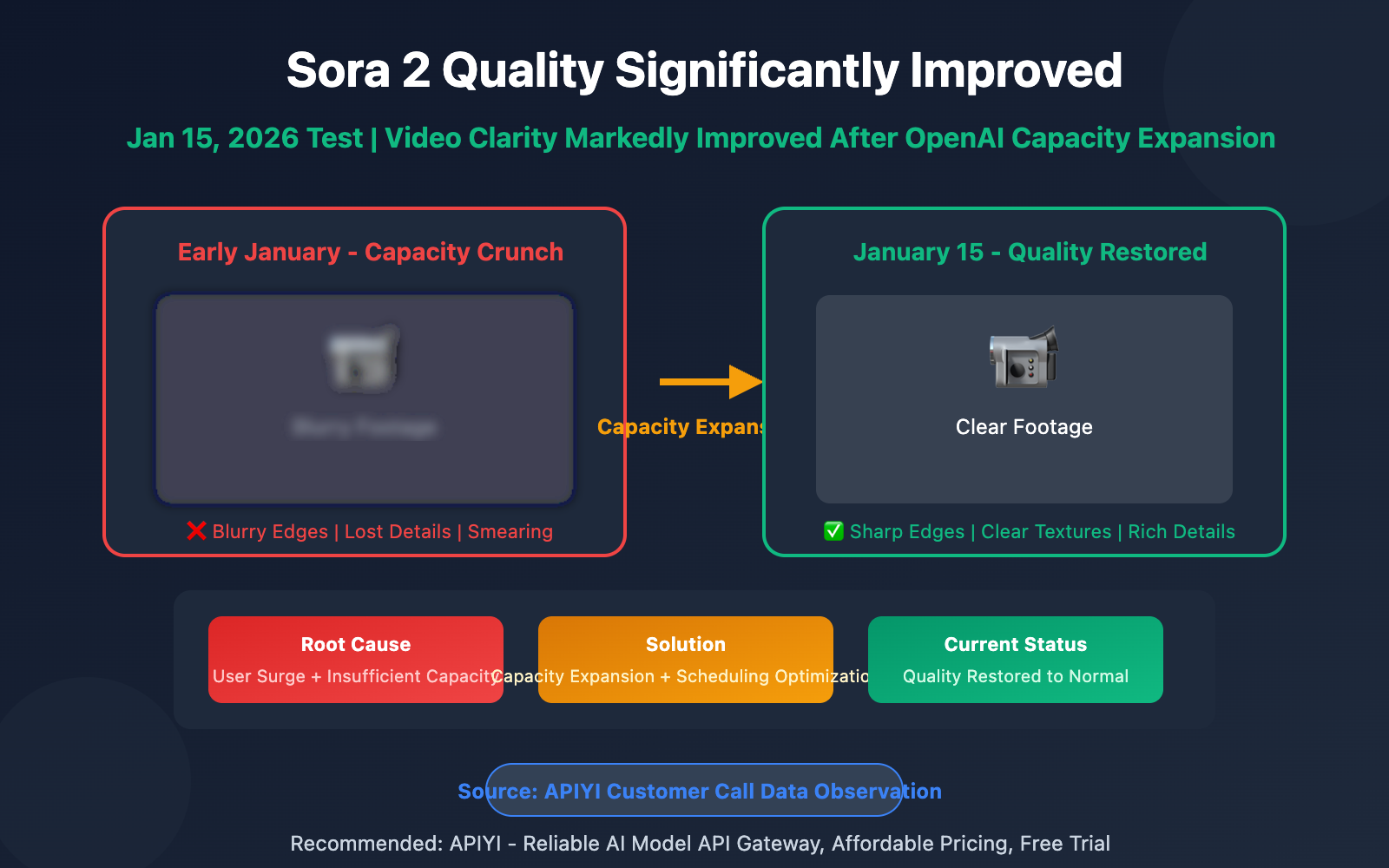
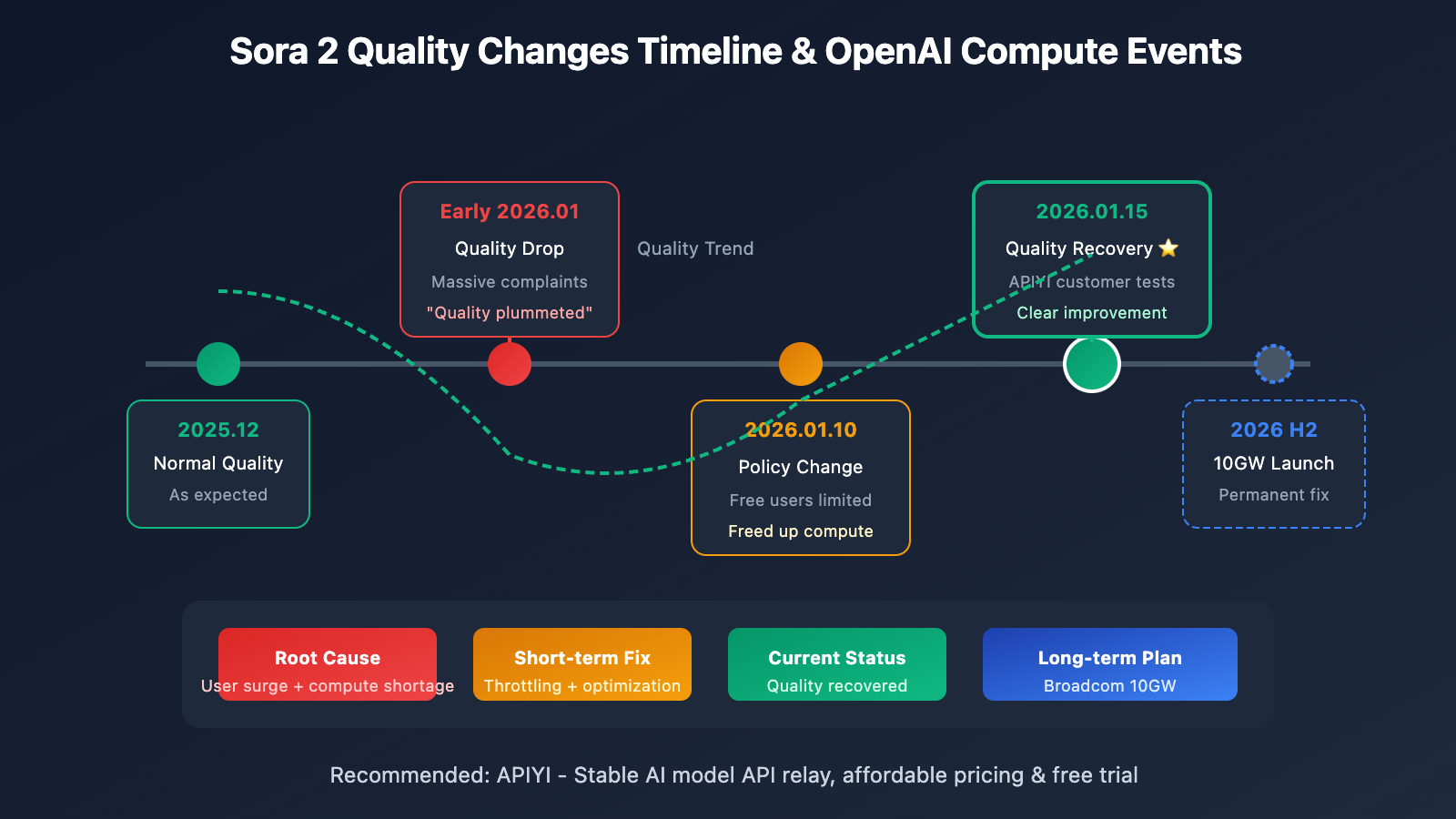
Sora 2 Quality Change Timeline
| Timeline | Status | User Feedback |
|---|---|---|
| December 2025 | Normal | Video clarity met expectations |
| Early January 2026 | Declined | Many users reported blurry footage |
| January 10, 2026 | Lowest point | High load persisted despite free user restrictions |
| January 15, 2026 | Improved | API calls showed marked clarity improvement |
Understanding Sora 2's Quality Recovery
This quality improvement isn't from OpenAI releasing a new version – it's infrastructure-level enhancement. To understand this, we need to first look at Sora 2's "blur-gate" incident.
From late 2025 to early January 2026, tons of overseas users reported Sora 2's video clarity took a "cliff dive." Reddit's OpenAI board was flooded with complaints – users griped that "quality plummeted overnight."
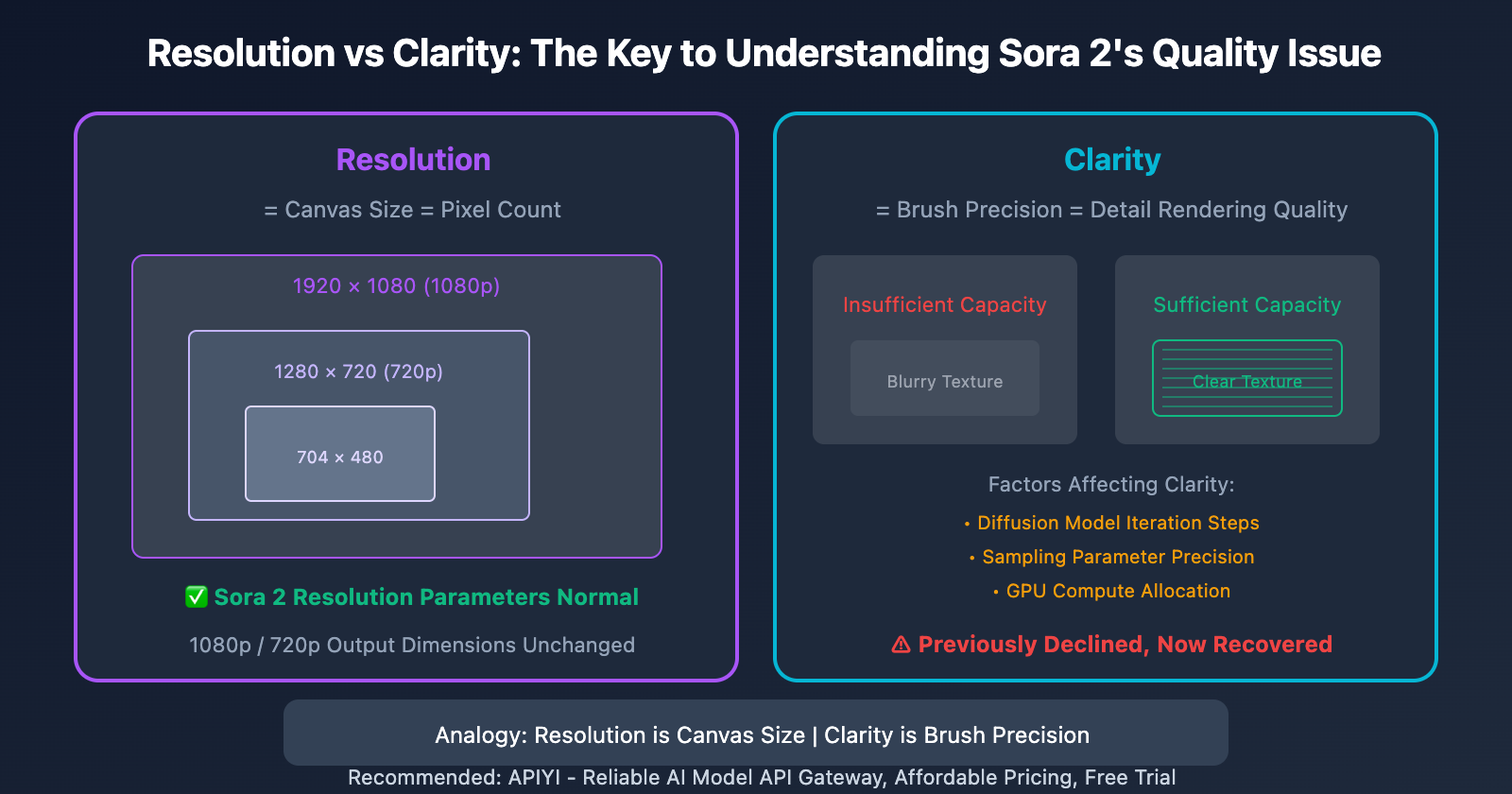
Here's the key: Resolution parameters stayed the same, but visual clarity dropped. This tells us the problem wasn't in output specs – it was in generation quality.
The Technical Reasons Behind Sora 2's Quality Issues
The Difference Between Resolution and Clarity
Many users confuse these two concepts:
| Concept | Definition | Sora 2 Situation |
|---|---|---|
| Resolution | Pixel dimensions (e.g., 704×1280, 1920×1080) | Parameters normal, unchanged |
| Clarity | Detail rendering capability, texture sharpness | Previously declined, now recovered |
Here's an analogy: resolution is the canvas size, while clarity is how fine your brush is. With the same 1080p canvas, when you've got sufficient computing power, you can paint detailed textures; when compute is limited, you can only sketch blurry outlines.
How Does Compute Pressure Affect Quality?
Sora 2's video generation demands massive computational resources. According to OpenAI's estimates:
- Generating 1 ten-second video = consuming GPU resources equivalent to thousands of ChatGPT conversations
- Direct compute cost per video: approximately $0.50 – $2.00
When platform load gets too high, OpenAI likely implemented these measures to maintain service availability:
- Reduced generation precision: Fewer diffusion model iteration steps
- Adjusted sampling parameters: Trading detail for speed
- Load balancing: Routing tasks to non-optimal compute nodes
These measures ensured the service stayed "usable," but sacrificed "quality."
The January 2026 Demand Spike
Quality issues peaked in early January due to several factors:
- Policy changes: Starting January 10, free users couldn't generate videos, causing a rush of users trying to create content before the deadline
- Holiday effects: Surging content creation demand during the New Year period
- Viral spread: Sora 2's popularity continued attracting new users
Actual observation: Through APIYI apiyi.com's API call monitoring, we've noticed that videos generated after January 15 show noticeably clearer detail textures and improved edge sharpness, indicating OpenAI's compute supply has improved.
The Technical Background of OpenAI's Compute Expansion
The Broadcom 10GW Partnership
OpenAI previously signed a massive collaboration agreement with Broadcom to build 10 gigawatts (GW) of custom AI chips and systems. This number's equivalent to:
- The electricity consumption of 8 million American households
- A major city's power usage
This project's expected to begin deployment in the second half of 2026, fundamentally solving bottleneck issues for high-compute applications like Sora 2.
Speculated Short-term Optimizations
Before large-scale infrastructure comes online, OpenAI likely took these short-term measures:
| Optimization Direction | Possible Measures | Effect |
|---|---|---|
| Compute scheduling | Optimized GPU cluster task allocation | Reduced resource waste |
| User distribution | Limited free users | Freed up compute for Pro users |
| Regional expansion | Activated more data centers | Distributed peak loads |
| Model optimization | Adjusted inference efficiency parameters | Higher quality output with same compute |
Sora 2 API Best Practices
Currently Available Resolutions
| Resolution | Pixels | Use Cases | API Parameter |
|---|---|---|---|
| 1080p | 1920×1080 | Commercial production, YouTube | resolution: "1080p" |
| 720p | 1280×720 | Quick previews, social media | resolution: "720p" |
Tips for Getting the Best Clarity
from openai import OpenAI

# Get a stable API calling experience through API Yi
client = OpenAI(
    api_key="YOUR_API_KEY",
    base_url="https://vip.apiyi.com/v1"
)

# Prompt techniques for optimizing clarity
response = client.videos.generate(
    model="sora-2",
    prompt="""
    A young woman walking through Tokyo's Shibuya crossing at night,
    neon lights reflecting on wet pavement,
    cinematic lighting, sharp focus, highly detailed,
    in 4K resolution, professional cinematography
    """,
    resolution="1080p",
    duration=10,
    fps=30  # 30fps is smoother than 24fps
)
Key Prompt Keywords for Improving Sora 2 Clarity
Adding these keywords to your prompt can guide the model to generate sharper videos:
sharp focus– crisp focushighly detailed– high level of detail4K resolution– 4K resolution (improves detail even when output is 1080p)professional cinematography– professional cinematographycrisp textures– clear texturescinematic quality– cinematic quality
Example prompt:
A golden retriever running on a beach at sunset,
waves splashing, fur details visible,
sharp focus, highly detailed, cinematic lighting,
professional 4K cinematography
Tip: Call the Sora 2 API through API Yi (apiyi.com) – the platform provides stable access and free testing credits to help you quickly verify generation results.
Sora 2 Quality Comparison: Before vs After Improvements
| Comparison | Early January (High Load Period) | January 15 (After Improvements) |
|---|---|---|
| Edge Sharpness | Blurry, with halos | Clear and sharp |
| Texture Detail | Lost detail, smudged appearance | Preserved textures, distinct layers |
| Motion Clarity | Noticeable motion blur | Clear motion trails |
| Color Reproduction | Grayish, low saturation | Vibrant colors, high contrast |
| Facial Details | Blurred features | Clear facial features |
What Should Users Watch Out For?
- Generation Timing: Early morning North American time (afternoon Beijing time) has lower load, potentially better quality
- Retry Strategy: If you're not happy with results, try regenerating – quality can vary at different times
- Prompt Optimization: Adding clarity-related keywords really does work
- Choose Pro Mode: The sora-2-pro model consistently delivers more stable, high-quality output
FAQ
Q1: Is the quality improvement permanent or temporary?
Based on OpenAI's compute expansion plans, quality should continue improving long-term. However, short-term fluctuations due to load variations are still possible. For critical projects, we'd recommend using the sora-2-pro model – it gets higher resource allocation priority and delivers more consistent quality. APIYI apiyi.com supports calls to both the standard and Pro versions.
Q2: Why is API quality more stable than the web interface?
API calls typically route through dedicated service channels, isolated from web users. Especially when accessing through professional platforms like APIYI, you'll often benefit from additional caching and scheduling optimizations. Enterprise API clients usually have dedicated compute quotas that aren't affected by public load.
Q3: How can I check current compute status?
There isn't an official compute status page yet, but you can indirectly assess it through:
- Generation time: A 10-second video normally takes 3-5 minutes – if it's over 10 minutes, load is high
- Output quality: Quick comparison of the same prompt at different times
- Community feedback: Follow discussions on Reddit's r/OpenAI and Twitter
Summary
Key takeaways about Sora 2's quality recovery:
- Root cause: Previous quality drops were due to compute constraints, not model versions
- Current status: Quality noticeably improved starting January 15, 2026 – OpenAI appears to have completed expansion
- Long-term outlook: The 10GW Broadcom partnership will fundamentally solve compute bottlenecks
- Best practices: Use clarity keywords, choose low-load time slots, prioritize Pro models
For users who need consistently high-quality output, we recommend accessing Sora 2 API through APIYI apiyi.com. The platform provides professional service quality guarantees and free testing credits.
📚 References
⚠️ Link Format Note: All external links use
Resource Name: domain.comformat for easy copying but are not clickable, preventing SEO weight loss.
-
OpenAI Official Documentation – Sora 2 Model: API interface specifications and parameter descriptions
- Link:
platform.openai.com/docs/models/sora-2 - Description: Learn about Sora 2's official technical specifications
- Link:
-
OpenAI Sora 2 Launch Announcement: Model capabilities and feature introduction
- Link:
openai.com/index/sora-2/ - Description: Official release information for Sora 2
- Link:
-
CNN Report – OpenAI Broadcom Computing Power Collaboration: 10GW infrastructure project details
- Link:
cnn.com/2025/10/13/tech/openai-broadcom-power - Description: Understanding OpenAI's strategic planning for computing power expansion
- Link:
-
Skywork AI – Sora 2 Best Practices Guide: Prompt techniques and parameter optimization
- Link:
skywork.ai/blog/sora-2-guide-tested-settings-prompts-for-pro-level-quality/ - Description: Professional-level Sora 2 usage tips
- Link:
Author: Technical Team
Technical Discussion: Feel free to discuss in the comments. For more resources, visit the API Yi apiyi.com technical community