Author’s note: Both magpie and CC Switch modify your local Agent configuration files. This article compares their architectures, release cadences, capabilities, and target audiences—and explains why only one should write to your configuration.
~/.claude/settings.json has found itself in an awkward spot lately. CC Switch has been working with it for over a year, changing only connection fields when you switch providers and leaving everything else untouched. Now magpie wants to write to the same file, changing the endpoint to 127.0.0.1:3425. Both programs write to it, so the last one to write wins, silently overwriting the other’s changes. That means only one program should control this configuration file at a time.
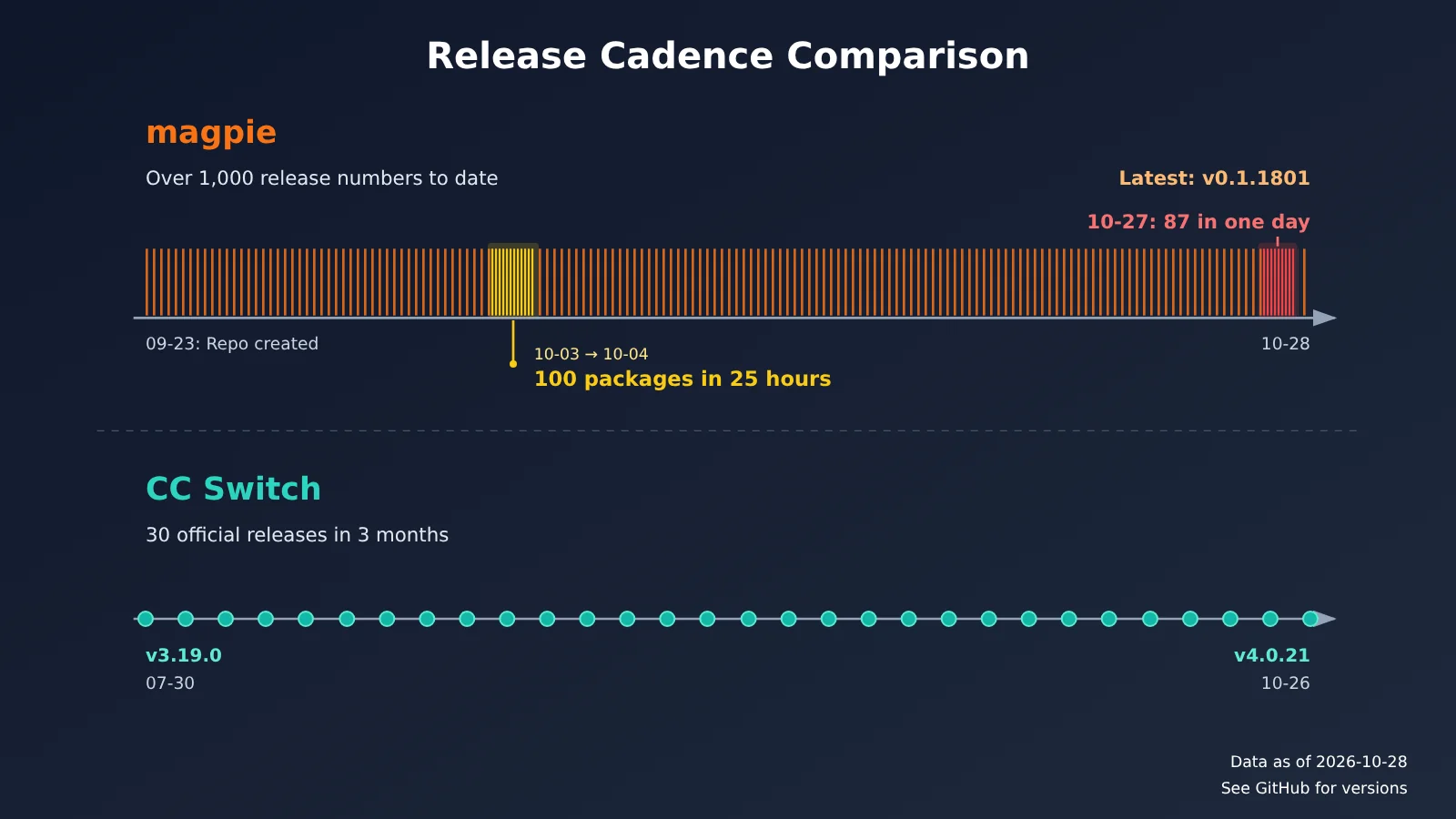
The two projects move at very different speeds. As of 2026-10-28, magpie’s release repository has racked up more than 1,000 release numbers since it was created on 2026-09-23. On 2026-10-27 alone, GitHub’s API shows 87 releases. Meanwhile, CC Switch went from v3.19.0 (2026-07-30) to v4.0.21 (2026-10-26), publishing 30 official releases over three months, each with Chinese release notes. A magpie is a bird, and this one announces dozens of version updates a day.
The community is split on magpie, too. An October 10 post on linux.do was titled “magpie feels pretty messy—wouldn’t recommend switching if you’re used to CC Switch.” The next day, another asked: “Why is everyone recommending magpie? I downloaded it and don’t see what’s so great about it.” Some people worry that CC Switch will be replaced. Our take: it won’t be replaced, but magpie has pulled away some of its users.
This isn’t an installation guide, and we’re not trying to declare an overall winner. We’ll explain how the two approaches differ and help you decide which one to keep.
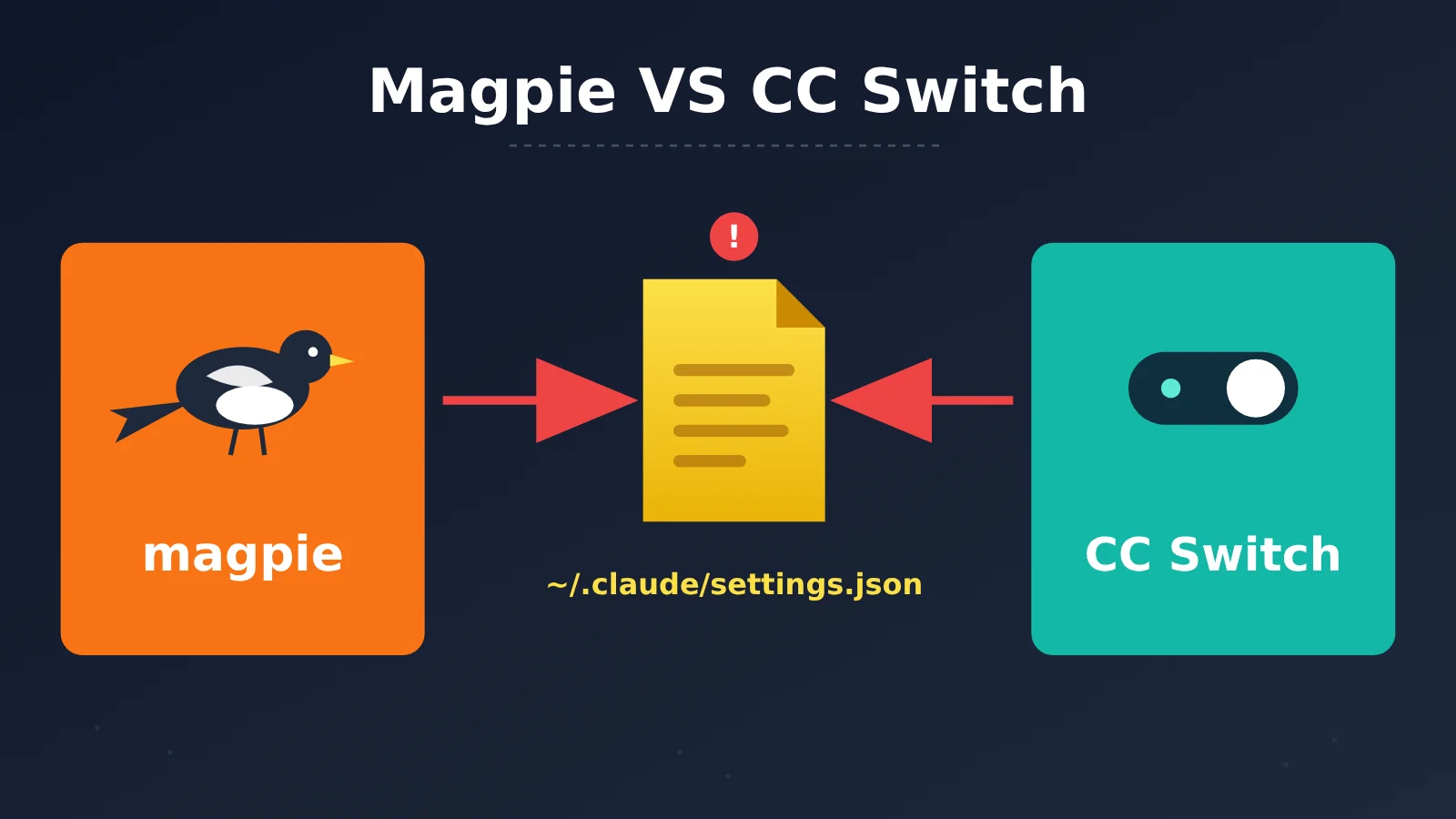
Magpie vs. CC Switch Release Pace: Dozens of Builds a Day vs. 30 Releases in Three Months
The difference in release pace is the clearest place to start. Magpie’s version number remains at 0.1.x, but its patch number is climbing fast. In the 25 hours from 13:00 on 2026-10-03 to 14:00 on 2026-10-04, it went from v0.1.756 to v0.1.859—exactly 100 releases. As of 2026-10-28, the latest version was v0.1.1801. The GitHub API returns at most the first 1,000 release records, so older ones are no longer visible, and the total continues to grow.
It’s worth explaining what those release numbers mean. They’re patch numbers generated by automated builds, with a new package produced for nearly every commit. They don’t mean there have been 1,000 feature upgrades. The pace tells us two things: maintenance is active and fixes arrive quickly, but 0.1.x is still in a phase of rapid experimentation. The version number itself is a reminder not to expect rock-solid stability.
| Metric (as of 2026-10-28) | magpie | CC Switch |
|---|---|---|
| Repository created | 2026-09-23 | 2025-08-04 |
| Latest version | v0.1.1801 | v4.0.21 (2026-10-26) |
| Release pace | Up to 87 found in a single day; over 1,000 total | 30 stable releases in three months |
| GitHub stars | About 23,800 | About 149,000 |
| Supported tools | README lists 68 agents | 12 tools, each with a dedicated preset |
| Maintenance | External PRs aren’t accepted; only the maintainer can open them | Open to issue and PR collaboration |
Put 149,000 stars alongside 100 packages in a day, and you can see that the projects are at different stages: CC Switch already has a large user base, while magpie is still iterating rapidly. It’s not about which team works harder; they have different rhythms and risk tolerances. The CC Switch author says they closed more than 500 old issues during the 4.0 refactor. Magpie grew to about 23,800 stars in just over a month, but popularity and stability are separate things.
One more note: the CC Switch page on APIYI’s documentation site (the docs.apiyi.com scenario tutorial) still lists v3.12.0 and five tools. That’s behind the official repository’s 12 tools and v4.0.21, so check GitHub for the current version.
Magpie vs. CC Switch: Edit Config Files or Route Through a Local Gateway?
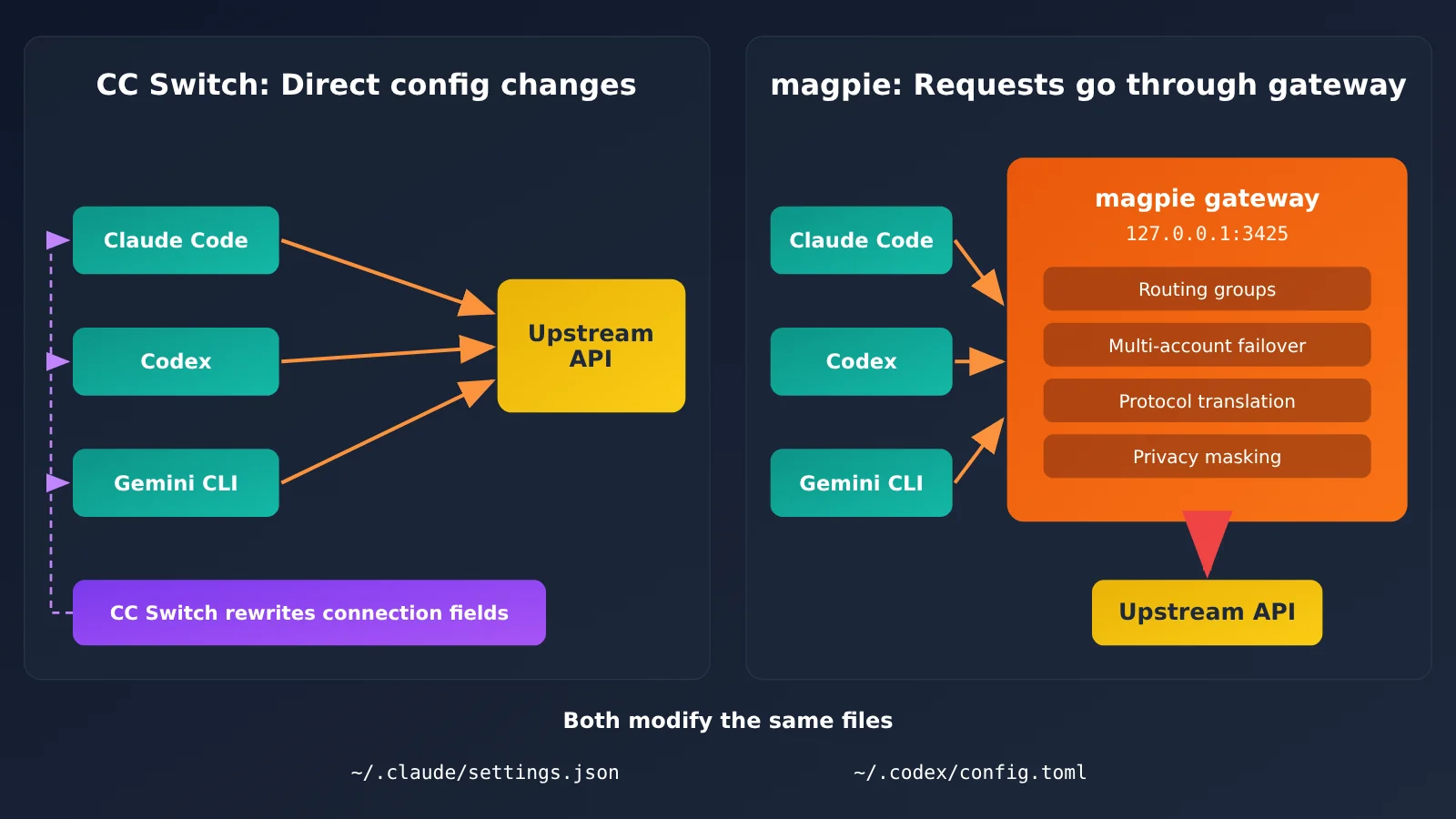
The fundamental difference is their approach: CC Switch is Agent-centric, while magpie is gateway-centric.
When you switch providers, CC Switch replaces only the connection fields in each tool’s configuration file: the request URL, key, and model. Plugins, Hooks, MCP, your custom settings, and comments stay untouched. It also automatically backs up the original file before the first change. Claude Code, Codex, and Gemini CLI use a “switching” model, where only one provider is active at a time. OpenCode, OpenClaw, Hermes, and Pi use a “coexistence” model, where multiple providers are written into the tool’s own configuration. CC Switch also offers local routing, but you need to enable it manually. Once enabled, it can translate between Anthropic Messages, OpenAI Chat Completions, OpenAI Responses, and Gemini Native, with a failover queue and circuit breaker.
magpie, on the other hand, first points each Agent to 127.0.0.1:3425. Keys are stored centrally in magpie, and the gateway forwards requests upstream. The gateway supports translation between four protocols, including streaming output, tool calls, and reasoning content. It also rewrites key fields in each Agent’s own configuration. As the README puts it, “magpie edits the one key that matters in the agent’s own config,” using atomic writes while preserving comments, order, and formatting. If you don’t want it to edit configuration files, you can point OPENAI_BASE_URL, ANTHROPIC_BASE_URL, and GOOGLE_GEMINI_BASE_URL to the local gateway and set the key to magpie.
| Dimension | magpie | CC Switch |
|---|---|---|
| Positioning | Local gateway + switcher | Desktop configuration manager + optional local routing |
| Switching method | Requests pass through 127.0.0.1:3425 before being sent |
Rewrites connection fields in each tool’s configuration |
| Account resilience | Five routing group modes + multi-account failover + Daily warm-up | Failover queue + circuit breaker + health monitoring |
| Day-to-day management | Library: write instructions, MCP, skills, and subagents once | MCP panel + Skills + prompt library + session manager |
| Sessions | List shows the cost of each session; reopen in the terminal with one click | Parses sessions into structured content, with turn summaries, export, and restore commands |
| Interfaces | Desktop, TUI, CLI, Web UI, Docker, Termux | Desktop + system tray |
magpie’s strengths: routing, fault tolerance, and migration
magpie’s main selling points include:
- Low migration effort: The Import feature on the provider page can import providers directly from CC Switch, making migration a matter of minutes. This is where magpie poses the most direct challenge to CC Switch.
- Routing groups: You can present a group to an Agent as a single model, such as
group/daily-coding. Groups support five modes: smart, order, rotate, usage, and pace. Sessions with valuable cached context stay with the account that originally responded to them. - Subscriptions as providers: Signed-in Claude, ChatGPT, Copilot, and other subscriptions can become providers for other Agents. You can turn this feature off in the privacy settings.
- Privacy masking: Keys, tokens, email addresses, and other information are replaced with placeholders locally before being sent. This feature is off by default. When enabled, if masking should have applied but didn’t, the request returns a 503 instead of sending the original text.
- LAN sharing and deployment: You can assign each client its own gateway key and spending limit, or run magpie on a NAS using Docker.
CC Switch’s strengths: finer-grained day-to-day management
CC Switch offers more detailed tools for everyday management:
- Unified MCP dashboard: Select which tools to sync with, and import existing configurations from each one.
- Skills management: Install from GitHub or a ZIP file with one click, and update everything at once.
- Prompt library: When enabled, prompts are written to CLAUDE.md / AGENTS.md. Before that happens, the files’ existing contents are saved back to the prompt library.
- Session manager: Each turn collapses into a one-line summary, failed steps are highlighted in red, and you can copy a recovery command to continue the conversation.
- Project snapshots: Switch providers, MCP, Skills, and prompts together as a set for each project.
v4.0.21 also added switching between multiple official Claude subscription accounts. Login follows the official process, and tokens are stored only in Claude Code’s own location. CC Switch neither records nor uploads them, and explicitly doesn’t rotate accounts automatically based on usage limits. It’s a more conservative design, in contrast to magpie’s approach.
The Tools Just Forward Requests: Models and Keys Behind Magpie and CC Switch
Whichever tool you choose, it only forwards requests—you’ll need to provide the model and API key separately. To get started smoothly, you’ll need a reliable claude-opus-5-5 key. APIYI (apiyi.com) provides both Anthropic-compatible and OpenAI-compatible endpoints, so you can connect either tool directly.
| Configuration | Value | Notes |
|---|---|---|
| Anthropic-compatible URL | https://api.apiyi.com |
No /v1; suitable for Claude Code |
| OpenAI-compatible URL | https://api.apiyi.com/v1 |
Suitable for Codex and other tools using the OpenAI protocol |
| Model name | claude-opus-5-5 |
The thinking version, claude-opus-5-5-thinking, is the same price |
| Price (per million tokens) | Input $4 / Output $20 / Cache reads $0.2 | As of 2026-10-28; check the platform’s model list for current models and pricing |
| Endpoints and groups | chat, messages; ClaudeCode, Default, SVIP, and other groups | Choose a group based on your use case |
Keep in mind that both tools read the same Agent configuration. CC Switch writes the key to ~/.claude/settings.json, while Magpie stores it in the gateway, but both ultimately connect to the same upstream account. That means you only need to change the key once in the APIYI console. You can also check your balance and usage in the same place, without entering them separately in both tools.
Magpie vs. CC Switch: Who Should Stay and Who Should Switch?
Who Should Stick With CC Switch
If you mainly use Claude Code, have only one or two providers, and value stability over troubleshooting after every upgrade, CC Switch is the better fit. It makes fewer changes and has a solid backup system. When something goes wrong, you can open the configuration file and see what’s happening. Users who regularly organize MCP, Skills, and prompts, or need to revisit past sessions, may also feel more at home with CC Switch’s interface and workflow.
The author of the October 10 post put it bluntly: “There’s no reason to switch to this when all the providers are mixed together. It’s too messy. Worse, once models go through this software, you can’t switch models in the CLI after making a selection.” Someone else in the same thread said, “So far, I haven’t seen any unique feature that would knock CC Switch out of the running.” These users want one-click provider switching, and CC Switch already delivers that.
Who Should Switch to magpie
If you use several Agents, such as Codex, Gemini CLI, OpenCode, and Pi, have multiple subscriptions and API keys, and want automatic switching when a quota runs out, magpie’s gateway approach may be a better fit—especially if you also need a cost dashboard. In a post that same day, one user said, “I switched from CC Switch to magpie this afternoon. I finally don’t have to test API proxy services one by one to see which ones work.” A supporter in the October 11 thread also said, “Adding and switching providers is easier in magpie than in CC Switch, and its routing rules are powerful.” Another user mentioned that CC Switch couldn’t properly display or switch models in the Codex app.
The negative feedback about magpie needs to be considered carefully. One user reported that Claude’s cache seemed to stop working after connecting through magpie, leading to higher costs. Another person in the thread said they suspected the intermediary layer was screening prompts and causing requests to be rejected. Both are isolated reports with no reproduction steps, so they aren’t enough to establish that magpie has these issues. The information in this article falls into three categories: the project’s official claims, isolated third-party reports, and matters that remain unresolved. Please consider them separately.
Magpie VS CC Switch: Which One Should You Choose?
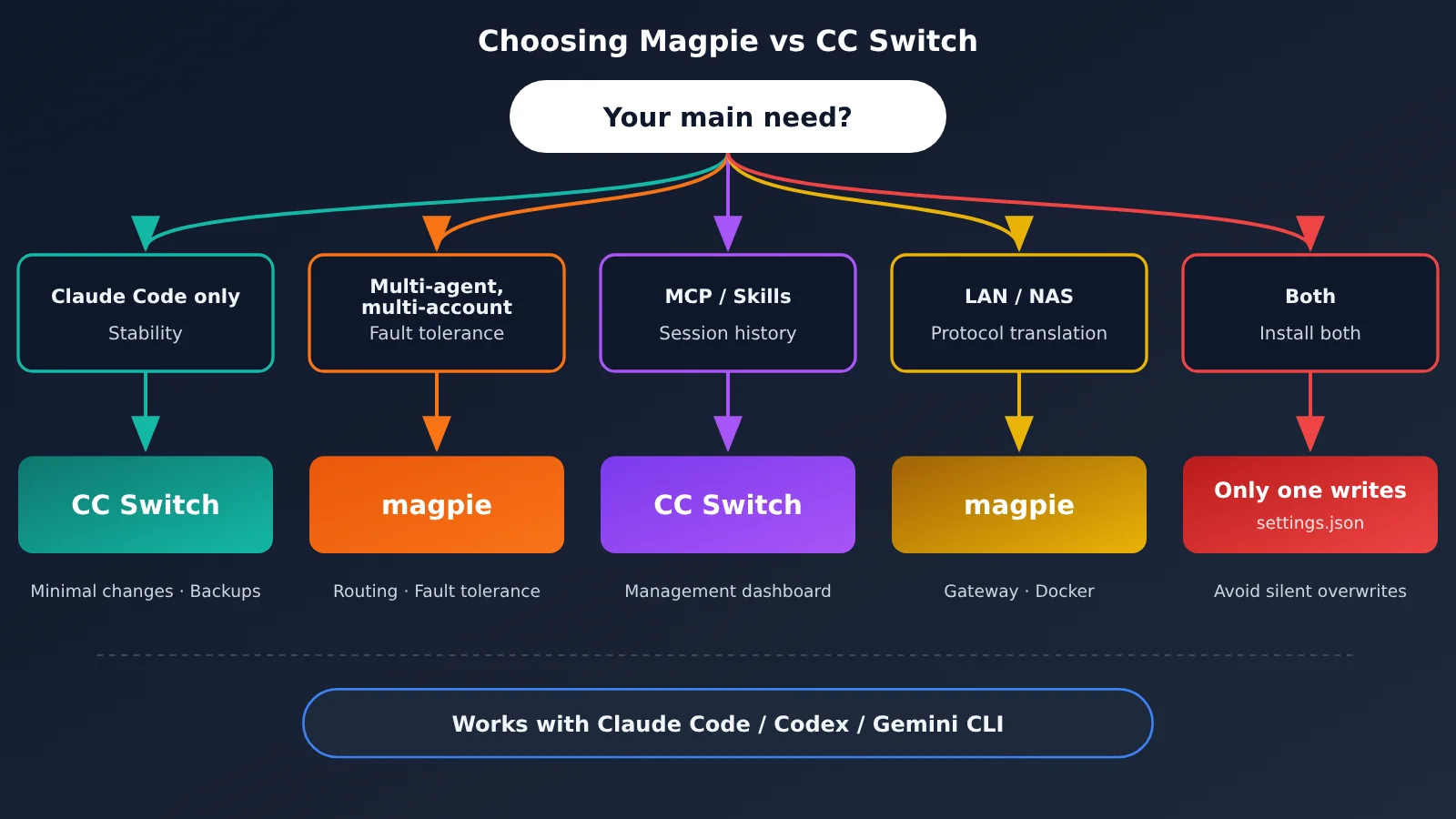
| Your situation | Recommendation | Why |
|---|---|---|
| You only use Claude Code with one or two providers and want stability | CC Switch | Minimal changes, backups, and a steady release pace of 30 official versions in three months |
| You use multiple Agents and accounts and want automatic fault tolerance and a cost dashboard | magpie | Routing groups, failover, and usage statistics |
| Your main pain points are MCP, Skills, prompts, and reviewing sessions | CC Switch | More detailed management panels and more complete session parsing |
| You need LAN sharing, NAS deployment, or protocol translation for unsupported Agents | magpie | Offers a gateway and Docker deployment |
| You want both | Let only one write the configuration | See the next section |
💡 How to choose: If you’re unsure, try each tool for an afternoon using the same API key. See the APIYI tutorial at
docs.apiyi.com/scenarios/programming/cc-switchfor CC Switch setup, andhelp.apiyi.com/magpie-unify-claude-code-codex-pi-hermes-api-gateway.htmlfor magpie’s unified gateway setup. You can follow the tutorials rather than figuring everything out from scratch.
Installing Both: Only One Program Should Manage settings.json
This brings us back to the question from the start. magpie and CC Switch rewrite the same files, including ~/.claude/settings.json and ~/.codex/config.toml. If both are running and you switch providers in one, the other’s settings will be silently overwritten without warning. Which provider Claude Code actually uses then depends on which tool wrote to the file last.
To use both, you need to decide which one owns the configuration files: one writes to them, while the other either reads them only or exits when you’re done using it. For example, you could keep CC Switch for managing MCP and prompts while leaving provider switching entirely to magpie—or do it the other way around. Don’t let both programs write to the same files on an ongoing basis. If you’re migrating, you can use magpie’s Import feature to bring over your CC Switch providers. Once you’ve verified everything, close the old tool to prevent both from writing at the same time.
Risks and Account Bans: Back Up Before Using Magpie or CC Switch
A few things to keep in mind:
- Both are third-party open-source tools (licensed under MIT), and both rewrite local Agent configuration files. Before installing either, manually back up files such as
~/.claude/settings.jsonand~/.codex/config.toml. Don’t rely entirely on the tools’ built-in backups. - Using subscriptions outside official clients may violate terms: Using Claude, ChatGPT, or Copilot subscriptions outside their official clients may violate the providers’ terms of service. CC Switch’s own documentation includes a similar warning. You can turn off magpie’s “subscription as provider” feature under Settings → Privacy.
- You accept the consequences: You’re responsible for any overwritten configurations, lost usage credits, account risks, or other consequences. This article doesn’t endorse either tool. Try them first with a secondary account or a less important project.
Frequently Asked Questions
Q1: Can I install Magpie and CC Switch at the same time?
Yes, but they shouldn’t write to the configuration at the same time. Both modify `~/.claude/settings.json`, so designate one to handle writes and keep the other in read-only mode or close it.
Q2: Magpie released over a thousand versions in just over a month. Is it unstable?
Most of these are automatically generated patch versions, indicating frequent maintenance and quick fixes. That said, 0.1.x is still in an experimental phase. If stability is a top priority, you may want to wait and see.
Q3: Can Magpie invalidate the cache and increase costs?
So far, only a few users have reported this, and there’s no way to reproduce it. That’s not enough to draw a conclusion. If you’re concerned, compare your usage dashboard before and after switching.
Q4: Do I need a new API key when switching tools?
No. Both tools simply forward requests, so you can keep using the same API key. Manage it in the APIYI apiyi.com console, then enter it in either CC Switch or Magpie.
Q5: Which address should I use for claude-opus-5-5?
Claude Code uses the Anthropic protocol, so enter the address without `/v1`. For Codex and other tools using the OpenAI protocol, use the address with `/v1`. As of 2026-10-28, pricing is $4 for input, $20 for output, and $0.20 for cache reads per million tokens. Check the model list on apiyi.com for current pricing.
Q6: Will Magpie replace CC Switch?
No. They operate at different layers: CC Switch manages and switches Agent configurations, while Magpie routes all requests through a local gateway first. The users most affected are those who use CC Switch solely to switch providers with one click.
Magpie VS CC Switch: Key Takeaways
- Different approaches: CC Switch rewrites configuration files, while magpie routes requests through a local gateway at
127.0.0.1:3425. - Different release cadences: As of 2026-10-28, magpie had accumulated over 1,000 release numbers, while CC Switch had published 30 stable releases in three months.
- Different strengths: magpie excels at routing, fault tolerance, and protocol translation. CC Switch is stronger in MCP, Skills, and session management.
- Only one can write to the config: Both tools modify the same settings.json file, so only one should have write access.
- Most negative feedback is anecdotal: Reports about caching, censorship, and similar issues don’t include steps to reproduce them, so they shouldn’t be treated as conclusions.
- Manage your key once: Update it centrally in the APIYI console. Both tools read from the same Agent configuration.
Summary
The comparison between magpie and CC Switch comes down to two different approaches: one centers on a gateway and iterates quickly; the other centers on Agent configuration and focuses on steady refinement. magpie has attracted users who just want to switch providers in one click, while CC Switch still offers more detailed day-to-day management features. The community debate will continue for a while, but for individual users, the choice is fairly straightforward.
Only one program should manage ~/.claude/settings.json at a time. Pick the tool that fits your needs based on the five scenarios above and stick with it—you don’t need to keep switching between the two.
You can set up your model access and API key through APIYI at apiyi.com. Use the same key to access claude-opus-5-5, whichever tool you choose.
📚 References
- magpie GitHub repository: A unified local AI gateway and model switcher
- Link:
github.com/yetone/magpie -
Notes: The README lists 68 agents and explains the gateway. The Chinese version is README.zh-CN.md.
-
magpie official documentation: Features and configuration
- Link:
usemagpie.ai/docs -
Notes: Detailed information on routing groups, privacy masking, LAN sharing, and other features.
-
CC Switch GitHub repository: A cross-platform all-in-one manager
- Link:
github.com/farion1231/cc-switch -
Notes: Release notes and individual fix records. Refer to this repository for authoritative version information.
-
CC Switch official website: Product information and downloads
- Link:
ccswitch.io - Notes: A list of supported tools and usage instructions.
Author: APIYI Technical Team
Technical discussions: Contact us through the APIYI homepage. For more integration resources, visit the docs.apiyi.com documentation center.