Author’s note: Based on Google’s official deprecation page, here’s the short answer: Nano Banana 2 has not been announced as deprecated. The model with a deprecation date is the preview version. We’ve also included the full Nano Banana timeline and a migration checklist.
Some developers recently heard a claim while using Nano Banana 2 for image generation: Nano Banana 2 is going offline at the end of this month. Many started considering an early migration, or even switching back to an older model. But they might end up giving up the model with the best text-rendering results.
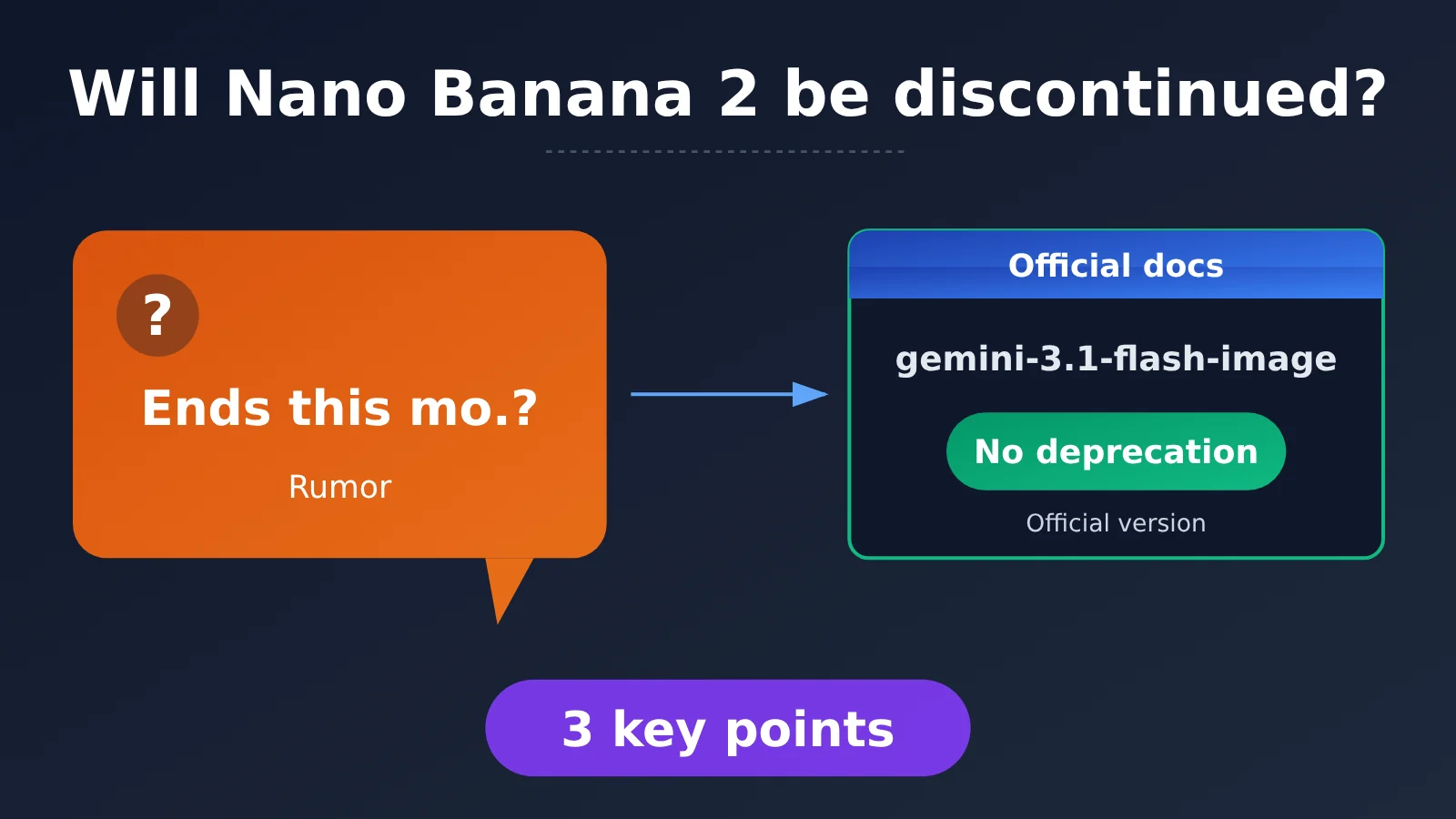
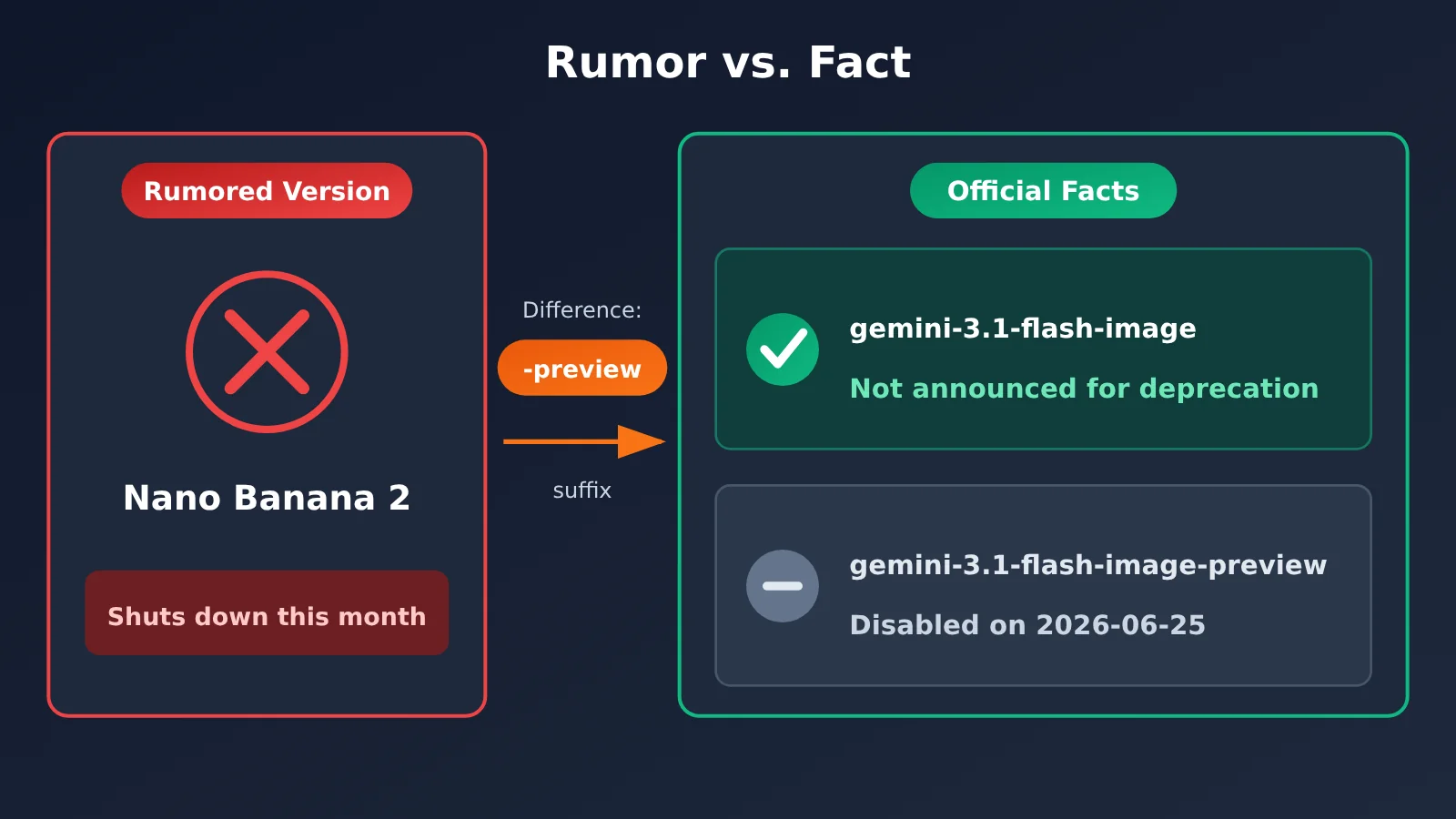
That claim isn’t accurate. We checked Google’s official Gemini API model deprecations page. The production model gemini-3.1-flash-image is listed as having “no announced deprecation date.” The model with a deprecation date is the preview version. The rumor likely confused the preview and production models.
What you’ll learn: In 3 minutes, get a clear picture of Nano Banana 2’s actual deprecation status and the timeline for the entire Nano Banana series—and find out whether you need to change your code.
Will Nano Banana 2 Be Discontinued? Key Facts at a Glance
Here’s the short answer. The information in the table below comes from the Nano Banana models section of Google’s official Gemini API deprecation page—the only authoritative source for determining whether a model is being discontinued.
| Item | Details |
|---|---|
| Where the claim came from | A rumor circulating in developer communities that “Nano Banana 2 will be discontinued at the end of this month” |
| Official source | The Nano Banana models section of Google’s Gemini API deprecation page |
| Nano Banana 2 stable version | gemini-3.1-flash-image: no deprecation date announced |
| Models with deprecation dates | The -preview series and the first-generation gemini-2.5-flash-image |
| Who’s affected | Only projects still using preview IDs or the first-generation model |
| What to do | Check the model IDs in your code. If you’re using the stable version, you don’t need to migrate. |
Nano Banana 2 Deprecation Date, Point 1: No Date Has Been Announced for the Stable Version
The official deprecation page gives the same status for all three stable models: “No deprecation date announced.” These are Nano Banana 2 (gemini-3.1-flash-image), Nano Banana Pro (gemini-3-pro-image), and the lightweight version (gemini-3.1-flash-lite-image). In other words, as of this article’s publication, Google hasn’t set a sunset date for the stable version of Nano Banana 2.
If your code uses gemini-3.1-flash-image, the claim that it “will be discontinued at the end of this month” doesn’t apply to you. If Google announces a deprecation plan in the future, the deprecation page will be updated first, and will generally include a replacement model and a transition period.
Nano Banana 2 Deprecation Date, Point 2: The Dates Apply to Preview Models
The official page does list deprecation dates for these models:
gemini-3.1-flash-image-preview(Nano Banana 2 preview): June 25, 2026gemini-3-pro-image-preview(Nano Banana Pro preview): June 25, 2026gemini-2.5-flash-image(first-generation Nano Banana): March 15, 2027
As of today, the deprecation dates for both preview models have passed. Projects still using preview IDs should switch to the stable versions as soon as possible. The first-generation model has more time, but you should still include its migration in your plans.
Nano Banana 2 Deprecation Date, Point 3: The Rumor Confuses the Preview and Stable Versions
The claim that “Nano Banana 2 is being discontinued” most likely applies the deprecation date for gemini-3.1-flash-image-preview to all of Nano Banana 2. The two IDs differ only by the -preview suffix, which is easy to leave out when a story gets repeated. To determine whether you’re affected, check the complete model ID—not just the product name “Nano Banana 2.”
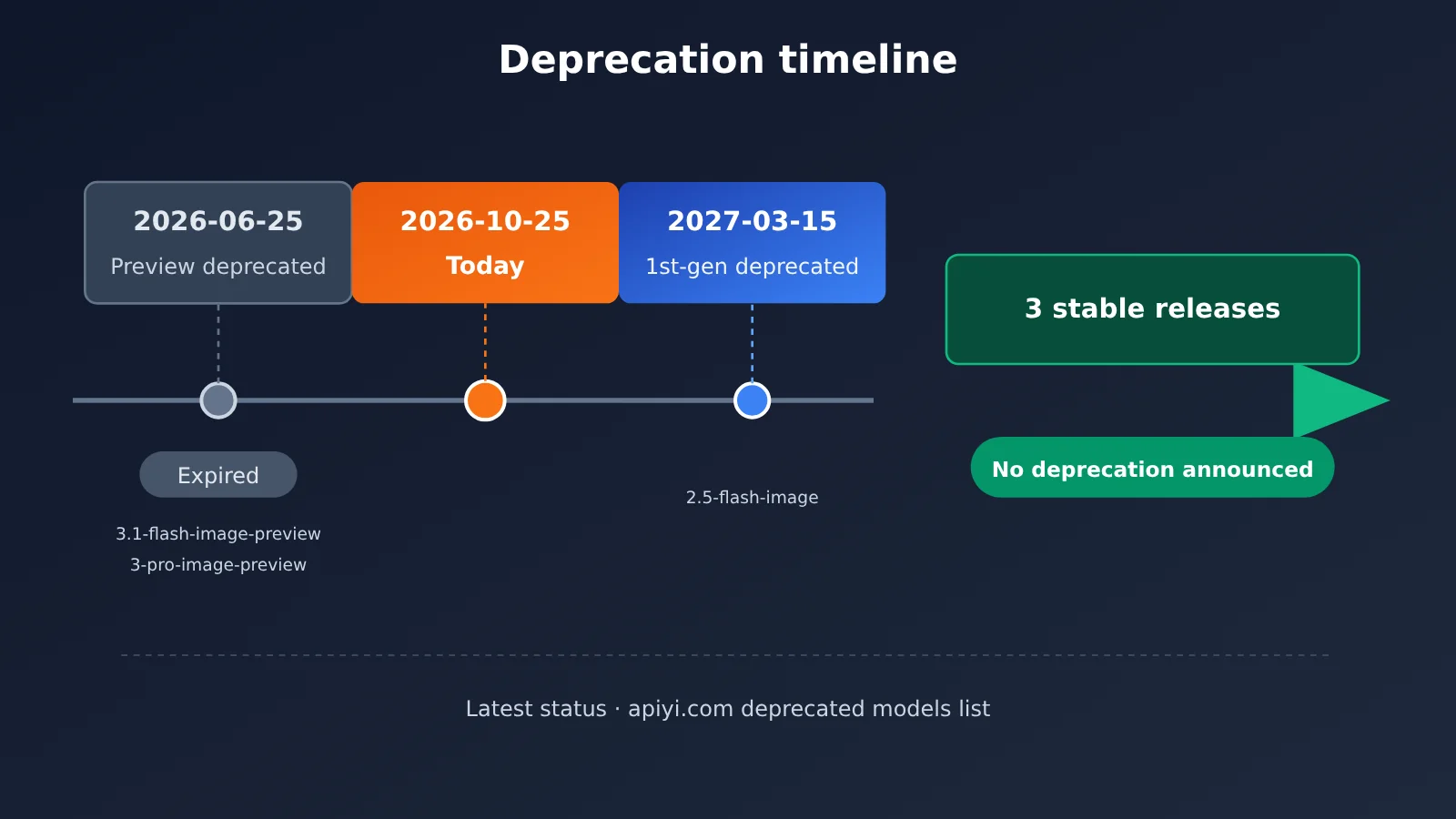
📌 About the data source: The timeline above is based on Google’s official deprecation page. If Google makes changes, APIYI at apiyi.com will update its deprecated models list with models scheduled for retirement and their replacement options, making it easy to check everything in one place.
Nano Banana Product Line Deprecation Timeline
Nano Banana currently has four product lines: the first generation, 2, 2 Lite, and Pro. Each line includes a stable version and a preview version, so there are quite a few model IDs. The table below lists the official deprecation status for each ID by product line.
| Product | Model ID | Version Type | Official Deprecation Date | Current Recommendation | Available Platforms |
|---|---|---|---|---|---|
| Nano Banana 2 | gemini-3.1-flash-image |
Stable | Not announced | Safe to use | APIYI, Official API |
| Nano Banana 2 | gemini-3.1-flash-image-preview |
Preview | 2026-06-25 | Deprecated; migrate immediately | Not recommended |
| Nano Banana Pro | gemini-3-pro-image |
Stable | Not announced | Safe to use | APIYI, Official API |
| Nano Banana Pro | gemini-3-pro-image-preview |
Preview | 2026-06-25 | Deprecated; migrate immediately | Not recommended |
| Nano Banana 2 Lite | gemini-3.1-flash-lite-image |
Stable | Not announced | Safe to use | APIYI, Official API |
| Nano Banana (first generation) | gemini-2.5-flash-image |
Stable | 2027-03-15 | Plan your migration | Available during the transition period |
One pattern stands out: none of the stable versions currently have a planned deprecation date, while preview versions and older models do. This is consistent with Google’s usual approach: preview versions are mainly for early testing, and they’re phased out some time after the stable version is released.
💡 Recommendation: To test the stable versions of Nano Banana 2, Pro, and Lite side by side, use APIYI at apiyi.com to switch between model IDs with the same API key. You can compare text rendering, speed, and cost without applying for multiple official accounts.
How to Check Whether Your Nano Banana 2 Model ID Is Affected
The most common risk is that a project hardcoded a preview ID during its initial integration, and nobody updated it later. Once the model is discontinued, API calls fail immediately.
How to Tell Nano Banana 2 Preview and Stable Versions Apart
| Check | Preview version | Stable version |
|---|---|---|
| ID suffix | Has -preview |
No suffix |
| Typical example | gemini-3.1-flash-image-preview |
gemini-3.1-flash-image |
| Stability commitment | Low; behavior may change | High; suitable for production |
| Discontinuation status | Discontinuation date announced | No discontinuation announced |
| Use case | Early testing | Production workloads |
There’s just one rule: replace any ID that contains -preview. Stable versions without the suffix can still be used. The first-generation gemini-2.5-flash-image is a stable version, but it already has a discontinuation date, so be sure to flag it separately.
Scan Your Project for Discontinued Nano Banana Model IDs
The following Python script searches your project directory for references to discontinued or soon-to-be-discontinued model IDs and suggests the corresponding stable replacements:
import os
import re

# Mapping based on Google's official deprecation page
DEPRECATED = {
    "gemini-3.1-flash-image-preview": ("gemini-3.1-flash-image", "2026-06-25"),
    "gemini-3-pro-image-preview": ("gemini-3-pro-image", "2026-06-25"),
    "gemini-2.5-flash-image": ("gemini-3.1-flash-image", "2027-03-15"),
}

PATTERN = re.compile("|".join(re.escape(k) for k in DEPRECATED))
EXTS = (".py", ".js", ".ts", ".go", ".java", ".env", ".yaml", ".yml", ".json")

def scan(root="."):
    for dirpath, _, files in os.walk(root):
        if any(skip in dirpath for skip in ("node_modules", ".git", "venv")):
            continue
        for name in files:
            if not name.endswith(EXTS):
                continue
            path = os.path.join(dirpath, name)
            with open(path, encoding="utf-8", errors="ignore") as f:
                for lineno, line in enumerate(f, 1):
                    for hit in PATTERN.findall(line):
                        new_id, date = DEPRECATED[hit]
                        print(f"{path}:{lineno}  {hit} -> {new_id}  (discontinuation date: {date})")

if __name__ == "__main__":
    scan()
The regular expression matches IDs as literal strings, so the stable gemini-3.1-flash-image won’t be flagged by mistake. If the scan returns no results, your project isn’t affected by this discontinuation.
Impact Analysis of the Nano Banana 2 Discontinuation Rumor
Impact on Developers
- Users of the stable release don’t need to take action: Projects using
gemini-3.1-flash-imagecan continue running as usual. There’s no need to switch away from a model with better text rendering based on an inaccurate rumor. - Users of the preview release need to act now: The preview version’s shutdown date has passed, so further calls may return errors such as “model not found.” Just change the ID to the stable version; the request structure is essentially unchanged.
- Users of the first-generation model should schedule a migration:
gemini-2.5-flash-imagewill be discontinued on March 15, 2027. We recommend running a regression test with Nano Banana 2 in a test environment ahead of time to confirm the image style and prompt results.
Impact on Team Workflows
This rumor shows that model discontinuation information must be verified against the official source. Media outlets and community posts often omit critical suffixes like -preview. If teams make decisions based only on headlines, they can easily get the wrong impression.
We recommend adding the following checks to your regular workflow:
| Check | Frequency | What to do |
|---|---|---|
| Verify the official deprecation page | Once a month | Check for updates to the Gemini API Deprecations page |
| Scan model IDs in code | Before each release | Run the scanning script above |
| Configure model IDs outside the code | One-time change | Put model IDs in environment variables instead of hard-coding them |
| Run regression tests for replacement models | 1–2 months before discontinuation | Compare images from the old and new models using the same prompts |
| Monitor platform announcements | Ongoing | Follow deprecation notices from the API platforms you use |
How to Keep Calling Nano Banana 2 Reliably
Now that we’ve confirmed the official release is unaffected, here’s a minimal example of calling it through an OpenAI-compatible API:
import openai

client = openai.OpenAI(
    api_key="YOUR_API_KEY",
    base_url="https://api.apiyi.com/v1"  # APIYI unified endpoint
)

response = client.chat.completions.create(
    model="gemini-3.1-flash-image",  # Official Nano Banana 2 release; don't use -preview
    messages=[{"role": "user", "content": "生成一张咖啡店海报,标题文字为「秋日新品」"}]
)
print(response.choices[0].message.content)
View the complete implementation (configurable model IDs + fallback)
import os
import openai
from typing import Optional

# Read the model ID from an environment variable, so future migrations only require a config change
PRIMARY_MODEL = os.getenv("IMAGE_MODEL", "gemini-3.1-flash-image")
FALLBACK_MODEL = os.getenv("IMAGE_FALLBACK_MODEL", "gemini-3-pro-image")

client = openai.OpenAI(
    api_key=os.getenv("APIYI_API_KEY", "YOUR_API_KEY"),
    base_url="https://api.apiyi.com/v1"
)

def generate_image(prompt: str, model: Optional[str] = None) -> str:
    """Generate an image with the Nano Banana series, automatically switching to a backup official model if the primary model fails."""
    for m in (model or PRIMARY_MODEL, FALLBACK_MODEL):
        try:
            resp = client.chat.completions.create(
                model=m,
                messages=[{"role": "user", "content": prompt}],
            )
            print(f"[info] 使用模型: {m}")
            return resp.choices[0].message.content
        except openai.NotFoundError:
            print(f"[warn] 模型 {m} 不可用,可能已停用,尝试备用模型")
        except Exception as e:
            print(f"[error] {m} 调用失败: {e}")
    raise RuntimeError("主模型与备用模型均不可用,请检查官方淘汰页")

if __name__ == "__main__":
    result = generate_image("一张极简风格的产品发布会邀请函,包含中文标题「新品发布」")
    print(result)
There are two production-ready practices worth adopting here. First, the model ID comes from an environment variable, so if the provider ever announces that a model is being discontinued, you can update the configuration without changing the code. Second, catching NotFoundError lets you automatically switch to another official model, preventing a single model being taken offline from bringing down your entire service.
🚀 Quick-start tip: Sign up at APIYI apiyi.com to get free testing credits, then use the code above to try out image generation with the official Nano Banana 2 release. The platform uses an OpenAI-compatible API, so you can switch between models like
gemini-3.1-flash-imageandgemini-3-pro-imageby changing a single parameter.
Frequently Asked Questions
Q1: Is Nano Banana 2 really being shut down at the end of this month?
No. According to Google’s official deprecation page, the stable version of Nano Banana 2, `gemini-3.1-flash-image`, has no announced deprecation date. The shutdown rumor actually refers to the preview version, `gemini-3.1-flash-image-preview`, which is scheduled for deprecation on June 25, 2026.
Q2: What’s the difference between the stable and preview versions of Nano Banana 2?
The difference is whether the model ID ends in `-preview`. The preview version is intended for early testing, comes with fewer stability guarantees, and already has a deprecation date. The stable version is designed for production and has no current deprecation plan. For production workloads, use the stable model ID without the suffix.
Q3: Will Nano Banana Pro or 2 Lite be affected?
The stable versions won’t be affected. The official page also lists `gemini-3-pro-image` and `gemini-3.1-flash-lite-image` as having no announced deprecation date. Only the Pro preview, `gemini-3-pro-image-preview`, shares Nano Banana 2 Preview’s deprecation date of June 25, 2026.
Q4: What should I do if I’m still using the first-generation Nano Banana?
The first-generation model, `gemini-2.5-flash-image`, is scheduled for deprecation on March 15, 2027, so there’s still time to transition. We recommend testing the stable version of Nano Banana 2 in a staging environment as soon as possible. Once you’ve confirmed that your prompts and image styles meet your needs, you can switch over. Don’t wait until the deadline to get started.
Q5: How can I keep using Nano Banana 2 through an API?
We recommend following these steps:
1. Visit APIYI at apiyi.com and sign up
2. Get an API key and free testing credits for new users
3. Use the code examples in this article, set `base_url` to `https://api.apiyi.com/v1`, and set `model` to `gemini-3.1-flash-image`
The same key also lets you call Nano Banana Pro, 2 Lite, and models from OpenAI, Claude, and others, making it easy to compare them.
Q6: How can I find out as soon as a model is scheduled for deprecation?
The most reliable approach is to check Google’s official Gemini API deprecation page regularly and run a model ID scan before each release. If you make API calls through APIYI at apiyi.com, you can also check the platform’s deprecated models list, which brings together models nearing deprecation and their recommended replacement IDs.
Nano Banana 2 Discontinuation: Key Takeaways
- No discontinuation date announced for the stable release: There’s currently no end-of-life timeline for
gemini-3.1-flash-image. - Preview versions have passed their discontinuation date: Both
-previewmodels were scheduled for discontinuation on June 25, 2026. - The first generation has a deadline:
gemini-2.5-flash-imagewill be discontinued on March 15, 2027. - The rumor stems from confusion: The preview models’ discontinuation dates were mistakenly applied to all of Nano Banana 2.
- Check the full ID: Look for the
-previewsuffix, not just the product name. - Make your setup configurable: Put the model ID in an environment variable and configure a fallback model.
- Quickly test the stable release: You can try Nano Banana 2 through APIYI apiyi.com using the free quota.
Summary
Three things to know about whether Nano Banana 2 is being discontinued:
- The stable releases aren’t being discontinued: The official discontinuation date for all three stable releases—Nano Banana 2, Pro, and 2 Lite—is listed as “Not announced.”
- The preview versions have been discontinued: The June 25, 2026 discontinuation date for
gemini-3.1-flash-image-previewandgemini-3-pro-image-previewhas passed. - Plan ahead for the first generation:
gemini-2.5-flash-imagewill be discontinued on March 15, 2027, so you’ll need to migrate in advance.
If, like the developer in question, you value Nano Banana 2’s text-rendering capabilities, you can keep using it with confidence. Just make sure the ID in your code doesn’t include -preview.
We recommend quickly testing the stable version of Nano Banana 2 through APIYI apiyi.com. The platform offers free testing quota and a unified interface for multiple models, so switching models later only requires changing one parameter.
📚 References
- Google Gemini API model deprecations page: Official source for Nano Banana series deprecation dates
- Link:
ai.google.dev/gemini-api/docs/deprecations -
Details: The Nano Banana models section lists the deprecation status of each model ID. It’s the authoritative source for verifying rumors about models being discontinued.
-
Google Gemini API image generation documentation: Details on Nano Banana series capabilities and parameters
- Link:
ai.google.dev/gemini-api/docs/image-generation -
Details: A useful resource for learning about request structures and prompt-writing techniques for image generation and image editing.
-
APIYI documentation center: Nano Banana series developer guides and list of deprecated models
- Link:
docs.apiyi.com - Details: Includes model ID selection guidance for Pro / 2 / 2 Lite / first generation, as well as platform deprecation announcements.
Author: APIYI Technical Team
Technical discussions: Feel free to contact us through the APIYI homepage. For more Nano Banana integration resources, visit the docs center at docs.apiyi.com.