Author’s note: Based on the official pricing table retrieved on 2026-10-24, this article breaks down Kimi K3.1 Pro’s five pricing tiers, cache billing, and rate limits. It also walks through three reusable cost examples to show exactly how much a single request costs.
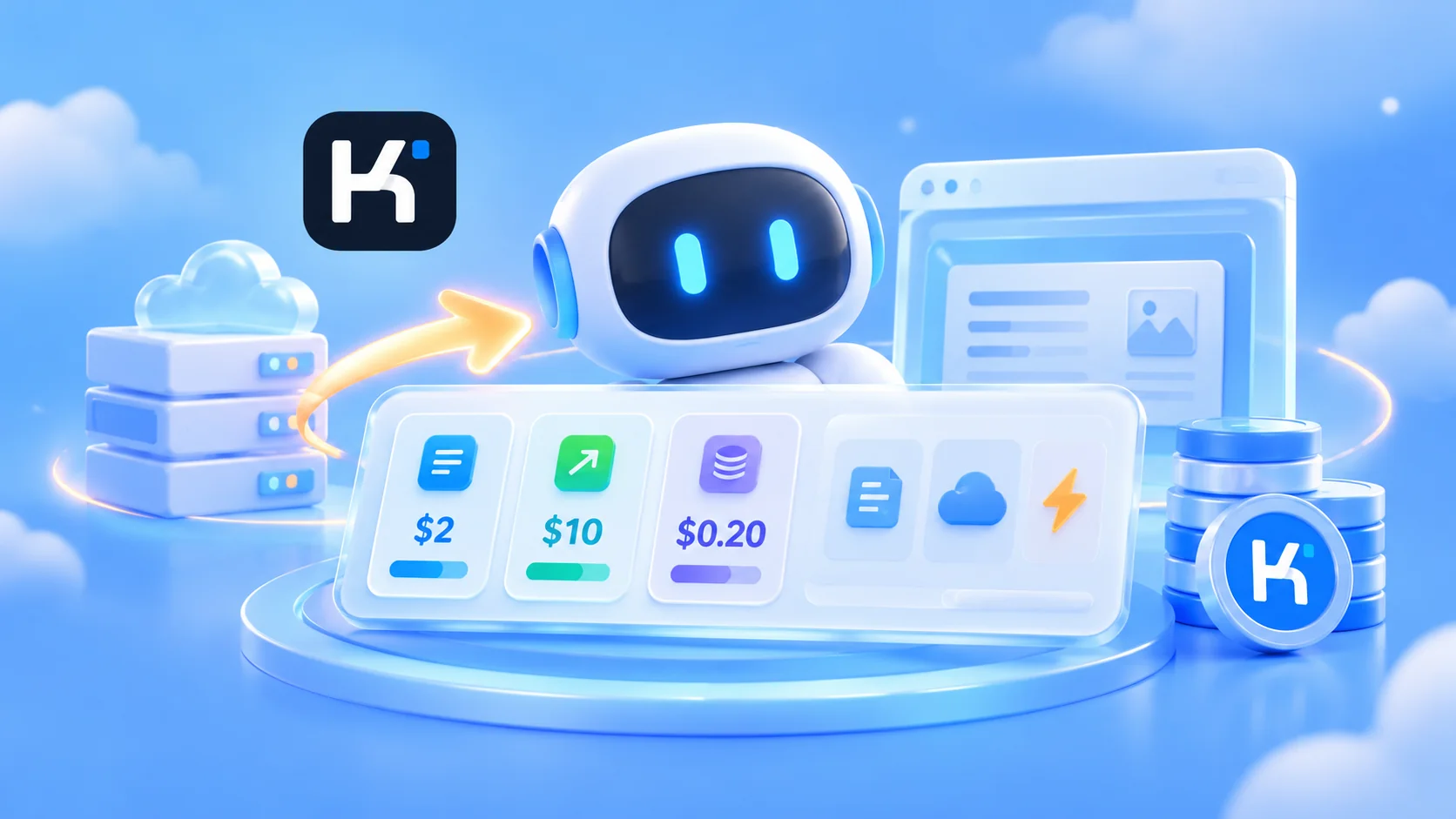
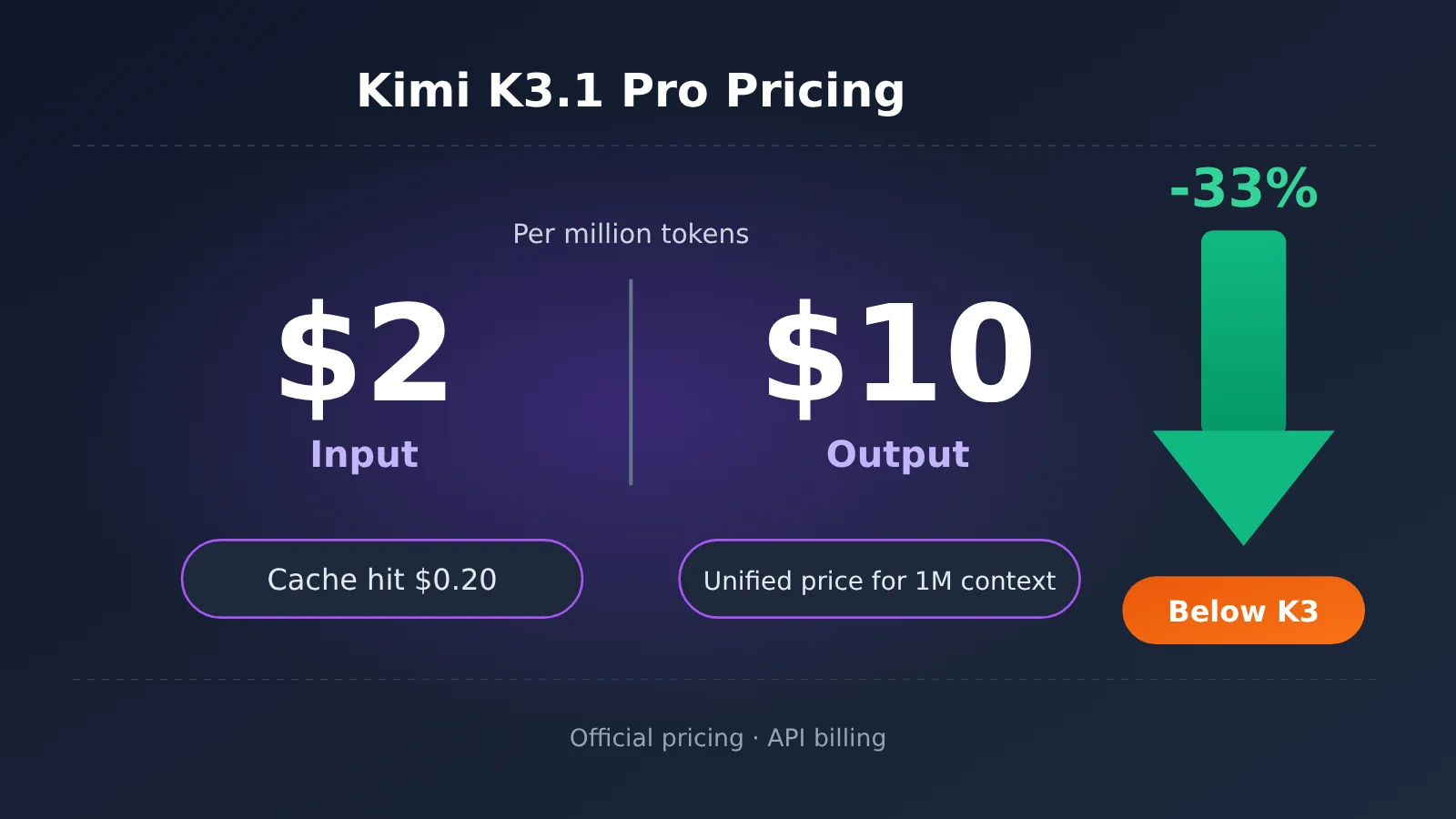
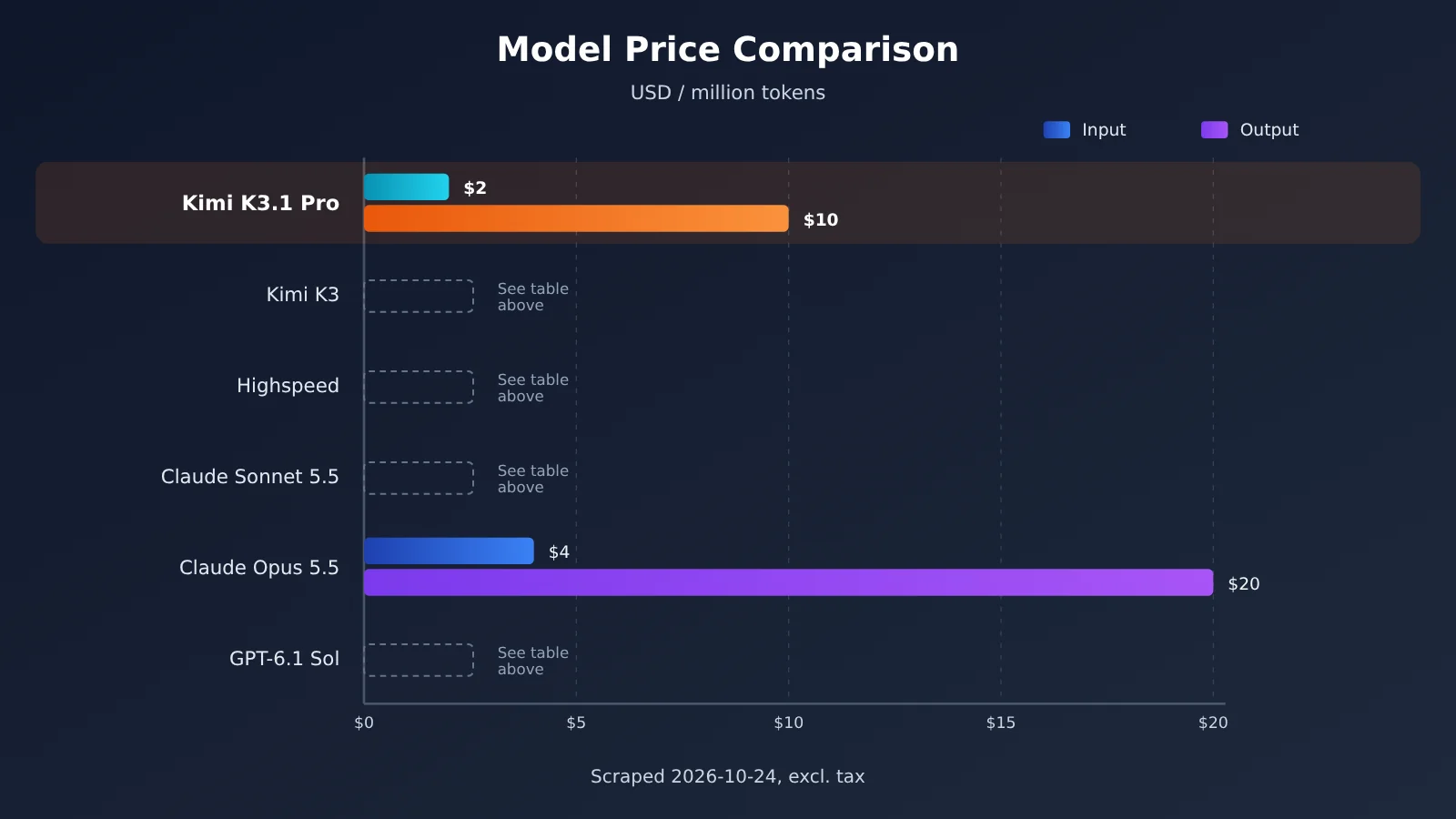
Kimi K3.1 Pro’s official pricing is $2 for input, $10 for output, and just $0.20 for cache hits (USD per million tokens). That’s 33% cheaper than the previous-generation Kimi K3. It’s priced the same as Claude Sonnet 5.5 and GPT-6.1 Sol, and costs half as much as Claude Opus 5.5.
These figures are based on Moonshot’s official pricing page (the pricing documentation on platform.kimi.ai) and cost calculations from third-party organization Artificial Analysis. Throughout the article, figures are labeled by source: “Official” means reported by Moonshot in its blog or official documentation; “Third-party” means estimated by external sources such as Artificial Analysis. Figures without a reliable source are labeled “Unverified.”
This isn’t an article that just copies the price list. A 33% price cut doesn’t mean your bill will necessarily drop by 33%. We’ll break down where you’ll save—and where you won’t.
What you’ll get from this article: By the end, you’ll be able to calculate the cost of a Kimi K3.1 Pro request yourself, know when to enable caching and when to upgrade your rate-limit tier in advance, and understand how developers in China can pay for and access the service.
1. Kimi K3.1 Pro Pricing: Key Takeaways
Here’s a table covering the questions people ask most often. The sections that follow go into more detail.
| Key point | Details | Source | What it means for you |
|---|---|---|---|
| Base rates | $2 for input / $10 for output / $0.20 for cache hits | Official | Same price tier as Sonnet 5.5 and GPT-6.1 Sol |
| Compared with the previous generation | All three rates are 33% lower than K3 | Official / third party | A significant drop in per-token prices |
| Context window | 1,048,576 tokens, with a single rate and no tiers | Official | Longer documents won’t trigger higher rates |
| Cost per task | About $1.98 for a published article / $2.11 for a model page | Third party | Roughly the same as K3, with no equivalent drop in actual task costs |
| Minimum requirements to get started | Add at least $1 in credits; Tier 0 is limited to 3 RPM | Official | You’ll need to upgrade your tier before scaling up |
First, let’s clarify two terms that come up throughout this article. A token is the smallest unit used for model billing. You can think of tokens as “fragments of words.” The official rule of thumb is that about 3–4 English characters equal 1 token. A million tokens (MTok) means 1,000,000 tokens, so the $2 rate in the pricing table means $2 for every million input tokens processed.
1.1 What Kimi K3.1 Pro charges for
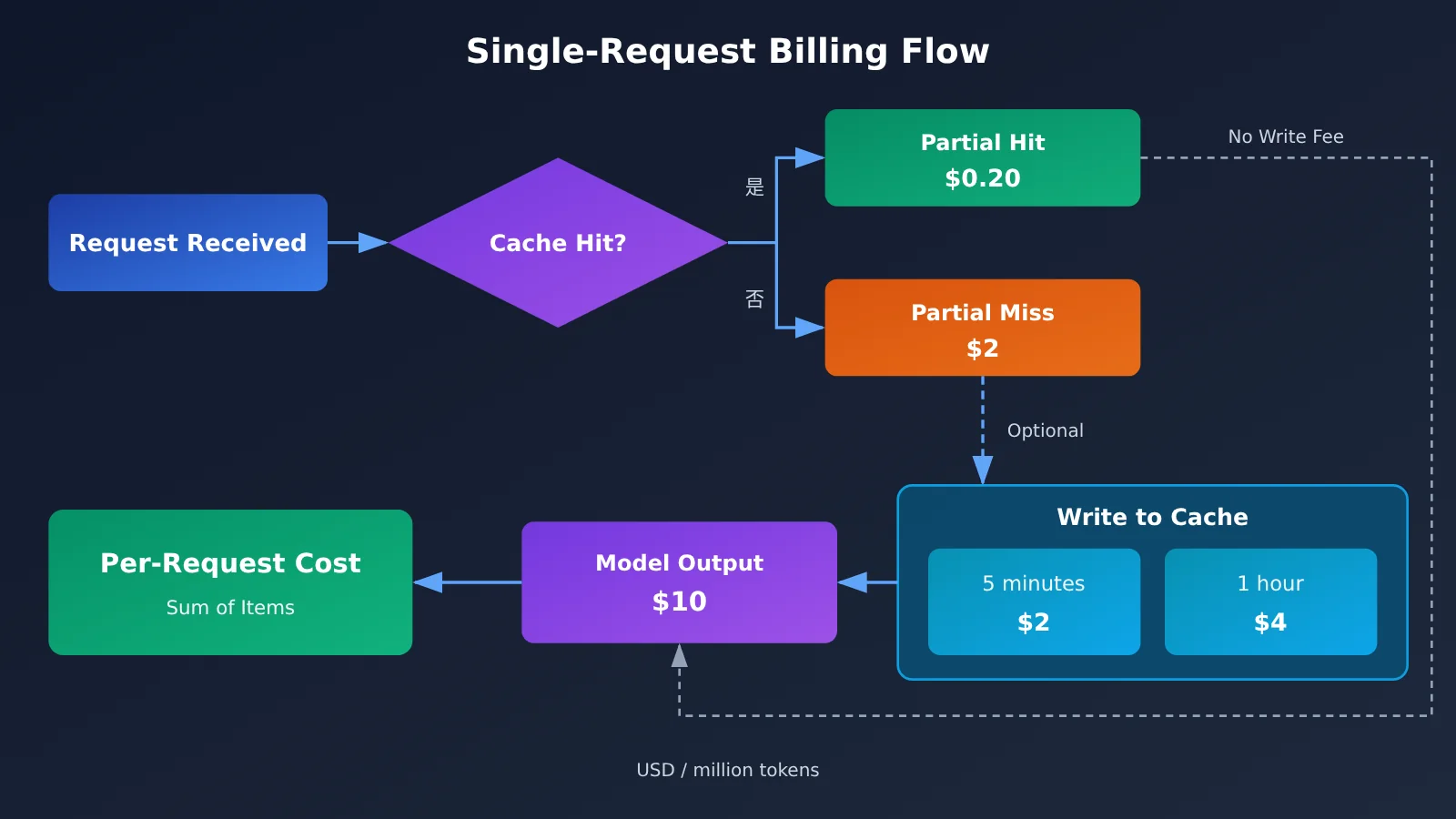
The official documentation lists three billable categories: cache writes (with 5-minute and 1-hour options), input (cache hits and misses are billed at different rates), and output. Together, these break down into the five price columns in the pricing table. Each request’s bill is the sum of these charges, calculated according to the number of tokens in each category.
Context caching is one of the most important parts of this pricing model. If the beginning of several consecutive requests is identical—for example, a long system prompt—the platform can store that content and reuse it in the next request. Reused content is billed at the much lower cache-hit rate. The official documentation says that Kimi API automatically enables cache billing for repeated request prefixes. The default TTL is 5 minutes; TTL means how long the cache is kept.
A few other easy-to-miss rules are also mentioned in the official documentation: cache hits on the K3 series are charged only at the cache-hit rate, with no additional write fee; file-related APIs, such as document content extraction and file storage, are currently free, but extracted content is still billed by token when sent to the model; and listed prices are before tax, with the final amount calculated according to the payment rules for your region.
2. Complete Kimi K3.1 Pro Pricing: All Five Rates at a Glance
The table below lists all five rates for Kimi’s current flagship models, making it easy to compare them side by side. “Not listed” means the official pricing page doesn’t provide a price for that item; it doesn’t mean it’s free.
| Model | Input (uncached) | Output | Cache hit input | Cache write, 5 minutes | Cache write, 1 hour |
|---|---|---|---|---|---|
| kimi-k3.1-pro | $2.00 | $10.00 | $0.20 | $2.00 | $4.00 |
| kimi-k3.1-pro-highspeed | $4.00 | $20.00 | $0.20 | $4.00 | $8.00 |
| kimi-k3 (previous generation) | $3.00 | $15.00 | $0.30 | $3.00 | $6.00 |
| kimi-k2.7-code | $0.95 | $4.00 | $0.19 | Not listed | Not listed |
| kimi-k2.6 | $0.95 | $4.00 | $0.16 | Not listed | Not listed |
Note: Retrieved on 2026-10-24. Prices are in USD per million tokens and exclude tax. Source: official pricing page.
A few patterns stand out. First, K3.1 Pro’s 5-minute cache write rate is the same as its standard input rate, at $2, so enabling a 5-minute cache adds virtually no cost. The 1-hour cache write rate is $4, twice the input rate. Second, every rate for the Highspeed version is twice the standard version’s—except the cache hit rate, which is also $0.20. That narrows the gap between the two when reusing long prefixes. Third, K2.7 Code and K2.6 cost less than half as much per unit as K3.1 Pro. They’re still more affordable options for tasks that don’t require the strongest reasoning capabilities.
2.1 Comparing Kimi K3.1 Pro with Models at Similar Price Points
Looking at several leading models side by side on the same pricing basis (USD per million tokens) makes K3.1 Pro’s position clearer.
| Model | Input / Output | Cached input | Cache write · short tier | Cache write · long tier | Source |
|---|---|---|---|---|---|
| Kimi K3.1 Pro | $2 / $10 | $0.20 | $2 (5 minutes) | $4 (1 hour) | Official |
| Kimi K3.1 Pro Highspeed | $4 / $20 | $0.20 | $4 (5 minutes) | $8 (1 hour) | Official |
| Claude Sonnet 5.5 | $2 / $10 | $0.10 | $2.50 (5 minutes) | $4 (1 hour) | Official |
| Claude Opus 5.5 | $4 / $20 | $0.20 | $5 (5 minutes) | $8 (1 hour) | Official |
| GPT-6.1 Sol (input ≤272K) | $2 / $10 | $0.10 | $2.50 (30 minutes) | $5 (12 hours) | Official |
| GPT-6.1 Sol (input >272K) | $4 / $15 | $0.20 | $5 (30 minutes) | $10 (12 hours) | Official |
| GPT-6 Astra (input ≤272K) | $10 / $50 | $1.00 | $12.50 (30 minutes) | $25 (12 hours) | Official |
| GPT-6 Astra (input >272K) | $20 / $75 | $2.00 | $25 (30 minutes) | $50 (12 hours) | Official |
The figures in the table come from each provider’s official pricing page, captured on 2026-10-24. Prices are in USD per million tokens and exclude tax. The three providers offer different cache tiers: Kimi and Claude use 5-minute and 1-hour tiers, while OpenAI uses 30-minute and 12-hour tiers. Cache write prices are 1.25× and 2.5× the uncached input price, respectively. For most models, the cache read price is 10% of the input price; GPT-6.1 Sol is the exception at 5%. OpenAI also uses input-length pricing tiers: inputs of ≤272K tokens use the short-context price, while inputs over 272K tokens move to the long-context price. The table lists standard pricing only. OpenAI’s half-price Batch option and its more expensive Fast (formerly Priority) and UltraFast options aren’t included.
Claude Sonnet 5.5 and GPT-6.1 Sol have lower cache hit prices ($0.10 for both), which makes them more cost-effective when frequently reusing long prefixes. However, Sonnet 5.5’s 5-minute cache write price is $2.50, slightly higher than K3.1 Pro’s $2. By contrast, K3.1 Pro is a better fit for tasks that involve loading large documents in one go, thanks to its lower write price and consistent pricing across context lengths. Claude Opus 5.5 costs twice as much as K3.1 Pro for both input and output, so the reason to choose it should be its capabilities, not its price. GPT-6.1 Sol’s drawback is its cache write price: the 30-minute tier costs $2.50, more than K3.1 Pro’s 5-minute tier at $2. It also uses input-length pricing tiers: once an input exceeds 272K tokens, input pricing rises to $4 and output pricing to $15. For long-document tasks, use the long-context row when estimating costs.
Recommendation: The real-world performance of similarly priced models depends on the task, so we recommend testing them with the same set of prompts before deciding. APIYI (apiyi.com) lists models including claude-sonnet-5-5, claude-opus-5-5, and kimi-k3, so you can compare them using a single API key. The exact model name and price for K3.1 Pro will be listed in the platform’s model catalog. We’ll make this model available as soon as possible.
3. How Much Does One Kimi K3.1 Pro Request Cost? 3 Examples
Once you understand the pricing table, the real question is: “How much will this particular request cost me?” The three examples below cover common scenarios: a short conversation, reusing a long prompt, and reading a long document. We’ve included the calculations so you can plug in your own token counts. The general formula is: cost = number of tokens × price per token ÷ 1,000,000.
3.1 Example 1: Cost of a Short Kimi K3.1 Pro Request
Scenario: A typical Q&A with 2,000 input tokens (no cache hit) and 500 output tokens.
- Input:
2000 × 2 ÷ 1000000 = $0.004 - Output:
500 × 10 ÷ 1000000 = $0.005 - Total:
$0.004 + $0.005 = $0.009
That’s less than one cent for a short conversation like this. Keep in mind that the output price is five times the input price, so output often accounts for more than half the cost of a short request. Keeping outputs short is more effective than trimming the input.
3.2 Example 2: Reusing and Caching a Long Prompt with Kimi K3.1 Pro
Scenario: A 20,000-token system prompt, followed by 10 questions over 5 minutes. Each question adds 1,000 new input tokens and generates 800 output tokens.
Without caching, you pay the full price for the entire prompt with every request:
- Per request:
(20000 + 1000) × 2 ÷ 1000000 + 800 × 10 ÷ 1000000 = $0.042 + $0.008 = $0.05 - For 10 requests:
$0.05 × 10 = $0.50
With caching, the system prompt is written to the cache on the first request, and the next 9 requests hit the cache:
- Request 1: Cache write:
20000 × 2 ÷ 1000000 = $0.04, plus$0.002for new input and$0.008for output, for a total of$0.05 - Requests 2–10, each: Cache hit:
20000 × 0.2 ÷ 1000000 = $0.004, plus$0.002 + $0.008, for a total of$0.014 - Total for the remaining 9 requests:
$0.014 × 9 = $0.126 - Grand total:
$0.05 + $0.126 ≈ $0.18
The same 10 conversations go from $0.50 to about $0.18, saving roughly 60%. This pattern—“a long, fixed prompt followed by multiple questions”—is common in customer service bots, coding assistants, and agent frameworks, making it an ideal use case for caching.
3.3 Example 3: Reading a Long Document with Kimi K3.1 Pro
Scenario: Read a 300,000-token document and generate a 3,000-token summary.
- Input:
300000 × 2 ÷ 1000000 = $0.60 - Output:
3000 × 10 ÷ 1000000 = $0.03 - Total: About
$0.63
If you ask another question about the same document within 5 minutes, the document portion will hit the cache. The input cost will be just 300000 × 0.2 ÷ 1000000 = $0.06, plus the cost of the output. If you need to ask follow-up questions about the same contract, financial report, or codebase, grouping them within the cache validity window can significantly reduce costs.
4. Kimi K3.1 Pro 1M Context Flat Pricing: What Does No Tiering Mean?
Context is the total amount of content a model can process at once, including your prompt, conversation history, and uploaded documents. The official documentation says all K3 models support a 1,048,576-token context window, and K3.1 Pro uses flat, usage-based pricing with no tiers based on context length.
The official FAQ says that K3.1 Pro offers a 1M context window with flat, usage-based pricing: cache writes, input tokens (cache hits and misses), and output tokens are all billed at the same rate. In other words, whether you send 2,000 tokens or 800,000 tokens, the price per million tokens is the same $2. A longer request doesn’t push you into a more expensive pricing tier.
This matters when comparing models, because not every provider prices this way. OpenAI’s GPT-6 series has input-length tiers: requests of up to 272K tokens use the short-context rate, while anything over 272K tokens immediately moves to a more expensive long-context rate. For example, with GPT-6 Astra, input pricing jumps from $10 to $20, output pricing from $50 to $75, and cache-hit pricing from $1.00 to $2.00. Claude takes a different approach: its official pricing page says Claude 4.6 and later models (except Claude Haiku 5.5) use standard pricing across the full 1M context window. A 900,000-token request costs the same per token as a 9,000-token request. Only Claude Haiku 5.5 gets more expensive when prompts exceed 100,000 tokens. So K3.1 Pro isn’t the only model without context-length tiers: Claude Sonnet 5.5 and Opus 5.5 also don’t charge more for longer contexts. GPT-6 is the series that actually has tiered pricing.
For developers, flat pricing has two direct benefits:
- Budgets are easy to estimate linearly: Double the number of tokens and you double the cost. There’s no sudden price jump at a particular length, so you can calculate the cost of a 300,000-token document like the one in Example 3 by multiplying it by the standard rate.
- You don’t need to split documents into chunks: With tiered pricing, some people split long documents into multiple parts to avoid the more expensive tier. That won’t save you money with K3.1 Pro, and it could hurt results by breaking the context.
5. Why Kimi K3.1 Pro Saves Money—and Where It Doesn’t
Let’s do the math honestly. The prices have come down, but the actual cost of a task still depends on how much it outputs.
| Dimension | Details | Source | Cost impact |
|---|---|---|---|
| Lower prices | Input, output, and cache-hit prices are all 33% lower than K3 | Official / third party | Saves money |
| Cache-hit price | $0.20, just 1/10 of the input price | Official | Significant savings when reusing long prefixes |
| 1-hour cache write | $4, twice the input price | Official | More cost-effective for tasks with longer intervals; not necessary for short tasks |
| Always-on thinking | Thinking can’t be disabled; average output is 55K tokens, 14% more than K3 | Official / third party | Offsets some of the price reduction |
| Cost per task | $1.98 (published article) / $2.11 (weighted figure on the model page) | Third party | Roughly on par with K3 |
5.1 Three Ways Kimi K3.1 Pro Saves Money
First, its prices are 33% lower across the board: input and output prices drop from $3/$15 with K3 to $2/$10, while cache hits drop from $0.30 to $0.20. These figures are consistent across the official pricing page and Artificial Analysis data.
Second, a cache hit costs just 1/10 of the input price. As Example 2 showed, multi-turn conversations with a fixed, long prompt can save around 60%.
Third, although a 1-hour cache write costs twice as much, it keeps the cache around for longer. That makes it a good fit for tasks where calls are more than five minutes apart, such as a scheduled Agent that runs every few minutes, or long-document Q&A where users pause to think before asking a follow-up. If the cache is hit more than twice within an hour, the extra write cost will usually pay for itself.
5.2 Where Kimi K3.1 Pro Doesn’t Save Money
Thinking is when the model works through a problem internally before giving an answer. That reasoning is also billed as output. The official documentation says you can’t turn off thinking in K3.1 Pro; you can only set reasoning_effort to low to reduce how much it thinks.
According to Artificial Analysis, a third-party evaluator, K3.1 Pro outputs an average of around 55K tokens per task on its Intelligence Index, compared with 48K for K3—14% more. Output tokens are the most expensive, so those extra tokens eat into some of the savings. The third-party estimate puts the cost per task at about $1.98 using the published-article figure, while the model page shows a weighted cost of $2.11 per task, with a 90% cache discount applied. That’s roughly on par with K3.
So, if your workload mainly involves long inputs and repeated multi-turn use, K3.1 Pro’s lower prices can make a noticeable difference to your bill. But if you mostly run complex reasoning tasks with long outputs, the cost per task may not be lower than K3’s. It’s worth running a small batch of real-world tasks first, then checking the actual bill.
6. Kimi K3.1 Pro Top-Up Requirements and Rate Limits
Kimi uses pay-as-you-go pricing, with no subscription plan. Kimi API billing is separate from Kimi membership and Kimi Code, so a membership plan won’t cover API costs. You need to add at least $1 to your account before you can make API calls. Add $5 or more in total and you’ll receive a $5 coupon. The coupon doesn’t count toward your cumulative top-up amount (according to the official documentation).
Rate limits depend on your cumulative top-up amount. Here’s what the abbreviations mean: concurrency is the number of requests that can run at the same time; RPM is the maximum number of requests per minute; TPM is the maximum number of tokens processed per minute; and TPD is the maximum number of tokens processed per day.
| Tier | Cumulative top-up | Concurrency | RPM | TPM | TPD |
|---|---|---|---|---|---|
| Tier0 | $1 | 1 | 3 | 500,000 | 1,500,000 |
| Tier1 | $10 | 15 | 100 | 2,000,000 | Unlimited |
| Tier2 | $20 | 40 | 100 | 3,000,000 | Unlimited |
| Tier3 | $100 | 50 | 200 | 3,000,000 | Unlimited |
| Tier4 | $1000 | 60 | 200 | 4,000,000 | Unlimited |
| Tier5 | $3000 | 100 | 300 | 5,000,000 | Unlimited |
Note: Based on the official rate limits documentation (the pricing/limits page on platform.kimi.ai), retrieved on 2026-10-24.
Tier0’s limits are very restrictive: you can send only 3 requests per minute, with a daily cap of 1.5 million tokens. Based on the 300,000-token document in Example 3, you could process it just 5 times a day before hitting the cap. And with a TPM limit of 500,000, you can’t even fit two documents of that size into a single minute. If you’re processing requests in bulk or launching a service for users, consider increasing your cumulative top-up to Tier1 or above during testing.
One more important point: according to the official documentation, rate limits triggered by risk controls can’t be lifted. Before launch, implement request rate limiting and exponential backoff for retries on the client side. Don’t use a concurrency script to probe the limits.
7. How to Pay for and Integrate Kimi K3.1 Pro in China
Official channels price in US dollars and settle payments according to the rules for your payment region. Although direct payment from China is available, developers in China often have concerns about international payment methods, invoices, and having to manage API keys from multiple providers. Another option is to use an API aggregation platform, where one account and one API key let you access models from multiple providers.
APIYI (apiyi.com) is an AI Large Language Model API aggregation platform. With a single API key, you can access leading models from OpenAI, Claude, Gemini, and others. Its API is compatible with the OpenAI format, billing is usage-based, and new users get free testing credits. According to a review of the platform’s model list at docs.apiyi.com/models on 2026-10-24, the Kimi models currently available are:
kimi-k3: $3 input / $15 output / $0.3 cache readskimi-k2.7-code: $0.95 input / $3.99 output / $0.19 cache readskimi-k2.6: $0.6 input / $2.4 output / $0.1 cache readskimi-k2.5: $0.6 input / $3.15 output / $0.1 cache reads
As of that review, kimi-k3.1-pro wasn’t listed on APIYI, so this article doesn’t provide a price for it on the platform. Check the model list in the platform console for the K3.1 Pro model name, price, and availability. We’ll add this model as soon as possible. Until then, you can use kimi-k3 to get your integration working. Once K3.1 Pro is available, you’ll only need to change the model name.
7.1 Quickstart: Kimi K3.1 Pro
The integration steps are roughly the same whether you use the official service or an aggregation platform. Here’s an example using an OpenAI-compatible API:
- Sign up and get an API key. With the official service, you’ll need to add at least $1 in credit first.
- In your OpenAI SDK or client, set
base_urltohttps://api.apiyi.com/v1when using APIYI. If your project uses the Anthropic format, set the base URL tohttps://api.apiyi.com. - Set
api_keyto your key andmodelto a name from the platform’s model list—for example, the currently availablekimi-k3. Once K3.1 Pro is available, use the name shown in the list. - To reduce output costs from reasoning, add
reasoning_effortto your request parameters and set it tolow. According to the official documentation, K3.1 Pro lets you reduce reasoning effort but doesn’t support turning it off. - Put your fixed, long system prompt at the beginning of the messages and keep it unchanged so repeated prefixes can automatically hit the cache.
- After making a call, check the token counts for input, cache hits, and output in your billing details or the response’s usage fields. Then recalculate the cost using the formula in Section 3.
Quickstart tip: Use the free testing credits from APIYI at apiyi.com to run Example 2 in Section 3. Compare usage with and without a fixed prefix—this is the quickest way to check whether caching is working. The K3.1 Pro model name and price on the platform are subject to the model list. We’ll add this model as soon as possible.
Frequently Asked Questions
Q1: How much does Kimi K3.1 Pro actually cost?
The official prices are $2 for input, $10 for output, $0.20 for cache hits, $2 for 5-minute cache writes, and $4 for 1-hour cache writes, all in USD per million tokens, excluding tax. Prices retrieved on 2026-10-24.
Q2: How much cheaper is Kimi K3.1 Pro than K3? Will my actual bill drop by 33%?
All three rates are 33% lower (according to the official pricing). However, K3.1 Pro always uses reasoning and produces 14% more output on average. Artificial Analysis estimates the cost per task at around $1.98 to $2.11, making it roughly on par with K3. You’ll see bigger savings with long inputs and repeated use across multiple turns.
Q3: Which is cheaper, Kimi K3.1 Pro or Claude Sonnet 5.5?
Both models charge $2/$10 for input and output. Sonnet 5.5 has cheaper cache hits ($0.10), while K3.1 Pro has cheaper 5-minute cache writes ($2 vs. $2.50) and a consistent rate for its 1M context window. Sonnet is a better fit for frequently reused short prefixes, while K3.1 Pro may be cheaper for reading large documents in one go. It’s best to compare them on your actual tasks.
Q4: Is Kimi K3.1 Pro’s 1-hour cache worth enabling?
A 1-hour cache write costs $4, which is $2 more than a 5-minute write. It’s usually worth enabling if the same prefix will be reused at least twice more than 5 minutes but less than 1 hour later. If your calls are all clustered within a few minutes, the default 5-minute cache is enough.
Q5: How can developers in China call Kimi K3.1 Pro through the API?
You can use the official service or connect through APIYI at apiyi.com using an OpenAI-compatible interface. Set `base_url` to `https://api.apiyi.com/v1`. The platform currently offers models such as `kimi-k3` and `kimi-k2.7-code`. Check the platform’s model list for K3.1 Pro’s model name and pricing. We’ll make this model available as soon as possible.
Q6: Can a Kimi membership cover API costs?
No. According to the official information, Kimi API is pay-as-you-go with no subscription plan. It’s billed separately from Kimi memberships and Kimi Code.
Q7: What billing gotchas should I know about with Kimi K3.1 Pro?
– Reasoning can’t be disabled, so output token usage may be higher. You can set `reasoning_effort` to `low` to reduce it.
– Tier 0 is limited to 3 RPM and 1.5 million TPD. Upgrade in advance if you need more capacity.
– Rate limits triggered by risk controls can’t be lifted.
– File extraction is free, but content sent to the model after extraction is billed as input.
Q8: What can I do now if my platform doesn’t offer K3.1 Pro yet?
You can set up your call flow, caching, and usage tracking with `kimi-k3` on APIYI at apiyi.com, then switch the model name once K3.1 Pro is available. Check the platform’s model list for the exact model name and pricing. We’ll make this model available as soon as possible.
Kimi K3.1 Pro Pricing: Key Takeaways
- Base pricing: $2 for input, $10 for output, and $0.20 for cache hits. These are the official prices, excluding tax.
- Five pricing tiers: 5-minute cache writes cost $2, and 1-hour cache writes cost $4—both are inexpensive.
- Where it stands: It’s priced the same as Sonnet 5.5 and GPT-6.1 Sol, and at half the price of Opus 5.5.
- Flat pricing: The 1M context window isn’t billed in length-based tiers, so you can estimate costs linearly.
- Real-world costs: Always-on thinking generates 14% more output, keeping per-task costs roughly on par with K3 (third-party estimate).
- Getting started: The minimum top-up is $1. Tier 0 is limited to 3 RPM, and rate limits imposed by risk controls can’t be lifted.
- Access in China: You can connect through APIYI’s OpenAI-compatible API. Check the platform’s model list for K3.1 Pro’s availability and pricing—we’ll add this model as soon as possible.
Summary
Key points about Kimi K3.1 Pro pricing:
- Pricing: $2 for input, $10 for output, and $0.20 for cache hits. That’s 33% less than K3, with a flat rate for the 1M context window.
- How to save: Put fixed, long prefixes at the beginning and make good use of caching. This can reduce input costs by about 60% in multi-turn conversations.
- What to expect: Always-on thinking means longer outputs. For complex reasoning tasks, per-task costs are close to K3’s, so don’t budget based on a 33% reduction.
- Before launch: Upgrade your rate-limit tier in advance and manage request rates to avoid triggering risk-control limits that can’t be lifted.
Use the formula in Section 3 with your own token distribution to estimate costs, then validate your estimate with a small number of real tasks. If you need to compare Kimi, Claude, GPT, and other models in China using a single API key, you can get a free trial through APIYI at apiyi.com. Check the platform’s model list for K3.1 Pro’s availability and pricing—we’ll add this model as soon as possible.
References
- Kimi Open Platform — Model Pricing: Pricing tiers and billing rules for K3.1 Pro and other models
- Link:
platform.kimi.ai/docs/pricing/chat -
Notes: Official source for the pricing table and unified billing rules for 1M context windows
-
Kimi Open Platform — Top-Ups and Rate Limits: Tier 0 through Tier 5 and risk-control policies
- Link:
platform.kimi.ai/docs/pricing/limits -
Notes: Official source for top-up requirements and RPM/TPM/TPD limits
-
Artificial Analysis — Kimi K3.1 Pro: Third-party estimates of per-task costs and output token usage
- Link:
artificialanalysis.ai -
Notes: Source for the $1.98 / $2.11 per-task cost estimates and the 55K output token figure in this article
-
APIYI Model List: Models currently available on the platform and their prices
- Link:
docs.apiyi.com/models - Notes: Shows which models, including Kimi and Claude, are available on the platform
Author: APIYI Technical Team
Technical questions: Contact us via the APIYI homepage. For more information, visit the documentation center at docs.apiyi.com.