<rect x="450" y="160" width="290" height="250" rx="18" fill="url(#rightPurple)"/>
<text x="595" y="210" text-anchor="middle" fill="#ffffff" font-size="26" font-weight="800">Lite</text>
<text x="595" y="255" text-anchor="middle" fill="#ffffff" font-size="19">Only 1K canvas</text>
<text x="595" y="295" text-anchor="middle" fill="#ffffff" font-size="19">Approximately 4 seconds ultra-fast</text>
<text x="595" y="335" text-anchor="middle" fill="#ffffff" font-size="19">$0.034 saved</text>
<text x="595" y="385" text-anchor="middle" fill="#e2e8f0" font-family="Consolas, monospace" font-size="15">flash-lite-image</text>

<circle cx="400" cy="285" r="42" fill="#0f172a" stroke="#f97316" stroke-width="3"/>
<text x="400" y="298" text-anchor="middle" fill="#f97316" font-size="30" font-weight="800">VS</text>
Ever since Google split the Nano Banana image family into different tiers, the question developers ask most often is: What’s the real difference between Nano Banana 2 and Nano Banana 2 Lite, and which one should I choose? The two models differ by only a "Lite" in the name, but their actual positioning is completely different. Choosing the wrong one means either wasting money or hitting a wall when it comes to critical image quality.
In short, Nano Banana 2 (the standard version, gemini-3.1-flash-image) is the all-rounder, supporting resolutions from 512 up to 4K with a higher quality ceiling. Nano Banana 2 Lite (gemini-3.1-flash-lite-image) is the lightweight version launched in late June 2026; it only outputs at 1K, but it’s insanely fast and incredibly cheap. One is for "all-purpose high-quality output," while the other is for "high-volume, rapid production."
This article breaks down the differences across six dimensions: resolution, speed, cost, Elo rating, capability boundaries, and use cases, providing you with a decision-making framework you can use right away. The data in this article comes from official English sources and public benchmarks. It’s worth noting that both models are currently available via official Google channels, and APIYI (apiyi.com) also provides a unified interface, making it easy for you to switch and compare them within the same codebase.
Nano Banana 2 vs Lite Core Specs: A Quick Comparison Table
Before we dive into the details, let’s get a high-level overview with a summary table. This table covers the hard metrics that matter most for your selection, and we’ll expand on the trade-offs in the following sections.
| Comparison Dimension | Nano Banana 2 (Standard) | Nano Banana 2 Lite |
|---|---|---|
| Official Model Name | gemini-3.1-flash-image |
gemini-3.1-flash-lite-image |
| Release Date | February 2026 | June 30, 2026 |
| Resolution | 512 / 1K / 2K / 4K | 1K only |
| Aspect Ratio | Up to 14 types | Primarily 1K standard format |
| Generation Speed | ~4-6 seconds | ~4 seconds (faster) |
| Cost Positioning | 4K approx. $0.151 / image | 1K approx. $0.034 / image |
| Text-to-image Elo | ~1280 (Arena Leaderboard) | 1251 (Official Benchmark) |
| Core Positioning | All-rounder, quality ceiling | High throughput, low cost, near real-time |
From this table, you can immediately see the division of labor: The standard version wins on "capability ceiling," while the Lite version wins on "unit efficiency." The standard version is the all-rounder that can handle any task and deliver 4K when needed, while the Lite version bets everything on speed and unit price, at the cost of sacrificing high resolution and aspect ratio flexibility.
A quick heads-up: the two Elo scores in the table come from different leaderboards and timeframes, so they shouldn't be compared directly. The 1251 for Lite is from Google's internal benchmark (where it slightly outperforms the Pro's 1245 under the same criteria), while the 1280 for the standard version comes from a third-party Arena leaderboard. They each demonstrate that the model is "highly competitive in its own lane," rather than representing an exact head-to-head win/loss ratio. We'll explain this in more detail later.
🎯 Quick Conclusion: Choose the standard version if you need 4K or complex compositions; go with Lite for high-volume 1K rapid production. When in doubt, I recommend using the unified APIYI (apiyi.com) interface to connect both models and run a comparison with your own real-world prompts before making a final decision.
Dimensions 1 & 2: Resolution and Speed, Lite Trades Flexibility for Efficiency
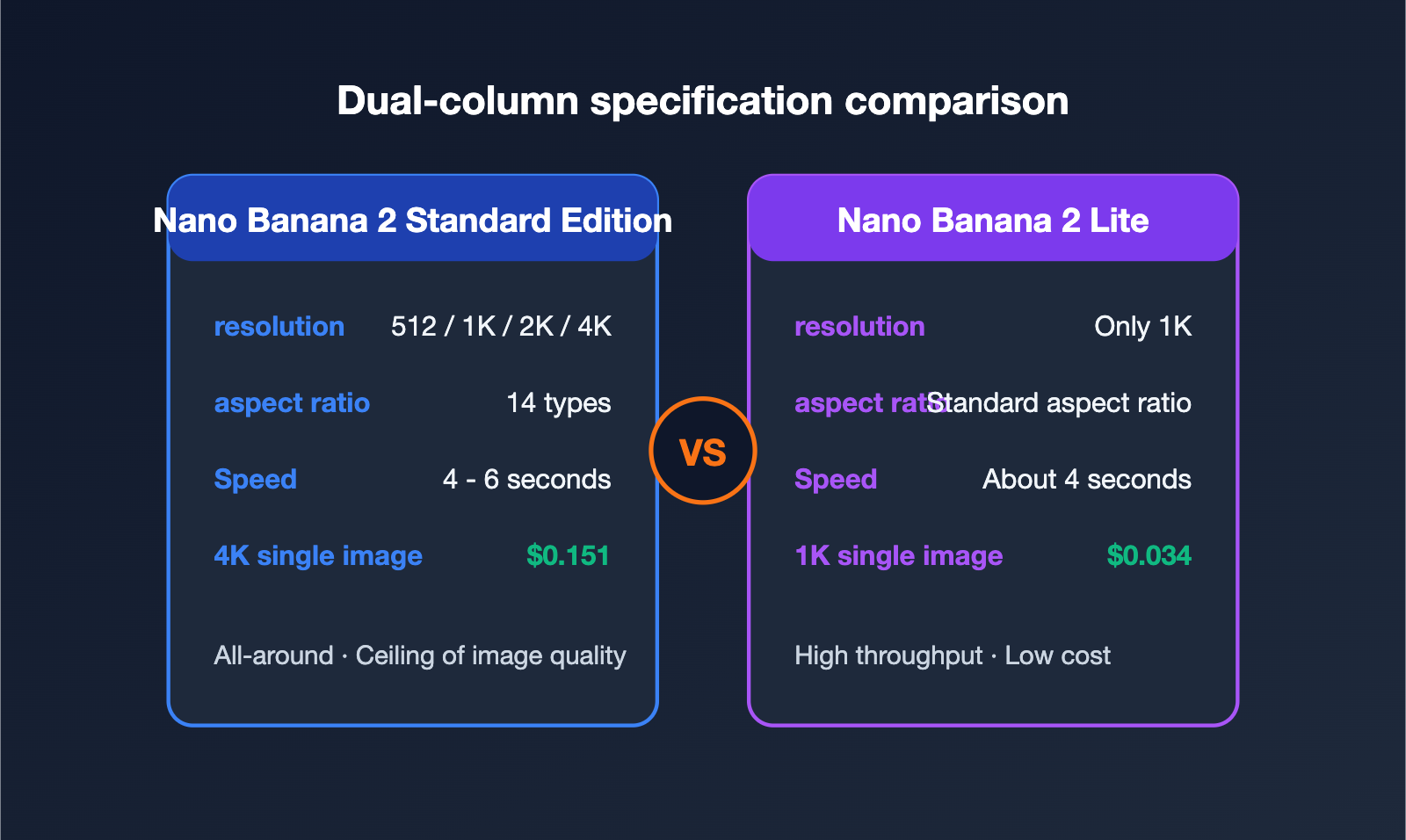
Resolution is the most obvious dividing line between the two. The standard Nano Banana 2 supports 512×512, 1K, 2K, and 4K output, offering up to 14 aspect ratios. Whether you need a vertical poster, a horizontal banner, or a square profile picture, it’s got you covered right out of the box. Nano Banana 2 Lite, on the other hand, locks resolution at 1K—that’s the core trade-off for its extreme speed and lower price.
In terms of speed, both are actually quite fast; the difference lies in stability and the upper limit. Standard version generation typically takes 4 to 6 seconds, fluctuating based on resolution and composition complexity. Lite stays steady at around 4 seconds, and because it only handles 1K, the latency jitter is much lower. This makes for a smoother experience in interactive scenarios that require "near-real-time feedback."
Looking at these two dimensions together, the conclusion is clear:
- Need large images or multiple aspect ratios? → The standard version is pretty much your only choice; Lite is out of the running.
- Need stable, low latency and 1K is acceptable? → Lite offers a better experience, especially in products where users frequently tweak prompts and need instant previews.
- Both fit your needs? → It comes down to cost and quality, which is exactly what the next two sections cover.
🎯 Integration Tip: If your business requires both 1K drafts and 4K final assets, you don't have to choose just one. We recommend setting up both models on a reliable platform like APIYI (apiyi.com) and routing tasks accordingly—send drafts to Lite and final renders to the standard version. It’s both faster and more cost-effective.
Dimension 3: Price Comparison, Different Cost Structures
Price is often the deciding factor for many teams, but the billing logic for Nano Banana 2 and Lite isn't identical, which is a detail that often gets overlooked. You need to understand this clearly to calculate your actual costs.
| Billing Item | Nano Banana 2 (Standard) | Nano Banana 2 Lite |
|---|---|---|
| Primary Billing Method | Per token ($0.50/M input, $3.00/M output) | Per image |
| Typical Cost per Image | 4K official price approx. $0.151 | 1K approx. $0.034 |
| Batch Discount | 4K can drop to approx. $0.075 | —— |
| Relative Cost | Image generation is about half of Pro | Lowest in the family |
The standard version uses token-based billing, with 4K output costing roughly $0.151 per image officially, which can be slashed to about $0.075 using the batch API. Lite uses a simpler per-image pricing model, at about $0.034 for a 1K image. If you estimate based on "producing one usable image," the unit cost of Lite is just a fraction of the standard 4K version. This difference is magnified significantly in high-volume pipelines processing thousands of images.
However, keep in mind that this price gap is based on the assumption that "you can accept 1K." If your business strictly requires 4K, Lite’s low price is meaningless because it simply can't produce 4K. So, the right way to think about cost isn't "who is cheaper," but "who is cheaper while meeting the resolution requirements." For cost-sensitive scenarios that only need screen-level display, Lite is the king of value; for projects that require high-definition delivery, the standard version (combined with batch discounts) is the logical choice.
Dimension 4: Image Quality and Elo — Which Model Produces Better Results?
Image quality is the most easily misunderstood dimension. While Elo scores look precise, they come with many caveats. Let’s lay out the data first:
| Model | Primary Image Quality Performance | Reference Elo |
|---|---|---|
| Nano Banana 2 Standard | Stronger in complex compositions and realistic details; full 4K detail | Arena text-to-image ~1280 |
| Nano Banana 2 Lite | Excellent 1K single-image perception; base quality rivals flagships | Official text-to-image 1251 |
| First-gen Nano Banana | Previous generation baseline | 1151 |
It's important to highlight a common pitfall here: Elo scores from different leaderboards cannot be directly subtracted. The Lite's 1251 score comes from Google's internal metrics, where it actually ranks slightly higher than the Pro version under the same criteria. Meanwhile, the Standard version's ~1280 comes from a third-party Arena leaderboard. Since they use different test samples, judges, and timeframes, the math of "1280 is 29 points higher than 1251" simply doesn't hold up.
Setting the numbers aside, here’s the takeaway from actual experience: Lite performs impressively in the most common "one-prompt, one-1K-image" scenario. Its base visual quality is more than sufficient, thanks to the strong world knowledge and instruction-following capabilities inherited from the Gemini 3.1 generation. However, once you tackle "hard" tasks like multi-subject complex compositions, realistic face consistency, and ultra-high-resolution details, the Standard version’s advantages become clear—it reliably handles scenarios where the Lite version struggles. In other words, Lite is the "top student in high-frequency scenarios," while the Standard version is the "consistent performer across all scenarios."
🎯 Pro-tip: For subjective dimensions like image quality, baseline scores are only for reference; what really counts is your own output. We recommend running a set of representative prompts (especially those containing text, faces, and brand elements) through both models on APIYI (apiyi.com). Conduct a manual blind test before deciding which pipeline to use for specific tasks.
Dimensions 5 & 6: Capability Boundaries and Use Cases
Both models share the core capabilities of the Nano Banana 2 generation: stronger world knowledge (great for data charts and logical layouts), cross-image character consistency, clear in-image text rendering, and support for image editing. The difference lies in the "ceiling" of their capabilities rather than their presence. The Standard version goes further in high resolution, multiple aspect ratios, and complex compositions, while the Lite version makes trade-offs in these areas.
To apply these capability differences to your business, the following scenario recommendation table can help you find the right fit:
| Business Scenario | Recommended Model | Reason |
|---|---|---|
| Mass-batch e-commerce product images | Lite | 1K is sufficient, extremely low unit cost, high throughput |
| Social media / Daily operational assets | Lite | Frequent generation, great 4-second response experience |
| Real-time in-product image preview | Lite | Low latency supports interactive editing |
| Marketing key visuals / Posters | Standard | Requires 2K/4K and multiple aspect ratios |
| Realistic portraits / Complex multi-subjects | Standard | Better composition and face consistency |
| Print-grade high-res delivery | Standard | Only the Standard version supports 4K |
| Draft screening + Final polishing | Both | Use Lite for screening, Standard for final output |
The most important takeaway from this table is the last row: The best practice for many mature teams isn't choosing one over the other, but using a layered combination. Use Lite to generate a large volume of drafts at a very low cost and high speed for initial screening, then use the Standard version to produce the 2K/4K final versions once you've picked a direction. This way, you enjoy the cost and speed benefits of Lite without sacrificing final image quality.
To implement this "dual-model synergy" workflow, the easiest way is to use a unified interface. We recommend connecting via an aggregation platform like APIYI (apiyi.com). Using the same OpenAI-compatible code, you can freely switch between models just by changing the model field, eliminating the need to maintain two separate integration logics.
Decision Making: A Three-Step Guide to Choosing the Right Model
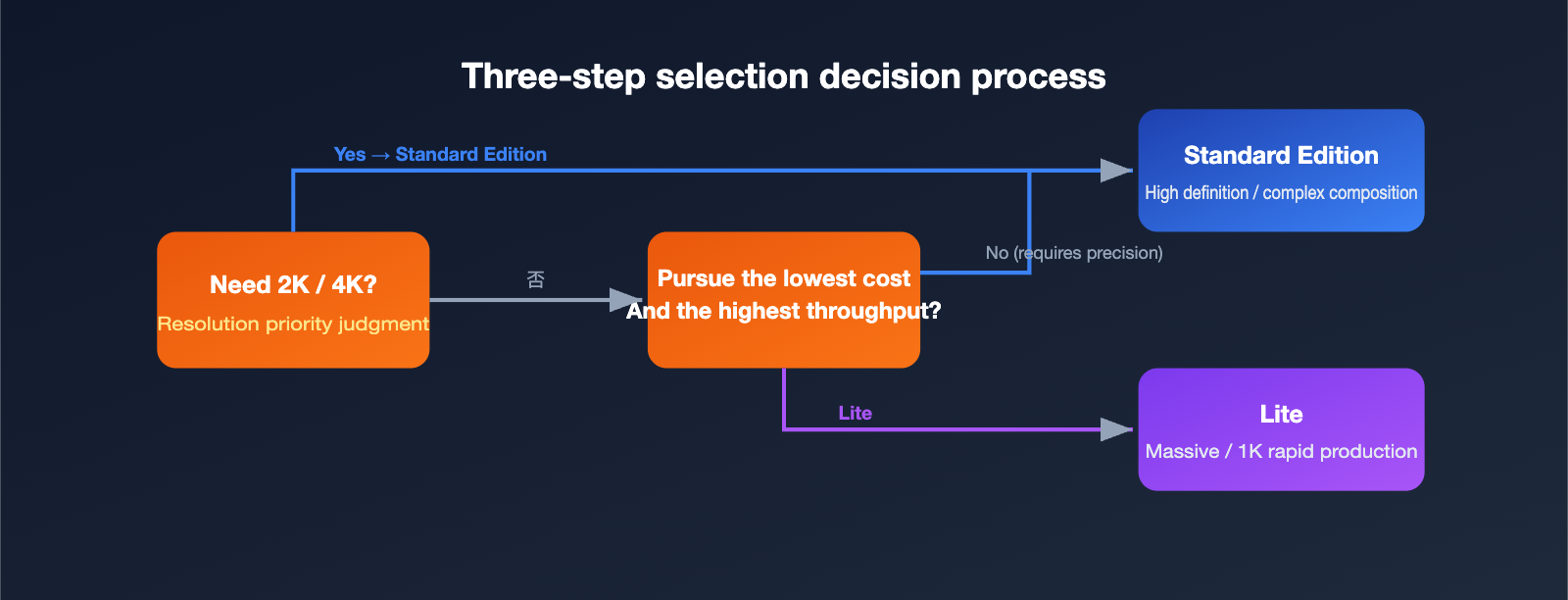
To condense those six dimensions into an actionable decision-making process, you only need to answer three questions:
- Do you need 2K or 4K resolution? If yes, go straight for the Nano Banana 2 Standard version. The Lite version won't cut it, so don't overthink it.
- Are you looking for the lowest cost and highest throughput, and is 1K resolution enough? If yes, choose the Nano Banana 2 Lite; it was built exactly for this scenario.
- Does your project involve complex composition, realistic face consistency, or high-precision brand reproduction? If yes, prioritize the Standard version; otherwise, the Lite version is perfectly capable.
If your business spans multiple scenarios (which is actually the norm), the optimal solution is usually to "integrate both and route as needed." This is why we repeatedly suggest using a unified interface platform: it makes the implementation cost of a multi-model strategy near zero. You can adjust your routing strategy at any time based on real-time trade-offs between cost, quality, and speed.
The following sample code shows how simple it is to switch between the two models using the same client:
# The same code, just change the model to switch between Standard and Lite
# base_url points to the APIYI apiyi.com unified interface
import openai

client = openai.OpenAI(
    api_key="YOUR_APIYI_KEY",
    base_url="https://api.apiyi.com/v1"
)

def gen_image(prompt, draft=False):
    # Use Lite for drafts (fast + cheap), use Standard for final versions (up to 4K)
    model = "gemini-3.1-flash-lite-image" if draft else "gemini-3.1-flash-image"
    size = "1024x1024" if draft else "2048x2048"
    return client.images.generate(model=model, prompt=prompt, size=size)
FAQ
Q1: What is the fundamental difference between Nano Banana 2 and Nano Banana 2 Lite?
The fundamental difference lies in resolution and positioning. The Standard version supports everything from 512 to 4K and multiple aspect ratios—it's your all-around workhorse. The Lite version only outputs 1K, but it's faster and significantly cheaper, designed specifically for high-frequency, high-volume scenarios. In short: the Standard version focuses on the "ceiling," while Lite focuses on "efficiency."
Q2: The Elo rating for Lite doesn't look low; can it completely replace the Standard version?
No. The high score for Lite mainly reflects the basic visual appeal of 1K images, whereas the Standard version is more stable with 4K details, complex compositions, and face consistency. Since their Elo ratings come from different leaderboards, they can't be compared directly. We recommend dividing tasks by scenario rather than treating them as direct replacements.
Q3: How big is the cost difference?
Assuming both meet your resolution requirements, a 1K image from Lite costs about $0.034, while the Standard 4K version is officially around $0.151 (or about $0.075 in bulk). The cost advantage of Lite is very clear in high-volume scenarios, provided you can accept 1K resolution. You can calculate the exact costs based on your actual usage at APIYI apiyi.com.
Q4: Can I use both models in the same project?
Absolutely, and that’s actually our recommended approach. Through the unified interface at APIYI apiyi.com, you can simply switch the model field using the same code—use Lite for drafts and the Standard version for final outputs to balance cost and image quality.
Q5: Which one should I choose if I'm upgrading from the original Nano Banana?
If you were using the first generation for high-frequency image generation, Lite is the officially recommended direct replacement with the lowest migration cost. If you need higher image quality or larger resolutions, upgrading to the Standard version is the better choice.
Summary: Choose Based on Your Use Case, Not Just Raw Power
Coming back to our original question—how do you choose between Nano Banana 2 and Nano Banana 2 Lite? The answer isn't about "who's stronger," but rather "who fits your specific needs better." The Standard version is your all-rounder, excelling at 2K/4K resolutions, multiple aspect ratios, and complex compositions. The Lite version is your efficiency expert, winning on its ~4-second generation speed and unbeatable cost-effectiveness at roughly $0.034 per 1K image.
The smartest approach is often to combine them: use Lite for batch processing, drafting, and real-time previews, and save the Standard version for high-definition final outputs and intricate compositions. This tiered strategy keeps your overall costs down while ensuring you never compromise on essential quality.
Regardless of which one you choose—or if you decide to use both—you can integrate them seamlessly and switch between them at any time using the unified interface provided by Wenta AI and APIYI (apiyi.com). Running a quick test with your own real-world data is always more reliable than just looking at specs on paper.
🎯 Next Steps: Want to compare them right now? We recommend using the same prompt to call
gemini-3.1-flash-imageandgemini-3.1-flash-lite-imagevia APIYI (apiyi.com). You'll be able to see which one fits your business needs better in just a few minutes.
Author: Wenta AI Technical Team | For more AI image model benchmarks and selection guides, visit APIYI at apiyi.com