Recently, many teams have been stuck for days on the same error when trying to integrate GPT-Image-2. Even with accounts upgraded to Tier 5 and credit cards linked, they’re getting blocked by a seemingly simple 4xx error. This is due to the "Verified Organization" mechanism that OpenAI officially introduced in 2025—any account wanting to use cutting-edge models like GPT-Image-2 or GPT-5 must first pass the Persona ID verification, and even long-time Tier 5 customers aren't exempt.
At APIYI (apiyi.com), we receive dozens of similar inquiries every day. The vast majority of customers are stuck on one of three issues: their country isn't on OpenAI's list of 200+ supported regions, their ID has already been used by another organization within the last 90 days, or the Persona verification shows as "passed" but the OpenAI backend simply refuses to sync the status. In this article, we’ve broken down these roadblocks into a diagnostic table and provided two workarounds to get your business running in under 5 minutes.
{
  "error": {
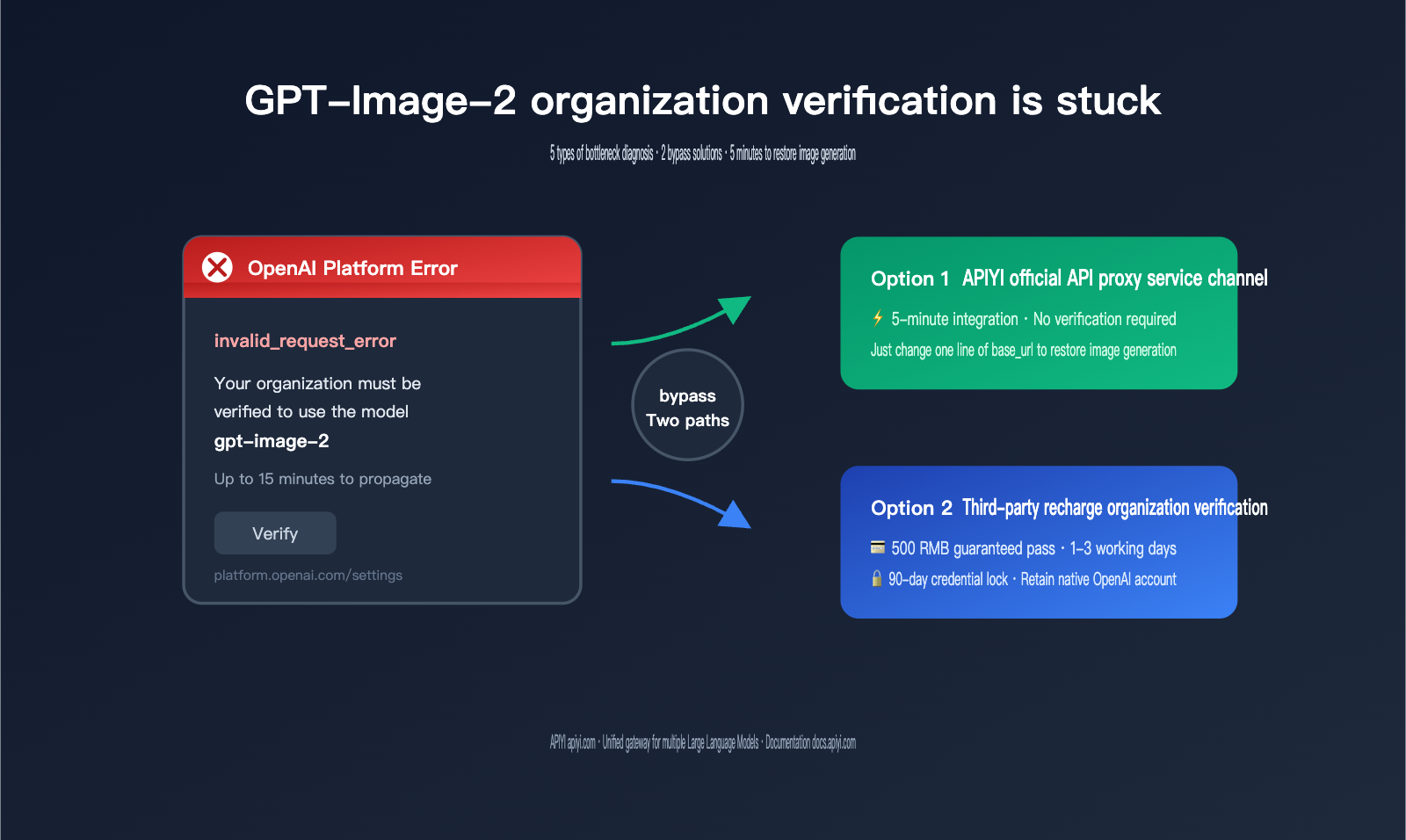
    "message": "Your organization must be verified to use the model `gpt-image-2`. Please go to: https://platform.openai.com/settings/organization/general and click on Verify Organization. If you just verified, it can take up to 15 minutes for access to propagate.",
    "localized_message": "Unknown error",
    "type": "invalid_request_error",
    "param": "",
    "code": null
  }
}
Breaking Down the GPT-Image-2 Organization Verification Error
To bypass this error, you first need to understand what it's actually saying. The key to this 4xx error isn't the HTTP status code, but the message field itself—it's a custom "account policy block" from OpenAI. The model is blocked by the front-end gateway before any inference even begins.
| Field | Value | Actual Meaning |
|---|---|---|
| type | invalid_request_error | Request blocked by policy; model execution never started |
| param | "" | No specific parameter error; this is an account-level restriction |
| code | null | No standard error code; you must check the message |
| message subject | organization must be verified | Organization has not passed Persona identity verification |
| Redirect URL | platform.openai.com/settings/organization/general | Official OpenAI verification portal |
| Propagation delay | up to 15 minutes | Sync window between verification completion and access |
This means that issues you might suspect—like incorrect API keys, misspelled model names, insufficient tiers, or exhausted quotas—are not the root cause. Rotating your API key or trying to fall back to gpt-image-1 won't solve the problem. You must either clear the "Organization Verification" hurdle or bypass it entirely.
🎯 Quick Diagnostic Advice: If you need to generate images urgently and don't have time to troubleshoot the Persona process, the most reliable approach is to switch your
base_urlto a third-party API proxy service and call the GPT-Image-2 model through that to get your business running. You can then handle the official OpenAI account verification at your own pace, avoiding the risk of keeping your business stakeholders waiting for days.
5 Common Reasons Why GPT-Image-2 Organization Verification Gets Stuck
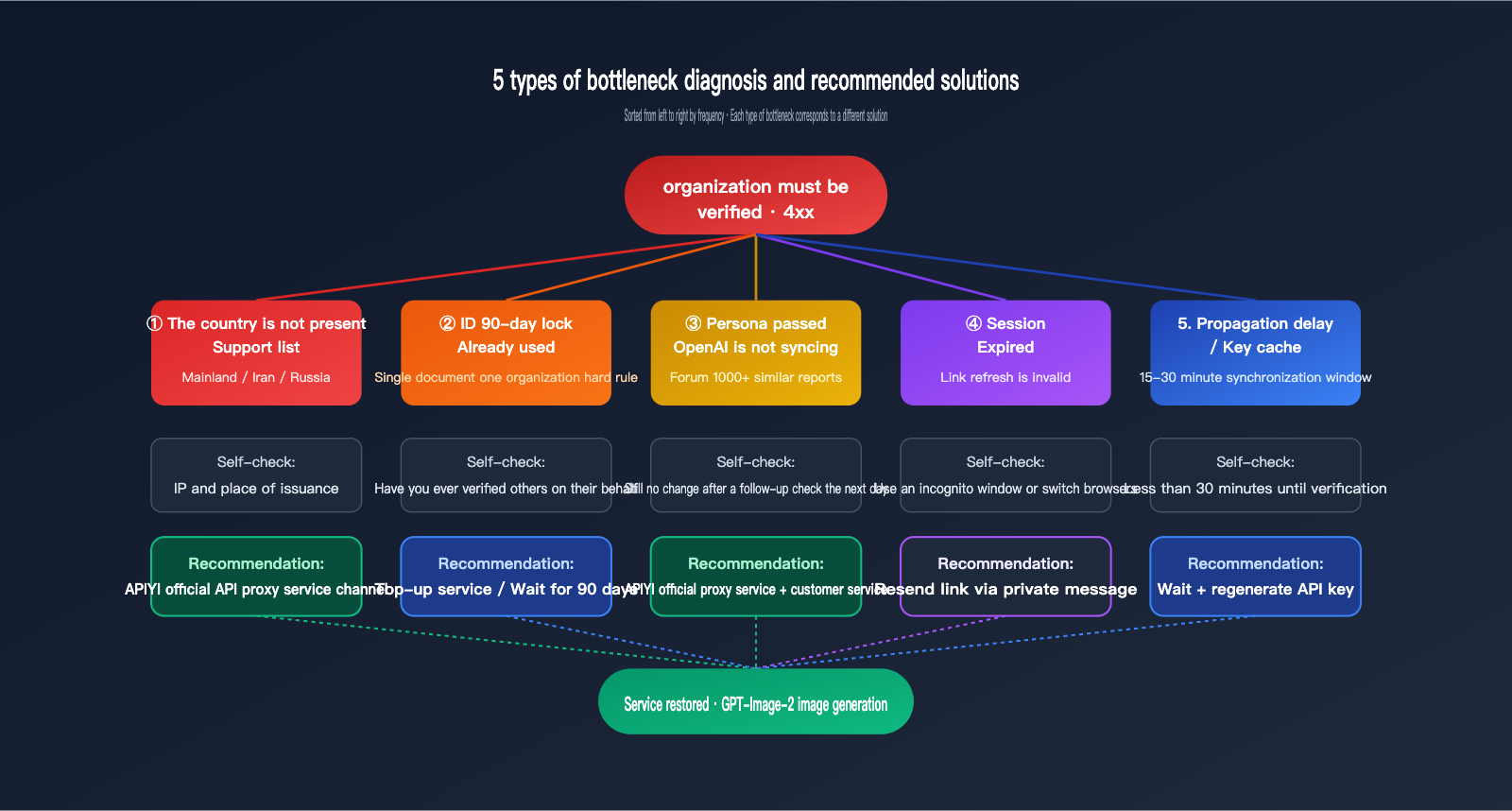
Based on the frequency of cases we’ve handled, organization verification usually gets stuck on these five common issues: unsupported country, the 90-day ID lock, Persona synchronization failures, expired session links, and propagation delays. Each has a different root cause and solution, so using the wrong fix will just waste your time.
The first category is the country is not on the 200+ supported list. While the identity verification OpenAI outsources to Persona theoretically covers over 200 countries and regions, in practice, regions like mainland China, Iran, and Russia are often rejected during IP detection or document origin verification. This isn't something you can fix yourself; you'll need a workaround.
The second category is one ID can only verify one organization every 90 days. This is a hard rule explicitly stated in OpenAI's official documentation. If you’ve previously used the same ID to verify someone else's organization or deleted and recreated your own, you’ll hit this limit. The error message won't explicitly say it, but all retries will fail.
The third category is Persona shows success, but OpenAI’s backend hasn't synced. This has been a frequent bug in the community since November 2025—the Persona page clearly says "Congratulations, you're done," but back in the platform.openai.com settings, the organization still shows as "Unverified." There are already over 1,000 similar reports on the official OpenAI forum.
The fourth category is the verification link session has expired. When you click the link from your email or the dashboard, it immediately shows "Session expired." Neither refreshing nor re-logging will get you a new link. In this case, you don't even get the chance to submit your ID.
The fifth category is already verified, but the API key hasn't refreshed or propagation hasn't finished. OpenAI claims it takes "up to 15 minutes," but we've seen it take up to 30 minutes in practice. If you keep getting errors when calling the API within 30 minutes of verification, it's likely the API key is still caching old permissions. You'll need to go to the dashboard and regenerate it.
| Issue ID | Symptom | Self-Check Method | Solution |
|---|---|---|---|
| 1 | Cannot access Persona form | Check IP and document origin | Use a workaround |
| 2 | ID already in use | Recall if you verified for others | Wait 90 days or use a different ID |
| 3 | Persona passed but no sync | Check again the next day | Regenerate API key + contact support |
| 4 | Link shows "Session expired" | Refresh or change browser | Resend email in private window / Switch network |
| 5 | Still getting 4xx after verification | Less than 30 mins since verification | Wait + regenerate key |
Comparison of 2 Workaround Paths for GPT-Image-2 Organization Verification
If you’ve checked all five points above and still can't get it to work, the remaining two paths are "ready-to-use solutions" that our customers have verified. One is to use the APIYI (apiyi.com) GPT-Image-2 official proxy channel, which outsources the verification to a pool of already-verified official accounts. The other is to purchase an organization verification service via AI top-up, which costs 500 RMB and guarantees success while letting you keep your original OpenAI account.
| Solution | Target Audience | Time Cost | Financial Cost | Main Risk |
|---|---|---|---|---|
| Path 1: APIYI GPT-Image-2 Proxy | Prioritizes business launch, doesn't require native account | 5 mins | Pay-per-token | Must change base_url |
| Path 2: AI Top-up Verification | Must keep native OpenAI account | 1-3 days | 500 RMB | 90-day ID lock |
🎯 Recommendation: 90% of our customers end up choosing Path 1 because OpenAI frequently adjusts its organization verification strategy in 2025-2026, making DIY verification less cost-effective. We suggest running your GPT-Image-2 calls through APIYI (apiyi.com) first; once you've validated your business model, you can decide whether to go through the official organization verification process later.
{3 paths when organization verification gets stuck}
{The main path is blocked by 5 types of bottlenecks · two bypass paths lead directly to GPT-Image-2 image generation}
{User request}
{GPT-Image-2}
{Main path · 5 types of blocking points}
{OpenAI official}
{platform.openai.com}
{Persona verification}
{ID + liveness detection}
{5 types of beat points}
{Country / 90 days / Synchronize / Session / Latency}
{Business is hindered}
{Infinite retries / waiting for response}
{Path A · APIYI GPT-Image-2 official API proxy service channel}
{Replace base_url}
{api.APIYI.com/v1}
{Official account pool verified}
{No ID required · No selfie required}
{Image generation successful in 5 minutes}
{The parameters are exactly the same as the official ones}
{Path B · AI top-up organization verification}
{Place an order for 500 yuan}
{Agent for Persona verification services}
{1-3 business days}
{90-day ID lock for one organization}
{OpenAI native accounts are supported}
{Keep all historical invocation records}
{Urgent use goes through A · Must keep official account goes through B · Dual-track system is the most stable}
Option 1: A Deep Dive into the APIYI GPT-Image-2 API Proxy Service
The GPT-Image-2 API proxy service from APIYI (apiyi.com) routes through an official account pool that has already completed OpenAI's organizational verification. The model weights, parameter space, and pricing tiers are identical to those of official OpenAI; the only differences are the base_url and the billing currency. Integrating it requires minimal code changes—you just need to swap the base_url field in your existing OpenAI SDK.
# 5-minute integration example: Swap the base_url to APIYI, keep the model as gpt-image-2
from openai import OpenAI

client = OpenAI(
    api_key="your-apiyi-key",
    base_url="https://api.apiyi.com/v1"
)

img = client.images.generate(
    model="gpt-image-2",
    prompt="A ginger cat in a spacesuit standing on the lunar surface, cinematic composition",
    size="1024x1024",
    quality="high",
    output_format="png",
    n=1
)
print(img.data[0].url)
Parameter compatibility is perfectly aligned with official standards. Below is the support status for the main GPT-Image-2 request parameters on the API proxy service, so you can copy them directly into your production code:
| Parameter | Supported | Notes |
|---|---|---|
| size | 1024×1024 / 1536×1024 / 1024×1536 | Identical to official |
| quality | low / medium / high / auto | Identical to official |
| output_format | png / jpeg / webp | Identical to official |
| moderation | auto / low | Identical to official |
| background | auto / opaque | Identical to official (transparent backgrounds are also not supported) |
| n | 1-10 | Up to 10 images per request |
| Streaming / Edits API | Supported | Identical to official |
🎯 Integration Tip: For detailed parameters and code examples for the GPT-Image-2 API proxy service, check out the documentation at docs.apiyi.com/api-capabilities/gpt-image-2/overview. It provides complete examples in Python, Node.js, and cURL, along with special usage for the Edits/Variations endpoints.
The biggest advantage of this approach is that your business doesn't need to worry about organizational verification. Your applications and customers won't need to deal with ID documents, selfies, or Persona processes, allowing you to restore image generation capabilities within 5 minutes. Billing is based on tokens and updates in sync with official OpenAI pricing, avoiding any ambiguity regarding "below-market" or "above-market" rates.
Option 2: A Deep Dive into AI Organization Verification Services
If your business has non-negotiable requirements to retain a native OpenAI account—such as existing high-volume usage, strict compliance needs, or team SSO already bound to an OpenAI Workspace—then you should look into the third-party verification market. A common provider is ai.daishengji.com, which offers "OpenAI Organization Verification" services, typically costing around 500 RMB with a turnaround time of 1-3 business days.
This service essentially uses the provider's compliant ID documents and high-success-rate residential IPs to complete the Persona process for you. Once you place an order, you receive a "Verified Organization" status, allowing you to continue using cutting-edge models like GPT-Image-2 and GPT-5 in the official OpenAI console. Note that the verification uses someone else's ID, which means that document cannot be used by you or anyone else to verify another organization within 90 days. Therefore, do not purchase repeatedly or switch organizations frequently in the short term.
🎯 Risk Warning: Before choosing a verification service, be sure to consider the 90-day ID lock rule—this means the document is tied to one organization for the next 3 months. If you just need to get your business running in the short term, I recommend using the APIYI API proxy service first. Once your business rhythm stabilizes, you can decide whether to proceed with official verification to avoid paying twice after a lock.
| Decision Factor | Choose Option 1 (APIYI Proxy) | Choose Option 2 (Third-party Verification) |
|---|---|---|
| Call Frequency | Unlimited | Unlimited |
| Keep OpenAI Account | Not required | Mandatory |
| Time-to-Market | Same day | 1-3 business days |
| 90-day ID Lock | Irrelevant | Must accept |
| Ecosystem | Unified gateway for multiple models | OpenAI only |
| Risk Level | Extremely low | Medium (verification may be flagged) |
Another hidden risk of third-party verification services is OpenAI's "drift detection" risk management: if the same ID appears repeatedly in verification records for different organizations in a short period, OpenAI's internal risk control may flag those organizations. So, even if you choose Option 2, it's best to complete it once and avoid treating third-party verification as a "monthly reset" tool.
{Comparison of decision-making for the two schemes}
{See if you are in a hurry · See if it is necessary to keep the original OpenAI account}
{Plan A · APIYI official API proxy service}
{⚡ Suitable for: urgent business needs, rapid recovery}
{⏱ Time cost}
{5 minutes}
{💰 Capital cost}
{Billing by token}
{📋 Operation Steps}
{Change base_url}
{🆔 Is an ID card required}
{Not needed}
{🌍 Country restrictions}
{无}
{🔒 90-day ID lock}
{Irrelevant}
{Supporting ecosystem}
{Unified gateway for multiple Large Language Models}
{api.apiyi.com/v1 + your-APIYI-key}
{B}
{Plan B · Recharge Verification}
{🛡️ Suitable for: must retain original OpenAI account}
{⏱ Time cost}
{1-3 business days}
{💰 Capital cost}
{500 yuan guaranteed pass}
{Operational steps}
{Place order + wait for processing}
{🆔 Is an ID card required}
{Provided by the API proxy service provider}
{🌍 Country restrictions}
{The proxy service provider assumes responsibility}
{🔒 90-day ID lock}
{Must accept}
{Supporting ecosystem}
{Only OpenAI native}
{Top-up website ai.daishengji.com}
{90% of customers start with A to validate their business, then add B later when they need native accounts for the long term.}
GPT-Image-2 Organization Verification FAQ
Q1: I’ve already verified successfully, so why am I still getting errors?
OpenAI states that propagation delays can take anywhere from 15 to 30 minutes. If it’s been over 30 minutes and it’s still not working, it’s usually because your API key has cached the old permissions. Try generating a new key from your Dashboard and test it again. If that doesn't work, use the APIYI proxy service to keep your operations running so your business doesn't have to wait.
Q2: Can I verify successfully if I have a US or Singaporean passport?
Yes. OpenAI’s Persona verification success rate is indeed much higher in regions like the UK, US, Australia, and Singapore. However, the "one ID per organization every 90 days" rule still applies. If you plan to verify for Company A and then Company B, you must wait the full 90 days; otherwise, the second attempt will immediately return an "ID already in use" error.
Q3: Is it actually possible to complete OpenAI organization verification from mainland China?
Attempting organization verification directly through the official OpenAI website has a very high failure rate. This isn't just about IP addresses; it involves multiple dimensions like document issuance location, liveness detection, and video source validation. This is why the APIYI (apiyi.com) proxy service is so popular in China—it bypasses the unpredictable "Persona verification" stage entirely, so you don't have to deal with that uncertainty.
Q4: How does APIYI’s GPT-Image-2 differ from the official version?
The model weights, parameter space, and pricing tiers are identical. The differences lie in the base_url, billing currency, and backend log styles. We’ve added a gateway layer that includes request retries, unified rate limiting, and exception alerts. For more details, check out our documentation at docs.apiyi.com/api-capabilities/gpt-image-2/overview.
Q5: Will my account be banned by OpenAI later if I use a third-party service for organization verification?
In theory, OpenAI checks for the authenticity of the ID, so the verification service itself doesn't directly trigger a ban. However, if the same ID is used to "drift" between organizations repeatedly in a short period, or if you run a large volume of abnormal prompts immediately after verification, you might trigger risk controls. The market generally treats the 90-day lock rule as a baseline, and under normal usage, you shouldn't run into issues.
3 Key Takeaways for GPT-Image-2 Organization Verification
First, the "organization must be verified" error is part of OpenAI’s ID verification strategy, not a simple parameter, tier, or quota issue. Any attempts to rotate API keys or change model names won't solve the root cause; you must address the organization verification requirement.
Second, you should troubleshoot the 5 common bottlenecks in this order: "Country → 90-day ID rule → Persona synchronization → Session linking → Propagation delay." Applying the wrong fix will only increase your downtime. Currently, for the 1st and 3rd types of issues, bypassing is often the only realistic solution, as waiting for an official response from OpenAI is rarely effective.
Third, if you need it urgently, use the APIYI proxy service; for long-term use of native OpenAI accounts, consider third-party verification services like ai.daishengji.com. These two aren't mutually exclusive. Many teams adopt a "dual-track" strategy: using the proxy service for immediate business continuity while using third-party verification to secure their long-term accounts, minimizing uncertainty.
If you're currently stuck on this error, you can test the GPT-Image-2 proxy service at APIYI (apiyi.com) to restore your image generation capabilities in 5 minutes, then decide if you need to proceed with official organization verification.
📌 Author: The APIYI Technical Team — We continuously track key changes in OpenAI’s organization verification strategies, model versions, and pricing to provide developers with a unified multi-model API gateway experience. To learn more, visit APIYI (apiyi.com).