The toughest part of creating content for Xiaohongshu isn't writing the copy—it's the visuals. A single cover image has to pack in a title, subtitle, unique selling points, branding, and decorative elements. It’s an information-dense task comparable to creating an infographic. By the time you’ve finished stitching together Canva templates, adjusting layouts in Figma, and retouching in Photoshop, you've easily burned through two hours.
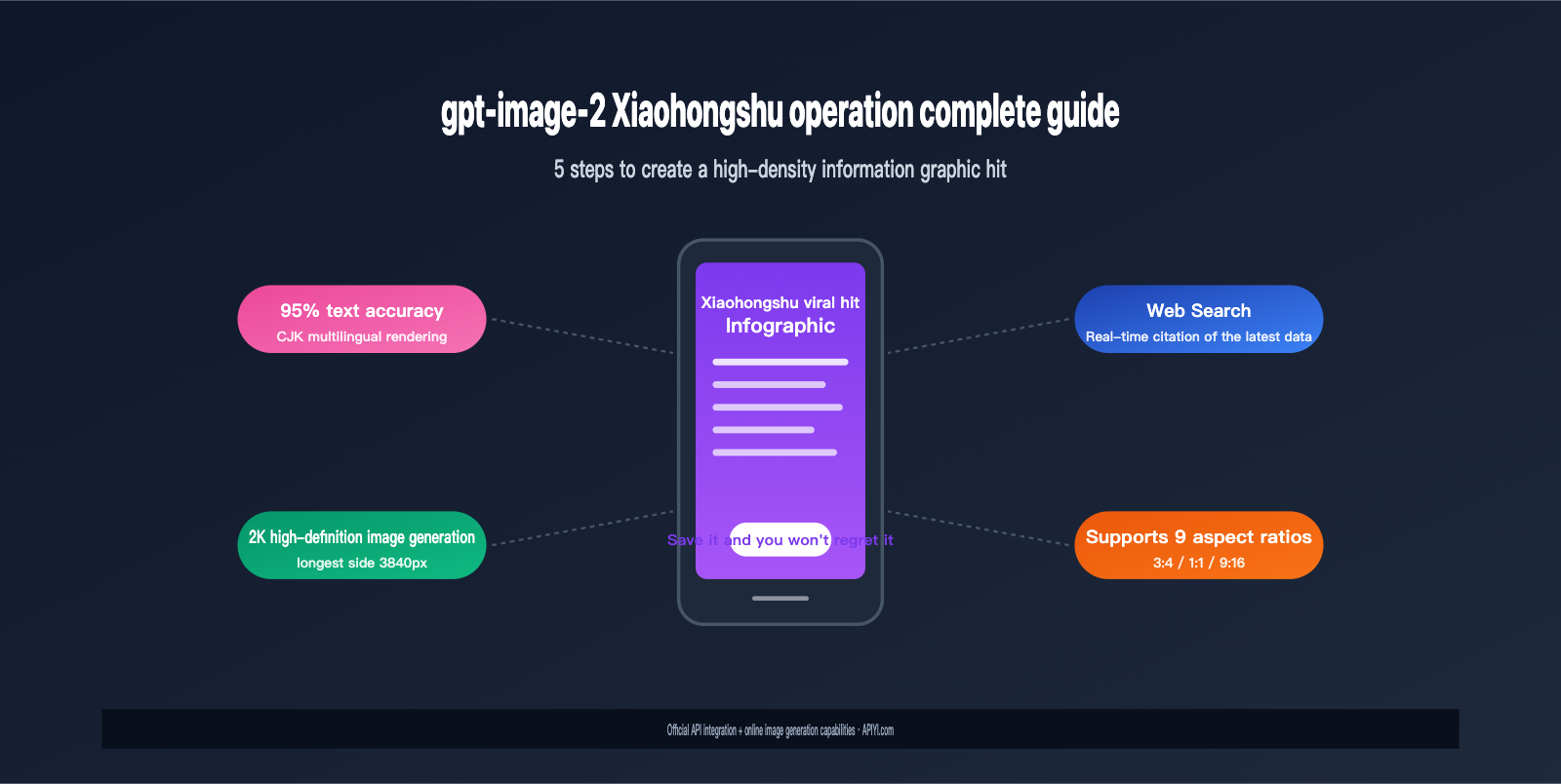
OpenAI’s release of gpt-image-2 in April 2026 has completely changed the game. It doesn't just push text rendering accuracy within images to over 95%; it also features, for the first time, an "Agentic" capability that combines web searching with reasoning-based image generation. If you ask it to "create a comparison chart for the latest iPhone 17 colors," it will first fetch official data, then generate a high-density infographic containing accurate models, colorways, and technical specs.
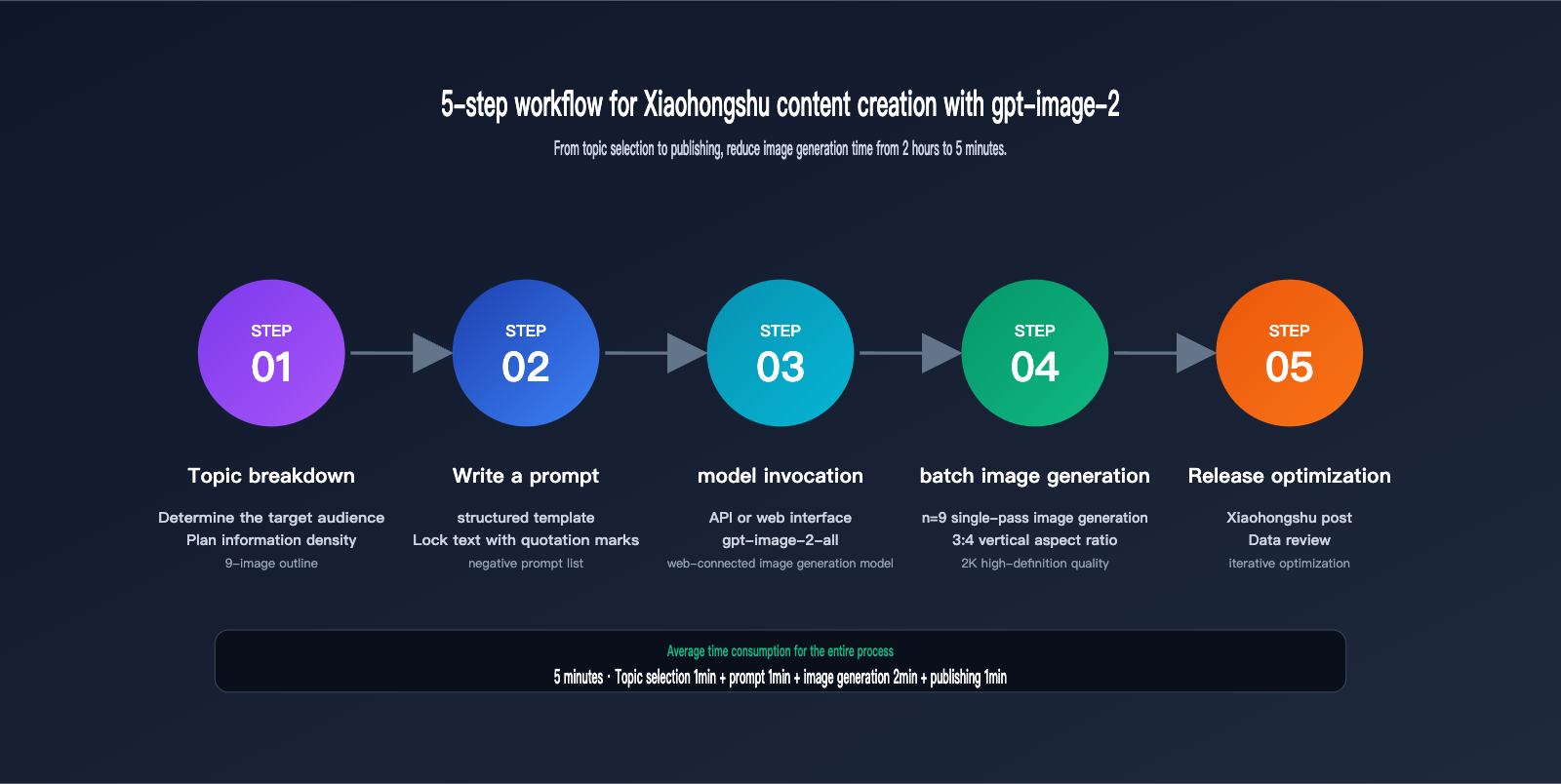
This article provides a systematic methodology for creating Xiaohongshu content using gpt-image-2, covering core capability analysis, a 5-step workflow, prompt templates, and an FAQ—designed to shrink your production time from 2 hours down to 5 minutes.
Why gpt-image-2's Xiaohongshu Content Creation Capability Stands Out
Before gpt-image-2, AI creators faced three major pain points when making images for Xiaohongshu: inaccurate text rendering, inability to handle high information density, and outdated knowledge. A viral cover usually requires a text layer of 50-100 characters, and earlier models (including gpt-image-1 and Midjourney v6) often produced typos, missing strokes, or garbled characters, making them virtually unusable for professional purposes.
gpt-image-2 has completely rewritten this status quo through three technological breakthroughs. First is the comprehensive upgrade of its text rendering engine. According to official OpenAI testing, the model has achieved over 95% high-fidelity rendering accuracy for non-Latin characters, including Chinese, Japanese, Korean, Hindi, and Bengali. It remains stable even in scenarios involving small font sizes, curved surfaces, or dense layouts.
Second is the Agentic Reasoning architecture. gpt-image-2 is the industry's first image model with a complete "think → search → generate → verify" inference loop. Before generating, it proactively plans the composition, queries references, and evaluates quality.
Third is built-in web-connected knowledge. When generating images involving the latest products, brand logos, public figures, or trending events, the model can query the internet in real-time rather than relying on stale data prior to its training cutoff (December 2025).
💡 Platform Recommendation: If you want to experience gpt-image-2's web-connected image generation capability directly, you can use the gpt-image-2-all model provided by the APIYI (apiyi.com) platform—this version is reverse-engineered from the official ChatGPT web interface. It comes with web search enabled by default and requires no extra parameter configuration, making it perfect for Xiaohongshu content creation scenarios that demand "timely knowledge."
Analyzing the 3 Core Dimensions of gpt-image-2 for Xiaohongshu
To understand why gpt-image-2 is particularly well-suited for Xiaohongshu, we need to break down its capabilities in relation to the platform's content style. The table below compares the performance improvements of gpt-image-2 over the previous generation, gpt-image-1, within key Xiaohongshu scenarios.
| Capability Dimension | gpt-image-1 | gpt-image-2 | Xiaohongshu Value |
|---|---|---|---|
| Chinese Text Rendering | 60-70% accurate, often typos/missing strokes | 95%+ accurate, stable on curved surfaces | Ready-to-use for cover titles and infographics |
| Single Output Count | 1 image | 1-10 images selectable | Generate a full 9-image carousel at once |
| Max Resolution | 1024×1024 | 2K (longest side 3840px) | Meets 3:4 HD cover requirements |
| Aspect Ratio Support | 3 types | 9 types (including 3:4) | Perfect fit for Xiaohongshu cover ratios |
| Web Knowledge | None | Built-in Web Search | Accurate references for products and trends |
| Reasoning-based Generation | None | Agentic Reasoning | Automated layout planning for complex infographics |
gpt-image-2 Xiaohongshu Advantage 1: High-Density Infographic Rendering
Xiaohongshu's "infographics," "tips cards," and "educational posts" are high-engagement content types. They typically feature 80-150 words per image and require clear hierarchy, color schemes, and icons. gpt-image-2's improvements in this area come down to three details:
First, gradient font size handling. The model understands hierarchical instructions like "Main title 60pt + Subtitle 32pt + Body text 18pt," ensuring stable font size ratios in the output.
Second, layout whitespace control. Through Agentic Reasoning, the model performs "virtual layout" before drawing, preventing text from being crowded or cropped at the edges.
Third, icon and text integration. The model can insert specific icons (✓, ★, →, numbered badges, etc.) at designated positions, ensuring perfect alignment between icons and text.
gpt-image-2 Xiaohongshu Advantage 2: Web-Connected Knowledge for Accuracy
This is arguably the most underrated capability of gpt-image-2. Traditional AI models have knowledge cutoffs based on their training data. When you ask them to generate content like "Latest iPhone 17 color comparison," "2026 Coffee Brand Rankings," or "Latest beauty trends," they are likely to hallucinate incorrect information.
During its internal "thinking" phase, gpt-image-2 determines if a task requires external information. If it does, it automatically triggers a web search, incorporating real-time data (product specs, logo shapes, official colors) into the generation process. This means Xiaohongshu creators can confidently use it for product comparisons, new product recommendations, and brand education without worrying about AI-generated "hallucinations."
🎯 API Integration Tip: To access the web-browsing features of gpt-image-2, you'll need an API proxy service that supports full API capabilities. We recommend using APIYI (api.apiyi.com) to access the
gpt-image-2-allmodel. This model comes via an official reverse channel, includes web search capabilities by default, and is more cost-effective than connecting directly to the official API—making it perfect for creators who need to generate images in bulk.
gpt-image-2 Xiaohongshu Advantage 3: Multiple Ratios and Multi-Image Output
The standard ratio for a Xiaohongshu cover image is 3:4 (vertical). Square 1:1 is great for info cards, and 9:16 is perfect for short video covers. gpt-image-2 natively supports these 3 ratios (along with 1:1, 2:3, 3:2, 4:3, 4:5, 16:9, and 21:9—a total of 9), eliminating the need for post-processing crops.
More importantly, gpt-image-2 supports generating 1-10 images in a single request. Since the ideal length for a Xiaohongshu post is 6-9 images (which carries the highest algorithmic weight), creators can have the model generate a full, visually consistent carousel based on a single theme in one go.
gpt-image-2 Xiaohongshu Content Adaptation Matrix
Different types of Xiaohongshu content have varying requirements for images. The table below helps you quickly determine the suitability and recommended parameters for using gpt-image-2 across different content formats.
| Content Type | Recommended Ratio | Number of Images | Text Density | gpt-image-2 Suitability | Recommended Quality |
|---|---|---|---|---|---|
| Educational/Knowledge | 3:4 | 6-9 | High (80-150 words/img) | ⭐⭐⭐⭐⭐ | high |
| Product Review | 3:4 | 6-9 | Medium (40-80 words/img) | ⭐⭐⭐⭐⭐ | high |
| Tutorial/Step-by-step | 3:4 | 4-9 | Medium (50-100 words/img) | ⭐⭐⭐⭐⭐ | medium-high |
| Data Visualization | 3:4 / 1:1 | 1-3 | High (100+ words/img) | ⭐⭐⭐⭐⭐ | high |
| Food/Fashion Recommendations | 3:4 | 6-9 | Low (tag-focused) | ⭐⭐⭐⭐ | medium |
| Vlog Cover | 9:16 | 1 | Medium (title-focused) | ⭐⭐⭐⭐ | high |
| Memes/Jokes | 1:1 | 1 | Low | ⭐⭐⭐ | low-medium |
As shown by the suitability ratings, gpt-image-2 excels at information-heavy content with medium-to-high text density, which is exactly the type of "high-save-rate" content favored by the Xiaohongshu algorithm. According to the official CES algorithm weights disclosed by Xiaohongshu, saves count for 1 point, carrying the same weight as likes, while comments and shares count for 4 points each. Infographics, tutorials, and review-style content have significantly higher save rates due to their "practical value," allowing them to gain more organic traffic through algorithmic distribution.
5-Step Practical Workflow for gpt-image-2 Xiaohongshu Content Creation
Now, let's dive into the practical application. The complete gpt-image-2 Xiaohongshu image generation workflow consists of 5 steps, each with reusable techniques.
Step 1: Topic Breakdown and Information Density Planning
Before opening gpt-image-2, spend 5 minutes breaking down your topic. A good Xiaohongshu infographic post should answer three questions:
- Who is the target audience? (Beginner / Advanced / Decision-maker)
- How many core points are there? (3 / 5 / 7)
- How much information does each image carry? (One point per image / Comparison per image)
Example: For a post titled "2026 AI Image Generation Tool Comparison," you could break it down into 9 images: 1 cover + 1 overview table + 5 tool introductions (one per image) + 1 recommendation conclusion + 1 call to action. Keep the core information for each image under 80 words.
Step 2: Writing Structured gpt-image-2 Xiaohongshu Prompts
There is an officially recommended structure for writing gpt-image-2 prompts: Background/Scene → Subject → Key Details → Text Content → Style Constraints. To ensure the generated Xiaohongshu images are consistently usable, follow these 4 core rules:
- Chinese text that must appear must be enclosed in Chinese quotes 「」 or English quotes "" so the model renders it accurately.
- Clearly specify the font size hierarchy in the prompt (e.g., "Main title 64pt bold, subtitle 28pt").
- Use keywords like "high-fidelity," "ultra-detailed," and "crisp typography" to enhance details.
- List negative constraints (e.g., "no watermark, no extra text, no duplicate words") to avoid unnecessary additions.
Step 3: Calling the gpt-image-2 API to Generate Images
If you have basic API calling skills, you can use the standard OpenAI interface to call gpt-image-2 directly. Below is a minimal code example for generating a 3:4 Xiaohongshu cover:
from openai import OpenAI

client = OpenAI(
    api_key="your_apiyi_key",
    base_url="https://api.apiyi.com/v1"
)

response = client.images.generate(
    model="gpt-image-2-all",
    prompt='Xiaohongshu style infographic cover, 3:4 vertical, main title 「2026 AI Image Tools TOP 5」 64pt white bold, subtitle 「Must-see for creators, save it now」 28pt light gray, display 5 tool logo thumbnails in the center, pink to purple gradient background, high-fidelity typography, crisp text, no watermark',
    size="1024x1536",
    quality="high",
    n=1
)

print(response.data[0].url)
📌 base_url Configuration Note: The code above uses the APIYI
api.apiyi.com/v1endpoint. The model namegpt-image-2-allis the official reverse-engineered version, which comes with web-searching capabilities enabled by default. Regular users can also use thegpt-image-2standard model (without web search) for a lower price.
Step 4: Batch Generating a 9-Image Carousel
The optimal number of images for a Xiaohongshu post is 6-9. Writing prompts for each image manually is inefficient. The n parameter in gpt-image-2 supports 1-10, allowing you to generate 9 images at once.
However, there is a trick here: Don't let the model generate 9 unrelated images independently. Instead, use the prompt to guide it to generate a "series." Example:
response = client.images.generate(
    model="gpt-image-2-all",
    prompt='''Generate a set of 9 coherent Xiaohongshu educational carousel images, 3:4 vertical,
unified dark purple background + white text, theme "5 Prompt Formulas Every AI Art Beginner Must Learn",
Image 1: Cover page, title 「Must-Learn AI Art」 subtitle 「5 Prompt Formulas」,
Image 2-6: Each introduces one formula, top numbering 01-05, formula name in the middle, 30-word explanation at the bottom,
Image 7: Formula comparison table,
Image 8: Practical case study,
Image 9: Follow call-to-action page, text 「Like and save so you don't get lost」 ''',
    size="1024x1536",
    quality="high",
    n=9
)
Step 5: Can't Code? Use the imagen.apiyi.com Web Tool
If you are a pure content creator without Python or API experience, you can skip the coding part entirely. We recommend using the imagen.apiyi.com web-based image generation tool—it encapsulates multiple mainstream image models like gpt-image-2, Nano Banana, and Seedream. It provides a user-friendly form interface, supports aspect ratio selection, image count control, and batch downloads, allowing you to get started in 5 minutes.
🎨 Tool Selection Advice: For individual creators, we recommend using the imagen.apiyi.com web tool directly—no coding or API configuration required; just select the model (we recommend gpt-image-2 or gpt-image-2-all) and the ratio (3:4) to generate. For studios that need batch automation, we suggest calling the API via APIYI (apiyi.com), which can be integrated into your own SaaS tools or Feishu tables.
gpt-image-2 Xiaohongshu Viral Prompt Template Library
Here are 6 field-tested prompt templates covering the most common content types on Xiaohongshu. All templates have optimized text rendering instructions, so you can copy them directly and replace the content inside the 【】 brackets with your own topic.
Template 1: Knowledge Infographic (High Information Density)
Xiaohongshu style knowledge infographic, 3:4 vertical,
Top header: dark purple background, white bold Chinese title "【Your main title, within 15 characters】" font size 56pt,
Subtitle "【One-sentence value proposition, within 20 characters】" font size 24pt light purple,
Middle content area: 5 numbered points, each point includes a number badge + title + 30-character explanation,
Bottom: pink CTA button "Save for later",
Color scheme: deep purple #2D1B69, bright pink accent #FF6B9D,
high-fidelity Chinese typography, crisp text rendering, no watermark, no duplicate text
Template 2: Product Review Comparison Card
Xiaohongshu product review comparison card, 3:4 vertical, white background,
Top: two product images side-by-side + product names "【Product A】" vs "【Product B】",
Middle: 5-row comparison table, each row includes dimension name + A rating + B rating,
Ratings displayed using 5-star icons (★),
Bottom: recommendation conclusion "Overall recommendation: 【Product Name】",
Clear and sharp fonts, table lines 1px light gray, main title bold 48pt,
high-fidelity, ultra-detailed, no extra elements
Template 3: Tutorial Step-by-Step Guide
Xiaohongshu tutorial step-by-step diagram, 3:4 vertical, warm beige background,
Top main title "【Topic】Done in 3 minutes" black bold 56pt,
Middle: 3 step blocks arranged vertically,
Each block: large step number on the left (01/02/03), step title + 25-character explanation on the right,
Bottom: result display image + text "Done!",
Hand-drawn illustration style icons, warm orange-yellow accent color,
crisp typography, clear hierarchy, no watermark
Template 4: Data Visualization Card
Xiaohongshu data card, 3:4 vertical, dark blue gradient background,
Top title "【Data Topic】2026 Latest Data" white 52pt,
Middle: 1 core large number "【Key Figure】" occupying 40% of the screen height,
Below the number: data source note 12pt light blue,
Lower middle: 3 rows of supplementary data, each row includes icon + data + brief explanation,
Bottom: light-colored CTA "Share with colleagues",
Color scheme: dark blue #0F172A to #1E40AF gradient, high-contrast white text,
high-fidelity typography, crisp small text, no extra words
Template 5: "Dry Goods" Checklist
Xiaohongshu checklist cover, 3:4 vertical,
Top: fluorescent green horizontal bar, black bold text "【Number】 【Topic】" 60pt,
Subtitle "Blogger's secret collection, copy this directly" 24pt,
Middle: 【Number】 checklist items, each item includes ✓ icon + item name,
Compact layout with reasonable white space, clear font size hierarchy,
Bottom: pink border + text "See the full list on the next slide",
Style: clean and modern, Notion-style layout,
high-fidelity Chinese text, crisp icons, no decorative noise
Template 6: Web-Connected Special Scenario (Exclusive to gpt-image-2-all)
Xiaohongshu new product recommendation card, 3:4 vertical,
Topic: Introducing 【Latest product name, e.g., iPhone 17 Pro Max】,
Please search online for the latest official colors, key specs, and release date of this product,
Top: realistic product rendering,
Middle: product name + 3 core selling points (color/capacity/price),
Bottom: recommendation copy "Is it worth buying? Decide after reading",
Style: Apple Style, minimalist, white background,
high-fidelity, accurate product details from web search, no fictional specs
💡 Template Tips: The templates above have been optimized for Chinese text rendering. For your first try, I recommend using
quality="medium"to test the composition. Once you're happy with the layout, switch toquality="high"for the final version to save 30-40% on costs. For batch production, we recommend connecting via APIYI (apiyi.com) for better stability and speed compared to direct connections.
gpt-image-2 vs. Traditional Design Tools: Capability Comparison
Many creators ask: With Canva, Figma, and Photoshop, why switch to gpt-image-2? The table below compares the actual efficiency of these four tools across core Xiaohongshu operational scenarios.
| Comparison Dimension | gpt-image-2 | Canva | Figma | Photoshop |
|---|---|---|---|---|
| Single image time | 30s – 1 min | 15 – 30 mins | 30 – 60 mins | 1 – 2 hours |
| 9-image carousel time | 5 mins (n=9) | 3 – 4 hours | 4 – 6 hours | 8+ hours |
| Chinese text rendering | 95%+ accurate | 100% (manual) | 100% (manual) | 100% (manual) |
| Creative ideation | High (AI generated) | Medium (templates) | Low (start from scratch) | Low (start from scratch) |
| Web-connected knowledge | ✅ Built-in | ❌ | ❌ | ❌ |
| Learning curve | Low (write Chinese) | Low | Medium | High |
| Monthly cost | $5-30 (usage-based) | $12.99/mo | $15/mo | $22.99/mo |
| Best for | Batch output, infographics | Template usage | Team collaboration | Commercial retouching |
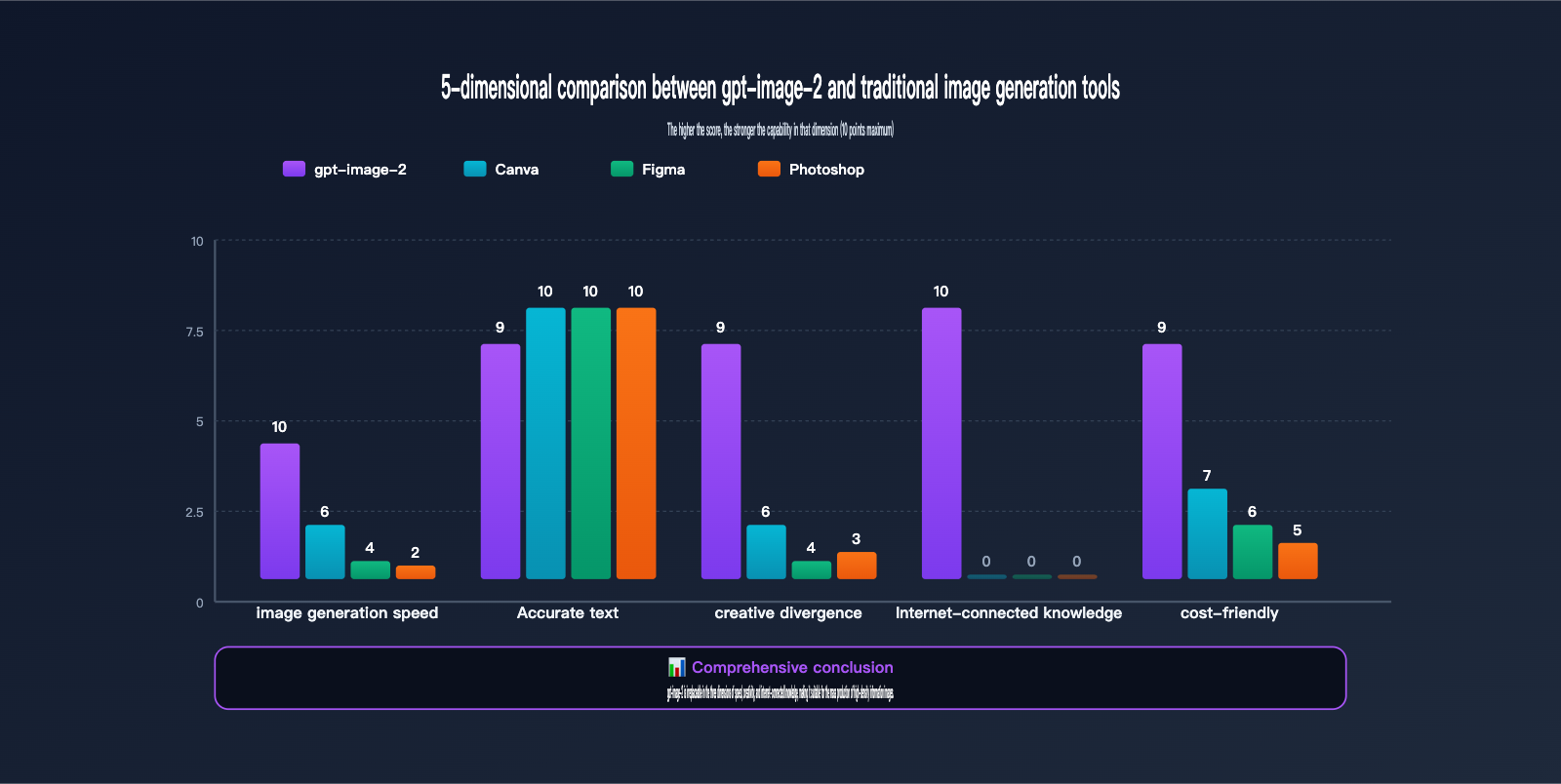
As the comparison table shows, gpt-image-2 isn't meant to replace Canva or Figma, but rather to cover a brand-new scenario: "Creative Ideation + Batch Output + Web-Connected Knowledge" all in one. If your Xiaohongshu account needs to consistently output 3-5 image-based posts per week, gpt-image-2 can compress your design time from 8-10 hours down to under 1 hour.
gpt-image-2 FAQ for Xiaohongshu Operations
Q1: Does gpt-image-2 really handle Chinese text in Xiaohongshu images without errors?
The accuracy rate is over 95% in our tests. OpenAI explicitly labels gpt-image-2 as a "polyglot" model in its official release blog, noting significant improvements in non-Latin characters like Chinese, Japanese, and Korean. However, keep two things in mind: First, wrap the Chinese text in your prompt with quotes (e.g., "text here"), otherwise the model might "interpret" the text rather than "copy" it. Second, rare characters and traditional Chinese may still cause errors, so it's a good idea to double-check key text before finalizing.
Q2: How much does it cost to generate a 3:4 Xiaohongshu image using gpt-image-2?
According to official pricing, a high-quality 1024×1536 (3:4) image costs about $0.20–$0.25. If you're creating a 9-image carousel, it'll cost roughly $1.8–$2.3 (approx. 13–17 RMB). By using the APIYI (apiyi.com) API proxy service, prices are typically lower, and it supports RMB settlement and invoicing, making it ideal for domestic creators to use at scale.
Q3: How do I use the "web-connected image generation" feature of gpt-image-2?
The web-connected feature is enabled by default in the ChatGPT web interface (Thinking mode). For the API, you need to use a model variant that supports web access. When calling the gpt-image-2-all model via APIYI (apiyi.com), web search is enabled by default—just mention the real-time information you need in your prompt (e.g., "latest release," "official color scheme," or "actual specs"), and the model will automatically trigger a web search and integrate the results into the image generation process.
Q4: I don't know how to code. Can I still use gpt-image-2 for Xiaohongshu?
Absolutely. We recommend using the imagen.apiyi.com web tool. No API configuration or Python environment is required. Simply select your model (gpt-image-2 or gpt-image-2-all) in the web form, enter your prompt, choose the aspect ratio (3:4) and quantity, and click generate. It supports a Chinese interface, batch downloads, and history management, making it perfect for content creators.
Q5: Will images generated by gpt-image-2 be flagged or throttled as "AI-generated"?
Currently, Xiaohongshu has no public rules for throttling "AI-generated images." The algorithm primarily evaluates engagement rates (likes, saves, comments, shares, and follows). As long as your images are information-dense and provide value to readers, they will naturally receive positive feedback. We suggest noting the image source in your caption (e.g., "AI-assisted production") to increase transparency.
Q6: What is the maximum number of images gpt-image-2 can generate at once?
The API allows up to 10 images per request (n=10), while the ChatGPT web interface allows up to 8. For a 9-image Xiaohongshu carousel, the API can handle it in one go, which is significantly more efficient than other models. Note that the higher the 'n' value, the longer the queue and processing time; we recommend setting up asynchronous tasks for batch production.
Q7: Which is better for Xiaohongshu: gpt-image-2, Nano Banana Pro, or Seedream?
In short: gpt-image-2 is best for "high information density + text-heavy" content (infographics, review cards, data charts). Nano Banana Pro is great for "creative scenes + face consistency" (serialized stories, multi-image narratives), and Seedream excels at "Eastern aesthetics + Chinese rendering" (Hanfu, traditional style, ink wash). You can try all three models on imagen.apiyi.com; we recommend running A/B tests before committing to a primary model.
Q8: How can I keep the style consistent across multiple images generated by gpt-image-2?
Three core tips: First, generate them all at once using n=9, as the model will automatically maintain style consistency. Second, explicitly lock in your color palette in the prompt (e.g., "use a consistent #2D1B69 purple and #FF6B9D pink theme"). Third, lock in the layout structure (e.g., "all images must follow a three-part structure: top title, middle content, and bottom CTA"). If you need stronger character or scene consistency, consider using the multi-image editing feature of gpt-image-2, which generates images based on a reference image.
Summary: 3 Underlying Principles for Using gpt-image-2 for Xiaohongshu
By now, we can distill the creation of gpt-image-2 Xiaohongshu content into three underlying principles:
First, treat image generation as "product design" rather than "drawing." The Agentic Reasoning of gpt-image-2 makes it more like a "thinking designer." The more your prompt resembles a design requirements document (clear goals, information hierarchy, visual constraints), the more precise the output will be.
Second, use "information density" as your competitive edge. The Xiaohongshu algorithm rewards content with high save rates, and the essence of a high save rate is "practical value." The breakthroughs gpt-image-2 has made in text rendering and layout allow you to create "high-density infographics" that Canva templates simply can't match—this is the best path for new accounts to overtake competitors.
Third, leverage "web-connected knowledge" for content timeliness. For content involving the latest products, trending events, or official data, always use a model that supports web access like gpt-image-2-all to avoid the pitfalls of AI-hallucinated information.
🚀 Actionable Advice: If you plan to integrate gpt-image-2 into your Xiaohongshu workflow, we suggest starting from two entry points: Pure creators should start with the imagen.apiyi.com web tool to generate your first image in 3 minutes; studios with technical capabilities should connect to the gpt-image-2-all model via APIYI (api.apiyi.com) to build a batch production pipeline. Both entry points support web-connected image generation and offer friendly pricing, making them perfect for scaling your content team.
Mastering gpt-image-2 won't make your Xiaohongshu account go viral overnight, but it can reduce the time spent on image production by 90%. This allows you to focus your energy on topic planning, copywriting, and community management—the factors that truly drive your data. That is the greatest value of AI tools for content creators.
Author: APIYI Technical Team — Focused on AI Large Language Model API integration and content creation tool development. Visit apiyi.com for more model reviews, prompt templates, and development guides.