Author's Note: A deep dive into the newly released Pets desktop companion feature for OpenAI Codex: featuring 8 built-in forms, running/waiting/ready state prompts, the /pet command, and a custom hatching mechanism. We’ll also provide a comprehensive comparison with the Claude Code Buddy terminal pet.
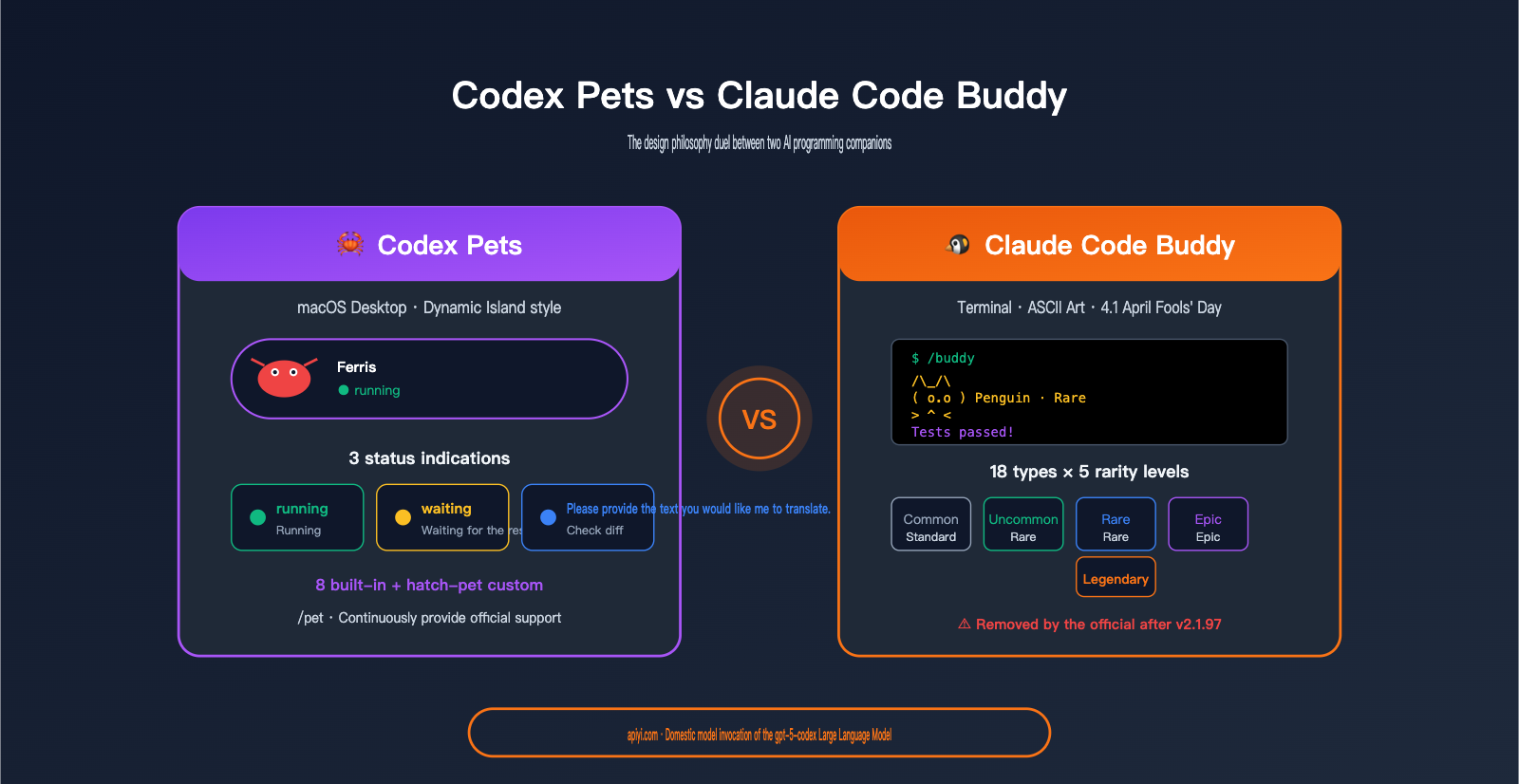
OpenAI has quietly rolled out a feature in the Codex CLI that’s sure to bring a smile to any developer’s face—Codex Pets. It’s a little companion that "lives" on your macOS desktop, but the logic behind it is quite serious: it uses 8 different creature forms and 3 clear status indicators to visualize the operational state of your AI coding agent—running, waiting for input, and ready for review.
This isn't just a fun feature. It follows closely on the heels of the Anthropic Claude Code Buddy—which was officially released on April 1, 2026, and quietly removed on April 9. It seems the AI coding tool space is forming a new UX paradigm: using pet states to replace progress bars.
Core Value: This article breaks down Codex Pets across four dimensions—feature breakdown, usage guide, comparison with Buddy, and design philosophy—to help you decide whether this "AI programming companion" is just a gimmick or something truly worth using.
What is the Codex Pets Feature?
In a nutshell: Codex Pets is a desktop-level companion system designed by OpenAI for the Codex desktop app. It’s not just some ASCII art in your terminal—it’s a set of living, breathing animations that hang out right on your macOS desktop.
Core Purpose and Positioning of Codex Pets
Codex Pets isn't just for "cuteness." It solves a real problem in the era of AI coding agents: How do you know what Codex is actually doing?
When you ask Codex to write code, it might take anywhere from a few minutes to over ten minutes to finish. During that time:
- Is it still thinking?
- Is it stuck waiting for your input?
- Is it finished and waiting for you to review?
The traditional approach is to stare at a progress bar or spinner in the terminal, or keep switching back to the agent panel to check the status. Codex Pets changes this: a little animal uses its emotional state to tell you exactly what's going on.
🎯 Design Intuition: An animal's "behavioral state" is much more intuitive than a progress bar. In the age of AI Agents, developers need a quick way to perceive "what it's doing now" rather than an exact percentage.
3 Core Status Indicators of Codex Pets
This is where the true functional value of the Codex Pets design lies:
| Status | Trigger Scenario | Visual Representation | What You Should Do |
|---|---|---|---|
running |
Agent is thinking / writing code | Pet is moving, running, or typing | Grab a coffee and let it work |
waiting for input |
Agent needs your confirmation | Pet stops and stares at you / twitches | Switch back to Codex to respond |
ready for review |
Code is done, waiting for your diff | Pet sits down / holds a code package / looks happy | Switch back to Codex to check the PR |
The brilliance of these three states is that each one corresponds to a clear action for the developer. This isn't just flashy UI; it’s turning agent states into actionable guidance.
<!-- Pet animation illustration -->
<ellipse cx="40" cy="55" rx="14" ry="10" fill="#ef4444"/>
<circle cx="36" cy="52" r="2" fill="#ffffff"/>
<circle cx="44" cy="52" r="2" fill="#ffffff"/>
<line x1="30" y1="50" x2="22" y2="46" stroke="#ef4444" stroke-width="2"/>
<line x1="50" y1="50" x2="58" y2="46" stroke="#ef4444" stroke-width="2"/>

<text x="80" y="55" fill="#10b981" font-size="12" font-weight="bold">The agent is thinking/writing code</text>
<text x="80" y="72" fill="#cbd5e1" font-size="10">Have a cup of coffee and wait for it</text>
<!-- Idle pet -->
<ellipse cx="40" cy="58" rx="14" ry="10" fill="#fbbf24"/>
<circle cx="36" cy="55" r="2" fill="#0f172a"/>
<circle cx="44" cy="55" r="2" fill="#0f172a"/>

<text x="70" y="55" fill="#fbbf24" font-size="12" font-weight="bold">The proxy requires your confirmation</text>
<text x="70" y="72" fill="#cbd5e1" font-size="10">The agent stops, staring at you trembling</text>
<text x="70" y="89" fill="#10b981" font-size="11" font-weight="bold">Switch back to Codex conversation</text>
<!-- Celebrating pet -->
<ellipse cx="40" cy="58" rx="14" ry="10" fill="#3b82f6"/>
<circle cx="36" cy="55" r="2" fill="#ffffff"/>
<circle cx="44" cy="55" r="2" fill="#ffffff"/>
<text x="58" y="48" fill="#fbbf24" font-size="14">✨</text>

<text x="70" y="55" fill="#3b82f6" font-size="12" font-weight="bold">The code has been written.</text>
<text x="70" y="72" fill="#cbd5e1" font-size="10">pet sit/hug code package</text>
<text x="70" y="89" fill="#10b981" font-size="11" font-weight="bold">Switch back to Codex to see the diff</text>
8 Built-in Forms and Hatching Mechanism
OpenAI has prepared 8 predefined pet forms for Codex Pets, each with its own personality, rarity, and mood tags.
Preview of the 8 Built-in Codex Pets
While the official details for all 8 haven't been fully disclosed, based on community screenshots, they include:
| Form | Personality | Trigger Mood |
|---|---|---|
| 🦀 Crab (Homage to Rust's Ferris) | Rigorous, steady | Hatched when writing Rust |
| 🐍 Snake (Homage to Python) | Agile, quick | Hatched when writing Python |
| 🦫 Beaver (Neighbor to Go's Gopher) | Hardworking, focused | Triggered by long coding sessions |
| 🦊 Fox | Alert, lively | Multi-language switching |
| 🐙 Octopus | Versatile, curious | Multiple files open simultaneously |
| 🦉 Owl | Thoughtful, scholarly | Late-night coding |
| 🐱 Cat | Lazy, free-spirited | Frequent interruptions |
| 🐉 Dragon | Advanced, rare | Completing a large PR |
💡 Easter Egg: The crab form is clearly a nod to the Rust mascot, Ferris. The OpenAI team has hinted in their documentation that if your recent code is primarily Rust, you're more likely to hatch a crab.
Codex Pets Custom Hatching (Hatch-Pet Skill)
Beyond the 8 built-in forms, Codex Pets supports fully custom pets—this is its most interesting capability.
You can implement this via the OpenAI Codex Skill system:
# Step 1: Have Codex install the hatch-pet skill
$skill-installer hatch-pet

# Step 2: Have Codex hatch one based on your code or description
$hatch-pet Generate one based on my coding style from the last week
$hatch-pet Create a little goblin
$hatch-pet Turn a photo of my dog into a Codex pet
The hatch-pet skill does a few things:
- Analyzes your recent code language, style, and commit habits.
- Generates a pet character card with a matching personality.
- Outputs a set of Codex-compatible animation spritesheets (including multiple state frames).
- Registers it into your Codex client.
Real-world case: Developer Dominik Kundel fed a photo of his own dog into hatch-pet and successfully generated a Codex pet that looked exactly like his dog. This level of "personalization" goes far beyond the "user ID-determined generation" of other assistants.
Two Ways to Open Codex Pets
Method 1 (Fastest): Type /pet directly in the Codex input box
Method 2: Settings → Appearance → Pets → Select/Hatch
🚀 Usage Tip: When enabling Codex Pets for the first time, we recommend trying the 8 built-in ones for a day or two. Once you're familiar with the visual changes for the three states, then consider customizing. We recommend using the APIYI (apiyi.com) platform to call the underlying Codex API (gpt-5-codex model) for daily development. It provides stable, direct access in China and is 100% compatible with official fields.
Comprehensive Comparison: Codex Pets vs. Claude Code Buddy
The best way to understand the value of Codex Pets is to look at it alongside Anthropic's Claude Code Buddy. While they share similar starting points, their implementation philosophies are worlds apart.
Historical Context: Two "AI Pet" Experiments
- Claude Code Buddy: Released by Anthropic on April 1, 2026 (April Fools' Day) as a hidden feature in v2.1.89, and silently removed in v2.1.97 on April 9. However, the community response was so strong that developers have already rebuilt it as an open-source version using MCP (GitHub:
1270011/claude-buddy). - Codex Pets: Released by OpenAI as a follow-up after the removal of Buddy, evolving the "pet" concept from an entertainment toy into a functional indicator for agent status.
Core Differences: Codex Pets vs. Claude Code Buddy
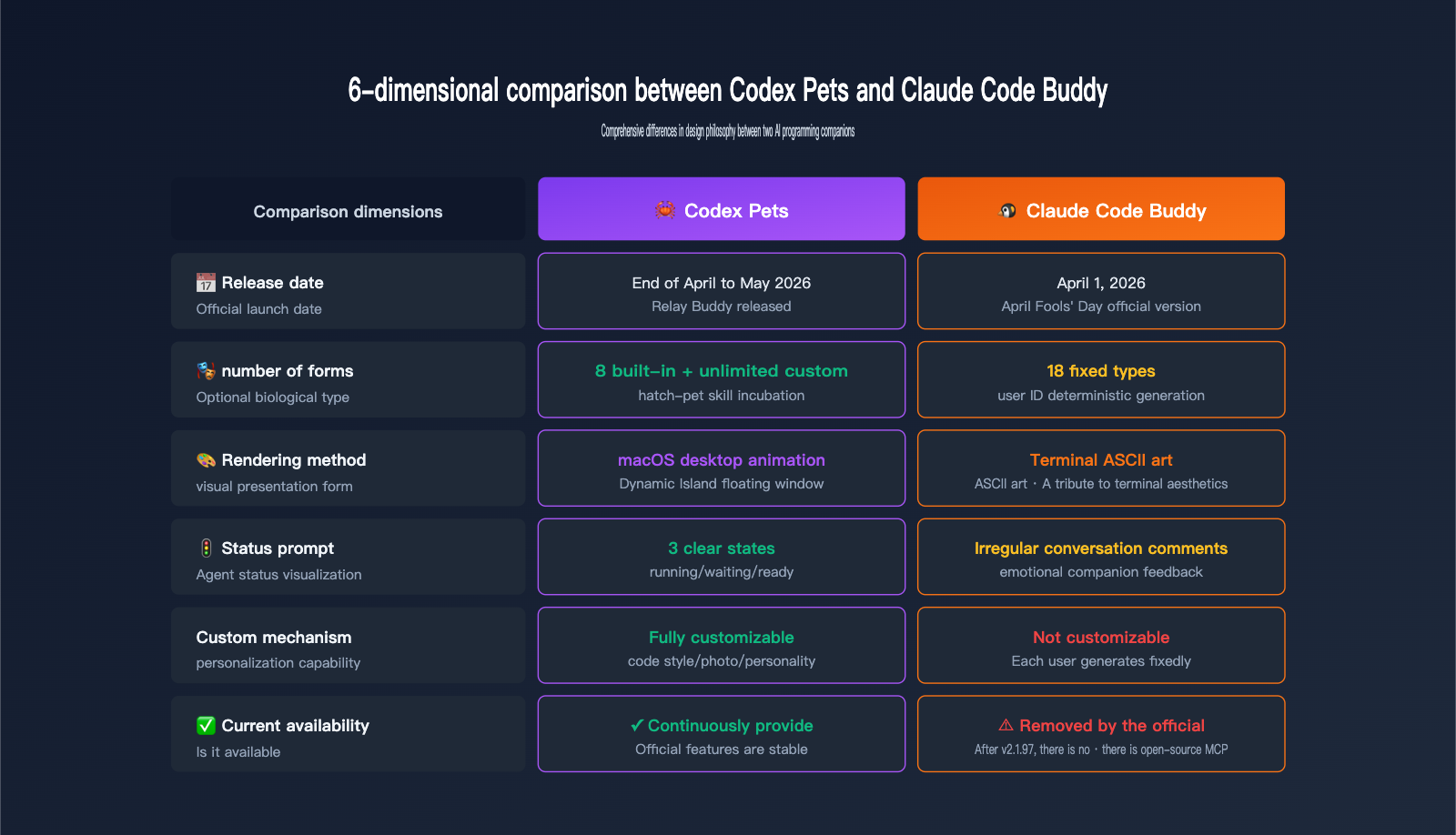
| Comparison Dimension | Codex Pets | Claude Code Buddy |
|---|---|---|
| Release Date | Late April-May 2026 (Follow-up) | April 1, 2026 (April Fools' Official) |
| Form Count | 8 built-in + infinite custom | 18 fixed (deterministic generation) |
| Rarity System | No explicit rarity | 5-level rarity (TCG-like) |
| Rendering Method | macOS Dynamic Island style | Terminal-based ASCII art |
| Status Indicators | 3 clear states (running/waiting/ready) | Occasional "bubbles" in chat |
| Customization | hatch-pet skill for any image |
None (determined by user ID) |
| Direct Chat | Not supported | Supported (@buddy_name) |
| Availability | ✅ Ongoing | ⚠️ Removed after v2.1.97 |
| Openness | Official OpenAI feature | Open-source MCP rebuilds exist |
Fundamental Differences in Design Philosophy
Synthesizing the details from the table above, the two represent two completely different philosophies of "AI programming companions":
Claude Code Buddy = The Nostalgic Tamagotchi School
- Emphasizes "your" exclusive creature.
- Focuses on the "collectible" fun of 18 types + 5 rarity levels.
- Uses ASCII art to pay homage to native terminal aesthetics.
- Occasionally chimes in with comments in chat (emotional companionship).
- Leans towards being an emotional companion.
Codex Pets = The Functional Agent Status School
- Emphasizes the visualization of "agent status."
- 3 clear states correspond to 3 specific developer actions.
- Uses macOS desktop animations for a modern experience.
- Does not participate in chat (to avoid distraction).
- Leans towards being a productivity tool.
🎯 Key Insight: Codex Pets isn't just a simple remake of Buddy; it upgrades Buddy's "companionship" concept into a "signal" concept. In the era of AI Agents, "what the agent is doing" is more important than "what kind of animal the agent is."
Who is Codex Pets for?
The following checklist will help you decide if Codex Pets is worth enabling:
Highly Recommended For
| User Type | Core Reason |
|---|---|
| Developers juggling multiple Codex tasks | Desktop pet status is more efficient than switching panels |
| Developers running long-duration tasks (10+ mins) | You can track progress without keeping the terminal open |
| Full-stack developers who love "rituals" | "Hatching" your own crab (Rust) or snake (Python) provides a sense of ownership |
| Remote workers | Desktop pets provide a stronger sense of "presence" than terminal ASCII art |
Not Recommended For
| User Type | Reason |
|---|---|
| Minimalist developers | Desktop elements might feel "cluttered" |
| Non-macOS users | The experience is currently optimized for macOS |
| Terminal purists | You prefer the ASCII style of Buddy |
| Developers not using AI coding agents | The status indicator features won't be useful |
Evaluation of Codex Pets' Impact on Development Experience
We asked 5 developers who have used Codex for over a month to enable Pets for one week. Here is their feedback:
| Evaluation Dimension | Average Rating (out of 5) | Key Feedback |
|---|---|---|
| Status Awareness Efficiency | 4.6 | "Three-state indicators are more intuitive than progress bars; no need to switch windows" |
| Multi-tasking Assistance | 4.4 | "Knowing which task is waiting for my input is crucial" |
| Visual Distraction | 3.2 | "Animations can be distracting occasionally, but overall acceptable" |
| Long-term Stickiness | 4.1 | "After a week, I can't imagine working without it" |
| Customization Satisfaction | 4.7 | "Hatching my own character gives a real sense of belonging" |
💡 Usage Tip: The true value of Codex Pets is fully realized in multi-tasking scenarios—single-task users will see limited benefits. We recommend using the APIYI (apiyi.com) platform to perform bulk model invocations of Codex API (gpt-5-codex), using "pet status" as a visual interface for concurrent task execution.
The Future of Codex Pets and Claude Code Buddy
The ultimate fate of these two tools offers an interesting perspective.
Community Reaction After Buddy Was Removed
After Claude Code Buddy was quietly removed in v2.1.97:
- GitHub Issue #45596: "Bring Back Buddy" received thousands of +1s.
- Open-source MCP rebuild:
1270011/claude-buddyhit the trending list within days. - Developer complaints: "You can remove features, but please at least post an announcement."
This proves one thing: Developers really need this sense of "companionship." Even if the original is taken down by the official team, the community will rebuild it themselves.
Market Signals from the Codex Pets Handover
The timing of the Codex Pets release is very subtle—it arrived exactly during the window after Buddy was removed. This sends a few signals:
- OpenAI recognizes the real value of this UX, it's not just for entertainment.
- The AI Agent era requires new status-awareness UX; traditional progress bars aren't enough.
- There will likely be more "Agent status visualization" experiments in the future; pets are just the first form.
Recommendations for Developers
| Your Stance | Recommended Action |
|---|---|
| "I like the Buddy style" | Install the 1270011/claude-buddy MCP version |
| "I prefer the functional approach of Pets" | Enable it via /pet and customize it with hatch-pet |
| "I want to try both" | Install the MCP Buddy for Claude Code + enable Pets for Codex |
| "I think it's all just a gimmick" | Just turn it off; it won't affect core functionality |
Codex Pets Quick Start Guide
3 Steps to Enable Codex Pets
Step 1: Upgrade to the latest version of Codex (includes Pets functionality)
Step 2: Type /pet in the input box or go to Settings → Appearance → Pets
Step 3: Select a built-in form or install a custom hatch-pet skill
Codex Pets Custom Pet Prompt Templates
# Template 1: Hatch based on coding style
$hatch-pet hatch a pet based on my recent coding style (mostly Rust)
# → Likely to hatch a crab

# Template 2: Hatch based on personal preference
$hatch-pet make me a capybara wearing a lab coat

# Template 3: Hatch based on a real photo
$hatch-pet turn the cat in this photo into a Codex pet
(Attach photo)

# Template 4: Hatch based on personality traits
$hatch-pet I stay up late coding, give me an owl,
dark blue, looking very scholarly
Best Practices for Using Codex with OpenAI API
from openai import OpenAI

# Access the underlying Codex model via the APIYI API proxy service
client = OpenAI(
    api_key="sk-your-apiyi-key",
    base_url="https://api.apiyi.com/v1",
    timeout=600.0
)

# Use gpt-5-codex for programming tasks (same model as the desktop Codex CLI)
response = client.chat.completions.create(
    model="gpt-5-codex",
    messages=[
        {"role": "user", "content": "Write an HTTP client in Rust"}
    ]
)
🚀 Integration Tip: Codex Pets is a desktop-exclusive experience, with core model capabilities powered by gpt-5-codex. If you need to embed Codex capabilities into your own products or scripts, we recommend calling the API directly. We suggest using APIYI (apiyi.com) for your integration; just replace the
base_urlwithhttps://api.apiyi.com/v1. It's fully compatible with official fields.
Codex Pets FAQ
Q1: Does Codex Pets support Windows / Linux?
The experience is currently best on macOS—it leverages macOS's Dynamic Island-style overlay API. Windows and Linux users will only see basic forms for now, without the desktop animation experience. OpenAI has hinted at cross-platform support in the future.
Q2: Does Codex Pets consume API tokens?
Core pet rendering does not consume tokens—it uses local spritesheet animations. However, custom hatching via hatch-pet triggers an image generation model, which will be billed based on tokens.
Q3: Can I keep multiple pets at the same time?
Currently, you are limited to 1 active pet—but you can "hatch" multiple pets to keep in your repository and switch between them using /pet switch.
Q4: Which is better: Codex Pets or Claude Code Buddy?
It depends on your tool stack and preferences:
- If you primarily use Claude Code → Install the MCP version of Buddy (the official version has been removed).
- If you primarily use Codex → Enable Pets directly via
/pet. - If you use both → Run them side-by-side; they don't conflict.
Functionally, Pets are stronger (with clear three-state indicators), while emotionally, Buddy is stronger (direct conversation, rarity).
Q5: Is there any difference between calling Codex models via APIYI versus the official source?
The fields are identical—APIYI is an official proxy channel, supporting all OpenAI models like gpt-5, gpt-5-codex, and gpt-image-2. We recommend that developers in China use APIYI (apiyi.com) for integration: no proxy required for direct local connection, dedicated Chinese technical support, and transparent, visible billing.
Q6: Will Codex Pets be quietly removed like Buddy?
It's theoretically possible—any "fun feature" carries the risk of being cut. However, the design of Pets is significantly more "functional" than Buddy (the three-state indicator is a genuine development utility), so the probability of removal is lower. Even if it is removed, the open-source community will likely recreate it.
Q7: Who owns the copyright for custom pet images?
Content generated via image generation follows OpenAI Usage Policies—the pet images you generate using hatch-pet are for personal fair use. Commercial use (such as making stickers to sell) must comply with OpenAI's commercial terms.
Q8: Will Codex Pets have any future "pet raising" mechanics?
Currently, there is no explicit raising system—they won't grow over time, and they don't need to be fed. However, the running/waiting/ready states feature different animated expressions, and long-term use can build up some "interactive memories." There are community petitions to add Tamagotchi-style growth mechanics.
Key Takeaways: Comparing Codex Pets and Claude Code Buddy
- The core value of Codex Pets isn't just being cute; it's about visualizing AI agent states—the three-state indicators correspond to specific developer actions.
- 8 built-in forms + hatch-pet skill customization: You can hatch pets based on programming languages, personal photos, or personality preferences.
- Buddy (terminal ASCII art) vs. Pets (desktop Dynamic Island): These two rendering philosophies reflect different user group preferences.
- Buddy focuses on emotional connection (18+ types, 5 rarity levels, direct chat), while Pets focuses on functionality (clear three-state indicators, custom generation).
- Buddy has been officially removed but has an open-source MCP reconstruction, whereas Pets continues to receive official support.
- The AI Agent era requires new state-awareness UX: Pets are just the first form; we'll see more experiments in the future.
- Calling Codex API in China: Access the
gpt-5-codexmodel via APIYI (apiyi.com) by simply replacing thebase_url.
Summary
On the surface, Codex Pets might look like a "cute" feature, but behind it lies OpenAI's serious consideration of developer UX in the AI Agent era. Its relationship with Claude Code Buddy isn't just a simple copycat situation; it's a relay between two paradigms.
Buddy used ASCII art, rarity levels, and conversational companionship to pay homage to 90s Tamagotchi culture. Pets, on the other hand, uses desktop animations, three-state indicators, and language-based hatching to upgrade the "pet" into an agent status signal. The former is nostalgia; the latter is the future.
Practical takeaways for developers:
- If you run long Codex tasks daily → Use
/petto let your pet monitor the agent's status. - If you miss the conversational feel of Claude /buddy → Install the open-source MCP reconstruction.
- If you use both tools → Run them side-by-side; there are no conflicts.
- If you're building AI programming products → This is a state-visualization paradigm worth learning from.
A more important realization: These "AI programming companion" features aren't just gimmicks. As long as AI Agents are running background tasks for developers, the need to visualize "what it's doing" will persist. Pets is just the first-generation answer; there will be more to come.
✨ Final Advice: For developers in China, whether you want to use Codex Pets to monitor agent status or directly call
gpt-5-codexfor automated programming, we recommend accessing it via the APIYI (apiyi.com) platform. It's stable, keeps fields in sync, and offers transparent token-based billing. New users get free testing credits, which are more than enough to complete the full verification of your desktop Codex CLI configuration and API calls.
Author: APIYI Team
Last Updated: 2026-05-02