Author's Note: A detailed breakdown of the major changes to the Google Gemini API free tier as of April 2026: Pro models moved to paid-only, mandatory monthly spending caps introduced, and Flash models remain free. Includes 3 practical coping strategies.
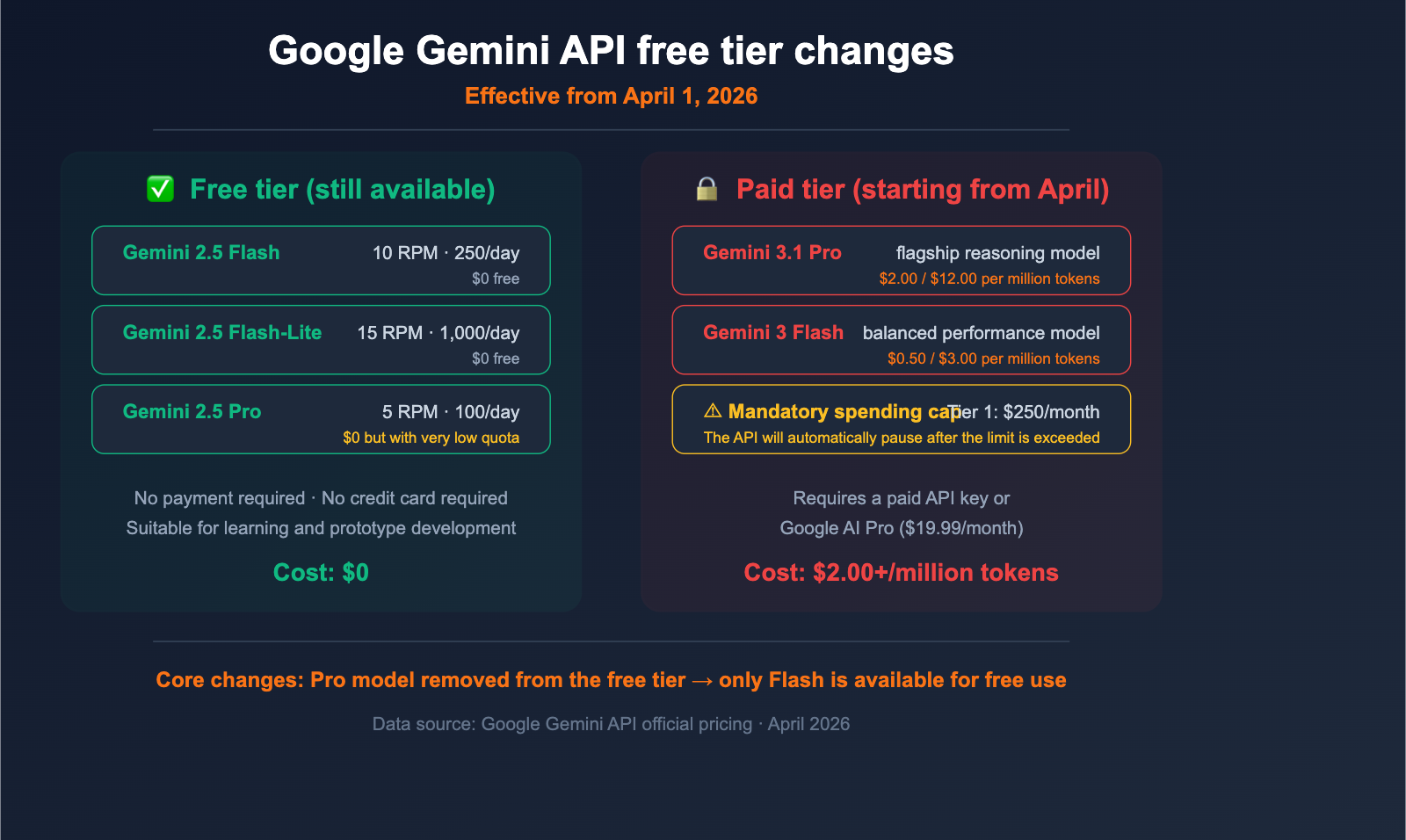
Starting April 1, 2026, Google significantly tightened the Gemini API free tier. The most critical change is: Pro series models (including Gemini 3.1 Pro) have been removed from the free tier and are now exclusive to paid users. Additionally, Google has introduced a mandatory monthly spending cap, after which the API will automatically pause.
Core Value: After reading this, you'll clearly understand which models are still free to use, the specific costs after upgrading, and 3 practical cost-optimization strategies.
Key Takeaways from the Gemini API Free Tier Changes
| Change Item | Before (March) | After (Starting April) | Impact Level |
|---|---|---|---|
| Pro Model Access | Available in free tier (with quotas) | Paid users only | ⚠️ High |
| Flash Model Access | Available in free tier | Still available in free tier | ✅ No impact |
| Monthly Spending Cap | No mandatory cap | Tiered mandatory caps | ⚠️ Medium |
| Gemini 3.x New Models | Partial free preview | All require payment | ⚠️ High |
What happened to the Gemini API free tier?
Since December 2025, Google has already reduced the Gemini API free tier quota by 50-80%. The changes on April 1, 2026, go even further—directly removing the Pro series models from the free tier.
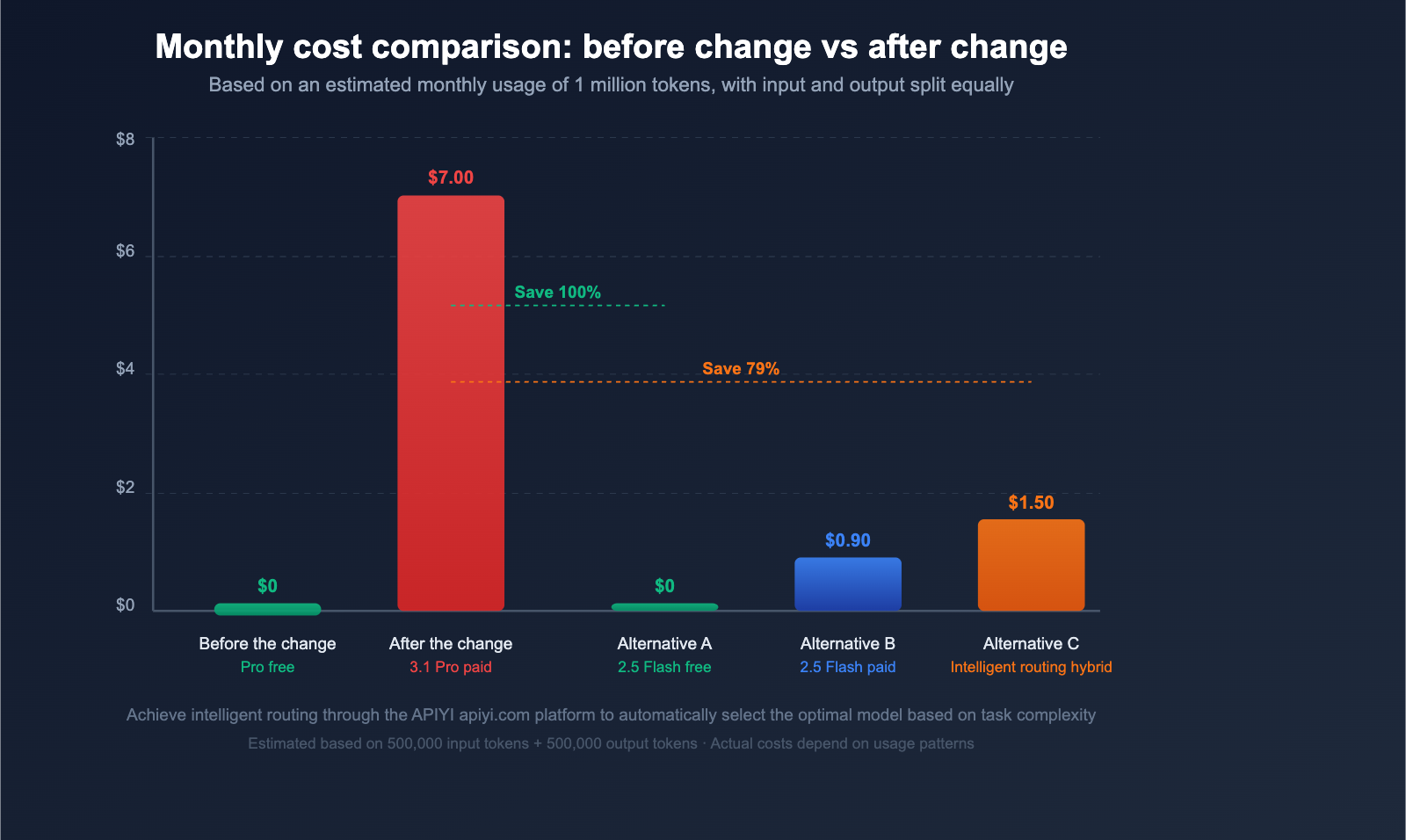
This means if you were previously using the Gemini Pro model for development or testing for free, you now need to upgrade to a paid plan to continue using it. However, the Flash series models remain in the free tier, which is great news for lightweight applications.
Google's strategy is clear: Use Flash to attract developers to get started, and leverage the capabilities of Pro to drive paid conversions.
Detailed Breakdown of Gemini API Free Tier Changes
Free Tier: Flash Series Models Only
Starting in April, the supported models and quotas for the free tier are as follows:
| Model | Free Tier Quota | Requests Per Minute | Daily Requests | Token Limit |
|---|---|---|---|---|
| Gemini 2.5 Pro | ✅ Retained | 5 RPM | 100/day | 250K/min |
| Gemini 2.5 Flash | ✅ Retained | 10 RPM | 250/day | 250K/min |
| Gemini 2.5 Flash-Lite | ✅ Retained | 15 RPM | 1,000/day | 250K/min |
| Gemini 3.1 Pro | ❌ Removed | — | — | Paid only |
| Gemini 3 Flash | ❌ Removed | — | — | Paid only |
It's important to note that Gemini 2.5 Pro is still included in the free tier, though the quota is quite low (only 5 requests per minute). Google's new generation models (the Gemini 3.x series) are not available for free access at all.
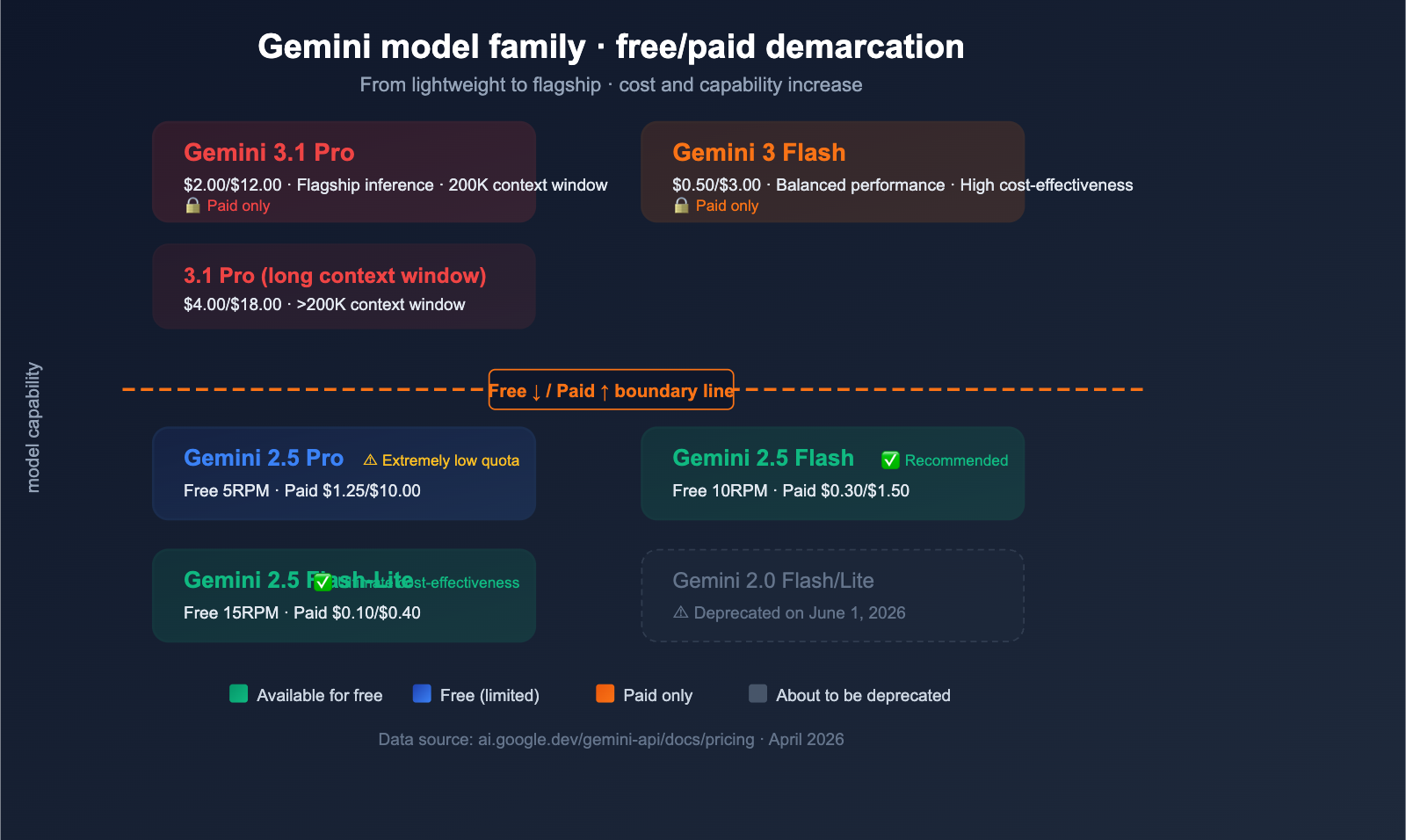
Additionally, Gemini 2.0 Flash and 2.0 Flash-Lite will be deprecated on June 1, 2026. Developers still using these models should migrate to 2.5 Flash or 3 Flash as soon as possible.
Paid Tier: Pro Model Pricing Breakdown
Once you upgrade to the paid tier, the pricing for each model is as follows:
| Model | Input Price (per 1M tokens) | Output Price (per 1M tokens) | Context Window | Positioning |
|---|---|---|---|---|
| Gemini 3.1 Pro | $2.00 | $12.00 | ≤200K | Flagship Reasoning |
| Gemini 3.1 Pro (Long context) | $4.00 | $18.00 | >200K | Long-text Processing |
| Gemini 3 Flash | $0.50 | $3.00 | Standard | Balanced Performance |
| Gemini 2.5 Pro | $1.25 | $10.00 | Standard | Mature & Stable |
| Gemini 2.5 Flash | $0.30 | $1.50 | Standard | Cost-effective |
| Gemini 2.5 Flash-Lite | $0.10 | $0.40 | Standard | Extreme Efficiency |
Pricing Comparison Reference:
Compared to other mainstream Large Language Model APIs, the $2.00/$12.00 pricing for Gemini 3.1 Pro is in the mid-to-high range:
- Claude Sonnet 4.6: $3/$15 per million tokens
- GPT-4o: $2.50/$10 per million tokens
- Gemini 2.5 Flash: $0.30/$1.50 per million tokens (the king of cost-effectiveness)
🎯 Cost Advice: If your application doesn't have extremely high requirements for model capability, Gemini 2.5 Flash remains an excellent free-to-use choice. When you need stronger capabilities, it's recommended to use an API proxy service like APIYI (apiyi.com) to integrate multiple model APIs, allowing you to flexibly switch models based on task complexity and optimize your costs.
Mandatory Monthly Spending Limits
Starting April 1st, Google is enforcing mandatory monthly spending limits at the billing account level:
| Billing Tier | Monthly Spending Limit | Use Case |
|---|---|---|
| Tier 1 | $250/month | Individual developers, small projects |
| Tier 2 | $2,000/month | Mid-sized teams, production apps |
| Tier 3 | $20,000-100,000+/month | Enterprise-scale deployment |
Key Impacts:
- Limits cannot be disabled: This is a mandatory account-level restriction, unlike project-level budget caps that you can set yourself.
- Suspension upon limit: Once the limit is reached, API calls will be automatically suspended until the next billing cycle or until you upgrade to a higher tier.
- Shared across all projects: All projects under the same billing account share this limit.
For individual developers with monthly API costs under $250, the Tier 1 limit won't really be an issue. However, if your application is growing rapidly, you'll need to plan for tier upgrades in advance to avoid sudden API suspensions that could impact your live services.
💡 Risk Warning: For production environments, we strongly advise against relying entirely on a single API provider. By using a multi-model aggregation platform like APIYI (apiyi.com), you can automatically switch to a backup model if one provider's API goes down, ensuring service continuity.
3 Strategies to Handle Gemini API Changes
Strategy 1: Replace Pro with Flash for Most Tasks
Gemini 2.5 Flash is now performing close to Pro levels on many tasks, and it remains free to use. Before you switch everything over, I recommend evaluating your specific use cases:
| Task Type | Recommended Model | Free Available | Performance Evaluation |
|---|---|---|---|
| Daily Chat/Q&A | Gemini 2.5 Flash | ✅ | 90%+ of Pro |
| Simple Code Gen | Gemini 2.5 Flash | ✅ | 85%+ of Pro |
| Summarization/Translation | Gemini 2.5 Flash-Lite | ✅ | 80%+ of Pro |
| Complex Reasoning/Analysis | Gemini 3.1 Pro | ❌ Paid | Best |
| Long Document Processing | Gemini 2.5 Pro (Free) | ✅ Limited | Sufficient |
| Multimodal Understanding | Gemini 3.1 Pro | ❌ Paid | Best |
Practical Tip: Test your prompts with the Flash model first. If the results meet your needs, there's no need to upgrade to Pro. Many developers have found that with a bit of prompt optimization, the Flash model can handle tasks they previously thought required the Pro version.
Strategy 2: Switch Models on Demand for Fine-Grained Cost Control
Don't use the same model for every request. Dynamically select your model based on the complexity of the task:
import openai

client = openai.OpenAI(
    api_key="YOUR_API_KEY",
    base_url="https://vip.apiyi.com/v1"  # APIYI unified interface
)

def smart_route(task_type: str, prompt: str) -> str:
    """Intelligently select a model based on task type"""
    model_map = {
        "simple": "gemini-2.5-flash",       # Free
        "medium": "gemini-2.5-pro",          # Free (Limited)
        "complex": "gemini-3.1-pro-preview", # Paid
    }
    model = model_map.get(task_type, "gemini-2.5-flash")

    response = client.chat.completions.create(
        model=model,
        messages=[{"role": "user", "content": prompt}]
    )
    return response.choices[0].message.content
View full smart routing code
import openai
from typing import Optional

client = openai.OpenAI(
    api_key="YOUR_API_KEY",
    base_url="https://vip.apiyi.com/v1"  # APIYI unified interface
)

def classify_task(prompt: str) -> str:
    """Simple task complexity classification"""
    # Keyword-based judgment
    complex_keywords = ["analyze", "reason", "compare", "evaluate", "strategy"]
    medium_keywords = ["summarize", "translate", "explain", "list"]

    for kw in complex_keywords:
        if kw in prompt:
            return "complex"
    for kw in medium_keywords:
        if kw in prompt:
            return "medium"
    return "simple"

def smart_completion(
    prompt: str,
    task_type: Optional[str] = None,
    max_tokens: int = 2000
) -> str:
    """Intelligent model routing"""
    if task_type is None:
        task_type = classify_task(prompt)

    model_map = {
        "simple": "gemini-2.5-flash",
        "medium": "gemini-2.5-pro",
        "complex": "gemini-3.1-pro-preview",
    }
    model = model_map.get(task_type, "gemini-2.5-flash")

    response = client.chat.completions.create(
        model=model,
        messages=[{"role": "user", "content": prompt}],
        max_tokens=max_tokens
    )
    return response.choices[0].message.content

# Usage Example
result = smart_completion("Help me summarize the core points of this article")
🚀 Quick Integration: Through the APIYI (apiyi.com) platform, you can use a unified interface to call models from Gemini, Claude, GPT, and more. Switching models only requires changing one parameter, which is perfect for implementing the smart routing strategy above.
Strategy 3: Multi-Vendor Backup to Avoid Single Points of Failure
Since Google introduced mandatory spending caps, if your application relies entirely on the Gemini API, your service will be interrupted once you hit that limit. I recommend configuring a multi-vendor backup:
- Primary Model: Gemini 2.5 Flash (Free/Low-cost daily tasks)
- High-Performance Backup: Claude Sonnet 4.6 or GPT-4o (Complex tasks)
- Ultimate Cost-Efficiency: Deepseek-V3 or Gemini 2.5 Flash-Lite
This multi-vendor strategy not only prevents single points of failure but also allows you to assign tasks based on the strengths of different models, achieving the best overall performance.
🎯 Platform Recommendation: APIYI (apiyi.com) provides a unified API interface for models like Gemini, Claude, GPT, and Deepseek. A single API key gives you access to all of them, making it ideal for implementing a multi-vendor backup strategy.
Impact of Gemini API Changes on Different Users
Individual Developers and Students
Impact: Moderate. If you previously relied on the free Pro model for learning and development, you'll now need to switch to the Flash model or prepare to pay.
Recommendation: Prioritize using the free Gemini 2.5 Flash and 2.5 Flash-Lite. These models are more than enough for learning and prototyping.
Small Startup Teams
Impact: Significant. The pay-as-you-go threshold for Pro models and the $250/month spending limit for Tier 1 might hinder rapid iteration.
Recommendation: Evaluate whether you can cover core functionalities with the Flash model, reserving Pro for critical scenarios only. Use aggregation platforms like APIYI (apiyi.com) to access multiple models, allowing you to manage costs more flexibly.
Enterprise Users
Impact: Minor. Enterprises usually have existing payment plans, but you should keep an eye on the mandatory spending limits to ensure your tier matches your needs.
Recommendation: Verify that your current billing tier aligns with your actual usage to avoid API suspension triggered by spending caps.
Frequently Asked Questions
Q1: Can I still use Gemini 2.5 Pro for free after April?
Yes, but the quota is quite low. Gemini 2.5 Pro is currently still included in the free tier, with a limit of 5 requests per minute and 100 requests per day. Note that this is 2.5 Pro, not the latest 3.1 Pro. The 3.x series Pro models have been moved entirely to the paid tier.
Q2: What happens after reaching the monthly spending limit?
API invocations will be automatically paused until the next billing cycle begins or you upgrade to a higher billing tier. This limit is a mandatory account-level restriction that cannot be disabled. Tier 1 users have a $250/month cap, which medium-scale applications might hit. We recommend using multi-model platforms like APIYI (apiyi.com) as a backup to prevent service interruptions caused by a single provider's suspension.
Q3: How much longer can I use Gemini 2.0 models?
Gemini 2.0 Flash and 2.0 Flash-Lite are scheduled to be officially deprecated on June 1, 2026. If your application is still using these models, we recommend migrating to Gemini 2.5 Flash or Gemini 3 Flash as soon as possible.
Q4: Are there cheaper, high-performance alternatives to Gemini Pro?
There are a few options worth considering: (1) Gemini 2.5 Flash ($0.30/$1.50) offers excellent value and can handle most scenarios; (2) Deepseek-V3 is more affordable and has impressive reasoning capabilities; (3) Claude Haiku 4.5 is extremely fast and cost-effective. You can quickly compare the performance and costs of different models via the APIYI (apiyi.com) platform.
Summary
Here are the key takeaways from the changes to the Google Gemini API free tier:
- Pro Models Move to Paid: The Gemini 3.x Pro series has been removed from the free tier. You'll now need a valid paid API key or a subscription to the Google AI Pro ($19.99/month) or Ultra ($249.99/month) plans.
- Flash Models Remain Free: Gemini 2.5 Flash and Flash-Lite are still available in the free tier, making them the go-to choice for zero-cost development.
- Mandatory Spending Limits: Tier 1 has a monthly limit of $250. Once you hit this, service is paused, which could impact the stability of your production environment.
- Urgent Migration: The Gemini 2.0 series will be deprecated on June 1st, so you'll need to migrate as soon as possible.
Given these changes, the most practical strategy is to use the free Flash models for daily tasks, reserve the paid Pro models for when they're absolutely necessary, and configure multi-vendor backups to prevent service interruptions.
We recommend using the APIYI (apiyi.com) platform to unify access to various AI model APIs. With a single interface, you can cover mainstream models like Gemini, Claude, and GPT, allowing for flexible switching and better cost control.
📚 References
-
Official Google Gemini API Pricing: Latest model pricing and quota information
- Link:
ai.google.dev/gemini-api/docs/pricing - Note: The official pricing page, including detailed cost breakdowns for all models.
- Link:
-
Google Gemini API Billing Documentation: Information on billing tiers and spending limits
- Link:
ai.google.dev/gemini-api/docs/billing - Note: Detailed rules regarding mandatory monthly spending limits.
- Link:
-
Analysis of Gemini API Free Tier Changes: A complete breakdown of the April updates
- Link:
findskill.ai/blog/gemini-api-pricing-guide - Note: A third-party analysis of the free tier changes.
- Link:
-
Google AI Subscription Plans: Details on Pro and Ultra subscriptions
- Link:
gemini.google/subscriptions - Note: Price and feature comparisons for Google AI Pro/Ultra subscriptions.
- Link:
Author: APIYI Technical Team
Technical Discussion: Feel free to share your experiences with the Gemini API and cost-optimization tips in the comments. For more AI model news, visit the APIYI documentation center at docs.apiyi.com.