title: "Fixing Claude Code 'API Error 400' Due to Tool Use Concurrency"
description: "A deep dive into the 4 causes and 5 solutions for the Claude Code 'API Error 400' concurrency issue, including a quick environment variable fix."
tags: [Claude Code, AI Development, API, Troubleshooting]
Author's Note: This guide provides a deep dive into the 4 primary causes and 5 solutions for the "API Error 400 due to tool use concurrency issues" in Claude Code. You'll learn how to fix third-party API channel issues with just a single environment variable.
When developing with Claude Code, you might suddenly run into this frustrating error: API Error: 400 due to tool use concurrency issues. Run /rewind to recover the conversation. This error disrupts your workflow and can even render an entire conversation unusable.
Core Value: By the end of this article, you'll understand the 4 root causes of this error and 5 ways to solve it. Specifically, if you're using Claude via third-party channels like AWS Bedrock, you'll see how a single environment variable can resolve the issue once and for all.
{Claude Code 400 error diagnosis and resolution}
{API Error: 400 due to tool use concurrency issues}
{Error 400: tool use concurrency issues}
{4 major reasons}
{Beta header incompatible}
{Third-party channels are not supported}
{context window compression exception}
{isolated tool_result}
{Message format error}
{Voice/extension conflict}
{Concurrent invocation disorder}
{Response order conflict}
{Diagnostic process}
{1. Check API channel}
{2. Determine the error frequency}
{3. Check session status}
{4. Select a solution}
{matching scheme}
{5 solutions}
{⭐}
{Set environment variables}
{A single command}
{/rewind rewind}
{Sporadic fix}
{/clear New session}
{Reliable recovery}
{Upgrade to the latest version}
{Long-term repair}
{Optimize usage habits}
{Prevention first}
{Core solution: export CLAUDE_CODE_DISABLE_EXPERIMENTAL_BETAS=1}
Claude Code 400 Error: Key Takeaways
| Key Point | Description | Difficulty |
|---|---|---|
| Beta Header Incompatibility | Third-party API channels don't support Anthropic's experimental Beta headers | ⭐ One-line command fix |
| Context Compression Issues | Long sessions create orphaned tool_result blocks after compression |
⭐⭐ Requires a new session |
| Message Format Errors | Voice input or other scenarios lead to messages violating API protocols | ⭐⭐ Requires /rewind |
| Concurrent Tool Call Conflicts | Out-of-order responses for parallel tool calls | ⭐⭐⭐ Requires official fix |
What is a Claude Code 400 Error?
When Claude Code sends a request to the API, the server returns an HTTP 400 error if the message structure doesn't comply with the Anthropic API protocol. Specifically, the "tool use concurrency issues" error occurs when the pairing between Claude Code's tool_use and tool_result blocks is broken.
The Anthropic API has strict requirements for message structure:
- Every
tool_useblock must have a correspondingtool_resultblock. - The IDs for
tool_useandtool_resultmust match exactly. - Messages from the same role cannot appear consecutively.
Once these rules are violated, the API returns a 400 error. There are several reasons why these rules might be broken, each requiring a different solution.
4 Major Causes of Claude Code 400 Errors
Cause 1: Beta Header Incompatibility with Third-Party API Channels (Most Common)
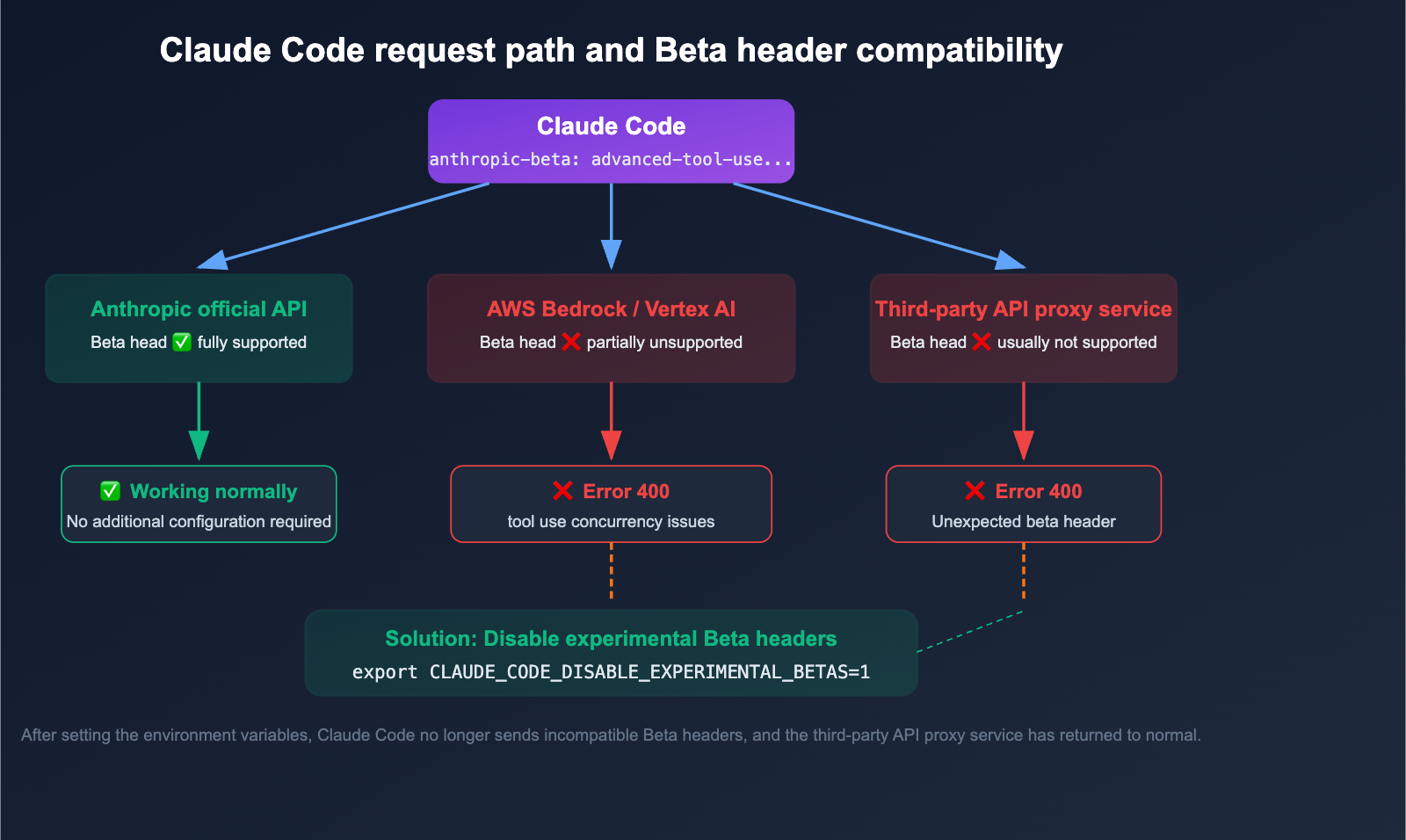
This is the most frequent cause when using Claude Code via AWS Bedrock, Google Vertex AI, or third-party API proxy services.
When sending API requests, Claude Code automatically attaches Anthropic's experimental Beta headers:
anthropic-beta: prompt-caching-scope-2026-01-05,advanced-tool-use-2025-11-20
These Beta headers work perfectly with the official Anthropic API, but third-party channels (like AWS Bedrock, Vertex AI, or API proxy services) often don't support these experimental features, causing the request to be rejected with a 400 error.
| Usage Method | Beta Header Compatibility | Error Likely? |
|---|---|---|
| Official Anthropic API | ✅ Fully Compatible | No |
| AWS Bedrock | ❌ Partial Support | Possible |
| Google Vertex AI | ❌ Partial Support | Possible |
| Third-Party API Proxy | ❌ Usually Unsupported | High Probability |
🎯 Key Tip: If you are using Claude Code via third-party platforms like APIYI (apiyi.com) or AWS Bedrock and encounter a 400 error, the first step is to check if you need to disable the experimental Beta headers.
Cause 2: Context Compression Creates Orphaned tool_result
This is the most common error cause in long, tool-intensive sessions. When a conversation gets long, Claude Code automatically performs context compression to manage token usage.
The problem is that the compression process might delete an assistant message containing a tool_use block while keeping the corresponding user message containing the tool_result block. This creates an "orphaned tool_result"—it references a tool_use ID that no longer exists in the conversation history.
Before compression:
  Assistant: [tool_use id="abc123"] → Call search tool
  User: [tool_result id="abc123"] → Search result

After compression:
  (Assistant message deleted)
  User: [tool_result id="abc123"] → ⚠️ Orphaned! Cannot find corresponding tool_use
Once the Anthropic API detects this mismatch, it rejects the entire request and returns a 400 error. Worse, the /rewind command often can't recover from this, as the orphaned tool_result block might be buried deep in the conversation history.
Cause 3: Message Format Anomalies
Certain scenarios can lead to message formats that don't comply with the API protocol:
- Voice Input: Messages entered via voice might be stored as plain strings rather than the array format required by the API. During context compression, these string-formatted messages can't be merged correctly, leading to consecutive messages from the same role.
- VSCode Extension Conflicts: When using Claude Code in VSCode to edit
.tsx/.jsxfiles, viewing the file simultaneously might trigger concurrency conflicts. - Improper Hook Rejection Handling: When a hook rejects a tool call, Claude Code might fail to handle it gracefully, resulting in a corrupted message structure.
Cause 4: Out-of-Order Parallel Tool Call Responses
Claude Code supports calling multiple tools in parallel to improve efficiency. However, when multiple tool responses return simultaneously, if the order of the responses is assembled incorrectly, it can disrupt the pairing of tool_use and tool_result.
This is more likely to happen during complex prompts and long sessions. Many users on GitHub have reported encountering this error "about every 15 minutes."
5 Solutions for Claude Code 400 Errors
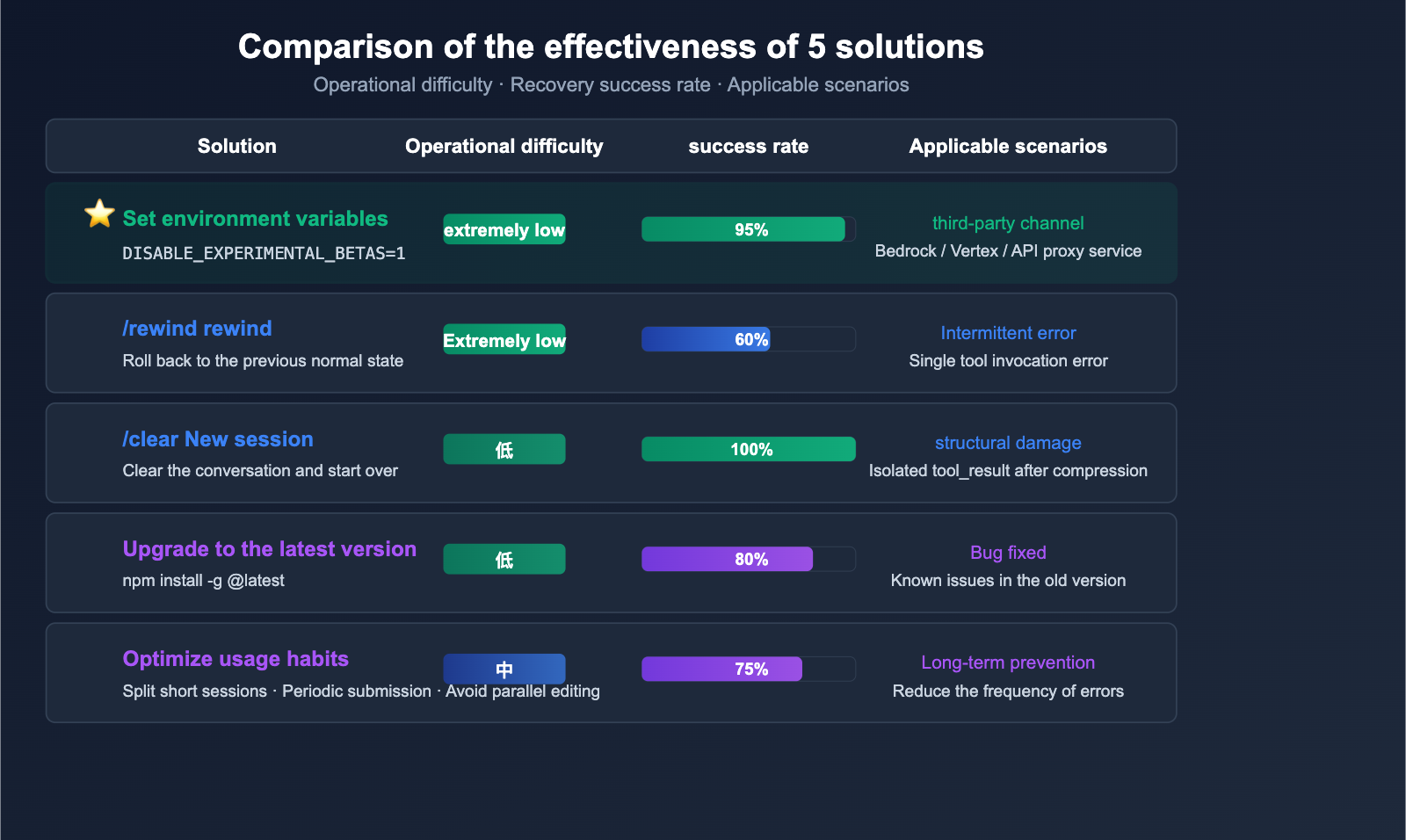
Solution 1: Set Environment Variables (Required for Third-Party Channel Users)
If you're using Claude Code via AWS Bedrock, Google Vertex AI, or any third-party API proxy service, this is the most critical step. Just run this single command:
export CLAUDE_CODE_DISABLE_EXPERIMENTAL_BETAS=1
This command disables the experimental Beta headers that Claude Code automatically attaches, ensuring your requests remain compatible with third-party API channels.
How to make it permanent:
Method A: Add to your Shell configuration file
# macOS / Linux (zsh)
echo 'export CLAUDE_CODE_DISABLE_EXPERIMENTAL_BETAS=1' >> ~/.zshrc
source ~/.zshrc

# Linux (bash)
echo 'export CLAUDE_CODE_DISABLE_EXPERIMENTAL_BETAS=1' >> ~/.bashrc
source ~/.bashrc
Method B: Add to your Claude Code configuration file
// ~/.claude/settings.json
{
  "env": {
    "CLAUDE_CODE_DISABLE_EXPERIMENTAL_BETAS": "1"
  }
}
View the full environment troubleshooting script
#!/bin/bash
# Claude Code 400 Error Troubleshooting Script

echo "=== Claude Code Environment Check ==="

# Check CLAUDE_CODE_DISABLE_EXPERIMENTAL_BETAS
if [ -z "$CLAUDE_CODE_DISABLE_EXPERIMENTAL_BETAS" ]; then
    echo "⚠️  CLAUDE_CODE_DISABLE_EXPERIMENTAL_BETAS is not set"
    echo "   Recommendation: export CLAUDE_CODE_DISABLE_EXPERIMENTAL_BETAS=1"
else
    echo "✅ CLAUDE_CODE_DISABLE_EXPERIMENTAL_BETAS=$CLAUDE_CODE_DISABLE_EXPERIMENTAL_BETAS"
fi

# Check API configuration
if [ -n "$ANTHROPIC_BASE_URL" ]; then
    echo "📡 Using custom API URL: $ANTHROPIC_BASE_URL"
    echo "   ⚠️  Third-party channels must set DISABLE_EXPERIMENTAL_BETAS=1"
fi

if [ -n "$CLAUDE_CODE_USE_BEDROCK" ]; then
    echo "☁️  Using AWS Bedrock channel"
fi

if [ -n "$CLAUDE_CODE_USE_VERTEX" ]; then
    echo "☁️  Using Google Vertex AI channel"
fi

# Check Claude Code version
if command -v claude &> /dev/null; then
    echo "📦 Claude Code version: $(claude --version 2>/dev/null || echo 'Unknown')"
    echo "   Recommendation: Keep it updated to receive bug fixes"
fi

# Check settings.json
SETTINGS_FILE="$HOME/.claude/settings.json"
if [ -f "$SETTINGS_FILE" ]; then
    echo "⚙️  settings.json exists"
    if grep -q "CLAUDE_CODE_DISABLE_EXPERIMENTAL_BETAS" "$SETTINGS_FILE"; then
        echo "   ✅ DISABLE_EXPERIMENTAL_BETAS is configured in settings.json"
    else
        echo "   ⚠️  DISABLE_EXPERIMENTAL_BETAS is missing from settings.json"
    fi
else
    echo "⚠️  settings.json does not exist: $SETTINGS_FILE"
fi

echo ""
echo "=== Check Complete ==="
💡 Tip: When using the Claude API via third-party platforms like APIYI (apiyi.com), we recommend making this environment variable a standard configuration. These platforms have optimized compatibility for the Claude API, and this setting ensures the most stable experience.
Solution 2: Use /rewind to Roll Back the Conversation
When an error is caused by an abnormal message format or a conflict in a single tool invocation, the /rewind command can usually restore functionality:
# Enter in Claude Code
/rewind
/rewind reverts the conversation to the last stable state, undoing the message that caused the error. If one /rewind isn't enough, you can run it multiple times to go back further.
Best for: Occasional 400 errors, especially those that appear immediately after a single tool call.
Not suitable for: Isolated tool_result issues caused by context compression (as the root cause lies deep in the conversation history).
Solution 3: Start a New Session (/clear)
When /rewind fails to resolve the issue, starting a new session is the most reliable fix:
# Enter in Claude Code
/clear
This clears the current conversation history and starts fresh. While you'll lose the current context, it's the only way to fix structural corruption caused by context compression.
Optimization Tip: Before starting a long, complex development task, briefly summarize your current work state in a prompt. That way, even if you need to /clear, you can quickly restore your context.
Solution 4: Upgrade Claude Code to the Latest Version
The Anthropic team is constantly fixing bugs related to 400 errors. Key recent fixes include:
| Version | Fixes |
|---|---|
| v2.1.70 | Fixed 400 errors when using ANTHROPIC_BASE_URL with third-party gateways; tool search now correctly detects proxy endpoints |
| v2.1.18+ | Improved suppression of structured-outputs Beta headers via CLAUDE_CODE_DISABLE_EXPERIMENTAL_BETAS |
| Ongoing | Fixed issues where advanced-tool-use Beta headers were not correctly disabled |
# Upgrade Claude Code
npm install -g @anthropic-ai/claude-code@latest

# Verify version
claude --version
Solution 5: Optimize Habits to Prevent 400 Errors
| Preventive Measure | Description | Impact |
|---|---|---|
| Control session length | Break long tasks into multiple short sessions | Reduces frequency of context compression |
| Avoid parallel editing | Don't manually edit files while Claude Code is editing | Prevents concurrency conflicts |
| Reduce tool density | Avoid triggering too many tools in a single turn | Lowers probability of message structure corruption |
| Save progress regularly | Git Commit important changes | Prevents code loss even if you have to /clear |
| Use print mode carefully | This error occurs more frequently in -p mode |
Prefer interactive mode |
🎯 Pro Tip: We recommend breaking complex development tasks into smaller chunks, keeping each task under 15-20 minutes. This not only reduces the likelihood of 400 errors but also helps maintain the quality of Claude Code's context.
Troubleshooting Claude Code 400 Errors
When you run into an API Error: 400 due to tool use concurrency issues, follow this workflow to quickly diagnose and resolve the problem:
Step 1: Identify your API channel
- Using AWS Bedrock / Vertex AI / a third-party API proxy service → Try Solution 1 first (set environment variables).
- Using the official Anthropic API → Move to Step 2.
Step 2: Check error frequency
- Occasional (first time seeing it) → Try Solution 2 (
/rewind). - Frequent (happens every 15 minutes) → Move to Step 3.
Step 3: Check session status
- Current session is very long (50+ turns) → Use Solution 3 (
/clearto start a new session). - Error occurs right at the start of a session → Use Solution 4 (upgrade your version).
Step 4: Long-term prevention
- Apply the best practices in Solution 5 to fundamentally reduce the occurrence of these errors.
💡 Quick Diagnosis: If you're using the Claude API via the APIYI (apiyi.com) platform and encounter this issue, simply setting
export CLAUDE_CODE_DISABLE_EXPERIMENTAL_BETAS=1will resolve the majority of cases immediately.
Claude Code Key Environment Variables Cheat Sheet
Beyond CLAUDE_CODE_DISABLE_EXPERIMENTAL_BETAS, the following environment variables also significantly impact the stability of Claude Code:
| Environment Variable | Purpose | Recommended Value |
|---|---|---|
CLAUDE_CODE_DISABLE_EXPERIMENTAL_BETAS |
Disables experimental Beta headers | 1 (Required for third-party channels) |
ANTHROPIC_BASE_URL |
Custom API endpoint | Set according to your provider |
CLAUDE_CODE_USE_BEDROCK |
Use AWS Bedrock | 1 (For Bedrock users) |
CLAUDE_CODE_USE_VERTEX |
Use Google Vertex AI | 1 (For Vertex users) |
BASH_DEFAULT_TIMEOUT_MS |
Default Bash tool timeout | 120000 (2 minutes) |
BASH_MAX_TIMEOUT_MS |
Maximum Bash tool timeout | 600000 (10 minutes) |
DISABLE_PROMPT_CACHING |
Disable prompt caching | 1 (When troubleshooting cache issues) |
🔧 Configuration Tip: For users utilizing third-party API proxy services, we recommend configuring these environment variables in
~/.claude/settings.jsonto avoid having to set them manually every time you launch. You can find the latest compatibility configuration recommendations via the APIYI (apiyi.com) platform.
FAQ
Q1: What should I do if I still get a 400 error even after setting CLAUDE_CODE_DISABLE_EXPERIMENTAL_BETAS=1?
It's a known issue that in some versions of Claude Code, this environment variable might not fully suppress all beta headers (such as advanced-tool-use-2025-11-20). The solution is to upgrade to the latest version of Claude Code (npm install -g @anthropic-ai/claude-code@latest), as this has been fixed in newer releases. If you're still having trouble after upgrading, try using /clear to start a fresh session.
Q2: What if /rewind doesn’t fix the error even after multiple attempts?
This usually means the issue is caused by orphaned tool_result entries resulting from context compression, with the root cause buried deep in your conversation history. In this case, /rewind can't reach the source of the problem. The only effective solution is to use /clear to start a new session. We recommend briefly summarizing your progress at the start of the new session to quickly restore context. APIYI (apiyi.com) users can check the documentation center for more tips on session recovery.
Q3: Any specific advice for frequent 400 errors when using the AWS Bedrock channel?
AWS Bedrock has stricter message format validation than the official Anthropic API. In addition to setting CLAUDE_CODE_DISABLE_EXPERIMENTAL_BETAS=1, we also recommend: (1) ensuring CLAUDE_CODE_USE_BEDROCK=1 is set correctly; (2) verifying your AWS Region and model ID configuration; and (3) upgrading to Claude Code version 2.1.70 or higher, which specifically addresses compatibility issues with third-party gateways.
Q4: Will this error cause me to lose my code?
No, it won't directly cause code loss. Claude Code performs operations before editing files, so even if the conversation errors out, changes already saved to disk remain unaffected. However, it's good practice to commit to Git regularly. This way, even if you need to /clear and restart your session, all your code changes remain safely stored in version control.
Summary
Key takeaways for handling Claude Code 400 tool use concurrency errors:
- Prioritize environment variables for third-party channels: When using Claude Code via Bedrock, Vertex, or an API proxy service, setting
export CLAUDE_CODE_DISABLE_EXPERIMENTAL_BETAS=1resolves most issues. - Watch out for compression risks in long sessions: Long, tool-intensive sessions can lead to orphaned
tool_resultentries due to context compression; try to keep your sessions concise. - Stay updated: The Anthropic team is continuously fixing related bugs, so upgrading to the latest version is the best long-term solution.
- Tiered troubleshooting: Start with
/rewind, move to/clearif that fails, and always double-check your environment variables and version.
For developers using third-party API channels, just remember this one command: export CLAUDE_CODE_DISABLE_EXPERIMENTAL_BETAS=1.
We recommend getting your Claude API service through APIYI (apiyi.com). The platform provides compatibility optimizations and detailed configuration documentation to help you avoid common integration issues.
📚 References
-
Claude Code Official Troubleshooting Documentation: The official guide for resolving errors.
- Link:
code.claude.com/docs/en/troubleshooting - Description: Contains official solutions for common issues like 400 errors.
- Link:
-
Claude Code Environment Variables Documentation: Complete reference for environment variables.
- Link:
code.claude.com/docs/en/env-vars - Description: Detailed explanations for all 60+ environment variables.
- Link:
-
GitHub Issue #40305: Technical analysis of 400 errors caused by orphaned
tool_result.- Link:
github.com/anthropics/claude-code/issues/40305 - Description: A detailed record of the root cause behind 400 errors triggered by context compression.
- Link:
-
GitHub Issue #46105: Fix for 400 errors when using third-party API gateways.
- Link:
github.com/anthropics/claude-code/issues/46105 - Description: Suggests setting
DISABLE_EXPERIMENTAL_BETASwhen encountering 400 errors while using a customBASE_URL.
- Link:
-
APIYI Help Documentation: Claude Code compatibility configuration guide.
- Link:
help.apiyi.com - Description: Best practices for using Claude Code with third-party channels.
- Link:
Author: APIYI Technical Team
Technical Discussion: If you run into any issues using Claude Code, feel free to share them in the comments. For more technical resources, visit the APIYI documentation center at docs.apiyi.com.