Recently, a customer encountered a very "Google-style" 400 error while using Nano Banana Pro (model ID: gemini-3-pro-image-preview) for image-to-image tasks:
{
  "status_code": 400,
  "error": {
    "message": "Unsupported file URI type: {{ $json.imageUrls }}. File URI must be a File API (e.g. https://generativelanguage.googleapis.com/files/<id>), Youtube (e.g. https://www.youtube.com/watch?v=<id>), or HTTPS (e.g. http://path/to/file).), or a valid gURI (e.g. gs://bucket/object",
    "type": "",
    "code": 400
  }
}
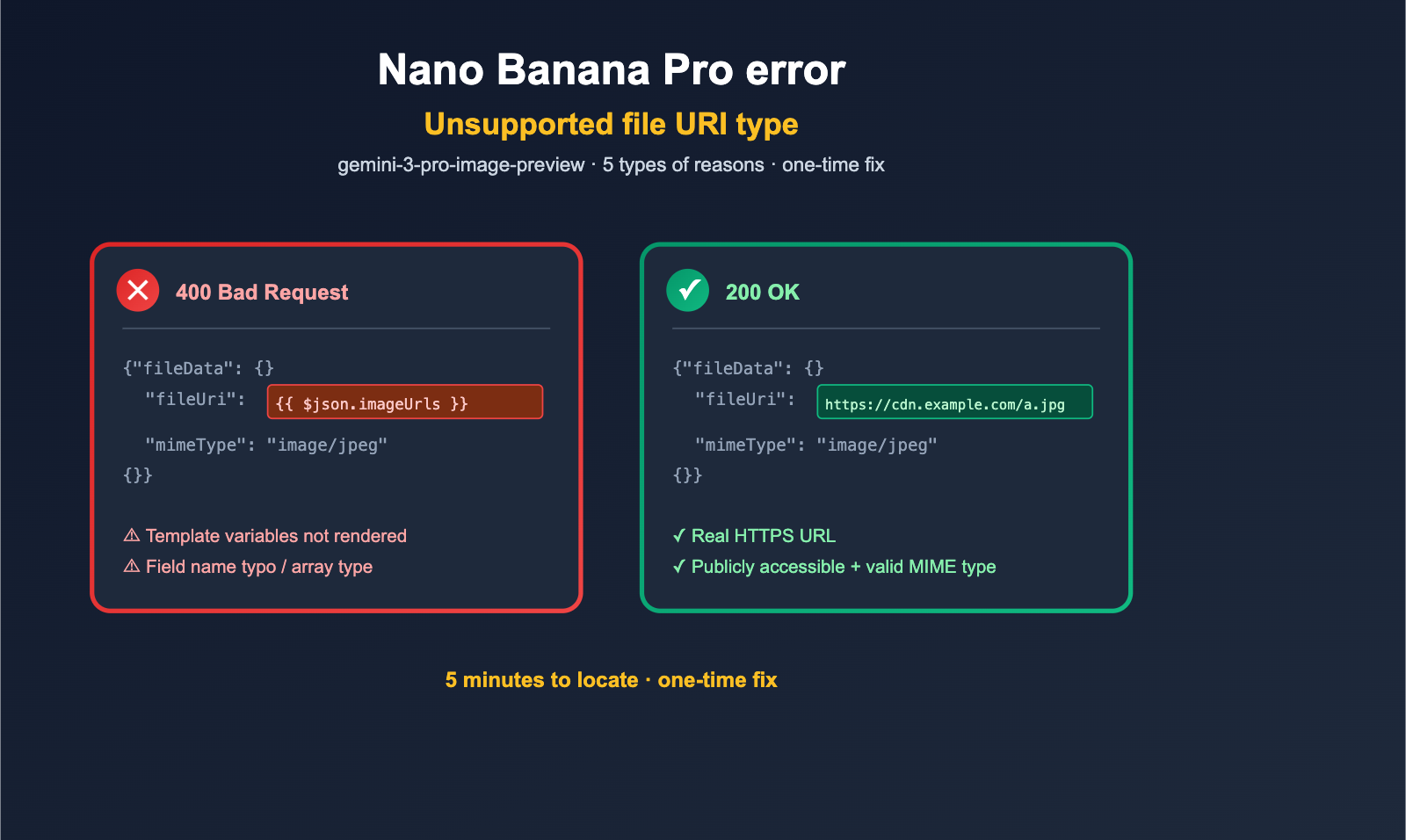
The error message for this Nano Banana Pro error actually points directly to the culprit: Unsupported file URI type: {{ $json.imageUrls }}. Note that {{ $json.imageUrls }} is the unrendered n8n template variable. In other words, the customer used a dynamic expression in their workflow, but the engine failed to render it into an actual URL, passing it as a literal string into the Gemini API's fileUri field instead. Naturally, Google couldn't recognize a URI that looked like {{ ... }}, so it rejected the request.
Based on this real-world error and the official Google documentation requirements for gemini-3-pro-image-preview input formats, this article breaks down the 5 most common trigger scenarios and provides a minimal reproducible code snippet and a quick-fix solution for each. After reading this, you should be able to locate and fix any failed request showing an "Unsupported file URI type" within 5 minutes.
Nano Banana Pro Error Key Information Overview
Before you start tweaking code, let's lock down the key facts of this error and the officially supported input URI formats in one table.
| Dimension | Key Fact |
|---|---|
| Model ID | gemini-3-pro-image-preview (Official name for Nano Banana Pro in Gemini API) |
| Error HTTP Status | 400 (Bad Request, client parameter error) |
| Error Key Field | Unsupported file URI type |
| Actual Problem Location | fileData.fileUri field in the request body |
| Literal in Error | {{ $json.imageUrls }} (Unrendered n8n expression) |
| Accepted URI Types | File API URI / YouTube URL / Public HTTPS URL / GCS gs:// URI |
| Accepted Image Formats | JPEG, JPG, PNG, WEBP, HEIF |
| Does Nano Banana Pro support external URLs? | ✅ Yes (Gemini 2.5+ models natively support public HTTPS / pre-signed URLs) |
| Likely Root Cause | Template variables in low-code workflows like n8n / Make / Zapier were not rendered |
🎯 Quick Troubleshooting Tip: If your customer is hesitant to share the full request body, ask them to perform a successful call in the APIYI (apiyi.com) console using the same
gemini-3-pro-image-previewmodel and the same reference image. Then, diff the body of the failed request against the successful one—this is the fastest way to pinpoint the Nano Banana Pro error.
5 Common Causes of the "Unsupported file URI type" Error in Nano Banana Pro
After categorizing real-world cases, we've narrowed down the Unsupported file URI type error to 5 typical causes. We've ranked them by frequency, from most to least common.
Cause 1: Unrendered Template Variables in n8n / Make / Zapier
This is the prime suspect for this specific error. {{ $json.imageUrls }} is n8n expression syntax, which should normally be replaced by the actual URL from the previous node (e.g., https://cdn.example.com/uploads/abc.jpg) before execution. However, this replacement often fails in these scenarios:
- The HTTP Request node's Body field isn't set to "Expression" mode, but rather "Fixed" mode, causing the entire JSON block to be sent as a plain text string.
- The JSON Body uses nested double quotes, leading n8n to mistake the expression for part of a string, causing it to skip rendering.
- The output structure of the previous node doesn't match your path—for example, the previous node outputs
imageUrl(singular), but you used$json.imageUrls(plural). When parsing fails, n8n returns the raw expression string. - Expressions in sub-nodes don't iterate by item, but instead default to the first item. In some inputs, this results in
undefined, which serializes into a string and returns the raw expression.
How to diagnose: If you see {{ ... }} in your Gemini error message, it is 100% this issue, as a valid URL would never look like that.
Cause 2: Field Name Typos Leading to undefined / null
Closely following is the issue of incorrect field names. Your code likely looks something like this:
// The upstream interface actually returns 'imageUrl' (singular)
const upstream = { imageUrl: "https://cdn.example.com/a.jpg" };

// But the downstream code uses 'imageUrls' (plural with an 's')
fileUri: upstream.imageUrls   // Result is undefined
When undefined is JSON-serialized or concatenated into a string, it becomes the string "undefined". Gemini can't recognize this, so it throws a 400 error almost identical to the unrendered template variable issue. The difference is that the literal value in the error will be undefined rather than {{ ... }}.
Cause 3: Passing an Array as a String into fileUri
This third cause often pops up when "batch processing multiple images." The fileData.fileUri field in the Gemini API only accepts a single string, not an array. Many developers make this mistake:
// ❌ Incorrect: Passing an array directly into fileUri
{
  "fileData": {
    "fileUri": ["https://cdn.example.com/a.jpg", "https://cdn.example.com/b.jpg"],
    "mimeType": "image/jpeg"
  }
}
After JSON serialization, the fileUri field becomes the string ["https://...", "https://..."]. Gemini fails to parse this and throws the Unsupported file URI type error. The correct approach is to generate a separate parts element for each image rather than stuffing an array into a single fileUri.
Cause 4: Unsupported URL Protocol or Path Format
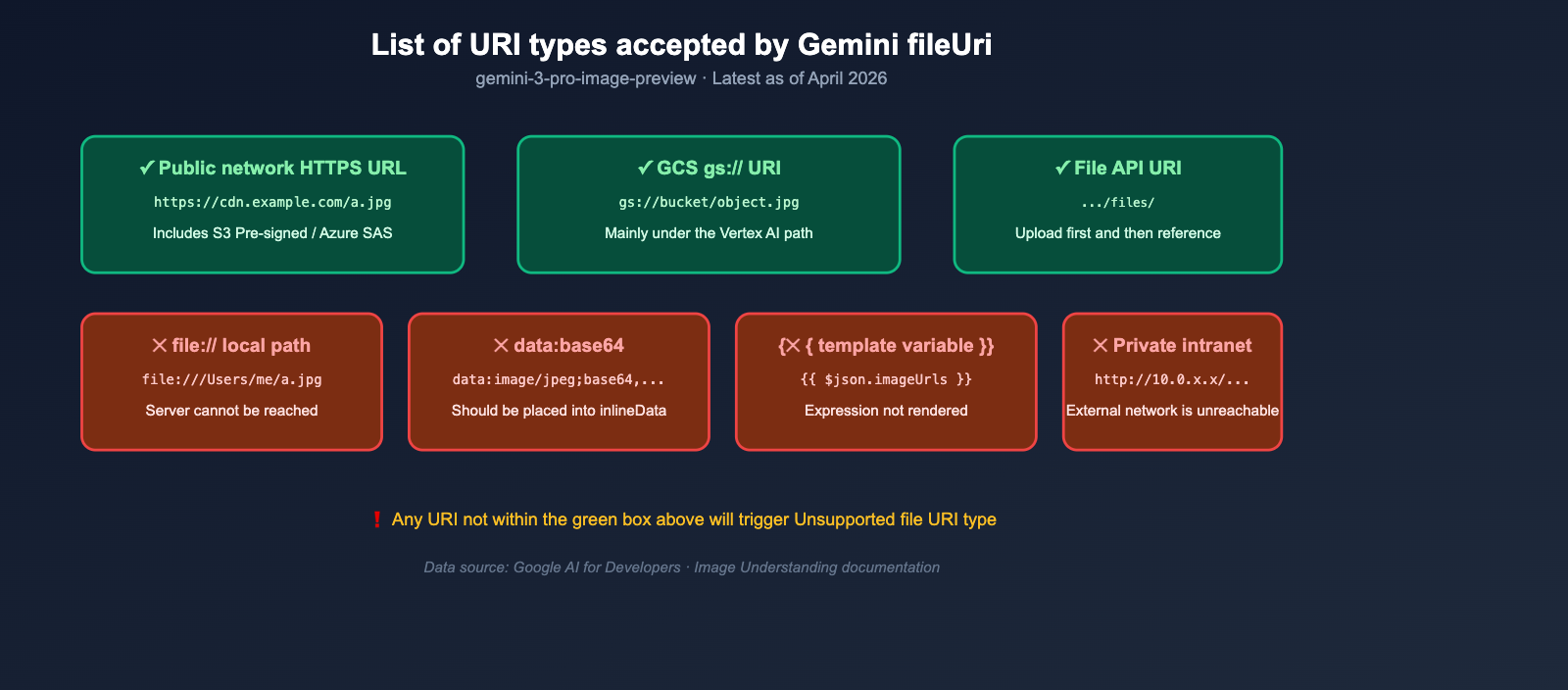
The fourth issue is a "format mismatch." The Gemini API only accepts 4 types of URIs; anything outside this scope will trigger the same error:
| URI Type | Example | Accepted by gemini-3-pro-image-preview? |
|---|---|---|
| File API Path | https://generativelanguage.googleapis.com/files/abc123 |
✅ |
| YouTube URL | https://www.youtube.com/watch?v=xxxxx |
✅ (Mainly for video understanding) |
| Public HTTPS URL | https://cdn.example.com/img.jpg |
✅ (Native support since Gemini 2.5+) |
GCS gs:// URI |
gs://my-bucket/img.jpg |
✅ (Vertex AI path) |
http:// Plaintext |
http://cdn.example.com/img.jpg |
⚠️ Rejected in some cases; upgrading to HTTPS is recommended |
file:// Local Path |
file:///Users/me/a.jpg |
❌ |
data:image/...;base64, |
base64 dataURL | ❌ (Should be placed in inlineData) |
| Pre-signed S3 URL | https://bucket.s3.amazonaws.com/...?X-Amz-... |
✅ |
| Azure SAS URL | https://account.blob.core.windows.net/...?sv=... |
✅ |
If you pass a local file path, a data:-prefixed base64 string, or a private intranet URL into fileUri, you will trigger the Nano Banana Pro error without exception.
Cause 5: URL is Accessible but Requires Auth / Returns Non-Image Content
The final category is "the URL looks correct, but Gemini can't fetch the content." Common scenarios include:
- Private OSS / Qiniu / Cloudinary links lack public permissions, causing Gemini to receive a 403 error.
- The temporary signed URL has expired.
- The URL returns an HTML page instead of an image (e.g., a "share page" from an image host rather than a direct link).
- The URL redirects to a login page.
- The MIME type doesn't match the
mimeTypefield.
These issues sometimes manifest as Unsupported file URI type, or they may appear as 400 Invalid or unsupported file uri. The fix is the same for both: Try accessing the URL directly in an incognito browser window to see if it downloads a valid image. It's the simplest and most effective method.
Minimal Reproduction and One-Click Fixes for Nano Banana Pro Errors
After reviewing the 5 major causes, here is the minimal reproducible code + fixed version for each scenario. You can copy these directly into your workflow or backend to replace your existing implementation.
Fix 1: Correctly Passing imageUrls in n8n
If you're encountering the Nano Banana Pro error while using an n8n HTTP Request node, here is the correct configuration:
HTTP Request Node Configuration:
- Method:
POST - URL:
https://api.apiyi.com/v1/messages(Replace with your APIYI proxy address) - Authentication: Header Auth (Add your API key)
- Body Content Type:
JSON - Specify Body: Select
Using JSON(instead of Using Fields) - JSON Body (Note: The entire JSON block must be in expression mode; ensure the purple "fx" button on the left is active):
={
  "model": "gemini-3-pro-image-preview",
  "contents": [
    {
      "parts": [
        { "text": "Turn this image into a Miyazaki style" },
        {
          "fileData": {
            "fileUri": "{{ $json.imageUrls }}",
            "mimeType": "image/jpeg"
          }
        }
      ]
    }
  ]
}
Keep these 3 key points in mind:
- The
=sign at the start of the JSON string tells n8n that the entire block is an expression that needs parsing. - The
"{{ $json.imageUrls }}"must be wrapped in double quotes so that the inner{{ }}is correctly replaced with the actual string. - The preceding node must output a field named
imageUrls. If it outputsimageUrl(singular) orimage_url, update the field name accordingly.
As long as these 3 points are met, the Unsupported file URI type error will disappear immediately.
Fix 2: Preventing Field Name Typos in Python / Node.js
If you're using backend code, I recommend adding an input validation step to catch typos before the request reaches Gemini:
import requests

def call_nano_banana_pro(prompt: str, image_url: str):
    # Defensive validation: Catch None / empty strings / unrendered templates before sending
    if not image_url or not isinstance(image_url, str):
        raise ValueError(f"image_url must be a non-empty string, current value: {image_url!r}")
    if image_url.startswith("{{") or "undefined" in image_url:
        raise ValueError(f"image_url appears to be an unrendered template variable: {image_url}")
    if not image_url.startswith(("https://", "gs://")):
        raise ValueError(f"image_url must start with https:// or gs://: {image_url}")

    payload = {
        "model": "gemini-3-pro-image-preview",
        "contents": [{
            "parts": [
                {"text": prompt},
                {"fileData": {
                    "fileUri": image_url,
                    "mimeType": "image/jpeg"
                }}
            ]
        }]
    }

    resp = requests.post(
        "https://api.apiyi.com/v1/messages",
        headers={"Authorization": "Bearer YOUR_API_KEY"},
        json=payload,
        timeout=120
    )
    return resp.json()
This "validate before sending" approach catches 90% of Nano Banana Pro errors before they happen, preventing your Gemini error logs from getting cluttered.
Fix 3: Correctly Splitting Multiple Images into Parts
If you need to pass multiple reference images to Nano Banana Pro (e.g., for style transfer + face consistency), you should create separate parts elements for each image, rather than stuffing an array into fileUri:
// ✅ Correct approach
const imageUrls = [
  "https://cdn.example.com/style.jpg",
  "https://cdn.example.com/person.jpg"
];

const payload = {
  model: "gemini-3-pro-image-preview",
  contents: [{
    parts: [
      { text: "Draw the person from the second image in the style of the first" },
      ...imageUrls.map(url => ({
        fileData: { fileUri: url, mimeType: "image/jpeg" }
      }))
    ]
  }]
};

const resp = await fetch("https://api.apiyi.com/v1/messages", {
  method: "POST",
  headers: {
    "Content-Type": "application/json",
    "Authorization": "Bearer YOUR_API_KEY"
  },
  body: JSON.stringify(payload)
});
This method not only avoids the Unsupported file URI type error but also helps Gemini better understand the semantic relationship between multiple images.
Fix 4: Falling Back to base64 Inline Data for Inaccessible URLs
If your URL points to a private bucket, an internal network address, or a temporary link, the Gemini server might not be able to fetch it. The most reliable fallback is to use inlineData + base64:
import base64
import requests

def call_with_base64(prompt: str, local_path: str):
    with open(local_path, "rb") as f:
        b64 = base64.b64encode(f.read()).decode("utf-8")

    payload = {
        "model": "gemini-3-pro-image-preview",
        "contents": [{
            "parts": [
                {"text": prompt},
                {"inlineData": {
                    "mimeType": "image/jpeg",
                    "data": b64
                }}
            ]
        }]
    }

    return requests.post(
        "https://api.apiyi.com/v1/messages",
        headers={"Authorization": "Bearer YOUR_API_KEY"},
        json=payload
    ).json()
Note: inlineData uses the data field (raw base64, without the data:image/jpeg;base64, prefix), while fileData uses the fileUri field. These are mutually exclusive—do not use both at the same time.
🎯 Stability Tip: For scenarios where the URL source is uncontrollable (e.g., user uploads or third-party APIs), we recommend defaulting to base64 inline data for image-to-image tasks and using an API proxy service like APIYI (apiyi.com) to call
gemini-3-pro-image-preview. This prevents intermittent rejections of external URLs due to network or permission issues.
Nano Banana Pro Troubleshooting Checklist
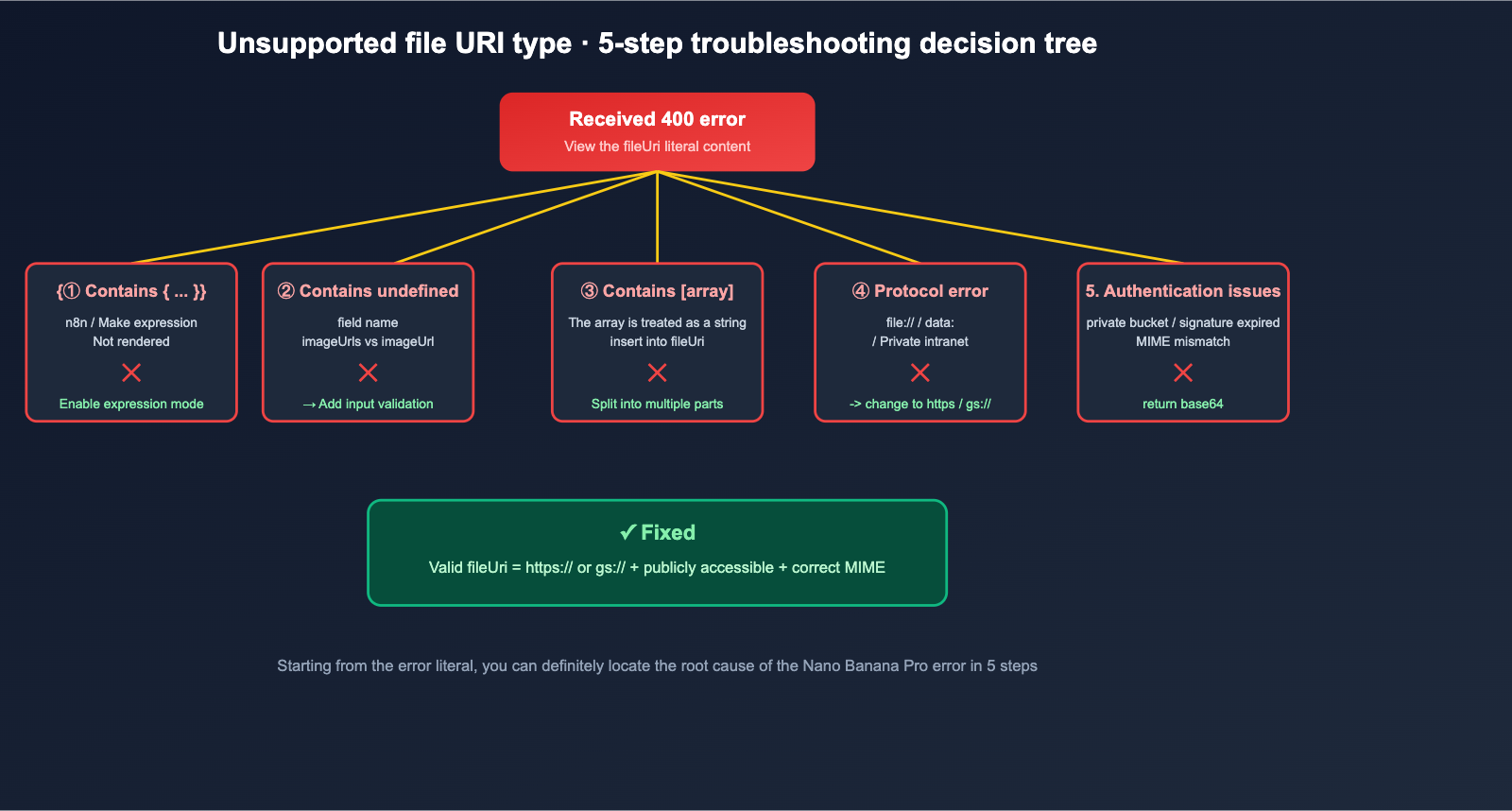
Here is a 5-minute troubleshooting checklist. If a user encounters an Unsupported file URI type error, follow these steps:
5-Minute Troubleshooting Checklist
| Step | Action | Expected Result |
|---|---|---|
| 1 | Copy the literal value after Unsupported file URI type: in the error message |
Get the actual fileUri value received by Gemini |
| 2 | Check if the value contains {{, undefined, null, or [ |
If yes → 90% chance it's an unrendered template or wrong field name |
| 3 | Open the URL in an incognito browser window | Expectation: Successfully download a valid JPEG/PNG/WEBP |
| 4 | Check if the URL protocol is https:// or gs:// |
If not → Change protocol or switch to base64 |
| 5 | Check for private buckets, expired signatures, or redirects | If yes → Switch to a public URL or use base64 |
| 6 | Test with the same model + a known public image in the APIYI console | If successful → The issue is on the client side; if it fails → Report it to us |
By following these 6 steps, you can uncover the root cause of almost any Nano Banana Pro error.
Nano Banana Pro Unsupported file URI type FAQ
Q1: Why does the error message show the literal string {{ $json.imageUrls }}?
When the Gemini API receives a request, it echoes the value of the fileUri field directly into the error message—this is standard behavior from Google, designed to help you quickly pinpoint exactly what you sent. If you see a literal like {{ ... }}, it means your low-code workflow template variable failed to render. If you see undefined or null, it's a field name typo. I recommend testing a hardcoded public URL on APIYI to confirm a successful call, then aligning your client's request body with that working structure.
Q2: Which URLs are actually supported by Nano Banana Pro / gemini-3-pro-image-preview?
According to official Google documentation, fileUri accepts four types of URIs: File API paths (https://generativelanguage.googleapis.com/files/...), YouTube URLs (primarily for video understanding), Public HTTPS URLs (including S3 Pre-signed and Azure SAS), and GCS gs:// URIs. Since Gemini 2.5 and newer models natively support public HTTPS, gemini-3-pro-image-preview does not require you to upload images to the File API before invocation.
Q3: What if {{ $json.imageUrls }} isn't rendering in n8n?
There are three common fixes: First, ensure the HTTP Request node's JSON Body is set to "Expression" mode (look for the = sign or the highlighted fx button). Second, verify that the field path matches the actual output of the previous node; you can check the "Output" panel after an "Execute Node" in n8n to confirm the field name. Third, if you're using a sub-node, expressions default to the first item only; either switch to the main node or use an "Item Lists" node to expand the data first.
Q4: How do I fix an undefined error?
This means you're trying to access a field that doesn't exist in your code. The fastest fix is to add an assertion before calling Gemini: assert image_url is not None and isinstance(image_url, str). Then, check the upstream API response to confirm the field name. Common typos include imageUrls vs imageUrl, image_url vs imageUrl, or url vs uri. In production, I recommend using a Python snippet (like the one in "Fix 2" of this article) to block any strings that aren't https or gs before they reach the request stage.
Q5: Can I put multiple images directly into fileUri?
No. fileUri only accepts a single string. To send multiple images, the correct approach is to create a { "fileData": { "fileUri": "...", "mimeType": "..." } } object for each image and place them all into the same parts array. This allows Gemini to correctly interpret the semantic relationships between the images.
Q6: What if I can't make my private bucket or temporary signed URLs public?
The most robust fallback is to use inlineData + base64: read the image on your end, encode it as base64, and put it directly into the request body. This avoids having the Gemini server fetch external resources, bypassing all "authentication failure / signature expired / MIME mismatch" issues. The trade-off is a larger request body, which is best for small, single-image scenarios. If you're doing high-concurrency image-to-image tasks, I still recommend uploading the image to a public-facing CDN first and then calling gemini-3-pro-image-preview via APIYI. This avoids base64 bloat and allows for centralized caching and retries at the platform level.
Summary: Best Practices for Fixing Nano Banana Pro Errors
Returning to the specific Nano Banana Pro error reported by the customer: Unsupported file URI type: {{ $json.imageUrls }}, we can be certain that this isn't a Gemini issue, but rather that n8n or the low-code workflow failed to replace the template variable with the actual URL, causing the literal {{ ... }} string to be sent to the Gemini API. The fix provided in "Fix 1" of this article—enabling expression mode in the HTTP Request node and confirming that the previous node actually outputs the imageUrls field—will make this error disappear immediately.
On a broader level, the Unsupported file URI type error highlights a common issue: many teams lack an "input validation" layer when calling image APIs. This makes it difficult to tell whether a rejection from Gemini is due to a model issue, a network issue, or a parameter issue. The 5-minute troubleshooting checklist, Python validation code, and n8n expression syntax provided here can serve as a standard operating procedure for your team.
🎯 Final Recommendation: If you're building an image-to-image workflow based on gemini-3-pro-image-preview for clients, we recommend routing all Nano Banana Pro calls through an API proxy service like APIYI. This allows you to quickly reproduce and diff failed requests in the console, and seamlessly switch to equivalent models like Nano Banana 2 or Seedream if Google experiences service disruptions, ensuring that parameter errors like Unsupported file URI type are identified and fixed immediately.
Author: APIYI Team | Focusing on Large Language Model deployment and stability engineering. For more practical troubleshooting on Gemini and image APIs, visit APIYI.