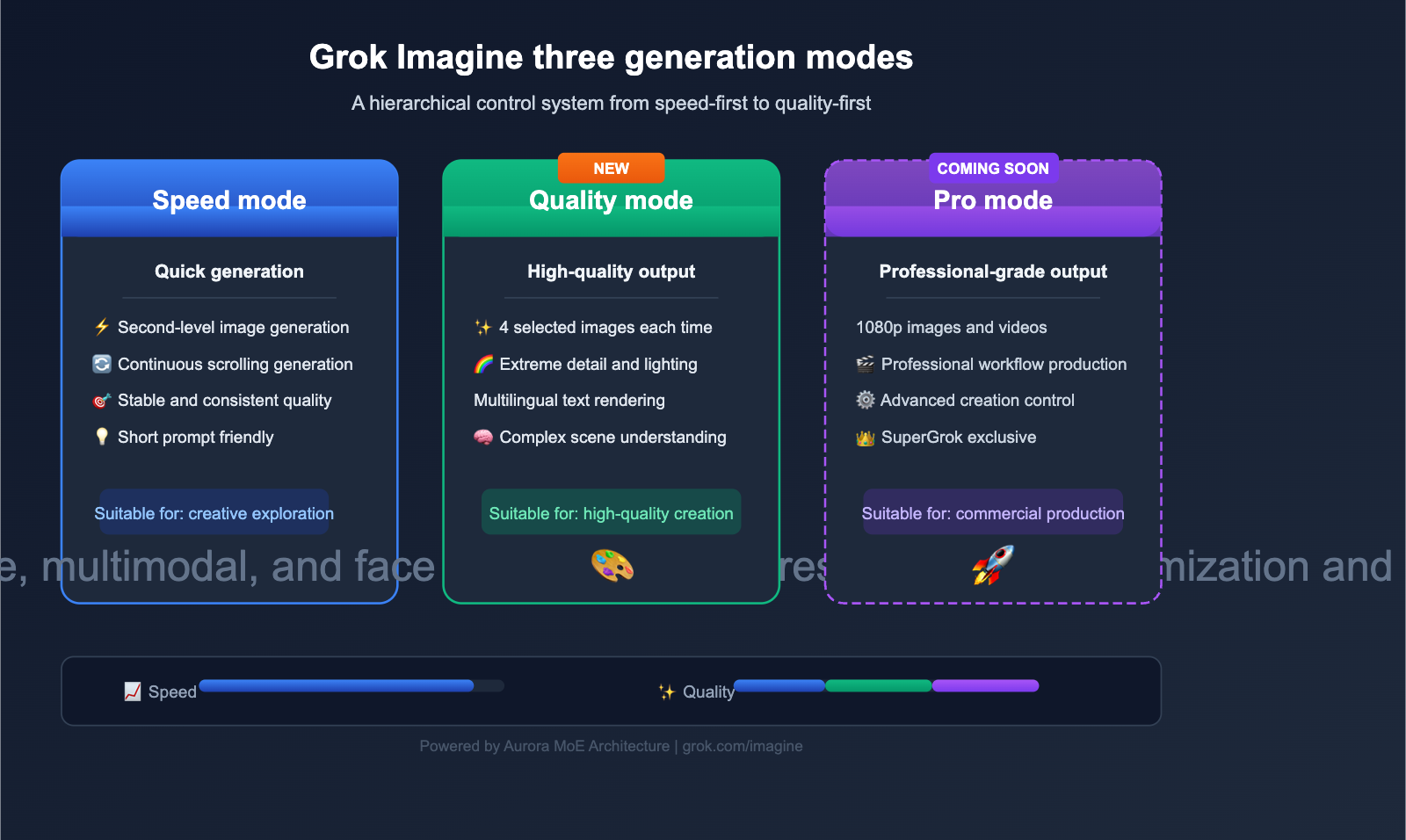
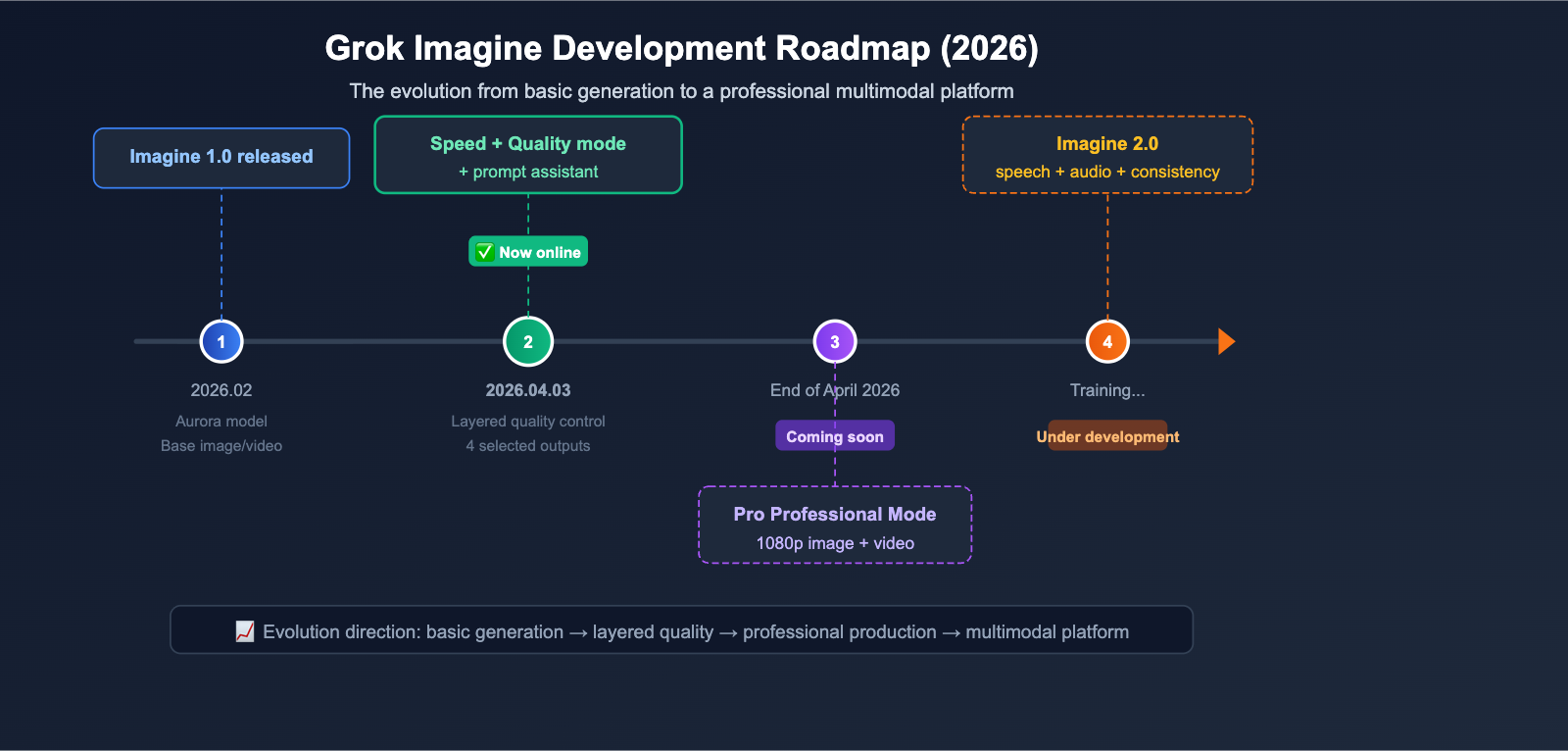
On April 3, 2026, xAI officially launched two brand-new generation modes for Grok Imagine: Quality and Speed. They also teased a Pro mode, set to arrive at the end of April. This update marks a shift for AI image generation tools, moving away from "one-click generation" toward a new era of "layered quality control."
Core Value: Spend 3 minutes getting up to speed on the key differences, technical principles, and best use cases for the three Grok Imagine generation modes, so you can make the best choice for your creative projects.
Quick Overview of Grok Imagine Generation Modes
| Feature | Details |
|---|---|
| Release Date | April 3, 2026 |
| Developer | xAI (Elon Musk) |
| Key Update | Added Quality and Speed modes for image/video generation |
| Underlying Model | Aurora (Autoregressive MoE architecture) |
| Coming Soon | Pro mode (1080p, expected late April) |
| Access | grok.com/imagine (Web and mobile) |
| Availability | All Grok users (free and paid) |
The core of this update is that users can now toggle between quality levels directly in the Grok Imagine prompt bar. This design ensures that users with different needs can find the generation strategy that works best for them.
Deep Dive into Grok Imagine's Quality Mode
Core Features of Quality Mode
Quality Mode is the standout highlight of this update, taking the image generation capabilities of Grok Imagine to a whole new level.
| Feature Dimension | Quality Mode Performance |
|---|---|
| Output Quantity | Generates 4 high-quality images per request |
| Detail Rendering | Volumetric lighting, fine reflections, realistic material textures |
| Text Rendering | Significantly improved accuracy for multi-language text |
| Prompt Understanding | Enhanced grasp of object relationships, physics, and stylistic nuances |
| Cultural Knowledge | More accurate handling of cultural, brand, and fictional references |
| Generation Speed | Slower than Speed Mode, but with a significant boost in quality |
5 Key Technical Advantages of Quality Mode
1. Volumetric Lighting and Shadow Rendering
Quality Mode achieves near-photorealistic rendering for volumetric lighting (God Rays). In scenes like landscapes, architecture, or portraits, light scattering and attenuation appear much more natural.
2. Material and Texture Precision
Whether it's the folds in fabric, reflections on metal, or the grain of sand, Quality Mode provides much finer surface texture processing, making the generated images visually more convincing.
3. Multi-language Text Rendering
Text rendering in AI image generation has always been a tough nut to crack. Quality Mode has made significant strides in rendering accuracy across various languages and writing systems, which is crucial for creative scenarios that require text within the image.
4. Complex Scene Understanding
When your prompt involves spatial relationships between multiple objects, physical interactions, or a fusion of styles, Quality Mode demonstrates a stronger ability to understand and execute, effectively reducing "AI hallucinations."
5. Accuracy of Cultural and Brand Elements
Quality Mode is more precise when handling specific brand logos, cultural symbols, and fictional characters, which is particularly important for commercial design and creative projects.
🎯 Pro Tip: Quality Mode is perfect for creative scenarios that demand high-quality output. If you're developing an AI image generation application, you can use the APIYI (apiyi.com) platform to integrate APIs from various mainstream image generation models, making it easy to switch between models and compare results on the fly.
Grok Imagine Speed Mode User Guide
Speed Mode Positioning
Speed Mode maintains the default generation behavior Grok Imagine was known for, focusing on fast output and stable quality.
| Comparison Dimension | Speed Mode | Quality Mode |
|---|---|---|
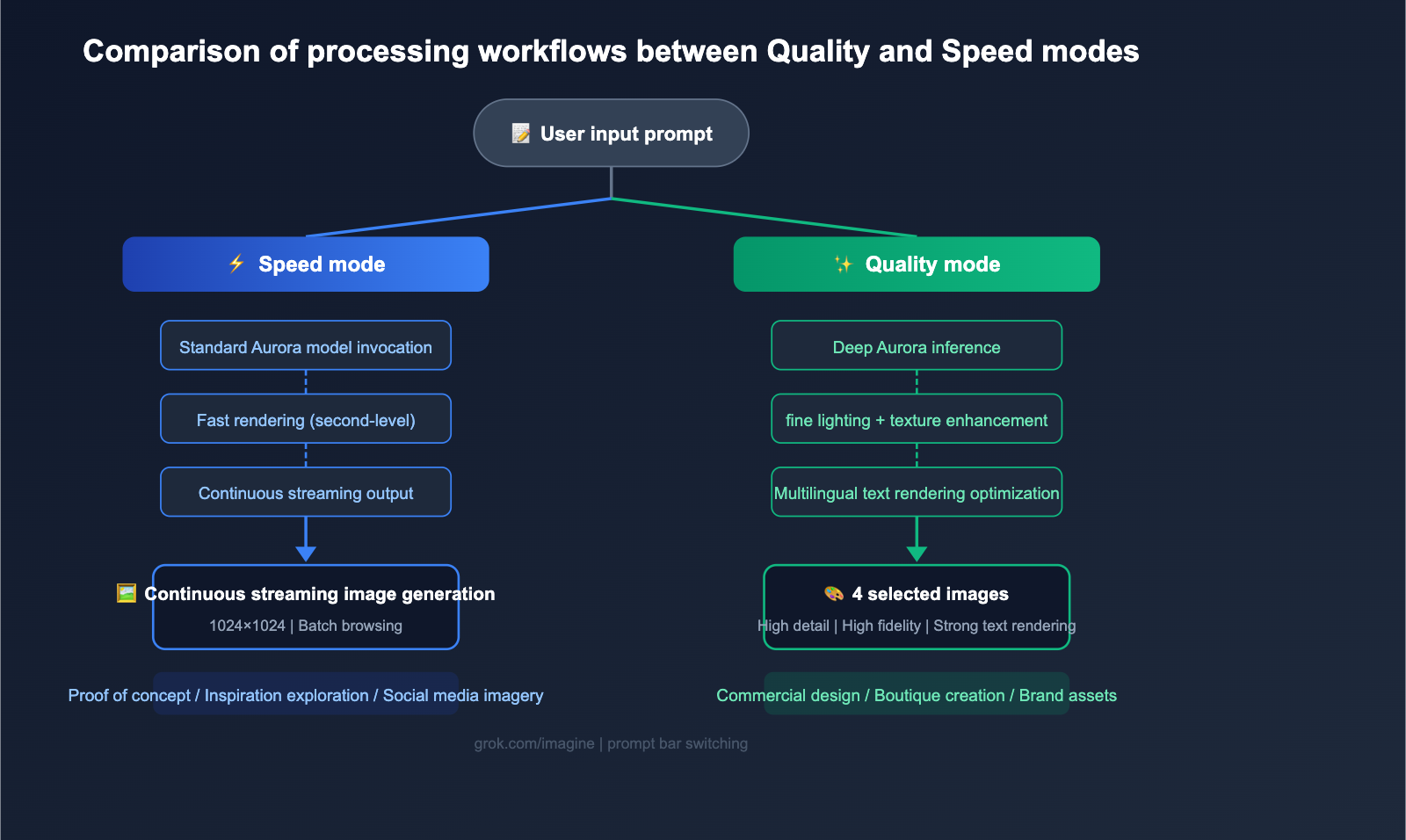
| Generation Speed | Extremely fast (seconds) | Slower (traded for higher quality) |
| Output Method | Continuous scrolling generation | 4 curated images per generation |
| Detail Level | Good | Excellent |
| Use Cases | Rapid concept validation, bulk creative exploration | High-end creation, commercial use |
| Prompt Requirements | Short prompts work great | Complex, detailed prompts yield better results |
Best Use Cases for Speed Mode
- Concept Validation Phase: Quickly generate a large number of options for screening.
- Creative Inspiration Exploration: Use continuous scrolling generation to find inspiration.
- Social Media Images: Scenarios where high precision isn't required, but fast turnaround is.
- Prototype Design Reference: Provide quick visual references for product design.
Grok Imagine Pro Mode Preview (Coming Soon)
Confirmed Details for Pro Mode
Elon Musk has confirmed on X that the Grok Imagine Pro mode is scheduled to launch by the end of April 2026. Based on currently available information:
| Feature | Pro Mode Expectation |
|---|---|
| Image Resolution | 1080p (Current Quality mode is approx. 1024×1024) |
| Video Resolution | 1080p HD video |
| Target Audience | Professional creators, commercial production teams |
| Expected Launch | End of April 2026 |
| Subscription Tier | Expected to require a SuperGrok subscription |
Progress on Grok Imagine 2.0
It’s worth noting that xAI also revealed that the Grok Imagine 2.0 version has been delayed by a few weeks to allow for more training time. Elon Musk indicated that version 2.0 will bring significant upgrades in voice, audio, and face/detail consistency. This signals that xAI is building a more comprehensive multimodal generation platform for Grok Imagine.
💡 Developer Tip: For developers looking to integrate image generation capabilities into their applications, keep an eye on updates to the Grok Imagine API. The APIYI (apiyi.com) platform consistently tracks API access for mainstream AI models, allowing developers to quickly compare generation results across different models via a unified interface.
Understanding the Grok Imagine Prompt Assistant
Intelligent Prompt Optimization
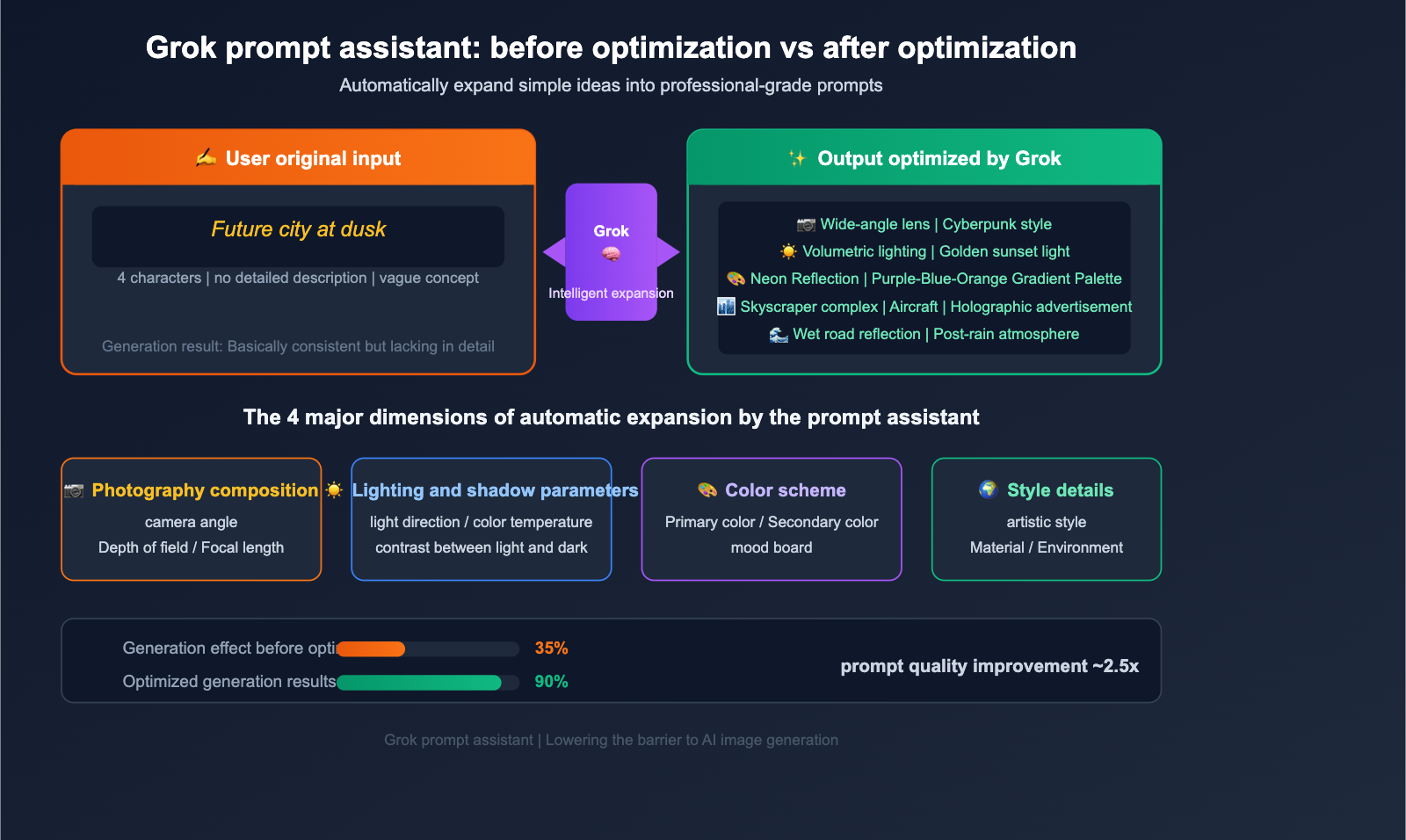
One of the most valuable yet overlooked features in this update is the new "Prompt Assistant" capability in Grok. Users can provide simple creative ideas, and Grok will automatically expand them into professional prompts that include:
- Cinematic Lighting Parameters: Light direction, color temperature, and contrast
- Photography Composition Suggestions: Camera angles, depth of field, and focal length
- Color Schemes: Primary tones, accent colors, and mood palettes
- Style Details: Artistic style, material descriptions, and environmental atmosphere
Prompt Optimization Examples
| User Original Input | Grok Optimized Prompt Elements |
|---|---|
| "Future city at dusk" | + Volumetric lighting, neon reflections, cyberpunk palette, wide-angle lens |
| "Cabin in the forest" | + Morning mist atmosphere, warm lighting, macro details, watercolor style |
| "Inside a space station" | + Hard sci-fi style, cool lighting, metallic textures, ultra-wide composition |
This feature effectively lowers the barrier to entry for AI image generation. For users unfamiliar with prompt engineering, it means they can achieve professional-grade results from simple descriptions.
🔧 Technical Practice: Prompt quality directly impacts AI image generation results. In actual development, you can use the APIYI (apiyi.com) platform to call Large Language Models like Grok to automate the prompt optimization process, building a smarter image generation pipeline.
Grok Imagine Underlying Technology: The Aurora Model Architecture
Core Parameters of the Aurora Model
Grok Imagine's image generation capabilities are powered by xAI's proprietary Aurora model. Unlike mainstream diffusion models (such as Stable Diffusion or DALL-E 3), Aurora takes a unique technical approach.
| Technical Dimension | Aurora Model | Traditional Diffusion Models |
|---|---|---|
| Architecture Type | Autoregressive Mixture-of-Experts (MoE) | Denoising Diffusion |
| Generation Method | Step-by-step token prediction | Iterative denoising from noise |
| Multimodal Support | Native support for interleaved text/image data | Requires additional encoders |
| Prompt Length | Supports long prompts (~1000 characters) | Usually limited to 77 tokens |
| Editing Capability | Native image-based editing | Requires additional Inpainting models |
| Text Rendering | Enhanced with Flux.1 Pro technology | Generally weak |
Key Technical Highlights
The Aurora model utilizes Temporal Latent Flow technology to achieve rapid generation, producing 1024×1024 resolution images in just a few seconds. The Image Pro version supports output resolutions up to 2K, doubling the standard version's output.
The advantage of this autoregressive architecture is that the model gains a deeper understanding of the semantic relationship between text and images, resulting in greater consistency and accuracy when generating complex scenes.
Grok Imagine Subscription Plans and API Pricing
User Subscription Plans
| Subscription Plan | Monthly Fee | Grok Imagine Access |
|---|---|---|
| Free Tier | $0 | Limited usage (~10 times per 2 hours) |
| X Premium | $8/mo | Basic Imagine access |
| X Premium+ | $40/mo | Enhanced Imagine access + Ad-free |
| SuperGrok | $30/mo ($300/yr) | Full Imagine access + all advanced features |
| SuperGrok Heavy | $300/mo | Grok 4 Heavy + full multimodal generation |
API Pricing Reference
For developers, xAI provides the Grok Imagine API interface:
- Video Generation API: $4.20/minute (~$0.07/second)
- Image Generation API: Billed per model invocation
💰 Cost Tip: API costs for AI image and video generation should be planned carefully based on usage volume. Integrating via the APIYI (apiyi.com) platform offers more flexible billing options. The platform supports unified API calls for various mainstream AI models, including Grok, making it ideal for developers who need to compare the performance of multiple models.
Analysis of the Impact of Grok Imagine Generation Modes
Impact on the AI Image Generation Industry
1. Tiered Quality Control is Becoming the Standard
Grok Imagine’s introduction of "Quality" and "Speed" modes is likely to push other AI image generation platforms to follow suit. Users are becoming increasingly accustomed to selecting quality levels based on their specific needs, rather than being limited to a single "default mode."
2. Lowering the Barrier for Prompt Engineering
Grok’s prompt assistant feature represents a broader industry trend: AI systems are shifting from passively executing instructions to actively collaborating with users. OpenAI and Google have already introduced similar prompt-assistance features into their own tools.
3. Intensifying Competition in Multimodal Generation
From images to video and audio, xAI is building a comprehensive multimodal generation platform. With the launch of Imagine 2.0 and the Pro mode, competition in this space is set to heat up significantly.
Impact on Developers
- More Diverse API Options: Developers now have a wider range of image generation APIs to choose from.
- Flexible Quality-Speed Trade-offs: You can dynamically switch generation modes based on your specific application scenarios.
- Automated Prompt Optimization: You can leverage Large Language Models to automatically enhance the quality of your prompts.
🎯 Development Tip: When building AI image generation applications, we recommend using the APIYI (apiyi.com) platform to unify access to multiple models. This allows you to dynamically route requests to different generation models based on user needs. This architectural design lets you switch underlying models quickly without needing to modify your code.
Frequently Asked Questions about Grok Imagine Generation Modes
Q1: What is the biggest difference between Quality mode and Speed mode?
Quality mode generates 4 high-quality images at a time, offering better performance in details, lighting, shadows, and text rendering, though it is slower. Speed mode continues the previous rapid, continuous generation approach, making it ideal for quickly validating creative ideas and generating images in bulk. You can switch between these modes in the prompt bar at grok.com/imagine.
Q2: When will Pro mode be released? Is there an extra cost?
Elon Musk has confirmed that Pro mode will launch in late April 2026, supporting 1080p resolution for both images and video. It is expected that a SuperGrok subscription ($30/month) will be required to access it. Specific pricing and feature details will be announced officially soon.
Q3: How can I access different Grok Imagine generation modes via API?
xAI provides the Grok Imagine API, and you can find the documentation at x.ai/api/imagine. If you need to compare the results of Grok Imagine with other image generation models (like DALL-E or Stable Diffusion), you can use the unified interface on the APIYI (apiyi.com) platform to switch between them quickly, saving on development costs associated with integrating multiple platforms.
Q4: How do I use Grok’s prompt assistant feature?
In the Grok chat interface, you can directly ask Grok to help you optimize prompts for image or video generation. For example, if you input "Help me write a prompt for a futuristic city," Grok will automatically expand it into a detailed prompt that includes professional elements like lighting, composition, and color, which you can then use directly in Imagine.
Q5: What is the difference between Grok Imagine 2.0 and the current version?
Grok Imagine 2.0 is currently still in training and is expected to bring major upgrades in speech synthesis, audio generation, and face/detail consistency. Elon Musk has indicated that it still requires several weeks of training. The goal of version 2.0 is to build a more complete multimodal content generation platform.
Summary of Grok Imagine Generation Modes
The latest update to Grok Imagine introduces three core changes:
- Quality Mode: Powered by the Aurora MoE architecture, this mode generates four high-quality images at a time, reaching new heights in detail rendering, text accuracy, and the understanding of complex scenes.
- Speed Mode: It maintains the traditional advantage of rapid generation, making it perfect for creative exploration and bulk output.
- Prompt Assistant: This turns Grok into an intelligent creative collaborator, automatically transforming simple ideas into professional-grade prompts.
For developers building AI image generation applications, this update offers more flexibility when balancing quality and speed. From a technical implementation perspective, we recommend using the APIYI (apiyi.com) platform to unify access to various image generation models, including Grok Imagine. This makes it easier to flexibly schedule models based on different business scenarios and quickly verify the best results.
📝 Author: APIYI Team | For more AI model tutorials and API integration guides, please visit the APIYI Help Center: help.apiyi.com