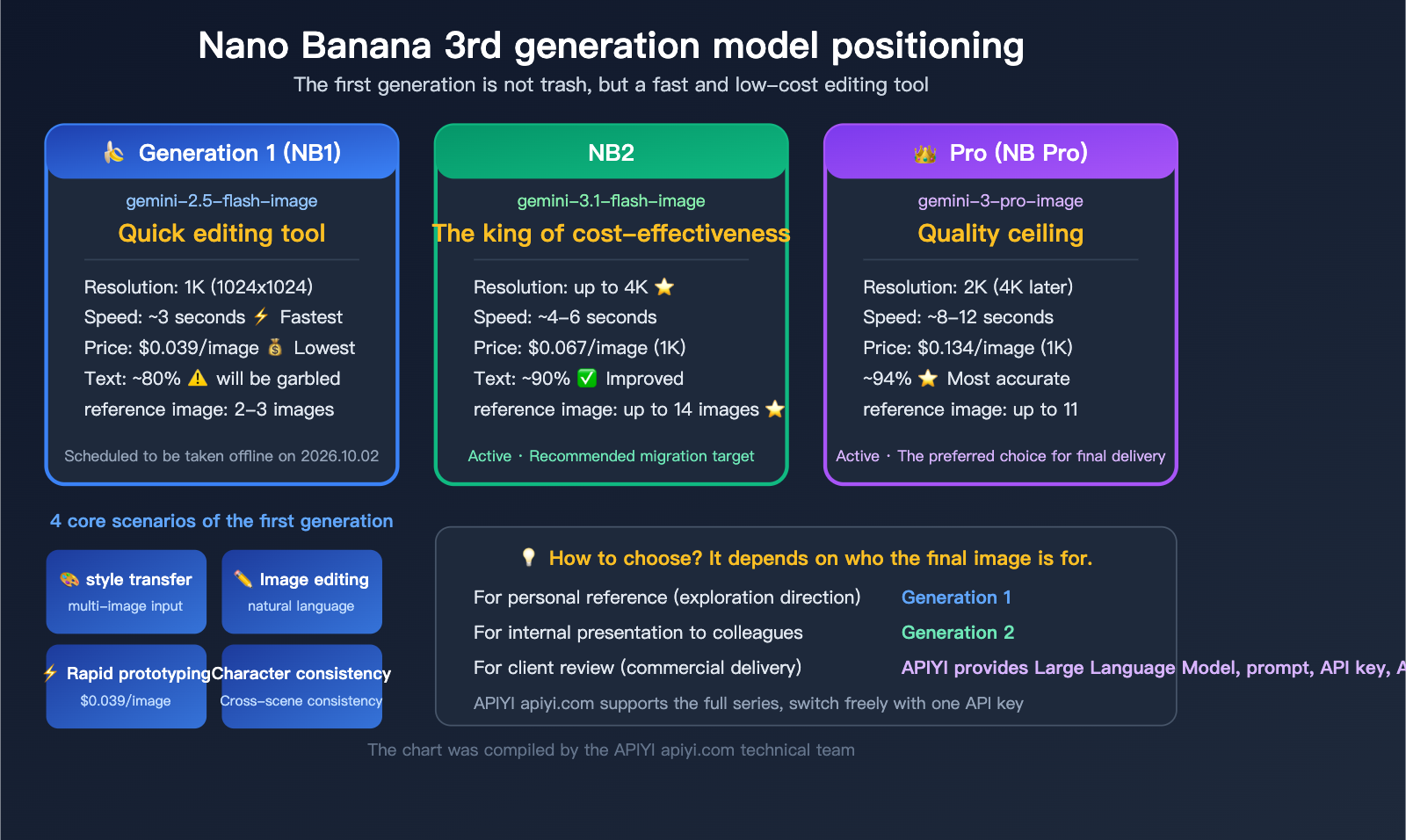
Let’s start with the bottom line: The first-generation Nano Banana (gemini-2.5-flash-image) definitely has some hard limitations—the resolution is capped at 1K, and text often comes out garbled. That’s just a fact. In an era where Nano Banana Pro can output high-quality 2K images and Nano Banana 2 can handle 4K, the first generation has clearly fallen behind when it comes to "creating beautiful imagery."
However, the first generation isn't useless. Its true positioning was never to be an "all-purpose image model," but rather a "3-second, 2-cent-per-image rapid editing tool."
Core Value: After reading this article, you’ll know exactly which scenarios still make the first-generation Nano Banana worth using, and when you should decisively switch to the second generation or Pro to avoid wasting time and budget on the wrong model.
The Hard Truth About Nano Banana Gen 1: Facing Reality
Before we dive into what the first generation can do, let's be clear about what it can't. This will help you set the right expectations.
| Limitation | Performance | Severity |
|---|---|---|
| 1K Resolution Only | Hard limit at 1024×1024; no 2K/4K support | High — Not suitable for print or large displays |
| Poor Text Rendering | ~80% accuracy; worse with Chinese characters | High — Unusable for text-heavy scenes |
| Loss of Fine Detail | Details get blurry in complex scenes | Medium — Minimal impact on simple scenes |
| No Transparent Background | PNG transparency not supported | Medium — Unusable for icons or stickers |
| Compression Artifacts | Occasional JPEG artifacts in output | Low — Acceptable for most use cases |
| Limited Reference Images | Max 2-3 reference images | Low — Sufficient for basic editing |
Customer Feedback: "The first-gen Nano Banana can't handle size, is stuck at 1K, and the text is often garbled." — This assessment is spot on.
So, why do people still use it? Because these limitations are all about generation quality. The strength of the first generation isn't in the final output quality; it's in speed, cost, and editing capabilities.
The Real Positioning of Nano Banana Gen 1
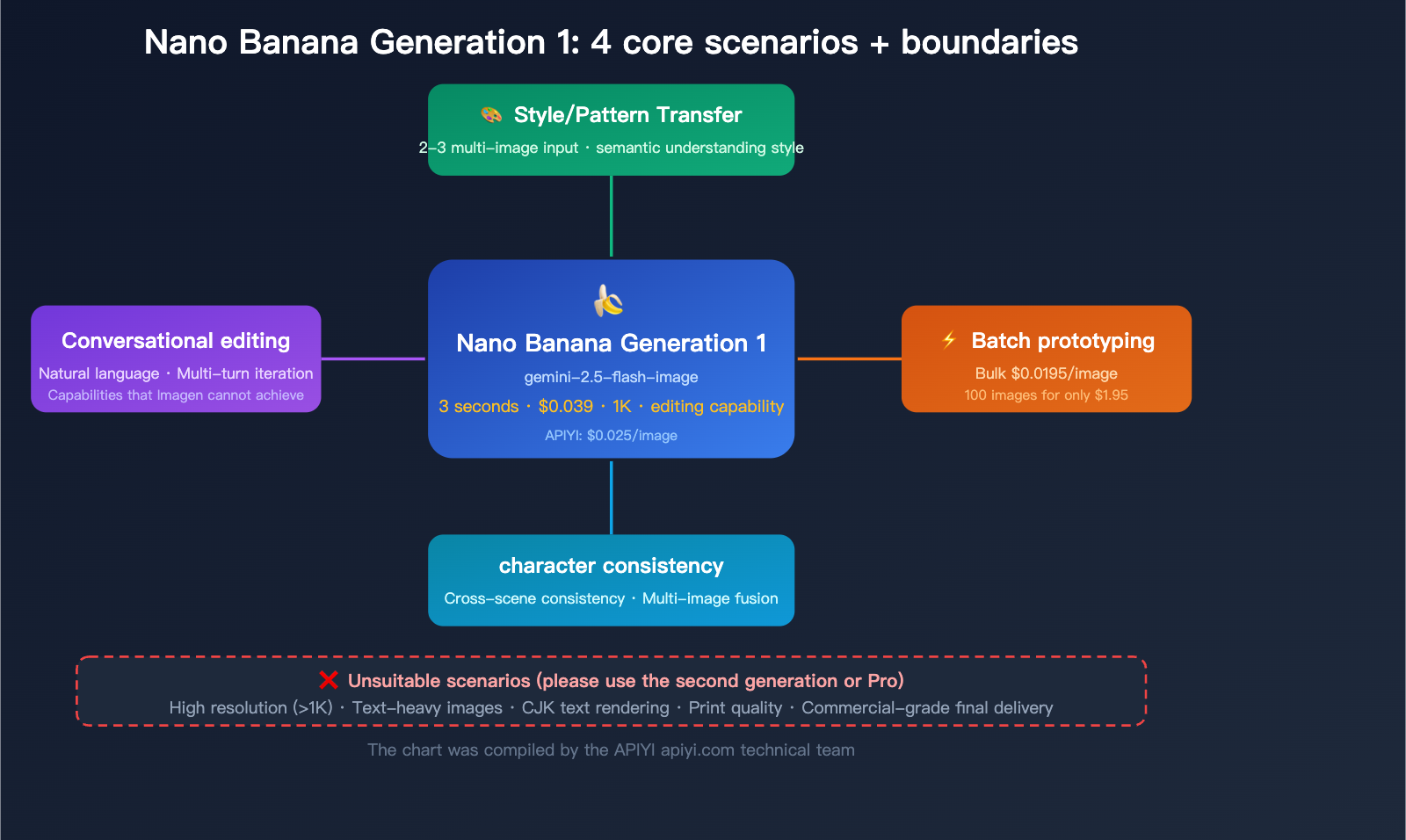
The architecture of the first generation is identical to the second generation and the Pro version—they are all native multimodal models with image generation built directly into the language model. However, since the first generation is based on the lighter Gemini 2.5 Flash foundation:
- Fastest Speed: ~3 seconds per image (vs. 4-6s for Gen 2, 8-12s for Pro)
- Lowest Cost: $0.039/image ($0.0195 for bulk), which is 1/3 the cost of Pro
- Full Editing Capability: Supports natural language-driven image editing, something the Imagen series completely lacks
🎯 Selection Advice: Choosing the right Nano Banana is simple. If your final output needs to be shown directly to users or clients, use Gen 2 or Pro. If you're just doing image processing within a workflow or quickly validating creative ideas, Gen 1 is the most economical choice. APIYI (apiyi.com) provides API access to the full Nano Banana model series, allowing you to switch flexibly as needed.
Nano Banana Gen 1 Use Case 1: Style Transfer and Pattern Transfer
This is the core use case for Nano Banana Gen 1 and the feature our customers use most often.
What is Style Transfer?
Simply put, it extracts the "style" (color palette, brushstrokes, texture, artistic flair) from Image A and applies it to Image B, creating a new image that has the content of B but the style of A.
Typical Uses:
- Standardizing product images for e-commerce
- Converting real photos into watercolor, oil painting, or pixel art styles
- Unifying brand visual identity
- Previewing interior design styles
Why is Gen 1 perfect for Style Transfer?
| Advantage | Description |
|---|---|
| Native Multimodal Understanding | Gen 1 "understands" the semantic relationship between image content and style, rather than just applying a simple filter |
| Multiple Reference Images | Supports 2-3 reference images simultaneously—one for style, one for content |
| Conversational Adjustments | Use natural language to tweak the style if it's not quite right: "make the colors warmer," "make the brushstrokes bolder" |
| Speed and Cost | 3-second turnaround at $0.039/call, making rapid iteration extremely cheap |
| 1K is Enough | Style transfer is usually an intermediate step, so high resolution isn't required |
Style Transfer API Call Example
import google.generativeai as genai
import base64

genai.configure(api_key="YOUR_API_KEY")

model = genai.GenerativeModel("gemini-2.5-flash-image")

# Load style reference and content image
with open("style_reference.jpg", "rb") as f:
    style_img = base64.b64encode(f.read()).decode()
with open("content_image.jpg", "rb") as f:
    content_img = base64.b64encode(f.read()).decode()

response = model.generate_content([
    {"mime_type": "image/jpeg", "data": style_img},
    {"mime_type": "image/jpeg", "data": content_img},
    "Convert the second image into the artistic style of the first image, keeping the original composition and subject unchanged"
])
Calling via OpenAI-compatible interface (APIYI)
from openai import OpenAI
import base64

client = OpenAI(
    api_key="YOUR_APIYI_KEY",
    base_url="https://api.apiyi.com/v1"
)

with open("style_reference.jpg", "rb") as f:
    style_b64 = base64.b64encode(f.read()).decode()
with open("content_image.jpg", "rb") as f:
    content_b64 = base64.b64encode(f.read()).decode()

response = client.chat.completions.create(
    model="gemini-2.5-flash-image",
    messages=[{
        "role": "user",
        "content": [
            {"type": "image_url", "image_url": {"url": f"data:image/jpeg;base64,{style_b64}"}},
            {"type": "image_url", "image_url": {"url": f"data:image/jpeg;base64,{content_b64}"}},
            {"type": "text", "text": "Convert the second image into the artistic style of the first image"}
        ]
    }]
)
Key Point: Style transfer doesn't require 4K resolution because it's usually an intermediate step in your workflow. If you need a high-resolution final output, you can use Gen 1 to nail down the style direction, then use Gen 2 or Pro to generate the final version.
💡 Pro Tip: The more specific your prompt for style transfer, the better the result. Don't just write "convert style." Instead, try: "Keep the original composition and subject position, change only the color palette and brushstroke style, and ensure color saturation matches the reference image."
Nano Banana Gen 1 Use Case 2: Conversational Image Editing
This is the second core capability of the Nano Banana Gen 1, and it's the biggest differentiator from the Imagen series—Imagen can only generate images and offers zero support for editing.
How Conversational Editing Works
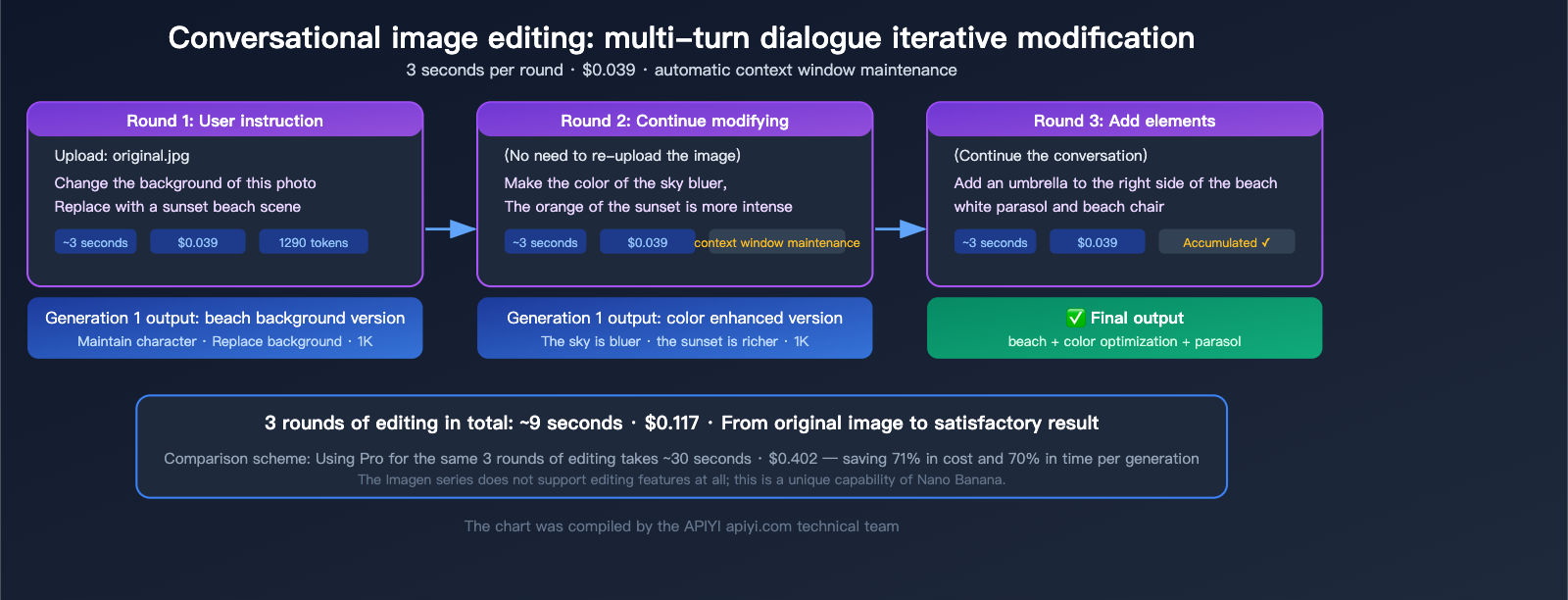
Gen 1's image editing is driven by natural language. You upload an image, describe the changes you want in text, and the model outputs the edited image directly.
Common Editing Operations:
| Edit Type | Example Prompt | Effect |
|---|---|---|
| Background Replacement | "Replace the background with a city night view" | Keeps the subject, replaces the entire background |
| Element Addition | "Add a cup of coffee on the table" | Adds a new element at the specified location |
| Element Removal | "Remove the pedestrian on the right" | Removes the specified element and fills the background |
| Tone Adjustment | "Change the overall tone to warm" | Adjusts the color atmosphere of the image |
| Seasonal Change | "Change the scene to a snowy winter day" | Changes the time/season of the scene |
| Clothing Change | "Change the person's clothes to blue" | Modifies specific element attributes |
Why is Gen 1 Great for Image Editing?
- Clear Cost Advantage: Each edit costs $0.039; even with 3-5 rounds of modifications, you're only spending $0.12-$0.20.
- Fast Speed: Results in 3 seconds—if you're not satisfied, you can tweak it immediately.
- 1K Resolution is Sufficient: The editing phase is usually about confirming direction, so you don't need final delivery quality yet.
- Maintains Conversation Context: The model remembers previous turns in multi-round edits, making the process iterative and progressive.
Code Example for Editing Scenarios
from openai import OpenAI
import base64

client = OpenAI(
    api_key="YOUR_APIYI_KEY",
    base_url="https://api.apiyi.com/v1"
)

# Read the image to be edited
with open("original.jpg", "rb") as f:
    img_b64 = base64.b64encode(f.read()).decode()

# First round of editing
response = client.chat.completions.create(
    model="gemini-2.5-flash-image",
    messages=[{
        "role": "user",
        "content": [
            {"type": "image_url", "image_url": {"url": f"data:image/jpeg;base64,{img_b64}"}},
            {"type": "text", "text": "Replace the background of this photo with a sunset beach scene, keeping the person unchanged"}
        ]
    }]
)
🚀 Quick Start: You can access the Nano Banana Gen 1 image editing capabilities via the APIYI platform (apiyi.com). It supports the OpenAI-compatible format, so there's no need to integrate with native Google APIs. Single-edit costs are as low as $0.025.
Nano Banana Gen 1 Use Case 3: Low-Cost Batch Prototype Generation
When you need to quickly generate a large volume of images to validate creative directions, populate UI prototypes, or build mood boards, the speed and cost advantages of the Gen 1 model are hard to beat.
Why skip Gen 2 or Pro for prototyping?
| Comparison | 100 Prototypes (Gen 1) | 100 Prototypes (Gen 2) | 100 Prototypes (Pro) |
|---|---|---|---|
| Total Time | ~5 mins | ~10 mins | ~20 mins |
| Total Cost (Official) | $3.9 | $6.7 | $13.4 |
| Total Cost (APIYI) | $2.5 | $4.5 | $5.0 |
| Total Cost (Batch API) | $1.95 | $3.4 | $6.7 |
| Image Quality | Sufficient (for validation) | Good (presentable) | Excellent (deliverable) |
For 100 prototype images, Gen 1 costs only $2.5 (via APIYI) and finishes in just 5 minutes. This cost-effectiveness lets you experiment freely—if you're not happy with the result, just tweak the prompt and run another batch without breaking the bank.
Typical Use Cases for Prototyping
- UI Design Prototypes: Quickly populate placeholder images for apps or websites.
- Mood Board Creation: Show clients creative directions without needing production-grade quality.
- E-commerce Selection Testing: Rapidly generate product display images in different styles to A/B test which one drives higher conversions.
- Content Operations Asset Library: Batch-generate draft images for social media posts.
- Game Concept Design: Quickly generate concept art for scenes or characters.
Code Example for Batch Generation
import asyncio
from openai import AsyncOpenAI

client = AsyncOpenAI(
    api_key="YOUR_APIYI_KEY",
    base_url="https://api.apiyi.com/v1"
)

prompts = [
    "An interior scene of a minimalist coffee shop",
    "A modern high-tech office",
    "A cozy home kitchen",
    # ... more prompts
]

async def generate_one(prompt):
    response = await client.chat.completions.create(
        model="gemini-2.5-flash-image",
        messages=[{"role": "user", "content": prompt}]
    )
    return response

# Concurrent generation (be sure to limit concurrency to avoid 429 errors)
async def batch_generate(prompts, concurrency=5):
    semaphore = asyncio.Semaphore(concurrency)
    async def limited(p):
        async with semaphore:
            return await generate_one(p)
    return await asyncio.gather(*[limited(p) for p in prompts])
💰 Cost Optimization: If some images from your batch require higher quality, I recommend this workflow: use Gen 1 to batch-generate and filter for the right direction ($0.025/image), then re-generate the selected ones using Gen 2 for high-resolution versions ($0.045/image). With APIYI (apiyi.com), you can access the entire model series with a single API key, no platform switching required.
Nano Banana Gen 1 Use Case 4: Face Consistency and Multi-Image Fusion
Gen 1 supports multi-image input (2-3 images), allowing you to extract character features from a reference image and maintain face consistency in new scenes.
How Face Consistency Works
Upload 1-2 reference images of a character along with a scene description, and Gen 1 will generate that character in the new scene while keeping facial features and clothing style consistent.
Use Cases:
- Consistent character representation across comics or picture books.
- Assets for virtual IP characters in various scenes.
- Displaying product mascots in different marketing scenarios.
- 3D character pose design references.
Multi-Image Fusion
Fuse elements from 2-3 images into a single new image:
- Character from Image A + Scene from Image B → New composite image.
- Product from Image A + Scene from Image B + Lighting from Image C → Product scene image.
Note: Gen 1 only supports 2-3 reference images. If you need more complex multi-image references (>3 images), you should use Gen 2 (up to 14 images) or Pro (up to 11 images).
🎯 Technical Tip: In face consistency tasks, the quality of the reference image directly impacts the result. I recommend using high-definition, front-facing photos as references and avoiding obstructions or extreme angles. If you have high requirements for face consistency (e.g., commercial-grade IP), I suggest using Nano Banana Pro, as it has stronger character retention capabilities. APIYI (apiyi.com) supports the entire model series, so you can test directions with Gen 1 and switch to Pro for the final output.
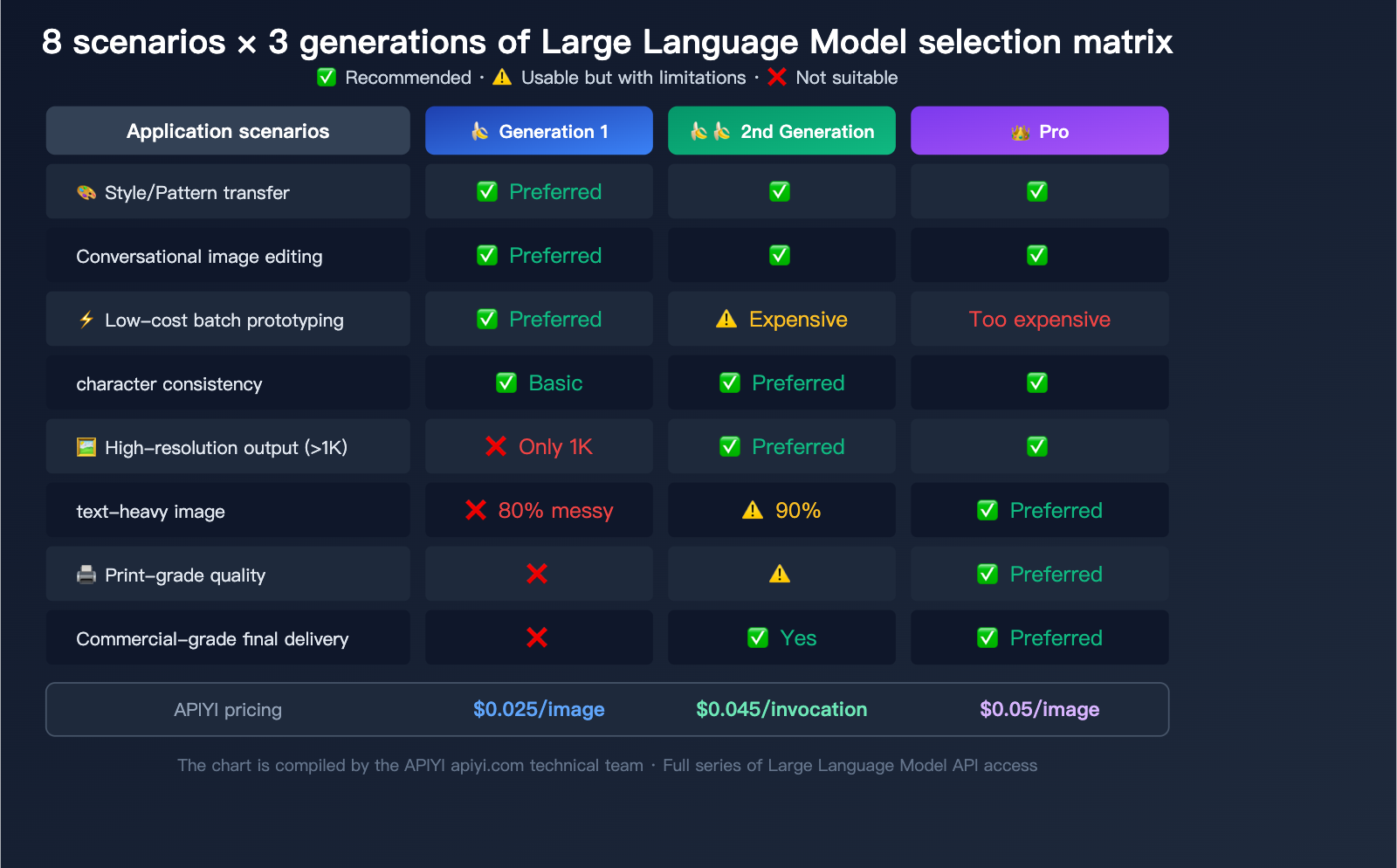
Nano Banana Gen 1 vs. Gen 2 vs. Pro Selection Guide
Choosing a Model by Use Case
| Use Case | Gen 1 | Gen 2 | Pro | Recommended |
|---|---|---|---|---|
| Style/Pattern Transfer | ✅ Top Pick | ✅ Good | ✅ Best | Gen 1 (Efficient & cheapest) |
| Conversational Image Editing | ✅ Top Pick | ✅ Good | ✅ Best | Gen 1 (Fast, low-cost iteration) |
| Batch Prototype Generation | ✅ Top Pick | ⚠️ Pricey | ❌ Too expensive | Gen 1 ($0.0195/image) |
| Character Consistency (Basic) | ✅ Sufficient | ✅ Better | ✅ Best | Gen 1 (2-3 reference images) |
| Character Consistency (Complex) | ⚠️ Not enough | ✅ Top Pick | ✅ Good | Gen 2 (14 reference images) |
| High-Res Output (>1K) | ❌ Not supported | ✅ Top Pick | ✅ Good | Gen 2 (Up to 4K) |
| Text-Heavy Images | ❌ Messy text | ⚠️ 90% accuracy | ✅ Top Pick | Pro (94% accuracy) |
| Commercial Final Delivery | ❌ Quality limit | ✅ Okay | ✅ Top Pick | Pro (Highest quality) |
Choosing a Model by Budget
| Budget Sensitivity | Recommended Model | Reason |
|---|---|---|
| Extremely Sensitive | Gen 1 | $0.025/image (APIYI), lower for bulk |
| Moderately Sensitive | Gen 2 | $0.045/image, best balance of quality/cost |
| Quality First | Pro | $0.05/image (APIYI), top-tier quality |
| Hybrid Strategy | Gen 1 + Gen 2/Pro | Use Gen 1 for exploration → Gen 2/Pro for final |
The Gen 1 "Sweet Spot Workflow"
The most efficient way to use these models isn't to rely on Gen 1 for the final output, but to use it at the start of your pipeline:
Gen 1 (Exploration) → Gen 2/Pro (Refinement)

1. Use Gen 1 to quickly generate 10-20 concepts ($0.25-$0.50, 1 minute)
2. Select 2-3 promising directions
3. Use Gen 2 or Pro to generate high-res final versions based on those selections ($0.10-$0.15)
4. Total cost $0.35-$0.65, balancing creative breadth with final quality
💡 Pro Tip: Not sure which model to pick? Use this simple rule: Who is the final image for? For yourself → Gen 1; for colleagues/internal review → Gen 2; for clients/users → Pro. APIYI (apiyi.com) supports the entire Nano Banana lineup, allowing you to switch between all three models using a single API key.
Nano Banana Gen 1 Sunset: Migration Advice
Please note that gemini-2.5-flash-image is scheduled to be deprecated on October 2, 2026. If you're currently using Gen 1, it's time to start planning your migration.
Migration Path
| Current Usage | Migrate To | Notes |
|---|---|---|
| Style Transfer | Gen 2 gemini-3.1-flash-image |
More capable, supports more reference images |
| Image Editing | Gen 2 gemini-3.1-flash-image |
Similar speed, better editing capabilities |
| Batch Prototypes | Gen 2 gemini-3.1-flash-image |
Slightly higher price, significant quality boost |
| Character Consistency | Gen 2 or Pro | Supports more reference image inputs |
Gen 2 is the direct successor to Gen 1—it's built on the same Flash architecture, offering fast speeds and reasonable pricing, but bumps resolution from 1K to 4K and improves text accuracy from 80% to 90%.
Nano Banana Gen 1 FAQ
Q1: How bad is the text rendering in Gen 1? Is it usable?
The text rendering accuracy for Gen 1 is around 80%. Short English text (3-5 words) is usually fine, but long text exceeding 10 characters often results in garbled, missing, or distorted letters. Chinese text is even more unstable, frequently suffering from broken strokes or incorrect characters. If your image requires text, we recommend using Gen 1 to generate the base image without text, then adding a text layer using image editing software. Alternatively, you can use Nano Banana Pro (which offers 94% accuracy).
Q2: Can I upscale 1K images generated by Gen 1?
Yes, but you'll need external super-resolution tools (like Real-ESRGAN, Topaz AI, etc.). Gen 1 itself doesn't support output resolutions higher than 1K. A better approach is to use Gen 1 to finalize the composition and style, then use Gen 2 with the same prompt to generate a 2K or 4K version. APIYI (apiyi.com) supports the entire model series, making it very easy to switch between them.
Q3: How does Gen 1 compare to Imagen 4?
Each has its own strengths. Imagen 4 offers better image quality for single-shot generation (as a professional diffusion model), but it does not support image editing, nor does it support multi-image input or style transfer. The core advantage of Gen 1 is its editing capabilities and multimodal understanding. Additionally, the entire Imagen 4 series will be deprecated on June 24, 2026, and Google officially recommends migrating to the Nano Banana series.
Q4: What image aspect ratios does Gen 1 support?
It supports over 10 aspect ratios: 1:1, 16:9, 9:16, 4:3, 3:4, 3:2, 2:3, 21:9, 5:4, and 4:5. Regardless of the ratio, the long side will not exceed 1024px.
Q5: What should I do if I keep getting 429 errors during batch model invocation?
Gen 1 does have relatively strict rate limits, and rapid, continuous calls can easily trigger a 429 RESOURCE_EXHAUSTED error. We suggest keeping concurrency at 3-5 requests per second or using the Batch API. Using APIYI (apiyi.com) for your model invocation provides a more stable interface experience and higher rate limits.
Q6: Will I need to rewrite my code after Gen 1 is deprecated?
No major changes are needed. Simply change the model parameter from gemini-2.5-flash-image to gemini-3.1-flash-image-preview (Gen 2); the API call format is fully compatible. The Gen 2 API is a superset of Gen 1, meaning it supports all parameters that Gen 1 supported.
Q7: Is Gen 1 suitable for e-commerce product images?
Not recommended. E-commerce main images usually require at least 800x800px with high clarity; Gen 1's 1K resolution is barely sufficient but lacks the necessary quality, and text rendering is unreliable. For e-commerce, we recommend using Nano Banana Pro (for high quality) or Gen 2 (for cost-effectiveness). However, Gen 1 can be used for early-stage product selection testing and style exploration.
Summary
Nano Banana Gen 1 (gemini-2.5-flash-image) isn't a "top-tier image generation model"—its 1K limit and text garbling are definitely drawbacks. However, it remains an excellent low-cost image processing tool with unique value in the following 4 scenarios:
- Style/Pattern Transfer: Extracting styles from a reference image to apply to new images, with strong multi-image input capabilities.
- Conversational Image Editing: Fast, natural language-driven editing that the Imagen series cannot perform.
- Low-cost Batch Prototyping: At $0.025 per image with 3-second generation times, it's perfect for high-volume trial and error.
- Face Consistency and Multi-image Fusion: Maintaining character consistency across scenes and blending 2-3 reference images.
The smartest way to use it is to place Gen 1 at the front of your workflow for exploration and editing, then use Gen 2 or Pro for the final output once the direction is set. APIYI (apiyi.com) provides API access to the entire Nano Banana model series. With a single key, you can freely switch between the three generations to find the perfect balance of cost and quality for your specific needs.
Author: APIYI Technical Team
Technical Support: Visit APIYI (apiyi.com) for full Nano Banana model API access and support.
Updated: April 2026
Applicable Version: gemini-2.5-flash-image (Scheduled for deprecation on 2026.10.02)
References:
- Google AI Image Generation Documentation: ai.google.dev/gemini-api/docs/image-generation
- Gemini API Pricing: ai.google.dev/gemini-api/docs/pricing
- Gemini Model List: ai.google.dev/gemini-api/docs/models