Author's Note: Jimeng AI has officially launched its CLI tool. With a single curl command, you can install it and directly invoke Jimeng's image and video generation capabilities within any agent, such as Claude Code or Cursor. This article provides a detailed guide on installation, configuration, and practical usage.
2026 is the year of the CLI tool explosion—Claude Code, Gemini CLI, and Codex CLI have become standard equipment in every developer's terminal. Now, ByteDance's Jimeng AI has officially joined the CLI ranks, launching an official command-line tool that allows developers to trigger Jimeng's image and video generation capabilities with a single command in any AI agent.
Core Value: After reading this article, you'll learn how to install the Jimeng AI CLI, configure it for use in agents like Claude Code, and master the practical operations of core features like text-to-image and image-to-video generation.
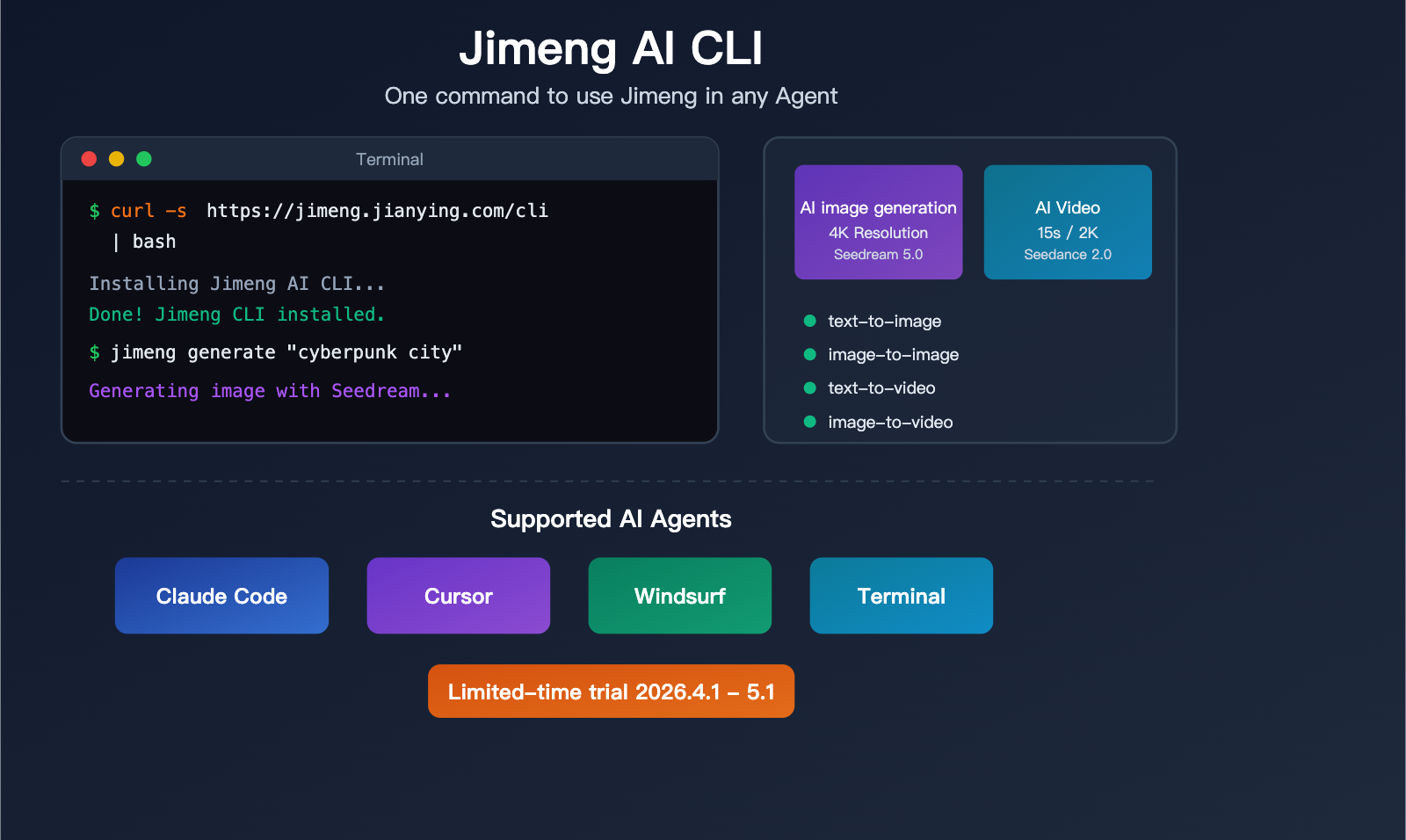
Jimeng AI CLI Key Highlights
| Feature | Description | Value |
|---|---|---|
| One-line Install | curl -s https://jimeng.jianying.com/cli | bash |
Zero-threshold installation |
| Any Agent | Supports all mainstream agents like Claude Code, Cursor | Seamless integration |
| Image Generation | Jimeng 4.0 / Seedream model | 2K-4K high-definition images |
| Video Generation | Seedance 2.0 engine | Up to 15 seconds of 2K video |
| Limited Trial | Premium membership 2026.4.1 – 5.1 | Free trial of all capabilities |
What is Jimeng AI CLI?
Jimeng AI CLI is the official command-line tool launched by ByteDance's Jimeng AI platform (known as Dreamina in overseas markets). Its core philosophy is "One command, use Jimeng in any agent"—opening up Jimeng's powerful AI image and video generation capabilities to the entire AI agent ecosystem via a CLI tool.
This means you no longer need to open a browser and log in to the Jimeng web version. Instead, you can generate images and videos directly within Claude Code, Cursor, your terminal, or any AI agent that supports tool invocation, simply by using natural language descriptions.
Jimeng AI CLI Installation Guide
Jimeng AI CLI Installation Steps
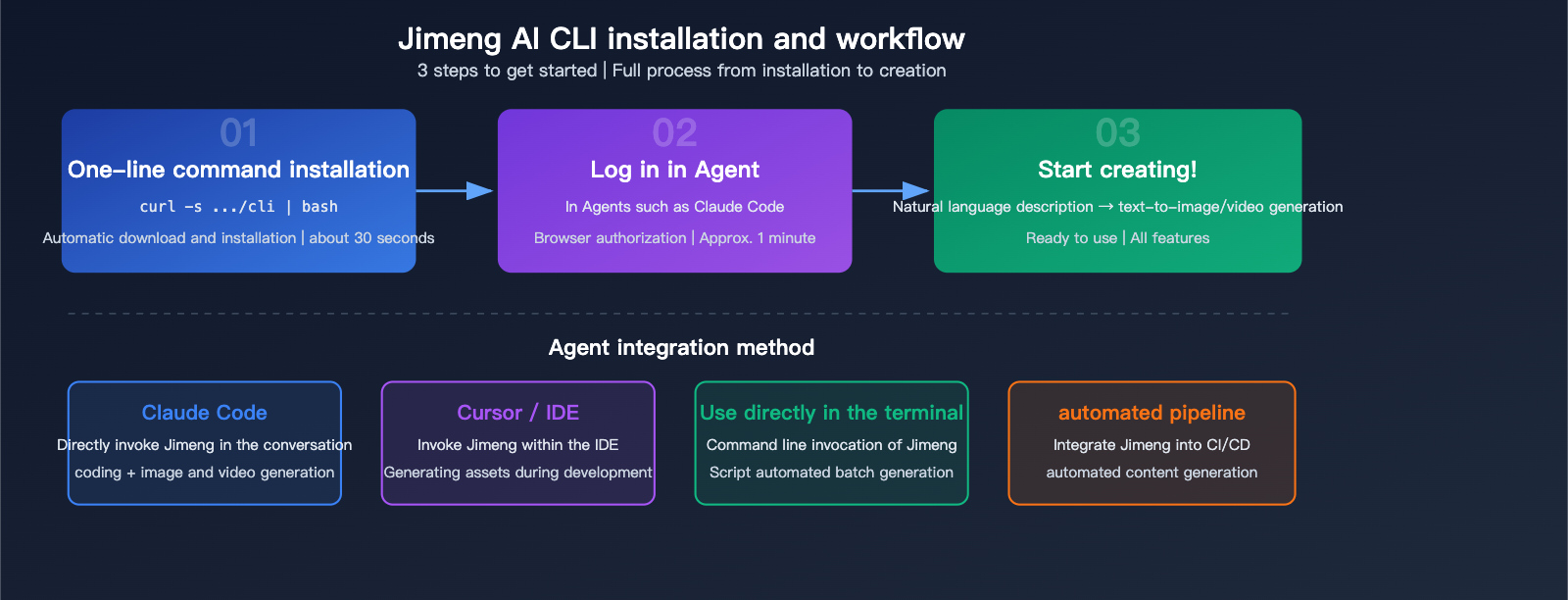
The entire installation process takes just 3 steps:
Step 1: One-line Installation
curl -s https://jimeng.jianying.com/cli | bash
This command will automatically download and install the Jimeng AI CLI onto your system. It supports both macOS and Linux.
Step 2: Log in via your Agent
Once installed, complete the login process for your Jimeng account within the AI Agent you're using (e.g., Claude Code). The CLI will guide you through the browser-based authentication.
Step 3: Start Creating
Once logged in, you're ready to use Jimeng's AI generation capabilities in any scenario.
| Step | Action | Time Required |
|---|---|---|
| Install CLI | Run the curl command in the terminal | ~30 seconds |
| Account Login | Complete authorization in the Agent | ~1 minute |
| Start Using | Describe your needs in natural language | Instant |
Jimeng AI CLI System Requirements
| Requirement | Description |
|---|---|
| OS | macOS / Linux |
| Dependencies | curl (pre-installed on most systems) |
| Network | Access to jimeng.jianying.com required |
| Account | Registered Jimeng AI account |
| Agent Compatibility | Claude Code / Cursor / Any Agent supporting tool calls |
🎯 Installation Tip: The Jimeng AI CLI installation is similar to Claude Code—it's done with a single command. If you're already using Claude Code for AI programming, the Jimeng CLI is the perfect companion for image and video generation. By using APIYI (apiyi.com) to invoke the Claude API alongside the Jimeng CLI for asset generation, you can build a complete AI workflow from code to visual content.
Jimeng AI CLI Core Features
Jimeng AI CLI Image Generation Capabilities
Jimeng AI's image generation is powered by the proprietary Seedream model series, currently a top-tier contender in the domestic AI image generation landscape:
| Feature | Description | Specs |
|---|---|---|
| Text-to-Image | Generate images from natural language descriptions | Up to 4K resolution |
| Image-to-Image | Style transfer based on a reference image | Supports multi-image fusion |
| Multi-image Synthesis | Combine multiple reference images | Up to 12 reference images |
| Model Versions | Jimeng 4.0 / 3.1 / Seedream 5.0 | Continuous iteration |
When using it in an Agent via the CLI, simply describe the image you want in natural language:
In Claude Code, just say:
"Help me generate a cyberpunk-style city night scene image using Jimeng, 2K resolution"
The CLI will automatically invoke the Jimeng API to generate the image and save the result to your specified directory.
Jimeng AI CLI Video Generation Capabilities
Jimeng AI's video generation is powered by the Seedance 2.0 engine, a next-generation video generation model released by ByteDance in February 2026:
| Feature | Description | Specs |
|---|---|---|
| Text-to-Video | Generate video from text descriptions | Up to 15 seconds, 2K resolution |
| Image-to-Video | Transform static images into dynamic video | Supports start/end frame control |
| Native Audio | Video includes built-in sound effects | AI-generated ambient sound |
| Multi-reference Generation | Combine multiple reference files | Up to 12 files |
Seedance 2.0 performs exceptionally well in the video generation space and is considered a strong competitor to Sora and Kling. Through the Jimeng CLI, these capabilities can be invoked directly within your AI workflow.
💡 Workflow Suggestion: A typical AI creation workflow could look like this: use Claude Code (invoking the Claude API via APIYI apiyi.com) to write code and content, then use the Jimeng CLI to generate the accompanying image and video assets—all without ever leaving your terminal.
The Industry Significance of Jimeng AI CLI: The Golden Age of CLIs
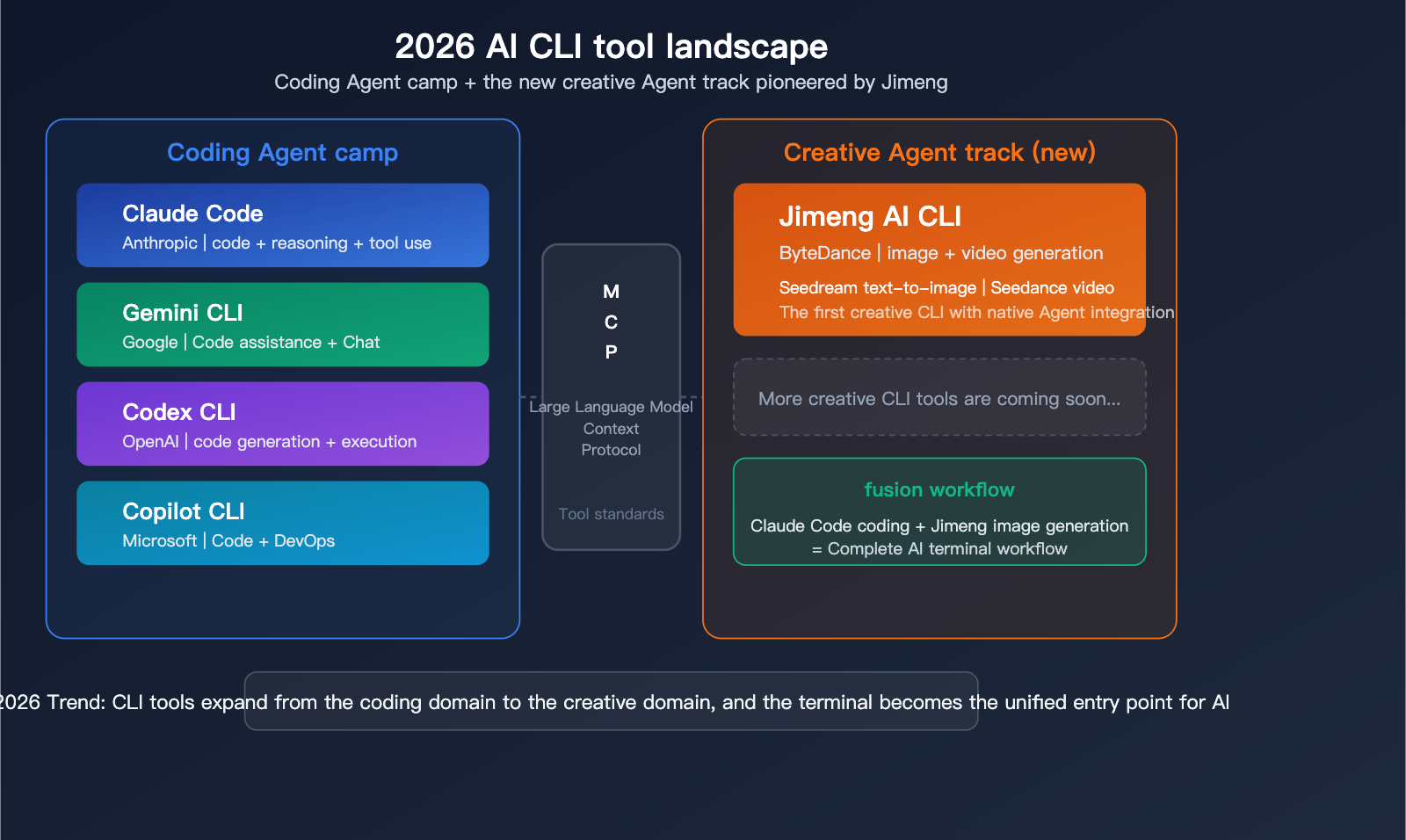
2026 AI CLI Tool Landscape
The release of Jimeng AI CLI marks a shift in the CLI tool race, expanding from "Coding Agents" into the realm of "Creative Agents." Here is the complete landscape of AI CLI tools in 2026:
| CLI Tool | Developer | Core Capabilities | Positioning |
|---|---|---|---|
| Claude Code | Anthropic | Code generation, reasoning, tool invocation | Coding Agent |
| Gemini CLI | Code assistance, conversation | Coding Agent | |
| Codex CLI | OpenAI | Code generation, execution | Coding Agent |
| GitHub Copilot CLI | Microsoft | Code, PR, Issue management | Coding + DevOps |
| Jimeng AI CLI | ByteDance | Image generation, video generation | Creative Agent |
Why Jimeng AI CLI is Worth Watching
1. Expanding CLI from Coding to Creativity
Previous CLI tools primarily focused on code generation and development workflows. The introduction of Jimeng AI CLI brings AI image and video generation capabilities into the Agent ecosystem via CLI for the first time. This signals a trend where the "universal terminal" is moving beyond development and into content creation.
2. Tool Standardization in the Agent Ecosystem
The design philosophy of Jimeng CLI—"use it in any Agent"—aligns perfectly with the tool standardization trend driven by the 2026 MCP (Model Context Protocol). MCP has become the de facto standard for communication between Agents and tools, and Jimeng CLI further enriches this ecosystem.
3. Terminal-First Transformation of Domestic AI Tools
In the international market, Claude Code and Gemini CLI have already pioneered the terminal-first development paradigm. Jimeng AI CLI is one of the first products from a domestic AI provider to offer a CLI-first experience for developers, reflecting ByteDance's commitment to the developer ecosystem.
Practical Use Cases for Jimeng AI CLI
Scenario 1: Generating Blog Post Images in Claude Code
When you're writing a technical blog post using Claude Code, you can directly invoke the Jimeng CLI to generate illustrations:
# Inside a Claude Code conversation
"Help me generate a technical diagram showing the MoE architecture using Jimeng, with a dark background and a professional style."
The Jimeng CLI receives the instruction, calls the Seedream model to generate a high-definition image, and automatically saves it to your project directory.
Scenario 2: Visual Assets for Product Prototypes
# Generate a product demo video
"Use Jimeng to generate a 5-second app interface animation video, sliding from the login page to the home screen."
Scenario 3: Automated Content Pipelines
By combining the coding capabilities of Claude Code with the creative power of Jimeng CLI, you can build a complete content automation pipeline:
- Claude Code generates the article content (via APIYI apiyi.com to call the Claude API).
- Jimeng CLI generates the accompanying images and videos.
- Automatically publish to your CMS.
🚀 Efficiency Boost: This "Coding Agent + Creative Agent" workflow can multiply your content creation efficiency. We recommend using APIYI (apiyi.com) to access a unified Claude API interface, and pairing it with Jimeng CLI to build your own AI content production line.
Jimeng AI CLI Limited-Time Trial
Free Trial for Premium Membership
Jimeng AI has launched a limited-time trial event for the release of its CLI:
| Event Info | Details |
|---|---|
| Event Period | April 1, 2026 — May 1, 2026 |
| Event Content | CLI users get free Premium membership access |
| Scope of Access | Full image generation + video generation features |
| How to Participate | Install the CLI and log in with your Jimeng account |
This means that between April 1 and May 1, all users who have installed the Jimeng CLI can enjoy free access to all of Jimeng's premium features, including the latest Jimeng 4.0 text-to-image and Seedance 2.0 video generation.
Jimeng AI CLI vs. Other AI Image Tools
| Comparison Dimension | Jimeng AI CLI | Midjourney | DALL-E 3 | Stable Diffusion |
|---|---|---|---|---|
| Usage Method | CLI + Agent | Discord | API / ChatGPT | Local Deployment / API |
| Agent Integration | Native support | None | Via API | Via API |
| Video Generation | Supported (Seedance 2.0) | Not supported | Not supported | Requires extra models |
| Resolution | Up to 4K | Up to 2K | 1024×1024 | Depends on config |
| Chinese Understanding | Native Chinese optimization | English-focused | English-focused | Depends on model |
| Deployment Barrier | One-line command | Requires Discord | Requires API key | Requires GPU |
The biggest competitive advantages of the Jimeng AI CLI are: native Agent integration + dual image/video capabilities + Chinese semantic optimization. For Chinese-speaking developers and content creators, this is currently the most convenient CLI solution for AI image and video generation.
🎯 Recommendation: If your workflow primarily takes place in the terminal and within Agents, the Jimeng CLI is the top choice for image and video generation. By pairing it with the Claude API from APIYI (apiyi.com) for coding and reasoning, you can achieve a fully terminal-based AI workflow.
FAQ
Q1: Does the Jimeng AI CLI support Windows?
Currently, the official CLI installation script curl -s https://jimeng.jianying.com/cli | bash primarily supports macOS and Linux. Windows users can run it via the WSL (Windows Subsystem for Linux) environment. As the CLI ecosystem evolves, we expect support for more platforms in the future.
Q2: Can I use the Jimeng AI CLI with Claude Code?
Yes, you can. The Jimeng CLI is designed to be "used in any Agent," and Claude Code is one of the supported Agents. Once the CLI is installed, you can directly invoke Jimeng's image and video generation features within your Claude Code conversations. We recommend using APIYI (apiyi.com) to obtain your Claude API key, allowing you to combine coding and creativity into a complete AI workflow with the Jimeng CLI.
Q3: How can I continue using it after the limited-time trial ends?
After the limited-time trial ends on May 1, 2026, you'll need to subscribe to a Jimeng AI premium membership plan to continue using all features. Please keep an eye on the official Jimeng AI website for specific pricing details. Basic features may remain free, but advanced models (such as Jimeng 4.0 and Seedance 2.0) might require a paid subscription.
Summary
Key takeaways for the Jimeng AI CLI:
- One-line installation, ready to use: Install via
curl -s https://jimeng.jianying.com/cli | bashand start using Jimeng's image and video generation capabilities in any Agent. - Creative expansion in the CLI era: From coding Agents like Claude Code to creative Agents like Jimeng, CLI tools are now covering the entire AI workflow.
- Limited-time free trial: The premium membership is free from April 1 to May 1, making it the perfect time to experience Seedream text-to-image and Seedance 2.0 video generation.
The launch of the Jimeng AI CLI marks the first time AI image and video generation has been integrated into the Agent ecosystem in a native CLI format. We highly recommend that developers and content creators install and try it out as soon as possible. Pair it with the unified API interface from APIYI (apiyi.com) to build a complete "coding + creative" AI terminal workflow.
📚 References
-
Jimeng AI CLI Official Installation Page: Official installation guide and usage instructions
- Link:
jimeng.jianying.com/ai-tool/install - Description: Includes one-click installation commands and a quick-start guide.
- Link:
-
Jimeng AI Official Platform: The full-featured web version of Jimeng AI
- Link:
jimeng.jianying.com - Description: Provides access to complete image generation, video generation, and model documentation.
- Link:
-
Seedance 2.0 Technical Documentation: ByteDance's video generation engine
- Link:
github.com/seedance-api/seedance-api - Description: API documentation and usage examples for Seedance 2.0.
- Link:
-
2026 AI CLI Coding Tools Comparison: A comprehensive market analysis of AI CLI tools
- Link:
tembo.io/blog/coding-cli-tools-comparison - Description: Covers features and performance comparisons for over 15 AI CLI tools.
- Link:
Author: APIYI Technical Team
Technical Discussion: Feel free to share your experience with the Jimeng CLI in the comments section. For more resources on AI tool integration, visit the APIYI documentation center at docs.apiyi.com.