Spent $200 on a monthly Claude Max 20x subscription, only to find you're using less than 10% of your quota each day? You're not alone. Many developers subscribe to the Max plan only to realize they "don't know how to use it to its full potential"—writing a few snippets of code or asking a couple of questions feels like enough. In reality, Claude Code is far more than just an "advanced Q&A bot"; it's a complete AI coding runtime equipped with multi-agent collaboration, automated workflows, CI/CD integration, and other enterprise-grade capabilities.
Core Value: This article provides 12 advanced tips to help you upgrade from "occasional user" to "24/7 AI partner," ensuring you squeeze every last drop of value out of your Max subscription.
title: Core Principles for Maximizing Claude Code Efficiency
description: Master Claude Code with these expert tips on agent teams, worktrees, and batch processing to supercharge your development workflow.
tags: [Claude Code, AI Development, Productivity, Coding]
Core Principles for Maximizing Claude Code
Before diving into specific techniques, let's grasp one core principle: Let Claude verify its own work.
This is the most efficient strategy repeatedly emphasized by Anthropic—give Claude a verification standard (test cases, screenshot comparisons, lint rules), and it will iterate until it meets that standard without you needing to review every step. Without a verification standard, you become the sole feedback loop, and your efficiency drops by an order of magnitude.
The Efficient Workflow
Explore (Plan Mode) → Plan → Code → Verify → Commit
   Shift+Tab          ↓      ↓      ↓      ↓
   Read-only analysis  Confirm  Auto-code  Pass tests  git commit
| Phase | Shortcut/Command | Description |
|---|---|---|
| Enter Plan Mode | Shift+Tab |
Read-only code analysis, no modifications |
| Edit Long Prompts | Ctrl+G |
Edit complex instructions in your editor |
| Auto-Accept | Shift+Tab (press again) |
Enter Auto-Accept, full automation |
| Interrupt/Undo | Esc / Esc+Esc |
Stop generation/undo previous step |
| Quick Side-chat | /btw |
Quick questions without polluting the main thread |
| Reference Files | @file.ts |
Inject files directly into the context |
| Voice Input | Hold Space |
Speech-to-text in 20 languages |
🎯 Pro Tip: Even if you have a Max subscription (no token-based billing), efficiency matters—
Max has weekly usage limits, and precise operations help your quota last longer.
For API pay-as-you-go users, these tips directly save money.
You can monitor token consumption for every model invocation via APIYI at apiyi.com.
Tips 1-4: Multi-Agent Collaboration and Parallel Development
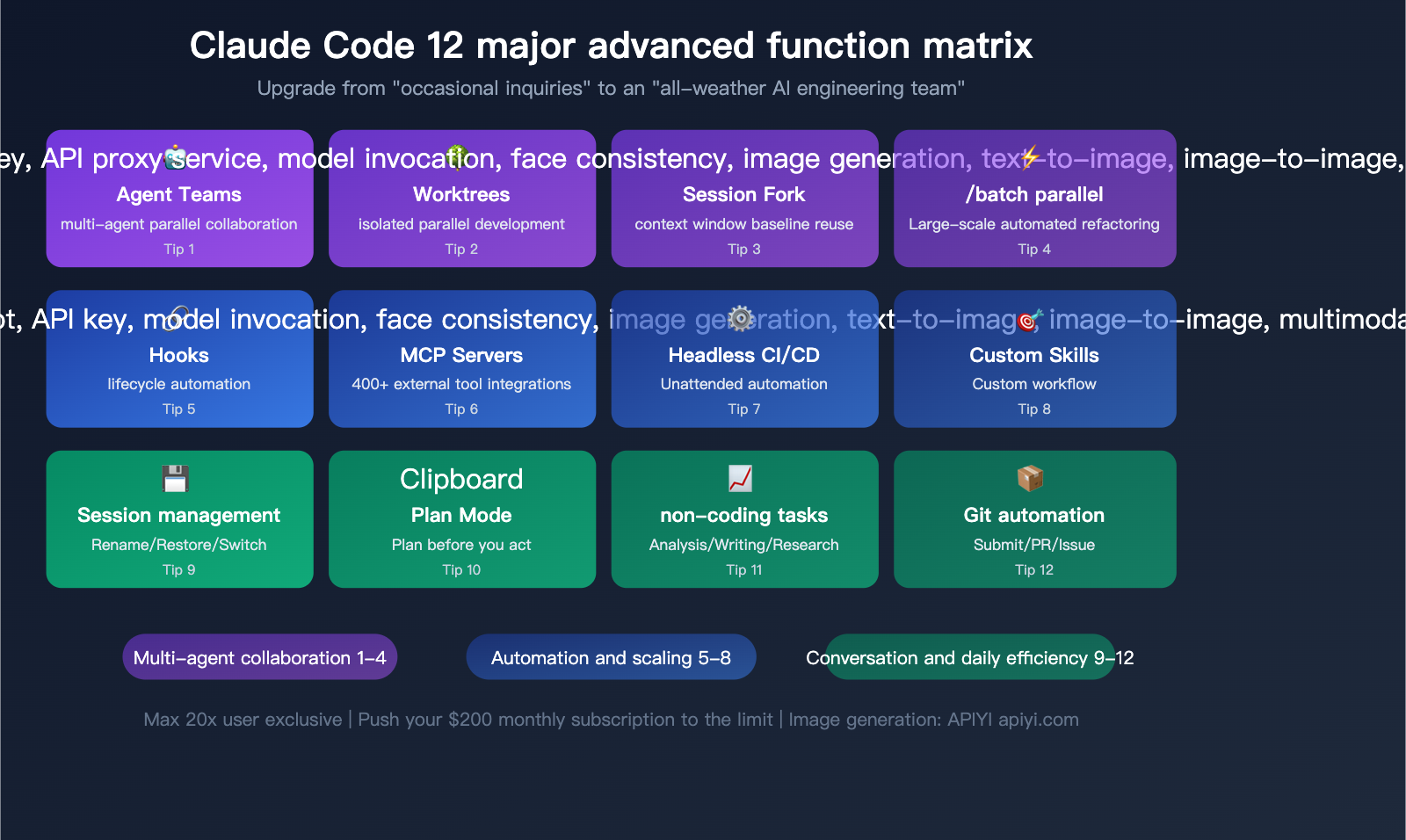
Tip 1: Agent Teams for Multi-Agent Collaboration
This is one of the most powerful features in Claude Code—letting multiple Claude instances work simultaneously, each responsible for different task modules.
How to enable: Add this to your settings.json:
{
  "env": {
    "CLAUDE_CODE_EXPERIMENTAL_AGENT_TEAMS": "1"
  }
}
Working Mode: A Team Lead coordinates multiple Teammates. Each teammate has an independent context window and communicates via shared task lists and direct messaging.
Best Use Cases:
| Scenario | Team Configuration | Description |
|---|---|---|
| Full-stack Development | Lead + Frontend + Backend + QA | Three-way parallel development |
| Code Review | Lead + Multiple Reviewers | Multi-perspective review |
| Debug Competing Hypotheses | Lead + Hypothesis A + Hypothesis B | Parallel verification of debugging paths |
| Large-scale Refactoring | Lead + Module A + Module B + Module C | Synchronized modular refactoring |
Recommended Team Size: 3-5 Teammates, with 5-6 tasks each. Token consumption grows linearly with team size.
Display Mode:
- Single terminal (use
Shift+Downto switch teammate views) - Split-screen mode (requires tmux or iTerm2)
Tip 2: Worktrees for Isolated Parallel Development
# Create independent worktrees to avoid interference
claude --worktree feature-auth     # Authentication feature
claude --worktree bugfix-123       # Bug fix
claude --worktree refactor-db      # Database refactoring

# Auto-naming
claude --worktree                   # Auto-generate name
Each Worktree branches from origin/HEAD and holds an independent copy of the code. Once finished, unused Worktrees are cleaned up automatically, and those with changes will prompt you to keep them.
Advanced Tip: List gitignored files that need to be copied into new Worktrees (like .env) in a .worktreeinclude file to ensure new worktrees run correctly.
Tip 3: Session Forking for Context Reuse
# First, establish a "context baseline" session
claude -n project-baseline
# Load architecture docs, coding conventions, etc.

# Then, fork into multiple feature branches
claude --fork-session              # Copy full context to a new session
The essence of this strategy is: Build context once, reuse it many times. You don't need to re-explain the project architecture in every new session; just fork the baseline session.
Tip 4: /batch for Large-scale Parallel Modifications
/batch Migrate all API endpoints from REST to GraphQL
The /batch skill automatically:
- Researches the codebase and breaks the work into 5-30 independent units.
- Generates a background Agent + independent Worktree for each unit.
- Each Agent implements and runs tests independently.
- Finally, each submits its own PR.
This is the most efficient way to handle "global refactoring" tasks—what takes days manually can be completed by /batch in minutes.
💡 Scenario Suggestion: Multi-agent collaboration is perfect for Max 20x users—
Token consumption is high but speed is fast; with a fixed monthly fee, you're aiming for maximum throughput.
If you are building your own AI development tools, you can achieve similar multi-agent architectures by calling the Claude API via APIYI at apiyi.com.
Tips 5-8: Automated Workflows and Extensibility
Tip 5: Hooks for Automated Lifecycle Management
Hooks are the foundation of automation in Claude Code—they allow you to execute shell commands automatically when specific events occur.
Configure them in .claude/settings.json:
{
  "hooks": {
    "PostToolUse": [
      {
        "matcher": "Edit|Write",
        "command": "npx prettier --write $CLAUDE_FILE_PATH",
        "description": "Automatically format code after editing"
      }
    ],
    "PreToolUse": [
      {
        "matcher": "Edit",
        "if": "Edit(.env*)",
        "command": "echo 'Modifying environment files is prohibited' && exit 2",
        "description": "Protect .env files"
      }
    ],
    "Notification": [
      {
        "command": "osascript -e 'display notification \"Claude Code needs your input\" with title \"Claude Code\"'",
        "description": "Desktop notification alert"
      }
    ],
    "Stop": [
      {
        "command": "npm test",
        "description": "Automatically run tests when Claude finishes"
      }
    ]
  }
}
4 Types of Hooks:
| Type | Description | Use Case |
|---|---|---|
| command | Execute shell commands | Formatting, linting, notifications |
| http | Send POST requests | Webhooks, log reporting |
| prompt | Single-turn LLM evaluation | Code style checks |
| agent | Multi-turn tool verification | Complex quality checks |
Most Useful Hook Combinations:
- Auto-run Prettier/ESLint after editing
- Protect sensitive files from being modified
- Automatically run tests when Claude finishes a task
- Desktop notifications (alerting you when Claude needs input)
- Re-injecting critical context automatically after
/compact
Tip 6: MCP Servers for Extended Tool Capabilities
The Model Context Protocol (MCP) allows Claude Code to call external tools and data sources. There are already 400+ community servers available.
# Add an MCP Server
claude mcp add github-server
claude mcp add postgres-server
claude mcp add slack-server
High-Value MCP Server Combinations:
| MCP Server | Capability | Use Case |
|---|---|---|
| GitHub | Issue/PR/Code operations | Implement features directly from Issues |
| PostgreSQL | Database queries/modifications | Write business logic based on data |
| Slack | Message reading/writing | Automatically reply to technical questions |
| Figma | Read design files | Convert designs directly to code |
| Monitoring | Read alerts and logs | Debug based on monitoring data |
Performance Optimization: Claude Code automatically lazy-loads MCP tool definitions—only the tool name enters the context, and the full schema is loaded only during actual invocation, reducing context usage by 95%.
Anthropic's Advice: If a feature has a corresponding CLI tool (like gh, aws, or gcloud), prioritize using the CLI over MCP, as CLI tools have zero context overhead.
Tip 7: Headless Mode for CI/CD Integration
Claude Code isn't just an interactive tool; it can run completely unattended:
# Basic unattended execution
claude -p "Fix the bug in auth.py" --allowedTools "Read,Edit,Bash(npm test)"

# With structured output
claude -p "Analyze this code for security vulnerabilities" --output-format json

# With JSON Schema validation
claude -p "Extract all API endpoints" --json-schema '{"type":"array","items":{"type":"object","properties":{"path":{"type":"string"},"method":{"type":"string"}}}}'

# With a cost limit
claude -p "Refactor the utils module" --max-budget-usd 5.00

# Bare mode (skips hooks/skills/MCP for faster startup in CI)
claude -p "lint this" --bare
GitHub Actions Integration Example:
# .github/workflows/claude-review.yml
name: Claude Code Review
on: [pull_request]
jobs:
  review:
    runs-on: ubuntu-latest
    steps:
      - uses: actions/checkout@v4
      - name: Claude Review
        run: |
          claude -p "Review the changes in this PR and check for potential issues" \
            --permission-mode plan \
            --output-format json \
            --max-budget-usd 2.00
Tip 8: Custom Skills
Skills are an extensible system for Claude Code, defined by SKILL.md files in the .claude/skills/ directory.
---
description: "Deploy to production environment"
disable-model-invocation: true
allowed-tools: ["Bash"]
---

# Deployment Skill

Follow these steps to deploy to production:

1. Run `npm run build`
2. Run `npm test`
3. After confirming all tests pass, execute `./deploy.sh production`
4. Verify deployment status: `curl -s https://api.example.com/health`
Key Frontmatter Fields:
| Field | Purpose | Example |
|---|---|---|
description |
Helps Claude decide when to auto-invoke | "Review Python code quality" |
disable-model-invocation |
Manual invocation only (prevents accidents) | Deployment, releases, etc. |
context: fork |
Run in an isolated subagent | Avoid polluting the main context |
allowed-tools |
Limit available tools | Allow only Read and Bash |
paths |
Restrict file scope | ["src/api/**/*.ts"] |
🚀 Extension Tip: Encapsulate your team's common workflows into Skills so every developer can execute them with one click.
If you're building your own AI toolchain, APIYI (apiyi.com) provides a unified API for 300+ models, which can serve as the backend for invoking external AI capabilities within your Skills.
Tips 9-12: Session Management and Daily Efficiency
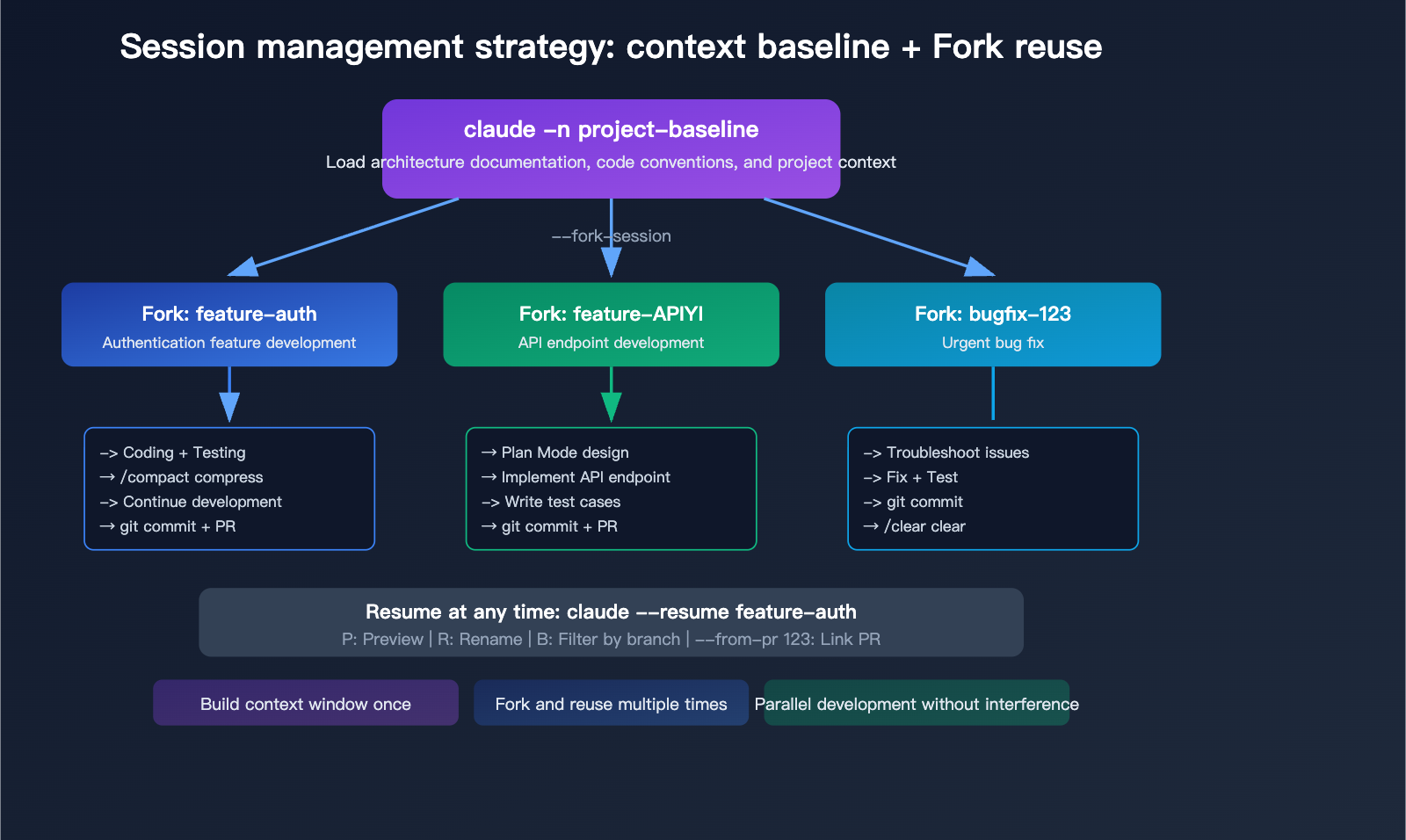
Tip 9: Session Naming and Resumption
# Name a session upon startup
claude -n auth-refactor

# Resume the most recent session
claude --continue

# Interactively select a session
claude --resume
# P: Preview  R: Rename  B: Filter by branch  A: Show all projects

# Resume by name
claude --resume auth-refactor

# Resume a session associated with a specific PR
claude --from-pr 123

# Rename within a session
/rename auth-v2
Core Strategy for Session Management: Use uniquely named sessions for every significant task, and run /clear to start fresh once finished. This keeps your context isolated while making it easy to backtrack whenever you need to.
Tip 10: Plan Mode – Think Before You Act
Press Shift+Tab to enter Plan Mode. Claude will analyze your codebase in read-only mode and provide an implementation plan without making any actual changes.
Why Plan Mode is the most underrated feature:
- Review the plan for complex tasks before committing to execution, avoiding wasted tokens on the wrong path.
- Plans are saved; you can use
Ctrl+Gto modify them in the editor before executing. - Claude automatically names sessions based on the plan content.
- You can set it as the default mode by adding
"defaultMode": "plan"to your.claude/settings.json.
# Start directly in Plan Mode
claude --permission-mode plan
Tip 11: Using Claude Code for Non-Coding Tasks
Claude Code is powered by the full Claude AI with file system access, so it's not just for writing code:
# Data analysis
cat sales_data.csv | claude -p "Analyze sales trends and identify anomalous data points"

# Documentation writing
claude -p "Write API documentation for this project based on the code in src/" > api-docs.md

# Log analysis
tail -n 1000 /var/log/app.log | claude -p "Analyze error patterns and provide repair suggestions"

# Project understanding
claude -p "Analyze the architecture of this project and map out module dependencies"

# Code metrics
claude -p "Calculate code quality metrics for this project: test coverage, complexity, and dependency count"
Integrating into package.json:
{
  "scripts": {
    "review": "claude -p 'review staged changes for bugs and style issues'",
    "docs": "claude -p 'generate API documentation from source code'",
    "changelog": "claude -p 'generate changelog from recent commits'"
  }
}
Tip 12: Full Git Workflow Automation
# Smart commits (analyze staged changes to generate a proper commit message)
claude -p "Analyze staged changes and create an appropriate commit" \
  --allowedTools "Bash(git *)"

# Automatic PR creation
claude -p "Create a PR for the current branch, including a summary of changes and a test plan"

# One-click from Issue to PR
claude -p "Implement the feature described in Issue #42, then submit a PR" \
  --allowedTools "Read,Edit,Bash"
💰 Cost Tip: All the tips above are "free" under the Max monthly subscription (within the fixed monthly fee).
For automated scenarios requiring API integration (Headless mode, CI/CD),
you can use the APIYI (apiyi.com) pay-as-you-go service to call the Claude API.
It's recommended to set--max-budget-usdto keep a lid on single-task costs.
A Day in the Life of a Max Power User
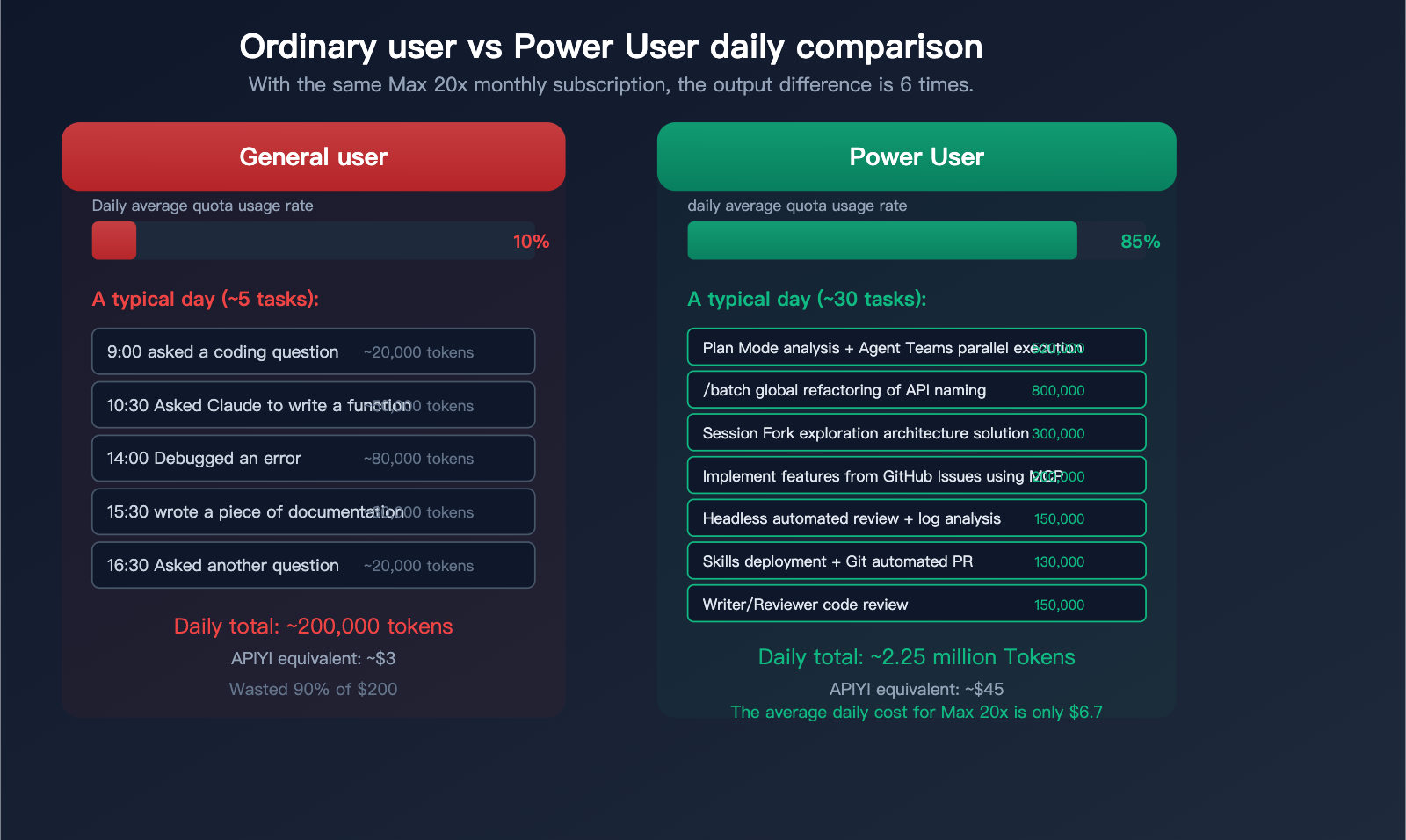
Here’s what a typical workday looks like for a Max 20x Power User:
| Time | Activity | Technique Used | Token Estimate |
|---|---|---|---|
| 9:00 | Plan Mode: Analyze daily tasks | Technique 10 | ~20k |
| 9:15 | Agent Teams: Parallel development of 2 features | Technique 1 | ~500k |
| 10:30 | /batch: Refactor API naming conventions | Technique 4 | ~800k |
| 11:00 | Session Fork: Explore two architectural approaches | Technique 3 | ~300k |
| 12:00 | CLI pipe: Analyze production logs | Technique 11 | ~50k |
| 13:30 | Headless mode: Automated code review | Technique 7 | ~100k |
| 14:00 | MCP + GitHub: Implement features from Issues | Technique 6 | ~200k |
| 15:30 | Custom Skill: Execute deployment process | Technique 8 | ~50k |
| 16:00 | Git: Automated commits and PR creation | Technique 12 | ~80k |
| 17:00 | Writer/Reviewer mode: Code review | Technique 1 | ~150k |
Daily Total Tokens: ~2.25 million (Equivalent to ~$30-60 via API)
Max 20x Actual Cost: $200 / 30 days = ~$6.7/day
This is why the Max monthly subscription is such a steal—for the same workload, you'd be paying $30-60/day with pay-as-you-go API usage, while Max costs you just $6.7/day.
Complete Shortcut and Command Cheat Sheet
| Shortcut | Function | Frequency |
|---|---|---|
Shift+Tab |
Toggle permission mode (Normal/Auto/Plan) | ★★★★★ |
Ctrl+G |
Open prompt in editor | ★★★★ |
Ctrl+O |
Show detailed output (thinking/tools) | ★★★ |
Ctrl+B |
Run current task in background | ★★★ |
Ctrl+T |
Toggle task list | ★★★ |
Esc |
Stop current generation | ★★★★ |
Esc+Esc |
Undo/Redo checkpoint | ★★★ |
Alt+P |
Switch model | ★★ |
Alt+T |
Toggle extended thinking | ★★ |
Alt+O |
Toggle quick mode | ★★ |
!command |
Run bash command directly | ★★★★ |
@file |
Reference file | ★★★★ |
Long press Space |
Voice input | ★★ |
| Command | Function |
|---|---|
/clear |
Clear conversation |
/compact |
Compact conversation history |
/init |
Generate CLAUDE.md |
/memory |
Manage auto-memory |
/hooks |
Manage Hooks |
/resume |
Resume Session |
/batch |
Large-scale parallel modification |
/simplify |
Review and simplify code |
/btw |
Quick side-question (won't pollute context) |
/effort |
Adjust thinking depth |
FAQ
Q1: What’s the difference between Agent Teams and Subagents?
Subagents are unidirectional—the main agent delegates a task, and the subagent reports back only to the main agent. Agent Teams are multidirectional—teammates can communicate and coordinate directly and share a task list. Teams are better for complex tasks requiring cross-module collaboration, while subagents are better for independent research or data processing tasks. To build custom AI agents, you can use APIYI (apiyi.com) to perform model invocation via the Claude API to implement similar multi-agent architectures.
Q2: What exactly is the Max 20x usage limit? How do I know if I’m running out?
Anthropic doesn't publish an exact token limit; they use a relative "20x Pro usage" multiplier. In practice, heavy daily use (including Agent Teams) usually won't hit the limit within a single workday. It resets weekly. If you frequently see "usage limit" warnings, you're hitting the ceiling—try spreading your work out over the week, or consider moving some automated tasks to APIYI (apiyi.com) for pay-as-you-go access.
Q3: Do Hooks consume my Max quota?
Command-type Hooks don't consume your quota—they are local shell commands. However, prompt and agent-type Hooks trigger a model invocation, which does consume your quota. I recommend using command-type Hooks for daily automation and reserving prompt/agent Hooks for scenarios requiring AI reasoning (like complex code quality checks).
Q4: My team has 5 people; which plan should we choose?
You have two options: subscribe everyone to Max 20x ($200/person/month, total $1,000), or go with Team Premium ($100/person/month, total $500). Team Premium provides Max-level usage plus team management features, but if everyone is a heavy Claude Code user, the 20x usage limit on the Max 20x plan is more generous. A middle-ground approach: give core developers Max 20x, support staff Team Premium, and manage API automation centrally through APIYI (apiyi.com).
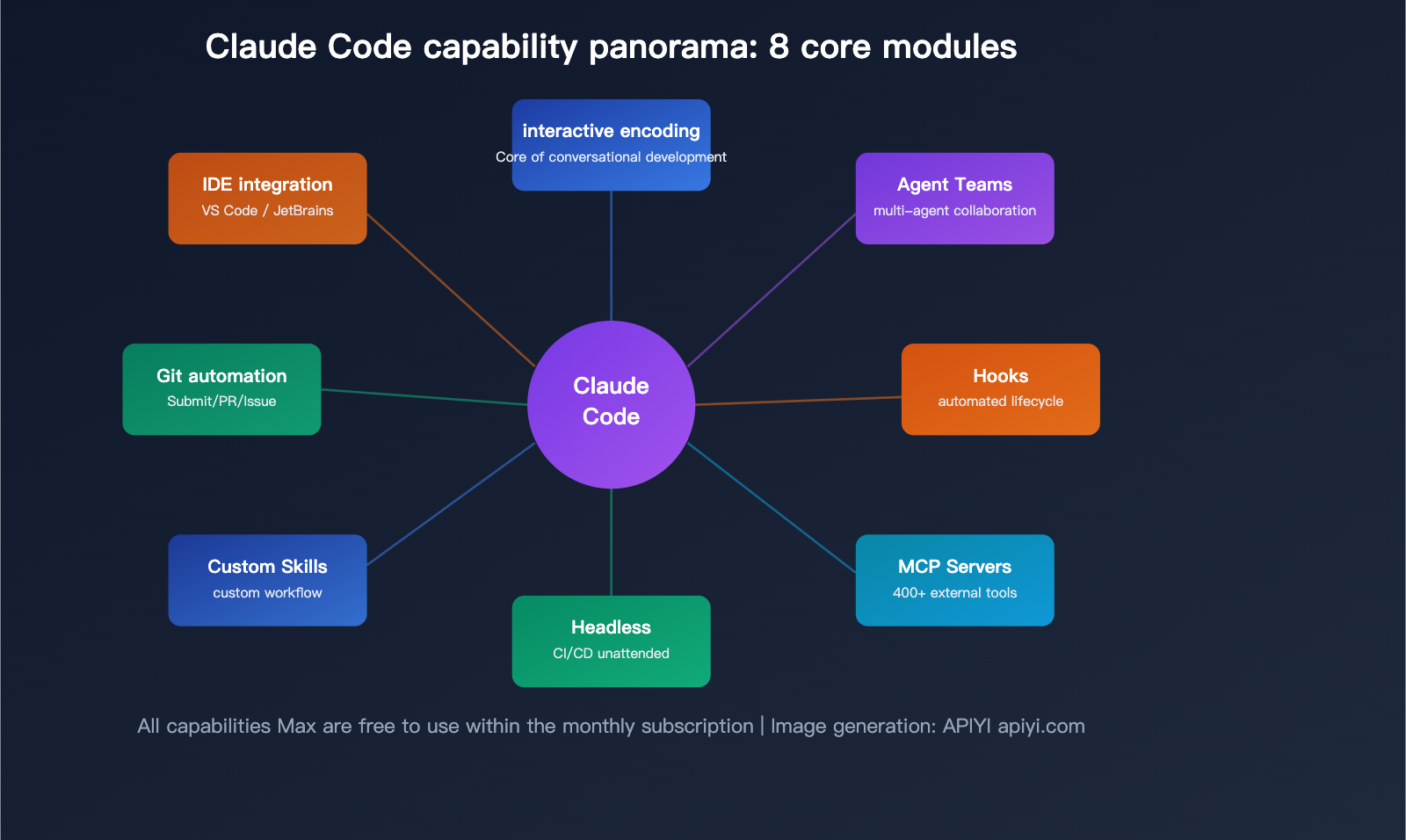
Summary: Treat Claude Code as Your AI Engineering Team
Claude Code isn't just a tool; it’s a programmable AI engineering team. Using it on its own means you're only tapping into 10% of its potential. It’s only when you combine it with Agent Teams, Hooks, MCP, Skills, and Headless mode that you’re truly running at full capacity.
Start doing these 5 things today:
- Enable Agent Teams—Try having 3 teammates develop a feature in parallel.
- Configure 3 Hooks—Set up code formatting, desktop notifications, and automated testing upon completion.
- Create 2 Custom Skills—Encapsulate your most frequent workflows into one-click commands.
- Integrate Headless Mode into CI/CD—Automate code reviews and PR creation.
- Start Every Day with Plan Mode—Look at the big picture before diving in; it’ll double your efficiency.
We recommend using APIYI (apiyi.com) to manage your pay-as-you-go API needs, combined with a Max monthly subscription to achieve the best value mix of "interactive primary usage + automated supplemental tasks."
📝 Author: APIYI Technical Team | APIYI apiyi.com – A unified access platform for 300+ AI Large Language Model APIs
References
-
Claude Code Official Best Practices: Recommended usage strategies from the Anthropic engineering team
- Link:
code.claude.com/docs/en/best-practices - Description: Includes core advice on test-driven development, context management, and more.
- Link:
-
Claude Code Hooks Guide: Detailed configuration for automated workflows
- Link:
code.claude.com/docs/en/hooks-guide - Description: Covers 24 lifecycle events and 4 types of Hooks.
- Link:
-
Claude Code Agent Teams: Documentation on multi-agent collaboration
- Link:
code.claude.com/docs/en/agent-teams - Description: Explains the Team Lead/Teammate architecture and use cases.
- Link:
-
Claude Code Skills Development: Documentation for custom skills
- Link:
code.claude.com/docs/en/skills - Description: Covers the SKILL.md format and dynamic context injection.
- Link: