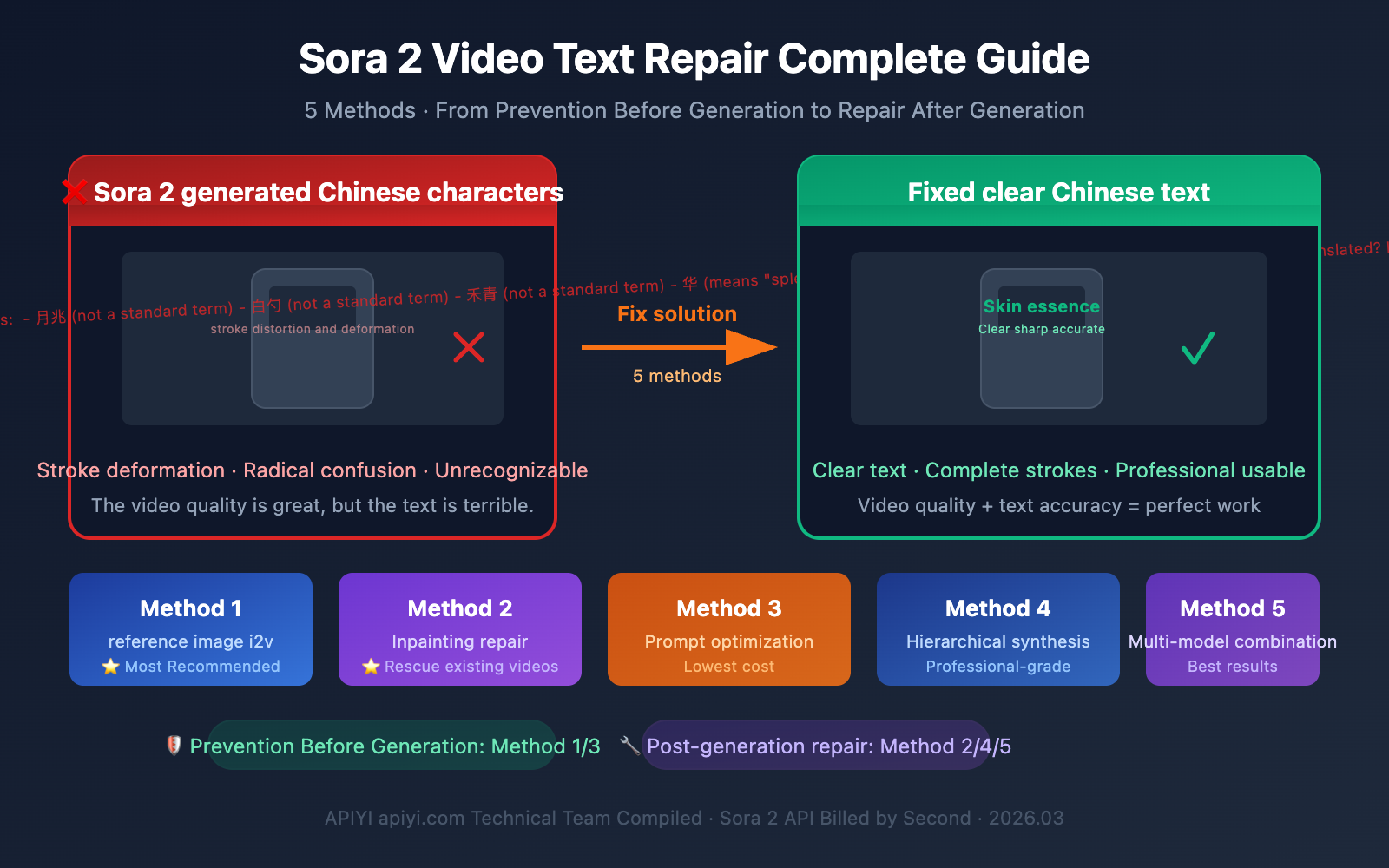
Author's Note: I generated a fantastic video with Sora 2, but the Chinese text in the frame came out crooked and garbled—it's a shame to throw it away, but sending it out isn't professional either. This is one of the most frustrating problems Sora 2 users face today. This article explores 5 practical solutions to help you salvage those works where "the video looks great but the text is a mess."
Core Value: Learn to solve Sora 2's Chinese character rendering issues from both "prevention before generation" and "repair after generation" angles, so every API call you make counts.
title: Why Sora 2 Garbles Chinese Text: A Technical Analysis
description: Understand why Sora 2 struggles with Chinese character rendering and learn 5 practical solutions to fix it
tags: [Sora 2, AI Video, Chinese Text, Text Rendering, Video Generation]
In explaining the solutions, let's first understand the problem itself—why does Sora 2's Chinese character rendering perform so poorly?
The Underlying Logic of Sora 2's Text Rendering
AI video models generate text in a completely different way than you might imagine. They're not "writing" characters, they're "drawing" them—the model generates "pixel patterns that look like text," not actual font rendering from a font engine.
This creates a fundamental problem:
| Text Type | Character Complexity | Sora 2 Rendering Quality | Reason |
|---|---|---|---|
| English Letters | Low (26 letters) | ⭐⭐⭐⭐ Acceptable | Simple strokes, abundant training data |
| Numbers | Minimal (0-9) | ⭐⭐⭐⭐⭐ Good | Simple structure, easy for model to learn |
| Simplified Chinese | High (thousands of common characters) | ⭐⭐ Poor | Complex strokes, radicals easily confused |
| Traditional Chinese | Extremely High | ⭐ Very Poor | Dense strokes, fine details hard to restore |
| Japanese Hiragana | Medium | ⭐⭐⭐ Fair | Simpler than kanji, but still has deviations |
3 Typical Ways Chinese Characters Go Wrong
- Stroke Distortion: The basic character structure is correct, but strokes are twisted, broken, or redundant
- Radical Confusion: Left and right radicals combine incorrectly, generating "almost-characters" that don't exist
- Complete Garbling: Generates meaningless pseudo-text symbols
🎯 Key Insight: This isn't a Sora 2 bug—it's a common issue across all current AI video models. Understanding this helps you choose the right solution strategy: either prepare the text properly before generation, or fix it with post-production tools afterward.
Method 1: Pre-embed Text in Reference Images (Image-to-Video i2v Approach)
This is currently the most effective "prevention before generation" solution.
Core idea: Don't rely on Sora 2 to "draw" Chinese characters itself. Instead, pass an image containing clear Chinese text as a reference frame, letting the model generate video based on this image.
Sora 2 Image-to-Video Workflow
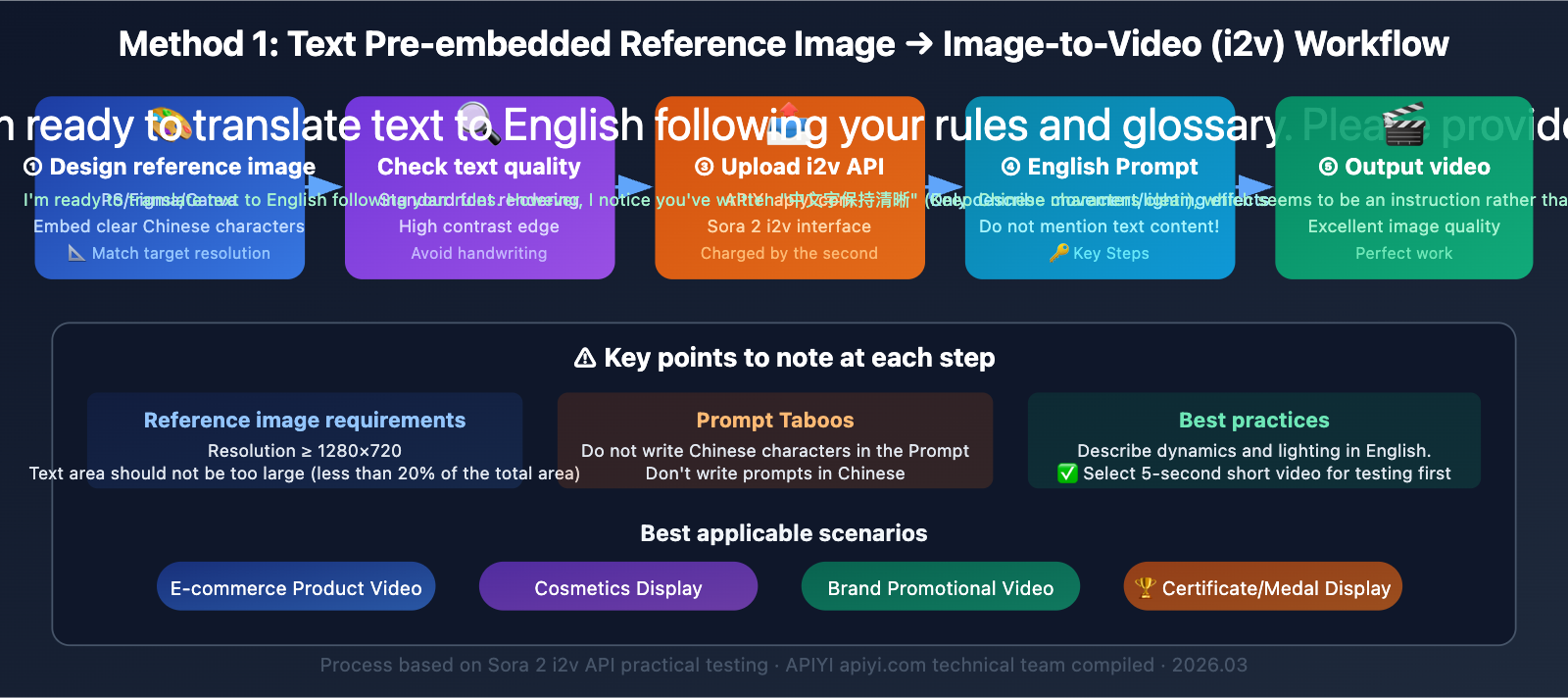
Sora 2 API supports Image-to-Video (i2v) mode, where you can upload an image with precise Chinese text as the first frame of your video. The model will try to maintain the visual elements from the first frame when generating subsequent frames.
Step-by-Step Implementation
Step 1: Prepare Your Reference Image
Use design tools like Photoshop, Figma, or Canva to create an image with clear Chinese text. Key requirements:
- Use standard fonts for text rendering (not handwriting styles)
- Resolution matches your target video (e.g., 1280×720)
- Text areas have high contrast and sharp edges
Step 2: Submit via i2v API
import openai

client = openai.OpenAI(
    api_key="YOUR_API_KEY",
    base_url="https://api.apiyi.com/v1"  # APIYI Sora 2 direct proxy
)

# Image-to-video mode
response = client.chat.completions.create(
    model="sora-2-i2v",  # Image-to-video model
    messages=[
        {
            "role": "user",
            "content": [
                {
                    "type": "image_url",
                    "image_url": {"url": "https://your-image-url.com/product.png"}
                },
                {
                    "type": "text",
                    "text": "The cosmetic product slowly rotates on a reflective surface, "
                            "soft studio lighting, cinematic, 8 seconds"
                }
            ]
        }
    ]
)
Step 3: Prompt Technique—Don't Mention Text Content
Key principle: In your prompt, only describe motion and lighting changes, don't mention the text content in the image. Once you write Chinese characters in the prompt, the model will "redraw the text," potentially overwriting the correct text from your reference image.
| Prompt Strategy | Example | Result |
|---|---|---|
| ❌ Mention text | "Product labeled '美白精华'" | Model redraws text, may garble |
| ✅ Describe motion only | "Product rotates slowly, soft light" | Preserves reference image text |
| ❌ Chinese prompt | "化妆品在旋转" | May trigger Chinese text generation |
| ✅ English prompt | "Cosmetic product rotating" | More stable, avoids triggering Chinese rendering |
Applicable Scenarios
- E-commerce product videos: Cosmetics, food packaging, and other products with Chinese labels
- Brand promotion: Scenarios where logos and brand names need precise display
- Certificate/award displays: Items requiring clear Chinese information
🚀 Practical Tip: Use APIYI's apiyi.com platform to call Sora 2's i2v interface, billed per second. You can try multiple combinations of reference images and prompts to find the best results. We recommend using English prompts with Chinese reference images—this combination currently offers the highest text fidelity.
Method 2: Video Post-Production Inpainting for Localized Text Replacement
If you already have a high-quality Sora 2 video with garbled text, this is the most worthwhile "post-generation repair" solution to try.
What is Video Inpainting
Video inpainting technology allows you to erase and regenerate specific regions in a video while keeping the surrounding footage intact. The core workflow is: select the text area → AI erases the garbled text → refill with correct content.
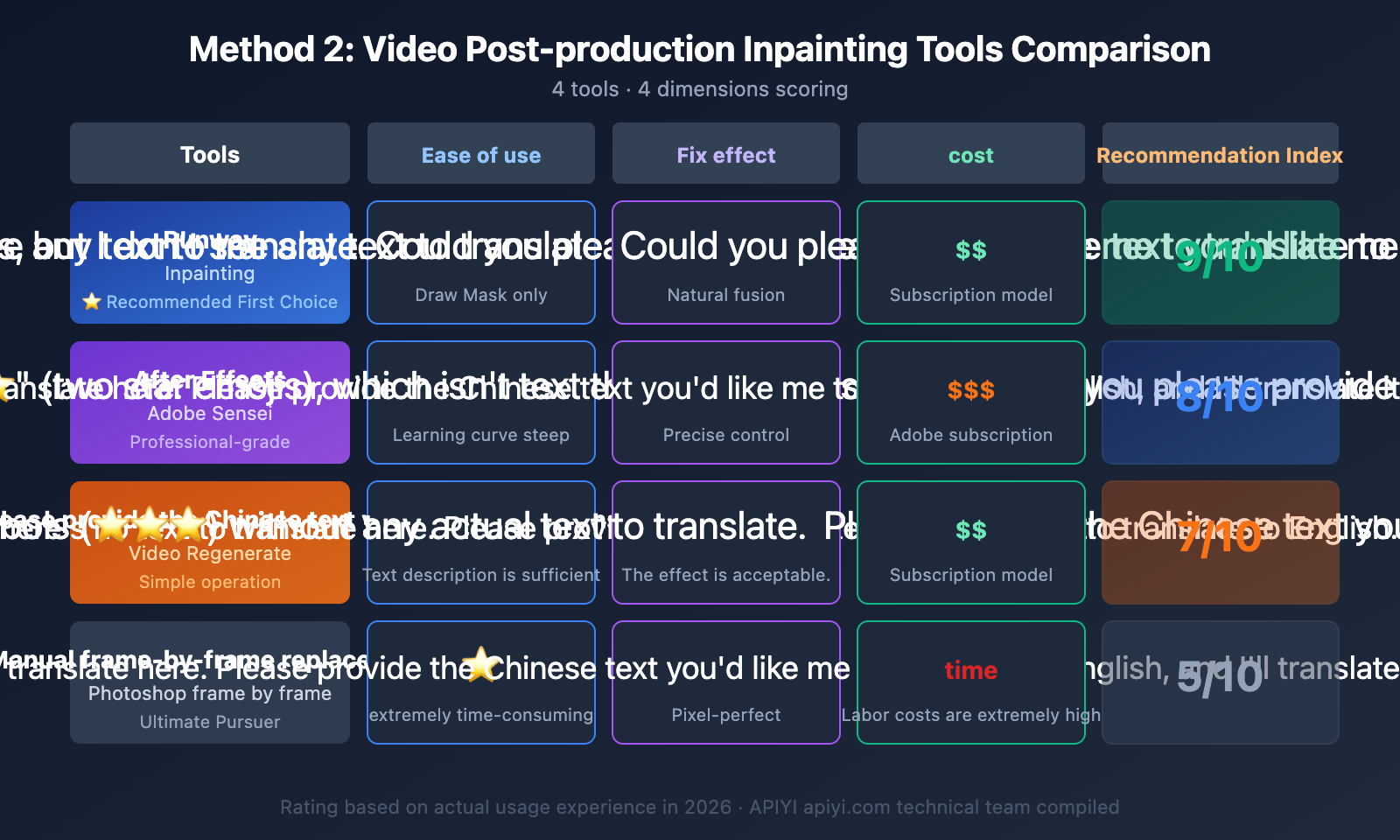
Comparison of Popular Video Inpainting Tools
| Tool | Operation | Text Replacement Quality | Cost | Best For |
|---|---|---|---|---|
| Runway Inpainting | Draw Mask → AI fill | ⭐⭐⭐⭐ Natural | Subscription | Creators/Designers |
| After Effects + Sensei | Professional VFX workflow | ⭐⭐⭐⭐⭐ Precise | Adobe subscription | Professional editors |
| Descript Regenerate | Text description → AI regeneration | ⭐⭐⭐ Acceptable | Subscription | Content creators |
| Manual frame-by-frame replacement | Photoshop frame-by-frame processing | ⭐⭐⭐⭐⭐ Perfect | High time cost | Perfectionists |
Runway Inpainting Workflow
This is currently the most balanced solution—great results with a low learning curve:
- Upload video: Upload your Sora 2-generated video to Runway
- Create Mask: Use the brush tool to circle the garbled text areas
- Set reference: Tell the AI what this area should look like (plain background/correct text)
- AI fill: Runway analyzes and fills the masked areas frame by frame
- Check results: Review frame by frame, paying special attention to fast-moving sections
Operational Tips
- Mask coverage must be complete: Include text shadows and reflections, otherwise traces will remain
- Play at normal speed first: Check overall smoothness, then review details frame by frame
- Fast-moving areas: The slower the text moves, the better the inpainting results
- Resolution matching: Ensure the inpainting tool's output resolution matches your original video
Method 3: Sora 2 Prompt Optimization Techniques to Reduce Text Errors
If you must include text during Sora 2 generation, the following prompt optimization techniques can improve text accuracy (though they won't completely eliminate the issue).
Text Prompt Optimization Strategies for Sora 2
| Strategy | Description | Effectiveness |
|---|---|---|
| Minimal Text | Use only 1-2 characters, avoid long sentences | ⭐⭐⭐⭐ Significant |
| High Contrast Description | "white text on black background" | ⭐⭐⭐ Moderate |
| English Prompt | Write prompts in English, even if the target is Chinese text | ⭐⭐⭐ Moderate |
| Shorter Duration | 5-second videos are more stable than 12-second ones with text | ⭐⭐⭐ Moderate |
| Fewer Scene Elements | Don't describe multiple text-containing objects simultaneously | ⭐⭐⭐ Moderate |
| Static Camera | Keep the text area free from movement or rotation | ⭐⭐⭐⭐ Significant |
Prompt Comparison Examples
Poor Prompt:
A cosmetic bottle with "Skin Renewal Essence" written on it, the bottle is rotating, background has many Chinese billboards
Good Prompt:
A skincare serum bottle with minimalist label, slowly rotating on white surface, studio lighting, static camera, 5 seconds, focus on product texture
Key difference: The good prompt doesn't force specific text content, allowing the model to focus on image quality.
💡 Cost-Saving Tip: Optimizing prompts requires iterative testing. By calling Sora 2 API through APIYI's apiyi.com platform with per-second billing, you can generate a 4-second 720p video for just $0.40, making it affordable to test different prompt combinations.
Method 4: Layered Compositing Workflow—Video + Text Layer
This is a solution commonly used by professional video teams: let Sora 2 generate video footage without text, then add text through post-production compositing.
Layered Compositing Workflow Breakdown
Step 1: Generate pure video without any text using Sora 2
- Explicitly exclude text elements in your prompt
- Reserve space for text areas (such as leaving product label areas blank)
Step 2: Use motion tracking to determine text placement
- After Effects: Use 3D Camera Tracker
- DaVinci Resolve: Use Planar Tracker
- Track the motion of the product surface or specific areas
Step 3: Layer Chinese text on top
- Render clear Chinese text using standard fonts
- Match the tracking data so text follows object movement
- Adjust blend modes and opacity to integrate with the scene
Pros and Cons Analysis
| Dimension | Rating |
|---|---|
| Text Accuracy | ⭐⭐⭐⭐⭐ Perfect, standard font rendering |
| Natural Integration | ⭐⭐⭐⭐ Requires color matching |
| Skill Barrier | ⭐⭐ Requires video editing skills |
| Time Cost | ⭐⭐ Tracking and compositing take time |
| Best For | Professional commercial video production |
Method 5: Multi-Model Combination Strategy — Playing to Strengths
Different AI video models have their own strengths and weaknesses when it comes to text rendering. You can leverage Sora 2's superior visual quality while combining it with other tools' text processing capabilities.
Multi-Model Combination Approach
- Sora 2 generates main video: Utilize its excellent physics simulation and visual quality
- Flux/DALL·E generates text frames: Use image models that excel at text rendering to create key frames
- Video editing software composites: Merge text frames into the Sora 2 video
Recommended Model Combinations
Different models show significant differences in text rendering capabilities, so you can choose the right combination based on your needs.
🎯 Technical Tip: Through the APIYI platform at apiyi.com, you can unified call APIs for multiple models like Sora 2, DALL·E, and Flux. Complete your multi-model combination workflow on a single platform, switch between models as needed, and no longer need to manage multiple API keys separately.
Sora 2 Chinese Text Video Repair Solution Selection Guide
Choose the most suitable approach based on your specific situation:
Situation A: Haven't started generating videos yet
→ Prioritize Method 1 (Reference Image i2v) or Method 3 (Prompt Optimization)
Situation B: Already have videos with garbled text in certain areas
→ Prioritize Method 2 (Inpainting Post-Production Repair)
Situation C: Need perfect Chinese text + high-quality video
→ Choose Method 4 (Layered Compositing) or Method 5 (Multi-Model Combination)
Situation D: Product showcase videos (products have text on them)
→ Best approach is Method 1: Use product photos with correct text as i2v reference images
💰 Cost Considerations: Methods 1 and 3 have the lowest cost—you can complete them through APIYI at apiyi.com with per-second billing. Method 2 requires additional post-production tool subscriptions. Methods 4 and 5 have the highest costs but deliver the best results, making them ideal for commercial projects.
Sora 2 Chinese Text in Video FAQs
Q1: If I add text to a product image first and then generate a video, won’t the text get distorted?
It won't be 100% distortion-free, but the probability of distortion drops significantly. By uploading a reference image with clear text using i2v mode, Sora 2 will try to preserve the visual elements of the first frame. The key is to avoid mentioning the text content in your prompt—just describe the motion and lighting effects instead, so the model doesn't "redraw" the text. In actual testing, small text areas on product surfaces (brand names, ingredient lists, etc.) have higher fidelity, while large text banners still carry some distortion risk. Using APIYI's apiyi.com platform to call the i2v API with per-second billing lets you test multiple times at low cost to find optimal parameters.
Q2: Will video inpainting repairs look fake after fixing the text?
It depends on the execution details. If the mask area isn't too large, the text background is relatively simple, and object motion isn't too intense, Runway Inpainting repairs look very natural. The key technique is to make sure the mask covers the text's shadows and reflections, and you'll need to check frame-by-frame after repair. For scenes with complex backgrounds or intense motion, After Effects' professional-grade processing delivers better results.
Q3: Will Sora 2 improve Chinese text rendering in the future?
It's possible but not optimistic in the short term. Text rendering issues are a common challenge across all diffusion models—it's not simply a training data problem. This involves fundamental limitations at the model architecture level. Generative models essentially perform pixel-level probabilistic inference rather than precise font engine rendering. Until there's a breakthrough in model architecture, the five methods mentioned above remain the most practical solutions.
Q4: Does English text also fail in Sora 2?
Yes, but the frequency and severity are much lower than with Chinese. English has only 26 letters with simple structure, and Sora 2's training data contains a much higher proportion of English text. Short English words (brand names, slogans, etc.) usually render acceptably, but long sentences or small-sized English text can still fail. If your scenario allows it, replacing Chinese with English is the simplest workaround.
Q5: Is there a difference in text rendering between calling Sora 2 via API and generating through the web interface?
The underlying model is the same, so text rendering should theoretically be identical. The advantage of API calls is that you can precisely control parameters (resolution, duration, frame rate), batch test different prompts, and Sentinel review rejections don't incur charges. Using APIYI's apiyi.com platform with per-second billing lets you find optimal generation parameters more efficiently.
Sora 2 Chinese Text in Video Repair Summary
Sora 2's Chinese text rendering issues are fundamentally a technical limitation of AI video models and won't be completely solved at the model level in the short term. However, with proper workflow design, you can absolutely produce high-quality videos with precise Chinese text.
Core logic of the 5 methods:
- Method 1 (Reference image i2v) and Method 3 (Prompt optimization): Solve the problem during generation with the lowest cost
- Method 2 (Inpainting): Fix the problem in post-production, flexible and practical
- Method 4 (Layered compositing) and Method 5 (Multi-model combination): The most professional approaches with the best results but highest cost
For most scenarios, we recommend Method 1 (Reference image i2v)—pre-embed text into high-resolution product or scene images, generate video through Sora 2's i2v API, and pair it with English-only prompts describing dynamic effects. This is currently the most balanced approach in terms of quality and cost.
APIYI's apiyi.com platform lets you call both Sora 2's t2v and i2v APIs in one place with per-second billing, supporting multiple tests of different parameter combinations. It's a convenient choice for exploring your optimal workflow.
References
-
Sora 2 Chinese Text Garbled Solution: 5 Practical Methods
- Link:
help.apiyi.com/en/sora-2-chinese-text-garbled-solution-en.html - Description: Complete solution including prompt optimization and post-processing
- Link:
-
Runway Inpainting User Guide: Video Local Repair
- Link:
help.runwayml.com/hc/en-us/articles/19155664495379-Inpainting - Description: Operating steps and techniques for video inpainting
- Link:
-
AI Video Inpainting Complete Guide: Step-by-Step Tutorial
- Link:
imagine.art/blogs/inpainting-video-with-ai - Description: Latest video restoration technology and tools for 2026
- Link:
-
Sora 2 Image-to-Video API Documentation: i2v Interface Parameters
- Link:
docs.aimlapi.com/api-references/video-models/openai/sora-2-i2v - Description: How to call Sora 2 Image-to-Video API
- Link:
📝 This article was written by the APIYI Team. For more Sora 2 video generation tips and API invocation guides, visit APIYI at apiyi.com for the latest content and technical support.