Author's Note: A detailed explanation of how Claude Code's built-in WebSearch and WebFetch web search tools work, their limitations, and a comparison of 6 major MCP search plugins like Brave Search, Tavily, and Exa, to help you decide if you need to install additional search MCPs.
Claude Code's web search capability is a hot topic for many developers—since it comes with both WebSearch and WebFetch tools, is there still a need to install search plugins like Brave Search MCP or Tavily MCP? This article will dive deep into the technical workings of both approaches and their ideal use cases, helping you make the choice that best fits your workflow.
Core Value: After reading this, you'll have a clear understanding of the capabilities and limits of Claude Code's built-in web search tools versus MCP plugins, and know which solution to use in different scenarios.
Claude Code Web Search Core Points
| Point | Description | Value |
|---|---|---|
| Comes with 2 Web Tools | WebSearch (search) + WebFetch (fetch page) | Ready to use, no configuration needed |
| MCP Search Plugins Optional | Brave Search, Tavily, Exa, etc. (6+ types) | Higher quality, more features |
| Built-in Tools Sufficient for Most Scenarios | Daily searches, checking documentation, verifying information | No need for extra installation |
| MCP Recommended for Specific Scenarios | Batch scraping, deep technical documentation queries, privacy requirements | Install as needed |
Core Conclusion on Claude Code Web Search
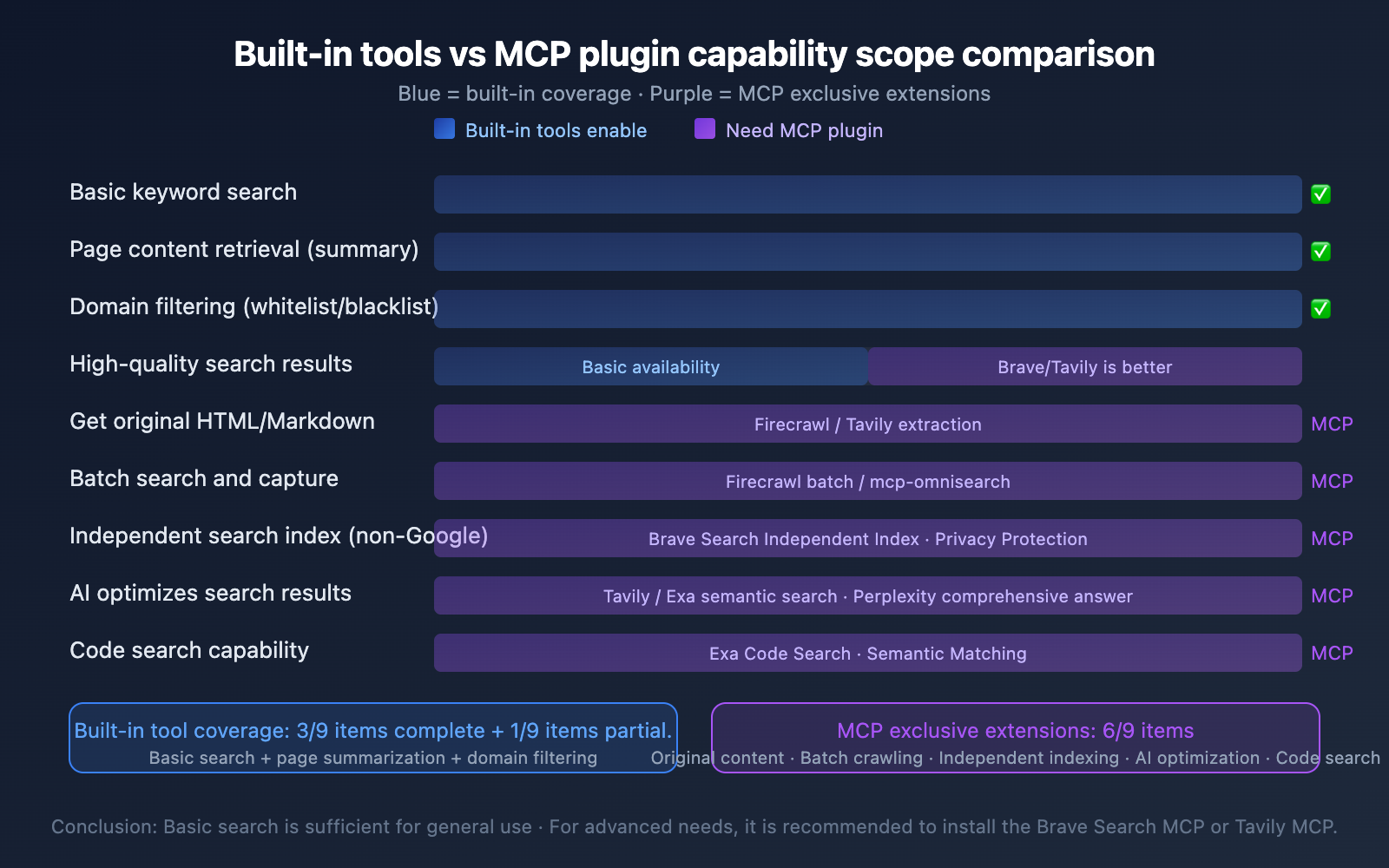
Conclusion first: For most developers, the built-in WebSearch + WebFetch combo in Claude Code already meets daily web search needs, no need to install additional search MCPs. However, if you have higher requirements for search quality, search result control, or batch web scraping, installing a search MCP (recommend Brave Search MCP) can bring significant improvement.
It's like the built-in browser search bar is enough for most people, but some install dedicated search plugins for a better experience—the key is your specific use case.
Detailed Explanation of Claude Code's Built-in Web Search Tools
Claude Code has two built-in, complementary web tools: WebSearch handles searching, and WebFetch handles fetching page content.
WebSearch Tool: The Search Engine
WebSearch is Claude Code's search entry point. It accepts query keywords and returns relevant webpage titles and links.
| Parameter | Description |
|---|---|
| query | Search keywords (required, at least 2 characters) |
| allowed_domains | Only return results from specified domains (optional) |
| blocked_domains | Exclude results from specified domains (optional) |
How WebSearch Works:
- Claude Code receives your search request
- Generates a secondary conversation, calling the
web_searchtool on Anthropic's service backend - This backend search engine uses the same infrastructure as the search function in the Claude.ai web interface
- Returns results containing only titles and URLs, not page body content
WebFetch Tool: Page Content Retrieval
WebFetch accepts a known URL and a specific question, fetches the page content, and returns a summarized answer to the question.
| Parameter | Description |
|---|---|
| url | Target webpage URL (required, ≤2000 characters) |
| prompt | Specific question about the page content (required) |
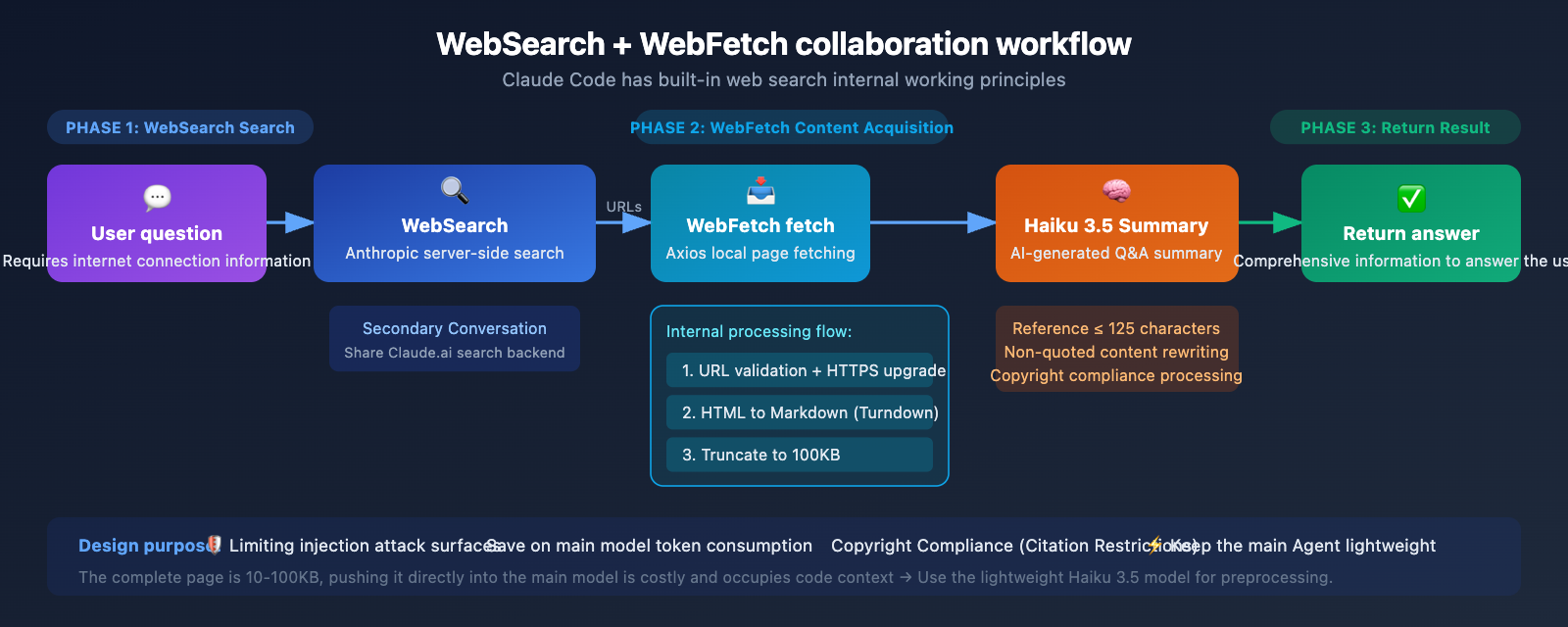
WebFetch's Internal Processing Flow:
- URL Validation: Length check, automatic HTTP to HTTPS upgrade, credential removal
- Domain Security Check: Calls
domain_infoendpoint to check blacklists, considers robots.txt - Page Fetching: Uses Axios locally, automatically follows same-domain redirects, cross-domain redirects need separate handling
- Content Conversion: HTML converted to Markdown via Turndown library, automatically truncated if over 100KB
- AI Summarization: Processed by Claude Haiku 3.5, returns a summarized answer to your question
Key Design Details:
- 15-minute Cache: Repeated access to the same URL within 15 minutes uses cached results
- ~10MB Size Limit: Maximum page size when fetching
- No Raw Content Returned: WebFetch only returns summarized answers, not raw HTML or Markdown
🎯 Design Purpose: Anthropic intentionally designed it not to return raw content for three reasons: (1) Full pages are typically 10-100KB, pushing them directly into the main model is costly and eats up code context; (2) Limits prompt injection attack surface; (3) Copyright compliance—citations limited to 125 characters.
Limitations of Claude Code's Built-in Web Search Tools
| Limitation | Description | Impact Level |
|---|---|---|
| Two-Step Operation | First WebSearch, then WebFetch to get content | ⭐⭐ Medium |
| No Raw Content | WebFetch only returns summaries, not raw HTML/Markdown | ⭐⭐⭐ High |
| Limited Search Results | WebSearch returns limited number of results, only titles and URLs | ⭐⭐ Medium |
| Cross-Domain Redirects | Cross-domain redirects not automatically followed, requires extra requests | ⭐ Low |
| Platform Restrictions | WebSearch not available on AWS Bedrock/Google Vertex | ⭐⭐ Specific scenarios |
| No Batch Operations | Doesn't support batch searches or batch page scraping | ⭐⭐ Medium |
Claude Code Web Search MCP Plugin Comparison
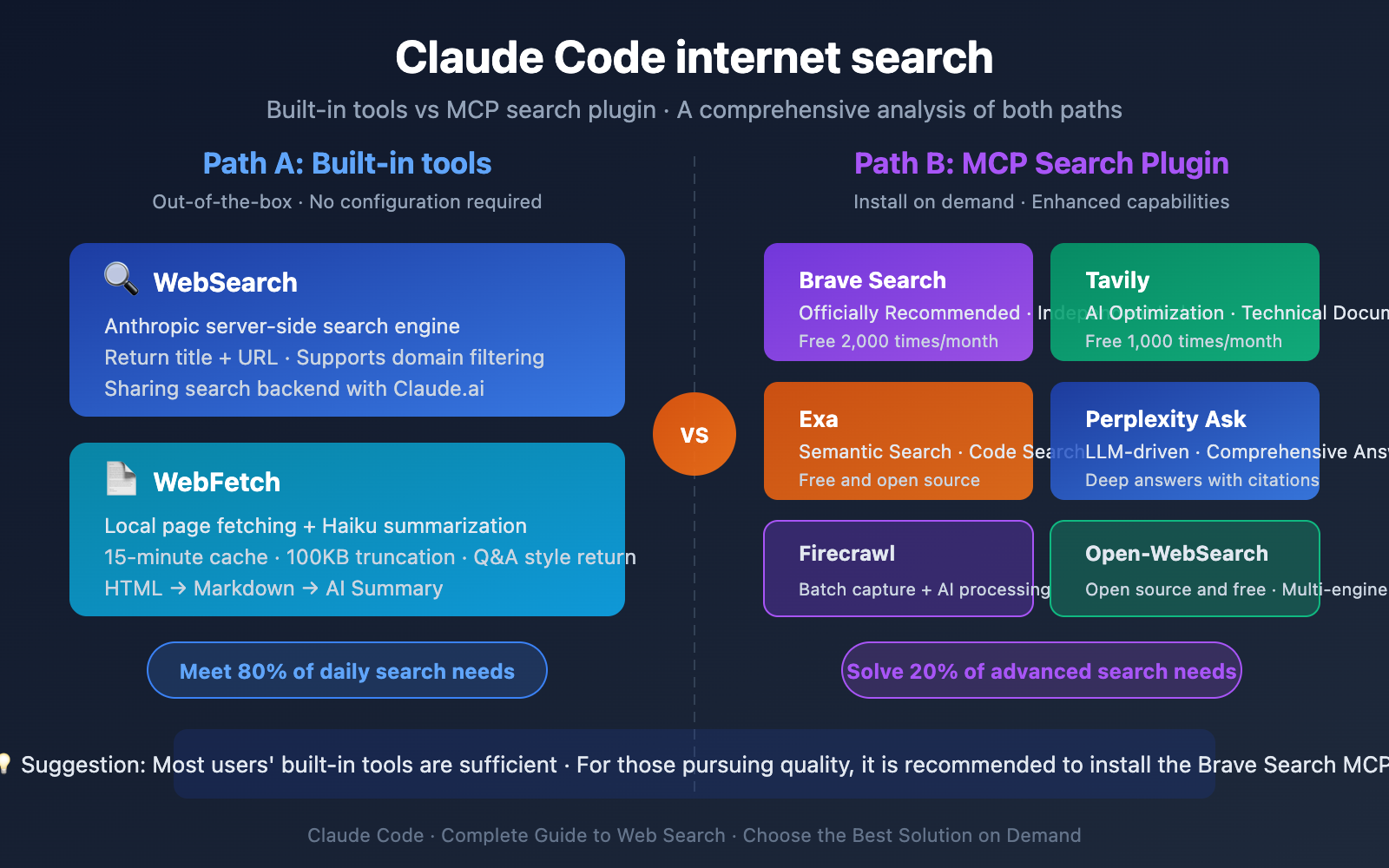
If the built-in tools don't meet your needs, here are 6 mainstream MCP search plugins:
| MCP Plugin | Core Features | Free Tier | Best For |
|---|---|---|---|
| Brave Search MCP | Anthropic official recommendation, independent index, privacy-first | 2,000 queries/month | General search, privacy-sensitive |
| Tavily MCP | AI-optimized results, automatically extracts core content | 1,000 queries/month | Technical documentation, development queries |
| Exa MCP | Semantic search, strong code search capability | Free & open source | Code search, academic research |
| Perplexity Ask MCP | LLM-driven, comprehensive answers + citations | $1/M tokens | Complex question comprehensive answers |
| Open-WebSearch MCP | Open source multi-engine (Bing/DuckDuckGo, etc.) | Completely free | Limited budget, basic search |
| Firecrawl MCP | Web scraping + AI processing, 8 tools | Has free tier | Batch scraping, data extraction |
Brave Search MCP Web Search Details
Brave Search MCP is the search MCP officially recommended by Anthropic and the most widely used search plugin. It's included in Anthropic's official modelcontextprotocol/servers repository.
Core Advantages:
- Uses Brave's independent search index (not a Google/Bing reseller), providing more diverse search results
- Privacy-first, doesn't track user search behavior
- Free tier offers 2,000 queries per month, sufficient for individual developers
- Community feedback suggests search quality is better than Claude Code's built-in WebSearch
Tavily MCP Web Search Details
Tavily is a search engine specifically designed for AI Agents, and its MCP plugin excels at technical documentation and development-related queries.
Core Advantages:
- Search results are AI-optimized, directly extracting core content
- Supports content extraction, sitemap generation, and crawling functions
- Higher accuracy for technical documentation queries compared to general search engines
- 1,000 free queries per month
Claude Code Web Search Solutions Comparison: Built-in vs MCP
Should You Choose Built-in Tools or MCP?
| Decision Factor | Choose Built-in WebSearch/WebFetch | Choose MCP Search Plugin |
|---|---|---|
| Search Frequency | Occasional searches, query verification | Frequent searches, deep research |
| Result Quality | Basic but sufficient | Need higher quality/more results |
| Raw Content | Don't need original HTML/Markdown | Need to scrape full page content |
| Search Engine | Not picky about search engine | Need specific engine (Brave/Google) |
| Batch Operations | Don't need batch searching | Need batch search or scraping |
| Privacy Requirements | No special requirements | Need privacy protection |
| Configuration Willingness | Don't want extra configuration | Willing to spend 5 minutes configuring |
Typical Use Cases:
- Daily development checking API docs → Built-in tools are sufficient
- Verifying solutions for error messages → Built-in tools are sufficient
- Writing technical articles requiring deep research → Recommend Tavily MCP
- Need privacy-protected searches → Recommend Brave Search MCP
- Batch scraping competitor website info → Recommend Firecrawl MCP
- Code search and academic research → Recommend Exa MCP
- Need comprehensive answers rather than links → Recommend Perplexity MCP
💡 Practical Tip: Claude Code supports configuring multiple MCP search plugins simultaneously—it will automatically choose the most appropriate tool based on your query. If you care about search quality, I recommend installing at least one Brave Search MCP as a supplement. You can also implement more flexible web search solutions by calling Claude models through APIYI apiyi.com with custom search logic.
Claude Code Web Search MCP Installation & Configuration
Brave Search MCP Installation (Recommended)
Step 1: Get API Key
Visit the Brave Search API page: brave.com/search/api, register for a free account to get your API Key (2,000 free queries/month).
Step 2: Add MCP Server
# Run in Claude Code terminal
claude mcp add brave-search \
  npx -y @anthropic/mcp-brave-search \
  --api-key YOUR_BRAVE_API_KEY
View Tavily MCP Installation Method
# Get Tavily API Key: tavily.com
# Add Tavily MCP Server
claude mcp add tavily-search \
  npx -y tavily-mcp@latest \
  --api-key YOUR_TAVILY_API_KEY
Tavily's free tier provides 1,000 queries per month, suitable for technical documentation search scenarios.
View Exa MCP Installation Method
# Get Exa API Key: exa.ai
# Add Exa MCP Server
claude mcp add exa-search \
  npx -y exa-mcp-server \
  --api-key YOUR_EXA_API_KEY
Exa excels at semantic search and code search, making it great for research-type queries.
MCP Configuration Management
# View installed MCP Servers
claude mcp list

# Remove an MCP Server
claude mcp remove brave-search

# Project-level configuration (team sharing)
claude mcp add --scope project brave-search \
  npx -y @anthropic/mcp-brave-search

# User-level configuration (personal only, stored in ~/.claude.json)
claude mcp add --scope local brave-search \
  npx -y @anthropic/mcp-brave-search \
  --api-key YOUR_KEY
Security Tip: MCP configurations containing API Keys should use
--scope localto store in personal configuration, avoiding API Key leaks to project repositories. For team-shared configurations, use--scope projectand inject API Keys through environment variables.
Practical Examples of Claude Code Web Search
Using Built-in WebSearch
When you ask Claude Code questions that require web information, it automatically calls WebSearch:
# Ask directly in Claude Code
> Help me check the latest changes to React 19 Server Components

# Claude Code automatically calls WebSearch
# Then uses WebFetch to get summaries from relevant pages
# Finally synthesizes the information to answer your question
Using MCP Search Plugins
After installing the Brave Search MCP, Claude Code automatically chooses to use it among available tools:
# After installing Brave Search MCP
> Search for the latest Node.js security bulletins

# Claude Code may choose to use Brave Search MCP
# Returns richer search results
# Contains more contextual information
Implementing Custom Web Search via API
If you need to implement similar web search capabilities in your own projects, you can achieve this through the Claude API combined with search tools:
import openai
import requests

def search_and_analyze(query: str) -> str:
    """Combine search engine and Claude for web search analysis"""
    # Step 1: Use search API to get results
    # Can use Brave Search API, Tavily API, etc.
    search_results = requests.get(
        "https://api.search.brave.com/res/v1/web/search",
        headers={"X-Subscription-Token": "YOUR_BRAVE_KEY"},
        params={"q": query, "count": 5}
    ).json()

    # Step 2: Have Claude analyze the search results
    client = openai.OpenAI(
        api_key="YOUR_API_KEY",
        base_url="https://vip.apiyi.com/v1"
    )

    context = "\n".join([
        f"- {r['title']}: {r['url']}"
        for r in search_results.get("web", {}).get("results", [])
    ])

    response = client.chat.completions.create(
        model="claude-sonnet-4-6",
        messages=[
            {"role": "system", "content": "Based on the following search results, answer the user's question."},
            {"role": "user", "content": f"Search results:\n{context}\n\nQuestion: {query}"}
        ]
    )
    return response.choices[0].message.content
Recommendation: By calling the Claude API through APIYI apiyi.com and combining it with search services like Brave Search API, you can build more flexible web search solutions. The platform offers free testing credits and OpenAI-compatible interfaces, making it ideal for quickly validating solutions.
Advanced Techniques for Claude Code Web Search
Technique 1: Optimize Search with Domain Filtering
Claude Code's WebSearch supports domain filtering, allowing precise control over search scope:
# Search only official documentation
> Search docs.python.org for asyncio usage methods

# Claude Code will use the allowed_domains parameter
# Limit results to only those from docs.python.org
Technique 2: Multi-MCP Search Engine Collaboration
Claude Code supports configuring multiple search MCPs simultaneously, and it automatically selects based on query type:
- General questions → Automatically chooses Brave Search or built-in WebSearch
- Technical documentation → Automatically chooses Tavily (if installed)
- Code examples → Automatically chooses Exa (if installed)
Technique 3: Direct URL Reading with WebFetch
If you already know the URL of the target page, you can skip the search step and have Claude Code use WebFetch directly:
# Directly read content from specified URL
> Please read https://docs.anthropic.com/claude/docs and tell me about the latest API changes
🎯 Technical Tip: If you frequently need web search capabilities in CI/CD workflows, we recommend calling the Claude API through the APIYI apiyi.com platform combined with search APIs like Brave or Tavily to build automated information retrieval pipelines. The platform supports OpenAI-compatible interfaces, making it easy to integrate with existing toolchains.
Frequently Asked Questions
Q1: Is Claude Code’s WebSearch the same as the search in Claude.ai web version?
Yes, they use the same backend search engine. Claude Code's WebSearch tool calls Anthropic's server-side web_search tool, which shares the same search backend as the Claude.ai web version. The main difference is that Claude Code's WebSearch only returns titles and URLs, while the Claude.ai web version directly displays summaries of search results.
Q2: After installing a search MCP, which search tool will Claude Code prioritize?
Claude Code automatically selects the most appropriate search tool based on the query content and context. If you have both Brave Search MCP and the built-in WebSearch installed, Claude Code may flexibly choose based on the query type. You can also explicitly specify which tool to use in your prompt. In practice, community feedback suggests that after installing MCP search tools, Claude Code tends to prefer MCP tools because they typically provide richer results. If you need to build custom search solutions via API, APIYI (apiyi.com) offers a unified Claude model invocation interface.
Q3: Is there a difference in internet search between free and paid users?
Claude Code's built-in internet tools (WebSearch/WebFetch) are available to all Claude Code users, regardless of free or paid status. However, usage frequency is affected by your Claude Code usage limits (different for Pro/Max plans). The quotas for MCP search plugins depend on the free tier limits of each search service (e.g., Brave 2,000 times/month, Tavily 1,000 times/month) and are independent of Claude's subscription plans.
Summary
Three key points about Claude Code's internet search capabilities:
- Built-in tools are sufficient: Claude Code's built-in WebSearch + WebFetch combination meets 80% of internet search needs. WebSearch handles searching and returning links, while WebFetch retrieves page summaries for answers. Together, they form a complete search workflow.
- MCP search is the cherry on top: Brave Search MCP (officially recommended, free 2,000 times/month) and Tavily MCP (excels at technical documentation) are the two most worthwhile search plugins to install, offering significant improvements in search quality and result richness.
- Choose based on your needs: Daily development documentation lookup → built-in tools; deep research and batch scraping → install MCP; need to integrate search in automated workflows → call Claude API via APIYI (apiyi.com) combined with search service APIs.
Claude Code's internet search design philosophy is "keep the main agent lightweight." The built-in tools strike a good balance between security, copyright compliance, and performance. Choose whether to install additional search MCPs based on your actual needs to avoid over-configuration.
📚 References
-
Claude Code Web Tools Deep Dive: Internal implementation principles of WebSearch and WebFetch
- Link:
mikhail.io/2025/10/claude-code-web-tools/ - Description: Reverse engineering analysis of the technical implementation of Claude Code's web tools
- Link:
-
Web Search Tool Official Documentation: Claude API search tool explanation
- Link:
platform.claude.com/docs/en/agents-and-tools/tool-use/web-search-tool - Description: Anthropic's official WebSearch tool API documentation
- Link:
-
Web Fetch Tool Official Documentation: Claude API page fetching tool explanation
- Link:
platform.claude.com/docs/en/agents-and-tools/tool-use/web-fetch-tool - Description: Anthropic's official WebFetch tool API documentation
- Link:
-
MCP Search Plugin Integration Guide: Comparison and installation tutorial for various MCP search services
- Link:
intuitionlabs.ai/articles/mcp-servers-claude-code-internet-search - Description: Detailed comparison and usage recommendations for 8 MCP search plugins
- Link:
-
Brave Search MCP: Anthropic's officially recommended search MCP
- Link:
brave.com/search/api/guides/use-with-claude-desktop-with-mcp/ - Description: Brave Search MCP installation and usage guide
- Link:
Author: APIYI Technical Team
Technical Discussion: Feel free to share your Claude Code web search configuration experience in the comments. For more AI development resources, visit the APIYI docs.apiyi.com documentation center