Author's Note: A deep dive into the differences between Nano Banana 2 and Nano Banana Pro across 7 key dimensions to help you pick the perfect AI image generation model.
Nano Banana 2 or Nano Banana Pro? It's been the hottest debate in the AI image generation world since February 2026. In this post, we'll break down the 7 core dimensions to help you make the best choice for your specific needs.
Core Value: By the end of this article, you'll clearly understand the strengths and best use cases for both Nano Banana 2 and Pro, whether you're prioritizing speed, quality, or cost.
Nano Banana 2 vs Pro: Core Differences at a Glance
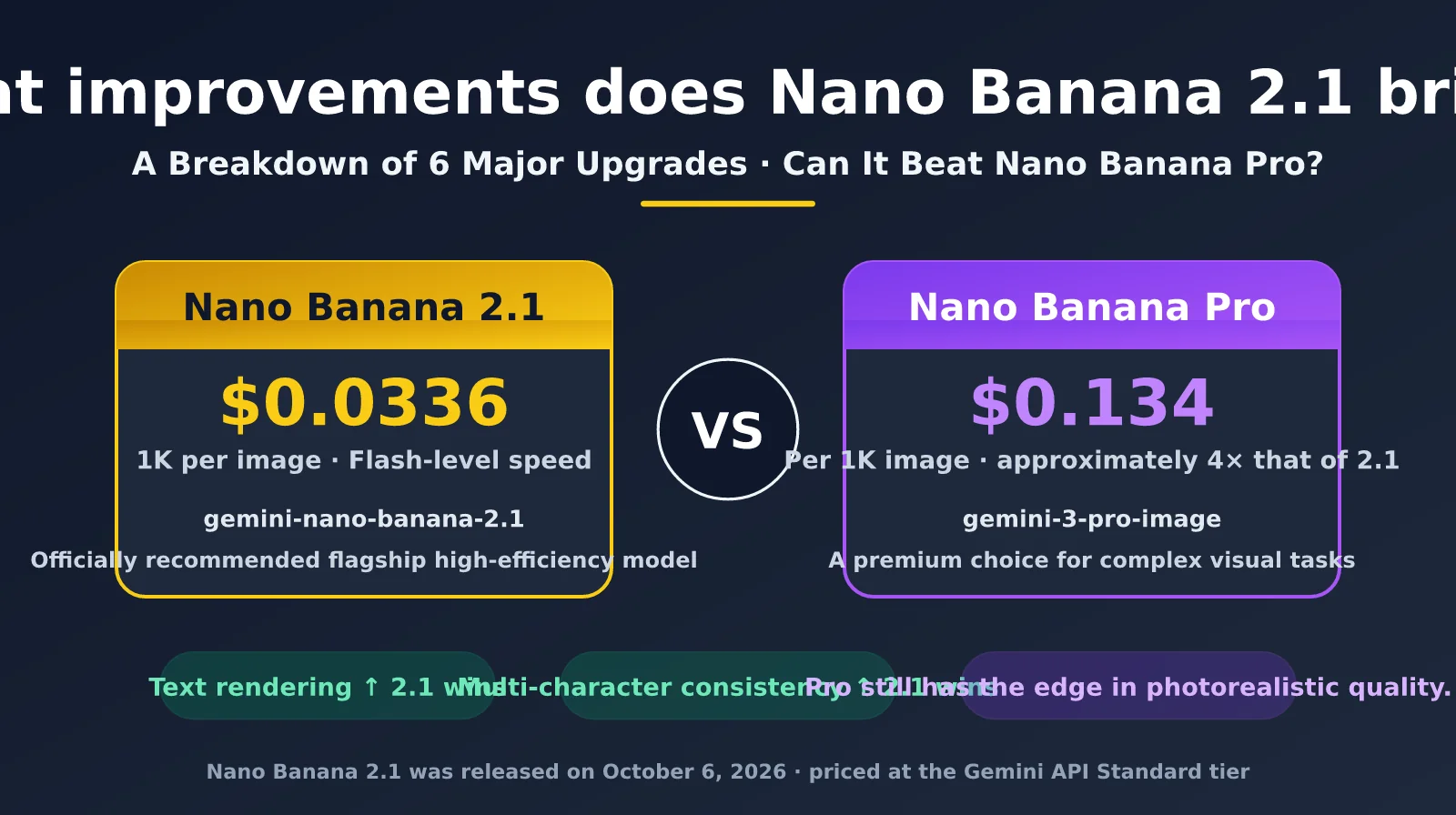
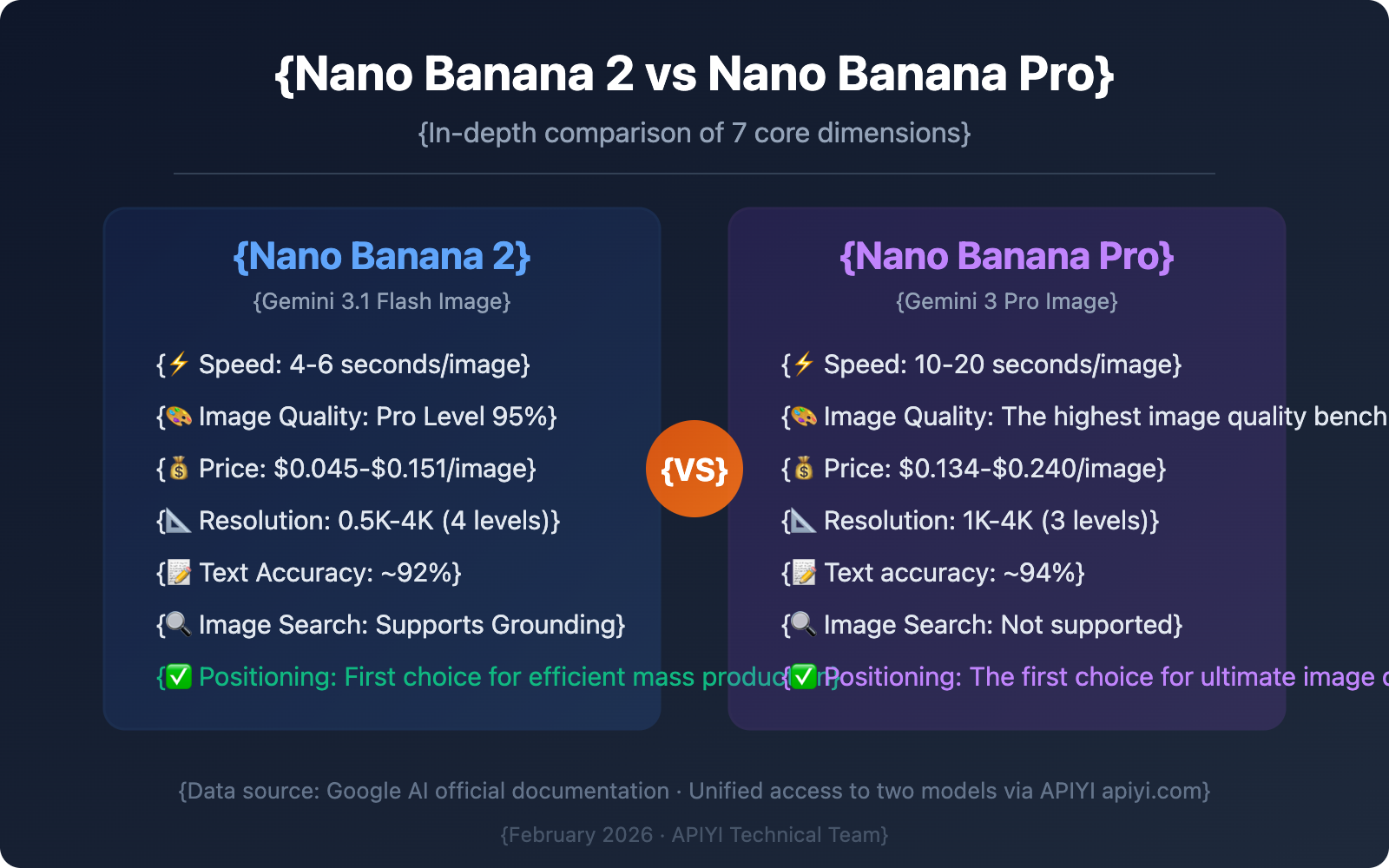
Nano Banana 2 (codenamed GEMPIX2) is based on the Gemini 3.1 Flash architecture, while Nano Banana Pro is built on the Gemini 3 Pro architecture. Their core positioning is distinct: NB2 focuses on speed and cost-effectiveness, while Pro aims for ultimate image quality and reasoning depth.
| Dimension | Nano Banana 2 | Nano Banana Pro | Key Difference |
|---|---|---|---|
| Underlying Architecture | Gemini 3.1 Flash | Gemini 3 Pro | Flash: Speed Priority; Pro: Reasoning Priority |
| Model ID | gemini-3.1-flash-image-preview | gemini-3-pro-image-preview | Must distinguish during model invocation |
| Generation Speed | 4-6 seconds (Standard Res) | 10-20 seconds (Standard Res) | NB2 is 3-5x faster |
| Image Quality | 95% of Pro level | Family's highest quality | Pro excels in detail and lighting |
| Text Rendering | ~92% character accuracy | ~94% character accuracy | Pro is slightly better, but the gap is small |
| Max Resolution | 4K (4096px) | 4K (4096px) | Both support native 4K generation |
| Resolution Tiers | 4 tiers (0.5K/1K/2K/4K) | 3 tiers (1K/2K/4K) | NB2 adds a low-cost 0.5K tier |
Deep Dive: Architectural Differences Between Nano Banana 2 and Pro
The fundamental differences between these two models stem from their underlying design philosophies. Nano Banana Pro is built on Gemini 3 Pro, Google's flagship Large Language Model for reasoning. It offers deeper reasoning capabilities, complex scene understanding, and higher-quality output. When generating an image, Pro "thinks" through the entire process—considering spatial relationships, lighting physics, composition rules, and creative intent.
Nano Banana 2, on the other hand, is built on Gemini 3.1 Flash, Google's speed-optimized variant. The Flash architecture optimizes the inference path to boost generation speed by 3-5x while maintaining quality close to the Pro version. According to Google, NB2 combines "Pro-level capabilities with lightning speed," achieving about 95% of Pro's image quality in most scenarios.
Nano Banana 2 vs. Pro Pricing Comparison
Price is one of the most critical factors when choosing a model. NB2's pricing is significantly lower than Pro's across all resolution tiers. In particular, the new 0.5K tier offers a great low-cost option for budget-conscious scenarios.
| Resolution Tier | Nano Banana 2 | Nano Banana Pro | NB2 Savings |
|---|---|---|---|
| 0.5K (512px) | $0.045/image | Not Supported | NB2 Exclusive |
| 1K (1024px) | $0.067/image | $0.067/image | Equal |
| 2K (2048px) | $0.101/image | $0.134/image | Save 25% |
| 4K (4096px) | $0.151/image | $0.240/image | Save 37% |
| Batch Mode | 50% off all tiers | 50% off all tiers | Both supported |
Nano Banana 2 vs. Pro Cost Optimization Strategy
For users generating over 100 images a day, NB2's cost advantage is massive. Let's look at the 2K resolution tier with a daily workload of 500 images:
- Using Pro: 500 × $0.134 = $67/day, monthly cost approx. $2,010
- Using NB2: 500 × $0.101 = $50.5/day, monthly cost approx. $1,515
- Using NB2 + Batch: 500 × $0.0505 = $25.25/day, monthly cost approx. $758
Cost Tip: By accessing Nano Banana 2 through APIYI (apiyi.com), you can get a flat rate as low as $0.03 per generation (regardless of resolution). This saves you 55%-80% compared to official pricing, making it the ultimate choice for batch generation.
Nano Banana 2 vs. Pro Feature Comparison
There are also clear differences in feature coverage. While NB2 inherits the core capabilities of Pro, it introduces several exclusive features.
| Features | Nano Banana 2 | Nano Banana Pro | Notes |
|---|---|---|---|
| Text-to-image | ✅ | ✅ | Both supported |
| Image-to-image (Editing) | ✅ | ✅ | Both supported |
| Native 4K Output | ✅ | ✅ | Both supported |
| Low-cost 0.5K Tier | ✅ | ❌ | NB2 Exclusive |
| 14 Aspect Ratios | ✅ (incl. 4 new ratios) | ✅ (10 ratios) | NB2 adds 1:4/4:1/1:8/8:1 |
| Text Rendering | ✅ Multilingual | ✅ Multilingual | Pro accuracy is slightly higher |
| Character Consistency | Up to 5 people | Up to 5 people | Equal performance |
| Object Fidelity | Up to 14 objects | Up to 10 objects | NB2 is stronger |
| Image Search Grounding | ✅ | ❌ | NB2 Exclusive |
| Thinking Mode | Minimal/High/Dynamic | Not Supported | NB2 Exclusive |
| SynthID Watermark | ✅ Automatic | ✅ Automatic | Both supported |
| Batch Generation | ✅ 50% off | ✅ 50% off | Both supported |
Deep Dive into Nano Banana 2 Exclusive Features
Image Search Grounding is the most distinctive feature of NB2. This feature allows the model to retrieve real-world reference images and information via Google Search during image generation. This significantly boosts accuracy for specific subjects like landmarks, famous people, and brand logos. It's an NB2 exclusive; Pro doesn't support it.
Thinking Mode is another unique NB2 feature. By offering three levels—Minimal (fast by default), High (high-quality reasoning), and Dynamic (automatic adjustment)—it gives developers the flexibility to balance speed and quality.
Nano Banana 2 vs. Pro: Image Quality Comparison
Image quality is the top priority for most users. Based on community feedback and Google's official benchmarks, both models have their own strengths in different scenarios.
| Test Dimension | Nano Banana 2 | Nano Banana Pro | Verdict |
|---|---|---|---|
| Lighting & Shadows | ★★★★☆ | ★★★★★ | Pro is more natural and refined |
| Texture Details | ★★★★☆ | ★★★★★ | Pro offers richer textures |
| Color Saturation | ★★★★★ | ★★★★☆ | NB2 has more vibrant colors |
| Composition | ★★★★☆ | ★★★★★ | Pro has a stronger sense of space |
| Text Clarity | ★★★★☆ | ★★★★★ | Pro is more precise at the character level |
| Complex Scenes | ★★★★☆ | ★★★★★ | Pro is more stable with multiple subjects |
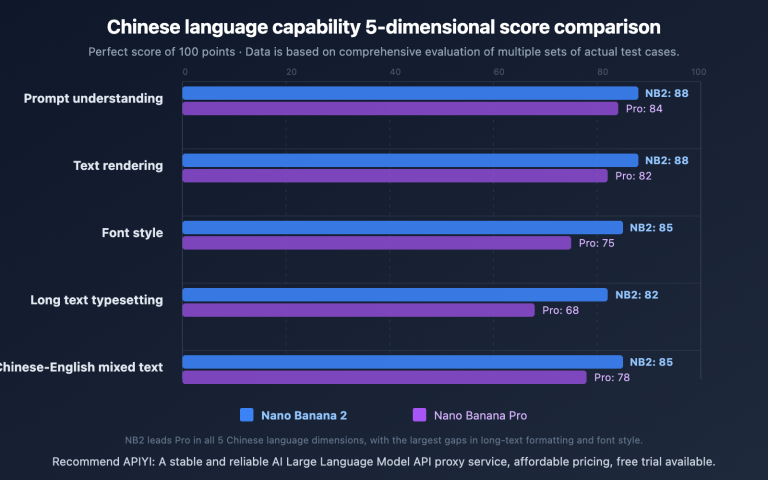
| Chinese Rendering | ★★★★☆ | ★★★☆☆ | NB2 performs better with Chinese |
| Consistency | ★★★★☆ | ★★★★★ | Pro is more stable for batch generation |
Interestingly, NB2 actually outperforms Pro in Chinese rendering. In our tests, NB2 showed a significantly higher accuracy rate when rendering complex Chinese texts like "Ode to the Red Cliffs" (Chibi Fu), which is a huge plus for Chinese-speaking users.
In most standard scenarios, NB2's image quality reaches about 95% of Pro's level—the difference is barely noticeable to the naked eye. Pro's advantages only really shine when you zoom in to the pixel level or deal with extremely complex lighting setups.
Practical Tip: If you're sensitive to quality differences, we recommend using the APIYI (apiyi.com) platform to call both models simultaneously. Run an A/B test with the same prompt to see the difference for yourself before making a final decision.
Nano Banana 2 vs. Pro: Speed and Throughput Comparison
Speed is the biggest selling point for NB2. At the same resolution, NB2 generates images 3 to 5 times faster than Pro.
Nano Banana 2 vs. Pro Speed Benchmarks
Standard Conditions: Same prompt complexity, 1K resolution, single request.
- Nano Banana 2: 4-6 seconds per image (optimized via Flash architecture)
- Nano Banana Pro: 10-20 seconds per image (Deep Inference mode)
Under 4K High-Resolution Conditions:
- Nano Banana 2: 15-30 seconds per image
- Nano Banana Pro: 30-60 seconds per image
For API-driven products, speed directly impacts user experience and system throughput. Let's look at a scenario requiring 10,000 images per day:
- Using Pro: Requires approximately 28-56 hours of GPU time
- Using NB2: Requires approximately 11-17 hours of GPU time
Performance Tip: If your application is sensitive to response times, NB2 is the way to go. By leveraging APIYI's (apiyi.com) load balancing mechanism, you can further optimize request distribution and reduce queue wait times.
Nano Banana 2 vs. Pro: Full Technical Comparison
Here's a complete breakdown of the technical specs for both models at the API level:
| Technical Spec | Nano Banana 2 | Nano Banana Pro |
|---|---|---|
| Model ID | gemini-3.1-flash-image-preview | gemini-3-pro-image-preview |
| Base Architecture | Gemini 3.1 Flash | Gemini 3 Pro |
| Input Token Price | $0.25/M tokens | $1.25/M tokens |
| Output Token Price | $1.50/M tokens | $5.00/M tokens |
| Context Window | 64K Input / 32K Output | 64K Input / 32K Output |
| Supported Aspect Ratios | 14 types | 10 types |
| Max Reference Images | 10 Objects + 4 Characters | 10 Objects + 4 Characters |
| Thinking Mode | Minimal / High / Dynamic | Not Supported |
| Image Search Grounding | Supported | Not Supported |
| SynthID Watermarking | Auto-embedded | Auto-embedded |
| Knowledge Cutoff | January 2025 | August 2024 |
New Aspect Ratio Options in Nano Banana 2
Building on the 10 aspect ratios supported by Pro, NB2 adds 4 extreme ratios to handle specialized layout needs:
- 1:4 / 4:1: Perfect for vertical banners and sidebar ads.
- 1:8 / 8:1: Ideal for ultra-wide banners, web headers, and app splash screens.
Full list of 14 ratios: 1:1, 1:4, 1:8, 2:3, 3:2, 3:4, 4:1, 4:3, 4:5, 5:4, 8:1, 9:16, 16:9, 21:9
Nano Banana 2 vs. Pro: Changes in the Gemini App
Starting February 26, 2026, Google rolled out some major updates to the Gemini app:
- Default Model Switch: Image generation in the Gemini app now defaults to NB2, replacing the previous Pro model.
- Pro Access Retained: AI Pro and Ultra subscribers can still trigger the Pro model using the "Regenerate with Nano Banana Pro" option found in the image's three-dot menu.
- Default Resolution Upgrade: NB2's default output resolution in the Gemini app is 2K, a step up from the 1K default previously used by Pro.
- Deployment Scope: NB2 is being integrated across various Google product lines, including AI Mode, Google Lens, and Flow.
- Independent API Access: Developers can continue to perform model invocations for both models independently via AI Studio, the Gemini API, or Vertex AI.
Basically, for the average Gemini user, NB2 is now the standard experience. Only paid users with extreme quality requirements will likely feel the need to manually switch back to Pro.
Nano Banana 2 vs Pro: Quick Invocation
Minimalist Example
Here's the simplest way to use them—you can call both models with just 10 lines of code:
import openai

client = openai.OpenAI(
    api_key="YOUR_API_KEY",
    base_url="https://vip.apiyi.com/v1"
)

# Call Nano Banana 2
response = client.chat.completions.create(
    model="gemini-3.1-flash-image-preview",
    messages=[{"role": "user", "content": "Generate a Shiba Inu wearing a spacesuit, 4K ultra-high definition"}]
)
print(response.choices[0].message.content)
View Nano Banana Pro invocation code
import openai

client = openai.OpenAI(
    api_key="YOUR_API_KEY",
    base_url="https://vip.apiyi.com/v1"
)

# Call Nano Banana Pro
response = client.chat.completions.create(
    model="gemini-3-pro-image-preview",
    messages=[{"role": "user", "content": "Generate a Shiba Inu wearing a spacesuit, 4K ultra-high definition"}]
)
print(response.choices[0].message.content)
Simply change the model parameter to switch between the two models; the API interface is fully compatible.
Tip: Get free test credits via APIYI (apiyi.com) to call both NB2 and Pro with the same prompt and compare their speed and image quality side-by-side. The platform supports a unified OpenAI-compatible interface for both models, allowing seamless switching with a single codebase.
Nano Banana 2 vs Pro: Scenario Selection Guide
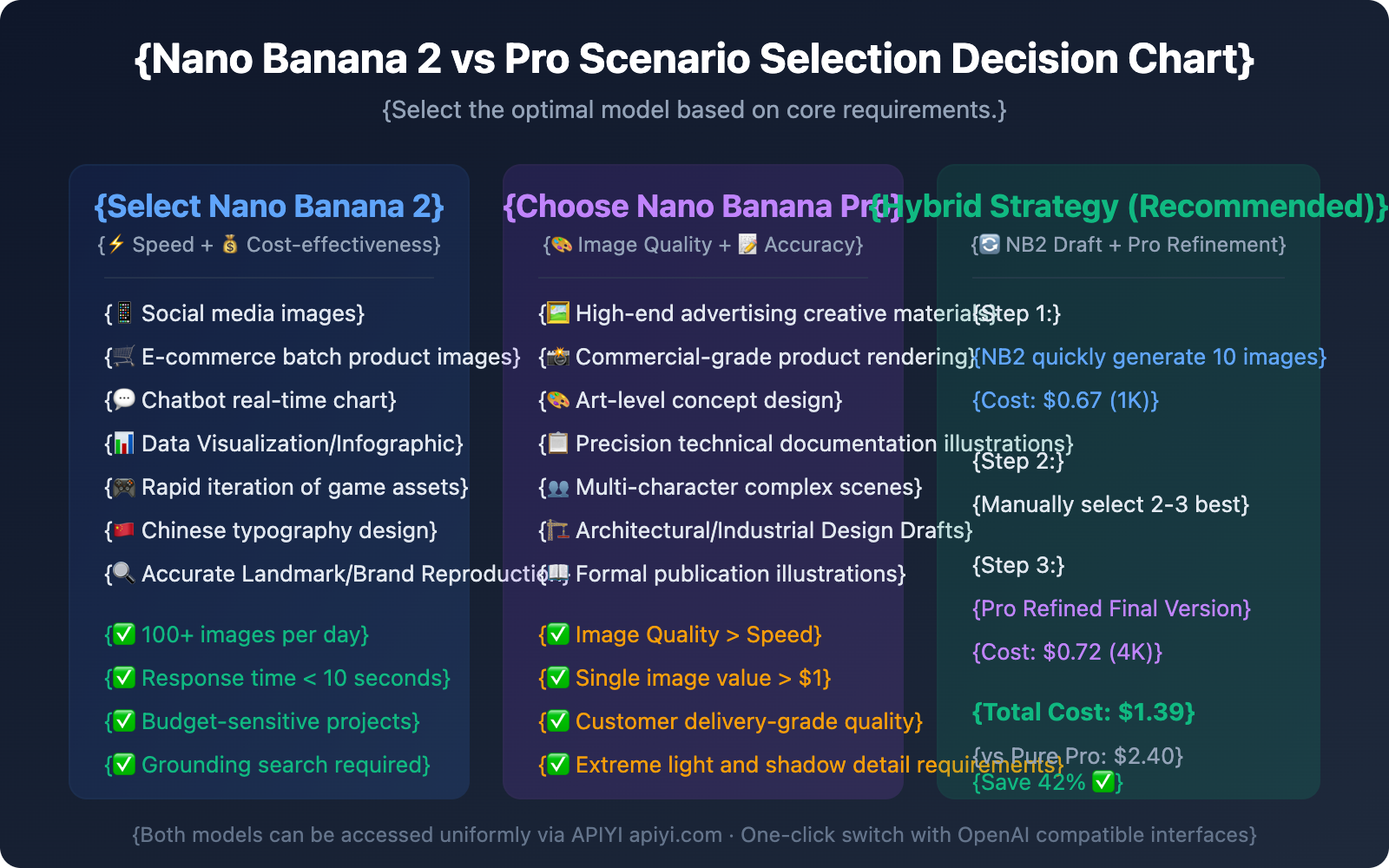
Choose the most suitable model based on your specific use case:
Nano Banana 2 vs Pro: Hybrid Usage Strategy
The optimal solution often isn't choosing one over the other, but rather combining them flexibly based on your workflow stage:
- Creative Exploration Stage: Use NB2 (0.5K or 1K) to quickly generate a large number of candidate options. Leverage the "Minimal" Thinking mode to ensure maximum speed.
- Refinement Stage: Use NB2 (2K) to perform medium-quality renders of selected options and observe detail performance.
- Final Delivery Stage: Use Pro (4K) for ultimate quality rendering of the final 1-2 selected images.
Integration Tip: Through APIYI (apiyi.com), you can seamlessly call both NB2 and Pro using the same API key, eliminating the need to manage two separate authentication systems.
FAQ
Q1: Will Nano Banana 2 completely replace Nano Banana Pro?
No. Google has made it clear that both models will coexist for the long term. In the Gemini app, NB2 has become the default image generation model, but AI Pro and Ultra subscribers can still access Pro via the "Regenerate" option in the three-dot menu. At the API level, both models can be invoked independently, catering to different business scenarios.
Q2: Which model should Chinese users prioritize?
If your primary need is generating images containing Chinese text (like posters, social media graphics, or product labels), we recommend prioritizing NB2. Real-world tests show that NB2's Chinese rendering is significantly better than Pro's, with higher accuracy in complex Chinese layout scenarios. Accessing NB2 via APIYI (apiyi.com) costs just $0.03 per model invocation, making it the most cost-effective choice for Chinese language scenarios.
Q3: How can I quickly compare the actual results of both models?
We recommend using a multi-model API aggregator for testing:
- Visit APIYI (apiyi.com) to register an account.
- Get your API key and free credits.
- Use the same prompt to call
gemini-3.1-flash-image-preview(NB2) andgemini-3-pro-image-preview(Pro). - Compare generation speed, image detail, and text rendering.
Nano Banana 2 vs Pro: Future Outlook
Looking at Google's product strategy, NB2 represents the evolution of the Nano Banana series:
- Flash Architecture Goes Mainstream: Google is gradually bringing Pro-level capabilities down to the Flash architecture, and NB2 is the first major result of this strategy.
- Strategic Importance of the 0.5K Tier: The new ultra-low-cost 0.5K tier shows Google is aggressively targeting the high-volume API market, competing directly with DALL-E and Midjourney APIs.
- Differentiated Grounding Features: Image Search Grounding is currently exclusive to NB2, suggesting that the Flash architecture might host more innovative features in the future.
- Pro's High-End Positioning: Pro will focus more on professional scenarios requiring the highest image quality and reasoning depth, following a "quality over quantity" approach.
For developers, now's the best time to integrate NB2—it offers the most features, the lowest price, and the strongest backing from Google's resources.
Summary
Key Takeaways: Nano Banana 2 vs. Nano Banana Pro:
- 3-5x Speed Difference: NB2 is built on the Flash architecture, generating images in just 4-6 seconds per image, while Pro takes 10-20 seconds.
- Only a 5% Quality Gap: NB2 achieves 95% of Pro's image quality, making the difference almost imperceptible in daily use.
- 25-37% Cost Savings: NB2 is 25% and 37% cheaper for 2K and 4K resolutions, respectively, and introduces a new ultra-low-cost 0.5K tier.
- NB2 Exclusive Features: Image Search Grounding and Thinking mode are unique advantages for NB2.
- Superior Chinese Rendering in NB2: For Chinese-speaking users, NB2 actually outperforms Pro in text rendering.
- Optimal Hybrid Strategy: Use NB2 for rapid prototyping and Pro for final high-end delivery to reduce overall costs by up to 42%.
For most users, Nano Banana 2 is already the better choice—it's faster, cheaper, more feature-rich, and the quality loss is negligible. Only professional scenarios with extreme quality requirements truly need Pro.
We recommend accessing both models through APIYI (apiyi.com). The platform offers free credits and an OpenAI-compatible interface, with NB2 starting as low as $0.03 per model invocation, allowing you to switch between models with a single set of code.
📚 References
-
Google AI Official Blog: Nano Banana 2 Release Announcement
- Link:
blog.google/innovation-and-ai/technology/ai/nano-banana-2/ - Description: Google's official introduction to NB2's core capabilities and positioning.
- Link:
-
Google AI Developer Documentation: Nano Banana Image Generation API Docs
- Link:
ai.google.dev/gemini-api/docs/image-generation - Description: Full API parameters and technical specifications for NB2 and Pro.
- Link:
-
Google AI Pricing Page: Gemini API Official Pricing
- Link:
ai.google.dev/gemini-api/docs/pricing - Description: Official pricing for NB2 and Pro across various resolution tiers.
- Link:
-
9to5Google Report: Nano Banana 2 Deployment Details in the Gemini App
- Link:
9to5google.com/2026/02/26/nano-banana-2-gemini-app/ - Description: Actual deployment strategies and user impact of NB2 in consumer-grade products.
- Link:
-
APIYI Documentation Center: Nano Banana 2 Integration Guide
- Link:
docs.apiyi.com/api-capabilities/nano-banana-2-image - Description: Detailed tutorial on accessing NB2 and Pro via an OpenAI-compatible interface.
- Link:
Author: APIYI Technical Team
Technical Discussion: Feel free to discuss your experiences with Nano Banana 2 and Pro in the comments. For more resources, visit the APIYI Documentation Center at docs.apiyi.com.