Many developers run into a confusing issue when using the Claude API: "I've enabled prompt caching, so why don't I see any cache discounts on my bill?"
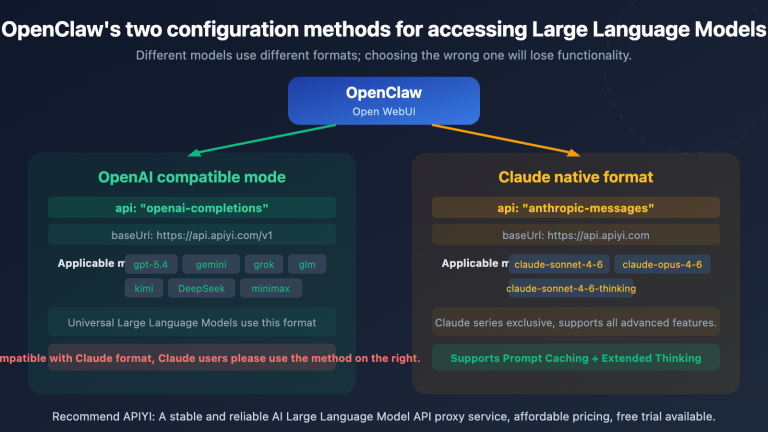
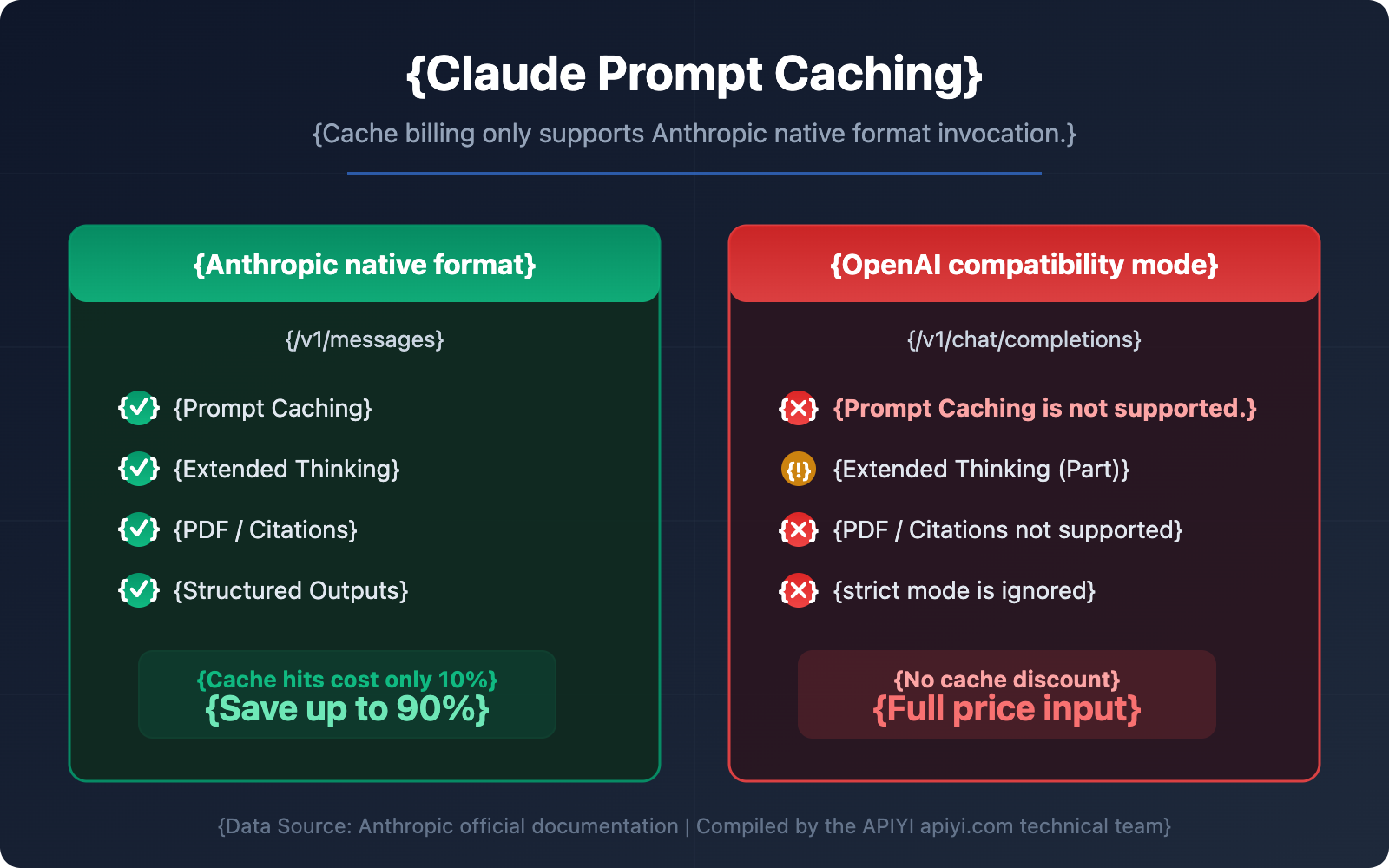
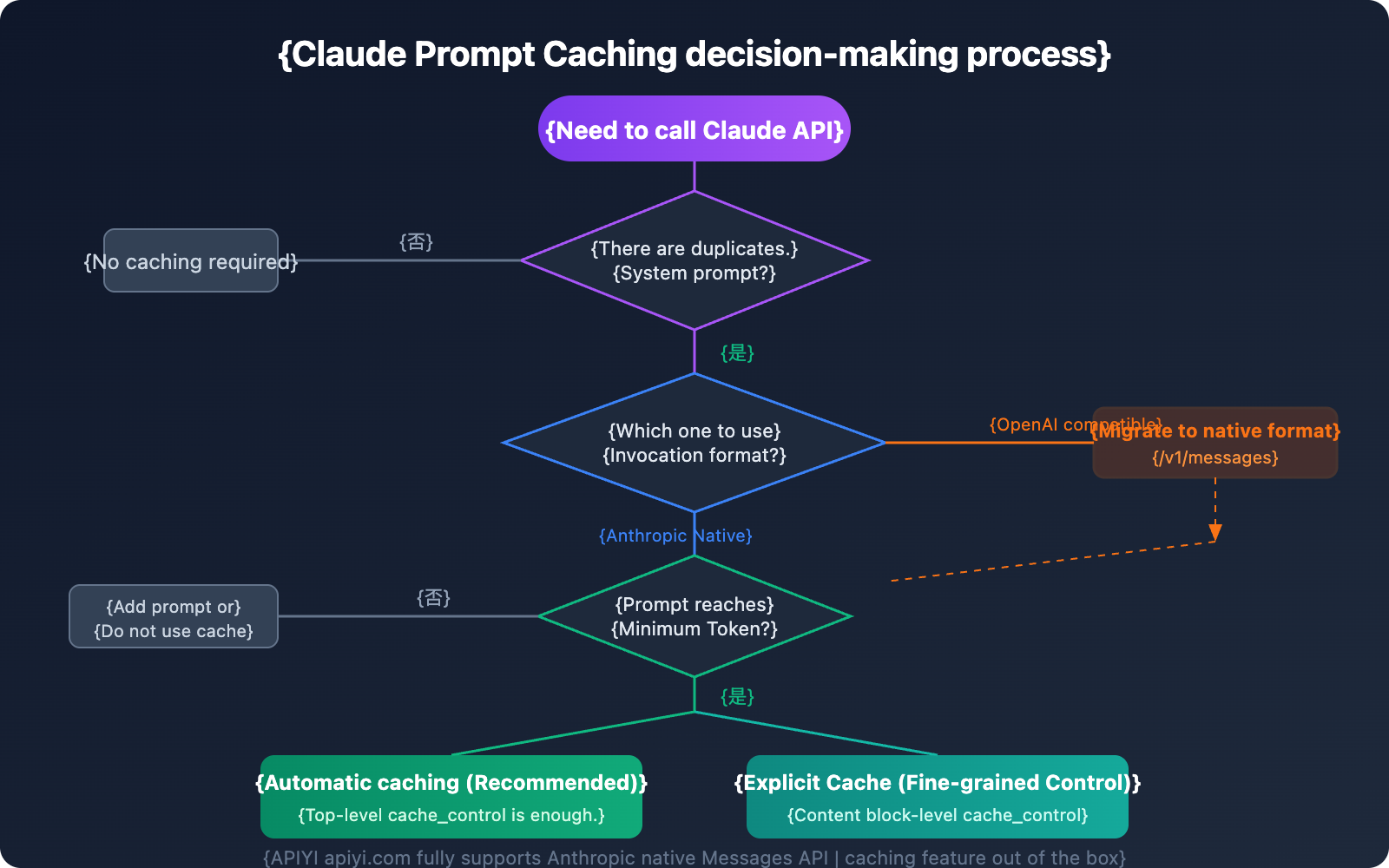
The answer is usually quite simple—you're using the OpenAI-compatible mode for your model invocation, but Claude's cache billing only supports the Anthropic native Messages API format.
This isn't a bug; it's a design limitation explicitly stated in Anthropic's official documentation. In this article, we'll break down the technical principles, invocation methods, and pricing comparisons to help you master Claude prompt caching and stop overpaying.
Core Principles of Claude Prompt Caching
Before diving into the differences in invocation formats, let's first understand how Claude prompt caching actually works.
How Claude Caching Works
When you send a request with prompt caching enabled, the system follows this workflow:
- Check Cache: The system checks if the prompt prefix is already cached from recent queries.
- Cache Hit: If a match is found, it uses the cached version directly, significantly reducing processing time and cost.
- Write Cache: If it's a miss, the system processes the full prompt and caches the prefix after the response begins.
| Claude Prompt Caching Core Parameters | Description |
|---|---|
| Cache Type | ephemeral (short-term cache, currently the only supported type) |
| Default TTL | 5 minutes (automatically refreshes on each hit) |
| Optional TTL | 1 hour (requires extra payment) |
| Max Cache Breakpoints | 4 cache_control markers |
| Cache Order | tools → system → messages |
| Cache Matching | 100% exact match of the prompt prefix |
What Claude Prompt Caching Supports
Claude prompt caching can store most content blocks within a request:
- Tools: Tool definitions in the
toolsarray. - System messages: Content blocks within the
systemarray. - Text messages: Text content blocks in
messages.content. - Images & Documents: Images and documents within user messages.
- Tool use & tool results: Content blocks for tool calls and their results.
🎯 Technical Tip: For scenarios that require frequent calls with the same system prompt, prompt caching is your most effective cost-optimization tool. We recommend using the Anthropic native format via the APIYI platform to fully take advantage of cache billing discounts.
Anthropic Native Format vs. OpenAI Compatibility Mode: Claude Caching Support Differences
This is the most critical part of the article—the fundamental difference between these two invocation formats when it comes to Claude's caching feature.
Official Statement from Anthropic
According to the original text of Anthropic's official OpenAI SDK compatibility documentation:
"Prompt caching is not supported, but it is supported in the Anthropic SDK"
This means if you're calling Claude through the OpenAI compatibility mode (/v1/chat/completions endpoint), you won't be able to use the prompt caching feature at all.
Troubleshooting Common Claude Cache Misses
If you find that the cache is consistently missing, check the following:
- Incorrect call format: Using OpenAI compatibility mode instead of Anthropic native format.
- Inconsistent content: Cache matching requires a 100% identical prompt prefix.
- Insufficient tokens: Not meeting the model's minimum cache token requirement.
- Timeout expiration: Cache expired after 5 minutes of inactivity.
- Parameter changes: Modified
tool_choice, image content, or thinking parameters.
Minimum Cache Token Requirements for Claude Models
| Model Series | Minimum Cacheable Tokens |
|---|---|
| Claude Opus 4.6 / Opus 4.5 | 4,096 tokens |
| Claude Sonnet 4.6 / Sonnet 4.5 / Sonnet 4 / Opus 4.1 / Opus 4 | 1,024 tokens |
| Claude Haiku 4.5 | 4,096 tokens |
| Claude Haiku 3.5 / Haiku 3 | 2,048 tokens |
If your prompt is below the minimum token count, cache_control won't take effect—the request will be processed normally but won't be cached.
🎯 Debugging Tip: When invoking the Claude API on the APIYI (apiyi.com) platform, you can quickly determine if caching is working via the
usagefield in the response. If bothcache_read_input_tokensandcache_creation_input_tokensare 0, it means the caching feature hasn't been correctly enabled.
Claude Prompt Caching FAQ
Q1: Can I use Claude caching when calling via OpenAI compatibility mode?
No. This is a clear restriction stated by Anthropic. OpenAI compatibility mode (the /v1/chat/completions endpoint) doesn't support prompt caching. You must use the Anthropic native Messages API format (the /v1/messages endpoint) to leverage caching features.
Through the APIYI (apiyi.com) platform, you can use both formats to call the Claude API—if you need caching, just choose the /v1/messages endpoint.
Q2: Claude cache writes are more expensive than regular input; is it still worth it?
Absolutely. Cache writes are only 25% more expensive than base input (with a 5-minute TTL), but cache hits cost only 10% of the base price. As long as the same content is used more than twice, you'll break even and start saving money. Take a 100,000 token system prompt as an example:
- Without cache: $0.30 per call (Sonnet 3.5)
- Cache write: $0.375 (first time only)
- Cache read: $0.03 (each subsequent time)
- You start saving money from the very second call.
Q3: How do I migrate from OpenAI format to Anthropic native format in my code?
Key migration points:
- Endpoint:
/v1/chat/completions→/v1/messages - Headers: Add
anthropic-version: 2023-06-01 - Message format: The
messagesarray structure is basically the same. - System prompt: Extract it from
messagesinto a standalonesystemfield. - Add the
cache_controlparameter.
The APIYI (apiyi.com) platform supports both endpoints, so you only need to modify the request path and format during migration—no need to change your API key.
Q4: Can Claude cache be shared across requests?
Caches are shared within the same Workspace (as of February 5, 2025, isolation moved from Organization-level to Workspace-level). Caches are never shared between different organizations.
Q5: Can caching and the Batch API be used together?
Yes. The Batch API offers a 50% discount, and the caching pricing multipliers are applied on top of that. Combining the two allows for maximum cost optimization. We recommend using a 1-hour cache TTL in batch processing scenarios to improve the hit rate.
Summary: 3 Core Takeaways for Claude Prompt Caching Billing
Based on our analysis, here are the 3 key points you need to remember about Claude prompt caching billing:
- Only Anthropic native format is supported: Caching is only available at the
/v1/messagesendpoint; OpenAI compatibility mode (/v1/chat/completions) is not supported. - Cache hit cost is only 10%: You pay 25% extra for the first write, but every subsequent hit costs only one-tenth of the base price. You break even in just 2 calls.
- Correct invocation is key: Use the
cache_control: {"type": "ephemeral"}parameter and ensure you meet the model's minimum token requirements for caching.
We recommend experiencing the full power of Claude prompt caching through the APIYI (apiyi.com) platform. It fully supports the Anthropic native Messages API, helping you use Claude models at the most optimal cost.
References
-
Anthropic Official Prompt Caching Documentation: Detailed explanation of Claude API caching features
- Link:
platform.claude.com/docs/en/build-with-claude/prompt-caching
- Link:
-
Anthropic Official Pricing Page: Claude model and caching pricing
- Link:
platform.claude.com/docs/en/about-claude/pricing
- Link:
-
OpenAI SDK Compatibility Documentation: Description of functional limitations in compatibility mode
- Link:
platform.claude.com/docs/en/api/openai-sdk
- Link:
📝 Author: APIYI Team | Dedicated to Large Language Model API integration and technical sharing. Visit apiyi.com for more technical tutorials.