Author's Note: A detailed guide on how to use Seedance 2.0, covering entry points like Jimeng, Lark, Doubao, and Volcengine, along with API access timelines and price estimates. We'll help you get started with ByteDance's most powerful AI video model right away.
How do you use Seedance 2.0? That's the question on everyone's mind right now. ByteDance officially released the Seedance 2.0 AI video generation model on February 12, 2026. With its multimodal audio-video joint generation architecture and multi-shot narrative capabilities, it's already sparked massive buzz across global social media. This article will walk you through every way to access Seedance 2.0 so you can dive in quickly.
Core Value: By the end of this post, you'll know the 5 main entry points for Seedance 2.0, its core features, and the latest on API access timing and pricing.
Seedance 2.0 Core Features at a Glance
Before we dive into how to use Seedance 2.0, let's quickly look at its core capabilities:
| Feature | Description | Improvement over Prev Gen |
|---|---|---|
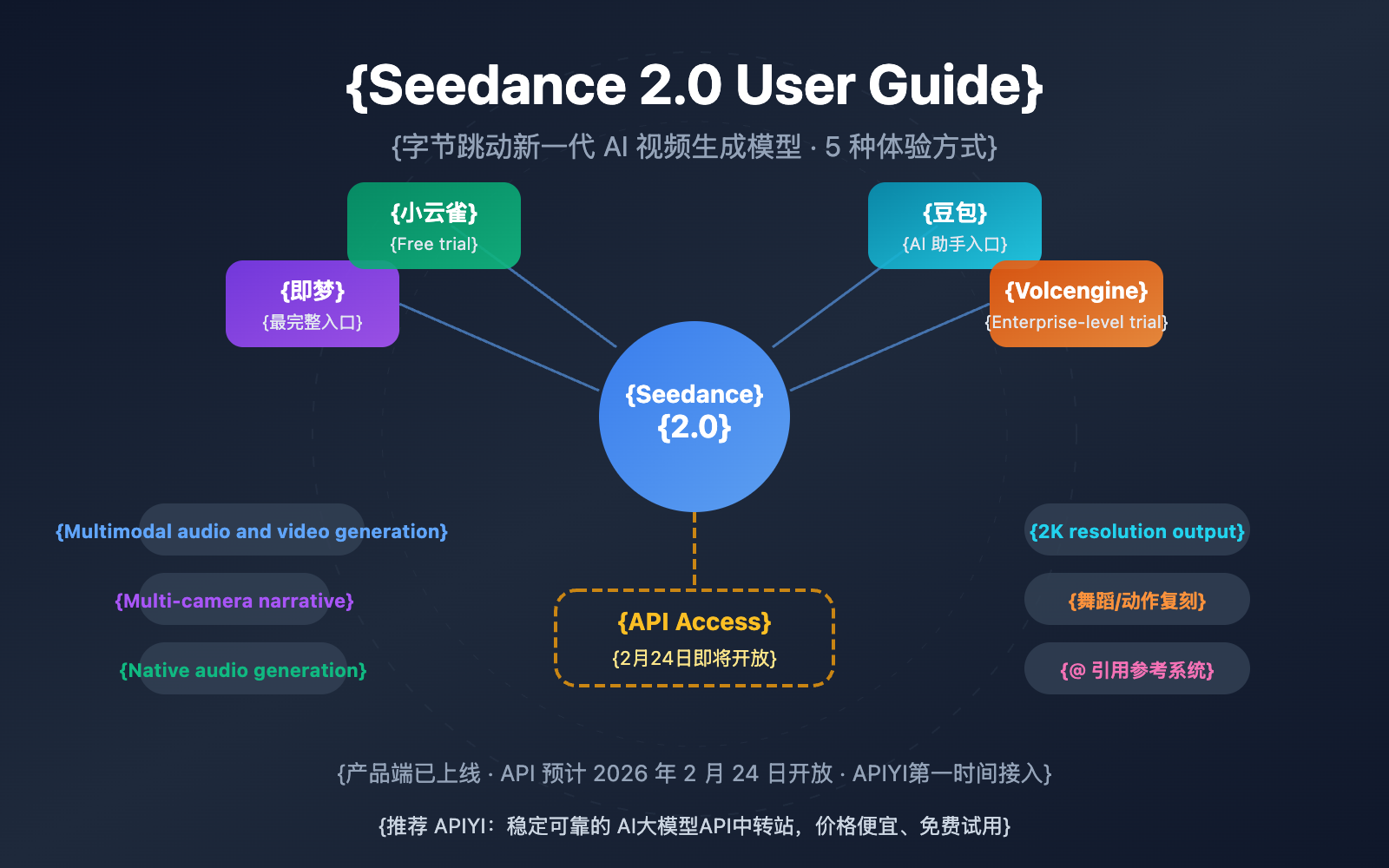
| Multimodal Input | Supports text, image, audio, and video inputs | Added audio input |
| Multi-shot Narrative | Generates coherent multi-scene videos with consistent characters and style | Brand new capability |
| Native Audio Generation | Automatically generates sound effects and BGM synced with the visuals | Brand new capability |
| 2K Resolution Output | Supports up to 1080p production-grade output | Doubled resolution |
| Dance/Motion Replication | Upload a reference video to precisely copy camera movement and choreography | Significant precision boost |
Seedance 2.0 Technical Architecture Deep Dive
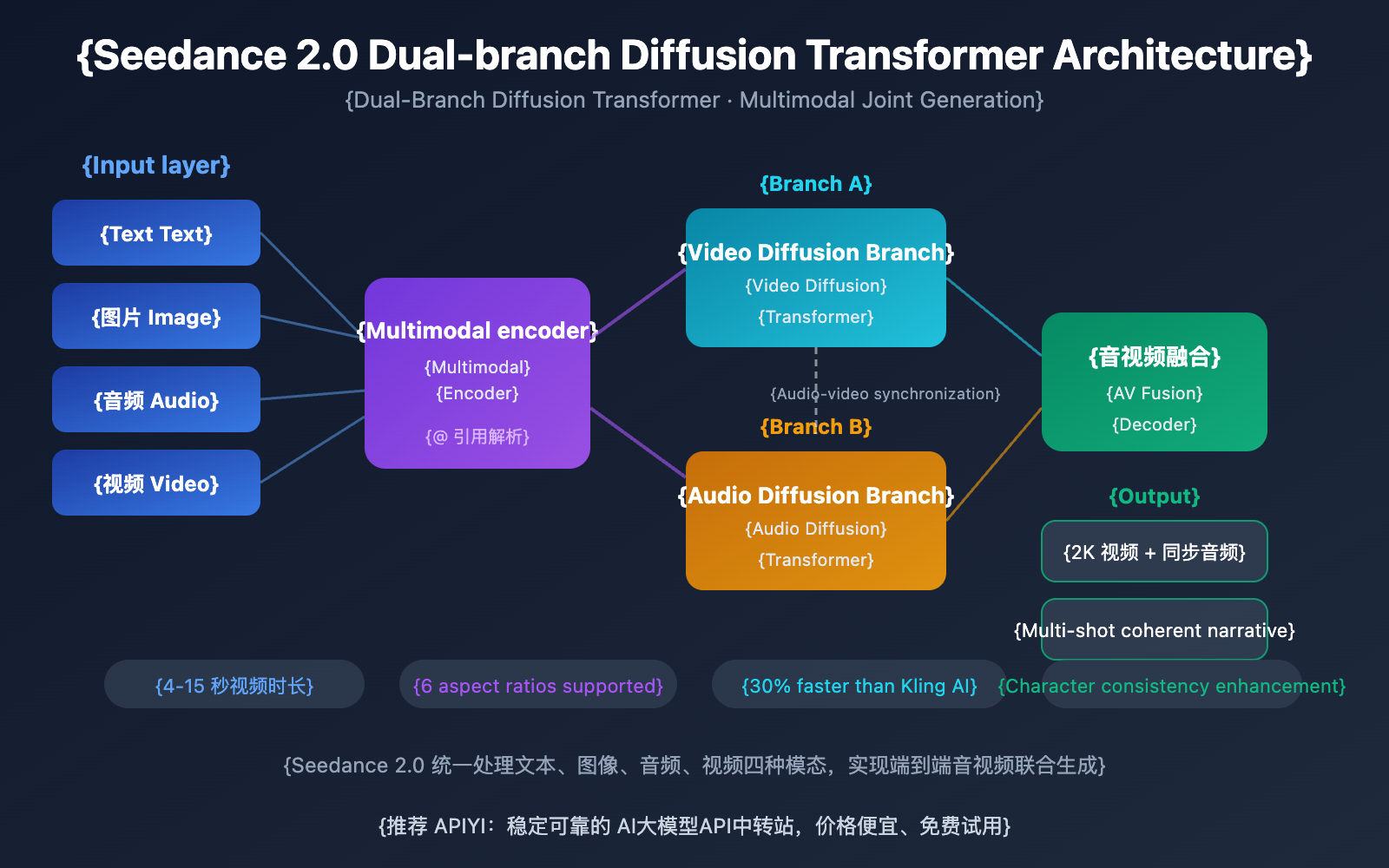
Seedance 2.0 utilizes a Dual-Branch Diffusion Transformer architecture, which is key to its multimodal joint generation. This architecture processes text, image, audio, and video signals together, enabling the model to produce audio that's perfectly in sync with the visual output.
When it comes to video quality, Seedance 2.0 is about 30% faster than competitors like Kling AI. It supports video lengths from 4 to 15 seconds and various aspect ratios like 16:9, 9:16, 4:3, 3:4, 21:9, and 1:1. Consistency for faces, clothing, text, and scenes has seen a massive boost over the previous version, effectively fixing the "character drifting" and style jumps common in AI videos.
How to Use Seedance 2.0: 5 Ways to Experience It
Seedance 2.0 has officially launched, but the API isn't open to the public just yet. Here are all the ways you can currently get your hands on Seedance 2.0:
Method 1: Jimeng — The Most Complete Experience
Jimeng is ByteDance's flagship AI creation platform and the primary entry point for Seedance 2.0. It offers the most comprehensive set of features.
Steps to use:
- Visit the Jimeng platform:
jimeng.jianying.com - Log in using your Douyin account.
- Go to the "Generate" section and select "Video Generation."
- Select Seedance 2.0 from the model options.
- Enter your text prompt or upload reference materials to start generating.
Pricing: Jimeng operates on a membership model. New users can often try it for 1 RMB for 7 days. Seedance 2.0 is currently a premium feature for paid members.
🎯 Pro Tip: Jimeng is the best place to experience the full power of Seedance 2.0 right now. If you're looking for bulk API calls later, keep an eye on APIYI (apiyi.com). We'll integrate it as soon as the API is released.
Method 2: Xiao Yunque — The Free Entry Point
Xiao Yunque is another AI app from ByteDance that offers a way to try Seedance 2.0 for free.
Steps to use:
- Download the Xiao Yunque App.
- Log in to receive 3 free Seedance 2.0 video generation credits.
- The app also gives out 120 points daily, allowing for ongoing experimentation.
Best for: Users who want to test Seedance 2.0 for free, especially those just looking to see what the results look like.
Method 3: Doubao — The All-in-One AI Assistant
Doubao, ByteDance's comprehensive AI assistant, has also integrated Seedance 2.0's video generation capabilities.
Steps to use:
- Download the Doubao App or visit the web version.
- Select the video generation feature within the chat interface.
- Choose the Seedance 2.0 model to start creating.
Method 4: Volcengine — Enterprise Trials
Volcengine is ByteDance's cloud service platform, providing enterprise-level workstation trials for Seedance 2.0.
| Platform | How to Access | Features | API Available? |
|---|---|---|---|
| Volcengine | volcengine.com Console |
For domestic (China) enterprise users | Not yet; expected Feb 24 |
| BytePlus | byteplus.com Console |
For international enterprise users | Not yet; expected Feb 24 |
Note: Currently, Volcengine and BytePlus only offer a workstation interface for testing; the API is not yet open.
Method 5: API Integration — The Developer's Choice (Coming Soon)
For developers and businesses that need to call Seedance 2.0 programmatically, the API is the way to go.
API Launch Timeline:
| Milestone | Event | Description |
|---|---|---|
| Feb 12, 2026 | Seedance 2.0 Official Release | Product-side launch |
| Feb 24, 2026 | Official API Expected Launch | Provided via Volcengine/BytePlus |
| Immediately after API launch | APIYI Platform Integration | Available at ~90% of the official price |
🎯 Developer Advice: The Seedance 2.0 API is expected to go live on February 24, 2026. APIYI (apiyi.com) will be among the first to provide Seedance 2.0 API access. We'll offer it at roughly a 10% discount compared to the official price, using an OpenAI-compatible format for easy integration. Stay tuned!
Seedance 2.0 Tips and Best Practices
Mastering these Seedance 2.0 tips will significantly improve your generation results:
Seedance 2.0 Prompting Tips
Text-to-Video Prompt Suggestions:
- Describe the scene in detail, including characters, actions, environment, and lighting.
- Specify camera movements (pan, tilt, zoom, tracking shots, etc.).
- Define the visual style (cinematic, documentary, anime, etc.).
- Note the timing and rhythm (e.g., "slowly zooming in," "fast-paced cuts").
Example Prompt:
A young woman in a white dress dancing gracefully under a cherry blossom tree,
the camera slowly moves from a wide shot to a medium shot,
soft natural light hitting from the left, petals falling with the wind,
cinematic quality, shallow depth of field, 4K resolution.
Seedance 2.0 Reference Video Tips
The "@" reference system is one of Seedance 2.0's unique strengths. You can upload reference videos to control:
- Camera Movement Reference: Upload a clip with camera movement you like, and the model will replicate it precisely.
- Choreography: Upload a dance reference, and the model can generate content that syncs with the rhythm and moves.
- Style Reference: Upload an image or video to maintain a consistent visual aesthetic.
🎯 Advanced Tip: In multimodal input scenarios, use the "@" tag to assign specific roles to each reference (e.g., @CameraReference, @CharacterReference) for more precise control. Once the API is open, APIYI (apiyi.com) will also support these full multimodal input capabilities.
Seedance 2.0 vs. Competitors
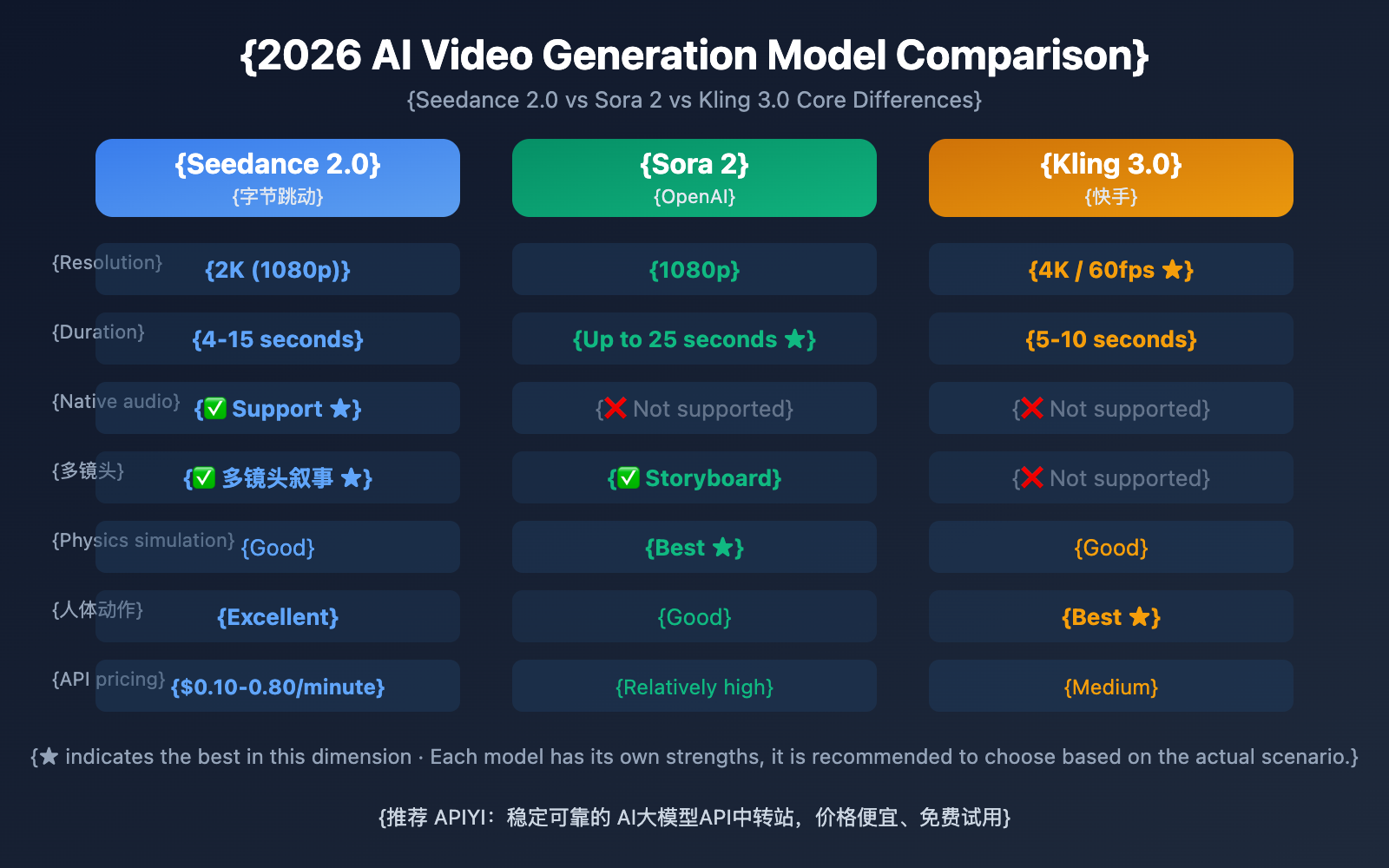
| Comparison Dimension | Seedance 2.0 | Sora 2 | Kling 3.0 |
|---|---|---|---|
| Developer | ByteDance | OpenAI | Kuaishou |
| Max Resolution | 2K (1080p) | 1080p | 4K/60fps |
| Video Duration | 4-15 seconds | Up to 25 seconds | 5-10 seconds |
| Native Audio | ✅ Supported | ❌ Not Supported | ❌ Not Supported |
| Multi-shot Storytelling | ✅ Supported | ✅ Storyboard | ❌ Not Supported |
| Reference Video Input | ✅ Multimodal @ Ref | ❌ Limited | ✅ Supported |
| Physics Simulation | Good | Best | Good |
| Human Motion | Excellent | Good | Best |
| Estimated API Price | $0.10-0.80/min | High | Medium |
Comparison Note: Each model has its own unique strengths. Seedance 2.0 leads the pack in native audio and multimodal referencing; Sora 2 remains the powerhouse for physics simulation and long-form content; while Kling 3.0 stands out for its high resolution and realistic human motion. We recommend choosing based on your specific project needs. You can easily test and compare multiple video generation models side-by-side via APIYI (apiyi.com).
FAQ
Q1: Where can I use Seedance 2.0? What are the current access points?
Currently, you can experience Seedance 2.0 through ByteDance's official apps like Jimeng, Xiao Yunque, and Doubao. Enterprise users can also try it via the Volcengine and BytePlus consoles. The API is expected to launch on February 24, 2026.
Q2: When will the Seedance 2.0 API be available, and how much will it cost?
The Seedance 2.0 API is slated for official release on February 24, 2026, through Volcengine and BytePlus. Official pricing is estimated at $0.10–$0.80 per minute (depending on resolution). APIYI (apiyi.com) will list it immediately upon release, with prices roughly 10% lower than the official rates.
Q3: Is Seedance 2.0 free to use?
Seedance 2.0 isn't entirely free. On the Jimeng platform, you'll need a paid membership (though new users can get a 7-day trial for 1 RMB). Xiao Yunque offers 3 free trials and 120 daily points. Once the API is out, it'll be pay-as-you-go based on usage.
Q4: How do I use the international version of Seedance 2.0? How can overseas users try it?
Right now, the full Seedance 2.0 experience is primarily available through the mainland Chinese version of Jimeng. The international version, Dreamina (dreamina.capcut.com), and Pippit haven't integrated Seedance 2.0 yet. Overseas users should keep an eye on BytePlus updates or wait for the API release to access it via APIYI (apiyi.com).
Important Notes for Using Seedance 2.0
When using Seedance 2.0, keep the following points in mind:
- Voice cloning is temporarily suspended: The "photo-to-voice" feature launched with Seedance 2.0 was paused by ByteDance within 48 hours due to deepfake concerns. It'll be back once an identity verification mechanism is in place.
- Content compliance: Make sure your generated content complies with relevant laws and regulations. Avoid creating anything that involves copyright infringement or ethical controversies.
- Account requirements: The Jimeng platform requires a Douyin account login, which involves verification with a mainland Chinese phone number.
Summary
Key takeaways on how to use Seedance 2.0:
- Try it now: You can use Seedance 2.0 right away through ByteDance's official apps like Jimeng, Lark (Xiaoyunque), and Doubao.
- Enterprise Trial: Volcengine and BytePlus offer a workbench interface for trials, but the API isn't open just yet.
- API Access: It's expected to launch on February 24, 2026, allowing for programmatic calls.
- Core Advantages: It leads the competition with three standout features: native audio generation, multi-shot storytelling, and multimodal @ mentions.
We recommend following APIYI (apiyi.com) for Seedance 2.0 API launch notifications. The platform will offer access at roughly 10% off the official price, featuring a unified OpenAI-compatible interface to help developers integrate quickly.
📚 References
-
Seedance 2.0 Official Intro Page: Model details from the ByteDance Seed team.
- Link:
seed.bytedance.com/en/seedance2_0 - Note: Includes full technical specs and feature descriptions.
- Link:
-
Jimeng AI Creation Platform: The primary entry point for experiencing Seedance 2.0.
- Link:
jimeng.jianying.com - Note: Currently the most feature-complete platform for using Seedance 2.0.
- Link:
-
Seedance 2.0 Official Launch Blog: The announcement from the ByteDance Seed team.
- Link:
seed.bytedance.com/en/blog/official-launch-of-seedance-2-0 - Note: Contains official info on launch dates, feature highlights, and more.
- Link:
Author: Tech Team
Tech Exchange: Feel free to discuss your Seedance 2.0 experience in the comments. For more news on AI video generation models, visit the APIYI (apiyi.com) tech community.