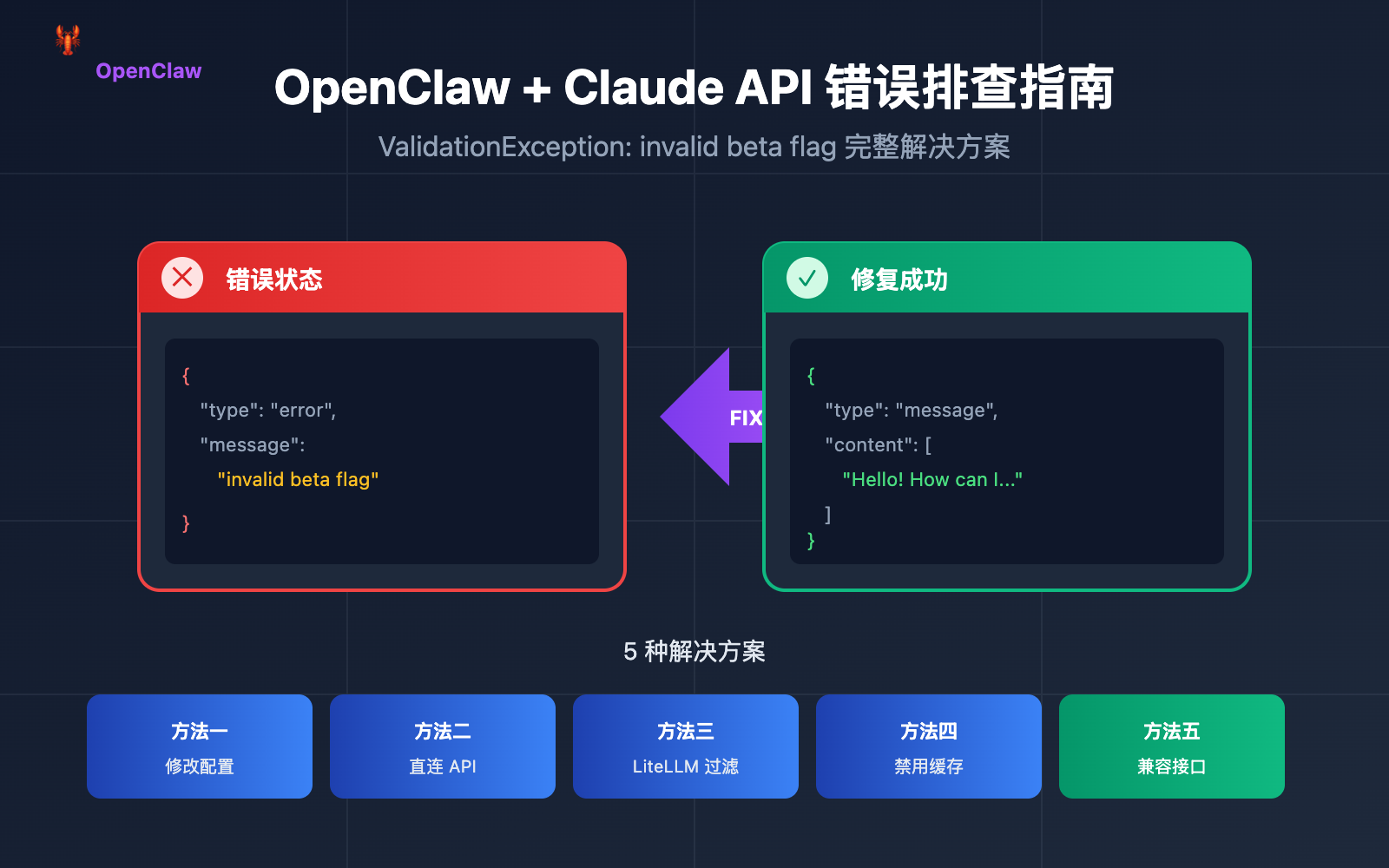
OpenClaw is the hottest open-source AI assistant project of early 2026, already racking up over 100,000 stars on GitHub. However, many developers have run into a confusing error when configuring Claude models: ValidationException: invalid beta flag.
In this post, we'll dive deep into the root causes of this OpenClaw Claude API "invalid beta flag" error and provide five proven solutions to get your AI assistant back up and running in no time.
Analyzing the OpenClaw "invalid beta flag" Error
When you're setting up AWS Bedrock or Google Vertex AI as your Claude model provider in OpenClaw, you might encounter the following error message:
{
  "type": "error",
  "error": {
    "type": "invalid_request_error",
    "message": "invalid beta flag"
  }
}
Typical Symptoms of the OpenClaw Claude API Error
| Error Scenario | Error Message | Impact |
|---|---|---|
| AWS Bedrock Call | ValidationException: invalid beta flag |
All Claude model requests fail |
| Vertex AI Call | 400 Bad Request: invalid beta flag |
Claude Sonnet/Opus becomes unavailable |
| LiteLLM Proxy | {"message":"invalid beta flag"} |
All proxy forwarding fails |
| 1M Context Variant | bedrock:anthropic.claude-sonnet-4-20250514-v1:0:1m failure |
Long-context scenarios become unusable |
Direct Impact of the OpenClaw Error
This OpenClaw Claude "invalid beta flag" error leads to:
- AI Assistant becomes completely unresponsive – OpenClaw can't complete any Claude-related tasks.
- Messaging platforms show blank responses – Platforms like WhatsApp and Telegram return "(no output)".
- Fallback models fail too – If Vertex AI is set as a fallback, it'll throw the same error.
- Severely damaged user experience – Requires frequent manual intervention.
Root Cause of the OpenClaw "invalid beta flag" Error
The Claude API Beta Header Mechanism
The Anthropic Claude API allows you to enable experimental features using the anthropic-beta request header. These beta features include:
| Beta Flag | Feature Description | Supported Platforms |
|---|---|---|
computer-use-2024-10-22 |
Computer Use capability | Anthropic Direct |
token-counting-2024-11-01 |
Token Counting API | Anthropic Direct |
context-1m-2025-08-07 |
1M Context Window | Anthropic Direct |
tmp-preserve-thinking-2025-10-01 |
Thinking Process Preservation | Anthropic Direct Only |
interleaved-thinking-2025-05-14 |
Interleaved Thinking Mode | Anthropic Direct Only |
Why OpenClaw Sends Beta Headers
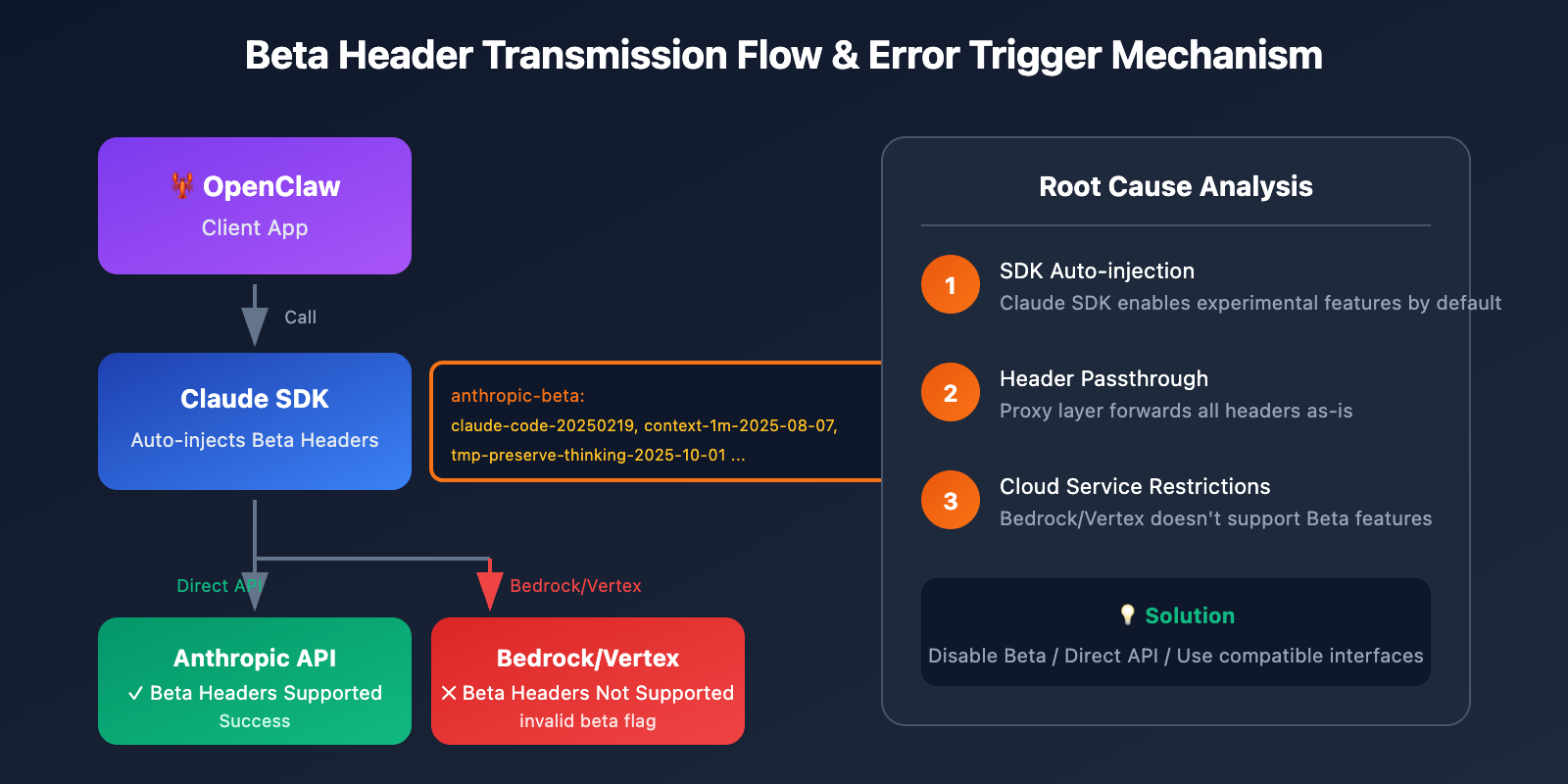
OpenClaw's underlying dependencies (like the Claude SDK, LiteLLM, etc.) automatically attach beta headers when sending requests:
anthropic-beta: claude-code-20250219,context-1m-2025-08-07,interleaved-thinking-2025-05-14,fine-grained-tool-streaming-2025-05-14,tmp-preserve-thinking-2025-10-01
Restrictions on AWS Bedrock and Vertex AI
This is the root cause of the OpenClaw invalid beta flag error:
As managed services, AWS Bedrock and Google Vertex AI don't support Anthropic's beta features. When these beta headers are passed to these cloud services, the server rejects the request and returns an invalid beta flag error.
🎯 Core Issue: The beta headers auto-injected by the SDK are incompatible with Bedrock/Vertex AI, but the SDK doesn't automatically filter these headers based on the target endpoint.
5 Ways to Fix the OpenClaw "invalid beta flag" Error
Method 1: Modify OpenClaw Model Configuration (Recommended)
The simplest way is to explicitly disable beta features in your OpenClaw configuration.
Edit ~/.openclaw/openclaw.json:
{
  "agents": {
    "defaults": {
      "model": {
        "primary": "anthropic/claude-sonnet-4",
        "options": {
          "beta_features": []
        }
      }
    }
  }
}
OpenClaw Configuration Details:
| Config Item | Description | Recommended Value |
|---|---|---|
beta_features |
Controls enabled beta features | [] (empty array) |
extra_headers |
Custom request headers | Don't set beta-related ones |
disable_streaming |
Disables streaming | false |
Method 2: Use Anthropic Direct API (Most Stable)
The most reliable way to avoid the OpenClaw invalid beta flag error is to use the official Anthropic API directly, rather than going through Bedrock or Vertex AI.
{
  "agents": {
    "defaults": {
      "model": {
        "primary": "anthropic/claude-sonnet-4"
      }
    }
  }
}
Set your environment variable:
export ANTHROPIC_API_KEY="your-anthropic-api-key"
🚀 Quick Start: If you don't have an Anthropic API Key, you can quickly get testing credits via APIYI (apiyi.com). The platform provides an OpenAI-compatible interface and supports calls to the entire Claude model series.
Method 3: Configure LiteLLM to Filter Beta Headers
If you're using LiteLLM as a model proxy for OpenClaw, you can configure header filtering:
# litellm_config.py
import litellm

# Configure not to send beta headers to Bedrock
litellm.drop_params = True
litellm.modify_params = True

# Or configure in config.yaml
# model_list:
#   - model_name: claude-sonnet
#     litellm_params:
#       model: bedrock/anthropic.claude-3-sonnet
#       drop_params: true
Method 4: Disable Prompt Caching (Temporary Workaround)
In some cases, the OpenClaw invalid beta flag error is related to the prompt caching feature. Disabling cache might solve the issue:
{
  "agents": {
    "defaults": {
      "model": {
        "primary": "anthropic/claude-sonnet-4",
        "cache": {
          "enabled": false
        }
      }
    }
  }
}
Method 5: Switch to a Compatible Model Provider
If you must use a cloud-hosted service but need to avoid the OpenClaw invalid beta flag error, consider using an OpenAI-compatible proxy service:
{
  "models": {
    "providers": [
      {
        "name": "apiyi",
        "type": "openai",
        "baseURL": "https://api.apiyi.com/v1",
        "apiKey": "your-api-key",
        "models": ["claude-sonnet-4", "claude-opus-4-5"]
      }
    ]
  }
}
💡 Selection Advice: Using an OpenAI-compatible interface can completely avoid beta header issues while maintaining excellent compatibility with OpenClaw. APIYI (apiyi.com) provides this unified interface, supporting multiple models like Claude, GPT, and Gemini.
OpenClaw Model Configuration Best Practices
Full Configuration Example
{
  "agents": {
    "defaults": {
      "model": {
        "primary": "anthropic/claude-sonnet-4",
        "fallback": "openai/gpt-4o",
        "options": {
          "temperature": 0.7,
          "max_tokens": 4096
        }
      },
      "sandbox": {
        "mode": "non-main"
      }
    }
  },
  "models": {
    "providers": [
      {
        "name": "apiyi-claude",
        "type": "openai",
        "baseURL": "https://api.apiyi.com/v1",
        "apiKey": "${APIYI_API_KEY}",
        "models": ["claude-sonnet-4", "claude-opus-4-5", "claude-haiku"]
      }
    ]
  }
}
OpenClaw Model Selection Recommendations
| Use Case | Recommended Model | Provider Choice |
|---|---|---|
| Daily Chat | Claude Haiku | Anthropic Direct / APIYI |
| Code Generation | Claude Sonnet 4 | Anthropic Direct / APIYI |
| Complex Reasoning | Claude Opus 4.5 | Anthropic Direct / APIYI |
| Cost-Sensitive | GPT-4o-mini | OpenAI / APIYI |
| Local Deployment | Llama 3.3 | Ollama |
OpenClaw "invalid beta flag" Troubleshooting Workflow
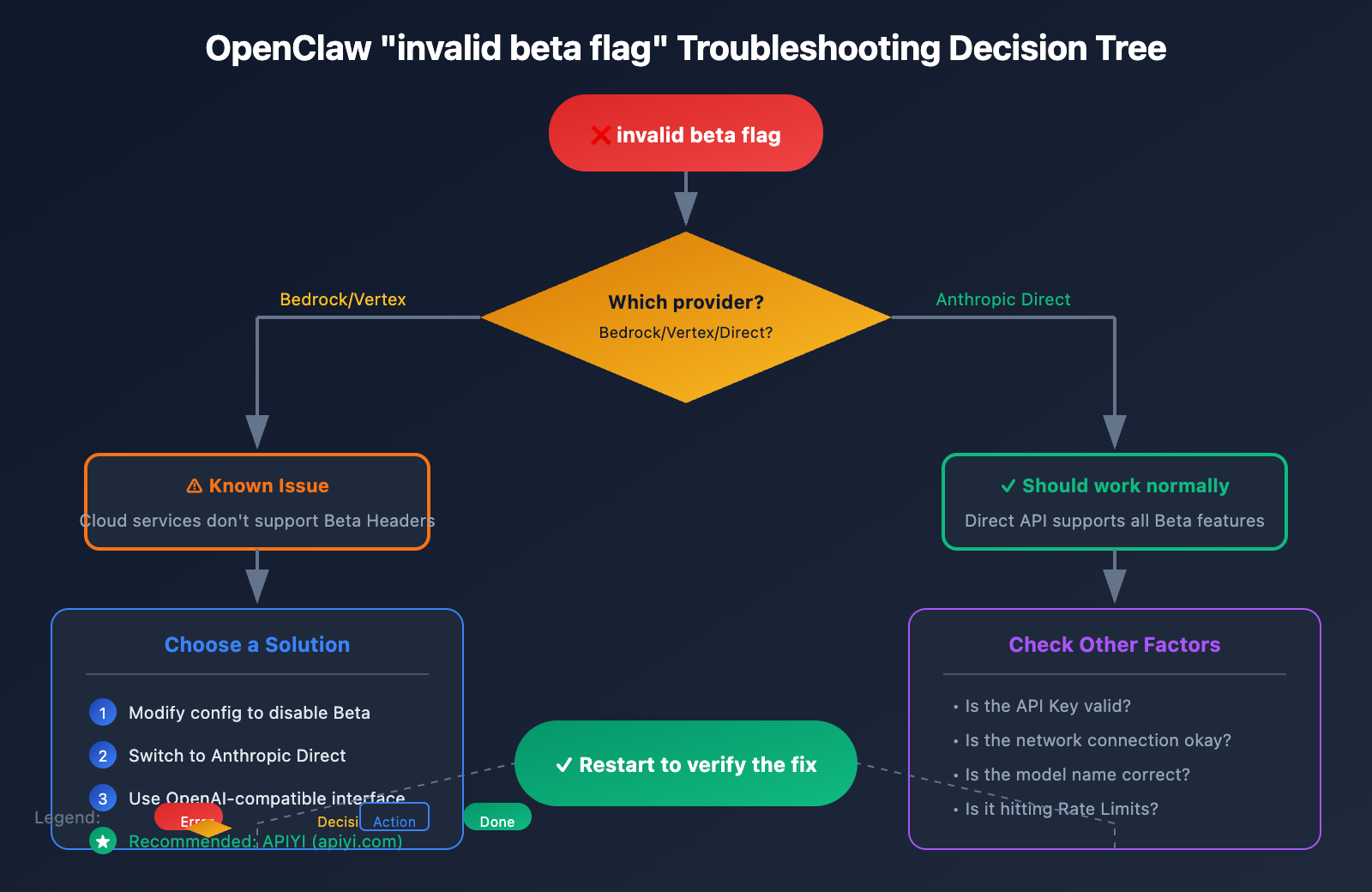
Troubleshooting Steps
Step 1: Confirm the error source
# Check OpenClaw logs
tail -f ~/.openclaw/logs/openclaw.log | grep -i "beta"
Step 2: Check current configuration
# View model configuration
cat ~/.openclaw/openclaw.json | jq '.agents.defaults.model'
Step 3: Test API connectivity
# Test with curl (without beta header)
curl -X POST https://api.anthropic.com/v1/messages \
  -H "Content-Type: application/json" \
  -H "x-api-key: $ANTHROPIC_API_KEY" \
  -H "anthropic-version: 2023-06-01" \
  -d '{
    "model": "claude-sonnet-4-20250514",
    "max_tokens": 100,
    "messages": [{"role": "user", "content": "Hello"}]
  }'
Step 4: Verify the fix
# Restart OpenClaw service
openclaw restart

# Send a test message
openclaw chat "Test message"
Common Troubleshooting Results
| Result | Root Cause Analysis | Solution |
|---|---|---|
| Direct API succeeds, Bedrock fails | Beta header incompatibility | Use Method 1 or Method 2 |
| All requests fail | API Key or network issues | Check credentials and network |
| Intermittent failures | Likely rate limiting | Check call frequency |
| Specific model fails | Model ID is incorrect or unavailable | Confirm the model name is correct |
OpenClaw Claude Code Examples
Python Direct Call Example (Avoiding the "invalid beta flag" error)
import anthropic

# Create client - don't enable any beta features
client = anthropic.Anthropic(
    api_key="your-api-key",
    base_url="https://api.apiyi.com/v1"  # Use the APIYI unified interface
)

# Send message - don't use beta parameters
message = client.messages.create(
    model="claude-sonnet-4-20250514",
    max_tokens=1024,
    messages=[
        {"role": "user", "content": "Hello, Claude!"}
    ]
)

print(message.content[0].text)
OpenAI SDK Compatible Call
from openai import OpenAI

# Use the OpenAI-compatible interface to completely avoid beta header issues
client = OpenAI(
    api_key="your-apiyi-key",
    base_url="https://api.apiyi.com/v1"  # APIYI unified interface
)

response = client.chat.completions.create(
    model="claude-sonnet-4",
    messages=[
        {"role": "user", "content": "Hello!"}
    ]
)

print(response.choices[0].message.content)
🎯 Pro Tip: Using the OpenAI-compatible interface is the simplest way to avoid the OpenClaw "invalid beta flag" error. The unified interface provided by APIYI (apiyi.com) isn't just compatible with Claude—it also supports GPT, Gemini, and other mainstream models, making it easy to switch between them for testing.
OpenClaw Compatibility with Cloud Providers
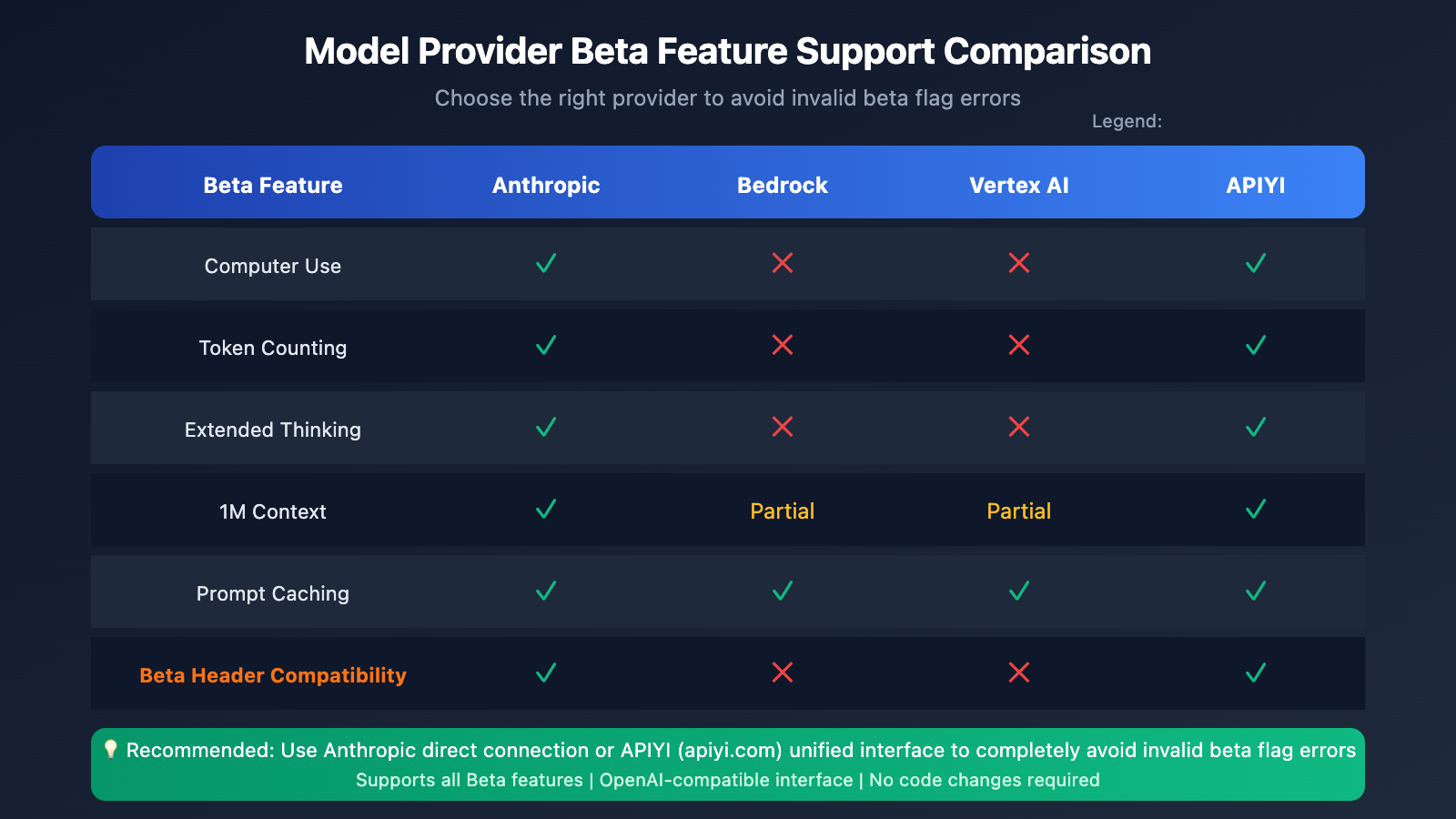
Cloud Service Beta Feature Support Matrix
| Feature | Anthropic Direct | AWS Bedrock | Vertex AI | APIYI |
|---|---|---|---|---|
| Basic Messages API | ✅ | ✅ | ✅ | ✅ |
| Computer Use | ✅ | ❌ | ❌ | ✅ |
| Token Counting | ✅ | ❌ | ❌ | ✅ |
| Extended Thinking | ✅ | ❌ | ❌ | ✅ |
| 1M Context | ✅ | Partial | Partial | ✅ |
| Prompt Caching | ✅ | ✅ | ✅ | ✅ |
Why Choose an API Proxy Service?
For OpenClaw users, using an API proxy service offers several advantages:
- Better Compatibility – It automatically handles header conversions, helping you avoid the "invalid beta flag" error.
- Better Cost-Efficiency – It's often more economical than calling official APIs directly.
- Easy Switching – A unified interface lets you swap between different models with ease.
- High Stability – Multi-node load balancing helps you avoid single points of failure.
OpenClaw invalid beta flag FAQ
Q1: Why does the "invalid beta flag" error only pop up when using Bedrock?
AWS Bedrock is Amazon's managed service. While it provides access to Claude models, it doesn't support Anthropic's experimental beta features. When OpenClaw or its underlying libraries automatically attach a beta header, Bedrock rejects those requests.
Solution: Use a direct Anthropic API connection or configure your setup to filter out beta headers. If you need to test things quickly, you can get some free credits at APIYI (apiyi.com) to verify your setup.
Q2: What if I've updated the config but it's still failing?
It's likely due to configuration caching or the service not restarting properly. Try these steps:
- Completely stop OpenClaw:
openclaw stop - Clear the cache:
rm -rf ~/.openclaw/cache/* - Restart:
openclaw start
Q3: Can I use Bedrock and the direct API at the same time?
Sure thing. We recommend setting the direct Anthropic connection as your primary provider (since it supports all features) and using Bedrock as a fallback (without beta features):
{
  "agents": {
    "defaults": {
      "model": {
        "primary": "anthropic/claude-sonnet-4",
        "fallback": "bedrock/anthropic.claude-3-sonnet"
      }
    }
  }
}
Q4: Which model providers does OpenClaw support?
OpenClaw supports over 12 model providers, including:
- Official Direct: Anthropic, OpenAI, Google Gemini, Mistral
- Cloud Managed: AWS Bedrock, Google Vertex AI
- Proxy Services: OpenRouter, APIYI
- Local Deployment: Ollama, LM Studio
💰 Cost Optimization: For individual developers on a budget, we suggest calling the Claude API via APIYI (apiyi.com). The platform offers flexible pay-as-you-go billing with no monthly minimums.
Q5: Does the "invalid beta flag" error affect all Claude models?
Yep, this error hits all Claude models called through Bedrock or Vertex AI, including the entire Claude Haiku, Sonnet, and Opus lineup.
Summary
The core reason for the OpenClaw Claude API "invalid beta flag" error is that the SDK automatically attaches beta headers that are incompatible with AWS Bedrock / Vertex AI. You can effectively solve this using the five methods we've covered:
- Modify OpenClaw Config – Disable beta features.
- Use Anthropic Direct – Fully compatible with all features.
- Configure LiteLLM Filtering – Solve it at the proxy level.
- Disable Prompt Caching – A temporary workaround.
- Switch to Compatible Providers – Use OpenAI-compatible interfaces.
For most OpenClaw users, we recommend using a direct Anthropic API or an OpenAI-compatible proxy service to avoid this issue entirely. We suggest checking out APIYI (apiyi.com) to quickly verify your results; the platform supports the full Claude model family and provides a unified OpenAI-compatible interface.
References
-
GitHub – OpenClaw Official Repository: Project source code and documentation
- Link:
github.com/openclaw/openclaw
- Link:
-
GitHub – LiteLLM invalid beta flag Issue: Community discussion
- Link:
github.com/BerriAI/litellm/issues/14043
- Link:
-
GitHub – Cline invalid beta flag Issue: Related error reports
- Link:
github.com/cline/cline/issues/5568
- Link:
-
Anthropic Beta Headers Documentation: Official beta feature details
- Link:
docs.anthropic.com/en/api/beta-headers
- Link:
-
OpenClaw Official Documentation: Model configuration guide
- Link:
docs.openclaw.ai/concepts/model-providers
- Link:
📝 Author: APIYI Tech Team
To learn more tips about calling AI model APIs, feel free to visit APIYI (apiyi.com) for technical support.