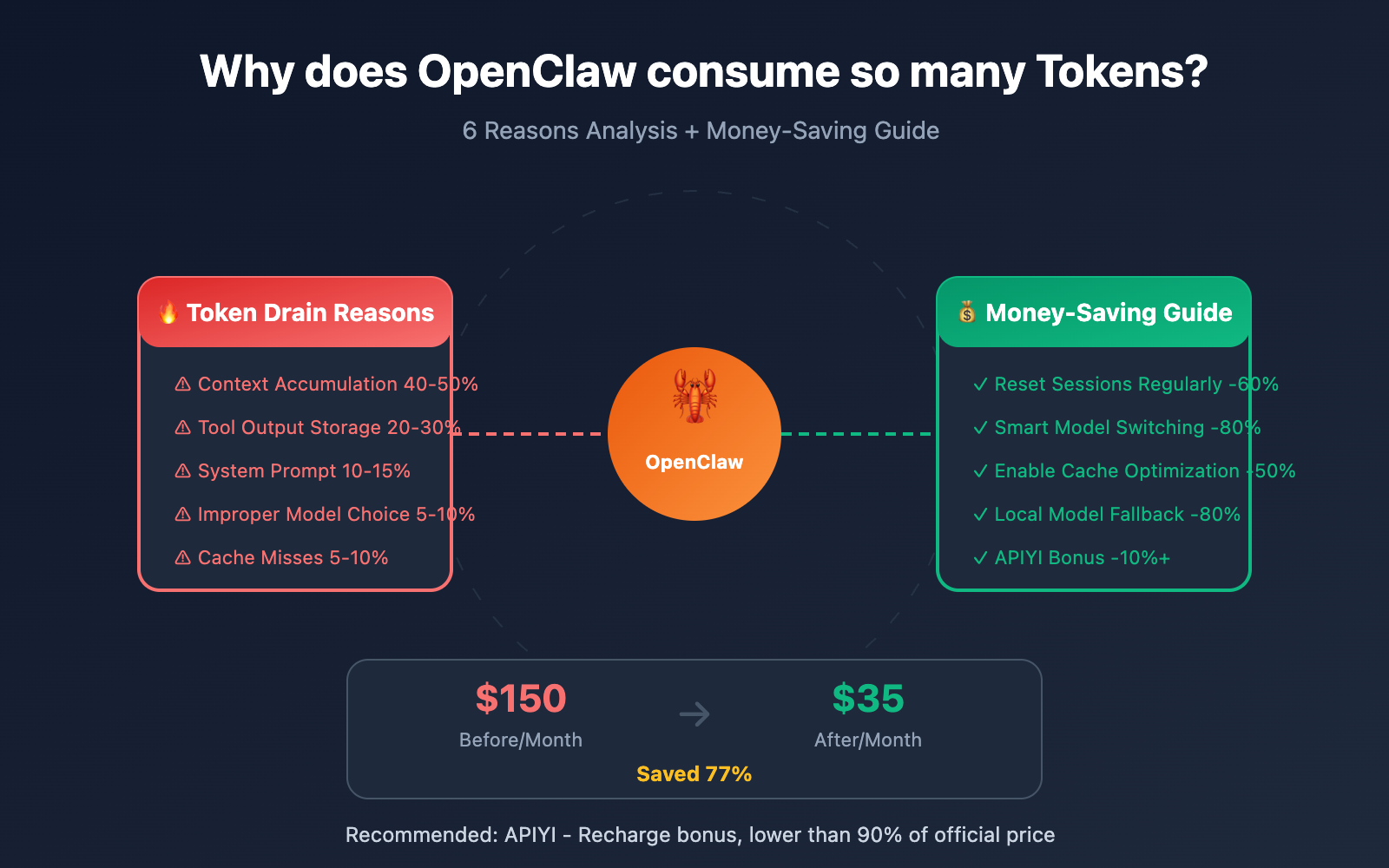
Author's Note: A deep analysis of the 6 major reasons for OpenClaw's high token consumption, providing field-tested optimization strategies to help users slash API costs by 60-80%, plus a money-saving guide with APIYI recharge bonuses.
"Burning 1.8 million tokens in a month, with a $3,600 bill" — this was the real-world experience of tech blogger Federico Viticci using OpenClaw. While OpenClaw is open-source and free, its token consumption speed has caught many users off guard. This article will dive deep into the 6 main reasons why OpenClaw drains tokens and provide field-tested strategies to save you money.
Core Value: By the end of this article, you'll understand the technical principles behind OpenClaw's high consumption, master 6 effective optimization methods, and learn how to bring costs down to under 90% of official prices through APIYI's recharge bonus events.
OpenClaw Token Consumption Core Data
| User Type | Avg Monthly Tokens | Avg Monthly Cost | Typical Scenario |
|---|---|---|---|
| Light User | 5M – 20M | $10-30 | Daily Q&A, simple tasks |
| Medium User | 20M – 50M | $30-70 | Automated workflows |
| Heavy User | 50M – 200M | $70-150+ | 24/7 Personal Assistant |
| Extreme Case | 180M+ | $3600+ | MacStories blogger test |
Why is OpenClaw's Token Consumption So High?
OpenClaw (formerly Clawdbot/Moltbot) is the hottest open-source AI assistant project of 2026, with over 135,000 GitHub stars. It's incredibly powerful, capable of connecting to 12+ messaging platforms, controlling browsers, executing Shell commands, and automating daily tasks. However, behind these capabilities lies staggering token consumption.
Many users excitedly set up OpenClaw only to be stunned by their API bill the next day—sometimes reaching dozens or even hundreds of dollars. One user reported "burning $200 in a day" because an automated task got stuck in an infinite loop.
Understanding why tokens are being drained is the first step toward cost optimization.
6 Main Reasons OpenClaw Drains Tokens
| Reason | Consumption Share | Technical Explanation | Optimization Potential |
|---|---|---|---|
| Context Accumulation | 40-50% | Session history keeps expanding | ⭐⭐⭐⭐⭐ |
| Tool Output Storage | 20-30% | Large JSON/logs stored in history | ⭐⭐⭐⭐ |
| System Prompt | 10-15% | Repeatedly sent with every request | ⭐⭐⭐ |
| Multi-round Reasoning | 10-15% | Complex tasks require multiple calls | ⭐⭐ |
| Model Selection | 5-10% | Opus is 25x more expensive than Haiku | ⭐⭐⭐⭐⭐ |
| Cache Misses | 5-10% | Expired cache leads to re-billing | ⭐⭐⭐⭐ |
Deep Dive into OpenClaw Token Consumption
Reason 1: Continuous Context Window Accumulation
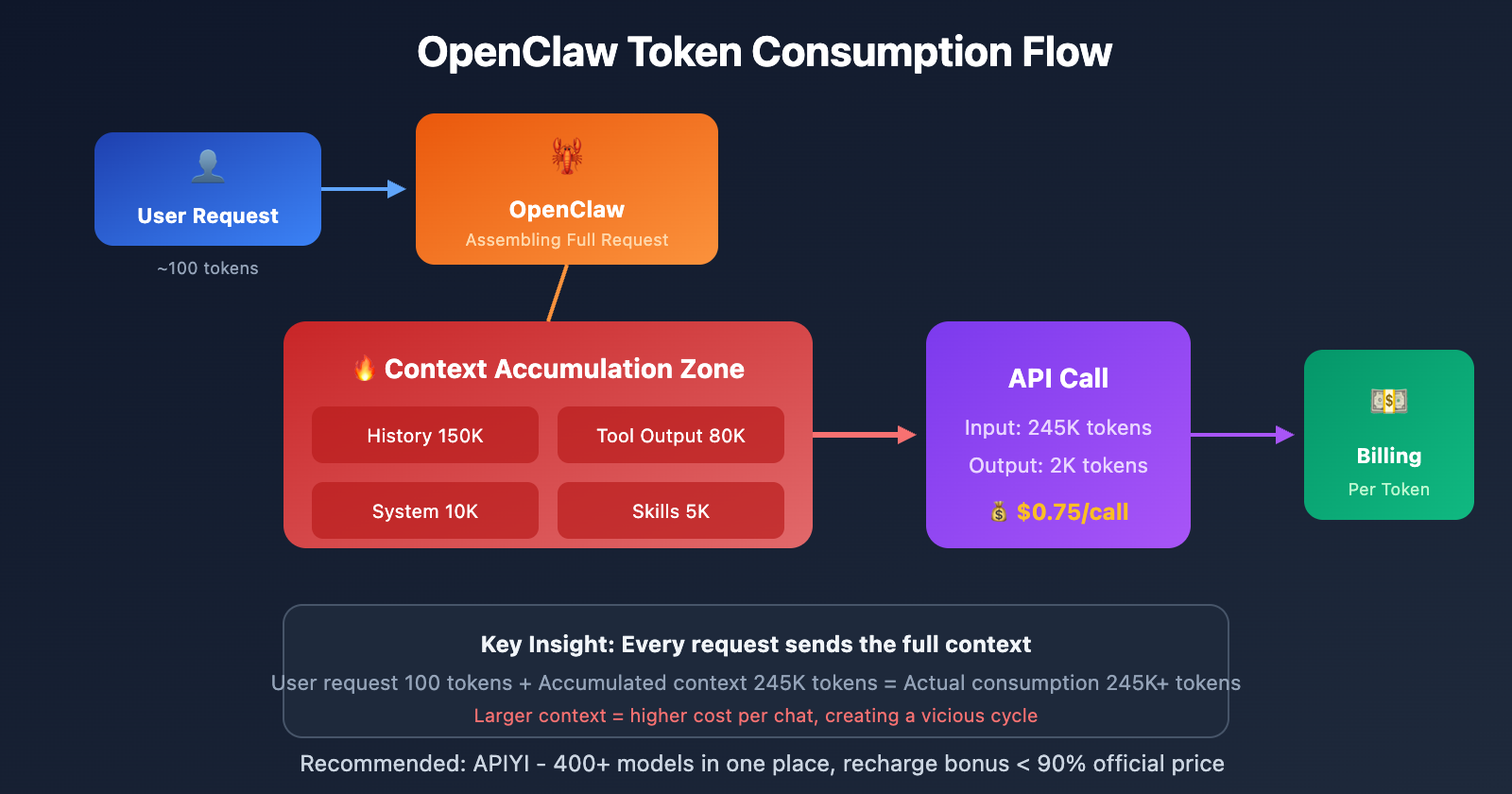
This is OpenClaw's biggest "money pit." Every time you chat with OpenClaw, all historical messages are saved in JSONL files within the .openclaw/agents.main/sessions/ directory.
The problem is: With every new request, OpenClaw sends the entire conversation history to the AI model.
One user reported that their main session context already occupied 56-58% of a 400K window. This means:
- Even for a simple question, it has to process over 200,000 tokens of cached context.
- Each interaction's
cacheReadhits the hundreds of thousands of tokens mark. - The longer the session, the more costs grow exponentially.
# Check current session token consumption
openclaw /status

# Example output:
# 🤖 Model: claude-sonnet-4
# 📊 Context: 234,567 / 400,000 tokens (58.6%)
# 💰 Estimated cost this session: $12.34
Reason 2: Infinite Storage of Tool Outputs
OpenClaw stores all tool call outputs into the session records. Problems arise when you perform the following:
| Risky Operation | Output Size | Consequences |
|---|---|---|
config.schema |
Tens of thousands of tokens | Massive JSON saved to context |
status --all |
Thousands of tokens | Full system status recorded |
Directory traversal find |
Tens of thousands of tokens | Entire file list stored |
| Log export | Tens of thousands of tokens | Complete logs added to records |
One developer shared: "I just asked OpenClaw to help me check the project structure. It traversed the whole directory and outputted tens of thousands of lines of file lists, all of which went into the session history. Now, every time I talk to it, that useless info gets resent to the model."
Reason 3: System Prompt Resent Every Time
OpenClaw uses a complex system prompt that includes:
- Core persona settings
- Available tools list
- Security restriction rules
- User preference configurations
This system prompt usually runs 5,000-10,000 tokens and is resent with every API call. While Anthropic offers Prompt Caching (charging only 10% for cache hits), the cache has a TTL (Time To Live) limit:
| Provider | Cache TTL | Expiration Consequence |
|---|---|---|
| Anthropic | 5 minutes | Re-billed at full price |
| OpenAI | 1 hour | Automatic invalidation |
If you aren't using it continuously, you'll pay full price for every "cold start."
Reason 4: Multi-round Reasoning for Complex Tasks
OpenClaw's strength lies in its ability to complete complex tasks autonomously, but this means more API calls:
User: Help me organize today's emails and create to-do items.

OpenClaw Internal Workflow:
1. Call Email Skill to get list → Consumes tokens
2. Analyze each email's content → Consumes tokens
3. Determine priority and category → Consumes tokens
4. Call Todoist Skill to create tasks → Consumes tokens
5. Generate summary report → Consumes tokens

Actual consumption: 5-10 API calls, each carrying the full context.
Reason 5: Improper Model Selection
Many users default to Claude Opus 4.5 or Sonnet 4.5, but not every task requires a top-tier model:
| Model | Input Price | Output Price | Use Cases |
|---|---|---|---|
| Claude Opus 4.5 | $15/M | $75/M | Complex reasoning, creative writing |
| Claude Sonnet 4.5 | $3/M | $15/M | Daily tasks, code generation |
| Claude Haiku 4.5 | $1/M | $5/M | Simple Q&A, format conversion |
| Gemini 3.0 Flash | $0.075/M | $0.30/M | Batch processing, cost-sensitive |
The price difference is up to 25x! Using Opus to ask "What's the weather like today" is a total waste.
Reason 6: Heartbeat and Background Tasks
OpenClaw's Heartbeat feature allows the AI to proactively wake up and execute scheduled tasks. However, many users don't realize:
- Every Heartbeat trigger is a full API call.
- If misconfigured, it might trigger every few minutes.
- Each trigger carries the full session context.
One user noted: "I set it to check my email every 5 minutes, and by the end of the day, the Heartbeat alone had burned through $50."
6 Major Strategies for OpenClaw Token Optimization
Strategy 1: Regularly Reset Sessions (Save 40-60%)
This is the most immediate way to see results. When the session context bloats, reset it decisively:
# Method 1: Reset within the chat
openclaw "reset session"

# Method 2: Delete session files
rm -rf ~/.openclaw/agents.main/sessions/*.jsonl

# Method 3: Use the /compact command to compress
openclaw /compact
Best Practice: Reset the session after completing each independent task to prevent context from accumulating indefinitely.
Strategy 2: Isolate Large Output Operations (Save 20-30%)
Never execute commands that might produce large outputs in your main session:
# ❌ WRONG: Executing in the main session
openclaw "show full system config"

# ✅ RIGHT: Use an independent debug session
openclaw --session debug "show full system config"
# Then just copy the small snippet you need back to the main session
Strategy 3: Configure Smart Model Switching (Save 50-80%)
Automatically select models based on task complexity:
{
  "agents": {
    "defaults": {
      "model": {
        "primary": "anthropic/claude-sonnet-4",
        "fallback": "anthropic/claude-haiku-4"
      }
    }
  },
  "routing": {
    "simple_queries": "haiku",
    "complex_tasks": "sonnet",
    "critical_decisions": "opus"
  }
}
🎯 Money-Saving Tip: Use Haiku or Gemini Flash for daily tasks, and only switch to Sonnet/Opus for complex reasoning. Through APIYI (apiyi.com), you can access 400+ Large Language Models in one place and switch flexibly via a unified interface to find the best price-performance combo.
Strategy 4: Enable Cache Optimization (Save 30-50%)
Take full advantage of the Prompt Caching mechanism:
{
  "agents": {
    "defaults": {
      "cache-ttl": 3600,
      "temperature": 0.2
    }
  }
}
Key Tips:
- Set a low temperature (0.2) to improve cache hit rates.
- Configure the Heartbeat interval to be slightly less than the cache TTL to keep the cache "warm."
- Use relay services like OpenRouter that support caching.
Strategy 5: Limit the Context Window (Save 20-40%)
Proactively control your context size:
{
  "agents": {
    "defaults": {
      "contextTokens": 50000,
      "compaction": "aggressive"
    }
  }
}
Limiting the context to 50K-100K instead of the default 400K can significantly lower the cost per request.
Strategy 6: Use Local Models as a Fallback (Save 60-80%)
Configure local models via Ollama to handle simple tasks:
{
  "models": {
    "providers": {
      "ollama": {
        "baseUrl": "http://localhost:11434",
        "models": ["llama3.3", "qwen2.5"]
      }
    }
  },
  "routing": {
    "simple_queries": "ollama/llama3.3"
  }
}
Local models have zero API costs and are perfect for simple format conversions, information lookups, and similar tasks.
OpenClaw Cost Optimization: Real-World Comparison
| Optimization Item | Cost Before | Cost After | Savings Ratio |
|---|---|---|---|
| Session Management | $50/mo | $20/mo | 60% |
| Model Switching | $80/mo | $25/mo | 69% |
| Cache Optimization | $40/mo | $20/mo | 50% |
| Local Fallback | $30/mo | $5/mo | 83% |
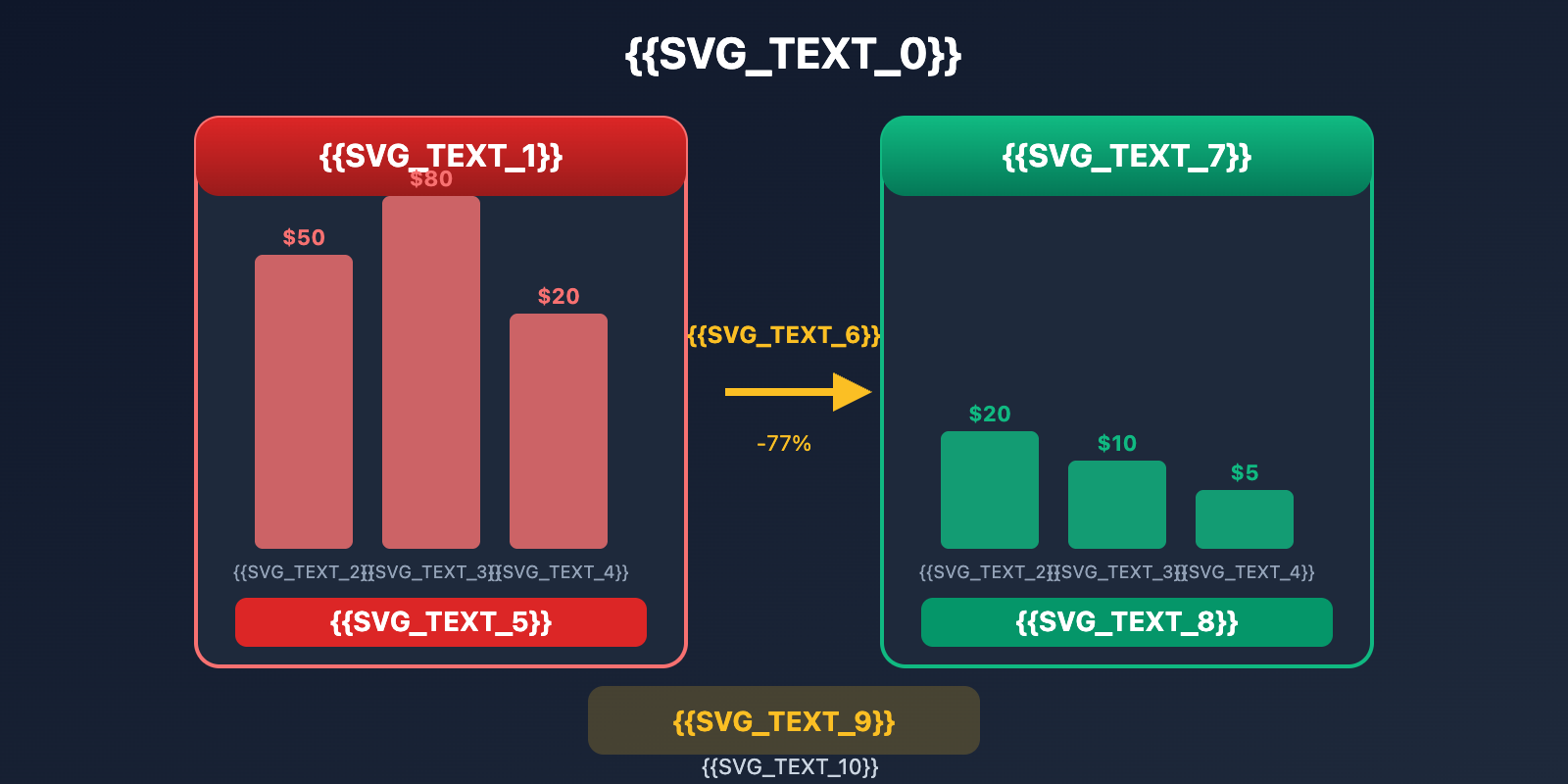
| Total Optimization | $150/mo | $35/mo | 77% |
Real-world data: A power user reduced their average monthly cost from $150 to $35 through comprehensive optimization—a savings of over 75%.
Further Reducing Costs via APIYI
Even after all the optimizations mentioned above, API call costs remain the primary expense for OpenClaw. This is where choosing the right API provider becomes crucial.
APIYI Top-up Bonus Program
APIYI (apiyi.com) provides a unified interface for 400+ Large Language Models. While their prices match official rates, you can drive costs even lower through their top-up bonus program:
| Top-up Amount | Bonus Ratio | Actual Balance | Effective Discount |
|---|---|---|---|
| $20 | 5% | $21 | 5% Off |
| $50 | 8% | $54 | 7% Off |
| $100 | 10% | $110 | 9% Off |
| $200 | 12% | $224 | 11% Off |
| $500+ | 15% | $575+ | 13% Off |
Let's do the math: If your monthly API spend is $100, topping up $100 on APIYI with a 10% bonus means you save $10 every month. That's $120 a year—enough to cover a Claude Pro subscription!
Other Advantages of APIYI
| Advantage | Description | Value for OpenClaw Users |
|---|---|---|
| 400+ Models | One-stop access to all mainstream models | Switch flexibly to find the best price-performance ratio |
| Unified Interface | OpenAI-compatible format | Seamless integration with OpenClaw |
| Real-time Balance | Consumption stats accurate to the cent | Monitor costs anytime |
| No Monthly Fees | Pay-as-you-go, only pay for what you use | Flexible spending control |
| Stable & Reliable | Multi-node load balancing | 24/7 availability |
Configuring APIYI as an OpenClaw Backend
{
  "models": {
    "providers": {
      "apiyi": {
        "type": "openai",
        "baseUrl": "https://vip.apiyi.com/v1",
        "apiKey": "YOUR_APIYI_KEY",
        "models": [
          "claude-sonnet-4",
          "claude-haiku-4",
          "gpt-4o-mini",
          "deepseek-v3"
        ]
      }
    }
  },
  "agents": {
    "defaults": {
      "model": "apiyi/claude-sonnet-4"
    }
  }
}
Once configured, all OpenClaw API calls will be routed through APIYI, allowing you to enjoy those top-up bonus discounts.
FAQ
Q1: Can I save money on OpenClaw with a Claude Pro/Max subscription?
No, and doing so violates Anthropic's Terms of Service. Claude Pro/Max subscriptions are strictly for direct use via the official interface and can't be used for third-party API calls. OpenClaw requires an API Key on a pay-as-you-go basis. This is why APIYI's recharge bonuses are so valuable—it's the only compliant way to save money.
Q2: How can I monitor Token consumption in real-time?
OpenClaw has built-in monitoring commands:
# Check current status
openclaw /status

# Enable usage display for every response
openclaw /usage full
Combined with the real-time balance and consumption details in the APIYI dashboard, you can track exactly where every cent is going.
Q3: How much can I save by using Gemini or Deepseek?
Compared to Claude Sonnet, the cost difference is massive:
| Model | Input Price | Cost Comparison |
|---|---|---|
| Claude Sonnet 3.5 | $3/M | Baseline |
| Gemini 1.5 Flash | $0.075/M | 40x cheaper |
| Deepseek V3 | $0.27/M | 11x cheaper |
You can access all these models in one place via APIYI (apiyi.com) and switch between them flexibly using a unified interface.
Summary
Here are the 6 core reasons why OpenClaw eats through your Tokens:
- Context Accumulation: Session history grows indefinitely—it's the biggest cost black hole.
- Tool Output Storage: Large outputs are saved in the logs and resent with every message.
- System Prompt: Complex prompts are resent every time; if the cache expires, you're billed at full price.
- Multi-turn Reasoning: Complex tasks require multiple API calls.
- Poor Model Selection: Using Opus for tasks that Haiku could easily handle.
- Frequent Heartbeats: Background tasks constantly consume Tokens.
Core Money-Saving Strategies:
- Reset sessions regularly to control context size.
- Switch models intelligently; use cheaper models for simple tasks.
- Top up via APIYI (apiyi.com) to get bonuses, effectively getting prices lower than 90% of the official rate.
We recommend visiting APIYI (apiyi.com) to register an account. The platform provides a unified interface for 400+ models and recharge bonus events, making your OpenClaw both powerful and budget-friendly.
📚 References
⚠️ Link Format Note: All external links use the
Resource Name: domain.comformat. This makes them easy to copy while preventing SEO link juice leakage.
-
OpenClaw Token Usage Documentation: Official consumption guide
- Link:
docs.openclaw.ai/token-use - Description: Token billing rules and monitoring commands
- Link:
-
GitHub Issue #1594: Discussion on context accumulation issues
- Link:
github.com/openclaw/openclaw/issues/1594 - Description: Deep community analysis of the "Token burning" problem
- Link:
-
Anthropic Pricing Page: Official Claude API pricing
- Link:
anthropic.com/pricing - Description: Latest prices and caching discounts for various models
- Link:
-
Fast Company Report: OpenClaw cost analysis
- Link:
fastcompany.com/91484506/what-is-clawdbot-moltbot-openclaw - Description: Media coverage regarding OpenClaw's high-cost issues
- Link:
-
APIYI Official Website: One-stop access to 400+ models
- Link:
apiyi.com - Description: Top-up bonus events, prices over 10% lower than official rates
- Link:
Author: Technical Team
Technical Exchange: Feel free to discuss in the comments. For more cost-saving tips, visit the APIYI apiyi.com technical community.