Nano Banana Pro is a top-tier image generation model from Google (essentially Gemini 3 Pro Image), famous for its incredible image quality and text rendering. However, the official API pricing can be a dealbreaker for many developers—coming in at $0.24 per 4K image and $0.134 per 2K image.
The good news is: By using a third-party API relay platform, you can access the same high-quality Nano Banana Pro service for just $0.05/call, saving you up to 79% in costs.
In this post, we'll break down the official pricing and explore alternative options to help you find the most cost-effective way to use the Nano Banana Pro API.
A Detailed Look at Official Nano Banana Pro API Pricing
Google's official Nano Banana Pro API follows a token-based billing model. Depending on the output resolution you need, the price varies significantly.
Official Pricing Structure
| Resolution Range | Token Consumption | Price per Image | Avg. Monthly Cost (1,000/day) |
|---|---|---|---|
| 1K-2K (Up to 2048×2048) | 1,120 tokens | $0.134 | $4,020 |
| 4K (Up to 4096×4096) | 2,000 tokens | $0.24 | $7,200 |
Subscription Plan Options
| Plan | Monthly Fee | Daily Quota | Monthly Quota | Max Resolution | Commercial License |
|---|---|---|---|---|---|
| Free | $0 | 2-3 images | ~90 images | 1K | ❌ Watermarked |
| Pro | $19.99 | 500 images | 15,000 images | 2K | ✅ |
| Ultra | $99.99 | 1,000 images | 30,000 images | 4K | ✅ |
| API Pay-as-you-go | Based on usage | Unlimited | Unlimited | 4K | ✅ |
⚠️ Note: Images from the free plan come with a visible watermark. Furthermore, if you exceed your quota, the system silently downgrades the model to standard Nano Banana (Gemini 2.5 Flash Image), which results in a noticeable drop in image quality.
Analyzing the Official Pricing Pain Points
For commercial applications that need to generate over 500 images a day, official API costs can become quite substantial:
- 500 2K images/day: $67/day → $2,010/month
- 500 4K images/day: $120/day → $3,600/month
- 1,000 4K images/day: $240/day → $7,200/month
Keep in mind, these figures don't even include extra costs from failed retries, testing, or debugging sessions.
5 Alternatives to the Nano Banana Pro API Compared
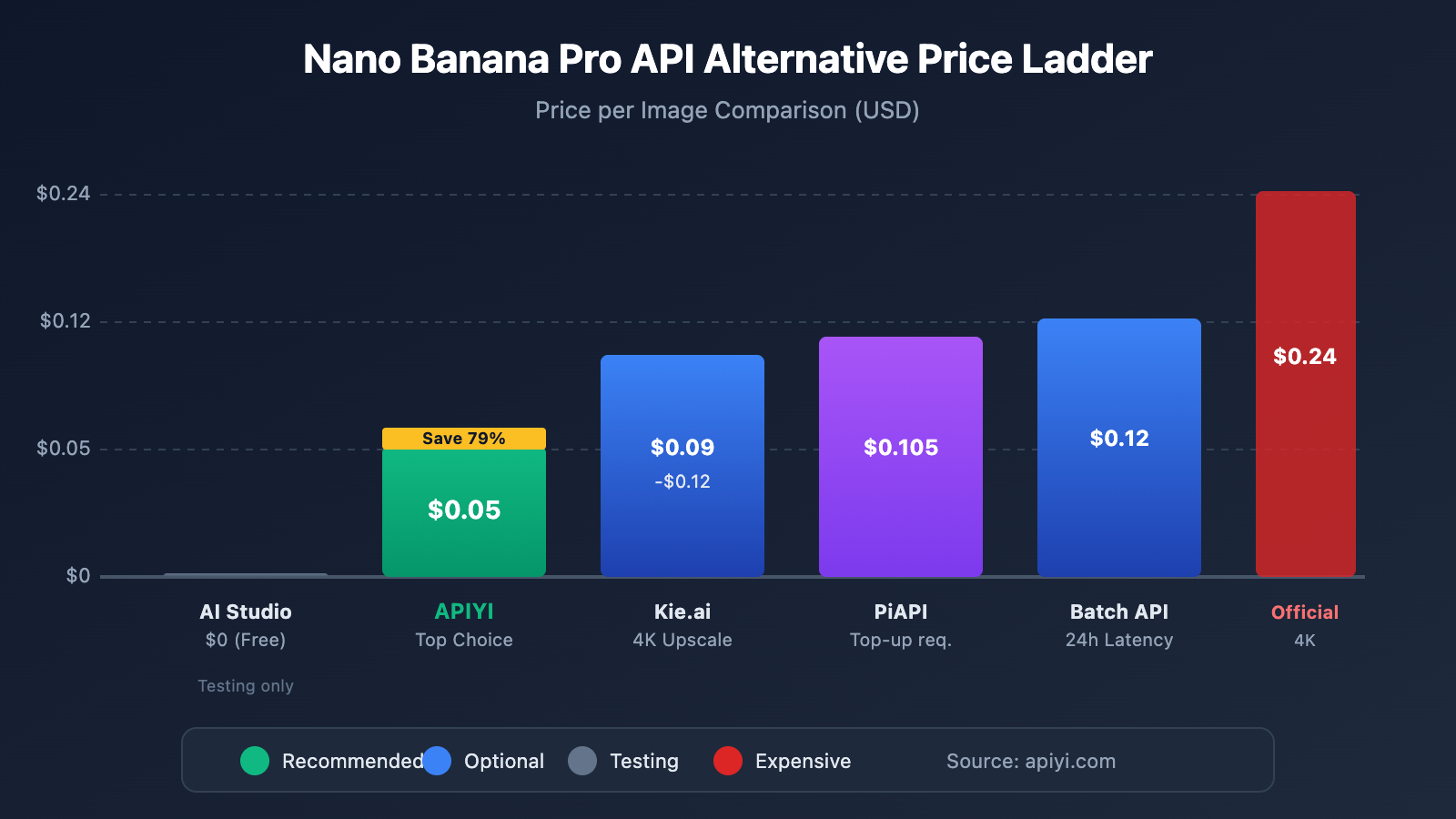
There are several ways to access the Nano Banana Pro API on the market, each with varying prices and stability levels.
Alternatives at a Glance
| Option | Price per Image | Savings vs. Official | Stability | Commercial License | Key Features |
|---|---|---|---|---|---|
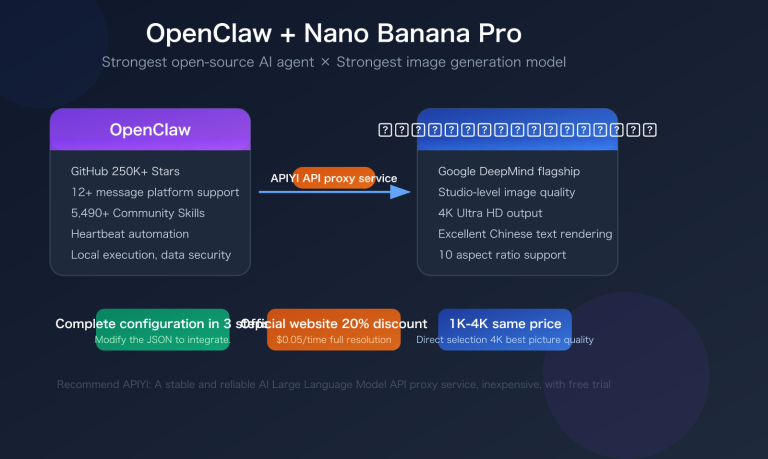
| APIYI (Recommended) | $0.05 | 79% | ⭐⭐⭐⭐⭐ | ✅ | Official relay, no rate limits, 1-4K same price |
| Google Batch API | $0.12 | 50% | ⭐⭐⭐⭐ | ✅ | 24-hour latency |
| Kie.ai | $0.09-0.12 | 33-50% | ⭐⭐⭐⭐ | ✅ | Supports smart 4K upscaling |
| PiAPI | $0.105 | 56% | ⭐⭐⭐ | ✅ | Minimum top-up required |
| AI Studio Free | $0 | 100% | ⭐⭐ | ❌ | 1,500 image daily limit, testing only |
Detailed Breakdown
Option 1: APIYI Platform (Top Recommendation)
APIYI (apiyi.com) is the most cost-effective choice for calling the Nano Banana Pro API:
| Feature | Details |
|---|---|
| Price | $0.05/call, same price for 1K-4K |
| Savings Rate | 79% cheaper than official 4K pricing |
| Stability | Official channel relay ensures consistent quality |
| Rate Limits | No speed limits, high concurrency support |
| Commercial License | Fully supports commercial use |
| API Compatibility | 100% compatible with official Google API formats |
🎯 Pro Tip: APIYI is currently the most stable and affordable way to call the Nano Banana Pro API. They invest a lot in devops to keep things business-ready, which is why it's our primary model for high daily volume.
Option 2: Google Batch API
This is the official batch processing API, perfect for scenarios where you don't need results instantly:
- Price: $0.12/image (4K)
- Latency: Results returned within 24 hours
- Best for: Bulk processing, offline tasks, and cost-sensitive apps
Option 3: Kie.ai
Offers native 2K output along with smart 4K upscaling features:
- Price: 2K for $0.09, 4K for $0.12
- Highlights: Improved text rendering capabilities
- Note: 4K is achieved via upscaling, not native generation
Option 4: Google AI Studio Free Tier
Great for the initial dev and testing phase:
- Price: Completely free
- Limits: 1,500 images per day, no commercial license
- Note: Requires a VPN in certain regions; stability can be hit or miss
Nano Banana Pro API Pricing Examples
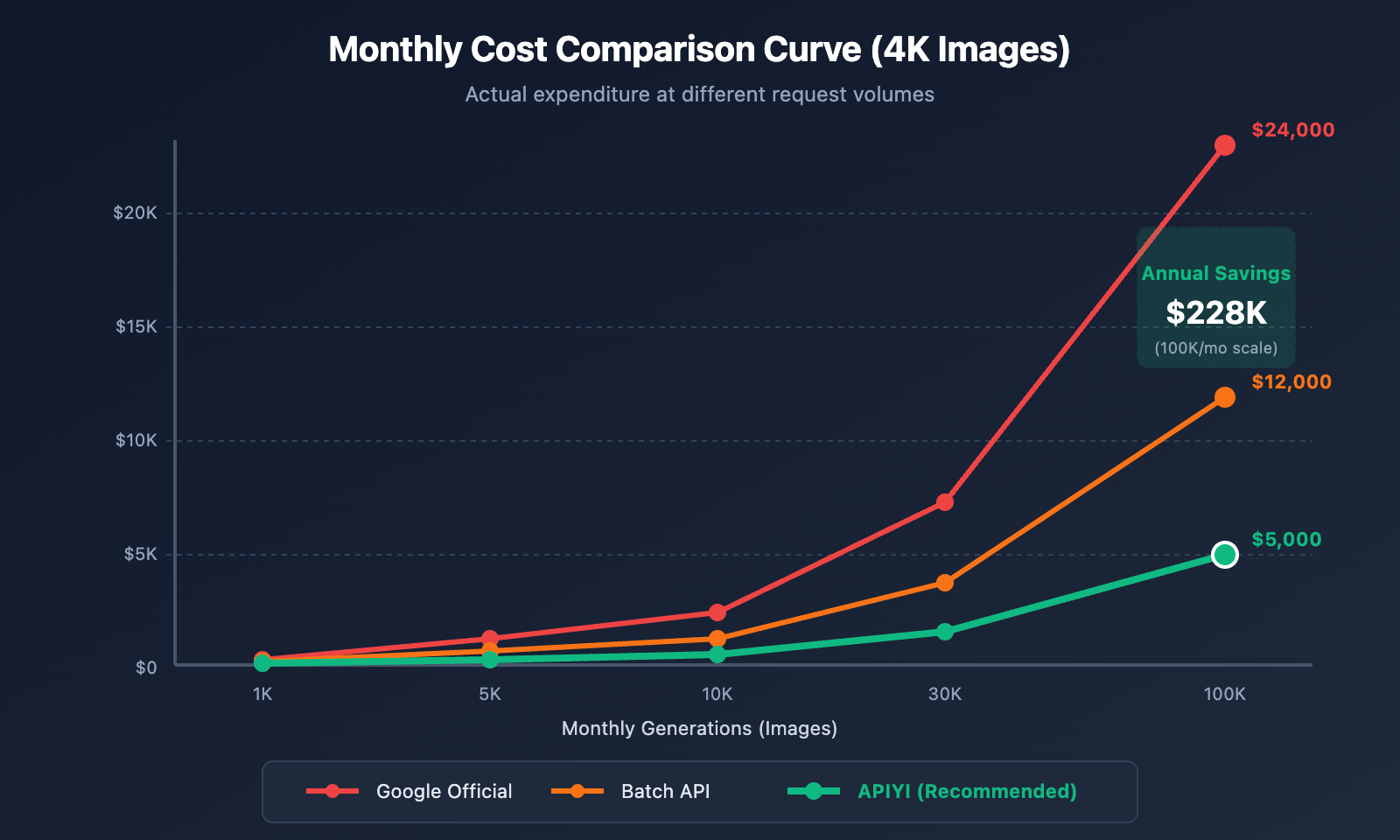
Let's use concrete numbers to compare the actual cost differences between each solution.
Monthly Cost Comparison (Taking 4K images as an example)
| Monthly Generations | Google Official | Google Batch | APIYI | Amount Saved |
|---|---|---|---|---|
| 1,000 images | $240 | $120 | $50 | $190 |
| 5,000 images | $1,200 | $600 | $250 | $950 |
| 10,000 images | $2,400 | $1,200 | $500 | $1,900 |
| 30,000 images | $7,200 | $3,600 | $1,500 | $5,700 |
| 100,000 images | $24,000 | $12,000 | $5,000 | $19,000 |
Annual Cost Savings
| Usage Scale | Official Annual Fee | APIYI Annual Fee | Annual Savings |
|---|---|---|---|
| Small (1K/mo) | $2,880 | $600 | $2,280 |
| Medium (10K/mo) | $28,800 | $6,000 | $22,800 |
| Large (100K/mo) | $288,000 | $60,000 | $228,000 |
💰 Cost Optimization Tip: For projects with a monthly average generation exceeding 5,000 images, calling through the APIYI (apiyi.com) platform can save nearly $1,000/month—that's over $10,000 in savings per year.
Nano Banana Pro API Quick Integration Guide
Minimalist Code Example
To call Nano Banana Pro via the APIYI platform, just replace the official request URL and key with the ones provided by the platform:
import google.generativeai as genai
from google.generativeai import types

# Configure APIYI platform key
genai.configure(
    api_key="YOUR_APIYI_KEY",
    transport="rest",
    client_options={"api_endpoint": "https://api.apiyi.com"}  # APIYI Unified Interface
)

# Call Nano Banana Pro to generate image
model = genai.GenerativeModel("nano-banana-pro")
response = model.generate_content(
    "A cute orange cat sitting on a windowsill, sunlight streaming in, ultra-high-definition photography style",
    generation_config=types.GenerationConfig(
        response_modalities=["image"],
        image_output_options=types.ImageOutputOptions(
            output_format="png"
        )
    )
)

# Save the generated image
image_data = response.candidates[0].content.parts[0].inline_data.data
with open("output.png", "wb") as f:
    f.write(image_data)
Using OpenAI SDK Compatible Interface
APIYI also provides an OpenAI-compatible interface, making it easy to migrate existing projects:
import openai
import base64

client = openai.OpenAI(
    api_key="YOUR_APIYI_KEY",
    base_url="https://api.apiyi.com/v1"  # APIYI Unified Interface
)

response = client.images.generate(
    model="nano-banana-pro",
    prompt="A cute orange cat sitting on a windowsill, sunlight streaming in, ultra-high-definition photography style",
    n=1,
    size="2048x2048"
)

# Get image URL or Base64 data
image_url = response.data[0].url
print(f"Generation successful: {image_url}")
📦 Click to expand full code example (including error handling)
import google.generativeai as genai
from google.generativeai import types
import time
import os

class NanoBananaProClient:
    """Nano Banana Pro API Call Wrapper"""

    def __init__(self, api_key: str, base_url: str = "https://api.apiyi.com"):
        """
        Initialize client

        Args:
            api_key: APIYI platform key
            base_url: API endpoint address
        """
        genai.configure(
            api_key=api_key,
            transport="rest",
            client_options={"api_endpoint": base_url}
        )
        self.model = genai.GenerativeModel("nano-banana-pro")

    def generate_image(
        self,
        prompt: str,
        output_path: str = "output.png",
        max_retries: int = 3
    ) -> str:
        """
        Generate image

        Args:
            prompt: Image description prompt
            output_path: Output file path
            max_retries: Maximum retries

        Returns:
            Generated image file path
        """
        for attempt in range(max_retries):
            try:
                response = self.model.generate_content(
                    prompt,
                    generation_config=types.GenerationConfig(
                        response_modalities=["image"],
                        image_output_options=types.ImageOutputOptions(
                            output_format="png"
                        )
                    )
                )

                # Check response
                if not response.candidates:
                    raise ValueError("Failed to get generation results")

                # Extract image data
                image_data = response.candidates[0].content.parts[0].inline_data.data

                # Save image
                with open(output_path, "wb") as f:
                    f.write(image_data)

                return output_path

            except Exception as e:
                print(f"Attempt {attempt + 1} failed: {e}")
                if attempt < max_retries - 1:
                    time.sleep(2 ** attempt)  # Exponential backoff
                else:
                    raise

        return output_path

# Usage example
if __name__ == "__main__":
    client = NanoBananaProClient(
        api_key=os.getenv("APIYI_KEY"),
        base_url="https://api.apiyi.com"
    )

    result = client.generate_image(
        prompt="A cute orange cat sitting on a windowsill, sunlight streaming in, ultra-high-definition photography style",
        output_path="cat_photo.png"
    )
    print(f"Image saved: {result}")
🚀 Quick Start: We recommend getting your API Key through the APIYI (apiyi.com) platform; you can finish the integration in just 5 minutes. The platform provides full SDK example code for download here: xinqikeji.feishu.cn/wiki/W4vEwdiCPi3VfTkrL5hcVlDxnQf
Nano Banana Pro vs. Other Image Generation Models Comparison
Besides looking for a cheaper way to access Nano Banana Pro, you can also consider other image generation models as alternatives.
Mainstream Model Comparison
| Model | Price/Image | Image Quality | Text Rendering | Generation Speed | Best Use Cases |
|---|---|---|---|---|---|
| Nano Banana Pro | $0.05-0.24 | ⭐⭐⭐⭐⭐ | ⭐⭐⭐⭐⭐ | 3-8s | Commercial-grade visual content |
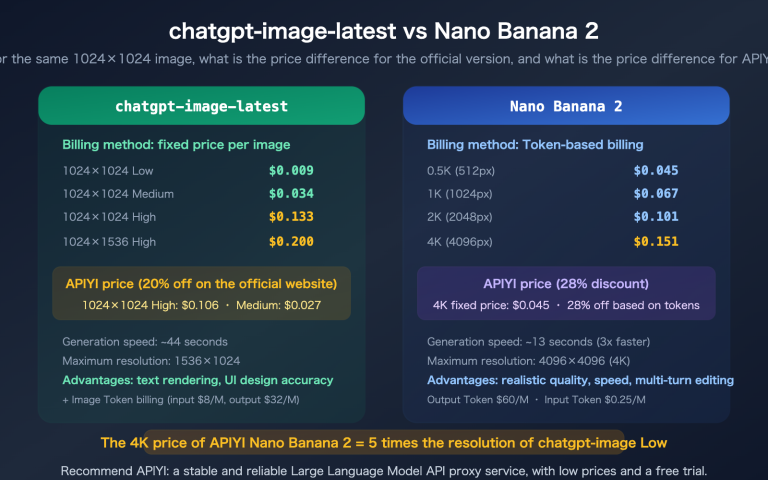
| GPT Image 1.5 | $0.04-0.08 | ⭐⭐⭐⭐ | ⭐⭐⭐⭐ | 5-15s | Creative iteration, rapid prototyping |
| Qwen-Image-2512 | $0.075 | ⭐⭐⭐⭐ | ⭐⭐⭐⭐⭐ | 8-12s | Precise editing, poster design |
| GLM-Image | Free (Open Source) | ⭐⭐⭐⭐ | ⭐⭐⭐⭐⭐ | 252s (H100) | Infographics, technical charts |
| Z Image API | $0.004 | ⭐⭐⭐ | ⭐⭐⭐ | 1-3s | E-commerce batches, social media content |
Selection Advice
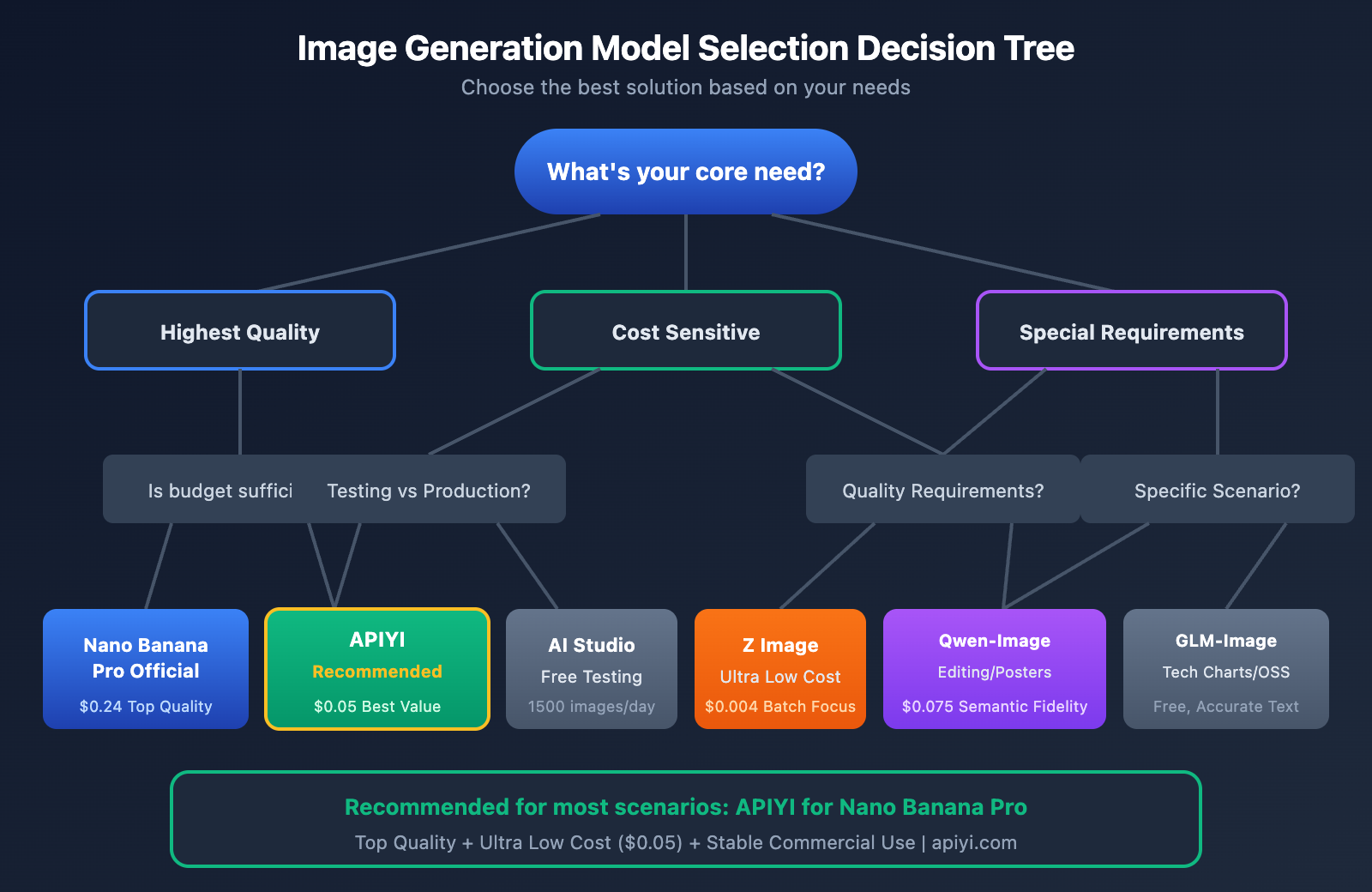
When to choose Nano Banana Pro:
- Commercial projects requiring top-tier image quality.
- Design drafts where high text rendering precision is critical.
- When you need to quickly generate high-fidelity realistic images.
- Brand visual content, product photography, and advertising materials.
When to consider other models:
- Extremely low budget: Z Image API ($0.004/image).
- Need for precise editing: Qwen-Image-2512 (high semantic fidelity).
- Generating technical charts: GLM-Image (Free and open source).
- Rapid prototype iteration: GPT Image 1.5 (High flexibility).
💡 Summary Advice: For most commercial applications, calling Nano Banana Pro via the APIYI (apiyi.com) platform is the sweet spot—it gives you top-tier image quality while keeping costs firmly under control.
Experience Nano Banana Pro's Image Generation Online
Before deciding which plan to go with, it's a good idea to check out Nano Banana Pro's actual image generation quality first.
Free Access Points
| Platform | Address | Free Quota | Features |
|---|---|---|---|
| APIYI Generation Test | imagen.apiyi.com | Limited credits | Instant experience, no registration required |
| Google AI Studio | aistudio.google.com | 1500 images/day | Requires global access, complex interface |
🎨 Generation Test: We recommend visiting imagen.apiyi.com to quickly test Nano Banana Pro's output. Get a feel for the image quality before deciding on your integration plan.
Recommended Test Prompts
The following prompts are great for showing off what Nano Banana Pro can do:
Realistic Portrait:
Professional headshot of a young Asian businesswoman, soft studio lighting,
shallow depth of field, shot on Hasselblad, 8K ultra-detailed
Product Photography:
Minimalist product photography of a luxury watch on white marble surface,
dramatic side lighting, reflection, commercial advertising style
Text Rendering Test:
Modern coffee shop storefront with neon sign reading "BREW & DREAM",
night scene, cinematic lighting, detailed textures
Nano Banana Pro API FAQ
Q1: What's the difference between APIYI's Nano Banana Pro and the official version?
APIYI provides a relay service via official channels, so the image generation quality is exactly the same as the official API. The main differences are:
- Lower Prices: $0.05/gen vs. official $0.134-$0.24/gen
- Easier Access: Direct access from within China without needing a VPN
- Unified Interface: Compatible with various SDK calling methods
By using the APIYI (apiyi.com) platform, you get the same top-tier image quality while significantly cutting down on costs.
Q2: Is it $0.05 for both 1K and 4K resolutions?
Yes. APIYI uses flat pricing for Nano Banana Pro. Whether you're generating 1024×1024 or 4096×4096 images, it's always $0.05 per generation. This is much friendlier for users with high-res needs compared to the official tiered pricing.
Q3: What project sizes is this suitable for?
The APIYI platform scales with you, no matter the project size:
| Project Scale | Daily Volume | Monthly Cost (APIYI) | Recommended Plan |
|---|---|---|---|
| Solo Developer | 10-50 images | $15-75 | Pay-as-you-go |
| Small Team | 100-500 images | $150-750 | Monthly Bundle |
| Medium Enterprise | 1000-5000 images | $1,500-7,500 | Enterprise Partnership |
| Large Platform | 10000+ images | Custom Pricing | Dedicated Channel |
Q4: Are there any rate limits on API calls?
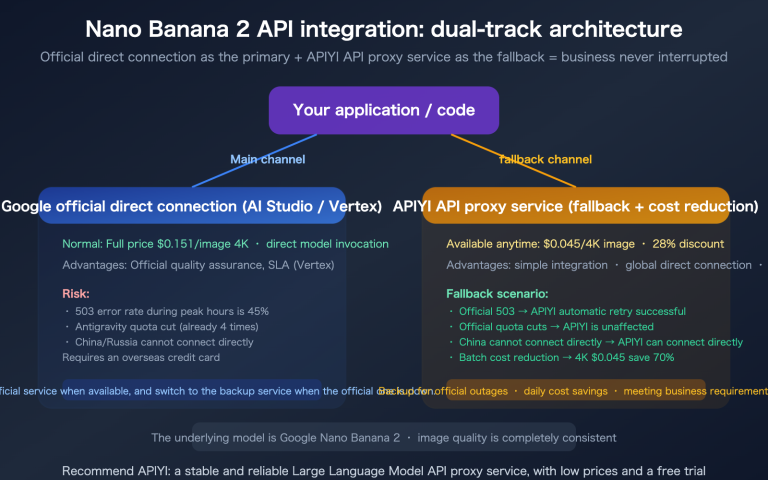
APIYI's Nano Banana Pro API doesn't have rate limits and supports high concurrency. This is crucial for commercial applications that need to batch-generate images. Official APIs often have strict rate limits on free or lower-priced tiers.
Q5: How do you ensure service stability?
APIYI invests heavily in maintenance and operations for Nano Banana Pro:
- Multi-node redundant deployment
- 24/7 service monitoring
- Automatic failover
- Professional tech support
Nano Banana Pro is the most-used model on the APIYI platform daily, and its stability has been proven at a massive scale.
Summary: How to Choose a Nano Banana Pro API Plan
Decision Process
- Define your needs: Daily generation volume, image resolution requirements, and budget constraints.
- Test the results: Head over to imagen.apiyi.com to experience the output quality firsthand.
- Calculate costs: Use the comparison table above to estimate your monthly expenses.
- Pick a plan: Choose the best option based on the cost-to-performance ratio.
Plan Recommendation Summary
| Use Case | Recommended Plan | Why? |
|---|---|---|
| Commercial Apps | APIYI | Stable and commercial-ready; best value at $0.05/request. |
| Dev & Testing | AI Studio | Generous free tier to get you started. |
| Offline Batching | Google Batch | Official channel with acceptable latency for non-real-time tasks. |
| Ultra-low Cost | Z Image API | $0.004/image; quality is acceptable for basic needs. |
For users looking for the perfect balance between image quality and cost, we recommend calling the Nano Banana Pro API through the APIYI (apiyi.com) platform. You'll get official-grade image quality and stable, commercial-ready service for just $0.05 per request.
Resources
Official Documentation:
- Google Gemini API Image Generation Docs: ai.google.dev/gemini-api/docs/image-generation
Developer Resources:
- Example Code Download: xinqikeji.feishu.cn/wiki/W4vEwdiCPi3VfTkrL5hcVlDxnQf
- Online Image Generation Test: imagen.apiyi.com
This article was compiled and published by the APIYI technical team. If you have any questions, feel free to visit apiyi.com for technical support.