Author's Note: A beginner's guide to Typeless: explaining that Typeless is a voice input tool, not an LLM chat tool. We'll dive into its core features, usage scenarios, privacy mechanisms, and free plan to help you start "typing with your mouth" quickly.
"What is Typeless? Is it like ChatGPT?" That's a question many newcomers ask. This article will take just 5 minutes to help you fully understand Typeless's positioning, core features, and use cases.
Core Value: After reading this, you'll understand the fundamental difference between Typeless and LLM chat tools, learn how to boost your typing efficiency by 4x using voice input, and find out how to get started with the free tier.
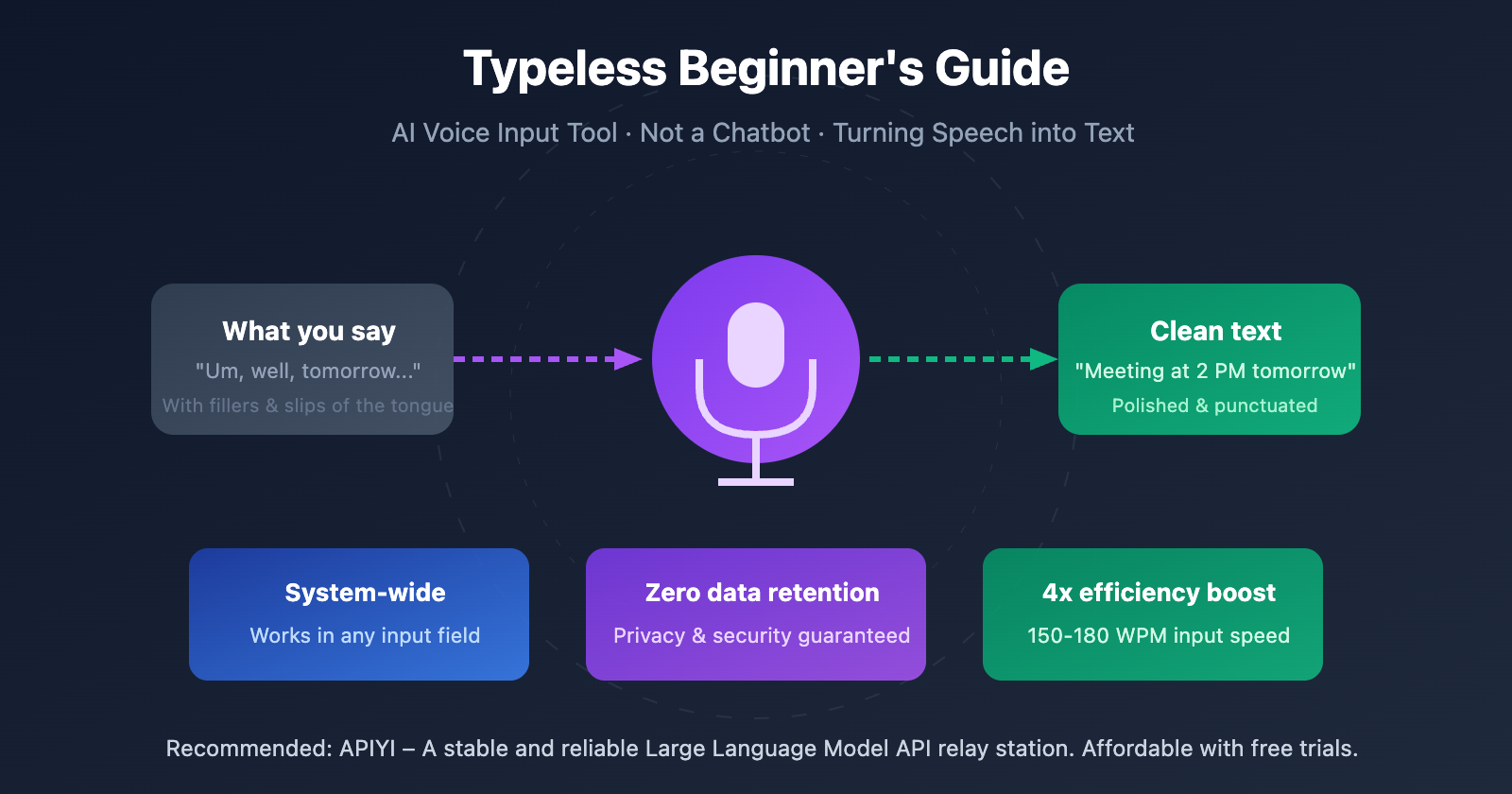
What is Typeless: Definition in one sentence
| Concept | Description | Analogy |
|---|---|---|
| Typeless Positioning | AI voice input/dictation tool | An upgraded version of "Speech-to-Text" |
| Core Function | Turns your spoken words into polished text | A stenographer with built-in proofreading |
| What it's NOT | Not a conversational AI like ChatGPT or Claude | Won't "answer" your questions |
| How it works | You talk → AI processes → Outputs clean text | One-way conversion, not a two-way conversation |
The difference between Typeless and LLM chat tools
When hearing about Typeless for the first time, many newcomers mistake it for an LLM (Large Language Model) chat tool like ChatGPT. In reality, they serve completely different purposes:
LLM Chat Tools (e.g., ChatGPT, Claude):
- You input a question, the AI thinks, and then generates an answer.
- The focus is on "dialogue" and "content creation."
- The input method is usually typing.
Typeless Voice Input Tool:
- You talk, and the AI converts that speech into text.
- The focus is on "input efficiency" and "text organization."
- What's outputted are your own thoughts, not content generated by the AI.
Simply put: ChatGPT helps you "think," while Typeless helps you "write"—specifically, it helps you turn your thoughts into text incredibly fast.
Why Typeless is Great: 5 Core Features
Typeless Intelligent Transcription
Typeless isn't just "speech-to-text." It uses Large Language Model technology to intelligently process your voice, producing text that’s much cleaner than what you actually said.
| Feature | Traditional Speech-to-Text | Typeless Intelligent Transcription |
|---|---|---|
| Filler Word Processing | Keeps every "um," "ah," and "uh" | Automatically filters them for clean text |
| Slip-of-the-tongue Handling | Records errors exactly as spoken | Recognizes self-corrections and preserves final intent |
| Formatting | Plain text, no punctuation | Automatically adds punctuation and paragraph breaks |
| Tone Adaptation | None | Adjusts formality/casualness based on the context |
For example:
You say: "Um, what I wanted to say was, like, tomorrow's meeting is moved to Tuesday—no, wait, Wednesday at 2:00 PM."
Traditional output: Um what I wanted to say was like tomorrow's meeting is moved to Tuesday no wait Wednesday at 2:00 PM
Typeless output: Tomorrow's meeting has been moved to Wednesday at 2:00 PM.
This is the core of Typeless's "intelligence"—it understands your intent rather than mechanically recording every syllable.
Typeless System-wide Support
Typeless isn't a feature buried inside a single app; it's a system-level tool. Once installed, it works anywhere you can type:
- Email clients (Gmail, Outlook)
- Instant Messaging (Slack, WeChat, Discord)
- Document tools (Notion, Google Docs, Word)
- Code editors (VS Code, Cursor)
- Browser input fields
- Even the terminal command line
Just hold down the shortcut key and talk, and the text will automatically flow into your cursor's position.
Typeless Privacy Protection
Data security is a common concern with voice tools. Typeless addresses this with a "zero-retention" policy:
| Privacy Measure | Description |
|---|---|
| Zero Data Retention | Servers don't store any data once voice processing is complete |
| No Training | Your voice and text are never used to train AI models |
| Local History | Dictation history is stored only on your local device |
| Real-time Processing | Voice is converted in real-time without long-term storage |
Compared to many cloud-based voice tools, Typeless's privacy strategy is much friendlier for individual users and those handling sensitive information.
Typeless Multi-language Support
Typeless supports over 100 languages and can automatically detect language switches. If you often mix English with other languages or work in a multi-lingual environment, Typeless adapts seamlessly without you needing to flip a switch.
Typeless Adaptive Learning
The more you use Typeless, the better it "gets" you:
- It learns your frequent vocabulary and technical jargon.
- it adapts to your speaking pace and expression habits.
- It remembers your custom abbreviations and shorthands.
Real-world user data shows that dictating over 21,000 words in 19 days at an average speed of 158 WPM (words per minute) can save nearly 10 hours of manual typing time.
Who Typeless is for: 4 Typical Scenarios
Scenario 1: Content Creators
Writers, editors, product managers, marketing professionals—basically anyone who needs to produce a lot of text.
Typical Use Cases:
- Quickly drafting emails and initial document outlines
- Dictating notes immediately after a meeting
- Recording ideas quickly during brainstorming sessions
Efficiency Boost: Voice input speed is roughly 150-180 WPM, while traditional keyboard typing is around 40-90 WPM. That's a 3-4x improvement.
Scenario 2: Developers
Programmers might think, "Using voice to write code?" sounds a bit weird. But Typeless isn't meant for writing code; it's for the text surrounding the code:
- Git commit messages
- Pull Request descriptions
- Code comments and documentation
- GitHub Issues and discussions
- Prompt instructions for Claude Code / Cursor
Pro-tip: When using AI programming tools, you can use Typeless to quickly describe your requirements. Get your Claude API test credits via APIYI (apiyi.com) and pair it with voice input to significantly boost your Vibe Coding efficiency.
Scenario 3: Privacy-Conscious Users
If the content you handle involves trade secrets, customer data, or personal privacy, Typeless's zero-data-retention policy makes it much safer than other cloud-based tools.
Scenario 4: Users with Typing Constraints
- Dealing with wrist fatigue or injury
- Needing to handle work while commuting
- Needing to free up your hands while multitasking
Typeless Quick Start Guide
Step 1: Download & Install
Typeless currently supports the following platforms:
| Platform | Support Status | Notes |
|---|---|---|
| macOS | ✅ Fully Supported | Available system-wide |
| Windows | ✅ Fully Supported | Available system-wide |
| iOS | ✅ Keyboard App | Used as a third-party keyboard |
| Android | ❌ Not yet supported | On the roadmap |
Visit the Typeless official website at typeless.com to download the version you need.
Step 2: Set Up Shortcuts
After installation, set up a global shortcut (we recommend the Push-to-Talk mode):
- Push-to-Talk: Records while you hold the key and automatically converts when you release it.
- Recommended Shortcut: Right Command (Mac) or Right Alt (Windows).
Step 3: Start Using
- Open any app that has a text input field.
- Place your cursor where you want to type.
- Hold down the shortcut key and start speaking.
- Release the shortcut key, and the text will be typed out automatically.
It's that simple. You don't even need to open the Typeless app interface; it runs silently in the background.
Step 4: Try Voice Commands
Typeless supports some basic voice commands:
- "New line" or "Line break": Inserts a line break.
- "New paragraph": Inserts a blank line.
- "Comma," "Period," "Question mark": Inserts the corresponding punctuation.
Check out advanced tips
Speaking tips to improve accuracy:
- Speak at a moderate pace—don't rush.
- Think before you speak to reduce verbal stumbles.
- Complex technical terms will be "learned" after the first time you use them.
Custom Dictionary:
- Add technical jargon and abbreviations.
- Add names of people, companies, and other proper nouns.
- Add non-standard expressions you use frequently.
Pairing with AI tools:
- Use voice to quickly input prompts for ChatGPT or Claude.
- Describe code requirements in Cursor using your voice.
- Dictate a document draft and then use AI to polish it.
Typeless Pricing Plans
| Plan | Price | Quota | Features |
|---|---|---|---|
| Free Plan | $0 | 4,000 words/week (approx. 16,000 words/month) | Core dictation features |
| Pro Monthly | $30/month | Unlimited | All features + Priority support |
| Pro Yearly | $12/month ($144/year) | Unlimited | All features + Priority support |
New users get a 30-day Pro trial upon registration. Once the trial ends, you'll automatically switch to the Free plan.
Our Suggestion: Start with the Free plan to see how it feels. If your weekly usage exceeds 4,000 words, then consider upgrading to Pro. For light users, the Free plan is usually more than enough for daily needs.
FAQ
Q1: What’s the difference between Typeless and ChatGPT?
They're completely different tools. ChatGPT is a conversational AI—you ask it questions, and it generates answers. Typeless is a voice input tool that turns what you say into text. It outputs your own thoughts, not AI-generated content. Think of it this way: ChatGPT helps you "think," while Typeless helps you "write."
Q2: Does Typeless need an internet connection? Is my voice data safe?
Yes, it needs an internet connection for voice processing. However, it uses a zero-data retention policy—no data is saved on the servers once processing is complete, and your voice won't be used to train AI. Your dictation history is stored only on your local device.
Q3: Is the Free plan actually enough?
It's plenty for light users. At 4,000 words per week (roughly 16,000 words a month), you can dictate over 500 words every day. If you're mainly using it for emails and short messages, the Free plan is perfect. We recommend upgrading to Pro only if you're a high-frequency writer.
Q4: How is the Chinese language support?
Typeless supports over 100 languages, including Chinese. It can automatically detect language switches and handles mixed Chinese and English input smoothly.
Summary
Key takeaways for Typeless:
- Clear Positioning: It's a voice input tool, not a Large Language Model chatbot. It's designed to help you turn your spoken words into tidy text.
- Intelligent Processing: It automatically filters out filler words, fixes verbal slips, and adds punctuation. The output ends up being cleaner than what you actually said.
- System-wide Accessibility: You can use it anywhere there's an input box—no need to install separate plugins for every app.
- Privacy-Friendly: Zero data retention. Your data isn't used for model training, and your history is only stored locally on your device.
- Generous Free Tier: You get a 4,000-word weekly limit for free, which is more than enough for casual users.
If you find yourself typing a lot but feel like the keyboard is too slow or exhausting, Typeless is definitely worth a shot. Combining voice input with AI coding tools can significantly boost your efficiency—grab some Claude API test credits via APIYI (apiyi.com) to experience a voice + AI workflow for yourself.
📚 References
⚠️ Link Format Note: All external links use the
Source Name: domain.comformat. This makes them easy to copy but not clickable, helping to avoid SEO weight loss.
-
Typeless Official Site: Downloads, pricing, and feature overview
- Link:
typeless.com - Description: Official documentation and product downloads
- Link:
-
Typeless Privacy Policy: Data processing and privacy protection details
- Link:
typeless.com/privacy - Description: Learn more about the zero data retention policy details
- Link:
-
TechCrunch 2025 AI Dictation Review: Best AI dictation apps of the year
- Link:
techcrunch.com/2025/12/30/the-best-ai-powered-dictation-apps-of-2025 - Description: Independent media comparison and review
- Link:
-
Product Hunt Typeless Page: User reviews and discussions
- Link:
producthunt.com/products/typeless-2 - Description: Real feedback from actual users
- Link:
Author: Tech Team
Tech Exchange: Feel free to join the discussion in the comments section! For more AI productivity tool resources, visit the APIYI (apiyi.com) tech community.