Author’s note: Before choosing a third-party AI subscription or API access provider, use the eight-point checklist in this article to check account security, order status, refund rules, support channels, invoicing, and payment. Then compare prices.
Many users and teams in China want to use ChatGPT Plus and Large Language Model APIs, but find official payment methods inconvenient. That’s when they start looking at third-party providers. The problem is that these providers vary widely in quality: even at the same price, account security and after-sales support can be very different. This article gives you an 8-point checklist for choosing a third-party AI access provider, covering both subscription top-ups and API services.
This isn’t a guide to finding the cheapest provider. We won’t compare specific platforms. Instead, we’ll focus on what you need to ask before paying and why each item matters.
What you’ll get: A ready-to-use checklist and a way to prioritize what matters, so you can tell deal-breakers from nice-to-haves instead of ordering based on price alone.
Key Checks for Third-Party AI Access Providers
Start with a basic principle: if you have a supported payment method, use the official channel first. Official subscription pricing is transparent, and the relationship between your account and subscription is straightforward. Arranging international payment yourself is also an option, but it takes some research: payment rules vary by region, and the setup can be a hassle. If neither option is convenient, you can consider a third-party provider—and that’s when careful vetting becomes essential.
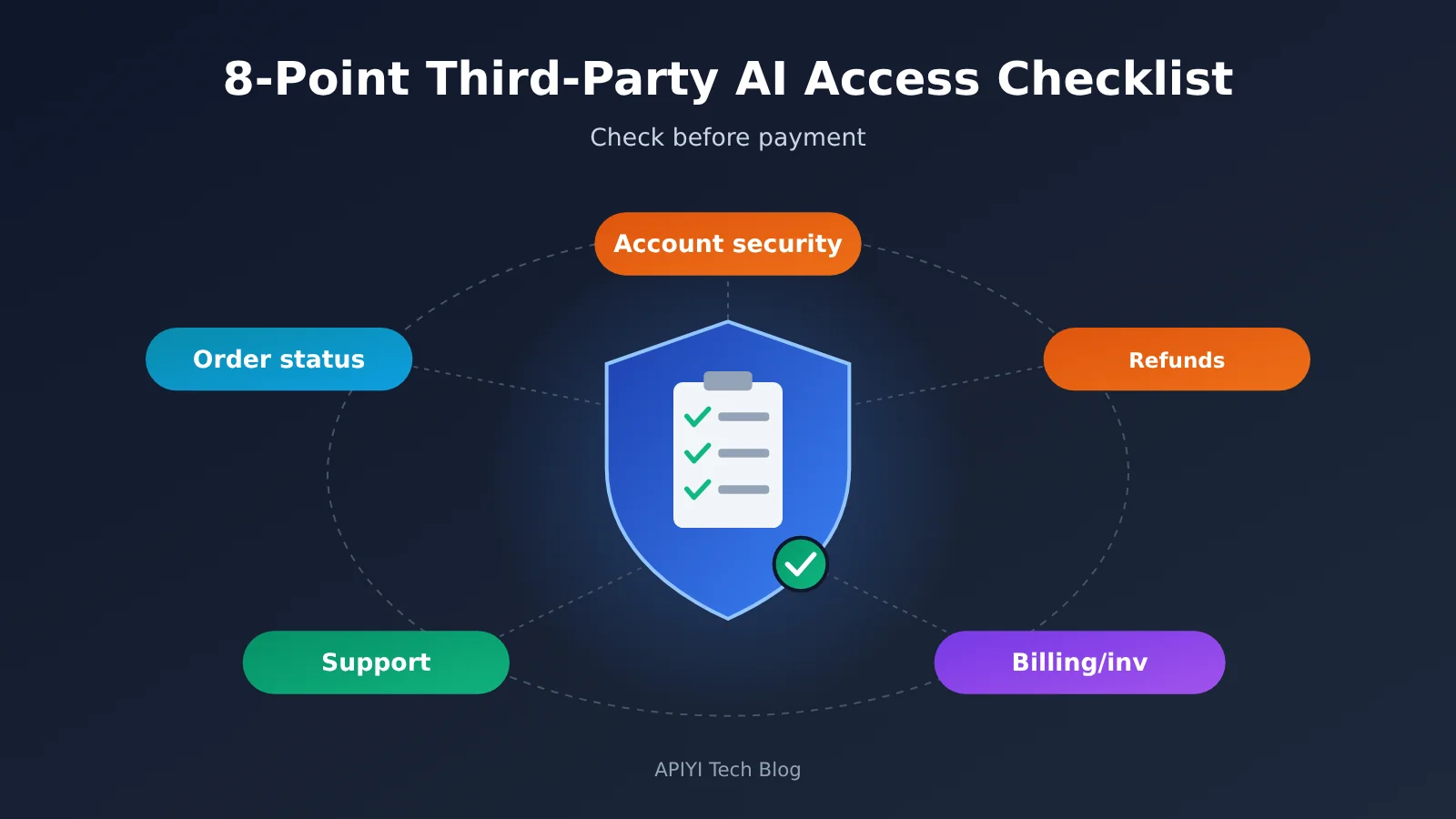
The table below summarizes the eight-point checklist in this article. The first four items come from concerns repeatedly raised in community discussions; the last four cover additional considerations for API services and team procurement.
| No. | Check | Key question | Risk level |
|---|---|---|---|
| 1 | Credential requirements | Does the provider ask for your account password or email verification code? | Red line |
| 2 | Order status | Can you see a clear processing status after placing an order? | Important |
| 3 | Refund policy | Are the conditions and timelines for refunds clearly stated if a subscription or top-up fails? | Red line |
| 4 | Customer support and after-sales service | Are there accessible, responsive support and after-sales channels? | Important |
| 5 | API key management | Can you create, disable, and rotate keys yourself? | Important for API services |
| 6 | Usage details and logs | Can you check the model, tokens, and charges for each call? | Important for API services |
| 7 | Billing transparency | Are unit prices, multipliers, and minimum charges publicly disclosed and fixed? | Important |
| 8 | Invoicing and payment | Does the provider accept business payments and issue official invoices? | Essential for teams |
Why Account Security Comes First When Choosing a Third-Party AI Access Provider
Credential requirements are a red line because handing over your account password and email verification code is almost the same as handing over complete control of your account. Someone with both can log in, view your conversation history, change the linked email address, or even take over the account. If your account contains work documents, code snippets, or customer information, that risk is far more serious than the extra money you might save.
A safer approach is to choose a provider that can process orders using only non-sensitive identifiers. For example, community members have mentioned platforms that handle subscription top-ups using an account ID or a similar identifier, without requiring a password or verification code. When vetting a provider, ask directly, “What information do you need from me to process the order?” If they insist on a password or verification code, rule them out.
Order Status and Refund Policies for Third-Party AI Access
Order status and refund policies may sound like after-sales details, but they determine what options you have when something goes wrong. With clear order statuses, you can see where an order is stuck. If all you get is “we’re processing it,” you can only wait. The same goes for refunds: a policy published on the provider’s website is something you can refer back to; promises made in chat are much harder to verify later.
Before paying, confirm three things: what qualifies as a failed subscription or top-up, whether a failure results in a full or partial refund, and how long the refund takes to arrive. If the provider is vague about any of these, its process may not be transparent enough.
How to Vet Third-Party Subscription Top-Up and API Services
“Third-party AI access” covers two quite different types of service. Subscription top-up providers help you activate memberships such as ChatGPT Plus or Pro. API proxy services, such as APIYI, provide a unified Large Language Model API and charge based on usage. Their risks aren’t quite the same, so you’ll need to focus on different things when vetting them.
| Dimension | Subscription top-up service | API proxy service |
|---|---|---|
| What you receive | A membership activated on your account | An API key and endpoint URL |
| Account risks | How you provide your credentials | Key leaks and access management |
| Billing | One-time monthly or annual payment | Charged per token or call, deducted from a prepaid balance |
| Key support concern | Whether you can get a refund if activation fails | Whether you can investigate billing discrepancies and resolve balance issues |
| Team purchasing priorities | Whether the provider issues valid invoices | Invoices, business payments, and usage reconciliation |
| Items to check | Items 1–4 | All items 1–8 |
4 Checks Specific to Third-Party API Access
Key management is the foundation of API security. A reliable platform should let you create multiple API keys, assign different keys to different projects, and disable or delete them at any time. That way, if a key is accidentally exposed in a public repository, you can disable it immediately before someone drains your balance.
Usage details and logs determine whether you can reconcile your charges. Ideally, you should be able to check the time, model name, input and output token counts, and actual charge for every call. If the dashboard only shows a total balance, you’ll have little to go on when disputing an unexpected charge. When evaluating an API proxy service like APIYI, check how detailed its call logs are and whether you can filter them by model and key.
Billing transparency is key to avoiding hidden price increases. Check whether unit prices are public, whether any multipliers apply, and whether you’ll be notified in advance of price changes. Some platforms express prices using “recharge multipliers” or “credits,” which can make the actual cost hard to see. It’s best to calculate the cost yourself and compare it with official prices.
Invoicing and payments are especially important for team purchases. Individual users may not care about invoices, but business reimbursements and accounting require valid invoices and traceable payment records. If a provider only accepts personal transfers and can’t issue invoices, a team purchase is unlikely to pass finance review.
Getting Started with Third-Party AI Access: A 5-Step Vetting Process
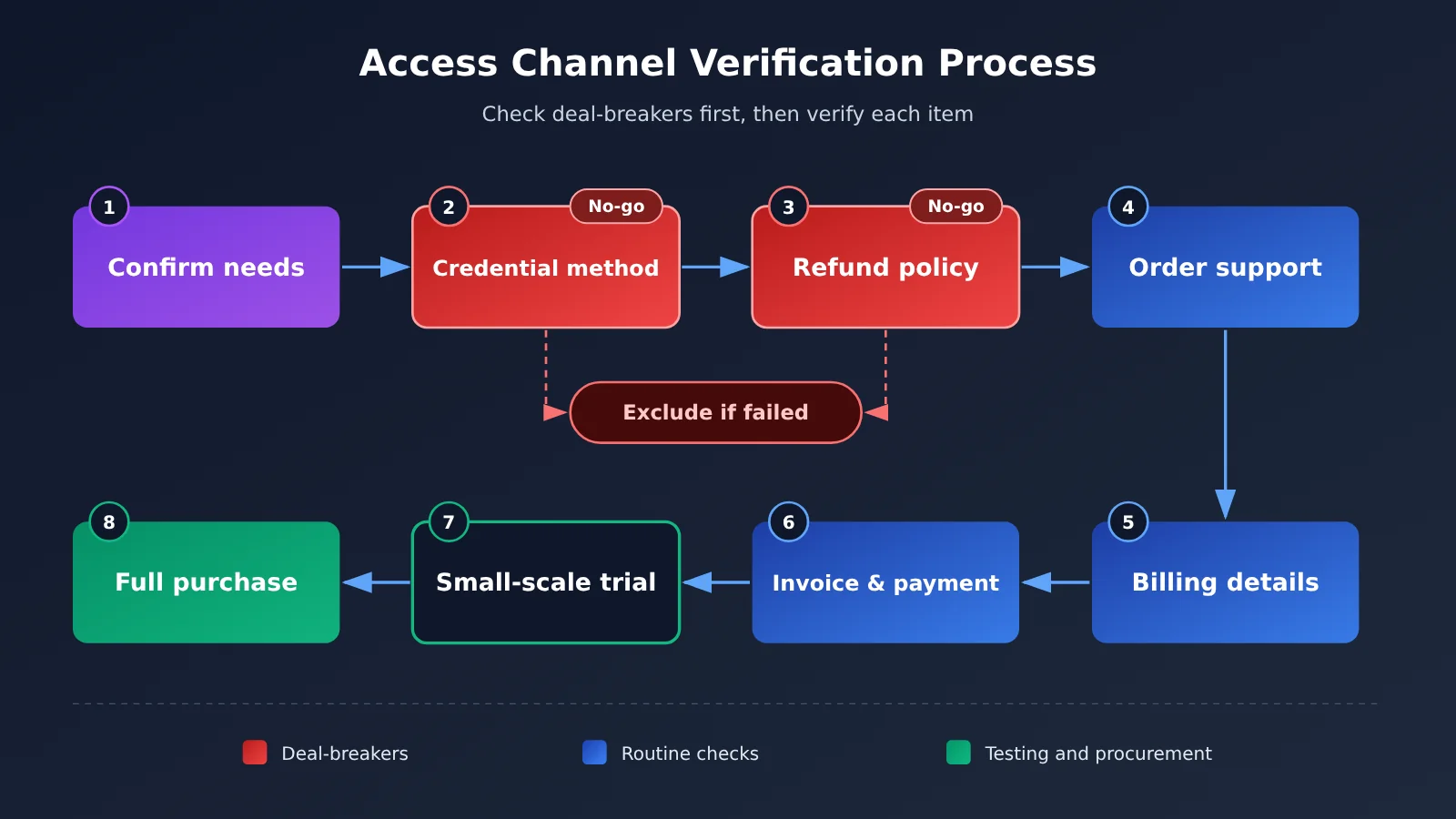
With the checklist in hand, follow these five steps. The process usually doesn’t take long, but it can help you filter out most unreliable providers.
- Define what you need: Decide whether you need a subscription or API access, and whether it’s for personal use or a team purchase. This determines what you’ll need to check.
- Check two deal-breakers first: Ask whether you’ll need to provide a password or verification code, and whether the refund policy is documented in writing. If either check fails, rule the provider out.
- Review public information: Read the provider’s pricing page, terms of service, refund policy, and help documentation. Make sure the rules are published, not just relayed verbally by customer support.
- Contact support to verify: Send support one or two specific questions. Pay attention to response times and how knowledgeable the answers are. This also tests whether the support channel is actually available.
- Start small, then scale up: Try the smallest payment or plan first. Complete the activation process or make an API call, then confirm that your usage details match the charges before committing to a larger purchase.
For step 4, use the questions below to turn the vague question “Is this provider reliable?” into specific questions they can answer.
| What to check | Questions to ask the provider | What a good answer looks like |
|---|---|---|
| Credentials | What information do you need from me to process an order? | No password or verification code required |
| Order status | Where can I check the status after placing an order? | A dedicated order page or status notifications |
| Refund policy | What counts as a failure? How much is refunded, and within what time frame? | Written rules with clear conditions |
| Support channel | How do I get in touch if there’s a problem? | A dedicated contact channel, not an ad hoc private chat |
| Usage details | Can I see the charge for each API call? | Records searchable by time and model |
| Quota source | Where does the API quota come from? | Can identify the source and is willing to explain |
| Invoicing and payment | Do you support business bank transfers and issue invoices? | Clearly specifies the supported invoice types |
For example, if you’re evaluating APIYI for API access, you can send these questions to the provider one by one. Ask about the quota source, how call logs are recorded, and whether business payments and invoicing are supported. Rely on the provider’s written answers and terms—they’re more useful than any marketing claim.
🚀 Quick-start tip: If you need API access, register at APIYI apiyi.com and start with a small top-up. Point the
base_urlin your usual OpenAI-compatible client to the address in the platform documentation, make a test call, then check the dashboard to confirm that the call log matches the charge. That’s the most direct way to complete the step 5 check.
Assessing Risk Priorities for Third-Party AI Access Providers
The eight checks aren’t equally important. When making a decision, sort them into three tiers: deal-breakers, important factors, and bonus features. Walk away if a provider fails a deal-breaker, use the important factors to decide whether it’s worth a trial, and use the bonus features to choose between candidates.
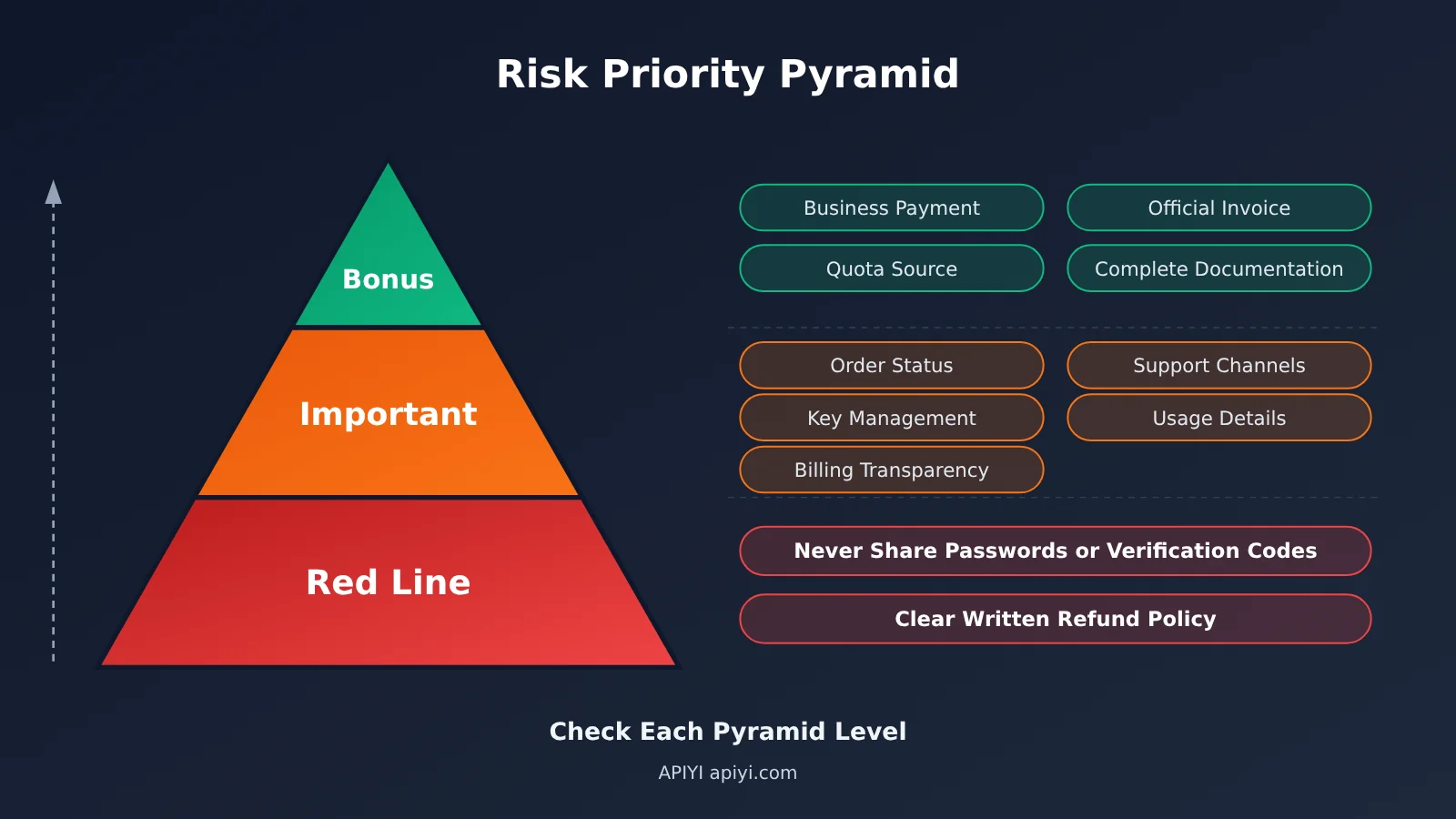
| Priority | Check | What to do if it falls short |
|---|---|---|
| Deal-breaker | Requests your password or verification code | Rule it out immediately; don’t engage further |
| Deal-breaker | No written refund rules | Rule it out immediately |
| Important | No order progress updates; support is hard to reach | Proceed cautiously and only try the smallest possible amount |
| Important | No usage details; billing isn’t transparent | Generally not recommended for API use |
| Bonus | Doesn’t support business payments or invoices | May be acceptable for individuals; teams should look elsewhere |
| Bonus | Incomplete documentation or explanation of credit sources | Use this to compare candidates |
Why isn’t price in this table? Because it’s worth comparing only after a provider has passed the deal-breaker checks. A cheap provider that asks for your verification code could cost you your entire account. With a cheap provider that has no refund rules, one failed order could wipe out all your savings. Community discussions repeatedly stress the same point: don’t place an order just because the price is low. Understand how delivery works and what the refund rules are before you pay.
💡 Selection tip: For developers who need to use multiple models, an API proxy service offers a unified interface and centralized management. Put APIYI apiyi.com and other candidates on the same checklist and score them item by item. Focus on invocation logs, billing rules, and invoice support rather than just comparing unit prices.
Frequently Asked Questions
Q1: What is a third-party AI access provider?
It’s a provider outside the official channel that helps users access AI subscriptions or APIs. These services generally fall into two categories: subscription activation services, which help you sign up for plans like ChatGPT Plus or Pro, and API proxy services, which offer a unified interface and usage-based billing. They mainly help when paying the official provider is inconvenient.
Q2: Should I use a third-party or the official channel?
Use the official channel whenever possible. Official pricing is transparent, and your account and subscription are directly connected to the provider. Consider a third party only when official payment is genuinely inconvenient or arranging an international payment yourself would cost too much. Before you do, complete the red-line checks in this article.
Q3: Why shouldn’t I give a third party my password and email verification code?
A password and verification code together give someone essentially full control of your account. They can log in, view your conversation history, and even change your account details. Even if the provider has no malicious intent, credentials can leak during transfer or storage. A service that only needs a non-sensitive identifier, such as an account ID, carries much less risk.
Q4: What should I check for an API proxy service versus a subscription activation service?
For subscription activation, focus on how credentials are handled and whether you’ll get a refund if activation fails. For an API proxy service, also check API key management, usage logs, billing transparency, and invoicing. API usage is billed continuously, so the ability to reconcile charges matters more than it does for a one-time activation.
Q5: How can I quickly check whether an API proxy platform works?
Try this sequence: sign up, add a small amount of credit, make a successful API call, and check the logs and charges. For example, after registering with APIYI at apiyi.com, follow its documentation to configure the endpoint in an OpenAI-compatible client. Call a model you commonly use, then check the dashboard to make sure the model, token usage, and charge for that call are clear and consistent.
Q6: What else should teams consider when purchasing third-party AI services?
Teams should confirm that the provider supports corporate payments, official invoices, and usage reconciliation. Ideally, you should also be able to assign separate API keys to different projects so costs can be attributed correctly. When evaluating platforms such as APIYI, ask customer support to confirm the supported invoice types and corporate payment process in writing before submitting an internal approval request.
Q7: What are the limitations of the checklist in this article?
The checklist can help reduce risk, but it can’t replace reading the terms of service. Third-party services may involve uncertainty around compliance and official terms, so refer to the latest terms from both the official provider and the service provider. The checklist also can’t verify claims about where a provider’s capacity comes from or its service levels. You’ll need to assess those yourself based on written commitments and trial results.
Key Takeaways for Evaluating Third-Party AI Access Providers
- Official first: If you have a compliant payment method, the official channel should always be your first choice.
- Two red lines: Never hand over passwords or verification codes, and don’t order without a written refund policy.
- Check order tracking and support: You’ll have somewhere to turn if problems arise when you can track your order and contact support.
- API usage should be verifiable: Look for manageable keys, invocation logs, and transparent pricing.
- Teams need proper documentation: Business payments and valid invoices determine whether a purchase can pass financial review.
- Start small: Try a small purchase on a platform such as APIYI apiyi.com, then check the logs before increasing usage.
Summary
When choosing a third-party AI access provider, the goal isn’t to find the cheapest option. It’s to find one with a transparent transaction process and clear support policies:
- Account security is non-negotiable: Rule out any provider that asks for your password or verification code.
- Get the rules in writing: Rely on written policies for order tracking, refund conditions, and support channels.
- Look for control over API services: Key management, detailed usage records, and transparent billing are all essential.
- Check compliance for team purchases: Business payments and valid invoices are mandatory requirements.
Don’t risk unnecessary trouble with your account just to save a little money. If you need API access to multiple models, consider APIYI apiyi.com as an option. Check it against each item in this guide and run a small test, using actual invocation logs and billing records to make your decision.
📚 References
- V2EX Community Discussion: Ways for users in China to pay for ChatGPT Plus through a third party, and what to watch out for
- Link:
v2ex.com/t/1254258 -
Overview: Summarizes three options—using official channels, arranging an overseas payment method yourself, and subscribing through a third party—as well as four considerations: credentials, order progress, refunds, and after-sales support.
-
OpenAI Help Center: ChatGPT subscription and account security guidance
- Link:
help.openai.com - Overview: Check the official subscription rules and account security recommendations before evaluating third-party services.
Author: APIYI Technical Team
Technical inquiries: Contact us through the APIYI homepage at apiyi.com. For API configuration and billing information, see the documentation at docs.apiyi.com.