Author’s note: An Agent can read web pages and turn what it finds into a list, but it gives you “leads you can choose to follow,” not “evidence you can quote directly.” This article uses a public account of an Agent session to explain four things writers need to verify themselves after the Agent gathers material.
A topic like “technological innovation” is so broad that writing about it can easily become vague. Many content creators and researchers now use AI Agents to gather material from the web at scale, hoping to find a specific angle among a pile of answers and posts. This article focuses on manual verification after Agent research, helping you decide which items on a list are usable, which are only snapshots or secondhand accounts, and which are incomplete.
This isn’t a tool review. The example comes from a community post labeled as promotional, and it’s just one case. We’ll examine it as one person’s experience, not as proof of effectiveness. The original author also noted that they hadn’t gone back to verify the source of the 3D-printing answer. We won’t cite its contents as fact either.
What you’ll get: A reusable checklist for verifying Agent-gathered material, narrowing a broad topic into a specific question, and avoiding the use of unverified secondhand accounts in your writing.
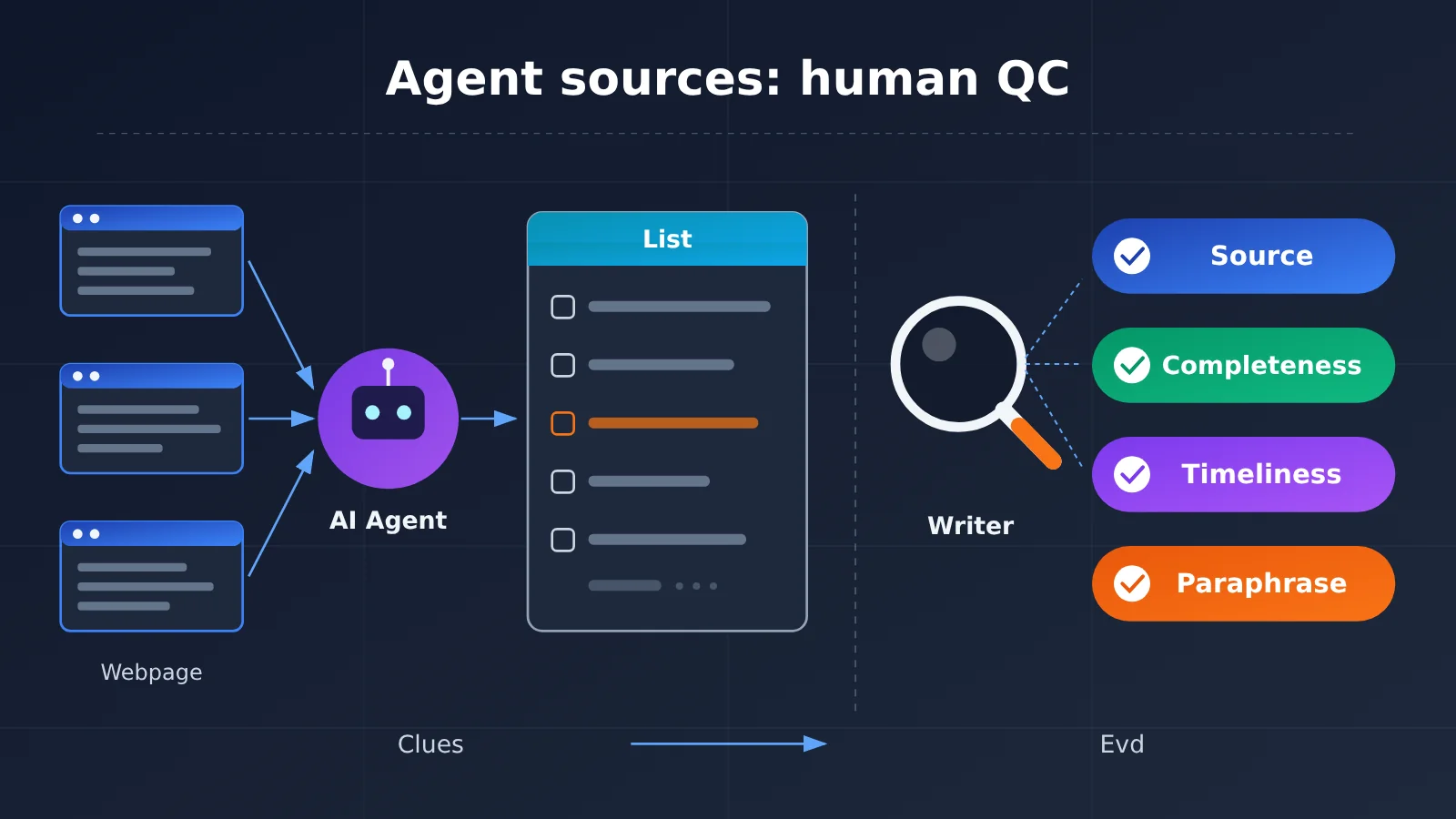
Key Takeaways for Agent Research: What a List Can and Can’t Do
Let’s start with what happened in the reference case. A writer reviewed a colleague’s record of using Codex with Moli to read Quora. The colleague selected the Moli Web Fetch Skill in Codex, pasted the link to Quora’s “Technological Innovation” topic, and added just one instruction: “View all content.” Codex planned the steps, called Moli to fetch the page, and organized the material into a list of questions, authors, summaries, and sources.
Three details in this process highlight the issues writers need to watch for. The first fetch command completed normally, but returned only the topic title and “Something went wrong”—no answers. Switching to a method that inspected the page response retrieved 10 answer cards, but hasNextPage was true, indicating there was another page. The seventh item in the list contained only a truncated preview.
| Key point | Explanation | What it means for writers |
|---|---|---|
| Lists are useful for selecting what to read | The agent puts questions, authors, summaries, and sources together for a quick scan | Saves time moving material between webpages and chat windows |
| A successful command ≠ retrieved content | The first fetch completed normally but returned only the title and an error message | Check every fetch result for the actual content |
| Pagination and truncation = incomplete material | hasNextPage was true, and the seventh item contained only a truncated preview |
Don’t treat the first batch of results as “all viewpoints” |
| Engagement counts are snapshots | Counts in the list reflect only the moment the data was fetched | Use them for reference, not as evidence of what’s “most popular” |
| Summaries are paraphrases | The real-life examples came from the agent’s summaries and hadn’t been checked against the originals | Go back to each original answer and verify it before quoting |
Why an Agent’s research list is best used for selective reading
The value of a list is that it helps you narrow your focus. The author in this case scanned 10 entries and stopped at the third, “What happened to 3D printing?” by James Martin. Its summary mentioned constraints around model design, materials, price, and mass-production costs. With the list, he could pick what he wanted to read first, then follow the sources to check the details. That’s where Agent-assisted research really saves time.
But the list itself has been processed twice: first, the Agent extracts data from web pages; then, a model compresses it into summaries. Either step can leave out information, change the tone, or attribute something to the wrong person. The reference materials don’t include data on the accuracy of Agent-generated summaries, and we’re not going to make up a number. A safer approach is to assume that summaries may be inaccurate and treat them as signposts, not evidence in themselves.
Narrowing a broad topic down to a specific question
The author’s narrowing process is worth learning from. The original topic was “technological innovation.” After seeing the list, he settled on “3D printing,” then narrowed it further based on an everyday detail recounted in the source material: according to that material, the respondent printed a faucet washer when the stores were closed and had also made a coffee machine part using someone else’s uploaded model. But when a cheap mass-produced part was available, they still felt it made more sense to buy it.
That led to the question: “If you urgently need a part you can’t buy, should you print it yourself?” It’s specific enough to distinguish between two different situations: printing an emergency replacement and using a printer as a long-term alternative to shopping. Note that the author explicitly stated at this stage that these were the respondent’s experiences as recounted in the material, and he hadn’t yet checked each detail against the original response. You can settle on a topic first, but any quotations or citations must wait until they’ve been verified.
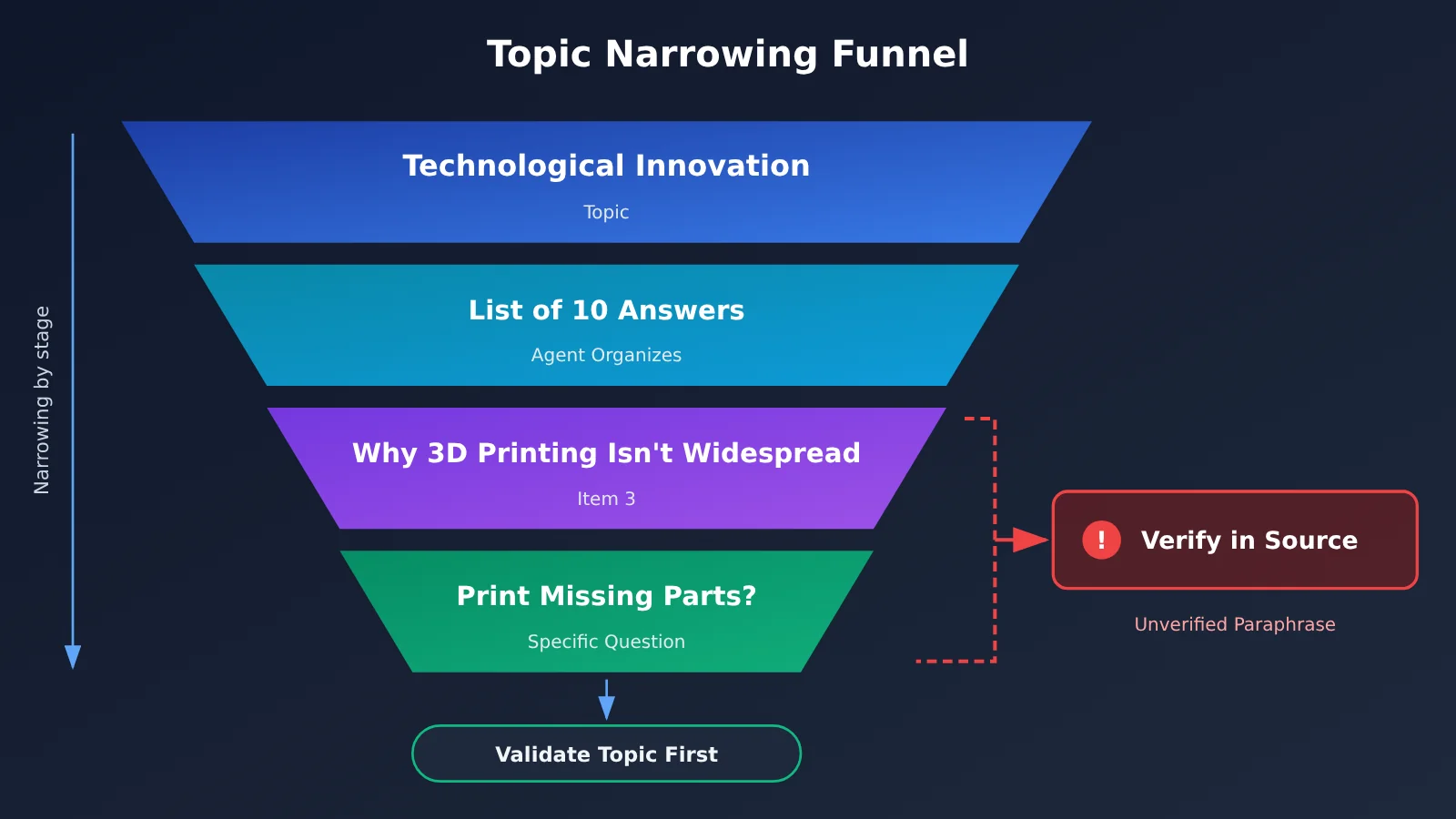
Quick Start: Gathering Source Material with an Agent in 6 Steps
Here’s a general workflow based on the case study. It doesn’t depend on a specific tool version: you can use Moli with Codex or any other Agent that can read web pages. Instructions and parameters are shown inline, so there’s no need to write code.
Steps 1–3: Have the Agent Retrieve and Organize the Material
- Provide a link and a minimal request: As in the case study, paste the topic link and add a request like
View all content. Don’t prescribe a table structure yet—first see what the Agent can retrieve. - Check that the results contain the actual text: A command finishing normally doesn’t mean it succeeded. If you only see titles or a message like
Something went wrong, the page content may need time to load. Ask the Agent to try another way of reading it, such as inspecting the response data the page received. - Require source fields in the list: Every entry needs a question, author, summary, and source link. Without a source, you can’t trace an entry back later, so exclude it from citation candidates.
Steps 4–6: Use Your Judgment and Verify
- Record completeness signals: Look for pagination markers like
hasNextPage, truncated previews, and item counts. Note when what you have is only the first batch. - Find angles, not conclusions: Look for details in the list that make you want to read further, and turn them into specific questions rather than ready-made claims.
- Check each point against the original: Open the source pages and compare every claim, example, and number you plan to cite before deciding whether to include it.
🎯 Technical tip: When generating summaries in Step 3, have two different models write one each, then compare them. If their descriptions of the same answer differ significantly, prioritize checking that answer against the original. Platforms like APIYI apiyi.com offer a unified interface to multiple mainstream models, so you only need to change the model name to switch models. That makes cross-checking much easier.
A 4-Point Checklist for Agent-Sourced Material
This is the most important part of the article. At the end of the case study, the author says you still need to read the original sources before citing them. We’ve broken that advice down into four things you can check off.
| Check | Question to answer | Signal in the case study | What to do if it doesn’t pass |
|---|---|---|---|
| Source | Which page and author does this content come from? Can you open the original link? | The list names the author, James Martin, and the source | If you can’t find the original link, don’t cite it; use it only for inspiration |
| Completeness | Am I seeing the full text, a preview, or the first batch? | hasNextPage is true; item 7 has only a truncated preview |
Retrieve the remaining pages or open the original answer and read it in full |
| Timeliness | When was the data collected? Could the engagement numbers change? | Engagement numbers are a snapshot from the time of collection | Include the date when citing them, or leave out the specific numbers |
| Differences in paraphrasing | Does the summary match the original? Has anything been embellished? | The faucet washer and coffee machine parts came from a paraphrase and haven’t been verified | Rephrase based on the original, or quote it directly if necessary |
Of these four, differences in paraphrasing are the easiest to overlook. Agent summaries often read smoothly, which can make you less cautious. For example, the original might casually mention a single printing experience, while the summary says the person “regularly relies on printing their own parts.” That shift in wording can throw your argument off course.
💡 Recommendation: If your article needs to cite many answers in another language, it’s best to separate translation from summarization. First, have a model translate the original text paragraph by paragraph, then write the summary yourself. APIYI apiyi.com lets you call different models through the same interface, so you can assign translation and summarization to different models. This can reduce the bias introduced when a single model rewrites as it translates.
The Limits of Agent Sourcing: Screening Material vs. Supporting Citations
There’s a subtle trap many people run into when using an Agent to gather material: the list looks complete and well organized, so they start treating it as a source they can cite. The table below compares the two uses: screening material and supporting citations.
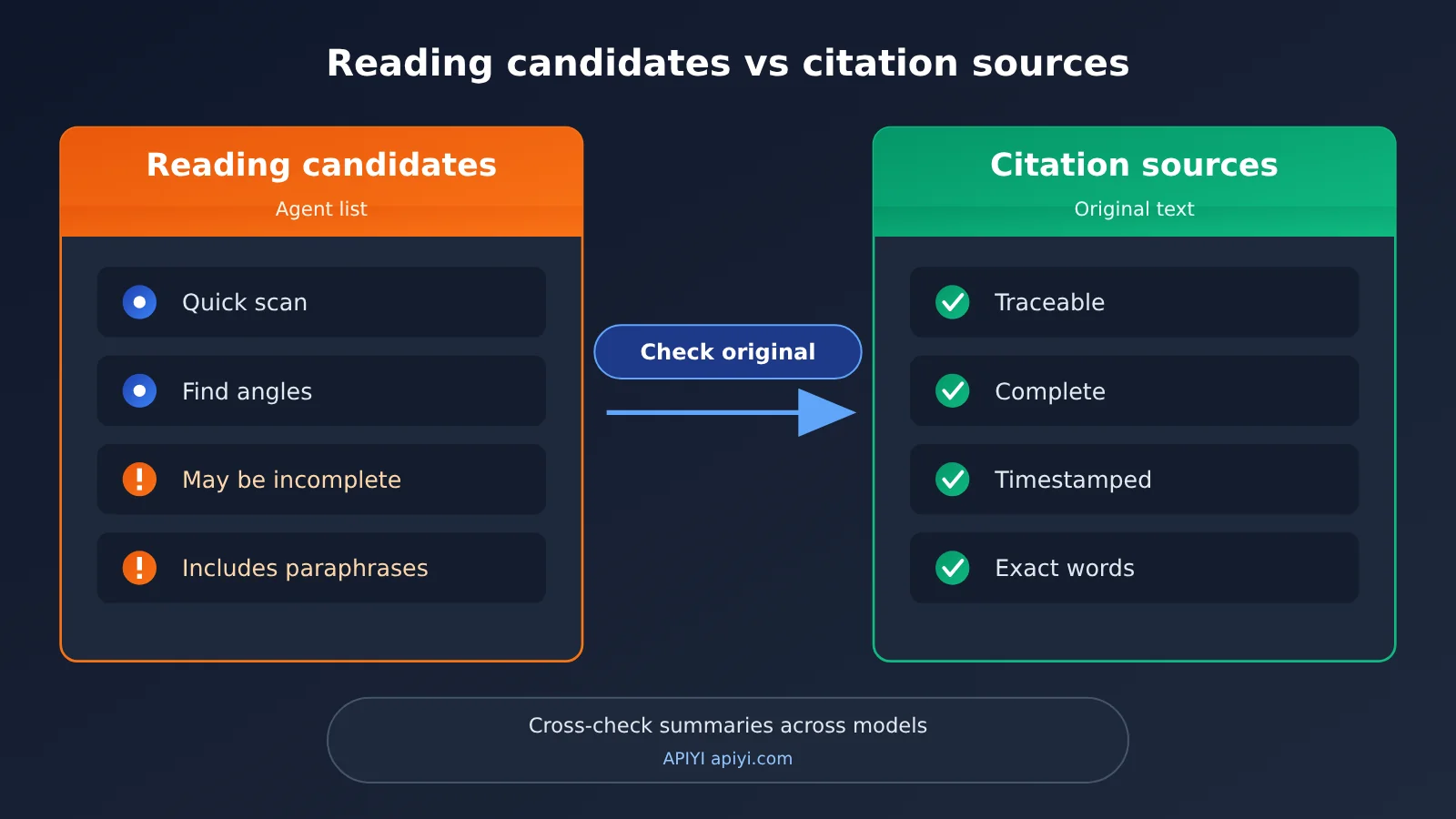
| Comparison | Agent-compiled list | Material checked against the original |
|---|---|---|
| Main purpose | Scan, filter, and find angles | Include in an article and support arguments |
| Completeness | May contain only the first batch or be truncated | Read the complete response |
| Wording | Paraphrased and condensed by the model | The author’s original words or your faithful paraphrase |
| Time sensitivity | A snapshot from when it was retrieved | Include the date accessed when citing |
| Consequences of errors | Only affects which item you choose to read | Directly affects the article’s credibility |
What the Comparison Shows
An Agent’s list is highly efficient when you need to scan material and pick out what’s worth reading. The author of the case study also found that the biggest benefit was eliminating the back-and-forth of moving material between web pages and chat windows. But the limitations are clear: the content may be incomplete, paraphrased, and tied to a particular point in time. Checking the original source is slower, but it’s the only way to take responsibility for what you cite.
Put another way, Agent sourcing shifts a writer’s focus from “moving material around” to “making judgments.” Where you once spent most of your time copying and pasting, you can now spend it checking and thinking—the parts where humans are indispensable.
📌 Workflow tip: Create a consistent “to verify” label. Whenever a point from an Agent’s list goes into your draft, tag it first and remove the label only after you’ve checked it. If you’re using APIYI apiyi.com to invoke models to help organize material, you can also ask the model to mark each summary as “paraphrased,” reminding you that it isn’t the original wording.
Practical Use Cases and Limits of Checking Agent Research
This checking method isn’t limited to Q&A communities like Quora. The case study’s author also mentioned wanting to try the same process with product documentation and release notes. Different types of material call for different checks.
| Material type | What to check most closely | Common risk |
|---|---|---|
| Q&A community answers | Paraphrasing differences, completeness | Personal experience gets summarized as a general conclusion |
| Product documentation | Currency | Claims become outdated when the documentation changes |
| Release notes | Source, currency | An announced feature gets mistaken for a released one |
| News or promotional posts | Source | Promotional content gets treated as an impartial review |
The last row deserves special attention. The post referenced in this article is itself labeled “promotional.” It records one use of a tool, not an independent evaluation. We cite it because it clearly exposes several key signals in the research process, not because it proves a tool is effective. Writers should apply the same source check to promotional material.
One Case Isn’t Enough: What Else Do You Need?
The case study author’s topic isn’t ready to become an article yet because it’s supported by just one answer. To answer “Should you print a replacement part yourself when you need one in a pinch?”, you’ll need more users’ experiences to understand where the sticking points are: finding a model, material prices, or the time and effort involved. The author also said they’d return to the original answer to check it, then look for more cases.
This is another limit of Agent research: it can help you find an initial lead, but it can’t decide whether that lead is representative. When you find that your argument rests on a single summary, it’s time to go back to searching rather than rush into writing.
🔍 Additional tip: When looking for more cases, ask an Agent to search using several different keywords, then have the model merge and deduplicate the resulting lists. Another low-cost check is to use APIYI’s unified interface at apiyi.com to run the same organizing prompt across different models and compare whether they pick out the same key points.
Frequently Asked Questions
Q1: What does it mean to gather material with an Agent?
It means having an AI Agent open webpages, wait for content to load, read the text, and organize it into a list. In the reference example, Codex plans the steps, an AI-oriented browser like Moli reads the pages, and the final output includes questions, authors, summaries, and sources.
Q2: How does an Agent-generated list differ from the original content?
A list has been processed twice: first by reading the content, then by summarizing it. It’s useful for quickly deciding what to read. The original contains the author’s full wording and is the better source to cite. Lists save time, but they can truncate content or misrepresent it through paraphrasing. Reading the original takes longer, but it’s the foundation for reliable information.
Q3: If the reading command succeeded, why check the result?
In the reference example, the first reading command completed normally, but the result contained only the topic title and “Something went wrong.” Some page content appears only after loading, so a command finishing and the content being retrieved are two different things. Always check that the result includes the actual text.
Q4: How can I tell if the retrieved material is incomplete?
Look for three signs: pagination markers in the returned data (such as `hasNextPage` being true), entries that contain only truncated previews, or a noticeably smaller number of entries than appear on the page. Any of these means you have only part of the material and can’t use it to generalize about “what everyone is saying.”
Q5: How can I use multiple models to cross-check summaries?
It’s simple: give the same raw content retrieved by the Agent to two different models and ask each to summarize it. Compare the results, then check the original content for the entries with the biggest differences first. An aggregation platform like APIYI apiyi.com lets you switch between models using the same OpenAI-compatible interface, saving you the trouble of integrating with multiple providers separately.
Q6: How often do Agent summaries contain errors?
The material we’ve referenced doesn’t include statistics on this, and there’s only one example, so we can’t provide a reliable figure. The safer approach is to assume summaries can be wrong and make verification a regular part of your workflow, rather than checking only when something looks suspicious.
Q7: Can I include engagement counts from the list in an article?
You can use them for reference, but it’s best not to rely on them directly as evidence. Engagement counts are snapshots from the time of retrieval and can change. If you do include them, note the date you checked. When selecting material, focus on the quality of the answers rather than the number of likes.
Q8: Can I use an example from a promotional post as a reference?
Yes, but be clear about what it is. Promotional posts usually show one successful experience, which doesn’t necessarily represent typical results. When citing one, disclose the nature of the source and treat its specific claims as information that needs verification, just as this article does with the reference example.
Key Takeaways for Checking Agent-Sourced Material
- Use lists to find leads: Agent-generated lists are useful for scanning and finding angles, but they aren’t sources you can cite directly.
- A successful command doesn’t mean content was retrieved: Even if a read command completes normally, check that the result actually contains the full text.
- Pagination or truncation means the results are incomplete: If you see
hasNextPageor a truncated preview, you’ve only got the first batch of material. - Engagement counts are snapshots: Numbers change after they’re collected, so include the retrieval time when citing them—or leave them out.
- Check summaries against the original: Before citing examples or viewpoints from a summary, verify each one against the original response.
- One example isn’t enough: Once you’ve found an angle, look for more examples to see whether the lead is representative.
- Cross-check with multiple models: Use the unified interface from APIYI apiyi.com to compare summaries from different models.
Conclusion
After an Agent gathers material, there are four things writers still need to check themselves:
- Sources: Every item should be traceable to a specific page and author. If you can’t find the source, treat it only as inspiration.
- Completeness: Watch for pagination, truncation, and failed reads. Don’t mistake the first batch of results for the whole picture.
- Timeliness: Engagement counts and document content are snapshots. Note the time when you cite them.
- Differences in paraphrasing: A summary isn’t a direct quote. Compare each point with the original before citing it.
From “technological innovation” to “should I print a missing part myself when I need it in a pinch?”, an Agent shortens the search for material. But deciding whether a story angle holds up and whether the material is fit to cite still requires you to read the original sources. Treat the Agent as a research assistant and verification as a standard part of your workflow, and you’ll get both speed and reliability.
If you’d like an extra check, you can use APIYI apiyi.com to call multiple models and compare their summaries. Start with a web page you know well and run through the process.
📚 References
- V2EX post – Watching a colleague use Moli + Codex to read Quora: Finding topic ideas in 10 answers: The source of this case study (labeled as a promotional post)
- Link:
www.v2ex.com/t/1254246 -
Details: Documents the full process, from a topic link to an organized list, including the initial read failure, pagination, and truncation
-
Official Moli open-source repository: An open-source browser for AI agents
- Link:
github.com/lexmount/moli - Details: Covers Moli’s installation and capabilities. This case study uses its content-reading and network response inspection features.
Author: APIYI Technical Team
Technical discussion: Contact us through the APIYI website homepage. For more resources on invoking multiple models, visit the docs.apiyi.com documentation center.