Author’s note: When multiple AI coding agents work in parallel, how can you reduce the window switching caused by permission approvals without loosening control over file writes and command execution? This article offers a framework for making those decisions at the workflow level.
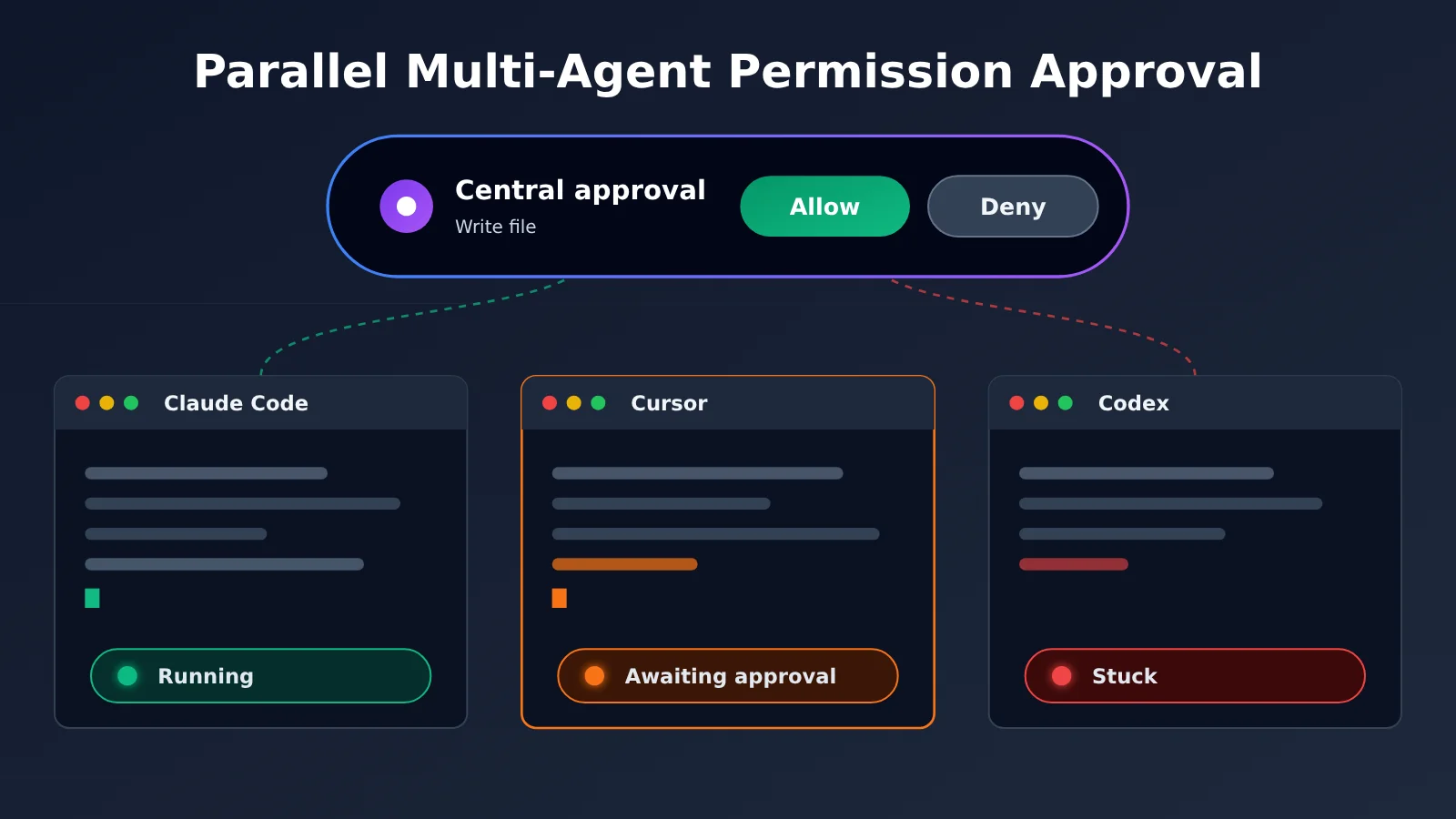
If you regularly run two or three Claude Code sessions alongside a Cursor window, you know the routine: just as you get into the zone, a terminal asks, “Allow this file write?” You switch over, review the request, click allow, and switch back. By the end of the day, the approvals themselves aren’t hard—the problem is how they fragment your attention dozens of times.
This isn’t just one person’s frustration. In early November 2026, a developer on V2EX shared a macOS tool they’d built specifically to collect approval requests from multiple agents in a Dynamic Island-like panel at the top of the screen. This article isn’t recommending a particular tool. Instead, it uses that example to explore a broader question: when you’re running multiple AI coding agents in parallel, how should permissions be designed to avoid constant interruptions without losing control?
What you’ll take away: You’ll understand the real cost of approval interruptions, the value and limits of centralized approvals and visible status, and how to design a tiered approval strategy for your own multi-agent workflow.
Key Takeaways for Permission Approvals with Parallel AI Coding Agents
Let’s start with the conclusion. Permission approvals for parallel agents come down to three relatively independent problems: scattered approval requests, lack of status visibility, and risks that aren’t classified. Many people focus on “clicking Allow less often,” but the last two problems are the ones that really need solving.
| Key point | What it means | Value for developers |
|---|---|---|
| Centralized approvals | Bring approval requests from multiple terminals and IDEs into one place | Spend less time switching windows and hunting for tabs |
| Visible agent status | See at a glance who’s running, who’s stuck, and who’s waiting for you | Keep agents from waiting idle and get more out of parallel work |
| Risk-based controls | Handle file reads, workspace writes, command execution, network access, and deletion according to their risk | Fewer interruptions for low-risk actions, without relaxing controls on high-risk ones |
| Clear trust boundaries | Specify which components can click “Allow” on your behalf | Prevent the approval channel itself from becoming an attack surface |
| Traceability | Make approval decisions auditable after the fact | Know who approved what when something goes wrong |
The Real Cost of Approval Interruptions
The original poster describes a typical workflow: switch windows, find the right terminal, figure out what the agent wants to do, click Allow, and switch back. One interruption may take only a dozen seconds or so, but of those five steps, only “figure out what the agent wants to do” actually requires judgment. The rest is mechanical overhead spent finding the request.
There’s a less obvious cost when agents run in parallel. If you’re running three or four agents at once and miss an approval request, that agent will sit idle until you notice. You may think all four agents are working when two are actually waiting for you. There’s currently no public data quantifying this efficiency loss, but idle time directly offsets the benefits of running multiple sessions in parallel.
A Centralized Approval Approach
The tool described in the original post does three things: it offers “Allow / Deny” directly on a unified approval panel; it handles agent questions and plan reviews in the same place, with keyboard shortcuts for selection; and it lets you jump back to the relevant iTerm2 tab with one click when you need context. The author also notes that the panel is non-activating, so clicking it doesn’t steal focus from the editor.
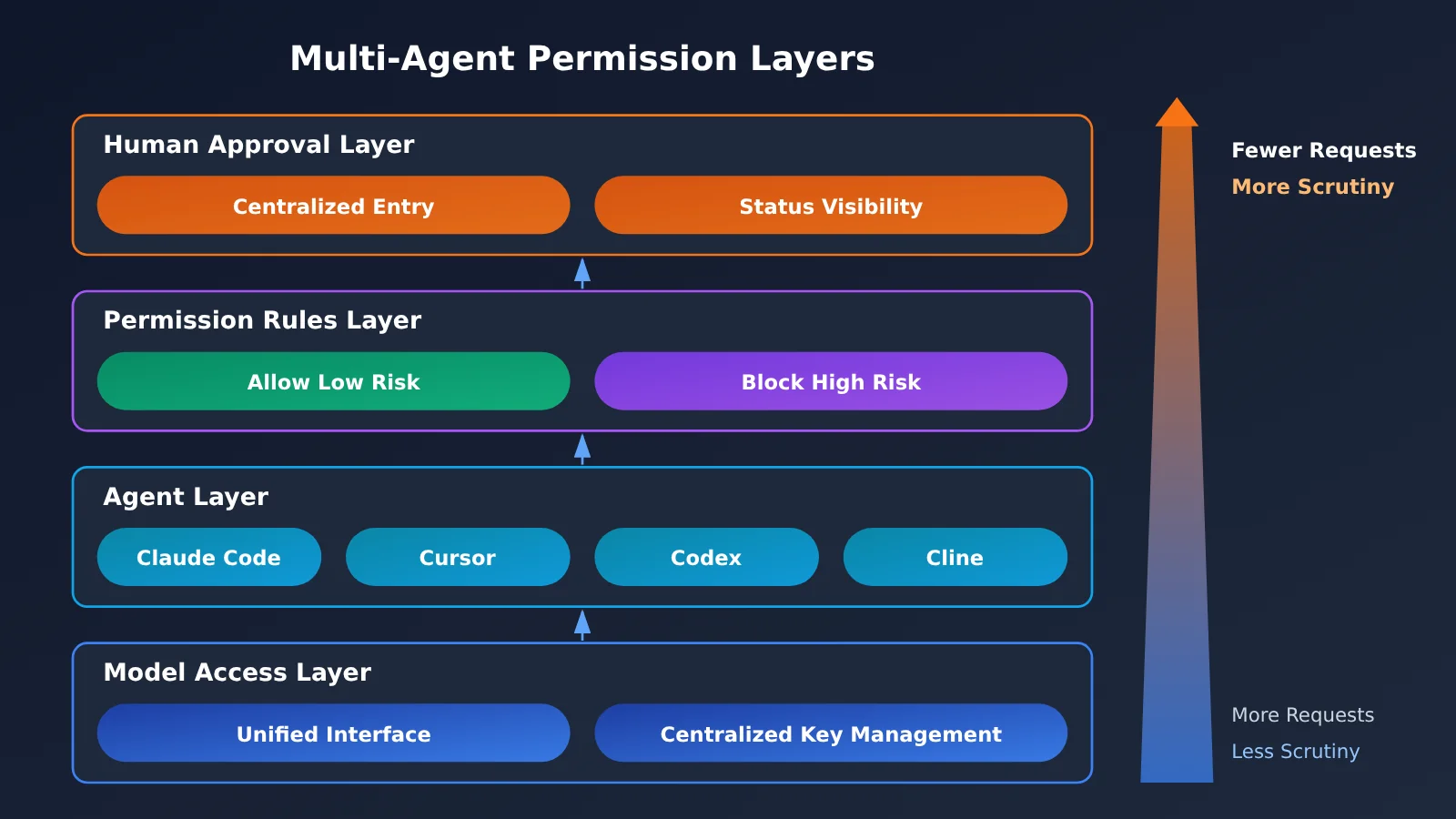
The key isn’t the “Dynamic Island” design itself. It’s two things: reducing the overhead of finding requests to nearly zero and making status visible instead of requiring you to check for it. Even if you don’t use a third-party tool, both principles can help you design your own approval workflow.
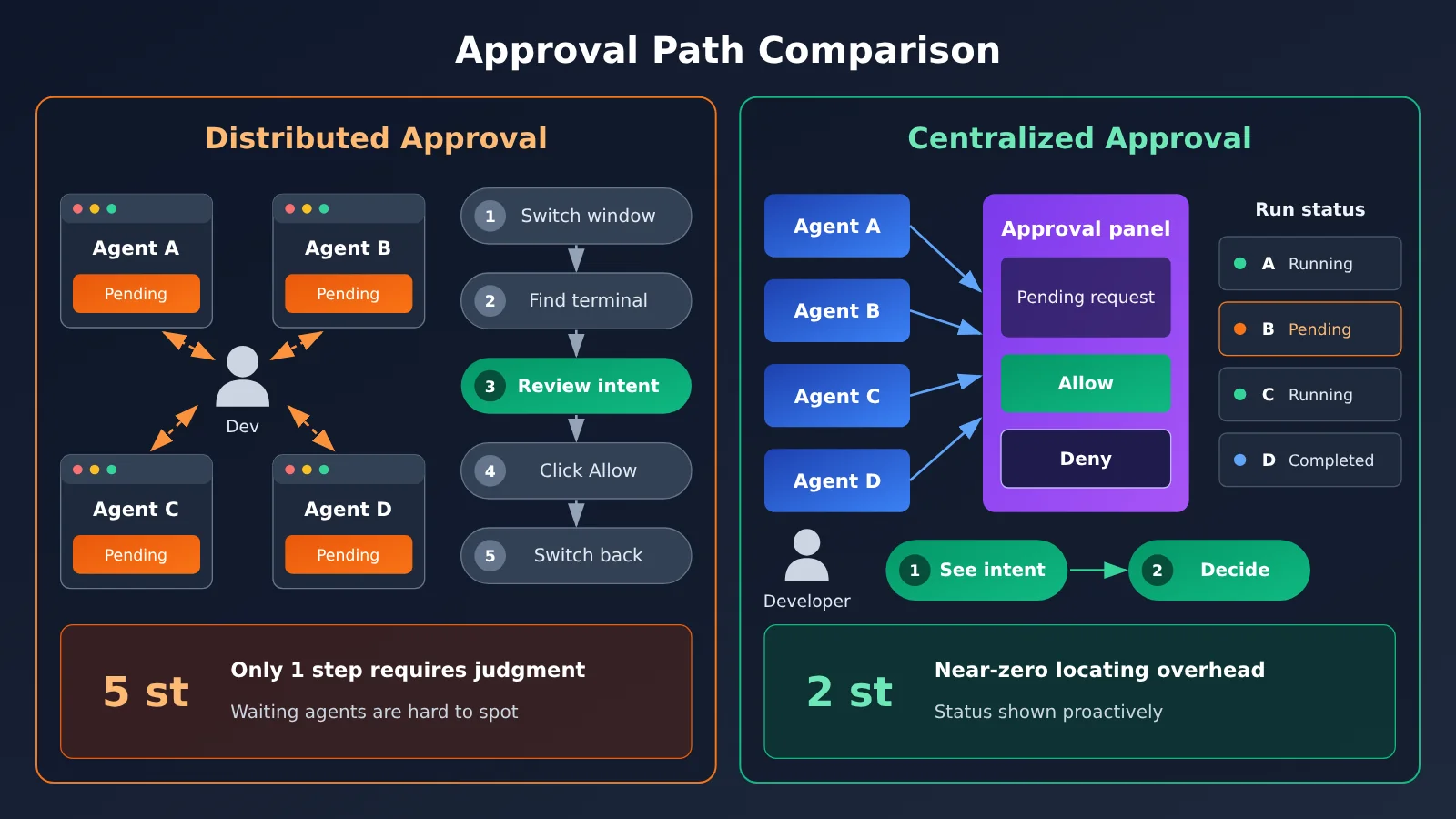
The diagram above shows how the approval path gets shorter. Parallel agents often connect to different models, too. If you configure each provider’s keys separately across multiple tools, you’ll also have to switch between them when troubleshooting. Bringing model invocations together through an aggregate interface such as APIYI apiyi.com can centralize the model access layer as well, following the same principle as centralized approvals.
Comparing Permission Approval Approaches for Parallel Coding Agents
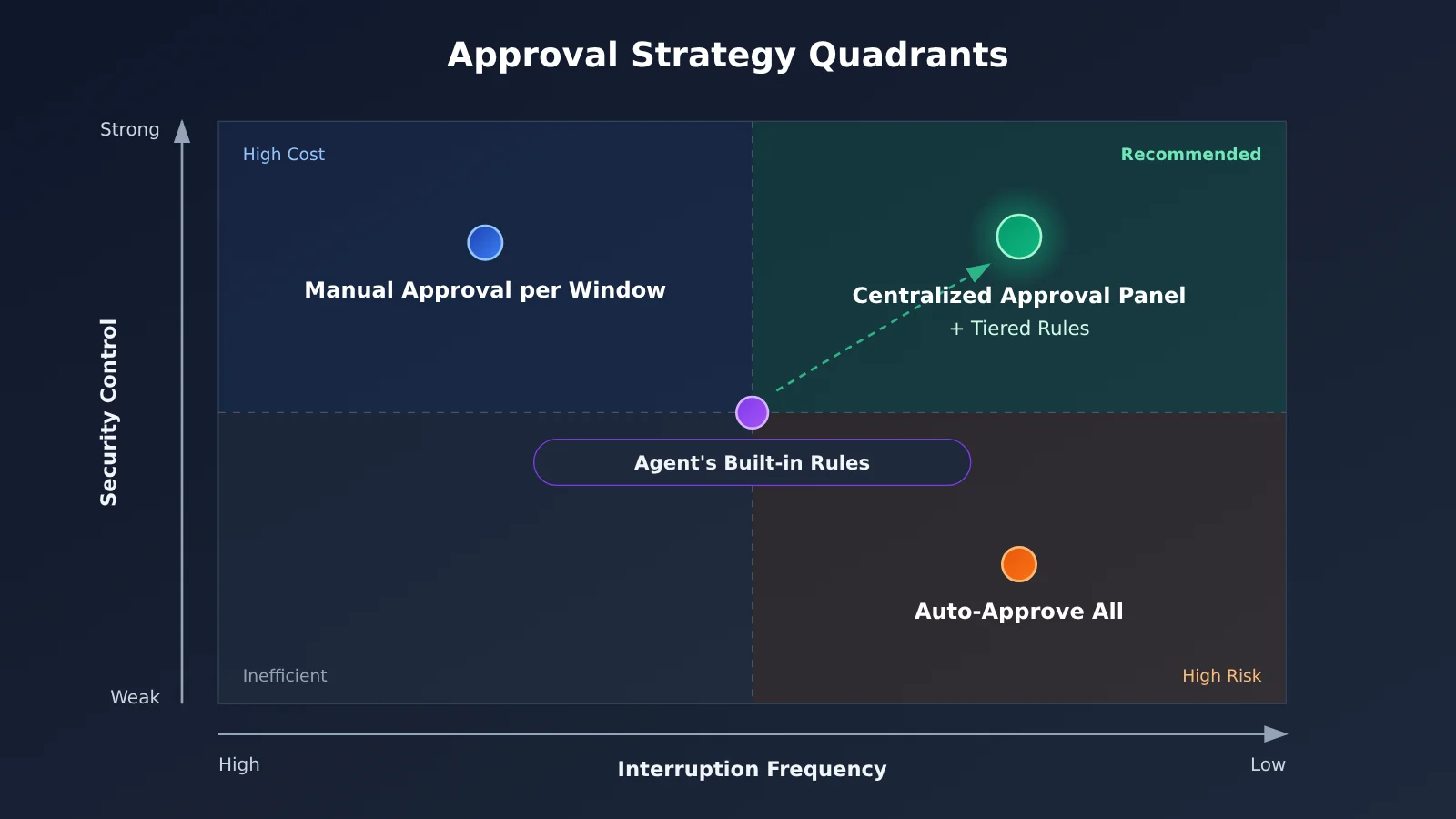
There are roughly four common approaches, each with clear trade-offs.
| Approach | How it works | Advantages | Main drawbacks |
|---|---|---|---|
| Manual approval in each window | Each agent prompts for confirmation in its own terminal or IDE | No extra dependencies; you can see the context for every decision | Costly context switching; agents waiting for approval are easy to miss |
| Automatically approve everything | Turn off confirmation or use the most permissive mode | No interruptions | Nothing stops the agent from writing to the wrong file or running dangerous commands |
| Built-in agent rules | Use each agent’s settings to preconfigure allow/deny rules for specific commands or paths | Official mechanism with a short chain of trust | Each agent must be configured separately; granularity and formats vary |
| Centralized approval dashboard | A third-party tool collects requests through each agent’s hooks / settings | One place to manage requests; statuses are visible | Adds a new party you need to trust; compatibility must be verified individually |
Understanding the Trade-offs
Manual approval in each window gives you the most direct security control: every decision is made in its original context. But the overhead grows linearly with the number of agents, and it becomes difficult to keep up once you have three or more sessions. Centralized approval, by contrast, keeps a human in the loop while reducing the effort of finding pending requests.
Automatically approving everything can work for one-off sandbox experiments, such as runs in a temporary container or a disposable branch. Once agents are working in a real repository, though, you’re leaving all that risk to chance. That’s not an acceptable default for regular production use.
Built-in agent rules are the best place to start. Most coding agents offer some form of permission configuration, but the sources for this article don’t cover exactly which rules each one supports or how granular they can be. You’ll need to check each agent’s official documentation individually. The limitation is that settings are scattered across tools, so they don’t solve the visibility problem of knowing which agent is waiting for you.
A centralized approval dashboard fills that gap. The original poster says the tool has built-in integrations for around 30 agents, including Claude Code, Codex, Cursor, Gemini CLI, Trae, Windsurf, and Cline. They also note that several are still being verified individually. Check the tool’s README for its actual compatibility status; this article hasn’t independently verified it.
💡 Recommendation: A safer combination is to use built-in agent rules for low-risk operations and a centralized entry point for the remaining approvals. If you’re still choosing the underlying models for different agents, you can use APIYI apiyi.com to switch between and test them through the same interface. First find out which model makes fewer mistakes in your repository, then decide how much access to give it.
Trust Risks When a Third Party Handles Permission Approvals
Centralized approval is tempting, but it changes a fundamental question: who can click “Allow” on your behalf? Previously, only you and the agent had that ability. Adding a third-party tool introduces another link in the chain. Two details from the original post deserve a closer look.
First, the author says the tool uses each agent’s own hooks / settings. That means it needs to write or modify each agent’s configuration so approval requests pass through it. A component that can receive an approval request and return “Allow” effectively has the power to authorize file writes and command execution.
Second, the author is upfront that the tool currently uses ad hoc signing and doesn’t have an Apple Developer certificate. If macOS reports that the app is “damaged” on first launch, users need to run xattr -cr followed by the application path in Terminal. This command recursively clears the app’s extended attributes, including the quarantine flag macOS uses to trigger Gatekeeper checks. In other words, you’re manually bypassing one of the system’s safeguards against apps from unidentified sources. The author’s disclosure is responsible, but as a user, you should understand what you’re doing.
| Risk | What it looks like | Suggested response |
|---|---|---|
| Delegated approval authority | A third-party component can return “Allow” on your behalf | Confirm that it only forwards decisions and doesn’t automatically approve requests; observe its behavior in a test repository first |
| Configuration changes | hooks / settings are modified and may leave traces after uninstallation | Back up each agent’s configuration before connecting it, and verify it’s restored after uninstallation |
| Bypassing signature checks | Clearing the quarantine attribute bypasses Gatekeeper | Only do this for apps from sources you’re willing to trust; don’t make it a habit |
| Uncertain compatibility | Integration with some agents is still being tested | Enable it only for agents confirmed to work; keep native approval for the rest |
| Single point of failure | If the dashboard crashes or hangs, all agents have to wait | Keep a way to fall back to native approval |
There’s no security audit available to cite here, so this article doesn’t judge whether any particular tool is safe. A more practical approach is to treat a third-party approval tool like a new colleague who needs permissions: observe it in a low-risk environment first, then gradually expand its scope.
Getting Started with Permission Approvals for Parallel AI Coding Agents
This five-step workflow doesn’t depend on any particular tool. You can get started with built-in capabilities and add a centralized approval dashboard later if you need one.
Step 1: Classify Parallel Agents’ Actions by Risk
Before configuring any tools, list the actions your agents might take and classify them by risk. This table provides the foundation for all the configuration that follows.
| Risk level | Typical actions | Recommended policy |
|---|---|---|
| Low | Reading repository files, searching code, checking git status | Allow by default without interruptions |
| Low-medium | Writing source files within the current workspace | Allow, but review all changes afterward using diffs |
| Medium | Running tests, lint, and build scripts | Allow known commands by default; require human approval for unfamiliar commands |
| High | Installing dependencies, making network requests, modifying configuration files | Require human approval every time |
| Critical | Deleting files, running git push, changing paths outside the workspace |
Always require human approval; prohibit outright when necessary |
Step 2: Handle Low-Risk Requests With Each Agent’s Built-In Permission Rules
Using the table above, add “low” and some “medium-low” and “medium” risk operations to each agent’s permission configuration. The goal is to stop approval prompts for most frequent, harmless requests. Since agents differ in configuration format and granularity, maintain a separate list for each one and record where its configuration lives for future review.
Step 3: Use Workspace Isolation to Limit the Cost of Mistaken Approvals
The problem with approval fatigue is that the more requests you approve, the less closely you read them. Rather than counting on yourself to scrutinize every request, make the consequences of a mistaken approval manageable. A few common practices:
- Give each agent session its own git branch or worktree so they don’t interfere with one another
- Keep agents working within the project directory, and leave sensitive files out of the workspace
- Make sure the workspace is clean before starting a task, so you can quickly review changes with
git diffand roll them back withgit restoreif something goes wrong
Step 4: Make status visible
At this point, the remaining approval requests should be ones that genuinely need your judgment. The next challenge is making sure agents aren’t left waiting. You can enable system notifications for each agent, keep all sessions in named tabs in the same terminal window, or use a centralized approval dashboard. If you choose a third-party dashboard, try it in a test repository first, using the risk checklist from the previous section.
Step 5: Unify model access for easier comparison and traceability
When you run multiple agents in parallel, Claude Code, Cursor, and Cline may each use different models. If your tools support a custom OpenAI-compatible endpoint, you can connect them all to APIYI apiyi.com. This lets you manage keys in one place and switch models by changing the model name. It also helps with your approval strategy: if you notice a model frequently requesting high-risk operations, you can switch to another model through the same endpoint and compare the results without reconfiguring everything.
🚀 Getting started: Spend half an hour on Steps 1 and 2 first. That alone can noticeably reduce the number of pop-ups. For model access, consider using APIYI apiyi.com to connect different agents through a unified interface, so you can evaluate model choice and permission levels together.
Frequently Asked Questions
Q1: What does fragmented permission approval mean for parallel AI coding agents?
It means multiple agents each pop up approval requests in different terminals or IDEs. Developers have to switch windows, find the right session, understand the request, and then return to what they were doing. Each interruption is small, but frequent requests break your focus and can leave agents waiting unnoticed for a long time.
Q2: How is a centralized approval panel different from an agent’s built-in permission settings?
Built-in settings have a shorter trust chain and are useful for automatically approving low-risk operations with rules. But they’re scattered across individual tools and don’t give you a unified view of agent status. A centralized approval panel brings requests and status into one place, at the cost of introducing a third-party component. The two approaches work better together than as alternatives.
Q3: Is the centralized approval tool mentioned in the original post available now?
According to the author’s November 3, 2026 update, the tool only supports macOS 13 and later. It’s free for a limited time, with activation codes available for up to three devices. You can also try it for 14 days without a code. The author reports that four agents use about 40MB of memory. Limited-time offers and compatibility may change, so check the author’s release page and README for the latest details.
Q4: When does it make sense to combine parallel agents with centralized approval?
– **Separate frontend and backend development**: One agent changes an API while another writes the frontend calls.
– **Parallel testing and fixes**: One agent adds tests while another fixes known bugs.
– **Comparing approaches**: Have different agents or models tackle the same task, then pick the best result.
If you only use one session from start to finish, approval fragmentation isn’t much of an issue, so you may not need an extra tool.
Q5: How can you manage access when multiple agents use different models?
If your coding tools support custom OpenAI-compatible endpoints, you can connect them all to APIYI apiyi.com and use one key and a unified interface to call multiple mainstream models. For parallel tasks where you’re comparing approaches, you can switch models by changing the model name in each tool. You’ll also have one place to look when troubleshooting invocation issues.
Q6: What are the risks of running the suggested xattr command to open an app?
The command clears the app’s quarantine attribute, so macOS no longer checks its origin. This is a common way to open apps that aren’t signed with a developer certificate, but it also means giving up one of the system’s safeguards. Only do this for apps from a known source that you’re willing to trust, especially tools that take over agent approvals.
Q7: Could automatic approval rules let an agent exceed its permissions?
Yes, which is why it’s important to classify operations by risk. Limit automatic approval to read-only operations and fixed commands, and require human confirmation for actions such as deleting, pushing, or accessing the network. Use separate branches to isolate each agent’s changes, so even if something is approved by mistake, you can spot it in the diff and roll it back.
Q8: Should permissions factor into model selection too?
Yes. Different models can request very different operations for the same task. Some tend to run commands frequently to verify their work, while others prefer to read first and then write. Try running the same task with several models through the same interface using APIYI apiyi.com. Observe the frequency and types of approval requests before deciding which model to use long-term.
Parallel AI Coding Agent Permission Approvals: Key Takeaways
- Fragmentation costs more than clicks: Finding the right request and keeping agents waiting are the biggest drains on parallel efficiency
- Classify risks before configuring permissions: Group operations by read, write, execute, network access, and delete to decide what to approve automatically
- Start with native rules: Use each agent’s built-in permission settings to handle frequent, low-risk requests; check the official documentation for the available level of control
- Use a central view for visibility: Knowing who’s running, who’s blocked, and who’s waiting for you matters more than saving a few clicks
- Treat third-party approval tools like new colleagues: They have the power to approve actions, so observe them in a test repository before expanding their access
- Be cautious when bypassing signature checks: Removing the quarantine attribute means giving up a system safeguard; it shouldn’t become a habit
- Centralize model access too: Use APIYI apiyi.com as a unified interface to compare model behavior and switch models more easily
Summary
When you’re running multiple AI coding agents in parallel, permission approvals come down to three principles:
- Make most requests independent of you: Use risk classifications and agents’ built-in rules to handle low-risk operations, such as read-only actions and predefined commands
- Make the remaining requests easier to handle: Centralize approvals and make agent status visible so you spend less time finding requests and agents spend less time waiting
- Keep the consequences of mistaken approvals manageable: Workspace isolation, separate branches, and a habit of making changes reversible are more reliable than “carefully reviewing every request”
Fewer approval clicks and good security aren’t at odds. The key is to reserve your judgment for operations that need it. Before adopting a third-party approval tool, consider what authority it gains and whether you’re comfortable handing it over.
At the model layer, we recommend using APIYI apiyi.com to access the models behind multiple agents through a unified interface, so you can handle model selection, permission policies, and cost evaluation in one place.
📚 References
- V2EX Show and Tell post: A developer shares a macOS tool built to centralize approvals for multiple coding agents
- Link:
v2ex.com/t/1254267 -
Notes: The source for this article’s case study, including the author’s description of the pain points, features, code signing, and macOS version requirements
-
X Island product page: The tool’s release page, shared by the original poster
- Link:
imagentx.top/products/xisland -
Notes: Check this page and the README for current details on the limited-time free offer, trial period, and compatibility with each agent
-
Official documentation for coding agents: Permission configuration guidance for Claude Code, Cursor, Codex, Cline, and others
- Link: Search for the permissions or hooks sections on each tool’s official documentation site
- Notes: This article doesn’t cover the specific permission settings for each agent; check them individually before implementation
Author: APIYI Technical Team
Technical discussions: Visit APIYI at apiyi.com to discuss multi-agent workflows and model integration practices. For more resources, see the documentation center at docs.apiyi.com.