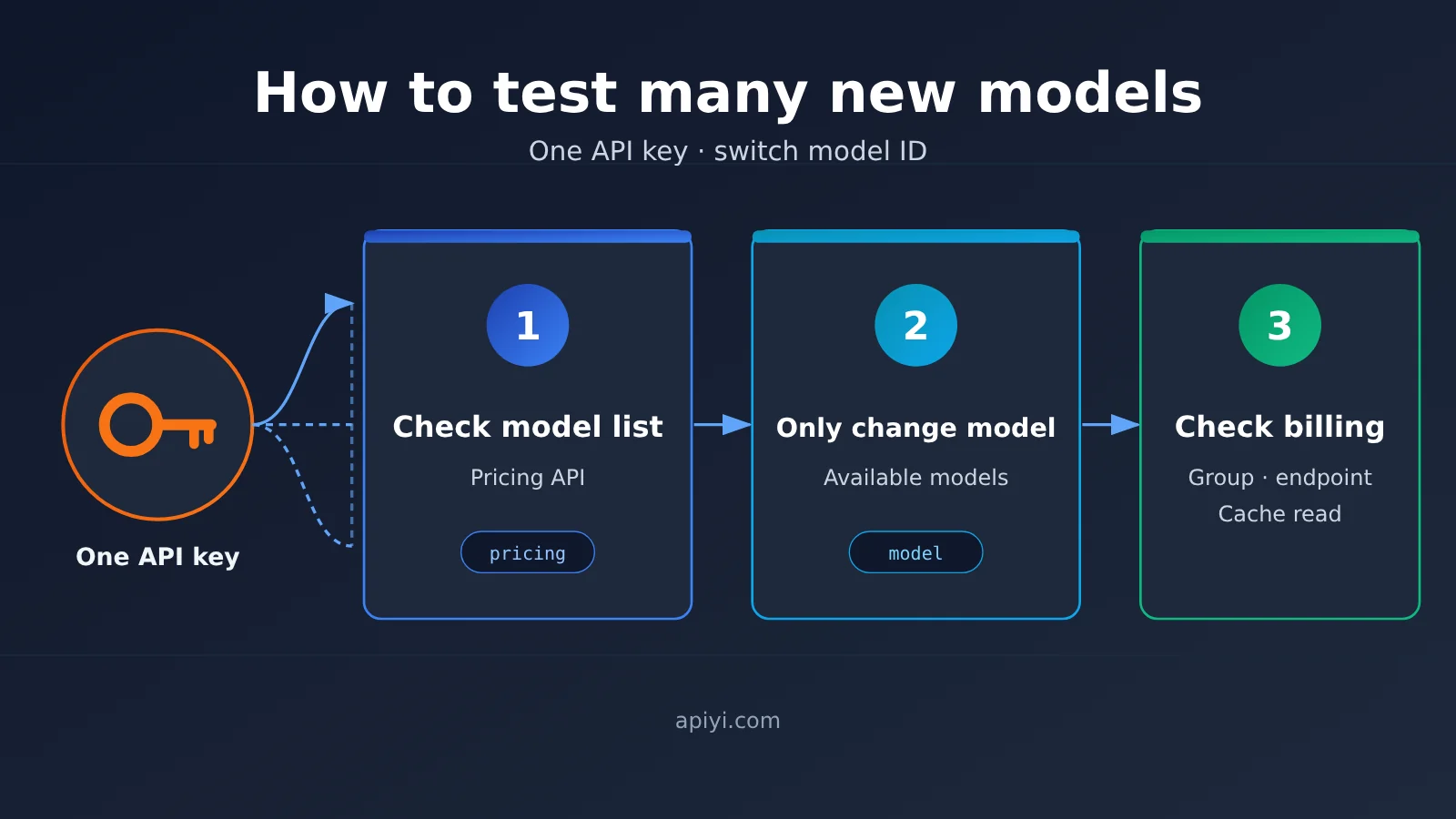
Author’s note: When new models are launching in clusters, first check whether the model is available. If it is, all you need to change is the model ID. Before switching, verify the price, endpoint, and group. You can run the test with the same key, so you don’t need to open an account for every vendor.
On 2026-11-09, Anthropic released Claude Fable 5.2. One week later, on 2026-11-16, Alibaba Cloud added Qwen4-Max to its model listing. For developers integrating new models, the hard part usually isn’t the invocation code—it’s the process: every time a vendor ships a new model, you have to sign up, request a key, add a payment method, and reconfigure everything. This article introduces a three-step test method that uses one key and a model ID swap, so you can use the same calling setup to first test models that are already available.
This isn’t another launch-event recap. The model names and prices in this article are based on the APIYI apiyi.com model catalog (the page notes that data was updated at 2026-11-16 09:39, UTC+8, sourced from the system’s real-time pricing API) and vendor documentation. We don’t provide our own benchmark scores—we only cover what to check, what to change, and what to verify before testing.
Core value: After reading this article, you’ll be able to use the same key from a single environment variable to switch between claude-fable-5-2 and the Qwen series for testing, and verify exactly how this model switch will affect your bill before you make the change.
How to Test a New Model: Key Points for Swapping Model IDs with a Single API Key
When new models come out in droves, the easiest thing to get wrong isn’t the code—it’s changing the model without first confirming whether that model can actually be called and what it costs. The table below outlines a three-step testing approach; we’ll break down each step next.
| Step | What to do | Why |
|---|---|---|
| ① Check the master list and pricing API | Search the model master list and pricing API for the target model ID | First confirm whether it’s live; the price on this row is authoritative |
② For live models, change only model |
Keep base_url and the API key unchanged; replace only the model field |
One calling setup can cover multiple models |
| ③ Check groups, endpoints, and cache reads | Verify input price, output price, cache read, endpoint, and group | Switching models changes billing and may also change the calling protocol |
Why one API key can swap model IDs
APIYI’s token documentation states that when a token has no model whitelist, you can use all 200+ curated models on the platform; if a whitelist is set, you can only call the specified models. So “one key, many models” has a prerequisite: the token you’re using doesn’t block the target model with a whitelist. If you prefer to isolate by project, the docs also support creating separate tokens for different projects, with separate views of quota, expiration, and logs.
Another easy-to-miss concept is groups. The docs explain that a group is a resource channel, and different models may require different groups; a token can be configured with at most one default group and two fallback groups—use Default if you’re unsure. This means whether a model ID works after the swap depends not only on whether the model is live, but also on whether its group is included in your token’s group configuration.
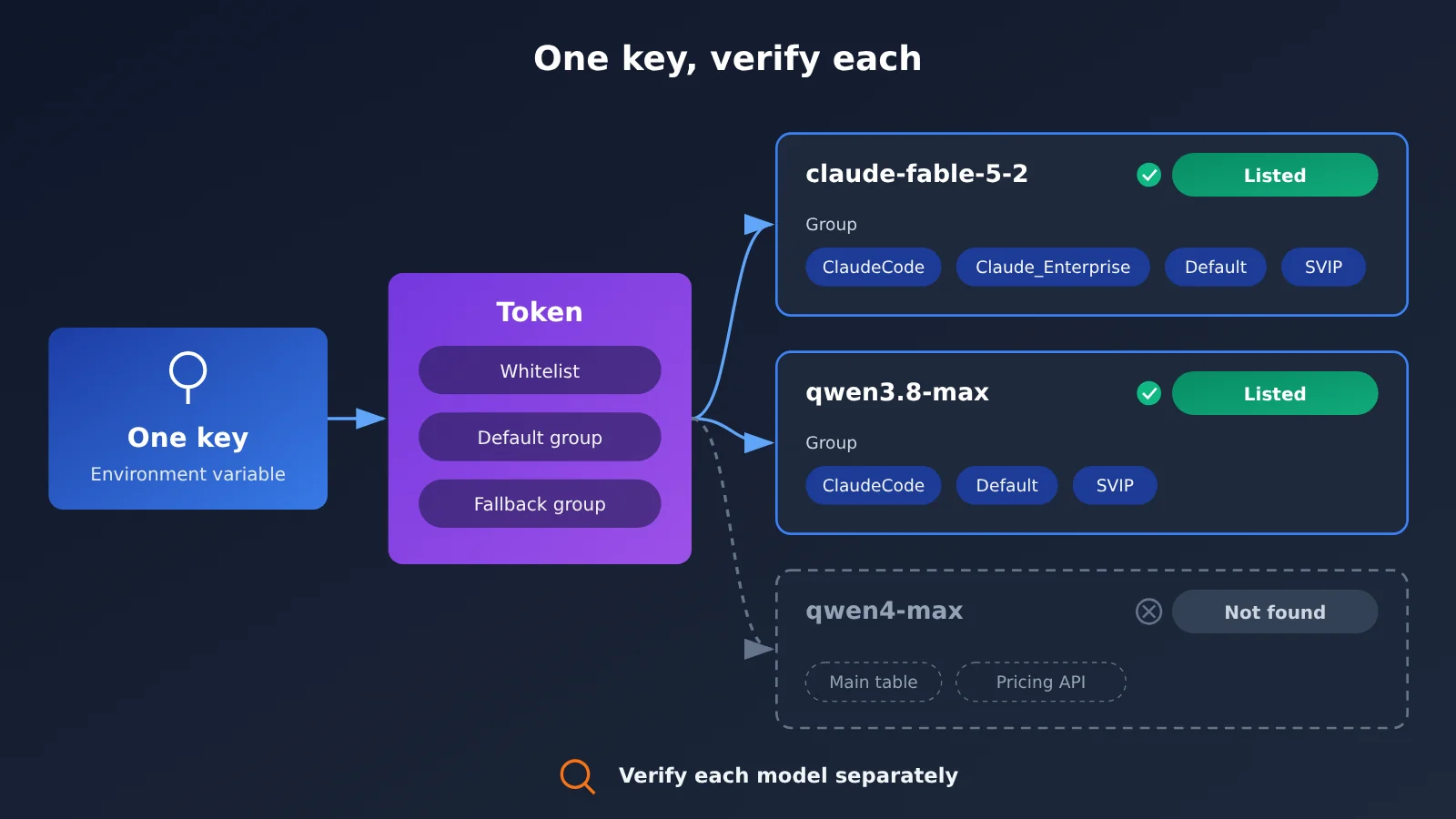
How to test a new model, step one: check the model list and the pricing API
Before you touch any code, do two lookups: the model master list at docs.apiyi.com/models.md, and the pricing API at https://api.apiyi.com/api/pricing. The master list is handy for humans to browse and compare prices; the pricing API is better for scripting — you can drop it into CI or a config center to automatically verify that a given model is actually in the price list. Once both sources agree, move on to the next step.
Take this week’s two new models as an example — the query results differ a lot:
| Model ID | Vendor release status | APIYI model master list | 2026-11-17 pricing API | Testing recommendation |
|---|---|---|---|---|
claude-fable-5-2 |
Anthropic announcement, 2026-11-09 | Listed (plus claude-fable-5-2-thinking) |
Present | Just change the model and test |
qwen4-max |
Alibaba Cloud recorded the listing on 2026-11-16 | Not in the Alibaba section | No qwen4 in the response | Use a neighboring model to get the pipeline working first |
qwen3.8-max |
Existing model | Listed | Present | Use as the fallback test target for the Qwen pipeline |
One more detail worth noting: claude-fable-5-2 has no dedicated model page in the APIYI docs, and the corresponding URL returns 404. That means its price can only be taken from that one row in the master list — don’t piece it together from somewhere else.
🎯 Technical tip: Make “query the pricing API” a pre-release check step. When a new model string shows up in your config, first hit the pricing API on APIYI apiyi.com with a script to confirm it exists — that way you won’t get a “model not found” error only after you’ve already shipped.
Claude Fable 5.2 Is Live: Just Swap the Model ID and Test It
Per Anthropic’s announcement on 2026-11-09, the developer model ID is claude-fable-5-2. The announcement says it generates up to 30% faster than Fable 5.1, and the official price is $8 per million input tokens and $40 per million output tokens. There’s also an optional fast mode at $16 input / $80 output. The APIYI master price table doesn’t list a fast mode row, so don’t write your config expecting fast-mode pricing.
The same announcement notes that Fable and Mythos share the same foundation model: Fable is open to all users, while Mythos requires going through the life sciences or cybersecurity verification program. The current models in Anthropic’s model overview are Claude Fable 5.2, Claude Opus 5.5, Claude Sonnet 5.5, Claude Haiku 5.5, and Mythos 5.2 (verification required) — there’s no model called Fable 5.5. The announcement’s recommendation: for most coding and knowledge tasks, start with Claude Opus 5.5, move up to Fable if that isn’t enough, and use Sonnet 5.5 or Haiku 5.5 for lighter workloads.
At APIYI, both claude-fable-5-2 and claude-fable-5-2-thinking are text models billed by usage: $8 input, $40 output, and $0.2 for cache reads (per million tokens). The endpoint supports both chat and messages, and the available groups are ClaudeCode, Claude_Enterprise, Default, and SVIP. This pricing applies only to these two Fable models and doesn’t represent the pricing of other Claude models.
How to Test Qwen4-Max: Start by Running the Qwen Pipeline End-to-End with the Already-Available qwen3.8-max
Let’s start with what the vendor says. Alibaba Cloud’s model page lists the invocation ID as qwen4-max: input accepts text, images, and video; output is text; context window is 1,000,000; max input 991,808 and max output 131,072; in thinking mode, max input 983,616, max output 262,144, and max chain-of-thought 262,144. It supports tool calling, structured output, explicit caching, and implicit caching, and it’s compatible with OpenAI Chat Completions, Responses, and Anthropic Messages — but it doesn’t support batch inference or model fine-tuning. Alibaba Cloud’s “Model Listings and Updates” page records it under 2026-11-16, with service deployment in mainland China.
Prices have to be read by source and by currency — you can’t merge them into a single number. The Alibaba Cloud Bailian model page is priced in RMB: non-thinking and thinking sit in the same tier, mainland China and “global” deployments are CNY 10 per million input tokens and CNY 30 per million output tokens, while international deployment is CNY 10.938 input and CNY 32.813 output. The same page also lists a free quota of 1 million tokens, valid for 90 days from the date you activate Bailian, the model is released, or your application is approved — whichever is later. That’s Bailian’s list price and Bailian’s quota, and it has nothing to do with APIYI. A Qwen official account post from 2026-11-16, meanwhile, states a different set of USD prices: $1.5 input, $4.5 output, $0.075 implicit cache (per million tokens), and notes that the API is offered on QwenCloud. On APIYI, qwen4-max isn’t listed yet — we’ll get it up as soon as we can. Model IDs and prices are subject to the platform’s model list.
So here’s the plan for the Qwen line: use the qwen3.8-max already in the master table to get the invocation path, prompt templates, parsing logic, and billing monitoring working end-to-end. Its APIYI pricing is $1.65 input, $4.95 output, $0.20625 cache read (per million tokens); the endpoints are chat and messages; the groups are ClaudeCode, Default, and SVIP. Once qwen4-max shows up in the pricing API, all you’ll usually need to do is change the model, then re-verify everything per step three.
Quick Start: One Key, Swap the Model ID
Here’s the minimal setup spelled out with inline code — one key the whole way through.
- Put the key in an environment variable: for example,
export APIYI_API_KEY=your_key. Don’t hardcode the key into your repo, and don’t commit it to a config file. - Initialize the client once: in Python you can write
client = OpenAI(api_key=os.environ["APIYI_API_KEY"], base_url="https://api.apiyi.com/v1"), and the corresponding Chat Completions path is/v1/chat/completions. - Make the model ID a config value: for example
MODEL=claude-fable-5-2, then call it withclient.chat.completions.create(model=os.environ["MODEL"], messages=[...]). - To switch models for a test, change just one thing: set
MODELtoqwen3.8-maxand rerun the same set of test cases — base_url, key, and message structure all stay put. - Log the
modelfield on every request: write down which model ID was used for this call, so later, when you reconcile costs, you can break spending down by model.
The upside of this approach is that the only variable left in your comparison test is the model itself. Same set of prompts, same parsing code — swap one string and you can see how different models respond differently, and it’s easy to drop the results straight into your evaluation sheet.
🚀 Quick start: If you don’t have a key yet, you can sign up at APIYI apiyi.com — new users get free trial credits. I’d suggest creating a separate token dedicated to “new model evaluation” first, so its quota, expiry, and logs stay separate from your production environment.
Step 3 Before Switching Model IDs: Check Groups, Endpoints, and Cache Reads
Changing the model field is simple enough, but it can quietly change two things: your bill and your protocol. Here’s a checklist worth running through before every switch:
| Check item | Where to look | Common pitfalls |
|---|---|---|
| Input price / Output price | The corresponding row in the model master table | Prices vary widely between models from the same vendor — you can’t estimate based on “same series” |
| Cached read price | The cached read column in the master table | With long system prompts, the cached read price directly affects your cost |
| Endpoint | The endpoint column in the master table (chat / messages) | If your code calls /v1/chat/completions, you need to confirm the model supports chat |
| Group | The group column in the master table + token group settings | Different models may require different groups — don’t assume they’re all in Default |
| Allowlist | Token settings | If the token has an allowlist and the new model ID isn’t on it, the request will be rejected |
Putting this round’s two model IDs side by side makes the differences much clearer:
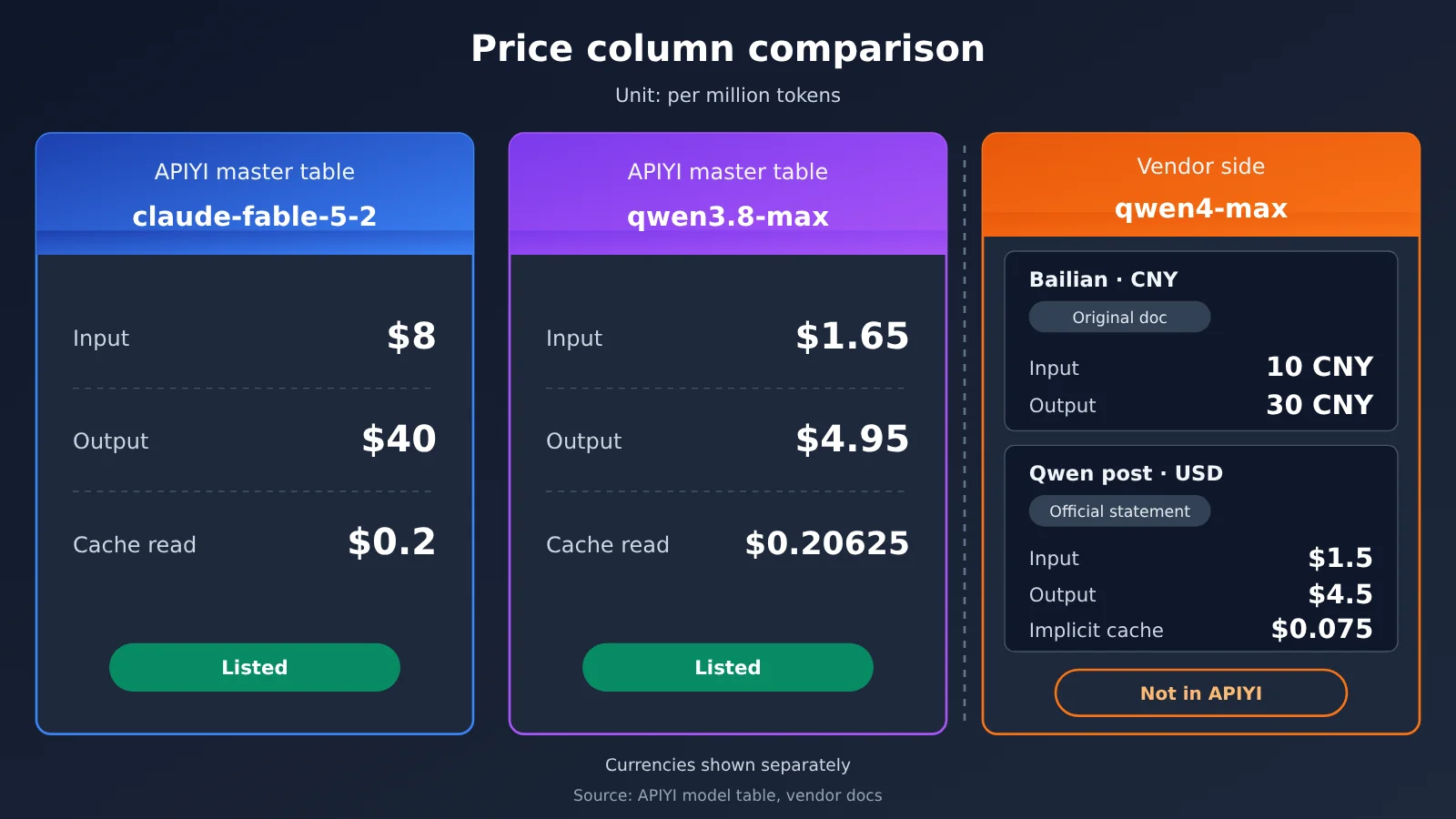
| Model ID | Price source | Input | Output | Cached read | Endpoint | Available platforms |
|---|---|---|---|---|---|---|
claude-fable-5-2 |
APIYI master table | $8 | $40 | $0.2 | chat, messages | APIYI apiyi.com, Anthropic official |
qwen3.8-max |
APIYI master table | $1.65 | $4.95 | $0.20625 | chat, messages | APIYI |
qwen4-max |
Original text of the Bailian model page (mainland / global) | 10 CNY | 30 CNY | — | Vendor side supports multiple protocols | Alibaba Cloud Bailian |
qwen4-max |
Qwen official post statement | $1.5 | $4.5 | implicit cache $0.075 | — | QwenCloud |
All prices in the table are per million tokens. The USD and CNY prices come from different sources, so treat them separately — don’t convert them, add them together, or compare them directly. Groups also need to be checked one by one: claude-fable-5-2 has a Claude_Enterprise group, while qwen3.8-max doesn’t. If your token’s default group is Claude_Enterprise, then when you switch to Qwen you’ll need a fallback group that includes the group it belongs to.
💡 Recommendation: During the evaluation phase, set the token’s default group to Default and configure 1–2 fallback groups that cover the models you want to test. For exactly which groups each model belongs to, refer to the APIYI model master table.
FAQ
Q1: What exactly does “one key, swap the model ID” mean?
It means the `base_url`, API key, and request structure all stay the same—you only replace the `model` field to switch models. This works only if the target model is already listed on the platform, the token isn’t blocked by an allowlist, and its group is available.
Q2: Can I test qwen4-max right now?
As of November 17, 2026, `qwen4-max` doesn’t appear in either the APIYI master table or the pricing endpoint. We recommend getting the Qwen path working with `qwen3.8-max` first, then periodically querying the APIYI apiyi.com pricing endpoint and switching the model once it shows up.
Q3: Can Bailian’s 1 million-token free quota be used on APIYI?
No. That’s the Bailian quota stated on the Alibaba Cloud Bailian model page, and it only applies to Bailian. APIYI has its own free trial quota for new users—the two are separate things.
Q4: Can Claude Fable 5.2’s fast mode be called through APIYI?
There’s no fast mode row in the APIYI master table. What’s listed is `claude-fable-5-2` and `claude-fable-5-2-thinking`. Fast mode’s $16 / $80 pricing is Anthropic’s official pricing.
Q5: I changed the model and got an error—what should I check first?
Check in this order: whether the model is in the master table, whether the token allowlist includes it, whether the token’s group covers that model’s group, and whether the endpoint supports the path you’re using. If you can’t figure it out, you can check the invocation logs for that token at APIYI apiyi.com to identify which item was rejected.
Q6: Can every model use only the Default group?
Don’t assume that. The docs recommend using Default when you’re unsure, but they also note that different models may need different groups. Each model’s group is defined by the master table—configure a fallback group when necessary.
How to Test a New Model: One Key, Swap the Model ID — Key Takeaways
- Look it up before you change anything: Confirm the target ID in both the model master list and the pricing endpoint before touching your config.
- Change only the
modelfield: For models already live on the platform,base_urland the API key stay the same. - Treat Fable pricing on its own: The $8 / $40 / $0.2 cache-read pricing for
claude-fable-5-2doesn’t represent other Claude models. - For Qwen, run the old pipeline first: Use
qwen3.8-maxto validate the flow, then switch onceqwen4-maxgoes live. - Read currencies separately: Bailian’s RMB pricing and the Qwen post’s USD pricing come from different sources — don’t merge them into one number.
- Match groups one by one: A token can have at most 1 default group plus 2 fallback groups, so don’t assume everything lives in Default.
Summary
When new models pile up, testing efficiency comes down to process, not how many accounts you’ve got:
- Check the master list and pricing endpoint: Confirm the model is live, and take the price from that row in the master list.
- Change only
modelfor live models: One key, one set of calls, covering multiple providers. - Verify groups, endpoints, and cache reads: Switching models changes your bill — and maybe the protocol too. Check each item before you flip the switch.
This week’s situation maps neatly onto those two paths: claude-fable-5-2 is ready to test directly, while for Qwen you first get the pipeline working with qwen3.8-max. We recommend running this whole test through APIYI apiyi.com with a single key, so you can spend your energy on evaluating the models themselves.
📚 References
-
APIYI model catalog: the source of truth for checking prices, endpoints, and groups
- Link:
docs.apiyi.com/models.md - Note: the page states its data was updated on 2026-11-16 09:39 (UTC+8), pulled from the system’s real-time pricing API
- Link:
-
APIYI tokens and groups docs: whitelists, dedicated tokens, default and fallback groups
- Link:
docs.apiyi.com/faq/token-and-groups.md - Note: explains the prerequisites for “one key, any model”
- Link:
-
Anthropic Claude Fable and Mythos 5.2 announcement: model IDs, official pricing, and fast mode
- Link:
anthropic.com/claude-fable-and-mythos-5-2 - Note: includes Mythos verification requirements and model selection guidance
- Link:
-
Anthropic model overview: the current list of Claude models
- Link:
platform.claude.com/docs/en/about-claude/models/overview - Note: confirms the existing model names
- Link:
-
Alibaba Cloud Bailian Qwen4-Max model page: specs, RMB pricing, and Bailian free quota
- Link:
help.aliyun.com/zh/model-studio/qwen4-max - Note: prices and quotas are quoted verbatim from the Bailian documentation
- Link:
-
Alibaba Cloud model releases and updates: qwen4-max launch date and deployment scope
- Link:
help.aliyun.com/zh/model-studio/newly-released-models - Note: recorded date is 2026-11-16
- Link:
-
Qwen official blog and official account post: the USD pricing as stated by the vendor, plus QwenCloud
- Link:
qwen.ai/blog?id=qwen4-max - Note: the USD prices are the vendor’s own figures and should be read separately from Bailian’s RMB prices
- Link:
Author: APIYI technical team
Technical discussion: feel free to reach us via the APIYI homepage. For more details on models and groups, check out the docs center.