Author’s note: Teams that work with OpenAI, Claude, Gemini, and Qwen at the same time can split tokens by project within a single account, then set a quota, validity period, model allowlist, and group for each token—and reconcile the books from the token logs.
R&D leads who integrate multiple models at once usually run into three kinds of problems. First, API keys are scattered across provider dashboards, so it’s hard to say who’s holding which key. Second, month-end bills don’t line up with projects—you don’t know how much each project spent. Third, once one key is shared by several people, if you want to cut off just one person, your only option is to revoke the entire key. This article describes a management approach based on one APIYI account + per-project tokens, turning enterprise multi-model management into concrete configuration steps.
This isn’t another explainer on “why you need an API proxy.” Every configuration item below maps to the token and group documentation at APIYI apiyi.com. Any numbers involving rate limits or groups are cited from the original documentation.
Core value: After reading this, you’ll be able to create a separate token for each project, limit how much it can spend, how long it stays valid, which models it can call, and which group it belongs to—and then check each project’s usage in the token logs.
Enterprise Multi-Model Management Key Points: Split Keys, Quotas, and Logs by Project
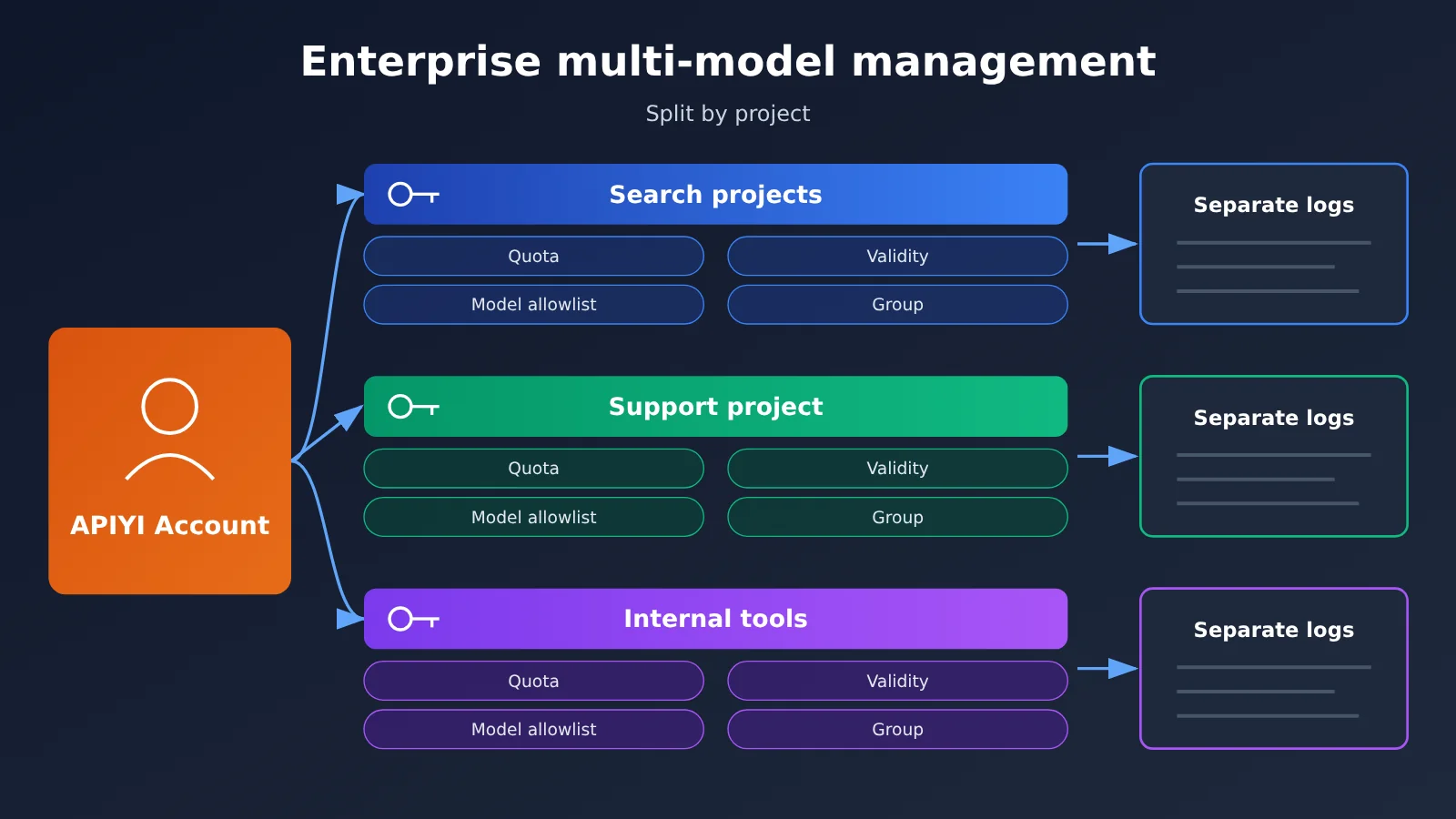
The key to enterprise multi-model management is splitting management boundaries, not funneling everything into one master key. At APIYI, a token is an API Key and starts with sk-. The docs say each token can have its own quota, expiration time, allowed models, and group, and usage, remaining quota, and invocation logs are tracked separately.
| Key point | Description | Value for R&D leads |
|---|---|---|
| Create a token per project | After sign-up, you get one default token, and you can create one for each project or team member | Disabling a person or a project doesn’t affect other callers |
| Set quota and validity separately | Each token can have a quota cap and expiration time | You can set limits ahead of time for budget overruns and contractor expiry |
| Model whitelist | If no whitelist is set, all 200+ curated models site-wide are available (per the docs); once set, only the specified models can be used | Prevents a project from quietly switching to an expensive model |
| Groups determine channel and multiplier | A group determines the upstream, available models, and billing multiplier | The same model in different groups can produce different actual charges |
| Logs are separated by token | Usage and invocation logs are viewed separately for each token | Month-end reconciliation can map directly to projects |
Why split tokens by project for enterprise multi-model management
One point from the docs needs to be clear upfront: when one token is shared by multiple people, rate limiting follows the account, not the number of tokens. The docs say a single account is generally fine at under 100 RPM, and TPM isn’t assessed. That’s the docs’ wording, not a stress-test result, and it isn’t an SLA.
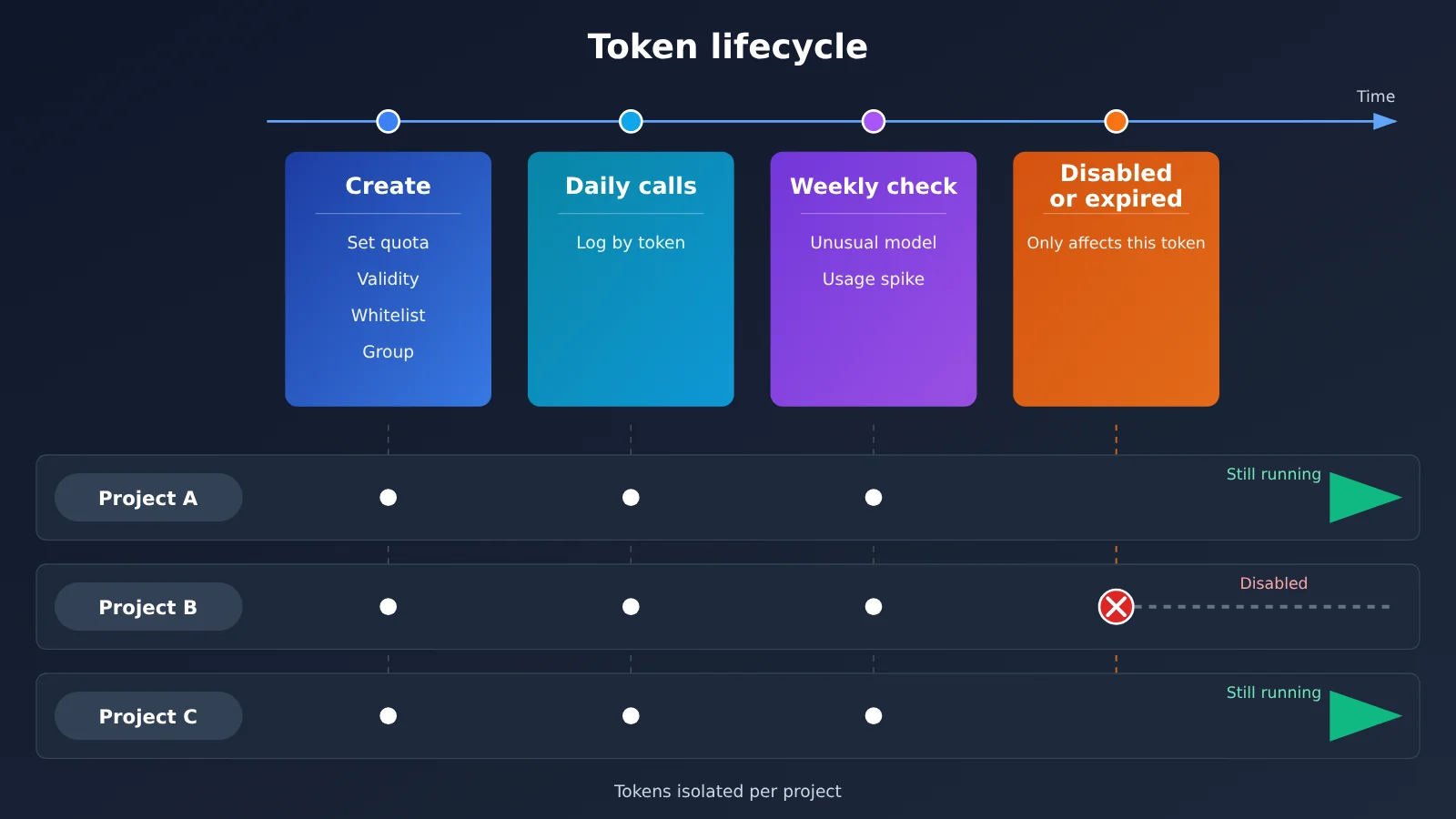
So splitting tokens isn’t about bypassing rate limits—it’s about management isolation. One token maps to one project or one team member; if something goes wrong, you can disable just that token, and when checking usage you can look at just that one. If everyone shares the default token, the usage in the logs gets mixed together, can’t be split by project, and there’s no way to precisely shut off a specific caller.
Group and fallback rules in enterprise multi-model management
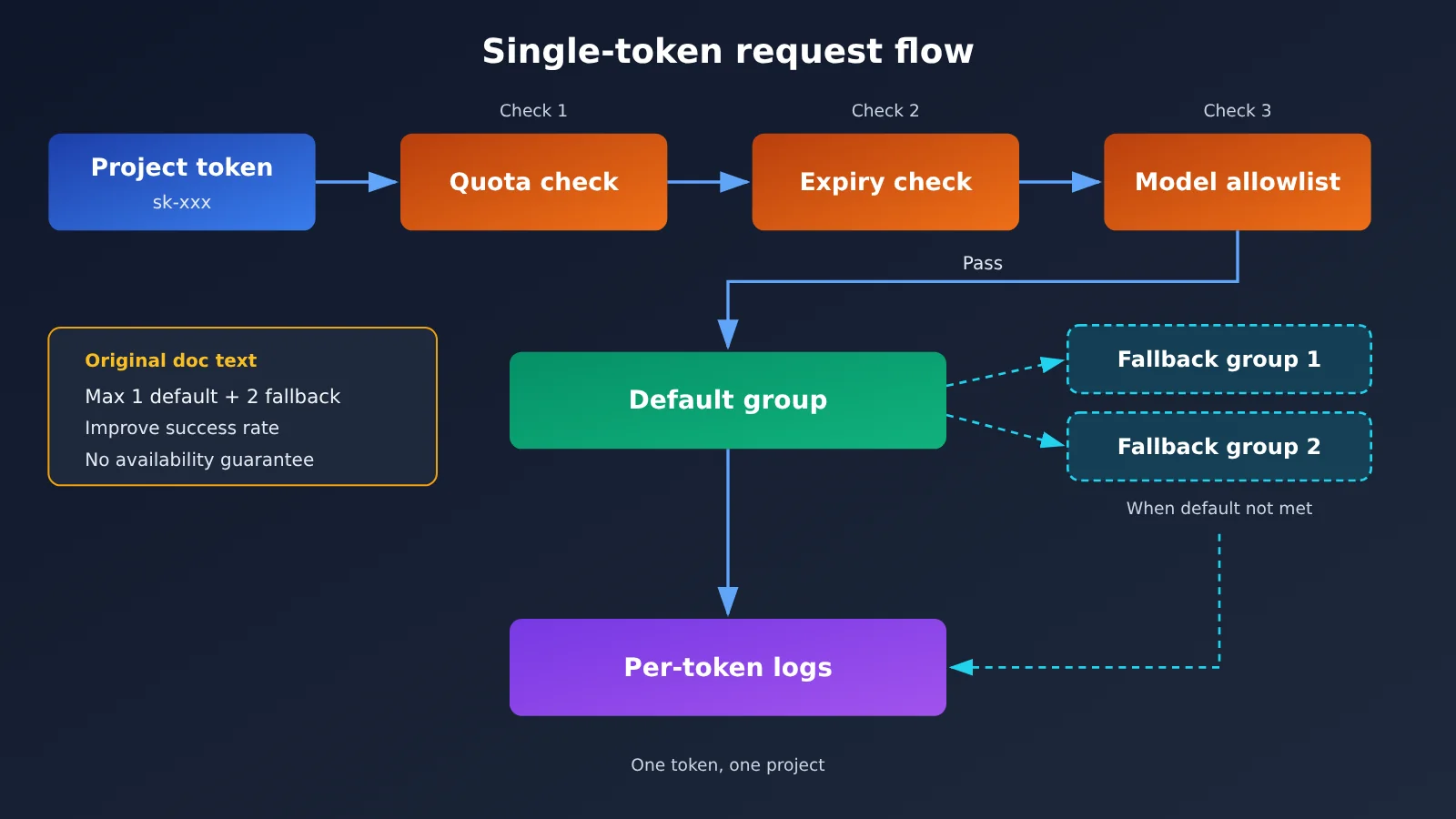
A group is a resource channel. Per the docs, a token can be configured with at most 1 default group and 2 fallback groups. Fallback means: when the default group can’t satisfy a request, the system automatically switches to a fallback group. The docs describe fallback as “improving invocation success rate,” not as an availability commitment, so don’t interpret it as “never fails.”
Most text models can just use the Default group. Dedicated models such as video need a different group; if the token doesn’t include that group, the corresponding model can’t be invoked. Also note that “200+ models” means the total number of curated models across the site, not that every model is in the Default group. Check the group noted on each model’s page for the specifics.
Quick Start for Enterprise Multi-Model Management: 5 Steps to Build Project-Based Tokens
Let’s use a three-project team as an example: a search enhancement project, a customer support bot project, and an internal writing tool. This walks through the full setup flow. The entry point is the token page at https://api.apiyi.com/token.
Step 1: Plan your tokens — one project or one person, one token
Draw up a token plan table first, then go create them in the dashboard. That way you won’t be building and revising at the same time, only to end up back in the “one key for everyone” situation.
| Token name | Used by | Model whitelist | Default group | Fallback group | Quota and validity recommendations |
|---|---|---|---|---|---|
proj-search |
Search enhancement service | gemini-3.8-flash, qwen3.8-max |
Default |
Configure from available groups on the model’s page | Set a monthly budget quota, long-term validity |
proj-support |
Customer support bot | claude-sonnet-5-5 |
Default |
Configure from available groups on the model’s page | Set a monthly budget quota |
team-writing-zhang |
Member’s personal tool | claude-opus-5-5 |
Default |
None | Small quota, with an expiration date |
vendor-outsource |
Outsourced team | Only the models needed for deliverables | Default |
None | Align quota with the contract period, auto-expire when it ends |
The management suggestions in this table are our own judgment. Which groups a given model actually belongs to should be checked on that model’s page — don’t just copy this table.
Step 2: Create a Token and Set Four Limits
When you create a new token on the token page, fill in these four items in order:
- Quota: Set it based on your project’s monthly budget. Once the quota runs out, this token stops incurring charges, and other tokens are unaffected.
- Expiration time: Always set this for contractors and temporary members—no manual cleanup needed when it expires.
- Available models (whitelist): Only check the models your project actually needs. Leaving it blank means all models across the site are open, which isn’t recommended.
- Group: Pick the default group first, then add up to 2 fallback groups as needed.
Step 3: Store the Key in Environment Variables, with a Variable Name per Project
Don’t hardcode keys in your code or repository. I recommend giving each project its own environment variable name—for example, set APIYI_KEY_SEARCH=sk-... and APIYI_KEY_SUPPORT=sk-... in the deployment environment, then have each service read its own. That way, when you rotate a key for one project, you only need to change a single variable.
Step 4: Call It Through the OpenAI-Compatible API
APIYI provides an OpenAI-compatible API. To integrate it, you only need to change two things:
- Set
base_urltohttps://api.apiyi.com/v1 - Read
api_keyfrom the project’s own environment variable, for exampleos.environ["APIYI_KEY_SEARCH"]
With the official Python SDK, the core is just one initialization line: client = OpenAI(api_key=os.environ["APIYI_KEY_SEARCH"], base_url="https://api.apiyi.com/v1"). Then you can call client.chat.completions.create(model="gemini-3.8-flash", messages=[...]). If you change model to one that isn’t on the allowlist, that token won’t be able to make calls. That’s exactly what the allowlist is meant to do.
Step 5: Check Token Logs Weekly and Reconcile by Token at Month-End
Each token’s usage, remaining quota, and invocation logs can all be viewed separately. I recommend checking each token’s logs once a week, focusing on two things: whether any unexpected models have appeared, and whether the usage curve has suddenly jumped. At the end of the month, aggregate by token to get a cost breakdown by project.
🎯 Technical tip: When you first roll this out, I recommend disabling the default token or reserving it for admins only, then creating each token one by one on the APIYI token page at apiyi.com according to the planning table above. That way, from day one, every call can be attributed to a specific project in the logs.
Enterprise Multi-Model Management Billing: Switch Models, and the Bill Changes
The thing multi-model teams most often overlook: change the model or change the group, and the bill changes right along with it. The prices below come from the APIYI model master list. They’re default list prices per million tokens, and the data was updated on 2026-11-16 09:39 (UTC+8).
| Model ID | Input price | Output price | Cache read | Endpoints / groups noted in docs | Available platform |
|---|---|---|---|---|---|
claude-opus-5-5 |
$4 | $20 | $0.2 | Endpoints chat and messages | APIYI apiyi.com |
claude-sonnet-5-5 |
$2 | $10 | $0.1 | See the model page | APIYI |
qwen3.8-max |
$1.65 | $4.95 | $0.20625 | Endpoints chat and messages; groups ClaudeCode, Default, SVIP | APIYI |
gemini-3.8-flash |
$0.75 | $3.75 | $0.075 | Gemini_Reverse multiplier 0.5×, Default and SVIP at 1× | APIYI |
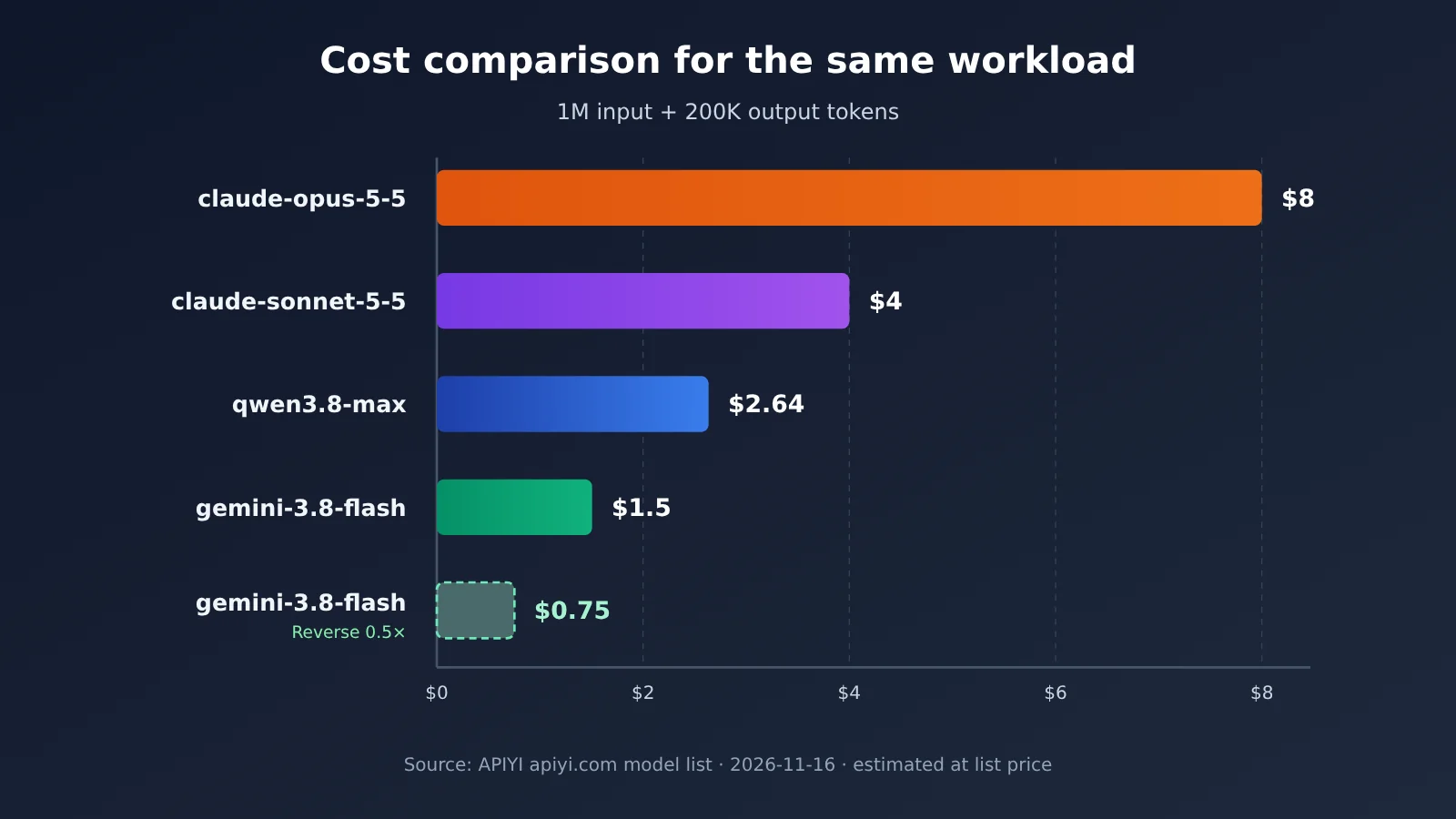
According to the docs, pay-as-you-go billing works like this: input tokens × input price + output tokens × output price. Say a project uses 1 million input tokens and 200,000 output tokens per month. At list price, here’s the estimate:
claude-opus-5-5: 4 + 0.2 × 20 = $8claude-sonnet-5-5: 2 + 0.2 × 10 = $4qwen3.8-max: 1.65 + 0.2 × 4.95 = $2.64gemini-3.8-flash(Default, 1×): 0.75 + 0.2 × 3.75 = $1.5; if it goes through Gemini_Reverse (0.5×), the multiplier works out to about $0.75
As you can see, for the same workload, switching models can make costs differ by several times, and switching groups directly changes what you’re actually charged. So when you set whitelists and groups on a token, you’re really setting a price ceiling for the project. When you look up models and check prices, use the model list on APIYI apiyi.com as the source of truth. Once you’ve confirmed which groups a model belongs to and what its multiplier is, add it to the matching token. The API base URL is always https://api.apiyi.com/v1; to switch models, you only need to change the model parameter—no need to change base_url.
If your team is evaluating a newly released model—say qwen4-max, which Alibaba Cloud released on 2026-11-16—note that it isn’t in the master list yet, and you won’t find it in the platform’s pricing API either. It isn’t listed yet, and we’ll get it listed as soon as we can. Models and prices are subject to the platform’s model list. Until it’s listed, don’t put it into any token whitelist plan.
Billing Models in Enterprise Multi-Model Management: Don’t Mix Pay-Per-Use and Per-Request
The documentation recommends “pay-per-use first” for text models. Per-request billing means a fixed price for each request, and it’s mainly used for images and video. If the same token runs both text and image generation, the logs will show both token-based charges and per-request charges at once — different units, so you can’t just add them together.
The safer approach: create separate tokens for text projects and for image/video projects. Video and other dedicated models already need their own group anyway, so once you split them out, both the group configuration and the billing units become much clearer.
| Billing method | Calculation (as stated in the docs) | Typical use | Token split recommendation |
|---|---|---|---|
| Pay-per-use | input tokens × input price + output tokens × output price | Text chat, code, summaries | One dedicated token for text projects; docs recommend pay-per-use first |
| Per-request | Fixed price per request | Image and video generation | One dedicated token for image/video, with the matching dedicated group configured |
On settlement, the docs say top-ups settle at a fixed 1:7 exchange rate, can be combined with top-up discounts, and actual deductions are whatever the console shows. Procurement workflows, contracts, and invoices are outside the scope of this article — if you need those, check with the platform directly.
💡 Recommendation: Create a separate small-quota token for expensive models (like
claude-opus-5-5) and hand it out only to the people who actually need it. Tokens for everyday batch jobs should only carry low-price models. On APIYI apiyi.com, verify groups and multipliers against the model list before allocating — that’s how you avoid surprise bills at the end of the month.
Common Questions About Enterprise Multi-Model Management (FAQ)
Q1: What is per-project token splitting in enterprise multi-model management?
It means creating a separate API key (token) for each project or team member within a single account, with each token getting its own quota, expiration date, model whitelist, and group. Usage and call logs are recorded separately per token, so disabling a token and reconciling costs can be pinned down to the project level.
Q2: If I create a lot of tokens, does the rate limit double?
No. The docs explicitly state that rate limits follow the account and have nothing to do with the number of tokens. The original wording is that a single account is generally fine under 100 RPM, and TPM isn’t assessed. That’s just what the docs say — it’s not an SLA. Splitting tokens is about management isolation, not about raising your quota.
Q3: If I configure fallback groups, does that mean requests won’t fail?
No. Per the docs, a token can have at most 1 default group plus 2 fallback groups. Fallbacks switch in automatically when the default group can’t satisfy the request, and their purpose is to improve the success rate. Your business logic still needs retry and degradation handling.
Q4: What happens if I don’t set a model whitelist?
From the docs: without a whitelist, a token can use the full site’s 200+ curated models. That’s a significant risk from a management standpoint — a project could casually switch to an expensive model. In enterprise scenarios, it’s best to put only the models a project actually needs on each token.
Q5: I already have code using the OpenAI SDK — how do I switch to per-project token calls?
Only two changes: set `base_url` to `https://api.apiyi.com/v1`, and read `api_key` from the project’s own environment variable. Create the token on the token page of APIYI apiyi.com; to switch models, you just change the `model` parameter.
Q6: Why can’t a certain video model be called with my token?
Video and other dedicated models require their own group. If that group isn’t configured on the token, the model isn’t available. Check the model’s page to see which group it belongs to, then add it to the token’s group settings — or create a separate token just for video workloads.
Q7: Why does the same model cost different amounts across projects?
Usually it’s because of different group multipliers. For example, the model page for `gemini-3.8-flash` states that the Gemini_Reverse group has a 0.5× multiplier, while Default and SVIP are 1×. When reconciling, check the model and the group together — you can’t just look at the list price.
Q8: What are the limitations of this approach?
Splitting tokens solves the isolation problems around keys, quotas, and logs. It doesn’t raise the account rate limit, and it can’t replace retries and monitoring on the business side. Newly released models can only be added to the whitelist after they’re available on the platform. For specific pricing and groups, refer to the model list at APIYI apiyi.com.
Key Takeaways for Enterprise Multi-Model Management
- A token is the key: it starts with
sk-, and you create one per project or per member so you can revoke each one on its own - Set all four limits together: quota, expiration time, model whitelist, and group — skip any one of them and you’ve left a gap in your management
- Rate limits follow the account: per the docs, staying under 100 RPM is generally fine and TPM isn’t enforced, so splitting tokens won’t get you more quota
- A fallback isn’t a guarantee: at most 1 default + 2 fallback groups (per the docs) — their job is to raise the success rate
- Switching models changes the bill: the model’s unit price and the group multiplier together decide what you’re actually charged, so reconciliation by token is the only way to see it clearly
- Keep text and image generation separate: volume-based and per-call billing use different units, so managing them with separate tokens makes reconciliation easier
- One entry point: every project goes through
https://api.apiyi.com/v1, with tokens doing all the work of separating permissions and billing
Summary
Enterprise multi-model management doesn’t call for one master key that opens every vendor’s dashboard. Instead, you split permissions by project:
- Split keys by project: one token per project or per person, so disabling and rotating one doesn’t affect the others.
- Cap quota and models: use quota to control total spend, and the whitelist plus group to control unit price.
- Reconcile logs by token: check for anomalies every week, and total up costs by token at the end of the month.
Start by drawing up your token plan using step one of this article, then create each one on the token page at APIYI apiyi.com. When checking models, prices, and groups, treat the platform’s model list as the source of truth — do it right once and your multi-model bills will stay clean.
📚 References
-
APIYI Documentation Center: tokens and groups, billing modes, complete model list
- Link:
docs.apiyi.com - Note: maps to the paths
/faq/token-and-groups.md,/faq/token-billing-modes.md,/models.md, and/models/gemini-3-8-flash.md; the token, group, and pricing information in this article is based on these
- Link:
-
Alibaba Cloud Model Studio Qwen4-Max documentation: vendor release information
- Link:
help.aliyun.com/zh/model-studio/qwen4-max - Note: this model was released by the vendor on 2026-11-16; its listing status on the platform is subject to the model list
- Link:
Author: APIYI Technical Team
Technical discussion: You’re welcome to reach us through the APIYI website homepage. More configuration details on tokens and groups are available in the documentation center.