Author’s note: Break this down by deliverable into three paths—Claude chat file generation, the Microsoft 365 add-in, and API invocation—and explain how to choose among the four model IDs and how they’re priced.
If you’re planning to use Claude for reports, spreadsheets, or slide decks, you’ll probably run into the same question: should you ask for files directly in chat, install an Office add-in, or write your own program to call the API. All three paths are called Claude, but their entry points, billing, and capabilities are different.
This isn’t a model benchmark article. The breakdown here is based on the usage recommendations in Anthropic’s official documentation and the publicly listed pricing from each platform. It doesn’t involve performance rankings.
Core value: After reading this, you’ll be able to decide which product path to take based on the deliverable first. And if you go the API route, you’ll know which model IDs to switch between and how your bill will change when you do.
Where to Start with Claude for Office Work: The Key Points
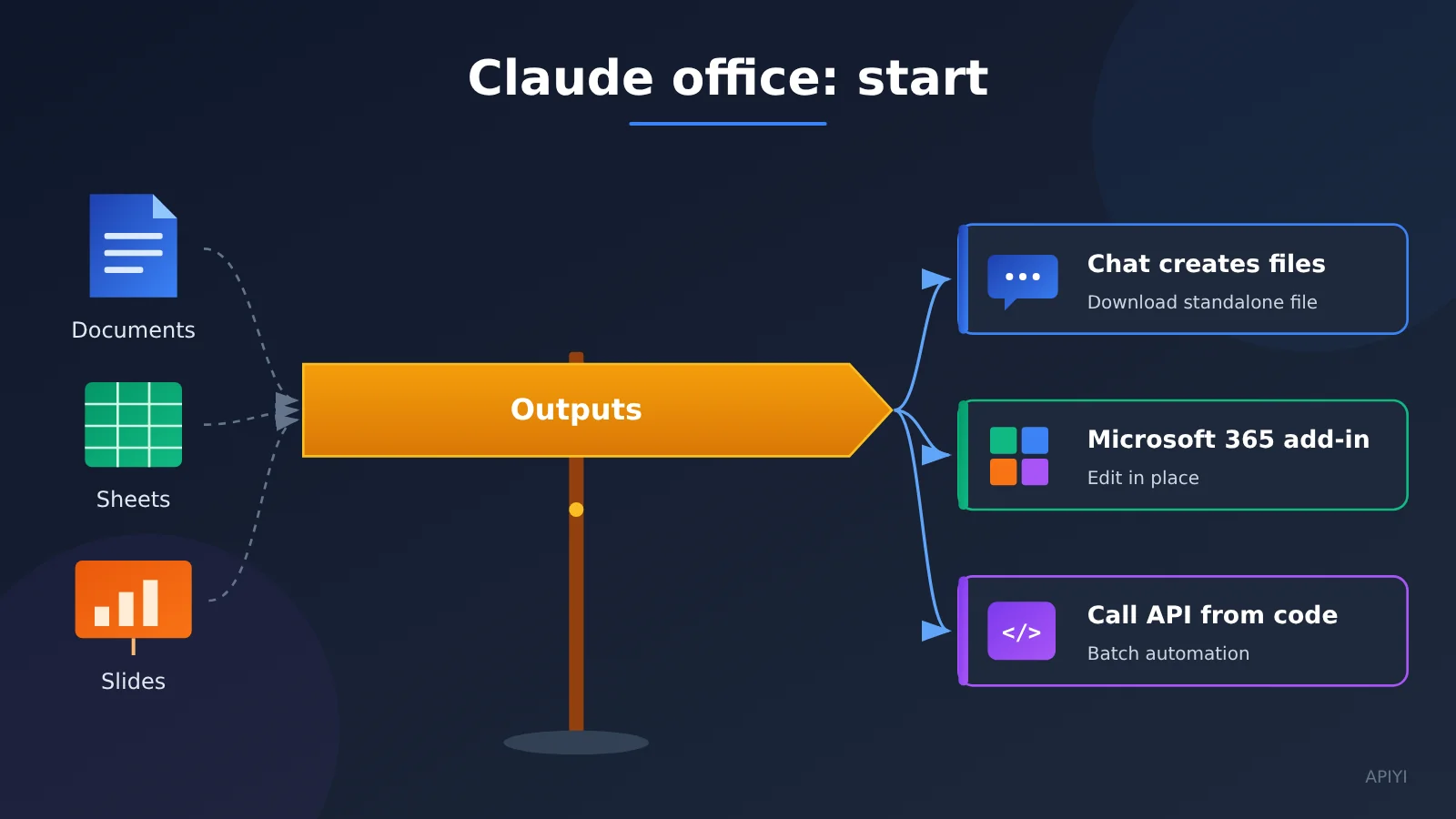
Before picking a model, answer one question first: where does the file ultimately need to go? The delivery format determines the path, and the path determines whether you can swap models and how you’ll be billed.
| Key point | Description | Value |
|---|---|---|
| Start with the deliverable | One-off files, files that stay in Office and get edited repeatedly, and batch-produced files each map to a different path | Avoid picking the wrong product and wasting time |
| Two official product paths | Chat file generation and Claude for Microsoft 365 are both Anthropic products | Makes it clear they aren’t office suites built into third-party platforms |
The API path only changes model |
When your own program makes the call, switch between four model IDs based on the task | One codebase covers tasks of varying difficulty |
| Changing the model changes the bill | The four models differ noticeably in input, output, and cache-read pricing | Estimate cost before you choose |
Two Anthropic product paths for Claude at work
The first path is generating files right in the chat. According to the Claude Help Center, Claude can create Excel (.xlsx), PowerPoint (.pptx), Word (.docx), and PDF files inside a conversation. Once generated, you can download them or save them to Google Drive, and the per-file upload and download limit is 30MB. Web, desktop, and mobile all support code execution and file creation, and it works on every plan from Free to Enterprise.
The second path is Claude for Microsoft 365. Per Anthropic’s official description, Claude can work inside Excel, PowerPoint, Word, and Outlook, and the download page offers Excel, PowerPoint, and Word extensions. What defines this path is that the file never leaves the Microsoft app — you review and edit it in an interface you already know.
One thing worth being clear about: both paths are Anthropic products, not buttons in the APIYI console. This article also didn’t confirm that third-party API keys can be entered into these add-ins, so don’t treat the add-ins as a universal client where “just swap the key and it works.”
| Path | Owner | Delivery format | Who it’s for |
|---|---|---|---|
| Chat file generation | Anthropic product | A standalone file you download or save to Google Drive | Individuals who occasionally need a document, spreadsheet, or deck |
| Claude for Microsoft 365 | Anthropic product | The file stays in Excel, PowerPoint, or Word and is edited in place | People who collaborate in Office daily and need repeated tweaks |
| Calling the API from your own program | Your own program | Content generated or processed in batch by the program | Teams that need automation, batch processing, or business-system integration |
The first yes/no question on the Claude-at-work path
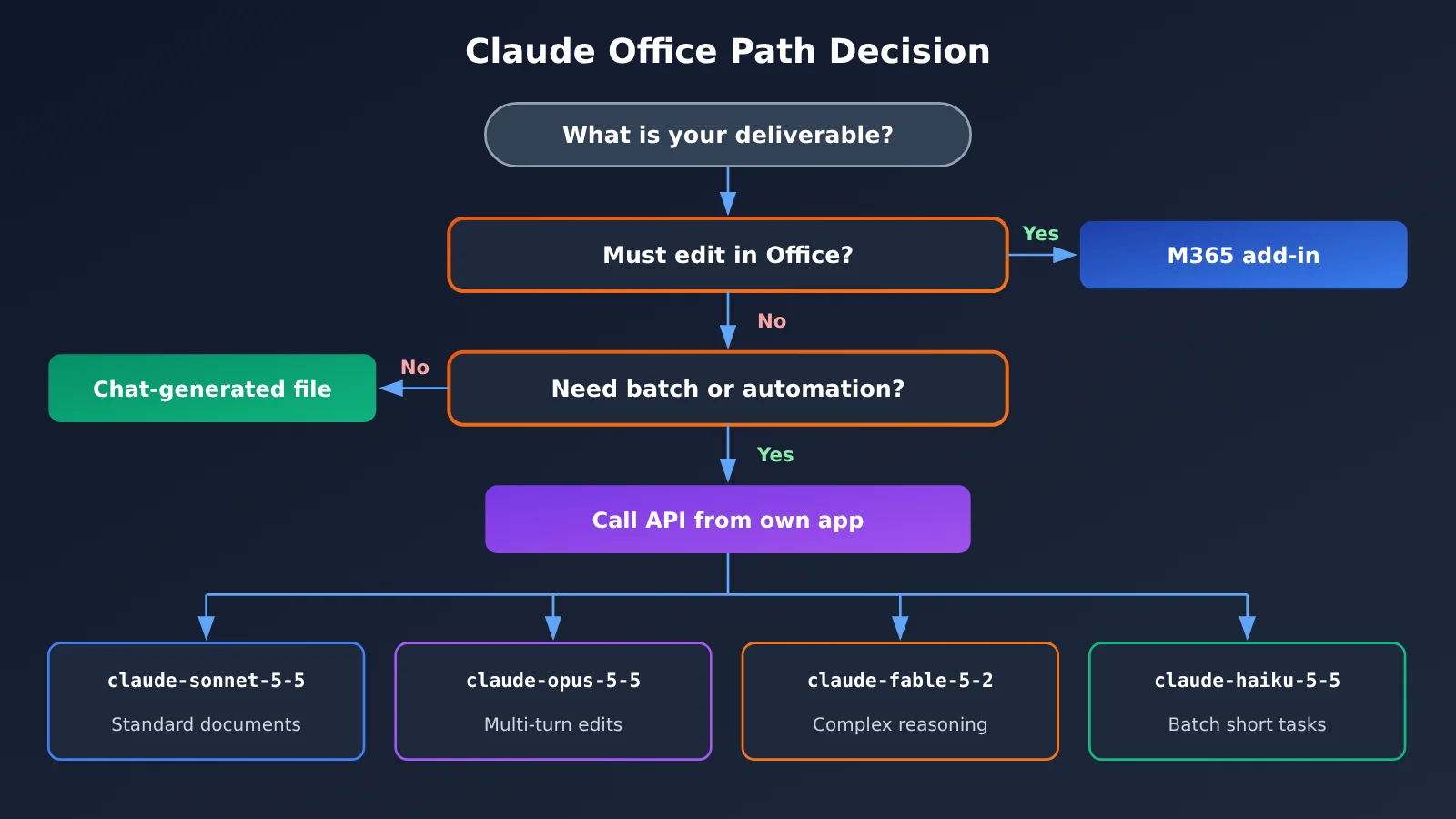
The whole decision comes down to one sentence: must the file stay inside the original Microsoft app to be edited? If your colleagues are all looking at the same sheet in Excel, or a deck needs page-by-page polish in PowerPoint, the add-in path is smoother. If you just need a finished artifact, generate it in chat and download it.
Only when a task needs to be run repeatedly, processed in batch, or wired into your own system does the API come into play. At that point the question shifts from “which product” to “which model ID” — which is where the second half of this article focuses.
Claude for Office Work via API: Match the Model ID to the Deliverable
The usage guidance in Anthropic’s model overview is refreshingly direct: when you’re not sure, start with Claude Opus 5.5; for harder reasoning and long-running tasks, use Fable 5.2; for lighter work, reach for Sonnet 5.5 or Haiku 5.5. Map that advice onto office deliverables and you get roughly this division of labor.
| Deliverable / task | Recommended model ID | Official usage rationale |
|---|---|---|
| Everyday documents, one-page slides, format conversion | claude-sonnet-5-5 |
Lighter tasks |
| Back-and-forth on assumptions, aligning definitions, revising the same document across multiple rounds | claude-opus-5-5 |
Described officially as the starting point for most work |
| Financial models, long-chain technical work, harder reasoning tasks | claude-fable-5-2 |
Harder reasoning and long-horizon tasks |
| High-volume short rewrites, classification, extraction | claude-haiku-5-5 |
Lighter tasks |
This table splits the work based on official usage guidance and list pricing — it’s not a benchmark conclusion. In a real project, you can get everything running with claude-opus-5-5 first, then move some tasks down to Sonnet or Haiku depending on quality and cost.
Pricing and groupings for the four Claude model IDs
The prices below come from the APIYI model table (apiyi.com documentation center, data updated 2026-11-16 09:39, UTC+8) and are in USD per million tokens. Where official pricing matches the table, you can cross-check it against the Anthropic model overview and the 2026-11-09 Fable 5.2 announcement.
| Model ID | Input | Output | Cache read | Group notes in the model table |
|---|---|---|---|---|
claude-sonnet-5-5 |
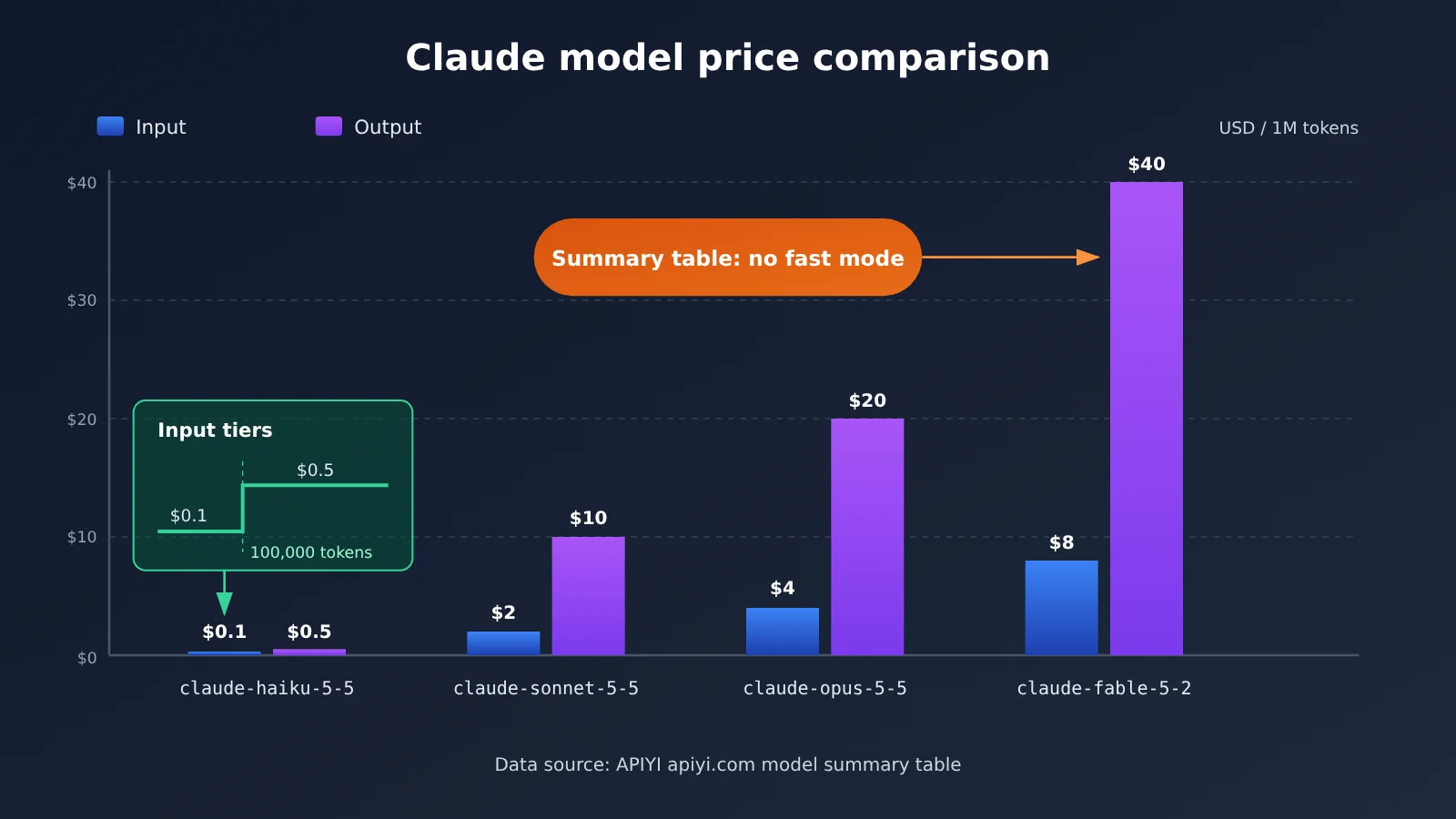
$2 | $10 | $0.1 | Includes ClaudeCode, Claude_Reverse, Claude_Enterprise, Default, SVIP; endpoints chat and messages |
claude-opus-5-5 |
$4 | $20 | $0.2 | Same groups, also including Claude_Reverse |
claude-fable-5-2 |
$8 | $40 | $0.2 | ClaudeCode, Claude_Enterprise, Default, SVIP; no Claude_Reverse |
claude-haiku-5-5 |
$0.1 (tiered) | $0.5 | $0.01 | No Claude_Reverse; $0.5/1M once input exceeds 100,000 tokens |
Every model’s price, tiers, and groupings need to be checked individually — you can’t apply one model’s numbers to another. Three spots are easy to misread and worth calling out separately:
- Haiku 5.5 has an input tier: in the table, input from 0 to 100,000 tokens is $0.1/1M, and above 100,000 tokens it’s $0.5/1M. Before you process a long document, estimate whether your input will cross that threshold.
- Fable 5.2 has no Claude_Reverse group: if your token only has that group enabled, you’ll need to adjust the grouping before calling
claude-fable-5-2. - Official fast mode isn’t in the table: Anthropic’s announcement prices Fable 5.2 fast mode at $16 / $80, but the APIYI model table doesn’t list it, so don’t treat it as an available option.
Switching Claude Model IDs Is the Same as Changing Your Bill
There’s a fixed ratio behind cache read pricing. According to the pricing notes in Anthropic’s model overview, cache reads for Opus 5.5 and Sonnet 5.5 are 5% of the input price, so they’re $0.2 and $0.1 respectively; cache reads for Fable 5.2 are 2.5% of the input price, and 2.5% of $8 is exactly $0.2. This ratio is only here to explain the cache prices in the table—you don’t need to calculate it again.
From the table, you can see that if you change the model in the same code from Sonnet to Fable, both the input and output unit prices become 4 times the original. When calling through APIYI, actual charges are based on the console records, and top-up discounts can stack with the listed prices. Before launch, it’s a good idea to verify with a small number of real requests in the console, then decide on your default model.
💰 Cost tip: When you revise the same document over multiple rounds, repeated background material is a good candidate for caching. If you want to compare costs across different models on the same task, you can use the same token to call all four models on APIYI apiyi.com, then check each charge breakdown in the console logs.
Quick Start with the Claude Office API: Just Change the model
When you hook this into your own program, the idea is simple: “same endpoint, only change the model.” APIYI offers an OpenAI-compatible interface — point base_url at https://api.apiyi.com/v1, then use the request path /v1/chat/completions, or the corresponding messages endpoint.
The Minimal Structure of a Claude Office Request
A request only needs the items below. When you switch deliverable types, you usually just change model and the prompt content, leaving everything else alone.
| Field | Example value | Notes |
|---|---|---|
| base_url | https://api.apiyi.com/v1 |
APIYI’s unified interface address |
| Path | /v1/chat/completions |
The corresponding messages endpoint works too |
| Auth | Token from an environment variable, e.g. APIYI_KEY_DOCS |
Don’t hard-code the key in your code |
| model | claude-sonnet-5-5 / claude-opus-5-5 / claude-fable-5-2 / claude-haiku-5-5 |
Switch based on the deliverable |
| messages | [{"role": "user", "content": "Turn this meeting summary into a one-page outline"}] |
The task content |
Here’s a common workflow: first use claude-haiku-5-5 to batch-extract action items from meeting notes, then use claude-sonnet-5-5 to turn the results into a one-page report outline, and finally switch to claude-opus-5-5 for the sections that need repeated checking of data definitions. Throughout the whole process the base_url and path stay the same — only the model changes.
Splitting Claude Office Tokens by Deliverable
APIYI’s token docs recommend managing keys by purpose. With no whitelist configured, a single token can call the 200+ models available on the platform, but for office scenarios it’s better to split them up:
- Document token: for reports, meeting notes, and format conversion; default model
claude-sonnet-5-5. - Spreadsheet token: for data cleanup and financial models; switch between
claude-opus-5-5andclaude-fable-5-2depending on difficulty — pay attention to the group Fable requires. - Slides token: for outlines and page copy; default
claude-sonnet-5-5, switch toclaude-opus-5-5when you need multiple rounds of polishing.
The benefit of splitting tokens is that if one use case runs into trouble, you can disable it on its own, and when you check the logs you can track usage and cost directly by deliverable.
🚀 Quick start: We suggest signing up at APIYI apiyi.com first and claiming the free trial credits for new users, then running a
claude-sonnet-5-5request through with your document token before gradually adding other models. Since the interface is OpenAI-compatible, your existing code usually only needs a new base_url and model.
Frequently Asked Questions (FAQ)
Q1: How many ways are there to use Claude for office work?
There are three main paths: generating files directly in Claude chat, using Claude for Microsoft 365 inside Office, and calling the API from your own application. The first two are Anthropic products; the third is driven by your own code, so you can switch model IDs freely.
Q2: What’s the difference between chat-generated files and the Microsoft 365 add-in?
Chat-generated files are good when you just want a finished deliverable — download it or save it to Google Drive, with a 30MB limit per file. The add-in is better when files have to stay in Excel, PowerPoint, or Word and be edited in place. The deciding factor is whether the file ultimately needs more edits in Microsoft’s original software.
Q3: Can add-ins like Claude for Excel take a third-party API key?
This article hasn’t verified that APIYI keys can be entered into these add-ins, so we don’t recommend planning around that. If you need to use APIYI, go the own-application route — set `https://api.apiyi.com/v1` as the base_url and send your own requests.
Q4: What if I’m not sure which model ID to use?
Per Anthropic’s official recommendation, start with `claude-opus-5-5`. Once that works, look at task difficulty: for tougher reasoning and long-horizon tasks, switch to `claude-fable-5-2`, and for lighter tasks drop down to `claude-sonnet-5-5` or `claude-haiku-5-5`.
Q5: How do I quickly call these four Claude models through the API?
It’s simple:
1. Go to APIYI apiyi.com, register an account, and create a token
2. Store the token in an environment variable and make sure the token group covers the target model
3. Set base_url to `https://api.apiyi.com/v1`, use the `/v1/chat/completions` path, and fill in the matching model
With the same code, just swap the model to switch between them — handy for comparing results and costs.
Q6: What should I watch out for when using Haiku on long documents?
`claude-haiku-5-5` has a tiered input price in the price table: $0.1/1M for 0 to 100,000 tokens, and $0.5/1M beyond that. Estimate the input length before processing long documents, and split them into chunks if necessary so you don’t cross the tier and push up the unit price.
Q7: Can I use Fable 5.2’s fast mode?
Anthropic’s announcement prices fast mode at $16 / $80, but the current APIYI price table doesn’t list this option, so don’t count on it as an available mode. When calling `claude-fable-5-2`, just go by the price table’s $8 / $40 pricing — actual billing is whatever the console shows.
Claude for Office: Key Takeaways
- Pick the path based on the deliverable first: whether the file has to stay in Office and be edited there is what decides between the add-in and chat-based generation
- Both product paths belong to Anthropic: chat-based file generation and the Microsoft 365 add-in are not kits that ship with the API platform
- On the API path, you only change the model: the endpoint stays the same, and you switch between four model IDs depending on the task
- Anthropic recommends starting with Opus: when you’re unsure, use
claude-opus-5-5; for hard problems, use Fable; for light tasks, use Sonnet or Haiku - Pricing groups are independent of each other: Haiku has input tiers, Fable has no Claude_Reverse group, and the master table has no fast mode
- Split tokens by deliverable: create one token each for documents, spreadsheets, and slides through APIYI apiyi.com, which makes it easy to disable them and check logs
Summary
The key points for getting started with Claude in the office:
- The deliverable determines the path: for a one-off finished product, use chat-based file generation; for in-place edits, use the Microsoft 365 add-in; for automation and batch processing, use the API.
- The model ID determines capability and cost: the four models have different official use cases, and the price gaps are significant — changing the model changes your bill.
- Keep things simple on the engineering side: fix the endpoint, change only the model, split tokens by deliverable, and verify actual charges in the console before going live.
If you’ve already decided to go the self-hosted program route, start by running the lightest possible request with free quota, then gradually add other models as task difficulty increases. We recommend calling all four Claude models uniformly through APIYI apiyi.com — the same OpenAI-compatible interface is all you need for switching and comparison.
📚 References
-
Claude Help Center – Create and edit files: instructions for generating Excel, PowerPoint, Word, and PDF files in chat
- Link:
support.claude.com/en/articles/12111783-create-and-edit-files-with-claude - Notes: covers file formats, the 30MB limit, and availability by plan
- Link:
-
Claude for Microsoft 365: how Claude works inside Excel, PowerPoint, Word, and Outlook
- Link:
claude.com/claude-for-microsoft-365 - Notes: the official walkthrough for the add-in route; download the extension at
claude.com/download
- Link:
-
Anthropic model overview: usage recommendations and pricing notes for each model
- Link:
platform.claude.com/docs/en/about-claude/models/overview - Notes: official guidance on starting with Opus and using Fable for tough problems, plus the cache-read ratio
- Link:
-
Claude Fable and Mythos 5.2 announcement: details on Fable 5.2, published 2026-11-09
- Link:
www.anthropic.com/claude-fable-and-mythos-5-2 - Notes: includes official list pricing and notes on fast mode
- Link:
-
APIYI model catalog and token docs: model pricing, groups, and token management
- Link:
docs.apiyi.com/models.md,docs.apiyi.com/faq/token-and-groups.md - Notes: list prices, tiers, and groups for the four model IDs, plus how to split tokens by use case
- Link:
Author: APIYI technical team
Technical discussion: feel free to reach out through the APIYI homepage — you’ll find more integration guides in the APIYI documentation center