Author’s note: Astryx is a React design system open-sourced by Meta and still in beta. It brings together components, themes, and documentation designed for Agents to read. It’s not a model, and it doesn’t come with a Large Language Model API.
When you use Agents like Claude Code, Cursor, or Codex to modify a React interface, you’ll often see inconsistencies: buttons have rounded corners on one page but not another; some dialogs close when you click the backdrop, while others don’t; spacing varies between 12px and 14px. The problem isn’t the model’s capabilities—it’s that the Agent doesn’t have a design system it can look up. It has to guess component names and props from memory. Astryx gives people and Agents the same component reference to work from: people use the documentation site, while Agents access the same content through the CLI, AGENTS.md, or MCP.
This article isn’t just a rehash of the installation commands. It explains which details are claims made by Meta, which come from one-off tests by third-party authors, and which are counts you can verify as of 2026-11-10 but may change. It also lists projects that aren’t suitable for migration right now.
The key takeaway: By the end, you’ll be able to judge whether Astryx is right for your React project and connect it to a shared workflow for people and Agents in four steps.

The image above is a banner published by Astryx. You can explore the actual interface through these three official links; no additional screenshots are included in this article:
- Documentation:
astryx.atmeta.com - Component browser (Storybook):
astryx.atmeta.com/storybook/ - Try it online (Sandbox):
astryx.atmeta.com/sandbox/
Astryx at a Glance: What It Is—and What It Isn’t
Let’s clarify the boundaries first. The official repository describes Astryx as an open-source design system that’s fully customizable and built for people and Agents to work together. It’s licensed under MIT, written primarily in TypeScript, and marked “Currently in Beta” in the README—it hasn’t reached 1.0 yet.
| Key point | Details | What it means for you |
|---|---|---|
| Technology | The official docs say it’s built on React 19+ and StyleX | React 18 projects aren’t supported |
| Component library | The official count is 150+ accessible components with TypeScript types | Most common UI building blocks are covered |
| Themes | Seven ready-made themes; customize colors, fonts, corner radii, and motion at the token level | Change the theme to switch styles instead of editing each component |
| Agent entry points | CLI, generated AGENTS.md, and remote MCP |
Agents can look up the docs instead of relying on memory |
| Model integration | Not included; you’ll need to connect a model using your coding tools, for example through APIYI at apiyi.com | Rendering components doesn’t require a model |
Astryx’s Origins: What the Official Sources Claim
The following claims come from the README and an official post dated 2026-06-18, authored by the Astryx team. They’re self-reported and haven’t been independently audited: Astryx was developed internally at Meta over eight years, is the company’s largest and most widely used design system, and supports more than 13,000 apps. The post also makes this point: design systems used to be written for people to read, but more and more code is now written by Agents. That’s why Astryx was designed from the start to be operated by AI, rather than being built first and having Agent support added later.
There are two dates to keep separate. The official post was published on 2026-06-18, while @astryxdesign/core first appeared on npm on 2026-06-24. The GitHub repository was created on 2026-01-09—that’s when the repository was set up, not when Astryx was released publicly.
How Astryx Differs from Re-skinning an Entire Package or Copying and Pasting
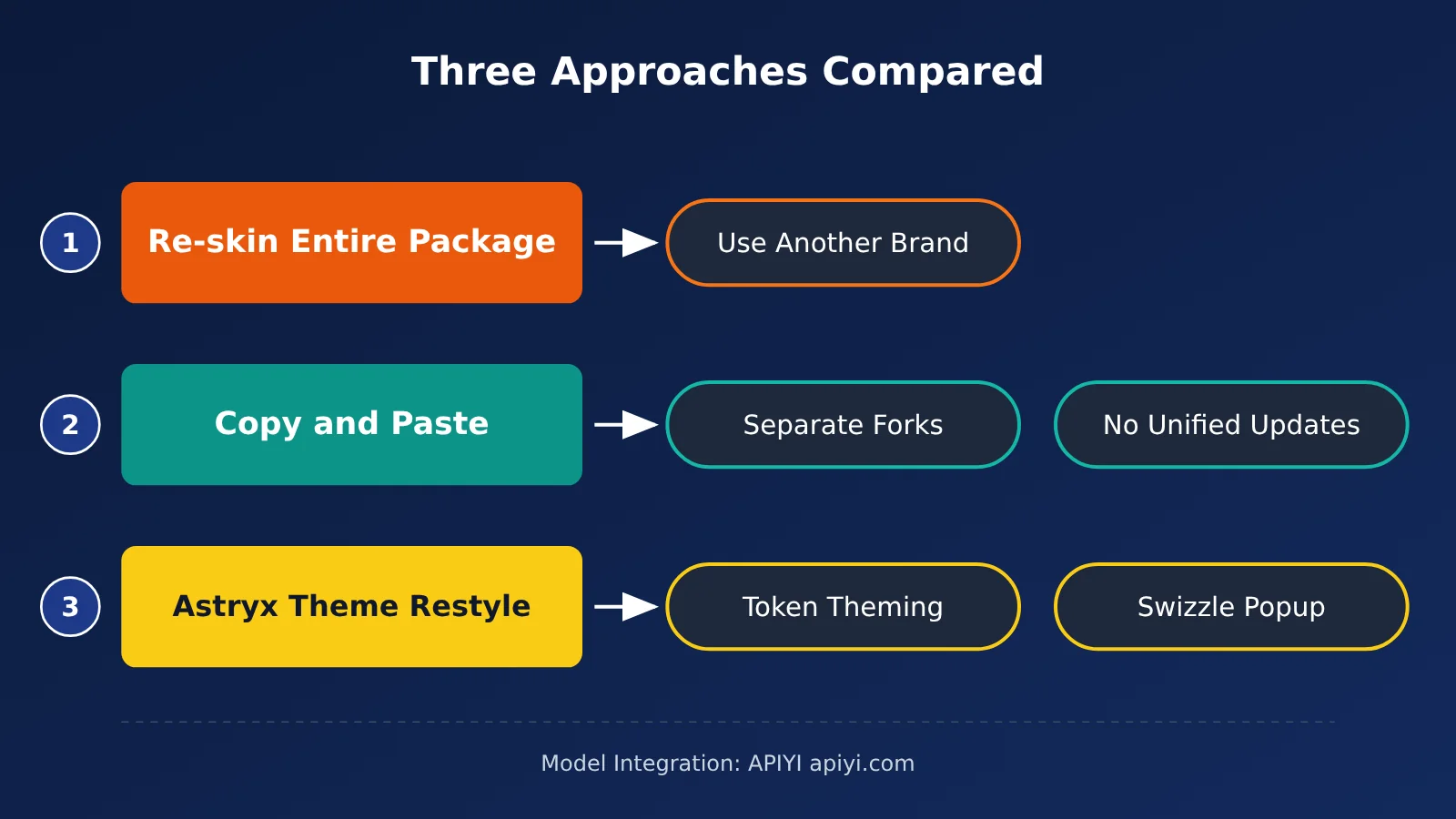
The official introduction compares two common approaches. The table below summarizes the project’s official positioning and doesn’t cover benchmark results:
| Approach | Problem, according to the official description | Astryx’s approach |
|---|---|---|
| Re-skinning an entire package: Use a large company’s complete design system as-is | The app takes on that company’s brand identity | The system handles behavior, accessibility, and quality |
| Copying and pasting: Fork the component code separately for each project | There’s no centralized upgrade path, and users are responsible for accessibility | Themes handle appearance, with changes made at the token level |
| Astryx: Install the package, then use a theme to change its appearance | It’s still in Beta and on a 0.x version | When needed, use swizzle to eject the source code for an individual component |
The README also lists four points of distinction. First, the internals are open: components can be composed at any level, commonly used building blocks are exported directly, and swizzle can eject a component’s full source code into your project for you to maintain. Second, styling isn’t locked down: you can override styles with className and use Tailwind, CSS modules, or plain CSS. Third, customization doesn’t require wrapping components: a theme is essentially a set of CSS custom property overrides. Fourth, the API, documentation, and CLI are designed together, so people and AI assistants can work from the same reference.
Third-Party Anecdote: One Author’s Theme-Switching Experiment
LogRocket published an article on 2026-08-13 in which author Chizaram Ken connected Claude Code to Astryx, built three interfaces, and then built the same three with shadcn/ui. According to the author, when switching the theme from neutral to gothic, he changed two files and four lines of code without touching any component files.
This was the author’s own experiment—not a benchmark or a test result from this article. It took place before the current version, 0.7.11, and the version used at the time was different. You can treat it as an example of the “themes and components are separate” design, but not as evidence of performance.
Astryx Quick Start: Connect People and Agents on the Same Path in 4 Steps
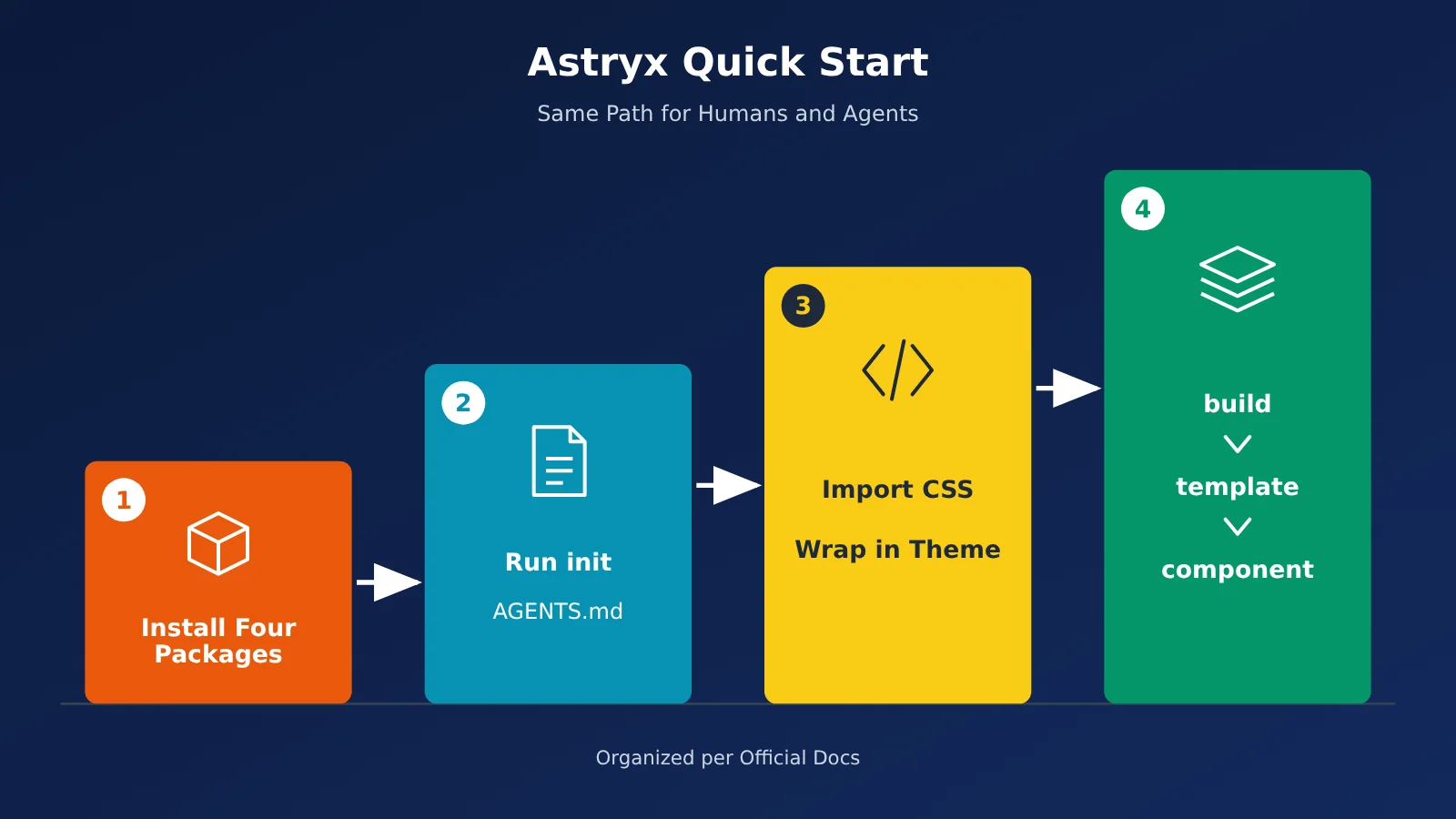
The four steps below follow the official Getting Started and Working with AI documentation. Each step explains what to do in the terminal or in a file, and what result confirms it’s complete. These steps are based on the official documentation; I haven’t run the installation myself.
Step 1: Install Astryx’s four packages
- Run in the terminal:
npm install @astryxdesign/core @astryxdesign/theme-neutral @stylexjs/stylex - Then run:
npm install -D @astryxdesign/cli - pnpm and yarn have equivalent commands; the package names stay the same.
- Done when:
package.jsonlists all four packages, and bothreactandreact-domare version 19 or later.
StyleX is required because it’s a peer dependency of core. However, the official documentation explains that Astryx’s use of StyleX for styling is transparent to users—you don’t need to switch your project to StyleX. Components accept styles through xstyle only if you choose to use StyleX yourself.
Step 2: Use init to generate documentation for your Agent
- Run in the terminal:
npx @astryxdesign/cli init - This command doesn’t require interaction, so people, CI, scripts, and Agents can run it directly.
- Done when:
AGENTS.mdappears in the project root. If the project already has aCLAUDE.md, the same instructions will also be added to that file.
The instructions are written to CLAUDE.md because the official documentation says Claude Code skips AGENTS.md when a project already has a CLAUDE.md. To specify a tool, you can add an option such as --agent claude, --agent cursor, --agent codex, or --agent all. Gemini CLI reads only GEMINI.md, so init adds a line there that references AGENTS.md.
Astryx manages the Astryx block between the markers in these files. The init and upgrade commands modify only that block and leave your own content untouched. The official documentation also notes that Agents often guess the CLI path incorrectly, so it recommends adding a script alias to package.json:
- Script name:
astryx - Script value:
node node_modules/@astryxdesign/cli/clients/cli/bin/astryx.mjs - Usage:
npm run astryx -- component --list
Step 3: Add CSS and wrap the app in the neutral theme
- Import
@astryxdesign/core/reset.cssin your global CSS. - Then import
@astryxdesign/core/astryx.css. - Run
npx @astryxdesign/cli theme add neutralin the terminal to generate a theme module for your app. - Import
Themefrom@astryxdesign/core/theme, pass inthemes[defaultThemeSlug], and wrap your entire app with it. - Import
Buttonfrom@astryxdesign/core/Button. The official example uses two props:labelandonClick. - Done when: The page shows an Astryx-styled Button instead of the browser’s default button.
This setup doesn’t require a build plugin or any PostCSS or Babel configuration. One thing to keep in mind: the reset is placed in @layer reset, and component styles are placed in @layer astryx-base. If your project already has global CSS, an older reset, or Tailwind, you’ll need to declare the layer order yourself. Unlayered styles will override astryx-base, regardless of selector specificity. The official recommendation is to read the two relevant sections in npx @astryxdesign/cli docs migration/migration-setup before you start building pages.
The official descriptions of the seven available themes are below. If you don’t have a particular preference, the official recommendation is to start with neutral:
| Theme package | Official description | Best suited for |
|---|---|---|
theme-neutral |
Low-saturation, minimalist | A default starting point |
theme-butter |
Warm gold with blue accents | Products with a warm feel |
theme-chocolate |
Chocolate and caramel tones | A vintage-inspired style |
theme-gothic |
Dark only, with an ink-and-noir style | Purely dark interfaces |
theme-matcha |
Leafy greens | A nature-inspired style |
theme-stone |
Warm neutrals like sandstone | A polished admin dashboard |
theme-y2k |
Playful, turn-of-the-millennium style | Event pages and fun products |
Step 4: Have the Agent Build the UI Using the Official Three-Step Workflow, and Add MCP if Needed
The rules generated by init tell the Agent to follow this sequence before writing any UI:
npx @astryxdesign/cli build "<想法>": Returns the closest matching page template (which will include at least an app shell), two alternative templates, and a list of missing blocks and components.npx @astryxdesign/cli template <名字> <路径>: Adds a template to the project. Keep its existing framework and spacing; only replace the content.npx @astryxdesign/cli component <组件名>: Shows the props and examples for each component you plan to use.- The rules also include a few things not to do: start every page from a template; don’t use bare
divs; don’t writestyle={{}}; use tokens, not magic numbers. - Definition of done: The component names and props the Agent cites must come from the CLI output, not be made up.
You can test this with three questions recommended by the official docs: What’s the correct import path for Button? How do you configure Dialog so it can’t be closed casually? Which prop does Selector use to receive items? If the Agent can’t answer, run init first. The correct answers are the ones in your local CLI output.
If you need to look things up remotely, you can connect to the official MCP at https://astryx.atmeta.com/mcp. It provides two tools: search(query) to find components, docs, and templates, and get(name) to retrieve full documentation. Configuration varies by client:
| Client | Configuration | Notes |
|---|---|---|
| Claude Code | Run claude mcp add --transport http astryx https://astryx.atmeta.com/mcp in the terminal |
The service name is astryx |
| Cursor | Put only the url in .cursor/mcp.json |
Don’t include type for remote services |
| Cline | Set the transport to streamableHttp |
Not http |
| Claude Desktop | Go to Connectors → Add custom connector in Settings, then paste the URL | The config file is only for local stdio |
| Other general-purpose clients | Set type to http and add the url |
Unrecognized transports are skipped, so the client may appear connected but have no tools |
The official docs don’t specify an SLA for this remote endpoint or explain what to do if the service is unavailable. The CLI is a local interface to the same documentation, so you can keep using it if MCP is unreachable.
Where the Coding Agent Gets Its Model
The design system handles components and documentation, but the Coding Agent also needs a model to generate code. If your team wants to provide a model for tools like Claude Code or Cursor, you can use APIYI apiyi.com’s OpenAI-compatible API. Set base_url to https://api.apiyi.com/v1, and configure the model name using the name shown in the current model list. Check APIYI’s model list for model availability and pricing; APIYI provides the models listed there.
One thing to note: components render in the browser, so they don’t need a model API. Whether you use APIYI has no effect on installing or running Astryx.
🚀 Quick-start tip: Follow the 4 steps above to build a template page on a new branch. Then ask the Agent to write it twice using the same model: once with
AGENTS.mdand once without. Compare the component names and props in the two outputs. New users can get free test credits from APIYI apiyi.com for this kind of comparison.
Astryx Risks and When It May Not Be a Good Fit
Risks of the Astryx Product Itself
Astryx is still in Beta, with a 0.x version number. As of 2026-11-10, npm’s latest version is 0.7.11 (released on 2026-11-07). The previous stable release, 0.7.10, was released on 2026-11-06, and stable releases are happening almost daily. When upgrading, make sure every @astryxdesign/* package used by your project is upgraded to the same version, then run npx @astryxdesign/cli upgrade --from <旧的 core 版本> --apply. Each theme declares the core version it corresponds to, so if you miss a theme package, it won’t match the core version. If your package manager delays installing new versions based on their release dates, exclude the entire @astryxdesign/* scope. With pnpm, add @astryxdesign/* to minimumReleaseAgeExclude.
For charting, @astryxdesign/vega and @astryxdesign/charts are published only under npm’s canary tag, with no stable releases available. As of 2026-11-10, the canary version is 0.7.12-canary.dfd75a6. Although its version number is newer than latest, it shouldn’t be used as a production dependency.
Risks of Connecting Models Through APIYI
This section covers only model invocations by coding agents. Requests go through APIYI’s gateway. You manage the API key and costs yourself, and the model’s actual performance depends on the model you select and the response returned by the gateway. This isn’t logging in to a Meta account, nor is it an account pool.
Projects That Shouldn’t Migrate Yet
- The project still uses React 18: the core package’s peer dependencies require both
reactandreact-domto be version 19.0.0 or later. - You need a 1.0 stability commitment right now: the project is currently labeled Beta, and no such commitment has been made.
- You need stable chart packages right now: the chart packages are available only as canary versions.
- You want every component’s source code in your own repository from day one: that’s the copy-and-paste approach. Astryx is installed as a package by default; swizzle lets you eject individual component source files later, as needed.
Astryx Popularity and Versions: Counts as of 2026-11-10
The figures below are current as of 2026-11-10 and will change over time, so don’t treat them as fixed facts:
| Metric | Value | Source |
|---|---|---|
| GitHub stars | 20,217 | GitHub API meta/astryx |
| forks | 1,536 | GitHub API |
| Open issues / PRs | 297 / 373 | GitHub Search API (670 combined; this doesn’t mean 670 bugs) |
| Core weekly downloads | 661,968 (2026-11-02 to 11-08) | npm downloads API; counts downloads, not users |
| Core downloads in the last 30 days | 1,725,492 (2026-10-10 to 11-08) | npm downloads API |
Frequently Asked Questions
Q1: Is Astryx a Tailwind component library?
No. The official documentation says it’s built on React 19+ and StyleX, and ships precompiled CSS. You can use it alongside Tailwind: override styles with `className`, or check out the `example-vite-tailwind` and `example-nextjs-tailwind` examples in the repository’s `apps/` directory. When combining them, keep the CSS layer order mentioned above in mind.
Q2: Can I use Astryx in a React 18 project?
No. Version 0.7.11 of the core package requires both `react` and `react-dom` to be at least version 19.0.0, so React 18 doesn’t meet that requirement. You’ll need to upgrade your project to React 19 first.
Q3: Can an agent use Astryx documentation without connecting to MCP?
Yes. The `AGENTS.md` file generated by `init`, together with the local CLI, covers the three steps: build, template, and component. MCP is simply another way to query the documentation remotely. If you want to paste the content into a web-based chat, use `–detail brief`, `–detail compact`, or `–dense` to shorten the output.
Q4: Are `facebook/astryx` and `meta/astryx` two separate repositories?
No, they’re the same repository. As of 2026-11-10, visiting `github.com/facebook/astryx` returns a 301 redirect to `github.com/meta/astryx`, the official repository URL. Older articles that mention `facebook/astryx` are referring to this repository.
Q5: Are Astryx chart components ready for production?
Not yet. `@astryxdesign/vega` and `@astryxdesign/charts` are only published under the canary tag, and the README states that there’s no stable release. For production projects, it’s best to stick with your existing charting solution for now.
Q6: Can I upgrade only core?
No. The official guidance is to upgrade all `@astryxdesign/*` packages used by your project to the same version. Otherwise, the theme won’t match core. Once the upgrade is complete, run `upgrade –from <旧版本> –apply`. This also refreshes any outdated Astryx sections in `AGENTS.md`.
Q7: Do I need a model API to use Astryx? How is it related to APIYI?
You don’t need a model API to render components. You only need one when asking a coding agent to write code; tools like Claude Code and Cursor handle that part. If your team wants to provide its own model, you can use one API key on APIYI at apiyi.com to access multiple leading models. APIYI has no partnership with Meta or Astryx.
Q8: Can I copy a component’s source code into my own repository and modify it?
Yes, but that’s not the default workflow. Swizzling copies the complete source code for a single component into your project, where you’ll maintain it yourself and handle future upgrades. The official guidance is to use `theme eject` only when you specifically need an independent source-code branch.
Astryx Key Takeaways
- Positioning: An open-source React design system from Meta, licensed under MIT. It’s still in beta and on a 0.x version.
- Separation of concerns: The system handles behavior and accessibility, while themes control appearance. You can change themes without editing component files.
- Requirements: React 19 or later is required, and StyleX must be installed as a peer dependency.
- Agent workflow: Run
initto generateAGENTS.md, then build the page in this order: build → template → component. - MCP is optional: The remote endpoint is
https://astryx.atmeta.com/mcp; the local CLI provides access to the same documentation. - Upgrade policy: Upgrade all
@astryxdesign/*packages to the same version. The chart package is available only as a canary release. - Connect your model separately: You can use APIYI at apiyi.com to connect the models your coding Agent needs.
Summary: Can Astryx Help Agents Build Consistent Interfaces?
Interfaces built by Agents often lack consistency because they have to guess component names and props. Astryx brings components, themes, and documentation for Agents together in one system:
- Four-step setup: Install four packages, run init, import the CSS, and wrap your app in a Theme. Then have the Agent look up what it needs in three steps before writing the page.
- Know where each claim comes from: The 13,000+ apps and eight years of internal use are claims made by the project; changing a theme with just four lines comes from a third-party author’s experiment; star and download counts are as of 2026-11-10.
- Check whether it’s a good fit first: If your project is still on React 18, needs a stable chart package, or requires a 1.0 commitment, you may want to hold off on migrating.
If your project is already on React 19 and you want your Agent to make fewer things up about props, try a template page on a separate branch first. You can connect the models your coding Agent needs through APIYI at apiyi.com, then use the free testing credits to compare how different models generate code from the same AGENTS.md.
📚 References
- Astryx GitHub repository: README, package list, theme catalog, and statement of principles
- Link:
github.com/meta/astryx -
Note: The primary source for information reported by the project itself;
facebook/astryxredirects here. -
Astryx official introduction: An explanation of its design philosophy, published on 2026-06-18
- Link:
astryx.atmeta.com/blog/introducing-astryx -
Note: The comparison with wholesale restyling and copy-pasting comes from this article.
-
Getting Started and Working with AI documentation: Installation, themes,
init, and MCP configuration - Links:
astryx.atmeta.com/docs/getting-started,astryx.atmeta.com/docs/working-with-ai -
Note: The official sources for the four steps in this article.
-
Astryx v0.7.11 release notes: The current stable version and upgrade instructions
- Link:
github.com/meta/astryx/releases/tag/v0.7.11 -
Note: The source for the requirement that all packages use the same version.
-
LogRocket comparison article: Published on 2026-08-13, by Chizaram Ken
- Link:
blog.logrocket.com/astryx-vs-shadcn-meta-ai-react-claude - Note: A third-party, one-off test using a version earlier than 0.7.11.
Author: APIYI Technical Team
Technical support: If you have questions about connecting coding agents to models, feel free to contact us through the APIYI homepage.