Summary: This article compares the output budget, reasoning defaults, and billing model of Qwen4-Max-Preview against the generally available Qwen4-Max, and lays out a step-by-step migration checklist you can work through before Preview goes offline on November 25.
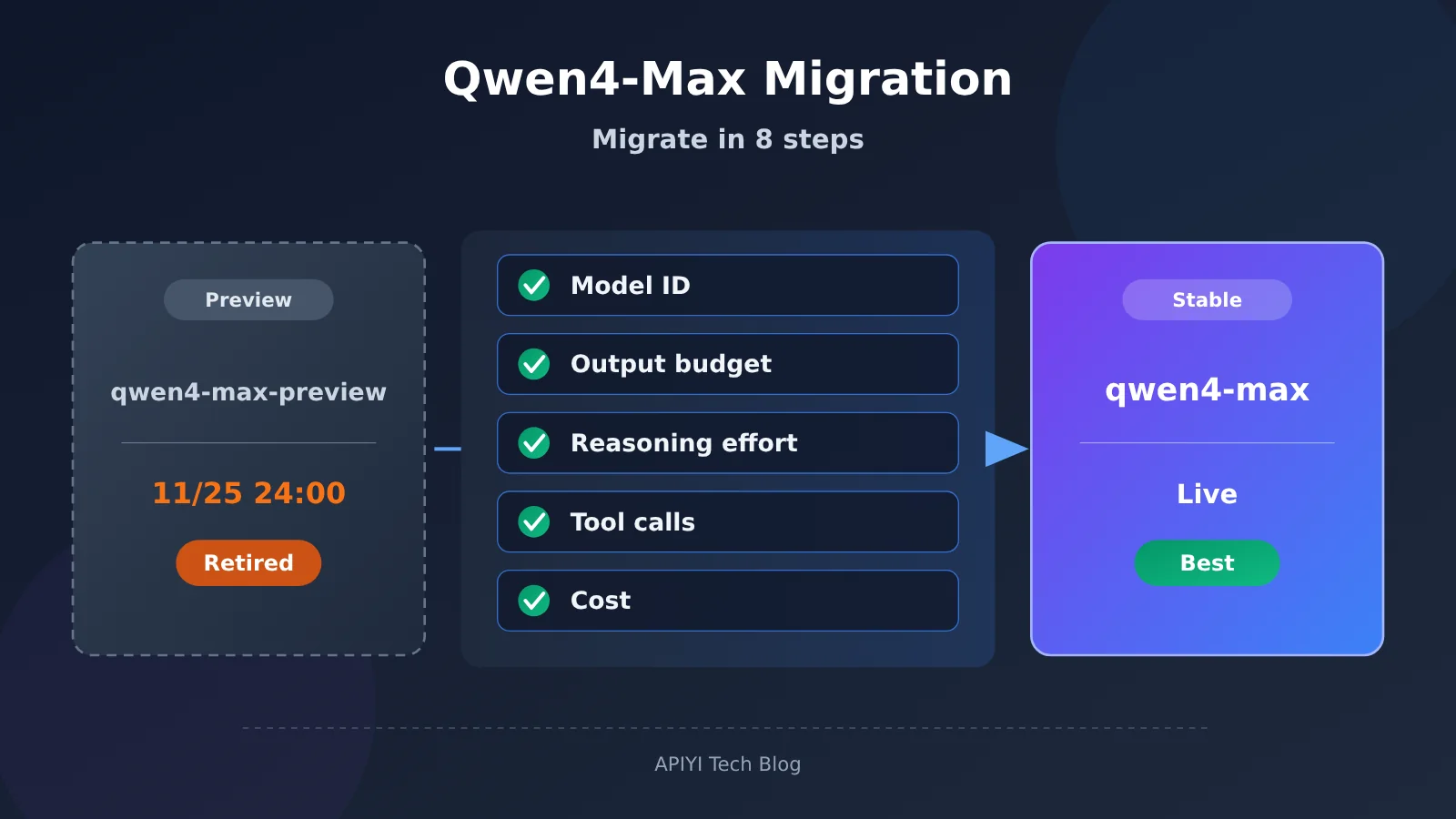
Qwen4-Max-Preview ends its preview period and goes offline at 24:00 on November 25, 2026 (UTC+8). The generally available Qwen4-Max launched on November 16 with the model ID qwen4-max. When you migrate to the GA release, you need to check five things at once: the products you’ve integrated, your output budget, reasoning defaults, tool behavior, and cost. Both versions offer a 1M-token context window, but the GA release lowers the output ceiling in thinking mode from 393,216 to 262,144, changes the default reasoning effort from xhigh to high, and moves billing from Token Plan Credits to pay-as-you-go. Swapping the model ID alone won’t guarantee that your production workloads behave the same way.
Below, we’ll start with the timeline and spec differences between Preview and the GA release, then cover the GA release’s API protocol, regions, pricing, and caching. After that comes the migration checklist in order — “capture a baseline, update your integration config, adjust request parameters, validate features, watch the bill, roll out gradually” — followed by acceptance criteria for workloads like long reports, code generation, and multi-turn agents. By the end, you’ll be able to turn this switch into a model version management process your team can reuse.
Things to Know: Qwen4-Max Migration Terminology
| Term | Explanation |
|---|---|
| Model ID | The identifier used in a request to specify a particular model version, for example qwen4-max. |
| Base URL | The base endpoint address a client uses to connect to a product or a regional service. |
| Context window | The total capacity the model can handle in one request, including input, history, and generated content. |
| Output budget | The upper limit on how many tokens a single request may generate. In thinking mode, the reasoning content and the final answer share this budget. |
| reasoning_effort | The request parameter that controls how much effort goes into reasoning. The default differs between Preview and the GA version. |
| thinking_budget | The parameter that controls the thinking token budget. In Preview, it can’t be set at the same time as reasoning_effort. |
| Token Plan | Alibaba Cloud Model Studio’s subscription service, metered in Credits — and the only way to access Preview. |
| Function Calling | The mechanism where the model returns a call request based on tool definitions, and the application executes the tool and sends the result back. |
| JSON Schema | A specification describing the structure, fields, and constraints of JSON data, used to constrain the model’s output format. |
| TTL | How long a cache is kept, which affects the scope of cache reuse and the corresponding cost. |
| Regression validation | Using a set of existing representative tasks to check how functionality, results, and cost change after a version switch. |
1 When Qwen4-Max-Preview Ends and When the Stable Version Goes Live
1.1 Qwen4-Max Version Timeline
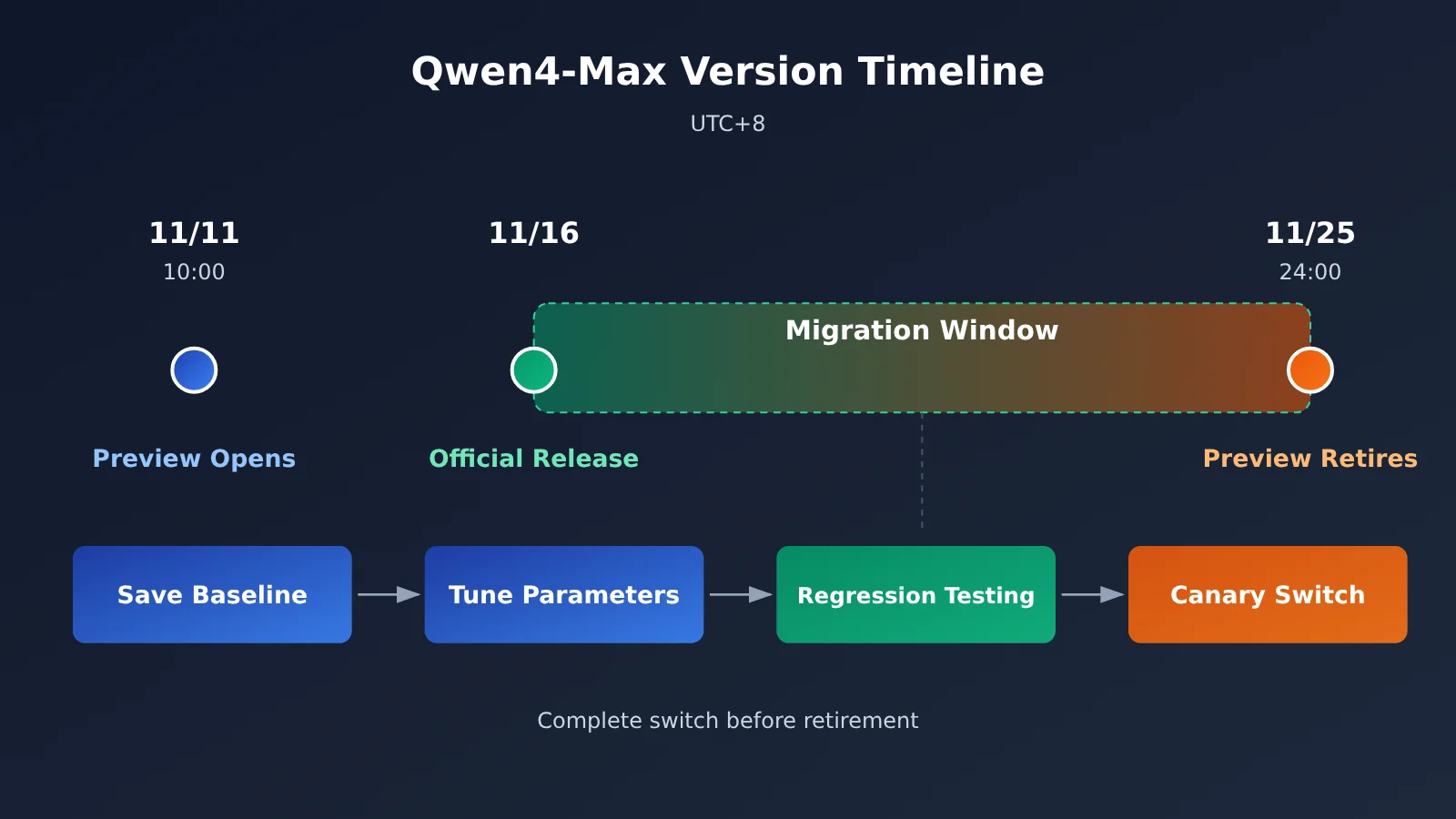
The Alibaba Cloud Token Plan feature update log lists two separate events: Preview launched on November 11, and the stable version launched on November 16. After the stable release, the originally scheduled retirement date for Preview did not change. A notice at the top of the official Preview documentation also says: “The stable version Qwen4-Max is now available; we recommend using the stable version.”
| Time (UTC+8) | Event | What It Means for Developers |
|---|---|---|
| 2026-11-11 10:00 | Qwen4-Max-Preview becomes available | Can only be invoked through Token Plan Individual or Team plan |
| 2026-11-16 | Qwen4-Max stable version launches | Supports the pay-as-you-go API and can also be used through Token Plan |
| 2026-11-25 24:00 | Preview period ends and the model is retired | qwen4-max-preview can no longer be invoked and cannot serve as a fallback target |
1.2 Two Model IDs and Their Respective Channels
Preview’s model ID is qwen4-max-preview, with the alias qwen4.0-max-preview. Both IDs can be used for invocation, and billing always shows qwen4.0-max-preview. Preview is accessed with a dedicated Token Plan API key and the dedicated Base URL https://token-plan.cn-beijing.maas.aliyuncs.com; pay-as-you-go is not supported.
The stable version’s model ID is qwen4-max. It offers two usage paths: Token Plan Individual or Team plan, and the Bailian pay-as-you-go API. The key, Base URL, and billing method differ between these two paths, so you’ll need to decide which path to take before migrating.
2 Specification Differences Between Qwen4-Max-Preview and the Official Release
2.1 Qwen4-Max Specification Comparison Table
The data below comes from the official model documentation for both the Preview and the official release.
| Technical Metric | Qwen4-Max-Preview | Qwen4-Max Official Release |
|---|---|---|
| Model ID | qwen4-max-preview |
qwen4-max |
| Context window | 1,000,000 | 1,000,000 |
| Max input (non-thinking / thinking) | Not listed separately in docs | 991,808 / 983,616 |
| Max output (non-thinking mode) | Not listed separately in docs | 131,072 |
| Max combined total of thinking + answer | 393,216 | 262,144 |
| Default reasoning effort | xhigh | high |
| Default thinking budget | Per Preview API parameters | 131,072 |
| API protocol | OpenAI Chat Completions, Responses, Anthropic Messages | The first three + DashScope |
| Billing method | Token Plan Credits only | Pay-as-you-go API, or Token Plan |
2.2 The Difference Between Context, Input, Output, and Thinking Budget
These four numbers measure different things, and they’re the easiest to mix up when migrating. The context window is the total capacity a single request can handle — both versions are 1 million. Max input determines how much material you can put in at once; in the official release under thinking mode it’s 983,616, a bit less than non-thinking mode, with the remaining headroom reserved for reasoning. Max output determines how many tokens can be generated in a single run, while thinking budget determines how many of those can go toward reasoning.
The biggest change is on the output side. Preview’s thinking and answer share 393,216 tokens, while the official release caps the combined total at 262,144 in thinking mode, with a default thinking budget of 131,072. Based on the default configuration, the official release leaves roughly 130,000 tokens for the final answer. If your workload relies on single outputs of more than 200,000 tokens on Preview, you’ll need to redesign how you handle output after switching.
3 API Access and Costs for the Qwen4-Max Official Release
3.1 Protocols and Features
The official release supports four protocols: OpenAI Chat Completions, OpenAI Responses, Anthropic Messages, and DashScope. On the feature side, the official list includes Function Calling, parallel tool calls, web search, JSON Object, JSON Schema, explicit caching, implicit caching, and chain-of-thought summaries plus encryption.
Compared with the Preview, the official documentation adds the DashScope protocol, parallel tool calls, and explanations of the two cache types. If your application previously handled only a single tool_call, you now need to make sure it can correctly handle multiple tool calls returned in one response.
3.2 Regions and Pay-as-You-Go Pricing
The pay-as-you-go API for the official release covers six regions. When choosing a region, consider network latency, data residency requirements, and where your business is deployed, not just price. For the specific capabilities available in each region, refer to the official capability matrix.
| Region | Deployment scope | Input (CNY/million tokens) | Output (CNY/million tokens, including thinking) |
|---|---|---|---|
| China North 2 (Beijing) | Mainland China | 10 | 30 |
| US (Virginia) | Global | 10 | 30 |
| Germany (Frankfurt) | Global | 10 | 30 |
| Japan (Tokyo) | Global | 10 | 30 |
| Hong Kong, China | Global | 10 | 30 |
| Singapore | International | 10.938 | 32.813 |
The official page for the Beijing region lists a free quota of 1 million tokens, valid for 90 days. The clock starts from the latest of the following: Bailian activation, model release, or application approval. These prices apply only to the official release. The Preview rate of 20% of list price and the 8% rate after nighttime stacking are Token Plan Credits promotions and cannot be carried over into cost estimates for the official release.
3.3 Explicit and Implicit Caching
Caching is billed separately in the official release. Explicit cache entries are created proactively by developers and work well for long-lived prefixes such as system prompts, tool descriptions, and fixed reference materials. The TTL can be 5 minutes or 1 hour, and explicit caching is supported in Chat Completions, Responses, and Anthropic Messages. Implicit caching is handled automatically by the platform based on conditions such as repeated prefixes, with no extra configuration required.
In multi-turn agent workloads, every turn carries the same tool definitions and background material. Using caching wisely can noticeably reduce the cost of repeated input. Choose the TTL based on the gap between sessions: use 5 minutes for sessions with frequent interaction, and consider 1 hour for batch workflows with longer gaps.
4 Steps for Migrating from Qwen4-Max-Preview to the Official Release
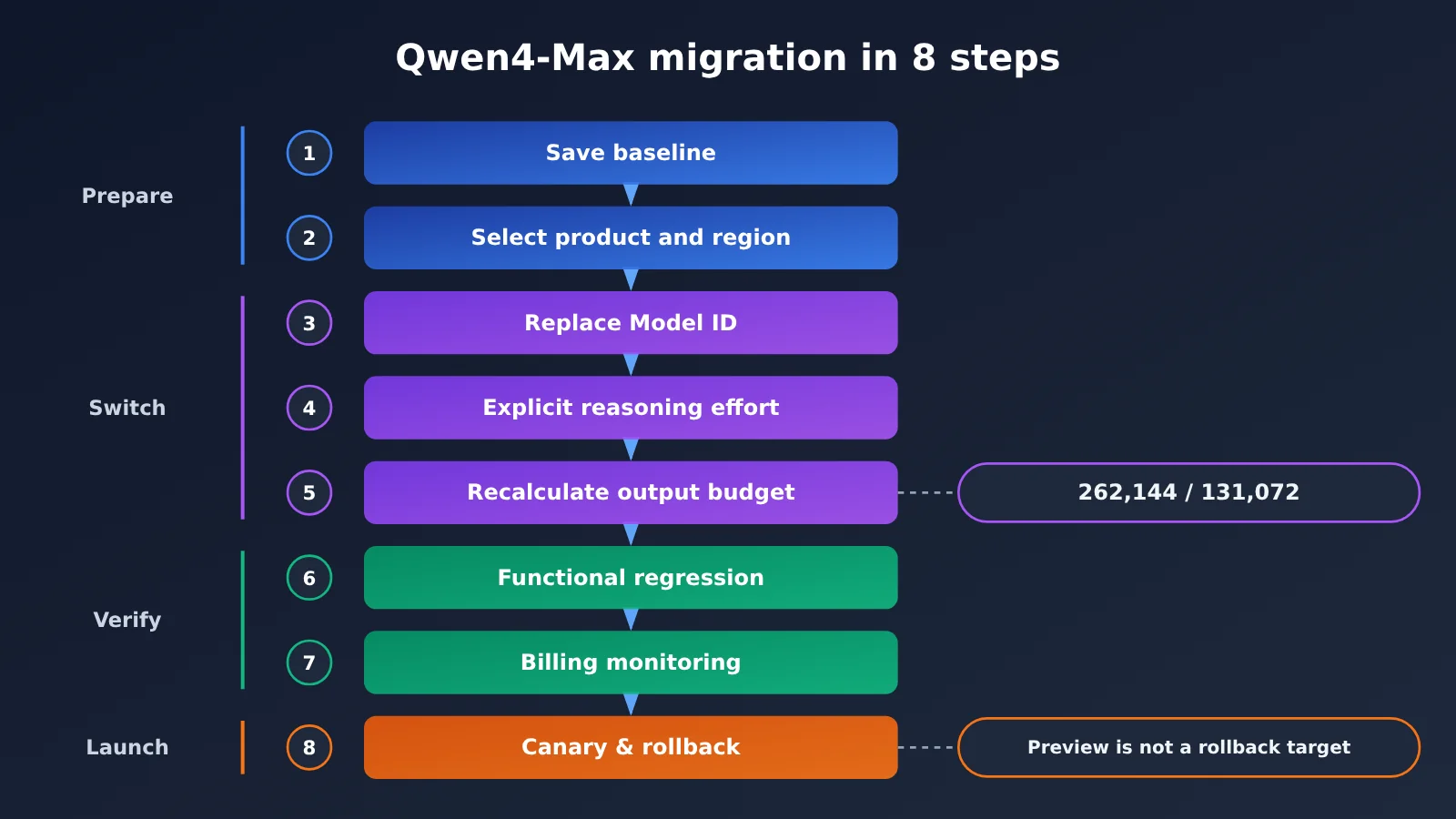
The eight steps below are a developer checklist put together from the official specs. There’s no automatic migration tool from the official side, and no claim that every request parameter is seamlessly compatible — so you’ll need to verify each step against your own workload.
| Step | Check | Acceptance criteria |
|---|---|---|
| 1 | Save the old configuration and representative tasks | Preview’s request parameters, output samples, latency, and usage are archived |
| 2 | Pick the integration product; verify region, key, and base URL | Backend services use the pay-as-you-go API; interactive tools use Token Plan |
| 3 | Replace model with qwen4-max |
Smoke request returns normally, and the model name in billing is correct |
| 4 | Set reasoning effort explicitly | Specify reasoning_effort or the corresponding field per task; don’t rely on defaults |
| 5 | Recalculate the output budget | Total ≤ 262,144 in thinking mode, ≤ 131,072 in non-thinking mode |
| 6 | Verify tool calls, JSON structure, long outputs, and multi-turn history | Pass rate on representative tasks matches the Preview baseline |
| 7 | Watch usage and cache billing | Input, output, and cache costs match expectations |
| 8 | Switch a small share of traffic and prepare a fallback config | The fallback target must still be a valid model — Preview isn’t one of them |
4.1 Save the Old Configuration and Representative Tasks
Before Preview goes offline, export all your current configurations that call qwen4-max-preview, including max_tokens, reasoning_effort or thinking_budget, tool definitions, response_format, and system prompts. In parallel, pick 10 to 30 representative tasks and save Preview’s outputs, latency, and usage as a comparison baseline. After November 25th, you won’t be able to retrieve Preview results anymore.
4.2 Choose the Integration Product and Verify the Key and Base URL
Token Plan only permits interactive use in coding tools or agent tools such as Claude Code, Cursor, Qwen Code, and Qoder. Automated scripts, self-built application backends, and batch calls from workflow platforms fall outside the permitted scope, and violations may lead to subscription suspension or Key banning. If you’re only using Preview inside tools like Qoder, you can keep using Token Plan to switch to the official version. If you want to integrate it into your own backend, switch to the official version’s pay-as-you-go API, and use the Key and Base URL that match your region in the console.
The Token Plan personal edition also comes with a data authorization clause: during use, inputs and generated content will be used to improve the service. Teams handling confidential materials need to factor this clause into their evaluation when choosing an integration product.
4.3 Replace the Model ID: Qwen4-Max Quick Start
Just change the model ID to qwen4-max and you can send your first request. Below is a minimal example using the OpenAI-compatible API. First make sure the request goes through, then move on to parameter tuning:
from openai import OpenAI

client = OpenAI(
    api_key="YOUR_API_KEY",
    base_url="https://api.apiyi.com/v1"  # APIYI unified endpoint; you can also replace it with the Base URL for the corresponding Bailian region
)

resp = client.chat.completions.create(
    model="qwen4-max",                   # was qwen4-max-preview
    messages=[{"role": "user", "content": "用三句话说明你的版本信息"}],
    reasoning_effort="high",             # set explicitly; don't rely on the default
    max_tokens=8192
)
print(resp.choices[0].message.content)
The models available under the same OpenAI-compatible API are subject to the platform’s live model list. In production, check once more before release.
4.4 Explicitly Set Reasoning Parameters
The Preview version defaults to xhigh, while the official release defaults to high. If your existing code doesn’t specify reasoning effort, the reasoning strength will automatically drop after the switch, and the quality, latency, and token usage for complex tasks may all change accordingly. We recommend setting reasoning effort explicitly by task type: for complex coding and scientific reasoning, first use the same strength as Preview as a baseline comparison; for simple extraction and formatting tasks, try lowering it.
The Preview documentation states that reasoning_effort and thinking_budget cannot be set at the same time. For the official release, the field names and values across the four protocols—Chat Completions, Responses, Anthropic Messages, and DashScope—should follow the documentation for the corresponding protocol. In Preview, preserve_thinking is enabled by default for multi-turn conversations, and previous thinking content must be placed back into the reasoning_content field. If your application passes thinking content back, you’ll also need to verify on the official release that the historical message format is accepted correctly.
4.5 Recalculate the Output Budget Against the New Limits
In Preview, max_tokens and max_completion_tokens are equivalent, and thinking plus response share a total budget of 393,216. In the GA release, the total budget in thinking mode is 262,144, while the output limit in non-thinking mode is 131,072. Any request that set a value above 262,144 on Preview must be lowered. For requests whose budgets were already tight, you also need to account for the portion consumed by the default thinking budget of 131,072.
View the full migration configuration code (budget validation + fallback)
from openai import OpenAI

# Official GA limits (thinking mode covers thinking + answer combined)
LIMITS = {
    "qwen4-max": {"thinking": 262_144, "non_thinking": 131_072},
}

def plan_max_tokens(model: str, thinking: bool,
                    answer_tokens: int, thinking_tokens: int = 0) -> int:
    """Calculate max_tokens by mode; raise an error if it exceeds the official limit to avoid silent truncation"""
    limit = LIMITS[model]["thinking" if thinking else "non_thinking"]
    need = answer_tokens + (thinking_tokens if thinking else 0)
    if need > limit:
        raise ValueError(f"{model} 预算 {need} 超过上限 {limit},请拆分任务")
    return need

PRIMARY = {
    "model": "qwen4-max",
    "base_url": "https://api.apiyi.com/v1",  # APIYI OpenAI-compatible base URL
    "reasoning_effort": "high",
}
# The fallback target must be a model that is still serving; qwen4-max-preview is unavailable after retirement
FALLBACK = {
    "model": "YOUR_FALLBACK_MODEL",
    "base_url": "https://api.apiyi.com/v1",
}

def call(cfg: dict, messages: list, max_tokens: int):
    client = OpenAI(api_key="YOUR_API_KEY", base_url=cfg["base_url"])
    kwargs = {"model": cfg["model"], "messages": messages, "max_tokens": max_tokens}
    if "reasoning_effort" in cfg:
        kwargs["reasoning_effort"] = cfg["reasoning_effort"]
    return client.chat.completions.create(**kwargs)

def run(messages: list, answer_tokens: int = 60_000, thinking_tokens: int = 131_072):
    budget = plan_max_tokens("qwen4-max", True, answer_tokens, thinking_tokens)
    try:
        resp = call(PRIMARY, messages, budget)
    except Exception as e:
        print(f"主模型失败,切换回退:{e}")
        resp = call(FALLBACK, messages, min(budget, 32_000))
    choice = resp.choices[0]
    if choice.finish_reason == "length":
        print("警告:输出因长度被截断,需要拆分任务或调整预算")
    print("用量:", resp.usage)
    return choice.message.content

if __name__ == "__main__":
    print(run([{"role": "user", "content": "生成一份模型迁移回归报告的大纲"}]))
4.6 Validate tool calls, structured output, and long output
Replay representative tasks one by one: whether Function Calling returns the same tool name and argument structure, whether parallel tool calls are handled correctly by the code, whether JSON Schema output passes the existing validator, whether long output ends with finish_reason == "length", and whether context remains coherent after multi-turn history is passed back. Compare each item against the baseline saved in 4.1 and record any differences.
4.7 Review usage and cache billing
After switching from Credits to usage-based billing, costs need to be calculated separately for three items: input, output (including thinking), and cache. In the official release, the output unit price is 3 times the input price, and thinking tokens also count toward output, so the reasoning effort setting directly affects the bill. You can first use the free quota in the Beijing region to run the regression, then estimate monthly costs based on actual usage.
4.8 Small-traffic rollout with a fallback configuration kept in place
Start by routing 5% to 10% of traffic to qwen4-max, then watch the error rate, truncation rate, and per-task cost. Only switch everything over once things look stable. Your fallback configuration must point to a model that’s still in service — another available version in the same family, for instance, or a model from another vendor you’ve already validated. Once Preview is retired, it can’t serve as a fallback target.
🎯 Technical recommendation: It’s best to validate the fallback model against the same representative task set before the gradual rollout. With the OpenAI-compatible interface at APIYI apiyi.com, a single key lets you switch among several major models — just change the
modelfield to run a fallback drill.
5 The Most Common Problems After Migrating to Qwen4-Max
5.1 Output truncation
This is the most common issue. A long report or large file that generated completely on Preview may get truncated on the stable release, either because of the 262,144 cap or because the default thinking budget eats into the output. The fix: check finish_reason, generate very long tasks section by section or file by file, and reserve an explicit budget for the answer portion.
5.2 Lower default reasoning effort
After the drop from xhigh to high, complex tasks may behave differently, while simple tasks may get faster and cheaper. Code that doesn’t set a reasoning parameter will change behavior without you realizing it. Every production request should set reasoning effort explicitly, and you should use A/B replay to determine the right level for each task type.
5.3 Tool calling and protocol differences
The stable release explicitly supports parallel tool calls, so a single response may contain multiple tool-call requests. Code that only reads the first tool_call will skip tool executions and break the agent flow. When switching protocols — say, from Chat Completions to DashScope — you’ll also need to re-check the docs for field naming and how thinking content gets returned.
5.4 Changes in caching and billing units
Preview’s Credits consumption is shaped by billing multipliers, cache hits, tool calls, and other factors, so you can’t convert it directly into a per-million-token price. The stable release prices in yuan per million tokens, with caching billed separately. Any budget model built around Credits needs to be rebuilt, and you should factor in the write cost of explicit caching plus your TTL choices.
6 Which Tasks Must Be Retested with the Qwen4-Max Official Release
| Task type | Key validation points | Parameters to watch |
|---|---|---|
| Long report generation | Whether output gets truncated, section completeness, factual consistency across the report | Output budget, finish_reason |
| Complex code generation | Compile and test pass rate, single-file length, cross-file consistency | reasoning_effort, output budget |
| Multi-turn Agent | Tool call order, handling of parallel calls, passing back historical reasoning | tool_calls, reasoning_content |
| Long document retrieval | Cross-paragraph linkage accuracy, whether input exceeds 983,616 or 991,808 | Max input, cache hits |
| JSON structured output | Schema validation pass rate, missing fields and type errors | response_format, JSON Schema |
Long document retrieval needs extra attention: in the official release, the max input varies by mode — thinking mode gets roughly 8,000 fewer tokens than non-thinking mode. If you’ve been packing reference material right up to the limit, switching modes could push you over it. For code tasks, I’d suggest reusing your existing unit test suite and treating the pass rate as the acceptance metric; that’s more reliable than reading the output by hand.
💡 Recommendation: If you want to compare Qwen4-Max against other flagship models on these same tasks, you can replay the identical batch through the unified interface at APIYI apiyi.com — that saves you from writing separate adapter code for each vendor.
7 Qwen4-Max-Preview Migration FAQs
Q1: After Qwen4-Max-Preview is retired, will old requests automatically route to the official release?
The official documentation only states that Preview will be retired and recommends using the official release — it says nothing about automatic forwarding. Please manually change the `model` field to `qwen4-max` before 24:00 on November 25, and complete the checks in Section 4 of this article.
Q2: Is changing the model ID to qwen4-max enough?
No. The output limit, default reasoning effort, and billing method have all changed. At a minimum, you’ll also need to recalculate your output budget, explicitly set the reasoning effort, and run regression tests on tool calling and structured output.
Q3: Do Preview’s 20% discount and night-time discount still apply to the official release?
Those two discounts apply only to Credits consumed by Preview under the Token Plan. The official release’s pay-as-you-go API is priced at 10 CNY per million input tokens and 30 CNY per million output tokens in the Beijing region, so you’ll need to recalculate your costs.
Q4: Can backend services keep using the Token Plan key?
No. The Token Plan only allows interactive use within designated coding or agent tools. Self-built application backends should switch to the official release’s pay-as-you-go API, or use an aggregation service such as APIYI apiyi.com that provides OpenAI-compatible endpoints with pay-as-you-go billing.
Q5: How can I quickly set up a regression environment during migration?
Organize your representative tasks into a fixed request set, then replay them by switching the `model` field in the same piece of code. APIYI apiyi.com offers free test credits for new users, which you can use to validate fallback models and compare approaches.
8 Conclusion: Bringing Model Version Management into the Qwen4-Max Production Workflow
This switch from Qwen4-Max-Preview to the official release touches on five dimensions that need ongoing management:
- Model ID: Keep them maintained centrally in a config center rather than hardcoded in your code, and subscribe to model lifecycle announcements.
- API parameters: Set reasoning effort, thinking budget, and response_format explicitly every time.
- Output limits: For each model, record the four key numbers — context, max input, max output, and thinking budget — and validate them before sending a request.
- Cost: Track input, output, and caching separately, and rebuild your budget model whenever the billing scheme changes.
- Regression testing: Keep a representative task set and baseline results, and replay the whole thing every time you switch versions.
Preview only lives for two weeks, and the official release will likewise see new versions and deprecation plans down the line. Establish a fixed workflow of “save the baseline, set parameters explicitly, canary switch, keep a rollback ready” — then the next version change becomes a matter of days rather than weeks. Teams that need a multi-model fallback plan can validate everything under a single interface through APIYI apiyi.com.
References
-
Qwen4-Max official release documentation: context, input/output limits, default reasoning effort, regions, pricing, and caching
- Link:
help.aliyun.com/zh/model-studio/qwen4-max - Description: the primary basis for the migration parameters
- Link:
-
Qwen4-Max-Preview official documentation: Preview specs, access method, deprecation date
- Link:
help.aliyun.com/zh/model-studio/qwen4-max-preview - Description: the reference point when preserving your old configuration
- Link:
-
Token Plan feature updates: release records for both Preview and the official version
- Link:
help.aliyun.com/zh/model-studio/token-plan-product-updates - Description: the source of the version timeline
- Link:
-
Token Plan permissions and usage guidelines: scope of interactive use and prohibited scenarios
- Link:
help.aliyun.com/zh/model-studio/token-plan-permissions-and-usage - Description: the compliance basis for choosing an access product
- Link:
-
Token Plan personal subscription and benefits: plans, Credits, and Preview discounts
- Link:
help.aliyun.com/zh/model-studio/token-plan-personal-overview - Description: distinguishing Preview discounts from official-release billing
- Link:
Author: APIYI Technical Team
Technical discussion: Feel free to reach us through the APIYI apiyi.com homepage; more integration resources are available at the docs.apiyi.com documentation center