Author's Note: A must-read guide for beginners on the complete usage of GPT-image-2: From ChatGPT web, OpenAI API, and third-party tools, to the gpt-image-2-all reverse API ($0.03/image), this article covers it all.
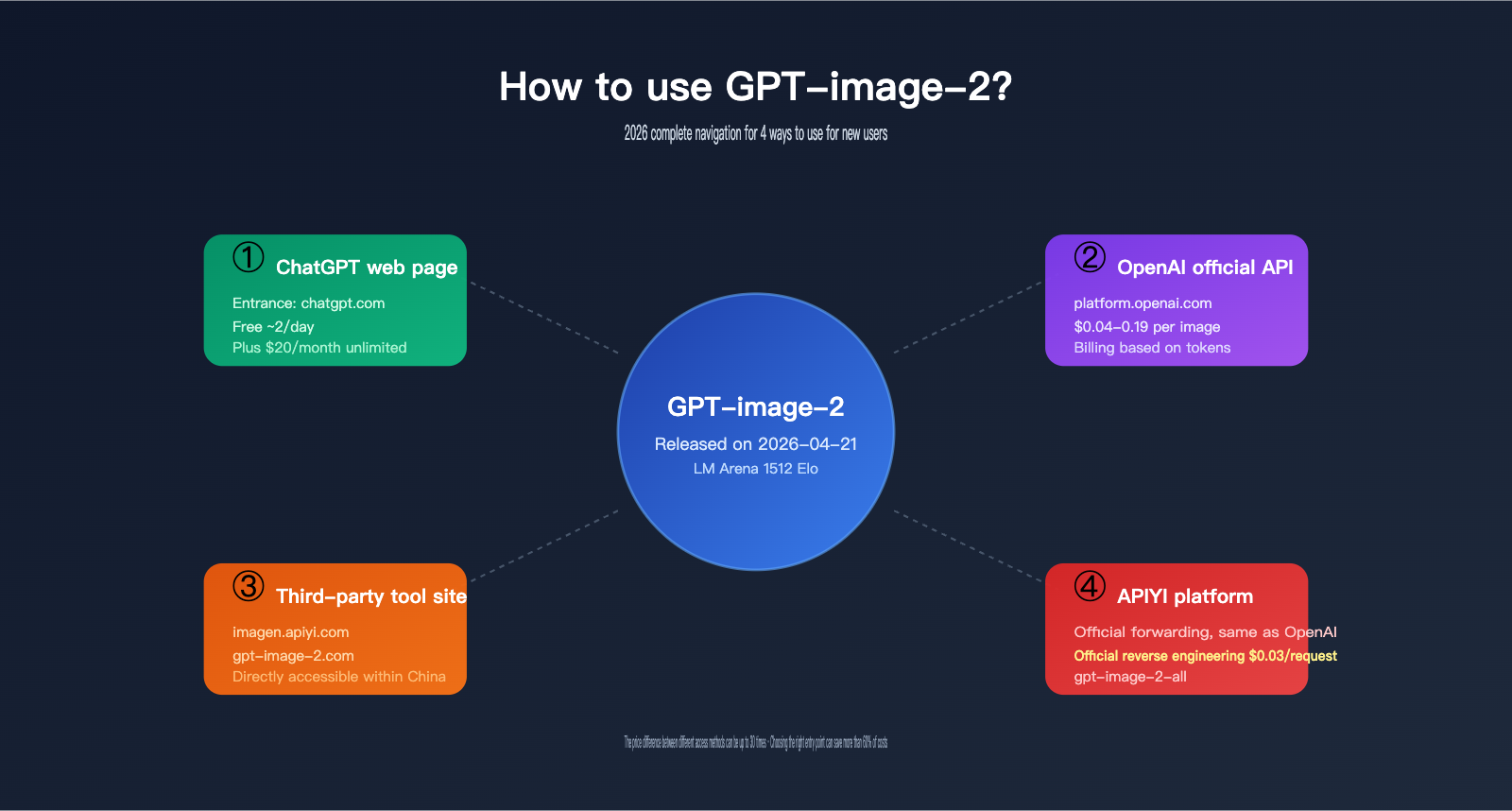
GPT-image-2 was officially released by OpenAI on 2026-04-21 and topped the LM Arena text-to-image leaderboard with a +242 Elo lead. However, the first question many new users face isn't "how powerful is it?" but "Where exactly can I use GPT-image-2?" This article provides a comprehensive overview of 4 mainstream ways to access it, helping you find the right entry point based on your budget and use case.
This is not another "GPT-image-2 review", but a "navigation map" for real users—different access methods can vary in price by up to 30 times, and choosing the wrong one could end up costing you 10 times more than necessary.
Core Value: After reading this, you’ll clearly understand the price, learning curve, and target audience for the 4 ways to use GPT-image-2, and learn what the "$0.03/image" reverse API is all about.
Key Points on How to Use GPT-image-2
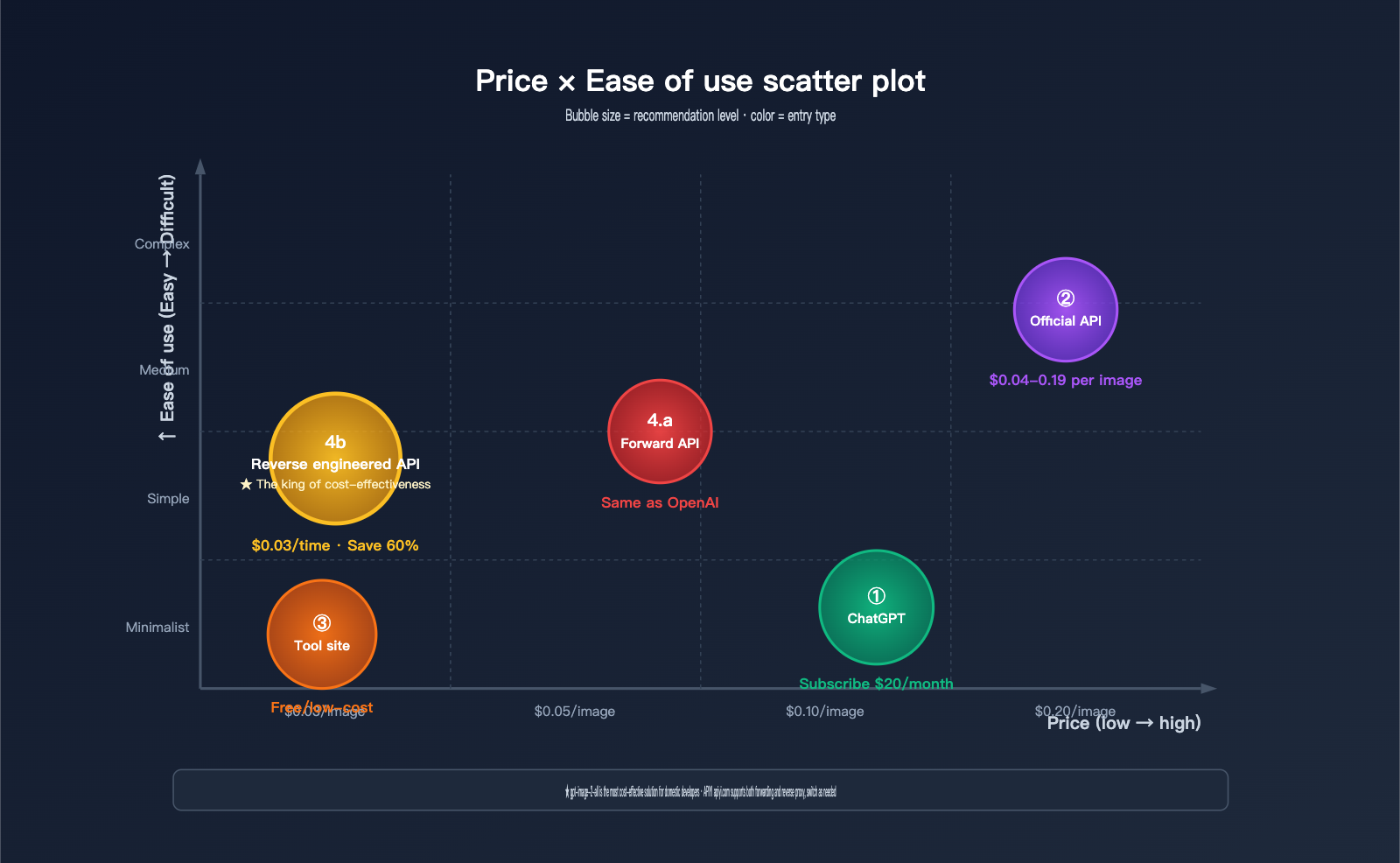
Before diving into each method, let's look at a table that clearly outlines the key differences between the four usage options.
| Usage Method | Access Point | Price | Learning Curve | Target Audience |
|---|---|---|---|---|
| Method 1: ChatGPT Web | chatgpt.com | Free users ~2 images/day, Plus $20/month | ⭐ Very Simple | Personal users, light use |
| Method 2: OpenAI Official API | OpenAI Platform | ~$0.04-0.19/image (billed by Token) | ⭐⭐⭐ Requires Dev | Developers, enterprises |
| Method 3: Third-party Tool Sites | imagen.apiyi.com / gpt-image-2.com | Mostly free/low-cost | ⭐ Very Simple | Non-technical users, quick generation |
| Method 4: APIYI Official Proxy + Reverse | apiyi.com | Proxy API same as official / Reverse API gpt-image-2-all $0.03/image | ⭐⭐ Moderate | Domestic developers, price-sensitive |
Deep Dive: How to Get Started with GPT-image-2
For casual personal users: Simply visiting chatgpt.com is the easiest way. Free users get a small daily quota (about 2 images), and subscribing to ChatGPT Plus ($20/month) unlocks the full Thinking mode. Note that OpenAI does not provide services directly in mainland China, so you'll need to handle network access yourself.
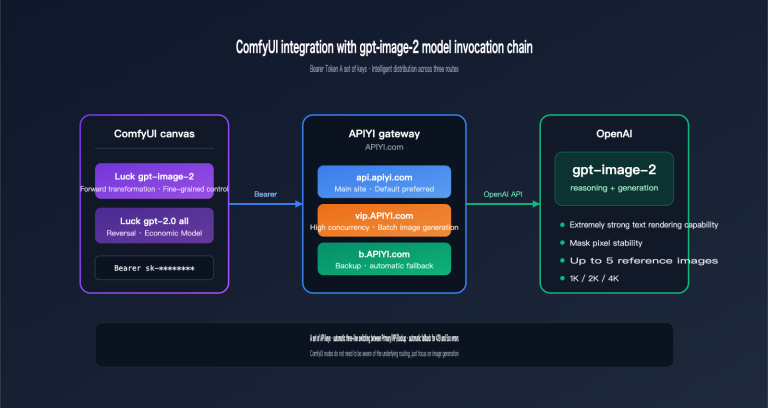
For developers and enterprises: The official OpenAI API is the most reliable entry point. The model ID is gpt-image-2, and it's billed by token (input $8/M Token, output $30/M Token). However, the official API also presents hurdles such as regional access restrictions, payment methods (foreign credit cards), and currency exchange. We recommend using the "Official Proxy API" on the APIYI (apiyi.com) platform, which is identical to the official API but solves the access and payment issues.
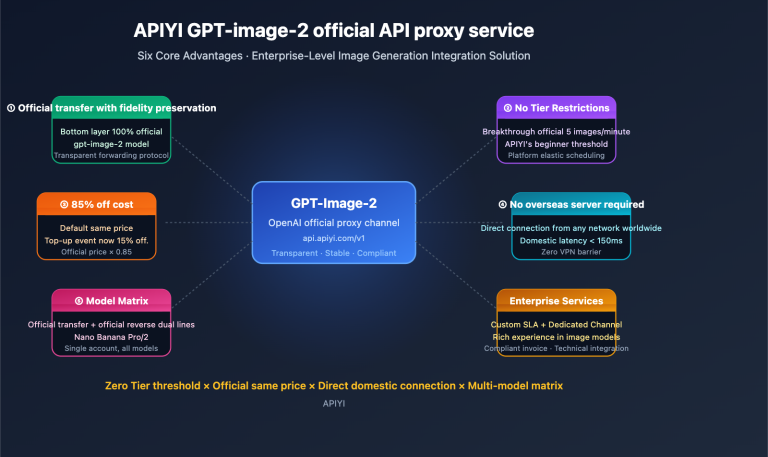
For domestic users seeking ultimate value: The APIYI platform also exclusively provides an "official reverse API," with the model ID gpt-image-2-all, costing just $0.03 USD (approx. 0.21 RMB) per image. It's currently one of the most stable and cost-effective ways to access GPT-image-2.
How to use GPT-image-2 Method 1: ChatGPT Web
This is the simplest, most direct, and code-free way to get started—it’s the go-to for most users.
Accessing the Service
Open your browser and head to chatgpt.com. After logging in, just type your request into the chat box. GPT-image-2 has fully replaced DALL-E 3 (DALL-E 2 / 3 were retired on 2026-05-12), so all image generation requests are automatically routed to GPT-image-2.
Free / Plus / Pro User Quota Comparison
| Plan | Price | GPT-image-2 Mode | Limit | Best For |
|---|---|---|---|---|
| Free | $0 | Instant Mode | ~2 images/day (dynamic) | Casual users, trying it out |
| Plus | $20/mo | Thinking Mode (incl. reasoning, multiple images, web search) | Unlimited (subject to fair use) | Heavy personal users |
| Pro | $200/mo | Thinking Mode + High Priority | Unlimited + Priority Queue | Professional creators |
| Team | $30/user/mo | Thinking Mode | Shared team quota | Small teams |
| Enterprise | Custom | All features + SLA | Custom | Enterprises |
Steps to Generate (3 Steps)
- Log in to chatgpt.com: Use your OpenAI account to sign in.
- Enter your prompt: Just type something like "Draw a…" or "Generate an image of…" in the chat box.
- Download the image: Click the download button in the bottom right corner of the image.
Instant Mode vs. Thinking Mode
GPT-image-2 works in two modes within ChatGPT:
- Instant Mode: Available to all users. It's fast (~3 seconds) and the quality is already far superior to DALL-E 3.
- Thinking Mode: Available for Plus users and above. It enables O-series reasoning (planning before generating), can use web search to pull real-time information, offers higher per-image quality, but is slightly slower (~10 seconds).
🎯 Usage Tip: For most daily needs, Instant Mode is more than enough. You only really need Thinking Mode for complex requirements like "including small text labels," "visualizations based on real data," or "maintaining specific spatial relationships between multiple objects." If you need to generate GPT-image-2 images in bulk outside of the ChatGPT web interface, you should consider the API solutions provided by APIYI (apiyi.com).
Limitations of the ChatGPT Web Method
- Not directly available in mainland China; requires a network workaround.
- Free users have a very low daily image limit (approx. 2 images).
- Does not support API calls, so you can't integrate it into your own applications.
- Not ideal for bulk generation (only 1-2 images at a time).
How to use GPT-image-2 Method 2: Official OpenAI API
This is the best route for developers who need to integrate GPT-image-2 into their own applications.
Accessing the API
Visit the OpenAI developer dashboard (platform.openai.com), create an API key, and you're ready to go. The model ID is gpt-image-2.
Official API Pricing (Token-based)
OpenAI charges for GPT-image-2 based on tokens rather than a flat per-image price:
| Item | Price | Note |
|---|---|---|
| Image Input Token | $8 / million tokens | Used for reference images, editing scenarios |
| Image Input Cache Hit | $2 / million tokens | 75% discount when reused |
| Image Output Token | $30 / million tokens | Consumed during actual image generation |
Real-world Costs by Quality and Size
Based on the official documentation, here are the estimated costs per image (for reference only; official billing prevails):
| Size | Quality | Cost per image (approx.) |
|---|---|---|
| 1024 × 1024 | low | ~$0.01 |
| 1024 × 1024 | medium | ~$0.04 |
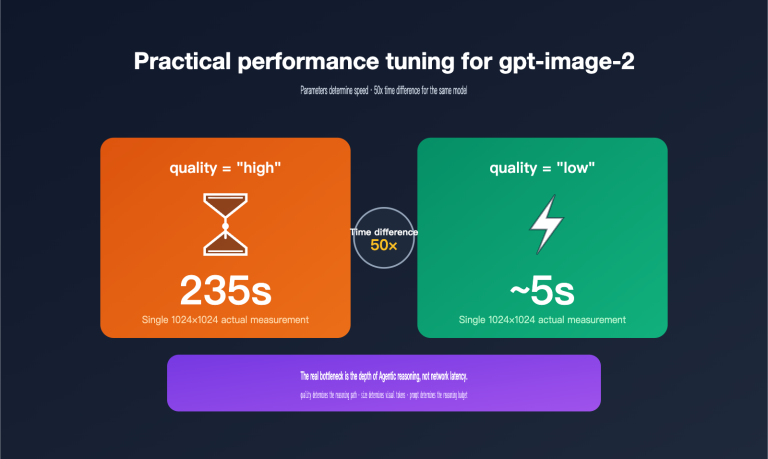
| 1024 × 1024 | high | ~$0.08 |
| 2048 × 2048 | high | ~$0.19 |
| 1536 × 1024 | high | ~$0.12 |
Python Code Example
import openai

client = openai.OpenAI(
    api_key="YOUR_OPENAI_API_KEY"
)

response = client.images.generate(
    model="gpt-image-2",
    prompt="A futuristic city skyline at sunset, photorealistic",
    size="1024x1024",
    quality="high",
    n=1
)

# Extract image base64 or URL
image_data = response.data[0].b64_json
Key Parameter Overview
| Parameter | Options | Description |
|---|---|---|
model |
gpt-image-2 |
Required, model ID |
prompt |
string | Required, your prompt |
size |
1024x1024 / 1536x1024 / 1024x1536 / custom (multiple of 16) / auto |
Output dimensions |
quality |
low / medium / high / auto |
Quality level, affects price |
n |
1-8 | Number of images to return (up to 8 to maintain face consistency) |
background |
transparent / opaque / auto |
Background transparency control |
output_format |
png / webp / jpeg |
Output file format |
Batch API Half-Price Option
OpenAI offers a Batch API: submit your requests in a bundle, and they will be processed asynchronously within 24 hours at a 50% discount on both input and output tokens. This is perfect for large-scale tasks where real-time speed isn't critical.
💰 Cost Optimization: For developers in China, using the official OpenAI API involves three hurdles: having a foreign credit card, USD payment methods, and network access. You might want to consider the "Official API proxy service" from APIYI (apiyi.com). It matches OpenAI’s official pricing but solves the access, payment, and invoicing issues. Simply change the
base_urltohttps://vip.apiyi.com/v1, and your code will work as expected.
How to use GPT-image-2 Method 3: Third-party Image Generation Sites
This is ideal for non-developers, those who don't want to deal with APIs, and anyone who just wants to "open a webpage and start generating."
Recommended Tool 1: AI Picture Master (imagen.apiyi.com)
AI Picture Master is the most convenient tool site for accessing GPT-image-2 in China. It's operated by the APIYI team and features:
- Direct local access: No need for a VPN or special network.
- Multi-model collection: In addition to GPT-image-2, it integrates mainstream models like Nano Banana Pro and Flux, allowing for one-click switching.
- Chinese interface: All prompts, buttons, and tutorials are in Chinese.
- Image history: You can review images you've generated in the past.
- Bulk download: Supports generating multiple images at once and downloading them as a package.
Recommended Tool 2: gpt-image-2.com
gpt-image-2.com is an independent tool site focused exclusively on GPT-image-2:
- Single-model focus: A clean interface dedicated solely to GPT-image-2.
- Preset templates: Provides scenarios for UI mockups, posters, logos, and more.
- Rich examples: You can refer to prompts used by others.
Tool Sites vs. Direct API Calls: What to choose?
| Dimension | Tool Sites (e.g., imagen.apiyi.com) | Direct API Calls |
|---|---|---|
| Barrier to entry | Low (Use immediately) | High (Requires coding) |
| Flexibility | Medium (Limited by site features) | High (Supports any parameter) |
| Product integration | Impossible | Possible |
| Best for | Personal casual use | Developers, bulk scenarios |
3 Criteria for Choosing a Tool Site
- Accessibility: Can it be accessed directly from your location?
- Transparent pricing: Ensure there are no hidden fees.
- Downloadability: Can you fully download and keep the images you generate?
🚀 Quick Start: If you don't know any code, just head over to AI Picture Master (imagen.apiyi.com), register an account, and you can start using GPT-image-2 to generate images in just 5 seconds. If you eventually need API access, you can seamlessly switch to the main APIYI (apiyi.com) site to grab your API key.
How to use GPT-image-2 Method 4: APIYI Platform (Official Proxy + Official Reverse)
This is the most recommended solution for developers—offering support for both "Official Proxy API" and "Official Reverse API" integrations.
Official Proxy API: Identical to OpenAI
- Model ID:
gpt-image-2(exactly matches OpenAI's official ID). - Price: Identical to OpenAI's official pricing (Token-based billing).
- Interface specs: 100% compatible with the OpenAI SDK; just replace the
base_url. - Advantages: Solves issues with regional access, RMB payments, and invoicing.
- Best for: Enterprise users who require strict interface stability and parity with official endpoints.
Official Reverse API: The Value King (gpt-image-2-all at $0.03/request)
- Model ID:
gpt-image-2-all - Price: $0.03 USD per request (approx. 0.21 RMB).
- Features: Fixed unit price, pay-per-request, no extra cost for different sizes/quality.
- Advantages: Predictable costs, 60–90% cheaper than the official API.
- Best for: Bulk image generation, personal projects, and cost-sensitive scenarios.
Price Comparison (Generating 100 images at 1024×1024 high quality)
| Access Method | Cost per Image | Total Cost (100 images) | Savings |
|---|---|---|---|
| OpenAI Official API | ~$0.08 | ~$8.00 | Baseline |
| APIYI Official Proxy API | ~$0.08 | ~$8.00 | Same as official |
| APIYI Official Reverse API (gpt-image-2-all) | $0.03 | $3.00 | 62.5% Off |
| ChatGPT Plus Subscription | $20/mo unlimited | $20 | Best for heavy volume |
Python Integration Example
import openai

# APIYI Official Proxy API (Matches OpenAI)
client = openai.OpenAI(
    api_key="YOUR_APIYI_API_KEY",
    base_url="https://vip.apiyi.com/v1"
)

# Call Official Proxy API (use official model ID)
response_official = client.images.generate(
    model="gpt-image-2",
    prompt="A futuristic city skyline",
    size="1024x1024",
    quality="high"
)

# Call Official Reverse API (use gpt-image-2-all model ID)
response_reverse = client.images.generate(
    model="gpt-image-2-all",  # Note: different model ID
    prompt="A futuristic city skyline",
    size="1024x1024"
)
View full bulk image generation code
import openai
import time
import base64
from pathlib import Path
from typing import List, Literal

ModelMode = Literal["gpt-image-2", "gpt-image-2-all"]

def batch_generate(
    prompts: List[str],
    model: ModelMode = "gpt-image-2-all",
    output_dir: str = "./outputs",
    size: str = "1024x1024",
) -> List[dict]:
    """
    Batch generate GPT-image-2 images and save them automatically.

    Use gpt-image-2-all mode for a fixed low price of $0.03/request.
    """
    client = openai.OpenAI(
        api_key="YOUR_APIYI_API_KEY",
        base_url="https://vip.apiyi.com/v1"
    )

    Path(output_dir).mkdir(parents=True, exist_ok=True)
    results = []

    for i, prompt in enumerate(prompts):
        print(f"[{i+1}/{len(prompts)}] Generating: {prompt[:40]}...")
        start = time.time()

        try:
            response = client.images.generate(
                model=model,
                prompt=prompt,
                size=size,
                n=1,
            )
            elapsed = time.time() - start

            image_data = response.data[0].b64_json
            output_path = f"{output_dir}/image_{i+1}.png"
            with open(output_path, "wb") as f:
                f.write(base64.b64decode(image_data))

            results.append({
                "index": i + 1,
                "prompt": prompt,
                "elapsed": round(elapsed, 2),
                "path": output_path,
                "status": "ok",
            })
        except Exception as e:
            results.append({
                "index": i + 1,
                "prompt": prompt,
                "status": "error",
                "error": str(e),
            })

    return results


if __name__ == "__main__":
    test_prompts = [
        "A minimalist logo for a tech startup",
        "A scientific paradigm diagram with three stages",
        "A cyberpunk city skyline at night",
        "A research poster about AI safety",
    ]

    results = batch_generate(test_prompts, model="gpt-image-2-all")
    success = [r for r in results if r["status"] == "ok"]
    print(f"\nSuccess: {len(success)}/{len(results)}")
    print(f"Estimated total cost: ${len(success) * 0.03:.2f}")
When to choose Proxy vs. Reverse API
| Your Need | Recommended Solution |
|---|---|
| Need 100% parity with OpenAI official (highest compatibility) | Official Proxy API (gpt-image-2) |
| Project requires high quality + custom sizes | Official Proxy API |
| High volume, cost-sensitive, single spec is fine | Official Reverse API (gpt-image-2-all) |
| Personal developer verifying ideas quickly | Official Reverse API |
| Enterprise environment (needs SLA, invoices) | Official Proxy API |
💡 Recommendation: We suggest starting with the Official Reverse API (gpt-image-2-all) on APIYI (apiyi.com) to quickly validate your use case. Once you confirm it meets your needs, decide whether to switch to the Official Proxy API based on your scaling requirements. Both APIs share the same API key; switching only requires changing one line of code for the model ID.
How to Master Prompting Techniques for GPT-image-2
Regardless of how you choose to use it, crafting effective prompts is the key to achieving high-quality results. GPT-image-2 has specific preferences when it comes to prompt engineering.
Basic Structure: The 5-Element Prompt
A great GPT-image-2 prompt usually includes five key elements:
[Subject] + [Style] + [Composition] + [Lighting/Atmosphere] + [Quality Description]

Example:
A young scientist in a lab (Subject)
, photorealistic, high detail (Style)
, centered composition, eye level (Composition)
, dramatic side lighting, blue ambient (Lighting)
, ultra-sharp, 8K resolution (Quality)
Preferred Prompt Patterns for GPT-image-2
Because GPT-image-2 features O-series "Thinking" capabilities, it responds significantly better to "structured instructions" than to "narrative storytelling."
| Method | Recommendation | Example |
|---|---|---|
| Numbered Lists | ⭐⭐⭐⭐⭐ | 1. Background: ... 2. Foreground: ... 3. Text: ... |
| Explicit Constraints | ⭐⭐⭐⭐⭐ | Use sans-serif font. Title size: 24pt. Footer: 8pt. |
| Quoted Text | ⭐⭐⭐⭐⭐ | Title text: "Welcome" (prevents GPT from paraphrasing) |
| Natural Narrative | ⭐⭐⭐ | A scene where a robot walks through... |
| Long Keyword Lists | ⭐⭐ | robot, neon, cyberpunk, detailed, 8k... |
Practical Prompt Template Library
Template 1: UI Mockup
A clean dashboard UI mockup with:
- Top header showing: "Analytics Dashboard"
- Left sidebar with menu items: Home, Reports, Settings
- Main area: 4 metric cards showing revenue, users, conversion, churn
- Style: minimalist, dark theme, blue accents
- Resolution: high detail, sharp text
Template 2: Logo Design
A modern logo for a tech startup named "Apiyi":
- Style: minimalist, geometric
- Colors: gradient from #1e40af to #3b82f6
- Background: pure white
- Optional element: abstract shape suggesting connection
- Output: vector-friendly, clean lines
Template 3: Poster/Banner
A promotional poster with:
- Title (top, large): "Summer Sale 2026"
- Subtitle: "Up to 50% Off"
- Visual: tropical beach with palm trees
- CTA button (bottom): "Shop Now"
- Aspect ratio: 16:9
- Style: warm sunset colors
Template 4: Technical Architecture Diagram
A technical architecture diagram showing:
1. Top tier: API Gateway (Nginx, Rate Limiter)
2. Middle tier: Application Services (Auth, Business Logic)
3. Bottom tier: Data Layer (PostgreSQL, Redis, S3)
Connect with arrows. Use dark theme, monospace font.
5 Common Mistakes and Corrections
| Mistake | Issue | Correction |
|---|---|---|
cool image |
Too abstract, model guesses | A cyberpunk street scene at night, neon lit |
make text say HELLO |
Text isn't quoted, prone to errors | Display the text "HELLO" in bold sans-serif |
realistic but cartoon |
Style conflict | Choose one: photorealistic or cartoon style |
lots of small details |
Vague instructions | Include 5 specific details: A, B, C, D, E |
not too dark |
Model struggles with negatives | Bright, evenly lit scene |
The Extra Edge of Thinking Mode
If you've enabled Thinking Mode via ChatGPT Plus or the OpenAI API, you can include more complex constraints in your prompt:
Generate an infographic with these strict constraints:
- Exactly 3 sections (not 2, not 4)
- Each section has a unique icon
- Total text characters under 80
- Color palette: only blue and white
Verify all constraints before generating.
Thinking Mode checks your constraints before generating, which significantly reduces the number of "off-target" results.
🎯 Usage Tip: There are no shortcuts for prompt writing. I recommend doing low-cost testing using the
gpt-image-2-allreverse API ($0.03/image) at imagen.apiyi.com or APIYI (apiyi.com) to find a stable prompt pattern before switching to production. You can run 100 trials for just $3, which is far more cost-effective than using the high-quality API from the start.
The Complete Decision Path for Using GPT-image-2
If you're unsure which route to take, this decision tree will help you find the best entry point in under a minute.
Decision Question 1: Can you code?
- No → Go to Question 2
- Yes → Go to Question 3
Decision Question 2: Are you located in mainland China?
- Yes → Recommended: AI Image Master (imagen.apiyi.com) (no special network required)
- No → Recommended: ChatGPT Web (chatgpt.com)
Decision Question 3: What do you care about most?
- Production Stability → APIYI Official Relay API (
gpt-image-2) - Ultimate Cost-Effectiveness → APIYI Official Reverse API (
gpt-image-2-all) - Native Official Experience → OpenAI Official API (requires international card and network)
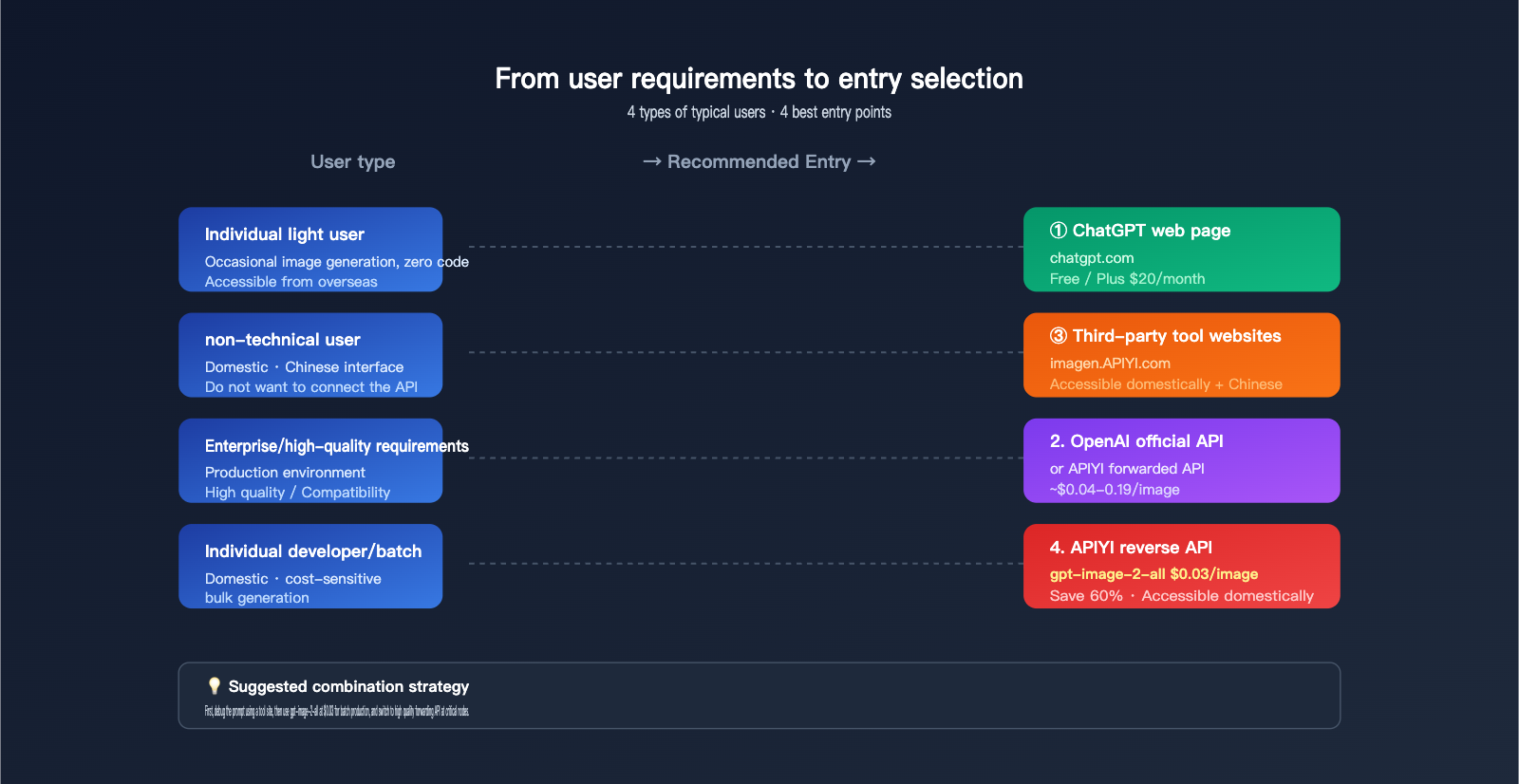
Recommendations by User Group
| User Type | Main Scenario | Top Choice | Reason |
|---|---|---|---|
| Students / Hobbyists | Occasional images, learning | imagen.apiyi.com | Free/low cost + Chinese UI |
| Designers / Creators | High-quality, bulk gen | APIYI Reverse API + Tool Site | Competitive $0.03/image price |
| Indie Developers | Integrating into apps | APIYI Official Relay API | OpenAI SDK compatible + domestic access |
| Startups | Rapid prototyping | APIYI Reverse API → Relay API | Low-cost validation before production |
| Enterprises | Production, SLA needs | OpenAI Official / APIYI Official Relay | 100% official API compatibility |
| Power ChatGPT Users | Daily personal use | ChatGPT Plus | $20/month, unlimited images |
{GPT-image-2 entry selection decision tree}{3 questions · 1 minute to locate the best entry point}{Q1: Can you write code?}{(including basic SDK model invocation)}{I don't know}{会}{Q2: Is it in mainland China?}{(network accessibility)}{是}{否}{AI Image Master}{imagen.APIYI.com}{Accessible in China + Chinese interface}{→ ChatGPT web page}{chatgpt.com}{Free / Plus $20/month}{Q3: What do you care about the most?}{(cost/stability/compatibility)}{Ultimate cost-effectiveness}{Stable production}{Official native}{★ APIYI Reverse API}{gpt-image-2-all}{$0.03/invocation}{APIYI.com · Save 60%}{APIYI forwarding API}{gpt-image-2}{Same price as official + available domestically}{APIYI.com}{OpenAI}{Official API}{Requires an overseas card}{+ Network access}{💡 User type quick check}{Student · Individual player · Occasional image generation}{AI Image Master imagen.apiyi.com}{Designer · Content Creator · Batch image generation}{APIYI reverse API gpt-image-2-all $0.03}{Independent developer · Startup team · Integrated product}{APIYI forwarding API + reverse API combination}{Heavy individual user · Accessible overseas}{ChatGPT Plus $20/month unlimited usage}
How to Use GPT-image-2: Frequently Asked Questions
Q1: Can I use GPT-image-2 in mainland China?
Accessing chatgpt.com and the official OpenAI API directly from mainland China requires a workaround for network restrictions. However, there are fully compliant solutions available: 1) The AI Image Master tool at imagen.apiyi.com is ready to use directly; 2) APIYI (apiyi.com) provides a local API proxy service, including the official forwarded API (gpt-image-2) and the official reverse-engineered API (gpt-image-2-all). The latter costs only $0.03 USD (approximately 0.21 RMB) per image, making it one of the most cost-effective solutions for developers in China.
Q2: What is gpt-image-2-all, and how is it different from gpt-image-2?
gpt-image-2-all is the model ID for the official reverse-engineered GPT-image-2 API provided by the APIYI platform. It delivers the same generation quality as the official gpt-image-2 but uses a fixed "per-call $0.03 USD" pricing model instead of the official Token-based billing. Its advantages include predictable costs and high cost-effectiveness (about 60% cheaper than the official high-quality tier). A minor limitation is that it doesn't distinguish between quality levels. It's ideal for bulk generation, cost-sensitive projects, and individual developer use cases.
Q3: How many GPT-image-2 images can free ChatGPT users generate per day?
OpenAI hasn't released precise numbers, but according to community testing and the OpenAI Help Center, free users can generate approximately 2 GPT-image-2 images per day. Once the limit is reached, it automatically downgrades to a lightweight mode. If you need unlimited generations, you can subscribe to ChatGPT Plus ($20/month) to unlock unlimited Thinking Mode. If you want bulk image generation without a subscription, a more cost-effective approach is using the reverse-engineered API (gpt-image-2-all) from APIYI, which costs $0.03 per image on a pay-as-you-go basis.
Q4: Is the pricing the same for the OpenAI official API and the APIYI forwarded API?
Yes. The "official forwarded API" (model ID gpt-image-2) on the APIYI platform has the exact same Token pricing as the official OpenAI API: $8/M Token for input, $2/M Token for cache, and $30/M Token for output. The key differences are: 1) APIYI solves issues related to local access, RMB payments, and invoicing; 2) APIYI offers the gpt-image-2-all low-cost reverse option, which isn't a standard SKU offered by OpenAI.
Q5: What code changes are required to use the APIYI platform with the OpenAI SDK?
You only need to change the base_url line; everything else stays the same:
client = openai.OpenAI(
    api_key="YOUR_APIYI_API_KEY",
    base_url="https://vip.apiyi.com/v1"  # The only line that needs changing
)
After that, just call client.images.generate(model="gpt-image-2", ...) or model="gpt-image-2-all". The parameter semantics and return format are completely identical to the official OpenAI SDK.
Q6: What image sizes does GPT-image-2 support?
GPT-image-2 supports highly flexible dimensions: 1) Preset sizes: 1024×1024, 1536×1024, 1024×1536; 2) Custom sizes: width and height simply need to be multiples of 16; 3) Aspect ratio range: from 3:1 (ultra-wide) to 1:3 (ultra-tall); 4) Maximum resolution: approximately 2048×2048. The size parameter also supports auto, letting the model automatically select the best dimension based on your prompt.
Q7: How many images can GPT-image-2 generate at once?
The n parameter in the API call can be set to a maximum of 8, and the model will maintain consistency in characters and settings. This is extremely useful for generating storyboards, character multi-views, or multi-angle product displays. In the ChatGPT web interface, the default is 1, but you can follow up with a prompt like "generate 4 more variations."
Q8: How do I migrate existing DALL-E 3 applications to GPT-image-2?
DALL-E 2/3 was retired on 2026-05-12, so migration is mandatory. The steps are: 1) Change the model ID from dall-e-3 to gpt-image-2; 2) Check the size parameter (GPT-image-2 supports more flexible sizes); 3) Add the quality parameter (which DALL-E 3 lacked); 4) Adjust your prompt style (GPT-image-2 is more sensitive to structured instructions). If you connect via APIYI, you can also access the gpt-image-2-all option for a more cost-effective alternative.
Key Takeaways for Using GPT-image-2
- Four distinct ways to use it: ChatGPT web (personal), OpenAI official API (enterprise/dev), third-party tool sites (non-technical users), and the APIYI platform (best overall for local developers).
- Price variations up to 30x: ChatGPT Plus ($20/mo unlimited) vs. OpenAI high-quality API (~$0.19/image) vs. APIYI reverse-engineered API ($0.03/image). Choose the model that fits your usage to avoid unnecessary costs.
- gpt-image-2-all is the top choice for developers in China: It’s an exclusive official reverse-engineered API from APIYI, costing a flat $0.03/image—about 60% cheaper than the official high-quality tier.
- Compliant access solutions: The AI Image Master tool (no-code) and APIYI (code-based) are both fully compliant and directly accessible within China.
- ChatGPT Plus ≠ API: The $20/month subscription only covers usage within the ChatGPT web interface; it does not allow API calls for integration into your own applications. Developers need a separate API access.
- DALL-E is retired: DALL-E 2/3 became unavailable after 2026-05-12; all image generation requests must be migrated to GPT-image-2.
- The "Forwarded + Reverse" combo is best practice: Use the forwarded API for production environments to ensure consistency, and the reverse-engineered API for verification and cost control—this is the standard workflow for local developers.
Summary
When it comes to "how to use GPT-image-2," there’s no "single correct answer"—only the one that best fits your current scenario:
- For casual use → Just open chatgpt.com or imagen.apiyi.com
- To integrate into a product → Use the official OpenAI API or an APIYI API proxy service (the top choice in China)
- For extreme cost-effectiveness → Use the APIYI reverse API (
gpt-image-2-allat $0.03/image) - For heavy personal use → Subscribe to ChatGPT Plus for $20/month
For the vast majority of developers and small teams in China, the most economical setup is: use the imagen.apiyi.com tool for quick previews and prompt debugging, use the APIYI apiyi.com platform's gpt-image-2-all for high-volume production, and use the official proxy API gpt-image-2 for critical tasks requiring high quality. This combination keeps costs at an absolute minimum without sacrificing quality, all while staying fully compatible with the official OpenAI SDK—making future migrations effortless.
We recommend getting all these capabilities through APIYI (apiyi.com). Using a single API key to access both official proxy and reverse APIs, allowing you to switch flexibly based on your scenario, is one of the best ways to access GPT-image-2 in 2026.
References
-
OpenAI ChatGPT Images 2.0 Official Announcement: GPT-image-2 release notes
- Link:
openai.com/index/introducing-chatgpt-images-2-0 - Note: Official 2026-04-21 release notes and model capability list.
- Link:
-
OpenAI API Documentation – GPT Image 2: Official API specifications and pricing
- Link:
developers.openai.com/api/docs/models/gpt-image-2 - Note: Full parameter documentation and token billing rules.
- Link:
-
OpenAI Image Generation API Guide: General guide for image generation integration
- Link:
developers.openai.com/api/docs/guides/image-generation - Note: SDK invocation patterns and parameter explanations.
- Link:
-
AI Image Master: Accessible GPT-image-2 online tool in China
- Link:
imagen.apiyi.com - Note: Multi-model aggregation, Chinese interface, and batch image generation.
- Link:
-
APIYI Platform: GPT-image-2 API proxy service in China
- Link:
apiyi.com - Note: Official proxy API + official reverse API (gpt-image-2-all).
- Link:
Author: APIYI Technical Team | For more GPT-image-2 integration solutions and performance comparisons, visit APIYI at apiyi.com to get free testing credits.