Author’s note: A troubleshooting guide for developers working with model APIs in production. Using a three-layer framework—your own request, the gateway platform, and the upstream model—it explains how to pinpoint failures with error codes, logs, and a minimal curl reproduction, and what information to include in a support request.
An alert goes off in the middle of the night: your model API error rate is climbing. The most time-consuming part often isn’t fixing the problem—it’s figuring out who should fix it. Did a code change break something? Is the gateway platform having trouble? Or is the upstream model service unstable? This article introduces a three-layer approach: your request → gateway platform → upstream model, so you can quickly narrow down where a model API failure originates.
This isn’t just another error-code lookup table. Operators of model aggregation platforms commonly use the same three-way approach to investigate invocation failures: reproduce the issue using request parameters, logs, error codes, and the request path, then determine whether it comes from the user’s request, the platform, or the upstream model service. This article turns that approach into a practical troubleshooting sequence you can follow yourself. Whether you connect directly to a provider or use an aggregation gateway like APIYI, the same sequence applies.
What you’ll take away: A six-step troubleshooting sequence, signals for identifying common error categories, a way to create a minimal reproduction with curl, and a ready-to-use support request checklist.
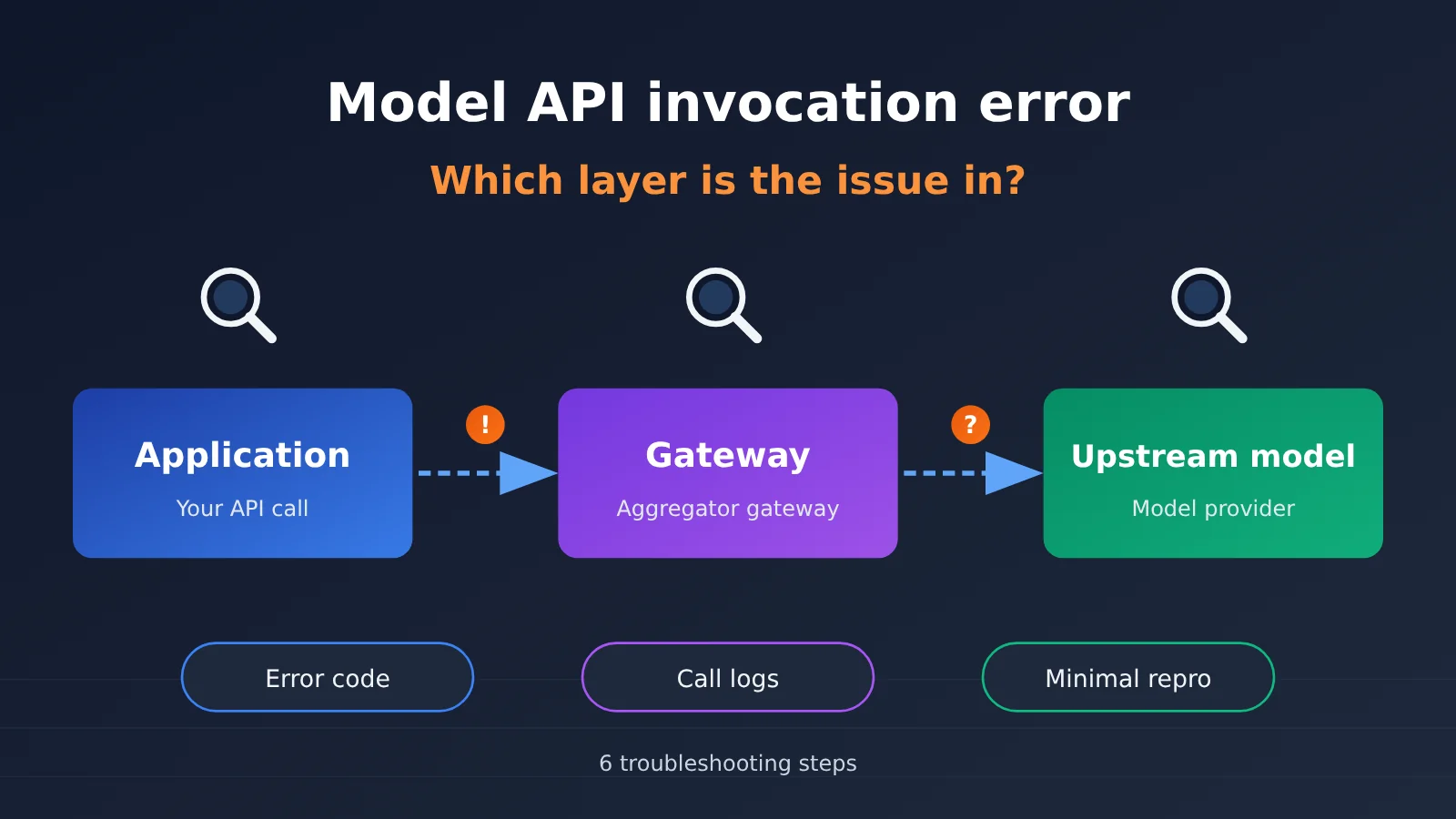
Key Takeaways: The Three Layers of Model API Failure Attribution
A model API call passes through at least three layers: your application and network environment, an intermediate gateway or aggregation platform, and the upstream model service that provides inference. When you connect directly to a provider, the middle layer is thin, but load balancing and access layers are still involved. The goal of troubleshooting is to pinpoint which layer is responsible.
| Layer | Typical Issues | Common Signals | Responsible Party |
|---|---|---|---|
| Your own call | Incorrect key, invalid parameters, context limit exceeded, local timeout set too short, proxy or DNS issues | 4xx errors reproduce consistently; the call works in another environment; only certain code paths are affected | You |
| Gateway platform | Authentication or billing issues, incorrect parameter mapping, routing or fallback problems, platform rate limiting, connections interrupted mid-call | Direct calls work but gateway calls fail; error format differs from the upstream provider’s; multiple models are affected at once | Platform provider |
| Upstream model | Service overload, model version changes, capability drift, provider-side rate limiting | Multiple access channels fail at once; the provider’s status page has an announcement; only one model is affected | Model provider (usually communicated through the platform) |
Why Troubleshooting Model APIs Starts With Three-Layer Attribution
When a model API call fails, many teams’ first instinct is to add retries or switch models. That can sometimes provide temporary relief, but without finding the root cause, the problem may return a few days later—and retries can even hide a real configuration error. Identifying the responsible layer first helps you avoid wasting time on the wrong fix.
Three-layer attribution also tells you who to contact next. If the issue is in your own call, you can fix the code. If it’s with the gateway platform, you’ll need to contact the platform provider with a request ID. If it’s with the upstream model, you’ll generally need to wait for recovery, switch models, or enable a fallback. The remedies differ considerably, so a wrong diagnosis can delay the fix.
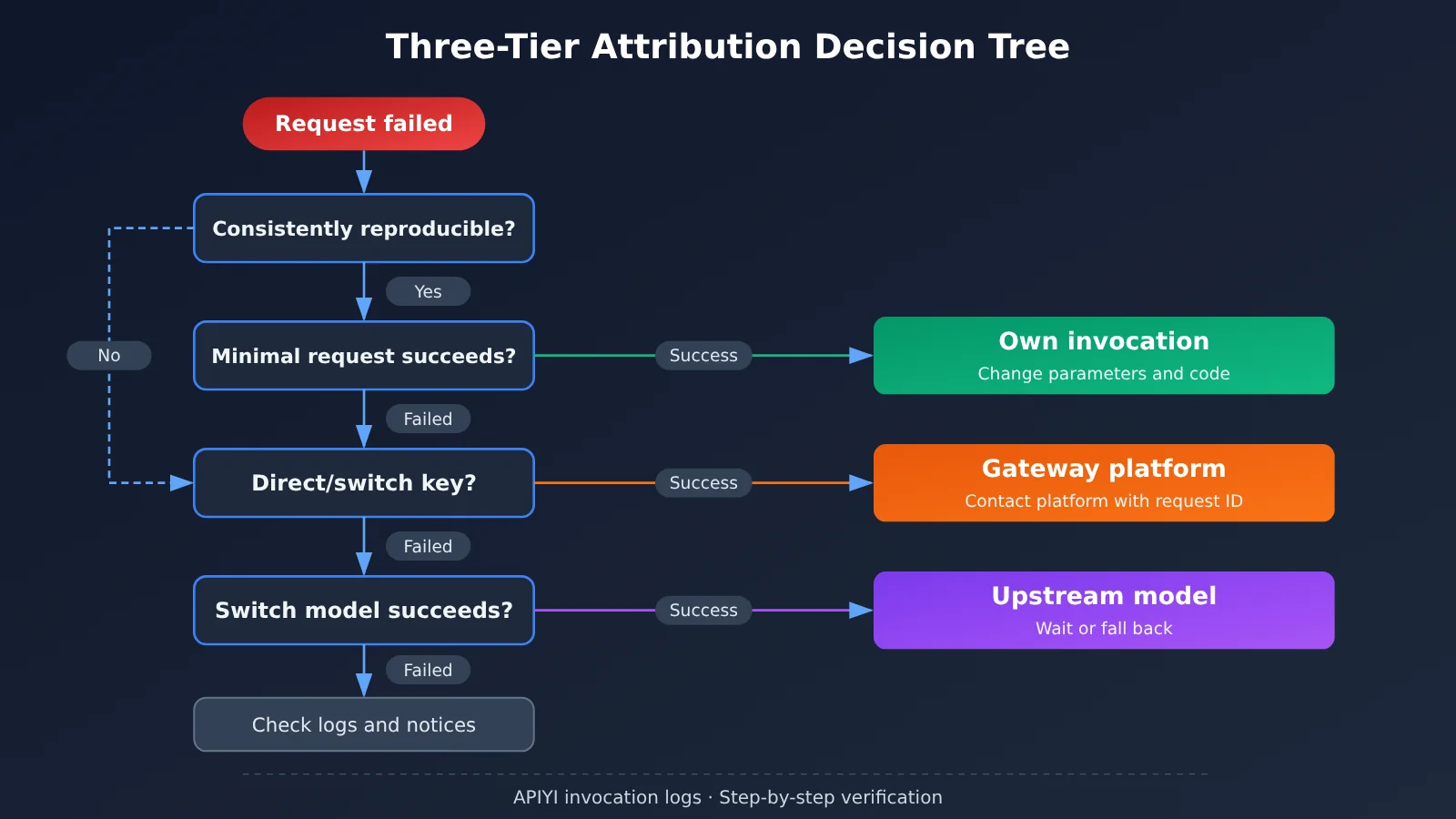
6 Steps to Troubleshoot Model API Errors
Follow these steps in order: start with the cheapest checks, isolate the problem, then dig deeper. Each step rules out a layer of possibilities instead of suspecting everything at once.
- Confirm the scope: Are all requests failing or just some? Is it one model or several? When did it start? The wider the impact, the more likely the issue is with the platform or upstream provider. If it affects just one feature, your own code is more likely to be the cause.
- Record the original error: Save the HTTP status code, the raw response body, the request ID from the response headers (if present), the time of the request, and its duration. Don’t rely solely on the SDK’s wrapped exception—important details can get lost in the process.
- Create a minimal reproduction: Outside your application code, use curl to send the simplest possible request—for example, a short text prompt with streaming and tool calls disabled. If that succeeds, the issue is likely in your parameter combination or application logic.
- Add parameters back one at a time: Starting with the minimal request, add the system prompt, long context,
stream,tools,response_format, and other parameters one by one until you find what triggers the failure. - Compare alternatives: Try another model through the same gateway, or connect directly to the provider if your network allows it. If switching models fixes the issue, that usually points to the upstream provider; if a direct connection works, it usually points to the gateway.
- Check logs and announcements: Review the platform’s request logs and the provider’s status page. Confirm whether the request reached the platform, whether the platform forwarded it, and what the upstream provider returned.
Common Model API Errors and Diagnostic Signals
Error codes are the most direct clue when troubleshooting, but platforms don’t all map them the same way. The table below follows general HTTP semantics; check your platform’s documentation for the exact meanings.
| Error category | Typical symptoms | Diagnostic signals | Most likely source |
|---|---|---|---|
| Authentication failure | 401 / 403 | Switching to another key fixes the issue; the key has extra spaces or is from the wrong environment | Usually the client request; occasionally the platform account status |
| Invalid parameters | 400 / 422 | A minimal request succeeds, but fails when a parameter is added back; the error message identifies the field | The client request or incorrect parameter mapping by the platform |
| Model not found | 404 or an invalid model message | The model name is misspelled, or the model has been retired or renamed | The client request or a change to the model version |
| Rate limit / quota | 429 | Reducing concurrency fixes the issue; the response headers specify a retry wait time | Depends on the source of the limit; may be the platform or upstream provider |
| Server error | 500 / 502 / 503 | The same request succeeds intermittently; multiple users report the issue at once | The gateway platform or upstream model |
| Timeout | 504 or a client-side timeout | More common with long-output requests; disappears when switching to streaming | Local timeout settings, gateway timeout, or slow upstream inference |
| Stream interruption | SSE connection drops midway without an end marker | Non-streaming requests work; occurs only with long responses | An intermediate proxy, gateway connection-keeping policy, or upstream provider |
Special Cases: Streaming Interruptions, Version Changes, and Automatic Fallback
Streaming interruptions are among the hardest issues to diagnose. The client may only see the connection drop, while the HTTP status code is still 200. Start by checking whether your proxy, load balancer, or Nginx has a short idle timeout for long-lived connections. Then use curl with the -N option to inspect the raw SSE output directly and see whether you received the end-of-stream marker.
Version changes don’t always cause errors, but they can change the output. For example, JSON formatting may become inconsistent, or tool-call parameters may be missing. If the model name points to a rolling alias, its behavior can change quietly after an upstream update. In production, use model names with dates or version numbers where possible, and run regression tests regularly.
Automatic fallback and dynamic routing can make troubleshooting results inconsistent. Some gateways automatically switch to a backup provider or model when an upstream request fails. This improves availability, but it can also mean that “the same request works one time and fails the next” or that “the output style suddenly changes.” Check whether the model field in the response matches the request. If the platform logs the provider or model actually used, check those records too. Whether the caller can detect a fallback depends on how the platform implements it, so it’s best to confirm with the platform in advance.
Troubleshooting Model API Errors: A Minimal Reproduction with curl
The goal of a minimal reproduction is to rule out interference from your application code. curl doesn’t depend on an SDK and shows the raw HTTP exchange, making it ideal for gathering evidence. The examples below use an OpenAI-compatible API. Replace the address with the base_url provided in your platform’s documentation.
5 curl Tips for a Minimal Reproduction
- Check just the status code and duration: Use
-sS -o /dev/null -w "%{http_code} %{time_total}"to quickly see whether the request reached the server and how long it took. - Inspect the full request and response headers: Use
-vto see the TLS handshake, request headers, and response headers. Many platforms include request IDs and rate-limit information in response headers. - Break down connection timing: Add
%{time_namelookup},%{time_connect}, and%{time_starttransfer}to-w. Slow DNS resolution or connection setup usually points to a local network issue; a long time to first byte usually points to a slow gateway or upstream inference. - Watch streaming output: Add
-Nto disable buffering and set"stream": truein the request body. Watch the SSE data line by line to see where the interruption occurs. - Keep the request body minimal: Include only
modeland one entry inmessagescontaining a short piece of text. Leave out optional parameters such astools,response_format, andmax_tokens.
🚀 Troubleshooting tip: On an aggregation platform like APIYI, you can call models from multiple providers with the same API key. To switch models in a minimal reproduction, you only need to change the
modelfield. This makes it easy to compare models without setting up separate accounts and API keys for each provider.
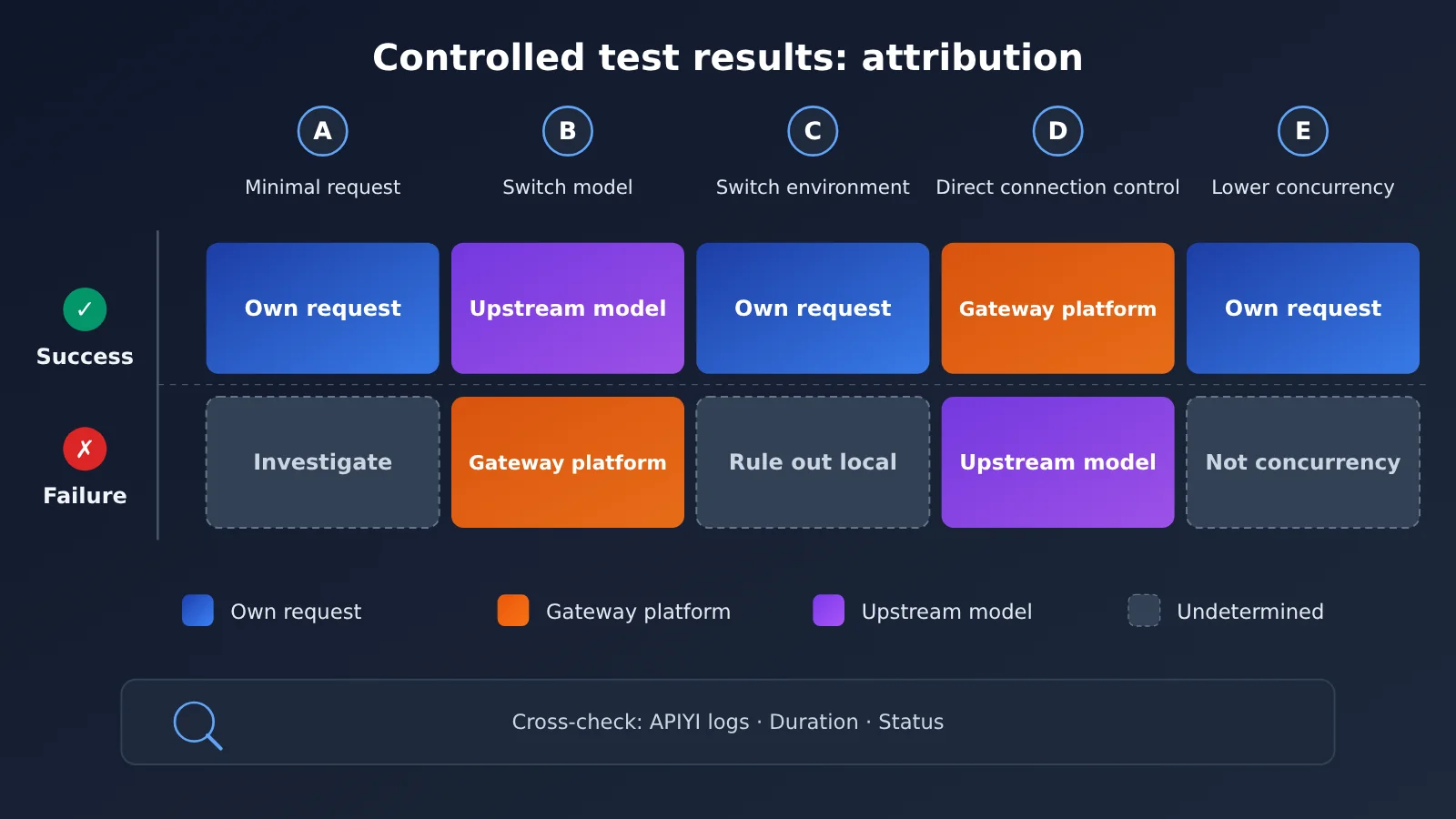
Comparison Matrix: Pinpoint the Fault Layer
Run the minimal reproduction as part of a comparison test to get a more reliable idea of where the problem lies. We recommend running at least the first three tests below.
| Test group | Action | What success suggests | What failure suggests |
|---|---|---|---|
| A: Minimal request | Use the same API key and model with a minimal request body | The problem is in the application parameters or code logic | Continue with tests B and C |
| B: Switch models | Use the same gateway and API key, but switch to another provider’s model | The original model’s upstream provider may have a problem | The gateway, API key, or local network is more suspect |
| C: Switch environments | Send the same request from another machine or network | There’s a problem with the local network, proxy, or DNS | Rules out local network factors |
| D: Direct connection comparison | Connect directly to the provider’s official API, if possible | The gateway layer is more suspect; report the issue to the platform | The upstream model itself is experiencing an issue |
| E: Reduce concurrency | Reduce concurrency to 1 and retry | There’s a rate-limit or quota issue | The issue is unrelated to concurrency |
Using Request Logs to Diagnose Model API Errors
curl can tell you whether a request fails now; request logs can tell you what happened at the time. Production issues are often hard to reproduce consistently, so logs may be your only source of evidence. When troubleshooting, align your application logs with platform logs by timestamp and request ID, then examine them together.
At a minimum, your application should log the request time, model name, parameter summary (without sensitive content), HTTP status code, raw error response, total duration, time to first byte, and the request ID returned by the platform. Platform logs can fill in details you can’t see, such as whether the request reached the platform, how many tokens were billed, and which model was actually invoked.
💡 Logging tip: If you connect through APIYI, you can view request records by time range in the console and match them up with your application logs. Check the console and documentation for the actual fields included in platform logs and whether they pass through original upstream error messages. When in doubt, asking technical support is faster than guessing.
What to Include When Reporting an Issue to Your Service Provider
The more complete your report, the faster the issue can be resolved. A description like “the API doesn’t work” will almost certainly lead to several rounds of follow-up questions. Use the table below to prepare everything and submit it at once.
| Information | Example | Purpose |
|---|---|---|
| Time range | Accurate to the second, with time zone | Helps the platform search its logs |
| Request ID | Unique identifier from the response headers or body | Locates the specific request |
| Model name and endpoint | Full model name and API path | Helps determine whether a specific upstream provider is involved |
| Original error | Status code and complete response body | Distinguishes platform errors from upstream errors passed through |
| Minimal reproduction | Description of sanitized curl parameters | Lets the provider reproduce the issue consistently |
| Scope of impact | Failure rate and affected models or features | Helps assess severity |
| Comparisons already performed | Results from experiments A through E | Avoids repeating troubleshooting steps |
Before reporting an issue, redact API keys and users’ private data. Keep only the first and last few characters of the API key for identification. If your platform offers 24/7 technical support, you can report the scope of an urgent incident first and provide the details as they become available.
Frequently Asked Questions
Q1: What’s the first thing I should do when a model API call fails?
Record the original error, including the status code, full response body, request ID, and timestamp. Then determine the scope of the impact. Don’t rush to restart the service or change the code—once the original evidence is lost, it’s much harder to find the cause.
Q2: How can I tell whether the problem is with the gateway or the upstream model?
The most effective approach is to run a comparison test: switch to a different model on the same gateway. If the request succeeds, the original model’s upstream provider is more suspect. If you can connect directly to the provider and that works, the gateway layer is more suspect. You can also check the error response format: upstream errors passed through by the gateway often have a provider-specific structure.
Q3: If I get a 429 rate-limit error, is it my fault?
Not necessarily. A 429 could be caused by your account quota, a platform concurrency limit on an individual key, or overall upstream overload. First, reduce concurrency to 1 and retry. Then check the response headers for rate-limit information and ask the platform which layer imposed the limit.
Q4: How should I troubleshoot a request that sometimes succeeds and sometimes fails?
Start by checking for automatic fallback or dynamic routing: compare the `model` field in the response with the provider channel actually used, as shown in the platform logs. Then examine the duration of failed requests. If they cluster around a particular duration, a timeout threshold at one layer may have been triggered.
Q5: How can I compare models without spending much time or money?
An aggregation platform with a unified interface for multiple models makes this easier. On APIYI, you can switch providers using the same key by changing the `model` field. You can create a minimal reproduction and compare models in minutes, without signing up for separate accounts with each provider.
Q6: If model output quality suddenly drops, does that count as a call failure?
It won’t produce an error, but it still needs investigation. First, check whether the model name points to an alias that’s updated on a rolling basis. Then compare results from a fixed set of test cases with historical results. Once you’ve confirmed that the model’s behavior has changed, report it to the platform along with comparison examples.
Q7: When reporting a problem through an aggregation gateway, do I need to provide upstream information?
You don’t need to contact the upstream provider yourself, but you should provide the request ID, model name, and original error message. The platform can use these to look up forwarding records and determine whether the error came from upstream. For example, when contacting APIYI technical support, providing the request ID and time range can significantly reduce back-and-forth communication.
Key Takeaways for Troubleshooting Model API Errors
- Identify the layer first: Determine whether the problem is in your own request, the gateway platform, or the upstream model before deciding how to fix it.
- Preserve the original evidence: The status code, raw response, and request ID are essential for finding the cause.
- Create a minimal reproduction: Use curl to strip away application code, then add parameters back one at a time to find what triggers the failure.
- Use comparison tests to isolate the layer: Switch models, switch environments, and test a direct connection to narrow down where the fault lies.
- Watch for automatic fallback: If results change unexpectedly, check the actual model in the response and the routing records.
- Cross-check logs on both sides: Match application logs against invocation logs from platforms like APIYI using timestamps and request IDs.
- Submit a structured incident report: Include the time, request ID, original error message, and comparison test results in one report.
Summary
When a model API call fails, the priority isn’t finding a fix immediately—it’s identifying which layer is responsible:
- Your request layer: Confirm the issue with a minimal reproduction and by adding parameters back step by step. A code or configuration change will usually fix it.
- Gateway platform layer: Confirm the issue with a direct-connection comparison and platform logs, then contact the platform provider with the request ID.
- Upstream model layer: Confirm the issue by testing another model and checking vendor announcements. Switch models or use a fallback strategy to mitigate the impact.
Consider adding the six-step troubleshooting process and incident report checklist from this article to your team’s on-call handbook, so you can follow them the next time an alert fires. If you’re building a multi-model integration, you can use APIYI at apiyi.com to run cross-model comparison tests through the same interface, then use the platform’s invocation logs to build your own troubleshooting workflow.
📚 References
- MDN HTTP Response Status Codes: An overview of HTTP status code semantics
- Link:
developer.mozilla.org/zh-CN/docs/Web/HTTP/Status -
Details: Explains the standard meanings of 4xx and 5xx errors
-
curl Official Manual: A complete guide to curl options
- Link:
curl.se/docs/manpage.html -
Details: Covers troubleshooting options such as
-wtiming variables,-N, and-v -
MDN Server-Sent Events: A guide to the SSE streaming protocol
- Link:
developer.mozilla.org/zh-CN/docs/Web/API/Server-sent_events - Details: Helps explain the format of streaming output and how interruptions appear
Author: APIYI Technical Team
Technical discussions: Contact us through the APIYI homepage. For more integration and troubleshooting resources, visit the docs.apiyi.com documentation center.