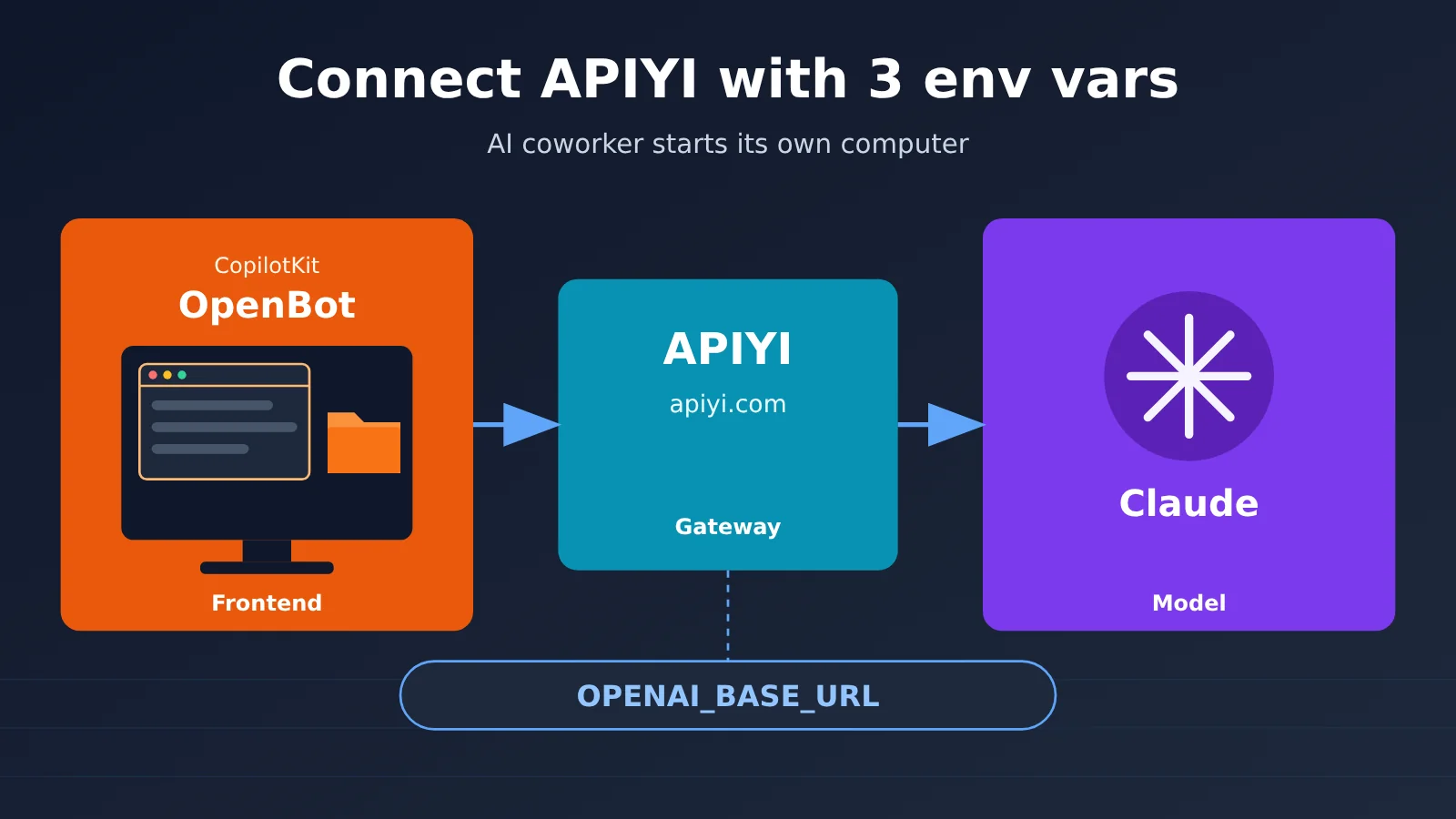
Author’s note: OpenBot doesn’t have a “select model” interface. Its model settings live in .env and the tenant package’s model.yaml. This article shows you how to connect APIYI by changing three environment variables and one line of YAML. You’ll start by enabling just three computer tools, then verify the setup by opening a web page, reading a file, and checking the audit logs.
You’ve cloned CopilotKit’s OpenBot, opened .env.example, and searched the frontend from end to end, but you still can’t find a “select model provider” dropdown. You don’t have a payment card for OpenAI’s official service and just want to use APIYI’s pay-as-you-go pricing to run claude-opus-5-5. But you can’t even find where to configure the model.
Here’s the short answer: OpenBot doesn’t have a “select model” switch. The model is configured in .env and the tenant package’s model.yaml. Connecting APIYI doesn’t require any code changes: just update three environment variables and one line of YAML. Start by enabling only three computer tools, then open up more as needed once you’ve verified everything works.
This isn’t a “one-click setup” tutorial. OpenBot is a template, and running it requires Docker, Bun 1.4+, a CopilotKit Intelligence project, and a model API key. We’ll cover all those prerequisites. Also, there are two projects called OpenBot on GitHub; this article covers the one from CopilotKit.
What you’ll get: By the end, you’ll know how to update the configuration, start with three tools, and verify the setup by opening a web page, reading a file, and checking the audit logs. There’s also a troubleshooting table for common issues: 400 and 401 errors, models not found, tools not being called, and startup failures.
OpenBot Models Aren’t Configured in the UI
OpenBot Is a Template, Not a Product
CopilotKit/OpenBot is an MIT-licensed open-source repository created on August 17, 2026. As of November 2, 2026, it had 9,561 stars, its latest official release was v0.2.0 (October 12, 2026), and the top of its README still said Beta. Its pitch is to give every AI coworker—called a Bot in the repository—a computer of its own, complete with a real browser, its own login sessions and files, and a handful of tools it’s been granted access to.
The README puts it plainly: this is “a template, not a product.” There’s no hosted version to sign up for, and it isn’t published as a dependency package. Instead, you clone the repository, replace the example tenant packages under examples/ with your own coworkers, channels, and skills, and run it yourself. So if you’re wondering where to select a model, the answer is in the configuration files, not the UI.
Four Prerequisites for Running OpenBot
The table below lists what you need before connecting a model. Without any one of these, you won’t be able to verify the configuration that follows.
| Prerequisite | Requirement | Notes |
|---|---|---|
| Docker | Runs PostgreSQL (with pgvector) and the bundled Bot | scripts/start.sh starts the Docker services and runs migrations |
| Bun | 1.4 or later | Use bun install to install dependencies |
| CopilotKit Intelligence | A project and license; a free plan is available | The local evaluation environment is macOS + Docker Desktop. The local license is valid for 30 days and can be renewed with npx copilotkit@latest local renew |
| Model key | A key for an OpenAI-compatible endpoint | This article uses an APIYI token, with base_url set to https://api.apiyi.com/v1 |
Intelligence is the easiest requirement to underestimate. The comments in .env.example state that the server will refuse to start if the Intelligence URL, gateway URL, or key is missing: “There is no degraded mode.” That’s because Intelligence stores persistent threads and memory; without it, each conversation would lose its context. So OpenBot can’t be described as a fully offline solution.
OPENAI_BASE_URL Affects the Entire Deployment
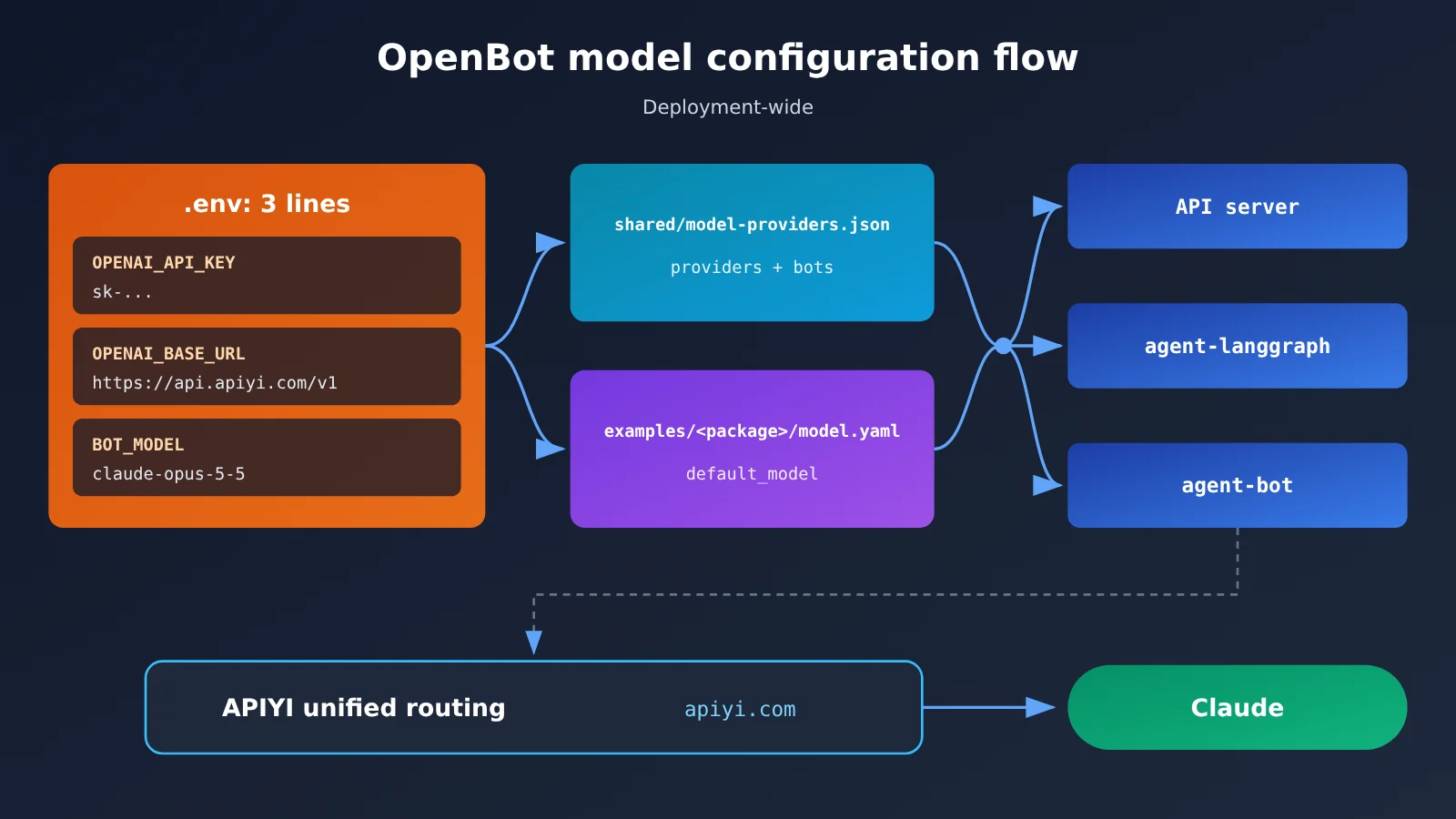
The README says “no model ships in the box”: the administrator supplies the credentials, which are encrypted and stored in the database, not written to logs. Deployment-level environment variables determine which model is used. The most important is OPENAI_BASE_URL, which the documentation says can point to any endpoint that speaks the same API, including a multi-provider gateway, a proxy, or a model running on your own hardware. The comments in .env.example are more specific: any endpoint that supports /v1/chat/completions will work.
This variable applies to the entire deployment, not an individual Bot. It’s read in three places: the API server’s client for the built-in agent, agent-bot when it constructs its own client, and agent-langgraph when BOT_PROVIDER=openai. The advantage, according to the documentation, is that you won’t end up with half the requests in one deployment going to a new address while the other half still go to the old one.
Connect OpenBot to APIYI: Configure the Environment Variables
How OpenBot Connects to APIYI
APIYI provides an OpenAI-compatible interface. Set base_url to https://api.apiyi.com/v1, and requests go to /v1/chat/completions, meeting OpenBot’s OPENAI_BASE_URL requirement.
One detail to watch: OpenBot passes model names verbatim, and APIYI’s /v1/models returns the bare name claude-opus-5-5. Don’t add the openai/ prefix shown in the official gateway example. The example openai/gpt-5.6-terra only applies to endpoints that namespace their model names.
Here’s an overview before we walk through the steps.
| Where to change it | What to set it to | Why |
|---|---|---|
OPENAI_API_KEY in .env |
The sk-... token you created in the APIYI console |
The built-in agent and both bundled Bots use this key by default |
OPENAI_BASE_URL in .env |
https://api.apiyi.com/v1 |
Directs model requests across the deployment to APIYI’s compatible endpoint |
BOT_MODEL in .env |
claude-opus-5-5 |
Specifies which model the Bot uses at startup; if omitted, the value in the provider spec file is used |
default_model in examples/<your-package>/model.yaml |
claude-opus-5-5 |
The example package currently uses gpt-5.6-terra; leaving it unchanged will result in a model-not-found error |
BOT_RESPONSES_API in .env |
Keep it false |
Claude returns a 400 error on APIYI’s Responses endpoint |
Step 1: Create a dedicated token
- Create a new key on the APIYI token page at
api.apiyi.com/token. Set a balance limit and expiration date, and label its purpose “OpenBot local evaluation.” - On your local machine, use curl to send a
GETrequest tohttps://api.apiyi.com/v1/modelswith the headerAuthorization: Bearer sk-....
Acceptance criteria: The request returns HTTP 200, and the list includes claude-opus-5-5. When we tested this on November 2, 2026, we received 259 models, including both claude-opus-5-5 and claude-opus-5-5-thinking.
A separate token keeps usage on this machine separate from production. The Bot will go through plenty of trial and error during the template stage, so having a balance limit provides some peace of mind.
Step 2: Change three lines in .env
Following the official quick start, first run cp .env.example .env and bun install. Then run npx --yes copilotkit@latest login, npx --yes copilotkit@latest project select, and bun scripts/setup-learning.ts in that order to add the runtime key and Learning container to .env. Then change these three lines:
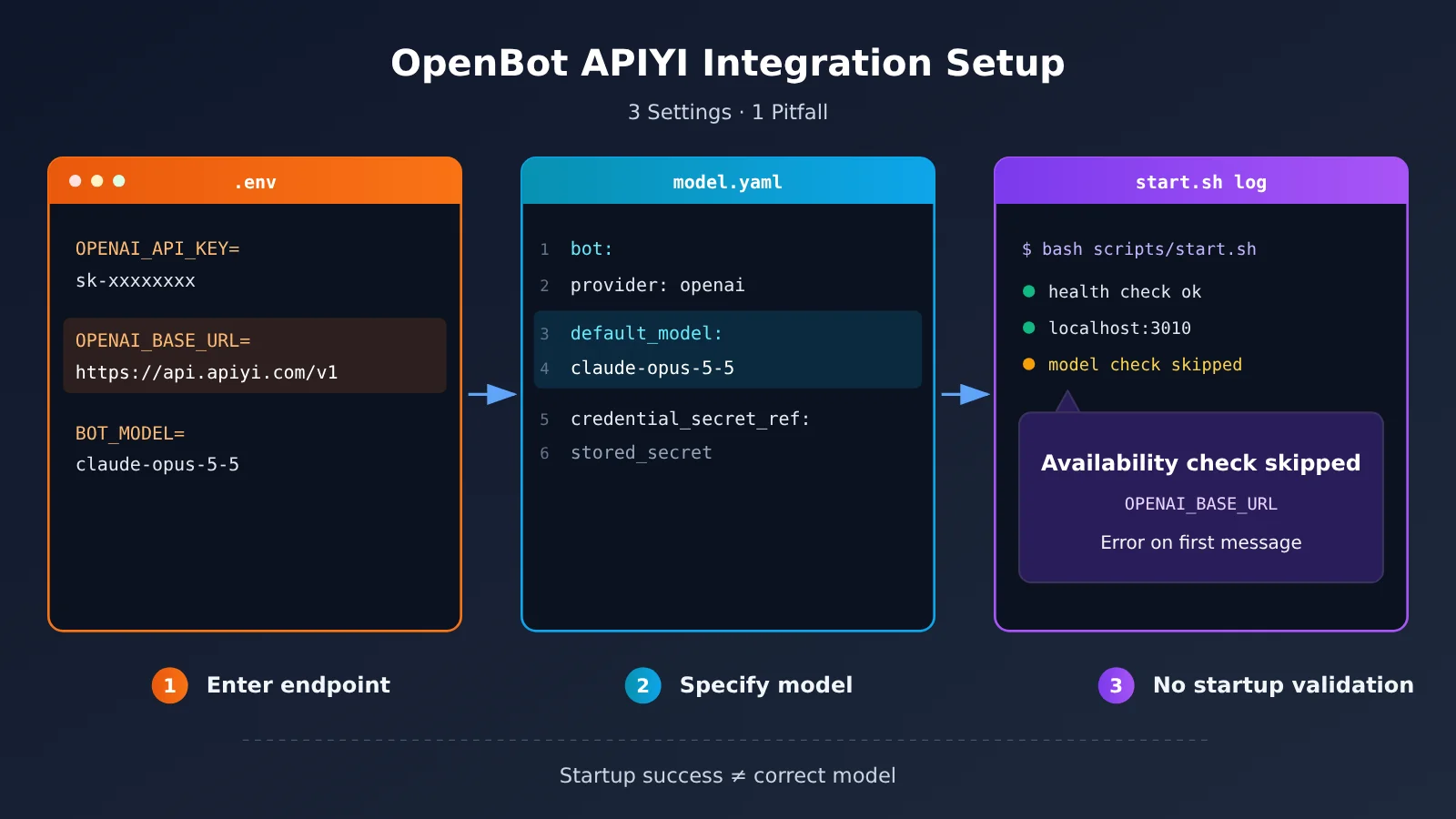
OPENAI_API_KEY=sk-your-APIYI-tokenOPENAI_BASE_URL=https://api.apiyi.com/v1BOT_MODEL=claude-opus-5-5
Also check four things: leave BOT_PROVIDER at its default value of openai; leave BOT_RESPONSES_API set to false; generate KEY_ENCRYPTION_KEY with openssl rand -base64 32; and note that AGENT_BOT_MODEL is used only by the proof-of-concept agent-bot. It defaults to gpt-5.5 and is independent of BOT_MODEL. If you also plan to start agent-bot, check that this model name exists in /v1/models, or change it to the model you want to use.
Acceptance criteria: The key and URL in the output of grep OPENAI_ .env are correct. The URL ends in /v1, with no extra slashes or spaces. If accessing the same endpoint from inside the container requires a different route, override it with OPENAI_CONTAINER_BASE_URL. APIYI is publicly accessible, though, so you usually won’t need this variable.
Step 3: Change one line in the tenant package’s model.yaml
Open examples/fintech/model.yaml, or the tenant package you copied. It currently contains model.provider: openai, model.credential_secret_ref: openai-api-key, and model.default_model: gpt-5.6-terra.
- Change
default_modeltoclaude-opus-5-5. - Keep
providerasopenai. The official configuration only acceptsopenaioranthropic, so chooseopenaiwhen using APIYI’s OpenAI-compatible endpoint. - Don’t change
credential_secret_refto a plaintext key. It references a stored credential.
Acceptance criteria: After running bash scripts/start.sh, all health checks pass. Open http://localhost:3010 and you should see the two default colleagues, General Assistant and Knowledge.
There’s one important catch. When the server starts, it normally asks OpenAI or Anthropic whether the key can access default_model. If it can’t, the server prints model-unavailable or model-credential-rejected. But setting OPENAI_BASE_URL skips this check. So when using APIYI, a typo in the model name won’t cause an error at startup—it won’t show up until you send your first message. A successful startup only means the service is running, not that the model is configured correctly.
Version Differences: v0.2.0 vs. the main Branch
One distinction is important. The Unreleased section of the main branch’s CHANGELOG describes a change to the built-in Bot: when an openai/... model uses an OPENAI_BASE_URL that points to neither OpenAI nor Azure, it will call the endpoint’s /chat/completions instead of the Responses API. The stated reason is that most OpenAI-compatible endpoints only support Chat Completions. The same change also adds COPILOTKIT_OPENAI_API=responses|chat to force either option.
This change has not yet been included in the official v0.2.0 tag. If you’ve checked out v0.2.0, the built-in Bot may still call Responses when using a third-party base URL. Based on our testing below, this is a likely source of the 400 error. You have two options: evaluate against the main branch, keeping in mind that it’s still changing, or wait until the change is officially released before integrating.
🚀 Quick start: Before working with OpenBot, use an APIYI apiyi.com token to make a standalone call to
/v1/chat/completionswith a function definition, and confirm thatfinish_reasonreturnstool_calls. Once you’ve verified the API side, you can focus on OpenBot’s configuration when troubleshooting.
Start by Allowing Just 3 Tools: Limit OpenBot’s Initial Permissions
Why OpenBot Shouldn’t Enable Everything at Once
The official guidance on tool count puts it this way: “A model picks the right tool reliably out of about ten, and unreliably out of thirty.” In other words, a model can reliably choose the right tool from around ten options, but not from thirty. OpenBot’s source code registers thirteen computer tools. Add the tools in the MCP catalog, and you can easily cross that threshold on day one.
For Bots with more than twelve tools, each run receives only the tools needed by skills that match the current message. But the official documentation is clear: this only narrows visibility. “It is not a boundary, and it never substitutes for one.” The actual boundary has three parts: per-Bot grants in Admin, the AGENT_COMPUTER_POLICY action policy, and audit rows. Also note that the default startup configuration is deny: [] plus allow: ["true"], which effectively allows everything.
The 3-Tool Starter List
| Tool | Purpose | Initial setting |
|---|---|---|
computer_navigate |
Open a URL in the browser | ✅ Allow |
computer_snapshot |
Capture a page snapshot | ✅ Allow |
computer_read_file |
Read workspace files | ✅ Allow |
computer_click / computer_type / computer_key |
Click, type, and press keys | ⏸ Enable as needed after validation |
computer_write_file |
Write files | ⏸ Enable as needed after validation |
computer_run_command |
Run shell commands | ⛔ Explicitly deny |
computer_run_command needs to be blocked explicitly. With COMPUTER_SEPARATE_WORKSPACES enabled under Compose, each Bot runs its shell in its own folder, but the official documentation acknowledges that “Commands can still read other folders.” For true isolation, you need computers.mode: sandbox. There’s no need to take that risk when you’re just getting started.
Set AGENT_COMPUTER_POLICY
The policy is a JSON object whose rules use CEL expressions. These expressions can read fields such as tool.name, page.host, and file.path. Here’s a starting point:
- Add this line to
.env:AGENT_COMPUTER_POLICY={"mode":"enforce","deny":["tool.name == 'computer_run_command'"],"allow":["tool.name in ['computer_navigate','computer_snapshot','computer_read_file']"]} - In Admin, grant General Assistant access to these three tools—and no others.
- Restart the service. If the JSON is malformed, the server will fail to start, making the problem easy to spot.
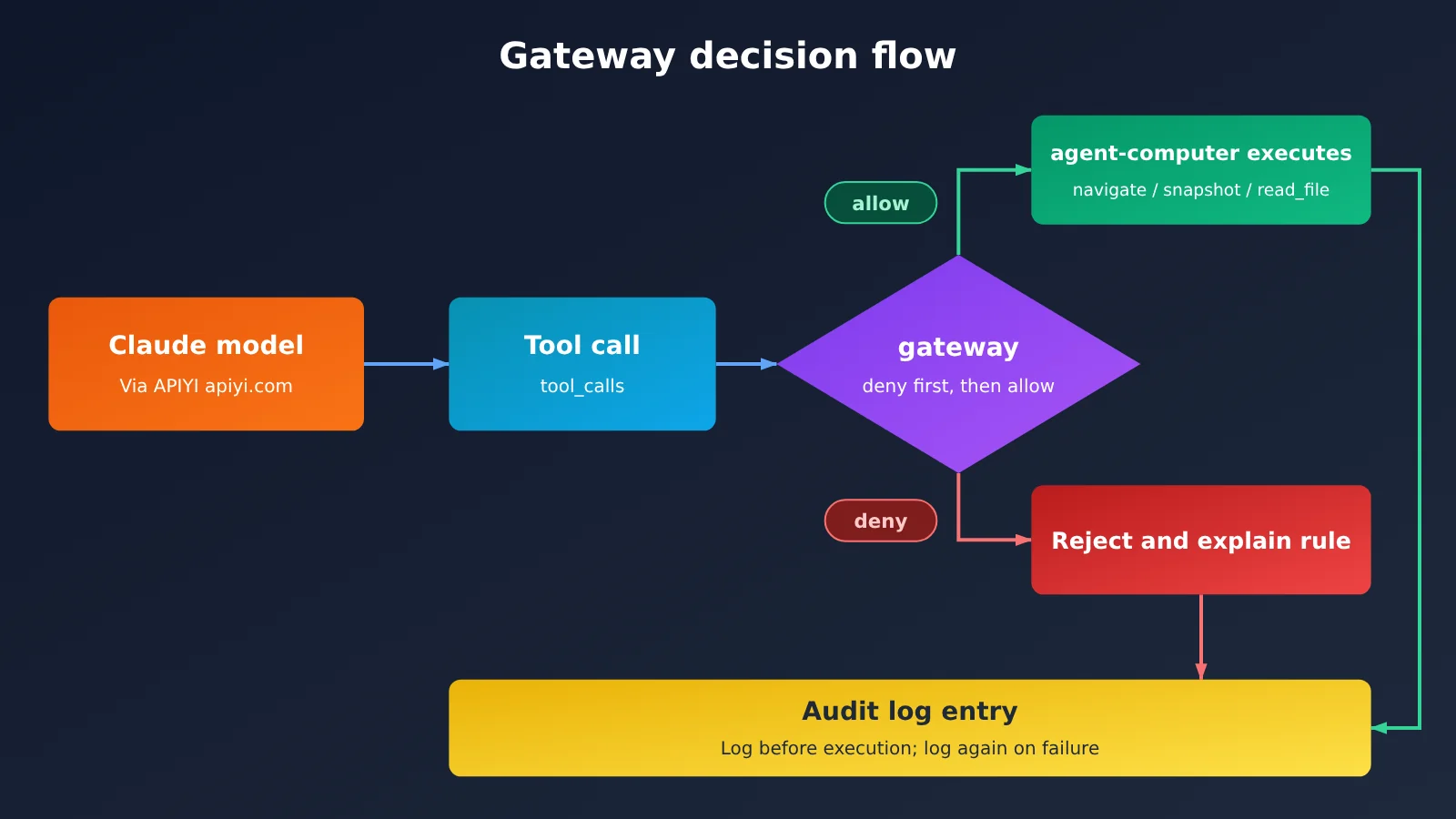
There are two evaluation rules to know. First, deny takes precedence over allow, so shell access stays blocked even if you broaden the allow rules later. Second, the engine fails closed: if the policy is missing or empty, nothing is allowed; a malformed deny rule is treated as a denial; and a malformed allow rule doesn’t grant access. The principle is simple: start restrictive, then open up access as needed. Once validation passes, add clicking, typing, or file writing one at a time, and check the audit log after each addition.
Testing and Troubleshooting OpenBot with APIYI
An Acceptance Test: Open a Web Page, Read a File, and Check the Audit Log
According to the official architecture, each tool call follows this sequence: resolve the target, evaluate it against the current policy, write an audit entry, and only then call the computer. If the forwarded action fails, a second audit entry is written. The computer itself doesn’t make policy decisions; that boundary sits at the server’s gateway. So acceptance testing needs to cover both whether an action works and whether it’s recorded:
- Put a
notes.mdfile in/workspaceand write a couple of lines in it. - Ask General Assistant to open a public web page, tell you its title, and then read
/workspace/notes.md. - Next, ask it to run
ls /. This should be denied, and the response should identify the rule that blocked it. - Open the Audit page and check for allowed entries for navigate, snapshot, and read_file, as well as a denied entry for run_command. To export the records, call
GET /api/admin/audit-events?format=csv. Each export is limited to 5,000 rows.
We’ve only tested model-side availability through APIYI. On 2026-11-02, we called /v1/chat/completions using claude-opus-5-5 with a read_file function definition. The request returned HTTP 200 in 4.06 seconds, with finish_reason set to tool_calls and arguments of {"path":"/workspace/notes.md"}. Usage was 393 prompt tokens and 55 completion tokens. With stream: true enabled, the request also returned 200; the SSE chunks showed incremental output for the function name and arguments, ending with data: [DONE]. This shows that APIYI’s chat endpoint can return Claude’s tool calls in OpenAI format—exactly what an agent needs when the model only decides which function to call and doesn’t execute it.
Troubleshooting: Five Common Failures
| Symptom | Most likely cause | What to do |
|---|---|---|
400 field messages is required |
The request went to the Responses endpoint. In our testing, calling APIYI’s /v1/responses with claude-opus-5-5 returned this error |
Confirm that BOT_RESPONSES_API=false. If you’re using v0.2.0, the built-in Bot may still call Responses. You can switch to the main branch and set COPILOTKIT_OPENAI_API=chat (this is still Unreleased) |
| 401 | The API key is incorrect or expired, or the token’s balance limit has been reached | Check the expiration date and balance on the APIYI token page, then retest /v1/models with curl |
| Model not found | default_model is still set to gpt-5.6-terra, or the name has an openai/ prefix |
Use the bare name claude-opus-5-5 in both places. Because the startup check is skipped, you’ll need to send a message to verify it |
| Tool wasn’t called | The model doesn’t support tool calling, the grant wasn’t provided, or a policy blocked the tool | As the official documentation puts it, a Bot without tool calling can’t operate a computer. First, check the audit log for any denials |
| Startup rejected | Intelligence configuration is missing, the policy JSON is invalid, or a provider was added to the provider spec without updating PROVIDER_IDS |
Complete all three Intelligence settings and validate the JSON. You don’t need to add a provider to connect to APIYI; keep using openai |
💡 Troubleshooting tip: When you encounter an error, first send the same request directly to APIYI’s
/v1/chat/completionsat apiyi.com. If the direct call succeeds but fails in OpenBot, the issue is with OpenBot’s configuration or version. If the direct call also fails, check the token and model name. This helps narrow down the problem.
Cost Reference for Running Claude with OpenBot
APIYI uses pay-as-you-go billing, with no fixed monthly fee. The following prices for claude-opus-5-5 were checked on 2026-11-02; claude-opus-5-5-thinking has the same pricing:
| Billing item | Price per million tokens |
|---|---|
| Input | $4 |
| Output | $20 |
| Cache reads | $0.2 |
Check the platform’s model list for current models and pricing. In our test request with tools, 393 input tokens and 55 output tokens cost very little. But once a Bot starts browsing and reading files over multiple turns, context can grow quickly, so we recommend setting a token balance limit too.
FAQ
Q1: Do I need to change the source code to connect OpenBot to APIYI?
No. Just change `OPENAI_API_KEY`, `OPENAI_BASE_URL`, and `BOT_MODEL` in `.env`, then update `default_model` in the tenant package’s `model.yaml`. You only need to change the provider spec and `PROVIDER_IDS` when adding an entirely new provider type. APIYI uses an OpenAI-compatible endpoint, so that doesn’t apply here.
Q2: Why not use a prefixed model name like openai/claude-opus-5-5?
OpenBot passes model names through as-is, so you should use the name published by the endpoint. APIYI’s `/v1/models` endpoint at apiyi.com lists the unprefixed name `claude-opus-5-5`. Adding a prefix will prevent it from finding the model.
Q3: Can I enable BOT_RESPONSES_API to use the Responses API?
Don’t enable it when connecting to Claude. In our tests, calling APIYI’s `/v1/responses` endpoint with `claude-opus-5-5` returned a 400 error, `field messages is required`, while `gpt-5.4-mini` returned 200. The official documentation also says to enable this switch only if the endpoint actually implements the Responses API.
Q4: Did you get the entire OpenBot setup running?
No. We only verified the APIYI side: the model list, chat calls with tools, streaming output, and the error from the Responses endpoint. We didn’t run the full OpenBot setup (Docker plus the Intelligence project) on the machine used to write this article. Everything in the article about OpenBot’s internal behavior is based on the official repository and documentation.
Q5: How can I stop a Bot from overspending with a pay-as-you-go key?
Set a balance limit and expiration date for the key on the token page at APIYI apiyi.com, and manage it separately from your production keys. Combine that with the three-tool policy in this article to limit both what the Bot can do and how much it can spend.
Summary
Connecting OpenBot to APIYI: Key Takeaways
- Model settings aren’t in the interface: They’re in three lines of
.envand one line of the tenant package’smodel.yaml. base_urlaffects the entire deployment: ChangeOPENAI_BASE_URL, and all three Bot types switch together.- A successful startup doesn’t mean the model is configured correctly: The check is skipped when you connect through a gateway, so you’ll need to send a message to verify it.
- Check your version: The switch to
/chat/completionsis still listed as Unreleased on the main branch and hasn’t made it into v0.2.0. - Start with just 3 tools: Deny rules take precedence over allow rules. Deny shell separately, and start restrictive before opening things up.
- Start with APIYI’s pay-as-you-go pricing: Use a dedicated token with a balance limit, and specify
claude-opus-5-5as a bare model name.
OpenBot’s model configuration can be hard to find because it isn’t in the interface at all. Get these three things right: the three lines in .env, the one line in model.yaml, and keeping Responses disabled. Then start with a policy that allows just 3 tools. When you test the setup, check three things: a web page can be opened, a file can be read, and denied actions are recorded in the audit log.
We recommend using a dedicated token from APIYI at apiyi.com to test chat and tool calls separately before connecting OpenBot. That way, if something goes wrong, you can quickly tell which side is responsible.
📚 References
- CopilotKit/OpenBot repository: README, Requirements, and Quick start
- Link:
github.com/CopilotKit/OpenBot -
Covers: Template positioning, prerequisites, and v0.2.0 release information
-
OpenBot configuration documentation: Model environment variables,
model.yaml, and startup validation - Link:
github.com/CopilotKit/OpenBot/blob/main/docs/configuration.md -
Covers: Original definitions of
OPENAI_BASE_URL,BOT_MODEL, andBOT_RESPONSES_API -
OpenBot architecture documentation: Gateway, policies, and auditing
- Link:
github.com/CopilotKit/OpenBot/blob/main/docs/architecture.md -
Covers: Tool invocation order and the audit export API
-
APIYI documentation center: OpenAI-compatible mode, function calling, and model list
- Link:
docs.apiyi.com - Covers:
base_urlsyntax,toolsformat, andclaude-opus-5-5pricing
Author: APIYI Technical Team
Technical discussions: Contact us through the APIYI website at apiyi.com. For more integration resources, visit the documentation center at docs.apiyi.com.