E-commerce ad placement faces the double challenge of "high-frequency updates" and "multi-platform adaptation." Traditional design workflows struggle to meet the daily demand for hundreds of assets. Nano Banana Pro API provides e-commerce teams with a solution for batch-generating high-quality ad assets through templating and automation.
Core Value: After reading this article, you'll master the full method of using Nano Banana Pro API to build an automated ad asset production line, enabling you to generate 500+ ad images a day and slash asset costs by 95%.
Nano Banana Pro Core Capabilities for Batch Ad Generation
| Use Case | Technical Capability | Business Value |
|---|---|---|
| Multi-size Adaptation | Native support for 10+ ratios (1:1, 16:9, 9:16, etc.) | Generate once to fit all major ad platforms |
| Brand Consistency | Maintain consistency for up to 5 characters/products | Ensures brand visual unity across batch production |
| Multi-image Composition | Supports fusion of up to 14 reference images | Quickly combine products, scenes, and model assets |
| Text Rendering | Accurate built-in multi-language text generation | Directly output finished ads with ready-to-use copy |
| Batch Processing | API supports 10+ concurrent tasks | Daily capacity reaches 2,000+ assets |
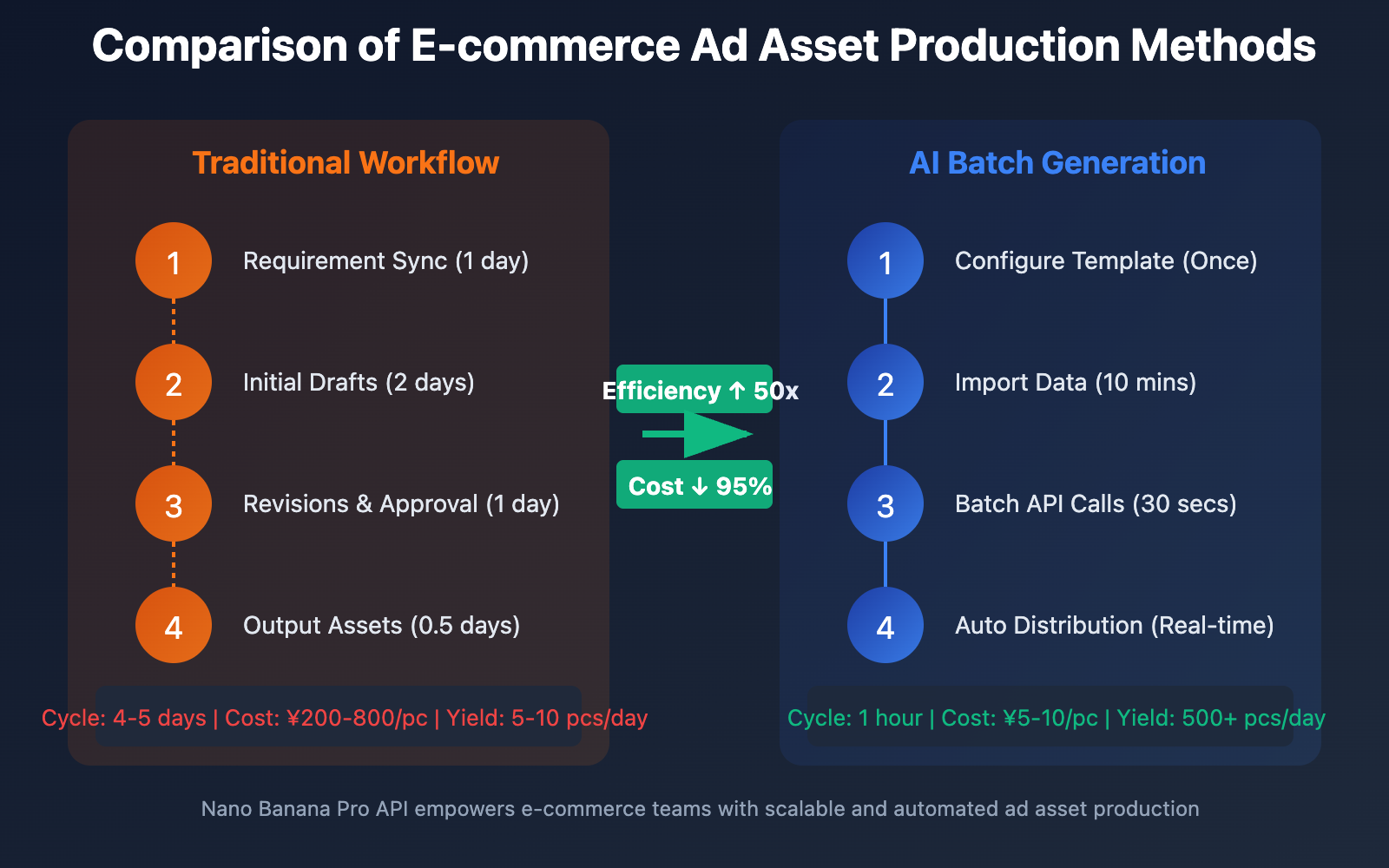
Nano Banana Pro vs. Traditional Ad Design Workflows
Traditional e-commerce ad asset production requires heavy collaboration across product photography, model shooting, designer layouts, and copywriting. A single ad image typically takes 2-3 days to finish and costs anywhere from 200 to 800 CNY. For e-commerce businesses that need constant updates—like daily arrivals, flash sales, or holiday campaigns—this workflow just can't keep up.
Nano Banana Pro API can generate ad assets that match your brand's tone in under 30 seconds. Even better, it supports "templated batch production." You can define 10 standard templates (e.g., main product images, detail pages, social media posts) and then automatically generate 100+ different style variations for the same batch of products. This makes it easy to run A/B tests and find the best-performing creative quickly.
🎯 Technical Pro-tip: For teams running large-scale ad campaigns, we recommend calling the Nano Banana Pro API via the APIYI (apiyi.com) platform. It provides batch task management, template version control, and automated workflow integration, connecting seamlessly with mainstream e-commerce systems and ad platforms.
Quick Start: Batch Generation with Nano Banana Pro API
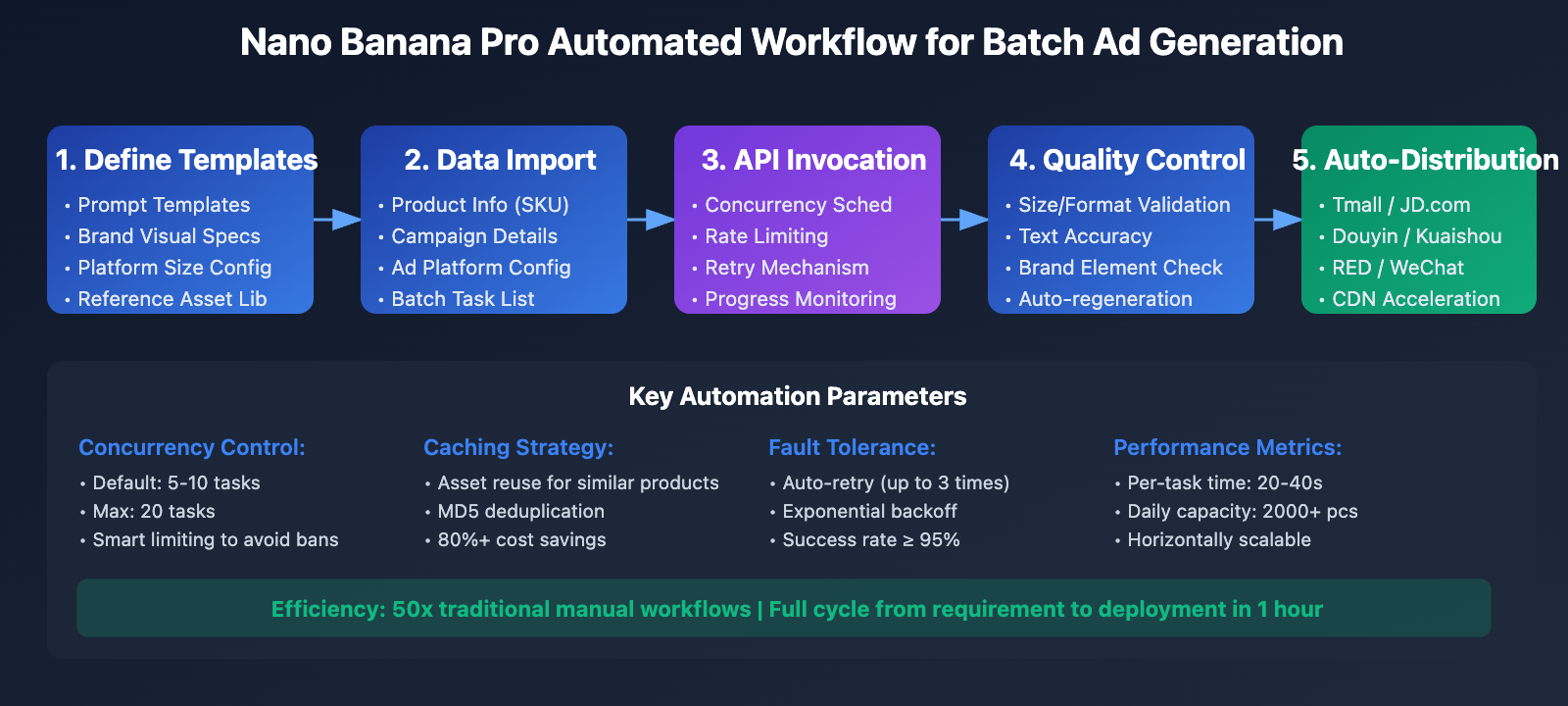
Core Architecture Design
A batch ad creative generation system needs three core components:
1. Template Management System
- Define standardized prompt templates
- Manage reference image asset libraries
- Configure size specifications for different platforms
2. Data-Driven Layer
- Product info database (SKU, price, selling points)
- Dynamic copy generation rules
- Delivery plans and priority management
3. Automated Scheduling Layer
- Batch task queue management
- API concurrency control
- Failure retries and quality checks
Minimalist Example Code
import openai
import asyncio

# Configure API client
client = openai.OpenAI(
    api_key="YOUR_API_KEY",
    base_url="https://api.apiyi.com/v1"
)

# Define ad template
ad_template = {
    "prompt_template": """E-commerce ad design:
Product: {product_name}
Selling point: {selling_point}
Style: {style}
Text: "{ad_copy}"

Design Requirements:
1. Product centered and highlighted
2. {style} style background
3. Discount label "{discount}" in the top left corner
4. Ad copy at the bottom
5. Comply with {platform} platform specifications

High-quality commercial ad image, professional typography.""",
    "size": "1024x1024",
    "aspect_ratio": "1:1"
}

# Batch generate ad creatives
def generate_batch_ads(products, template):
    """Batch generate ad creatives"""
    results = []

    for product in products:
        # Fill the template
        prompt = template["prompt_template"].format(
            product_name=product["name"],
            selling_point=product["selling_point"],
            style=product["style"],
            ad_copy=product["ad_copy"],
            discount=product["discount"],
            platform=product["platform"]
        )

        # Call the API for generation
        response = client.images.generate(
            model="nano-banana-pro",
            prompt=prompt,
            size=template["size"],
            n=1
        )

        results.append({
            "product": product["name"],
            "image_url": response.data[0].url,
            "platform": product["platform"]
        })

        print(f"✓ Generated: {product['name']} - {product['platform']}")

    return results

# Example product data
products = [
    {
        "name": "Bluetooth Earbuds Pro",
        "selling_point": "Noise-canceling tech",
        "style": "Techy blue",
        "ad_copy": "Immerse yourself in music",
        "discount": "50% off for a limited time",
        "platform": "Taobao"
    },
    {
        "name": "Sports Water Bottle",
        "selling_point": "24h insulation",
        "style": "Fresh green",
        "ad_copy": "Your healthy life companion",
        "discount": "Buy one get one free",
        "platform": "JD.com"
    }
]

# Execute batch generation
results = generate_batch_ads(products, ad_template)
print(f"\nDone! Generated {len(results)} ad creatives in total")
View Full Production-Grade Code
import openai
import asyncio
import aiohttp
import json
import os
from typing import List, Dict, Optional
from dataclasses import dataclass
from enum import Enum
import hashlib
from datetime import datetime

class Platform(Enum):
    """Ad platform enum"""
    TAOBAO = {"name": "Taobao", "size": "800x800", "ratio": "1:1"}
    JD = {"name": "JD.com", "size": "800x800", "ratio": "1:1"}
    PINDUODUO = {"name": "Pinduoduo", "size": "750x750", "ratio": "1:1"}
    WECHAT_MOMENTS = {"name": "WeChat Moments", "size": "1280x720", "ratio": "16:9"}
    DOUYIN = {"name": "Douyin", "size": "1080x1920", "ratio": "9:16"}
    XIAOHONGSHU = {"name": "Xiaohongshu", "size": "1242x1660", "ratio": "3:4"}

@dataclass
class AdTemplate:
    """Ad template data class"""
    name: str
    prompt_template: str
    style: str
    platform: Platform
    negative_prompt: Optional[str] = None

@dataclass
class ProductData:
    """Product data class"""
    sku: str
    name: str
    category: str
    selling_points: List[str]
    price: float
    discount: Optional[str] = None
    reference_images: List[str] = None

class NanoBananaProAdGenerator:
    """Nano Banana Pro Ad Creative Batch Generator"""

    def __init__(self, api_key: str, base_url: str = "https://api.apiyi.com/v1"):
        self.client = openai.OpenAI(api_key=api_key, base_url=base_url)
        self.cache_dir = "./ad_cache"
        self.output_dir = "./generated_ads"
        os.makedirs(self.cache_dir, exist_ok=True)
        os.makedirs(self.output_dir, exist_ok=True)

    def _generate_cache_key(self, product: ProductData, template: AdTemplate) -> str:
        """Generate cache key"""
        data = f"{product.sku}_{template.name}_{template.platform.name}"
        return hashlib.md5(data.encode()).hexdigest()

    def _check_cache(self, cache_key: str) -> Optional[str]:
        """Check cache"""
        cache_file = f"{self.cache_dir}/{cache_key}.json"
        if os.path.exists(cache_file):
            with open(cache_file, 'r', encoding='utf-8') as f:
                cache_data = json.load(f)
                return cache_data.get('image_url')
        return None

    def _save_cache(self, cache_key: str, image_url: str, metadata: Dict):
        """Save cache"""
        cache_file = f"{self.cache_dir}/{cache_key}.json"
        cache_data = {
            "image_url": image_url,
            "generated_at": datetime.now().isoformat(),
            "metadata": metadata
        }
        with open(cache_file, 'w', encoding='utf-8') as f:
            json.dump(cache_data, f, ensure_ascii=False, indent=2)

    def build_prompt(self, product: ProductData, template: AdTemplate) -> str:
        """Build prompt"""
        selling_point = product.selling_points[0] if product.selling_points else "Premium Product"
        discount_text = product.discount if product.discount else "Hot Seller"

        prompt = template.prompt_template.format(
            product_name=product.name,
            category=product.category,
            selling_point=selling_point,
            price=product.price,
            discount=discount_text,
            style=template.style,
            platform=template.platform.value["name"]
        )

        return prompt

    async def generate_single_ad(
        self,
        product: ProductData,
        template: AdTemplate,
        use_cache: bool = True
    ) -> Dict:
        """Generate a single ad creative"""

        # Check cache
        cache_key = self._generate_cache_key(product, template)
        if use_cache:
            cached_url = self._check_cache(cache_key)
            if cached_url:
                return {
                    "success": True,
                    "from_cache": True,
                    "product_sku": product.sku,
                    "template": template.name,
                    "platform": template.platform.name,
                    "image_url": cached_url
                }

        # Build prompt
        prompt = self.build_prompt(product, template)

        try:
            # Call the API for generation
            response = self.client.images.generate(
                model="nano-banana-pro",
                prompt=prompt,
                size=template.platform.value["size"],
                n=1,
                response_format="url"
            )

            image_url = response.data[0].url

            # Save cache
            metadata = {
                "product": product.name,
                "sku": product.sku,
                "template": template.name,
                "platform": template.platform.name,
                "prompt": prompt
            }
            self._save_cache(cache_key, image_url, metadata)

            return {
                "success": True,
                "from_cache": False,
                "product_sku": product.sku,
                "template": template.name,
                "platform": template.platform.name,
                "image_url": image_url,
                "prompt": prompt
            }

        except Exception as e:
            return {
                "success": False,
                "product_sku": product.sku,
                "template": template.name,
                "platform": template.platform.name,
                "error": str(e)
            }

    async def batch_generate(
        self,
        products: List[ProductData],
        templates: List[AdTemplate],
        max_concurrent: int = 10,
        use_cache: bool = True
    ) -> List[Dict]:
        """Batch generate ad creatives"""

        tasks = []
        for product in products:
            for template in templates:
                tasks.append(self.generate_single_ad(product, template, use_cache))

        # Control concurrency
        results = []
        for i in range(0, len(tasks), max_concurrent):
            batch = tasks[i:i + max_concurrent]
            batch_results = await asyncio.gather(*batch)
            results.extend(batch_results)

            # Progress display
            print(f"Progress: {min(i + max_concurrent, len(tasks))}/{len(tasks)} completed")

        return results

    def generate_report(self, results: List[Dict]) -> Dict:
        """Generate generation report"""
        total = len(results)
        success = sum(1 for r in results if r.get("success"))
        from_cache = sum(1 for r in results if r.get("from_cache"))
        failed = total - success

        # Statistics grouped by platform
        by_platform = {}
        for result in results:
            if result.get("success"):
                platform = result["platform"]
                if platform not in by_platform:
                    by_platform[platform] = 0
                by_platform[platform] += 1

        return {
            "total_tasks": total,
            "success_count": success,
            "from_cache_count": from_cache,
            "new_generated_count": success - from_cache,
            "failed_count": failed,
            "success_rate": f"{(success/total*100):.1f}%",
            "by_platform": by_platform
        }

# Usage Example
async def main():
    # Initialize generator
    generator = NanoBananaProAdGenerator(
        api_key="your_api_key_here"
    )

    # Define ad templates
    templates = [
        AdTemplate(
            name="Main Image Template",
            prompt_template="""E-commerce main image design:
Product: {product_name}
Category: {category}
Core selling point: {selling_point}
Price: ¥{price}
Promotion label: {discount}

Design style: {style}
Platform: {platform}

Design Requirements:
1. Product centered, taking up 60-70%
2. White or light clean background
3. Red promo label in the top left corner
4. Price displayed in the bottom right corner
5. Professional commercial photography quality

High-quality e-commerce main image, suitable for {platform} platform.""",
            style="Minimalist modern",
            platform=Platform.TAOBAO
        ),
        AdTemplate(
            name="Social Media Template",
            prompt_template="""Social media ad design:
Product: {product_name}
Selling point: {selling_point}
Offer: {discount}

Design style: {style}, lifestyle scene
Text: Product name and selling point copy

Design Requirements:
1. Showcase product usage in a lifestyle scene
2. Warm and natural atmosphere
3. Product name displayed at the top
4. Core selling point at the bottom
5. Suitable for sharing on {platform}

Highly realistic and eye-catching.""",
            style="Fresh and natural",
            platform=Platform.XIAOHONGSHU
        )
    ]

    # Prepare product data
    products = [
        ProductData(
            sku="BT-001",
            name="Bluetooth Earbuds Pro Max",
            category="Digital Accessories",
            selling_points=["Active Noise Cancellation", "40h battery life", "Hi-Fi sound"],
            price=299.0,
            discount="50% off for a limited time"
        ),
        ProductData(
            sku="WB-002",
            name="Business Vacuum Flask",
            category="Lifestyle Products",
            selling_points=["24h insulation", "316 stainless steel", "Leak-proof design"],
            price=159.0,
            discount="Buy one get one free"
        )
    ]

    # Batch generate
    print("Starting batch generation of ad creatives...")
    results = await generator.batch_generate(
        products=products,
        templates=templates,
        max_concurrent=5,
        use_cache=True
    )

    # Generate report
    report = generator.generate_report(results)

    print("\n" + "="*50)
    print("Generation Report")
    print("="*50)
    print(f"Total Tasks: {report['total_tasks']}")
    print(f"Successful: {report['success_count']} ({report['success_rate']})")
    print(f"Read from Cache: {report['from_cache_count']}")
    print(f"Newly Generated: {report['new_generated_count']}")
    print(f"Failed: {report['failed_count']}")
    print(f"\nDistribution by Platform:")
    for platform, count in report['by_platform'].items():
        print(f"  {platform}: {count} images")

    # Save results
    with open("generation_results.json", "w", encoding="utf-8") as f:
        json.dump(results, f, ensure_ascii=False, indent=2)

    print(f"\nDetailed results saved to generation_results.json")

if __name__ == "__main__":
    asyncio.run(main())
💡 Quick Start: We recommend using the batch task API from the APIYI (apiyi.com) platform. It provides task queue management, automatic failure retries, and real-time progress monitoring. You can submit 100+ generation tasks at once, and it'll automatically handle concurrency control and resource scheduling.
Template Design: 4 Core Strategies
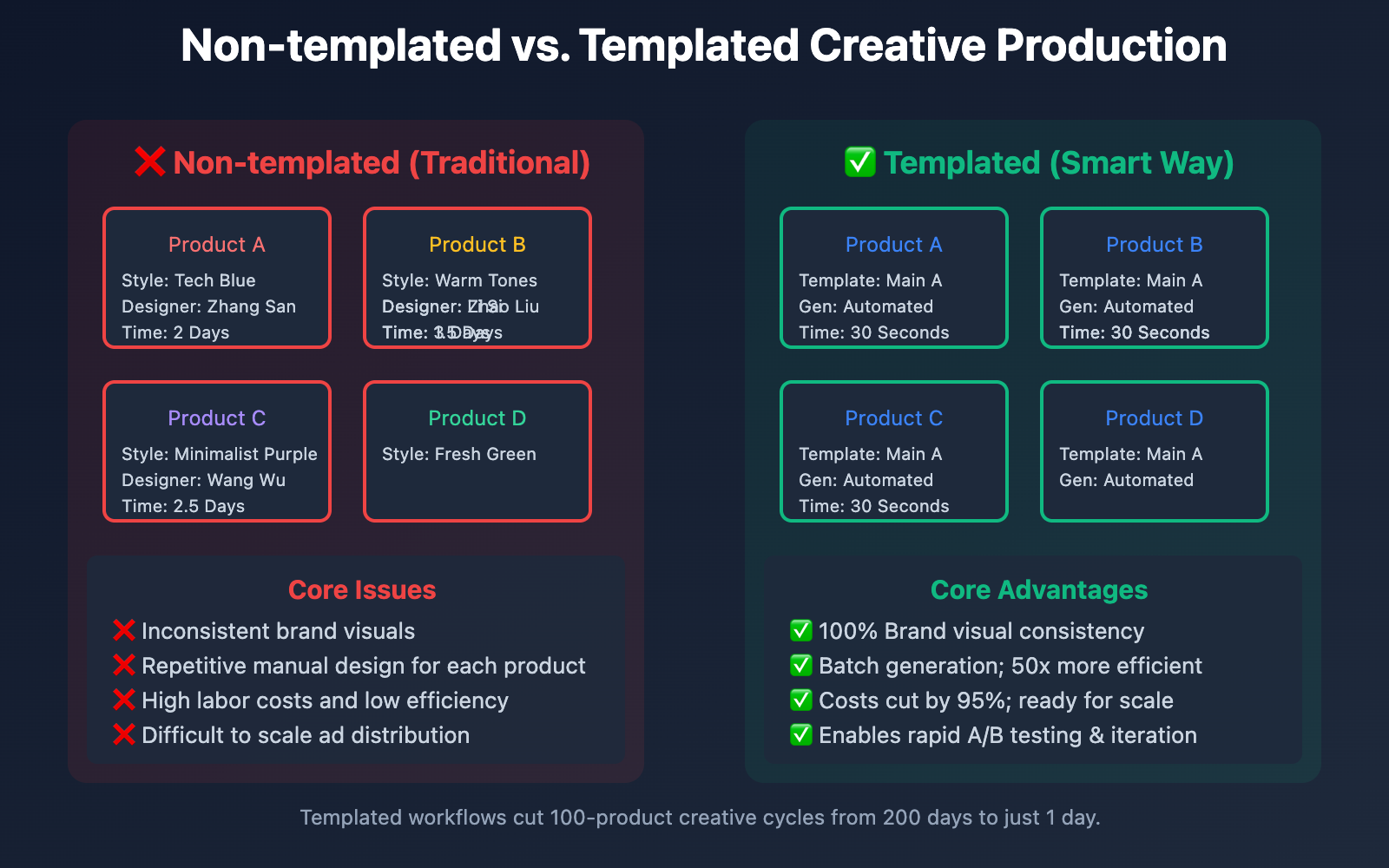
Strategy 1: Layered Template Architecture
E-commerce ad creatives need to hit two targets simultaneously: "brand consistency" and "scene diversity." The solution is to build a three-layer template architecture:
Base Layer – Brand Visual Standards (Shared across all templates):
Brand Colors: [Primary/Secondary/Accent]
Logo Position: [Top-left/Top-right/Centered]
Font Style: [Modern Minimalist/Retro Elegant/Futuristic Tech]
Overall Tone: [Youthful & Vibrant/Professional Business/Cozy Home]
Middle Layer – Scene Templates (Categorized by use case):
Main Image Template: Solid background + Centered product + Promo tags
Detail Page Template: Scene display + Feature descriptions + Usage diagrams
Social Media Template: Lifestyle scenes + Natural lighting + Authentic feel
In-feed Ad Template: High-impact composition + Bold copy + Call to Action (CTA)
Surface Layer – Dynamic Variables (Replaced with each generation):
Product Info: [Name/Model/Color]
Promo Info: [Discount/Gifts/Limited Time]
Copy Content: [Headline/Selling Points/CTA]
Platform Specs: [Dimensions/Ratio/Safe Zones]
Strategy 2: Intelligent Variant Generation Matrix
For the same product, you'll often need multiple variants for A/B testing. We recommend using an "Intelligent Variant Generation Matrix" strategy:
| Variant Dimension | Options | Combinations |
|---|---|---|
| Background Style | Solid/Gradient/Scene/Texture | 4 |
| Product Angle | Front/45-degree/Side/Top-down | 4 |
| Copy Placement | Top/Bottom/Left/Right | 4 |
| Color Tone | Warm/Cool/Neutral/High Saturation | 4 |
In theory, this can generate 4×4×4×4 = 256 combinations. In practice, selecting 10-20 core combinations is usually enough to cover your main testing needs. By managing these through a matrix, you can systematically test how different visual elements impact your conversion rates.
Strategy 3: Platform Adaptation Automation
Technical specs for ad creatives vary wildly across different platforms, and manual adaptation is a recipe for mistakes. It's much better to preset platform parameters within your templates:
| Platform | Dimensions | Ratio | File Size | Text Area | Safe Margin |
|---|---|---|---|---|---|
| Taobao Main Image | 800×800 | 1:1 | <3MB | Bottom 20% | 10px |
| JD Details | 990xN | Adaptive | <1MB | Any | 0px |
| WeChat Moments | 1280×720 | 16:9 | <300KB | Top/Bottom 15% | 20px |
| Douyin In-feed | 1080×1920 | 9:16 | <5MB | Middle 50% | 30px |
| Xiaohongshu | 1242×1660 | 3:4 | <20MB | Bottom 30% | 15px |
Incorporate platform-aware logic into your prompt templates:
prompt_platform_rules = {
    "TAOBAO": "Pure white background, product centered, promo tags in top-left, text area reserved at the bottom",
    "DOUYIN": "Dynamic composition, high saturation colors, strong visual impact, product emphasized in the center",
    "XIAOHONGSHU": "Natural lighting, lifestyle scenes, strong sense of authenticity, warm atmosphere"
}

prompt = f"{base_prompt}\nPlatform Specs: {prompt_platform_rules[platform]}"
Strategy 4: Dynamic Copywriting Rendering
Nano Banana Pro features built-in text rendering, allowing it to generate accurate copy directly within the image. The key is establishing a "Copywriting Template Library":
Promo Copy Templates:
- "Limited Time {discount} - Today Only"
- "First {number} customers get a free {gift}"
- "Save {reduce} on orders over {amount}"
- "Member Exclusive: {discount}"
Selling Point Templates:
- "{feature} | The Quality Choice"
- "Visible {benefit}"
- "{effect} in just {number} hours"
- "Crafted from {material} for peace of mind"
CTA Templates:
- "Shop Now >"
- "Learn More >"
- "Add to Cart"
- "Limited Pre-order"
Clearly define the text content and style within your prompt:
text_prompt = f"""
Render the following text in the image:
- Main Headline (Top, size 24, Bold): "{product_name}"
- Promo Tag (Top-left, red background, white text): "{discount}"
- Selling Point (Middle, size 18): "{selling_point}"
- CTA Button (Bottom, orange background): "Buy Now >"

Text must be clear and legible, with no typos or blurring.
"""
🎯 Template Optimization Tip: Using the template management features on the APIYI (apiyi.com) platform, you can track conversion data for different templates. The platform automatically logs the CTR and conversion rates of creatives generated by each template across various channels, helping you quickly identify high-performing templates and phase out the duds.
Workflow Automation: From Manual to Fully Automated
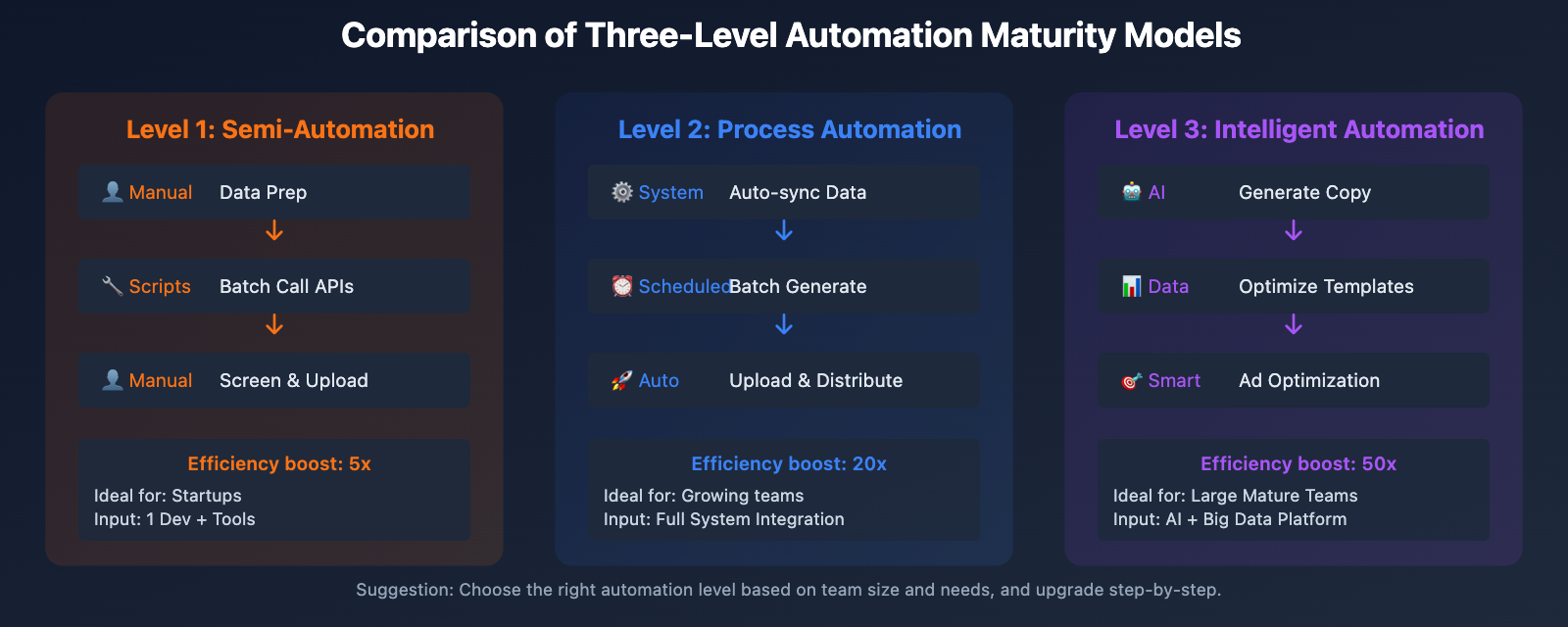
Three-Level Automation Maturity Model
Level 1: Semi-Automation (Ideal for startups)
- Manually prepare product data and copy.
- Use Python scripts to batch call APIs.
- Manually screen and upload assets.
- Efficiency boost: 5x
Level 2: Process Automation (Ideal for growing teams)
- Automatically sync product data from e-commerce backends.
- Use scheduled tasks to automatically generate assets for new products.
- Automatically upload to asset management platforms via API.
- Automatic retries for failed tasks.
- Efficiency boost: 20x
Level 3: Intelligent Automation (Ideal for mature teams)
- AI automatically analyzes product features to generate copy.
- Optimize template selection based on historical conversion data.
- Automated delivery and real-time performance monitoring.
- Automatically adjust generation strategies based on CTR.
- Efficiency boost: 50x
Workflow Integration Solutions
Option 1: No-code Integration with n8n
The n8n platform offers ready-to-use Nano Banana workflow templates, supporting:
- Pulling product data from e-commerce platform APIs.
- Batch calling Nano Banana Pro to generate assets.
- Automatically uploading to cloud storage or advertising platforms.
- Webhook notifications for generation results.
It's perfect for operations teams without a coding background to quickly set up automation.
Option 2: Deep API Integration
For teams with development capabilities, we recommend deep integration into existing systems via API:
# 集成到电商后台的素材生成流程
def on_product_created(product_id):
    """新品上架时自动生成广告素材"""
    # 1. 获取产品信息
    product = get_product_from_db(product_id)

    # 2. 选择适用的模板
    templates = select_templates_for_category(product.category)

    # 3. 批量生成素材
    results = batch_generate_ads(product, templates)

    # 4. 自动上传到广告平台
    for result in results:
        upload_to_ad_platform(result["platform"], result["image_url"])

    # 5. 记录生成日志
    log_generation_history(product_id, results)
Option 3: Hybrid Cloud Deployment
For large-scale scenarios (generating 2,000+ images daily), we recommend adopting a hybrid cloud architecture:
- Task Scheduling Layer: Self-built task queue (Redis + Celery).
- API Invocation Layer: Unified calling via the APIYI platform.
- Storage Layer: Object storage (Alibaba Cloud OSS / Tencent Cloud COS).
- Distribution Layer: CDN acceleration + multi-platform automated API uploads.
This architecture can handle high-concurrency, large-volume, and low-latency asset production needs.
💰 Cost Optimization: For large-scale scenarios with over 1,000 daily generations, we suggest getting bulk discounts through the enterprise plans on the APIYI (apiyi.com) platform. The platform offers monthly enterprise pricing, which can save you 30-50% compared to official rates, and includes dedicated technical support and SLA guarantees.
Case Study: Boosting Ad Efficiency for a Fashion Brand
Project Background
A fast-fashion brand launches over 50 new items every week. For every single product, they need to generate:
- 5 Taobao main images (from different angles)
- 10 detail page images (scenes and close-ups)
- 8 social media assets (for platforms like Xiaohongshu and WeChat)
That’s a total of 1,150 ad assets per week (50 items × 23 images). Their traditional 5-person design team could only churn out about 200 images a week at maximum capacity—nowhere near enough to keep up with the pace of new arrivals.
Implementation Strategy
Phase 1: Template Standardization (2 weeks)
- Analyze historical high-conversion assets to identify visual patterns.
- Define 12 standard templates (4 for main images, 6 for details, 2 for social media).
- Test and optimize prompt parameters.
Phase 2: Building the Automation Pipeline (1 week)
- Develop Python automation scripts.
- Integrate with the brand's apparel ERP system to pull product data.
- Configure batch generation and automated upload workflows.
Phase 3: Scaling Production (Ongoing Optimization)
- Automatically generate all assets every Monday.
- Designers now only need to manually review about 10% of the output.
- Continuously collect conversion data to refine the templates.
The Results
| Metric | Before | After | Improvement |
|---|---|---|---|
| Weekly Output | 200 images | 1,150 images | +475% |
| Cost per Image | ¥80 | ¥5 | -93.8% |
| Designer Workload | 100% | 15% | -85% |
| Launch-to-Ad Cycle | 5 days | 0.5 days | -90% |
| Asset Diversity (Variants) | 2-3 types | 10-15 types | +400% |
| A/B Testing Efficiency | 3 groups/mo | 8 groups/week | +800% |
Key Takeaways:
- Batch generation allows the team to test multiple visual styles simultaneously, making it easy to find the winning formula fast.
- Increasing asset updates from "monthly" to "weekly" has significantly reduced "ad fatigue" among users.
- Designers are finally freed from tedious, repetitive tasks, allowing them to focus on high-level creativity and strategy.
📊 Efficiency Verification: By using the Enterprise Edition of the APIYI (apiyi.com) platform, this brand automated the entire workflow from product listing to asset generation and deployment. The platform’s batch API supports 200 tasks per submission, and combined with smart scheduling and load balancing, it ensures all assets are ready every Monday before 9:00 AM.
Cost Analysis: The Economics of Scaling
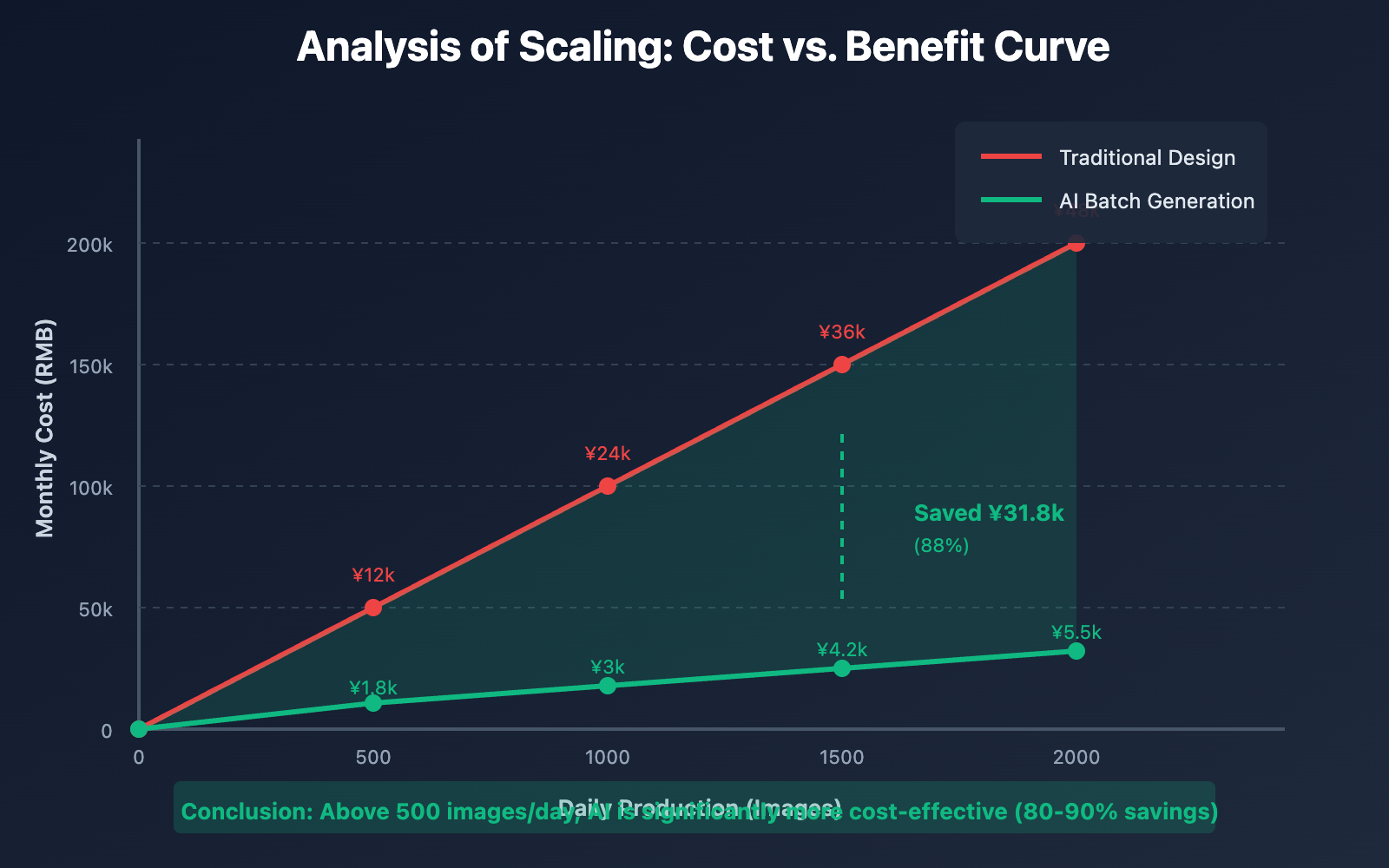
Cost Comparison at Different Scales
| Daily Volume | Traditional Design Cost | AI Generation Cost (APIYI) | Savings | ROI |
|---|---|---|---|---|
| 50 images | ¥4,000 | ¥150 | ¥3,850 | 26:1 |
| 200 images | ¥16,000 | ¥600 | ¥15,400 | 26:1 |
| 500 images | ¥40,000 | ¥1,200 | ¥38,800 | 33:1 |
| 1000 images | ¥80,000 | ¥2,000 | ¥78,000 | 39:1 |
| 2000 images | ¥160,000 | ¥3,500 | ¥156,500 | 45:1 |
Note: Traditional design costs are calculated at ¥80 per image. AI costs include API calls and storage fees.
Hidden Cost Savings
Beyond the direct production costs, moving to a batch template system brings several indirect benefits:
Time Savings:
- Communication costs dropped by 80% (no more back-and-forth revisions).
- Approval cycles shortened by 90% (thanks to pre-approved standardized templates).
- 10x faster time-to-market via automated workflows.
Quality Control Savings:
- Better brand consistency (templates ensure everyone stays on-brand).
- Human error reduced by 95% (automation avoids simple mistakes).
- 5x better A/B testing efficiency (generating variants is now extremely cheap).
Team Efficiency:
- Designer workload reduced by 70-85%.
- Reduced need for aggressive hiring as the brand grows.
- The team can now focus on high-value creative work.
Cost Optimization Tips
1. Use Caching Wisely
For similar products (like the same shirt in different colors), you can reuse 90% of the generation logic and only swap out the product specific part. This can slash costs by another 80%.
2. Off-Peak Generation
Take advantage of nighttime or low-traffic hours for large batch jobs. Some platforms offer off-peak discounts, potentially saving you 10-20%.
3. Prepaid Packages
If you have stable monthly needs, switching from pay-as-you-go to a prepaid package is usually 20-40% cheaper.
4. Smart Quality Assurance
Use automated QA (like OCR to verify text accuracy or image recognition to check product placement) to reduce the cost of manual reviews.
💡 Cost Suggestion: The APIYI (apiyi.com) platform offers flexible billing for high-volume clients, including monthly, quarterly, and annual enterprise plans. If your monthly volume exceeds 5,000 images, we recommend reaching out for a custom enterprise quote for better rates and dedicated support.
Common Questions & Solutions
Q1: How do I ensure quality consistency when generating assets in bulk?
Maintaining consistency in batch-generated assets requires control at three different levels:
Template Level Control:
- Use standardized prompt templates to ensure the descriptive language remains consistent.
- Explicitly define forbidden elements (negative prompts) within the template.
- Fix core visual elements such as brand color palettes and Logo positioning.
Process Level Control:
- Implement automated quality checks (using image recognition to verify key elements).
- Set quality thresholds; assets that don't meet the bar are automatically regenerated.
- Establish a manual spot-check mechanism (sampling about 10% of the output).
Data Level Control:
- Use high-quality, highly consistent reference images.
- Normalize product data (unifying field formats and naming conventions).
- Log generation parameters to make results easier to reproduce and optimize.
By using the quality management features of the APIYI (apiyi.com) platform, you can set up automated quality check rules. Any assets that don't meet your requirements will be automatically sent to a manual review queue or trigger a regeneration.
Q2: How should I handle failed tasks during batch generation?
Handling failures properly is the key to maintaining system stability during batch processing:
Preventive Measures:
- Validate input data for completeness and correct formatting.
- Set reasonable API call timeouts.
- Control concurrency levels to avoid hitting rate limits.
Failure Handling Strategies:
- Implement an exponential backoff retry mechanism (wait 1 second for the 1st try, 2 seconds for the 2nd, 4 seconds for the 3rd).
- Limit retries to 3 attempts; if it still fails, log it to a failure queue.
- Periodically process the failure queue in batches (either via manual intervention or parameter adjustment).
Monitoring & Alerts:
- Monitor success rates in real-time; trigger an alert if it drops below 90%.
- Keep detailed error logs to make troubleshooting easier.
- Generate failure reports to analyze the distribution of error causes.
Code Example:
async def generate_with_retry(task, max_retries=3):
    for attempt in range(max_retries):
        try:
            result = await generate_single_ad(task)
            if result["success"]:
                return result
        except Exception as e:
            if attempt == max_retries - 1:
                # Last attempt failed, log to the failure queue
                save_to_failed_queue(task, str(e))
            else:
                # Wait before retrying
                await asyncio.sleep(2 ** attempt)
Q3: Do I need different templates for different product categories?
Yes, absolutely. Ad asset requirements vary significantly across categories. We recommend building a "Category Template Library":
Standard Category Templates (Suitable for most products):
- 3C Digital & Electronics: High-tech feel, functional displays, highlighting specs.
- Fashion & Apparel: Lifestyle scenes, model showcases, styling suggestions.
- Beauty & Personal Care: Texture shots, before/after effects, ingredient explanations.
- Food & Beverage: Appealing visuals (appetite appeal), freshness, flavor descriptions.
- Home & Living: Integration into daily life, usage scenarios, material close-ups.
Specialized Custom Categories:
- Luxury Goods: High-end feel, detail close-ups, brand storytelling.
- Mother & Baby: Sense of safety, warm scenes, material certifications.
- Healthcare: Professional endorsements, data support, authoritative certification.
Template Reuse Strategy:
- Products in the same category share templates, only swapping out product info.
- Cross-category universal elements (like promo tags) can be reused.
- Periodically analyze conversion data for each category to optimize your template library.
We suggest starting with 3–5 core templates for each major category and gradually expanding and optimizing them based on actual performance.
Q4: Can batch-generated assets be used directly for ad delivery?
In most cases, yes, but we recommend establishing a "tiered review" mechanism:
Automatic Delivery (70–80% of volume):
- Uses proven, mature templates.
- Product information is complete and accurate.
- Passed all automated quality checks.
- Historical data shows strong performance.
Quick Review (15–20% of volume):
- First-time use of a new template.
- High-value products or major campaigns.
- Involves brand-sensitive information.
- Manual spot-check passed within 2–3 minutes.
Strict Review (5–10% of volume):
- Specialized categories (Medical/Finance/Education).
- Content involving celebrities or IP licensing.
- Massive scale delivery (million-dollar budgets).
- Joint review by legal and brand departments.
Platform Compliance Checks:
Before delivery, always verify:
- Image dimensions and formats meet platform requirements.
- Copy contains no prohibited words.
- No infringement on third-party copyrights.
- Ad labels and disclaimers are complete.
Using the "Smart Review" feature on the APIYI (apiyi.com) platform, you can automatically detect if assets comply with major ad platform regulations, including size validation, prohibited word detection, and content safety scans, significantly boosting your delivery efficiency.
Q5: How do I measure the performance of batch-generated assets?
Building a complete tracking system is essential for optimizing your asset generation strategy:
Asset-Level Metrics:
- CTR (Click-Through Rate): Measures how attractive the asset is.
- CVR (Conversion Rate): Measures how persuasive the asset is.
- CPC (Cost Per Click): Measures delivery efficiency.
- ROI (Return on Investment): Measures overall profitability.
Template-Level Metrics:
- Comparison of average CTR/CVR across different templates.
- Performance variance of templates across different categories.
- Performance lift before and after template iterations.
Tracking Method:
- Assign a unique ID to every generated asset.
- Link the asset ID with delivery data during ad placement.
- Summarize performance data for each asset on a regular basis (daily/weekly).
- Build a data dashboard for visual representation.
Optimization Loop:
Generate Assets → Delivery Testing → Collect Data →
Analyze Performance → Optimize Templates → Regenerate
Code Example:
# Log asset metadata
metadata = {
    "asset_id": "AD-2026-001",
    "template": "Hero_Template_A",
    "product_sku": "BT-001",
    "generated_at": "2026-01-19",
    "platforms": ["Taobao", "JD.com"]
}

# Periodically pull delivery data
ad_performance = fetch_ad_performance(
    asset_id="AD-2026-001",
    date_range="last_7_days"
)

# Analyze and optimize
if ad_performance["ctr"] > 0.05:  # CTR > 5%
    mark_template_as_high_performing("Hero_Template_A")
The APIYI (apiyi.com) platform provides an asset performance tracking API that integrates with mainstream ad platforms (Tencent Ads/OceanEngine/Alimama), automatically linking asset IDs with delivery performance to generate optimization recommendation reports.
Advanced Tips: Intelligence & Personalization
Dynamic Template Selection
Automatically choose the best template based on product characteristics:
def select_optimal_template(product: ProductData) -> AdTemplate:
    """Intelligently select a template based on product features"""

    # Rule 1: Based on price range
    if product.price > 1000:
        style = "Premium Luxury"
    elif product.price > 300:
        style = "Quality Living"
    else:
        style = "Value Choice"

    # Rule 2: Based on category
    category_styles = {
        "Digital": "Tech Blue",
        "Fashion": "Modern Minimalist",
        "Beauty": "Fresh Pink",
        "Food": "Appetizing Warmth"
    }
    color_style = category_styles.get(product.category, "Clean Modern")

    # Rule 3: Based on historical performance
    historical_best = query_best_template_for_category(product.category)

    # Integrated decision
    return build_template(style, color_style, historical_best)
Seasonal & Holiday Auto-Adaptation
Pre-configure holiday templates so the system automatically enables them during specific periods:
seasonal_config = {
    "spring_festival": {
        "date_range": "01-15 to 02-20",
        "style_override": "Festive Red & Gold",
        "text_prefix": "Chinese New Year Special",
        "decorative_elements": ["lanterns", "fireworks", "Fu character"]
    },
    "618": {
        "date_range": "06-01 to 06-18",
        "style_override": "Vibrant Orange-Red",
        "text_prefix": "618 Shopping Carnival",
        "decorative_elements": ["discount tags", "flame icons"]
    }
}
User Profile Driven Personalized Assets
For scenarios where user profile data is available, you can generate unique ad assets for every individual:
def generate_personalized_ad(product, user_profile):
    """Generate personalized ads based on user profiles"""

    # Age group adaptation
    if user_profile["age"] < 25:
        style = "Trendy & Cool"
        tone = "Youthful Expression"
    else:
        style = "Classic & Steady"
        tone = "Professional & Trustworthy"

    # Gender adaptation
    color = "Pink Palette" if user_profile["gender"] == "F" else "Blue-Grey Palette"

    # Purchasing power adaptation
    if user_profile["consumption_level"] == "high":
        focus = "Quality & Experience"
    else:
        focus = "Value & Discounts"

    return generate_ad(product, style, color, tone, focus)
🎨 Intelligence Tip: The Enterprise version of the APIYI (apiyi.com) platform offers a "Smart Template Recommendation" feature. Based on historical delivery data and machine learning models, it automatically recommends the template combinations most likely to achieve high conversion for each product, and supports online A/B testing with automatic traffic splitting.
Summary
Here are the core takeaways for using the Nano Banana Pro API to batch-generate e-commerce advertising assets:
- Templated Architecture: Establish a three-tier template system (brand guidelines layer / scene template layer / dynamic variable layer) to ensure brand consistency and scene diversity across your batch generations.
- Automated Workflow: Transition from semi-automated (script-driven) to fully automated (intelligent scheduling), gradually maturing your automation levels to eventually achieve a 50x efficiency boost.
- Platform Adaptation: Pre-set the technical specifications for major advertising platforms so a single generation run automatically adapts to Taobao, JD.com, Douyin, Xiaohongshu, and more.
- Performance-Driven Optimization: Build a tracking system for your creative assets to continuously refine your template library, applying high-conversion templates to a wider range of products.
- Scalable Cost Advantages: Once you're batch-generating, the cost per image drops below ¥5. The larger the scale, the more obvious the advantage becomes—ROIs can even reach 40:1 or higher.
For e-commerce teams that need large-scale ad distribution, we recommend accessing the Nano Banana Pro API via the APIYI (apiyi.com) platform. It provides enterprise-grade features like batch task management, template version control, smart quality checks, and performance data tracking, making it the ideal choice for building an automated ad creative production line.
Author: APIYI Team | Dedicated to sharing Large Language Model API technology
Tech Exchange: Visit APIYI (apiyi.com) to explore e-commerce advertising automation solutions.