Author’s note: There are two ways to pay for coding with Claude: Pro/Max subscription usage allowances or a token-based API. This article explains the rules, hidden pitfalls, and how to switch between them.
Many developers run into the same question when they first use Claude for coding: should you buy a subscription or get an API key and pay as you go? Both options can run Claude Code, but they work very differently when it comes to billing. Choose the wrong one, and you could run out of usage, get interrupted by rate limits, or spend more than you need to. This article introduces a 3-step decision process: look at your usage patterns, calculate the costs, and then configure your toolchain.
This isn’t a “both options have their merits” kind of analysis. We’ll give you clear criteria for when to choose a subscription, when to use the pay-as-you-go API, and when combining both is the most cost-effective option. If you prefer the pay-as-you-go API, you can also access the Claude models covered here through APIYI at apiyi.com. APIYI supports both OpenAI and Anthropic API formats.
What you’ll get: By the end, you’ll be able to estimate the cost of each option based on your coding habits and know which billing path tools like Zed, T3 Code, Bamboo, and Delta use—so you can avoid paying twice.
Key Differences Between the Two Ways to Pay for Coding with Claude
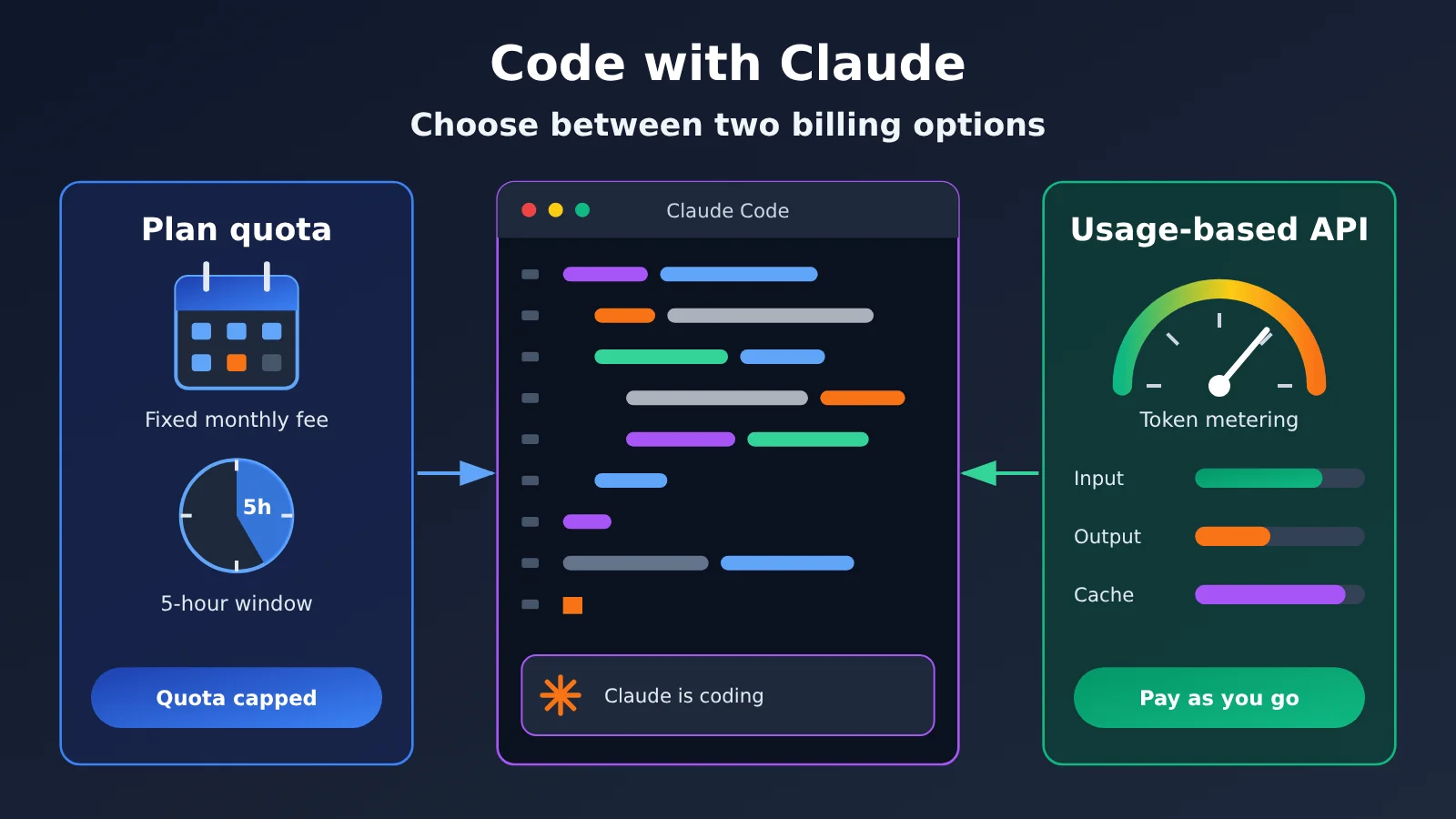
The table below shows the essential difference: a subscription gives you a capped allowance for a fixed monthly fee, while the API charges for what you use without a session window.
| Key point | Subscription allowance (Pro / Max) | Pay-as-you-go API |
|---|---|---|
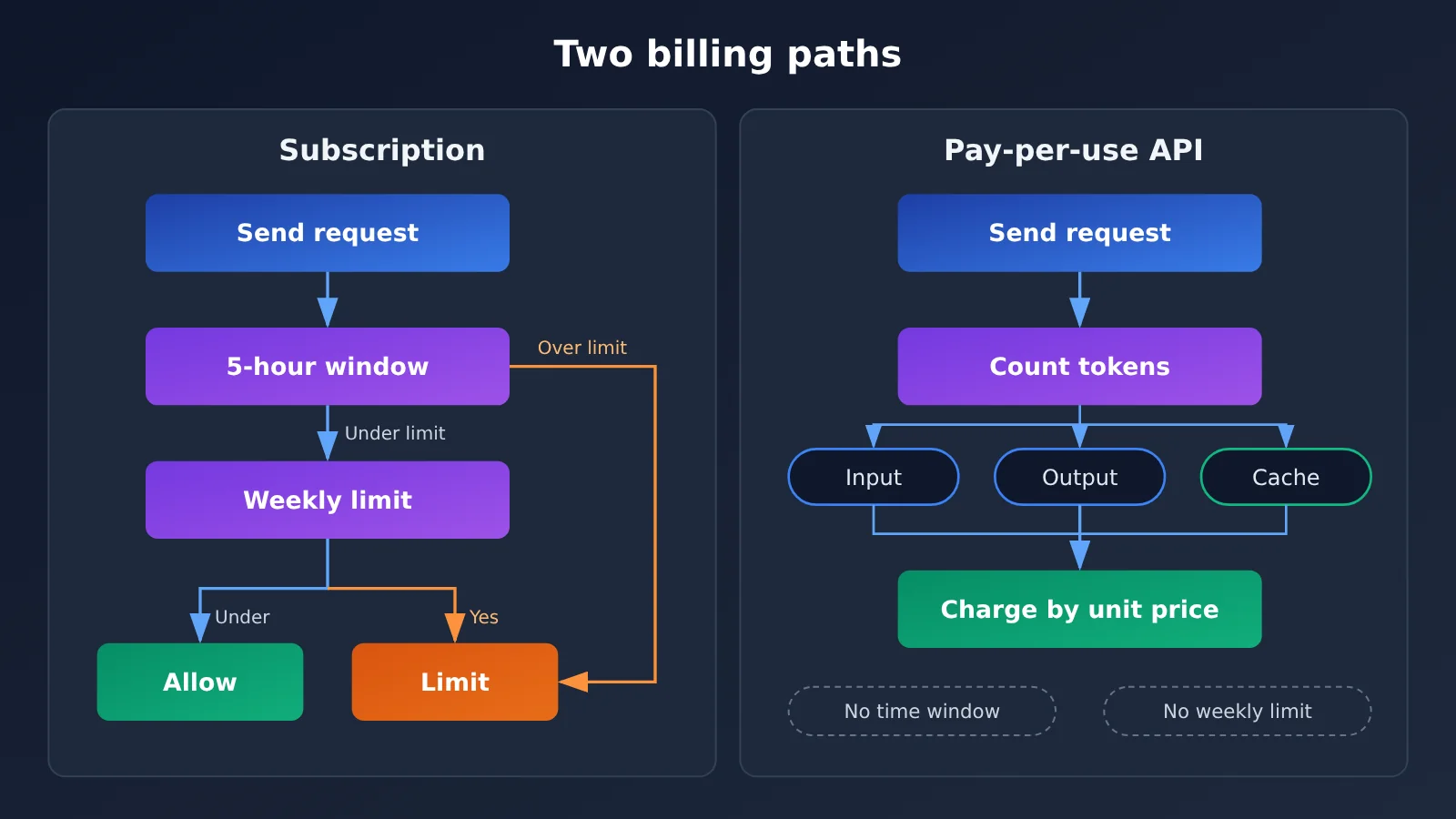
| Billing | Fixed monthly fee; usage is subject to a 5-hour session window and a weekly limit | Input, output, and cached tokens are priced separately |
| Shared allowance | Chat and coding share the same usage pool | Each key is metered separately, so you can use different keys for different projects |
| Rate limits | You must wait for the window to reset after using your allowance | No session window, but account rate limits apply |
| Cost predictability | Fixed monthly cost makes budgeting easier | Cost varies with usage and requires monitoring |
| Best for | Individual developers who code consistently every day | Teams, automation scripts, CI pipelines, and workloads with significant peaks and troughs |
How Claude Subscription Billing Works
According to a comparison article published by MindStudio on November 5, 2026 (a third-party source provided for reference; check Anthropic’s official information for the latest details), Claude Code requires a paid plan. The free tier supports chat but not the coding agent that can work with local files. The entry-level Pro plan costs $20 per month or $200 per year (about $16.67 per month). Above that are Max 5x ($100 per month) and Max 20x ($200 per month), both available only as monthly subscriptions.
The easiest terms to misunderstand are “5x” and “20x.” They describe the session allowance relative to Pro. They don’t mean unlimited usage, and there’s no guarantee that every weekly limit scales by the same factor. Another key rule is that usage is shared: chatting on the web, running Claude Code in your terminal, and starting parallel tasks in T3 Code all draw from the same account allowance. Opening more interfaces doesn’t give you extra usage.
How Claude Pay-as-You-Go API Billing Works
The pay-as-you-go API is more straightforward. Each request is charged based on the input tokens, output tokens, and cache-hit tokens it actually uses. There’s no 5-hour window or weekly limit. The trade-off is that costs aren’t fixed: tasks with long contexts or repeated reads of large codebases can quickly accumulate input tokens.
That makes caching the main focus for keeping pay-as-you-go costs down. Coding agents like Claude Code repeatedly send system prompts, project files, and conversation history. When that content is served from the cache, its unit price is an order of magnitude lower than regular input. How effectively you use caching often determines whether the pay-as-you-go route costs more or less than a subscription.
Coding with Claude: Subscription Limits vs. API Pricing
Claude Subscription Plan Comparison
The table below uses data from a MindStudio article (a third-party source, provided for comparison) so you can compare subscription plans with the API rates later in this article.
| Plan | Price (third-party source) | Usage allowance | Notes |
|---|---|---|---|
| Pro | $20/month, or $200/year | 5-hour window + weekly limit | Entry-level plan, includes Claude Code |
| Max 5x | $100/month | Approximately 5 times the Pro allowance per session | Monthly billing only; includes $100 in API credits |
| Max 20x | $200/month | Approximately 20 times the Pro allowance per session | Monthly billing only; includes $200 in API credits |
| Team Standard | $25/person/month ($20 with annual billing) | Minimum 2 seats | Premium tier is $125 ($100 with annual billing) |
| Enterprise | Starting at $20/seat/month (billed annually) | Usage billed separately at API rates | Requires 20 seats for self-service or 50 seats with sales assistance |
One detail is worth noting: to claim the monthly API credits included with Max and Team plans, you must have been on an eligible plan for 7 days and link a console organization. These credits don’t cover interactive Claude Code sessions and can’t be used to offset usage beyond your plan’s allowance. Pro doesn’t include this benefit.
Claude Pay-as-You-Go API Pricing (Based on the APIYI Pricing Page)
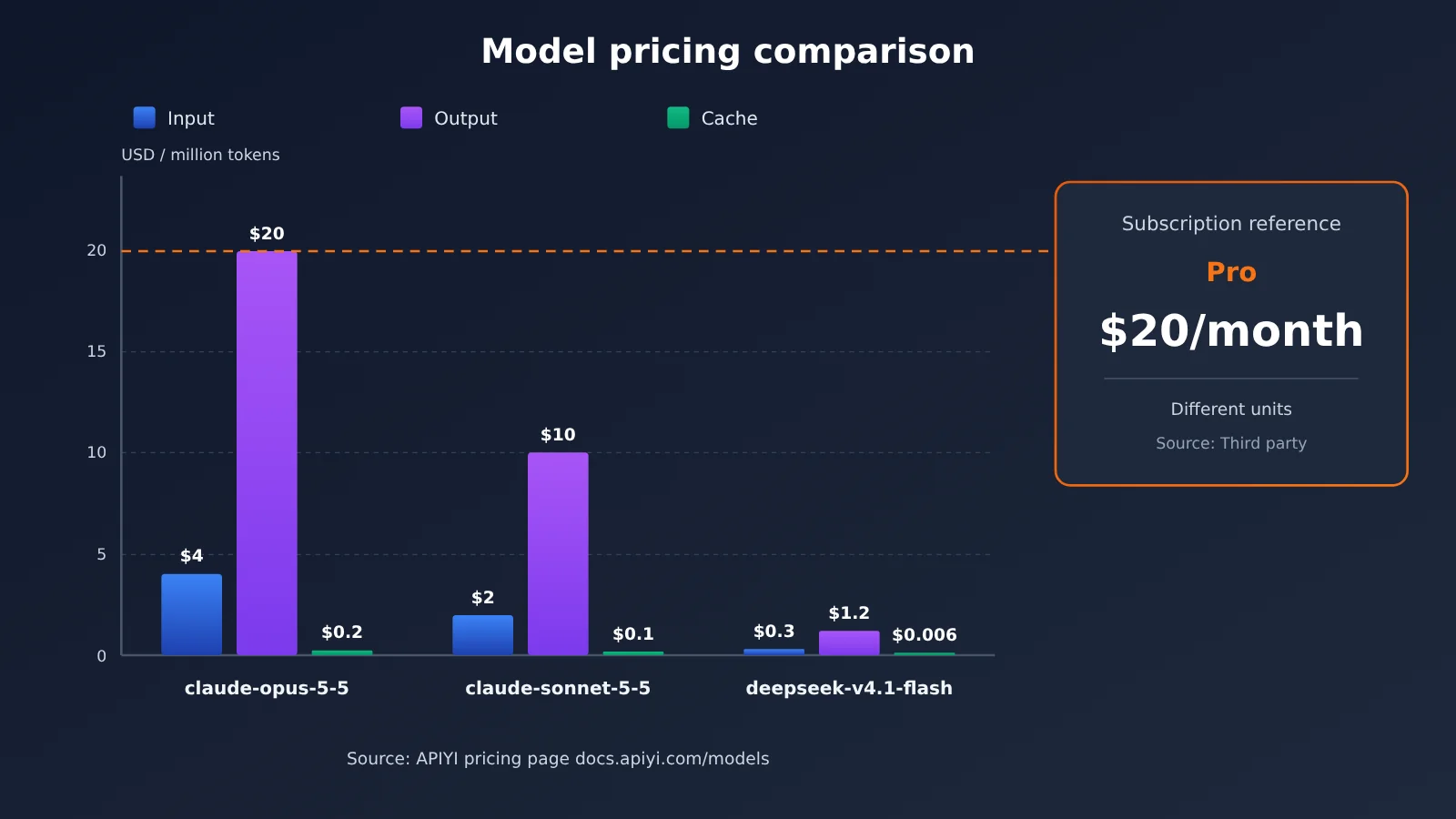
The prices below are based on the APIYI pricing page at docs.apiyi.com/models. Check the pricing page for units and the latest prices.
| Model | Input price | Output price | Cache price | Best for | Available on |
|---|---|---|---|---|---|
| claude-opus-5-5 | $4 | $20 | $0.2 | Architecture design, complex refactoring, troubleshooting | APIYI apiyi.com |
| claude-sonnet-5-5 | $2 | $10 | $0.1 | Everyday coding, code reviews | APIYI apiyi.com |
| kimi-k3.1-pro | $2 | $10 | $0.2 | Use with tools like Kimi Code | APIYI apiyi.com |
| deepseek-v4.1-flash | $0.3 | $1.2 | $0.006 | Batch formatting, comment generation, low-cost subtasks | APIYI apiyi.com |
💡 Choosing a model: Most tokens used by coding agents are input tokens, so cache pricing has a big impact on total cost. The cache price for claude-sonnet-5-5 is one-twentieth of its regular input price. Try a real task with a small budget on APIYI apiyi.com first, check the cache hit rate, and then choose your primary model.
Example: Estimating the Cost of a Coding Task
Suppose a medium-sized refactoring task uses a total of 2 million input tokens and 300,000 output tokens with claude-sonnet-5-5. Using the assumed prices below per million tokens (check the pricing page for actual rates):
- Without caching: Input costs 2 × $2 = $4, output costs 0.3 × $10 = $3, for a total of about $7.
- With an 80% input cache hit rate: Uncached input costs 0.4 × $2 = $0.80, cached input costs 1.6 × $0.1 = $0.16, and output still costs $3, for a total of about $3.96.
This estimate shows how much cache hit rates matter: the same task can cost nearly half as much with a high hit rate. If you only run two or three tasks like this per month, a pay-as-you-go API will likely be cheaper than a subscription. If you’re running several rounds every day, a subscription’s fixed monthly fee may be a better deal.
Getting Started with Claude Coding Billing: A 3-Step Decision Guide
Step 1: Identify Your Usage Pattern
A subscription works well if you code consistently at a moderate pace every day. If you write code for a few hours daily and occasionally hit the 5-hour window limit, Pro is the simplest place to start—you can wait a bit and continue. MindStudio also recommends starting with Pro, upgrading to Max 5x when Pro’s limits regularly interrupt your work, and considering Max 20x only when your usage justifies the extra $100.
A pay-as-you-go API is better for usage that comes in bursts or runs without interaction. For example, you might code intensively just two days a week, run automated code reviews in CI, or assign separate API keys to team members by project. With a subscription, these scenarios can mean paying for unused capacity or competing for the same allowance. Pay-as-you-go billing gives you more precise control.
| Scenario | Recommended path | Why |
|---|---|---|
| Individual developer coding consistently every day | Start with a Pro subscription | Fixed cost that covers routine usage |
| Heavy daily usage, frequently hitting limits | Max 5x, then upgrade if needed | Higher allowance reduces interruptions |
| Occasional use, concentrated on certain days of the week | Pay-as-you-go API | Don’t pay for idle time |
| CI automation and batch scripts | Pay-as-you-go API | Subscription allowances don’t apply to non-interactive scenarios |
| Team collaboration across projects | Pay-as-you-go API with separate keys per project | Costs can be attributed and audited |
| Need to keep working after hitting subscription limits | Subscription + API | Use the API as a fallback during peak usage |
Step 2: Calculate Costs Using Your Own Data
Don’t estimate based on a gut feeling—start with a week of real usage data. With pay-as-you-go billing, most API platform dashboards show input, output, and cached tokens for each request. After a week, multiply your usage by the unit prices to estimate your monthly cost. Then compare it with the monthly subscription fee.
🚀 Quick start: For an easy way to estimate pay-as-you-go costs, register at APIYI apiyi.com and get test credits. Use claude-sonnet-5-5 for your everyday tasks for a week. The dashboard’s usage details can help you calculate your actual monthly cost. See the documentation center at
docs.apiyi.comfor setup instructions.
Step 3: Switch Claude Code to a Pay-as-You-Go API
Claude Code supports API key billing through environment variables, so you don’t need to change any code. Here are the main settings:
| Setting | Purpose | What to enter |
|---|---|---|
ANTHROPIC_BASE_URL |
Specifies the Anthropic-format API endpoint | Enter the Anthropic-compatible endpoint provided in the APIYI documentation |
ANTHROPIC_API_KEY |
API authentication key | Enter the key created in the APIYI dashboard |
| Model selection | Switches the model in Claude Code | Choose an available model listed on the pricing page, such as claude-sonnet-5-5 |
APIYI supports both Anthropic and OpenAI API formats. Use the Anthropic format for Claude Code; if your other scripts or editor plugins only support the OpenAI format, you can connect them through the same account. Check the APIYI documentation at docs.apiyi.com for the current endpoints and parameters. Once configured, run claude in your terminal and make a simple request. If a charge appears in the dashboard, the switch was successful.
Billing Paths for Claude Coding Interfaces
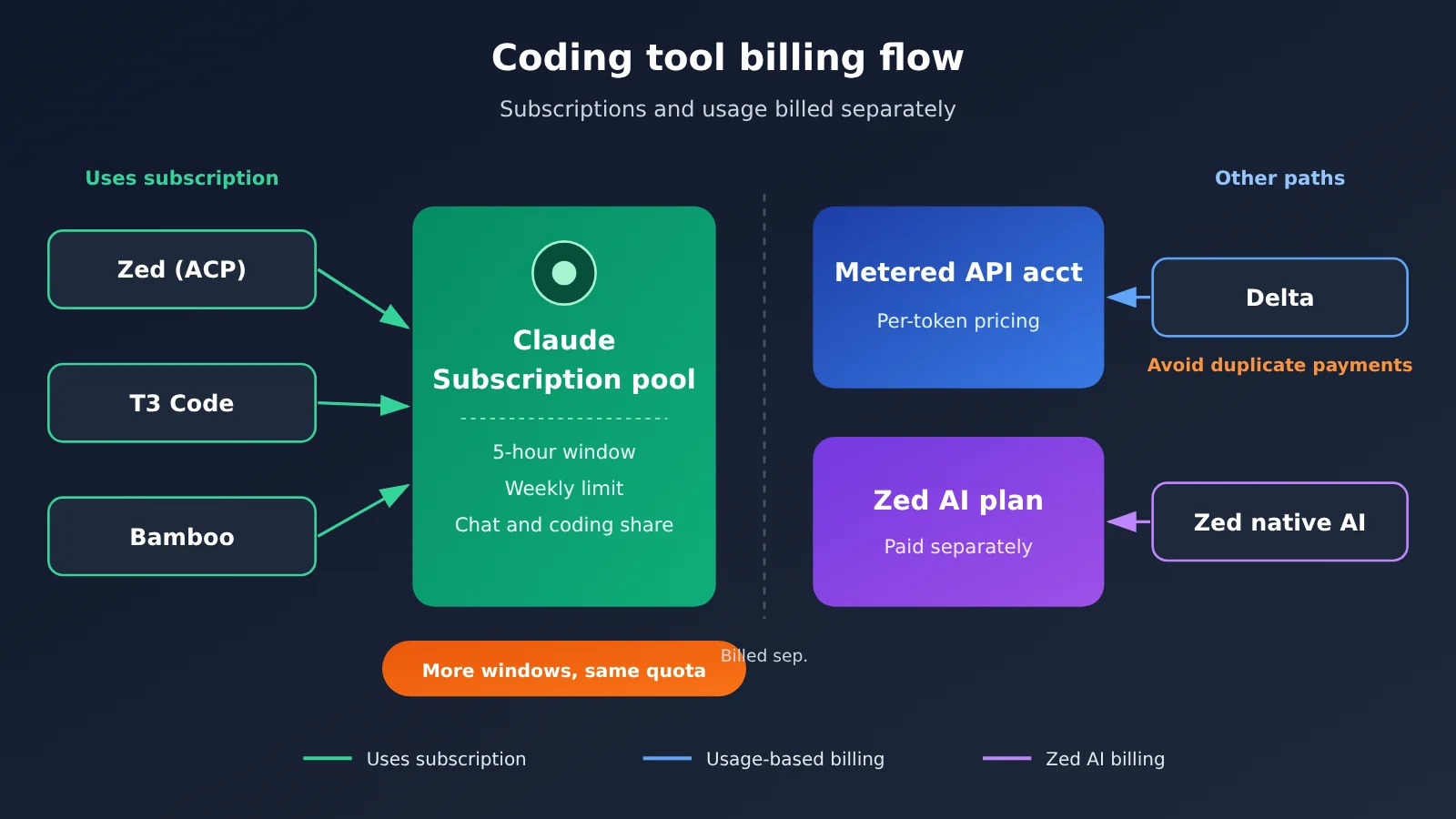
Once you’ve chosen a billing path, check which one your editor or agent management tool uses. The four tools mentioned in the MindStudio article have different billing arrangements (tool prices come from third-party sources):
| Tool | Tool Cost (Third-Party Sources) | Can Use an Existing Claude Subscription? | Billing Considerations |
|---|---|---|---|
| Zed | Free | Yes, through the built-in terminal or an external agent via ACP | Selecting “Claude” in the built-in AI uses a Zed AI subscription, a separate billing path |
| T3 Code | Free and open source | Yes, automatically detects an existing Claude login | Parallel work trees still share the same usage allowance |
| Bamboo | $20/month (two devices) | Yes | Combined with Pro, the monthly cost is about $40; currently in alpha |
| Delta | Free for individuals; Pro is $10/month | Not yet; subscription login is marked “coming soon” | Only supports an Anthropic API key, so watch out for paying twice |
Zed is the easiest one to get wrong. It has two “Claudes”: an external Claude Code agent connected through ACP, which uses your Claude subscription allowance, and a Claude model option in Zed’s native agent, which uses a Zed AI subscription. If you want to use the Pro or Max plan you’re already paying for, make sure you choose the external agent integration.
Delta, meanwhile, can be a trap for subscription users. It currently only connects through an Anthropic API key, so if you already have Pro or Max and also configure an API key for Delta, you’re paying twice. Delta also uploads project files that haven’t been ignored to its servers. Isolated work trees keep edits separate, but they aren’t sandboxes, so assess the risks before working with sensitive code. On the other hand, if you’ve already chosen pay-as-you-go billing, tools like Delta and Bamboo that support API keys are more straightforward to configure.
Frequently Asked Questions (FAQ)
Q1: Do I have to pay to code with Claude?
Yes. According to the MindStudio article, Claude’s free tier only offers chat. The Claude Code coding agent requires a Pro subscription or higher, or a pay-as-you-go API key.
Q2: What’s the main difference between subscription usage limits and the pay-as-you-go API?
A subscription has a fixed monthly fee, with usage constrained by a five-hour window and a weekly cap. Chat and coding share the same usage pool. The pay-as-you-go API has no session window and charges by token, so costs vary with usage. Subscriptions are more predictable; the API is more flexible and lets you separate usage across projects.
Q3: Can I get more usage by running multiple terminals or interfaces at once?
No. Running a terminal, Zed, T3 Code, and Bamboo at the same time draws from the same account’s usage allowance. Parallel tasks will only use it up faster. If you need more concurrency, the pay-as-you-go API is a better way to scale.
Q4: Can I use the API credits included with the Max plan to run Claude Code?
You can’t use them for interactive Claude Code sessions or to cover usage beyond your plan’s limits. They’re better suited to API calls from scripts or applications you write yourself. The Pro plan doesn’t include this benefit.
Q5: How can I access the Claude models mentioned in this article on a pay-as-you-go basis?
Sign up at APIYI, apiyi.com, create an API key, and configure `ANTHROPIC_BASE_URL` and `ANTHROPIC_API_KEY` in Claude Code. APIYI offers claude-opus-5-5 and claude-sonnet-5-5 and supports both Anthropic and OpenAI formats. Check the pricing page at `docs.apiyi.com/models` for current rates.
Q6: How can I control pay-as-you-go API costs?
Three approaches work best: improve your cache hit rate by keeping system prompts and project context stable; choose models based on task complexity, assigning simple subtasks like formatting and comments to deepseek-v4.1-flash; and use separate API keys for each project with budget alerts. The APIYI console shows token details for each request, making it easier to identify high-consumption tasks.
Q7: Can I use both a subscription and the pay-as-you-go API?
Yes, and many heavy users do exactly that. Use your subscription for everyday interactive coding, then switch to an API key when you hit a window limit or need to run CI or batch jobs. The two routes are billed separately, so don’t configure both in the same tool—otherwise, you could accidentally use the wrong one and pay twice.
Q8: What are the known limitations of each route?
With subscriptions, usage limits aren’t transparent, higher-tier multipliers don’t guarantee a linear increase in capacity, and some tools, such as Delta, don’t yet support subscription login. With pay-as-you-go, costs can fluctuate significantly. Long-context tasks can get expensive quickly if cache hit rates are low, so you’ll need to monitor usage actively.
Key Takeaways for Claude Coding Costs
- The two billing paths work differently: Subscriptions provide a limited usage allowance for a fixed monthly fee; the API charges by token.
- Allowances don’t stack: Multiple terminals, interfaces, and parallel tasks share the same subscription allowance.
- Pro is the safest starting point: Upgrade to Max 5x if you frequently hit limits, then consider Max 20x if your usage warrants it.
- Caching makes a big difference to API costs: The same task can cost nearly twice as much depending on the cache hit rate.
- Watch for mismatched billing paths: Zed’s native AI features and Delta may each use a separate paid path.
- Choose the API for non-interactive work: Pay-as-you-go pricing is better suited to CI, batch scripts, and tracking team usage by project.
- APIYI is a pay-as-you-go option: It supports Anthropic and OpenAI formats. See
docs.apiyi.com/modelsfor pricing.
Summary
The key factors when choosing how to pay for coding with Claude:
- Look at your usage patterns: Choose a subscription for consistent, frequent use, or a pay-as-you-go API for variable or non-interactive workloads.
- Do the math with real data: Multiply a week’s actual token usage by the per-token price, then compare it with the monthly subscription fee.
- Check your toolchain: Confirm which billing path your editor and proxy tools use to avoid paying twice.
For most individual developers, a Pro subscription plus the free Zed and T3 Code tools makes a complete starter setup. If you’re focused on team collaboration, automation, or workloads with significant usage fluctuations, a pay-as-you-go API offers more flexibility. Try running real tasks for a week with a small budget through APIYI at apiyi.com, then use your own cost data to make a long-term decision.
📚 References
- MindStudio – Zed vs T3 Code vs Bamboo vs Delta Comparison: A comparison of Claude Code interface tools and subscription prices (November 5, 2026)
- Link:
mindstudio.ai/blog/zed-t3-code-bamboo-delta-compared -
Note: Source for third-party data on subscription plans and tool costs in this article, provided for comparison only
-
APIYI Model Pricing Page: Source for all API unit prices in this article
- Link:
docs.apiyi.com/models -
Note: Check the latest input, output, and cache prices for models such as claude-opus-5-5 and claude-sonnet-5-5
-
APIYI Documentation Center: API endpoints and integration guidance
- Link:
docs.apiyi.com - Note: Configuration instructions for Anthropic- and OpenAI-compatible formats
Author: APIYI Technical Team
Technical discussions: Contact us through the APIYI homepage at apiyi.com. For more integration resources, visit the documentation center at docs.apiyi.com.