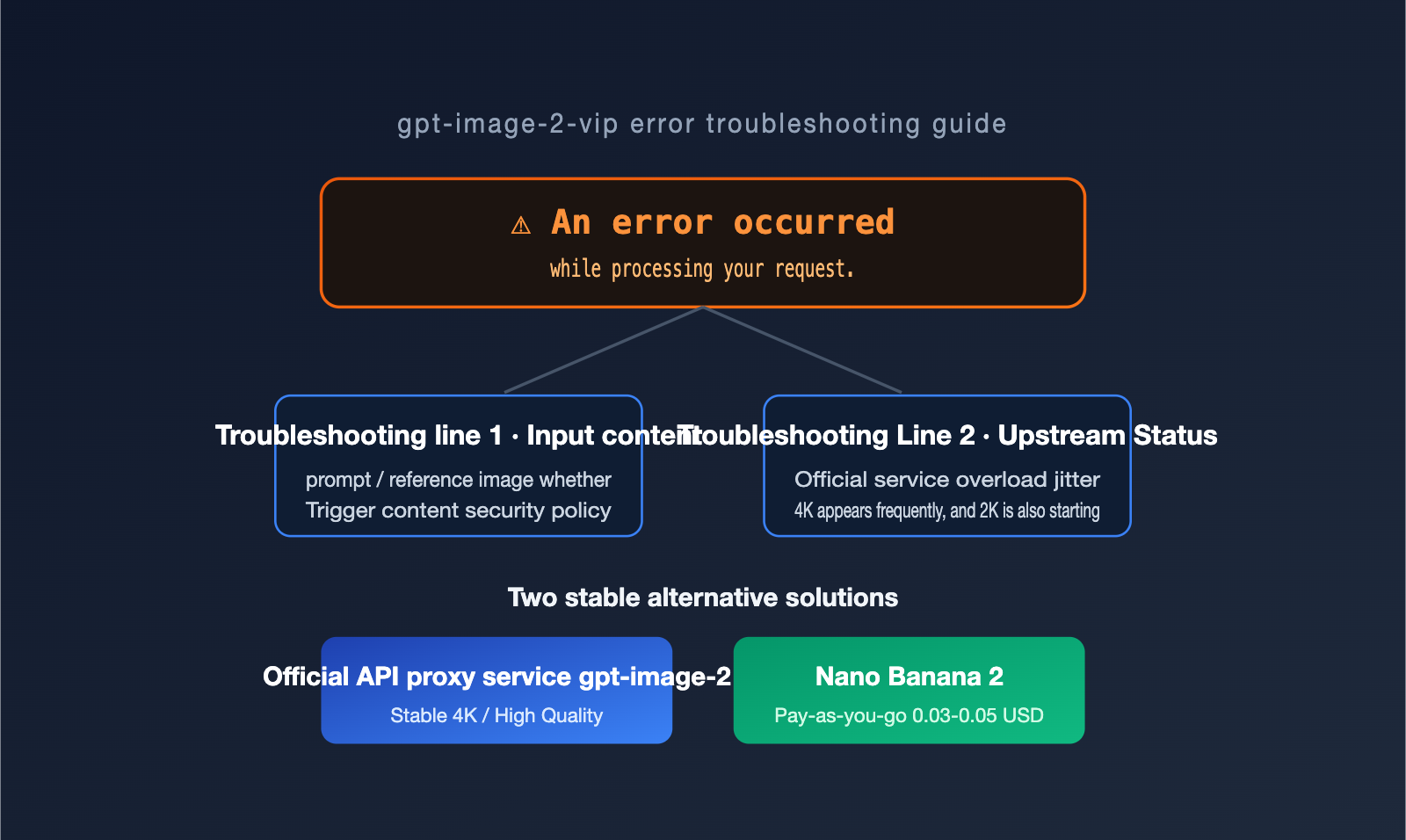
When many teams batch process images using gpt-image-2-vip, they often hit a cryptic error message: An error occurred while processing your request.. Unlike a parameter error that points directly to a line of code, or a quota limit that gives you a clear number, this error feels like hitting a brick wall in the dark.
After observing a massive volume of real-world requests on the APIYI (apiyi.com) platform, we’ve found that this error isn't caused by a single factor. Instead, it’s the result of an intersection between "input content" and "upstream service status." This article will break down the causes of the gpt-image-2-vip error, provide a logical troubleshooting workflow you can follow, and share two proven, stable alternatives.
1. What does the gpt-image-2-vip error actually mean?
To troubleshoot the An error occurred while processing your request message, the first step is to distinguish it from another similar-looking error. These two types of errors occur at completely different stages and require opposite handling strategies.
The first type is an interception during the input stage, typically with the message Your request was rejected by the safety system, error code moderation_blocked, and an HTTP 400 status code. Essentially, the request was caught by the front-end safety classifier before it even reached the model. Rewriting the prompt or changing the image usually solves this.
The second type is the subject of this article: An error occurred while processing your request. This usually indicates a failure during the processing stage (rather than the input validation stage) and often corresponds to a 5xx-level server error. Its meaning is more ambiguous: it could be that the input triggered a secondary review during generation, or it could simply be that the upstream official service is overloaded or experiencing jitter.
| Error Message | Error Code | Trigger Stage | First Action |
|---|---|---|---|
| Your request was rejected by the safety system | moderation_blocked (400) | Input Validation | Rewrite prompt / Replace input image |
| An error occurred while processing your request | 5xx Processing Error | Model Processing | Retry, then check input |
| That model is currently overloaded | 429 / overloaded | Upstream Queue | Back-off and retry |
| Both edges must be multiple of 16 | invalid_request (400) | Parameter Validation | Fix dimension parameters |
🎯 Troubleshooting Tip: If you see
rejected by the safety system, rewrite your prompt immediately. If you seeAn error occurred while processing, start with a "retry—check input" sequence. If you're unsure which error you've encountered, you can check the full error body and request ID in the logs on the APIYI (apiyi.com) platform to pinpoint the issue using the table above.
2. Troubleshooting the Three Main Causes of gpt-image-2-vip Errors
Once you've identified the error type, the next step is to pinpoint the exact source of the gpt-image-2-vip error. Based on platform observations, the vast majority of An error occurred messages can be attributed to the following three causes.
Cause 1: Input Prompts or Images Violate Content Policies
The first—and most easily overlooked—reason is that the prompt or reference image provided by the user has crossed a content safety line. The security system for gpt-image-2 has been significantly upgraded on the VIP channel; it doesn't just scan for sensitive keywords in prompts, but also performs a secondary assessment on images during or after generation.
It's worth noting that this mechanism places high weight on IP rights and descriptions of clothing or attire. Even if your intent is a completely legitimate business requirement (e.g., an e-commerce seller generating product images for lingerie or swimwear), if the result "looks like" a violation, it may be blocked during processing. You'll receive that vague An error occurred message instead of a clear moderation explanation.
OpenAI provides a free omni-moderation-latest moderation endpoint that accepts both text and images. Before making an official call to gpt-image-2-vip, running the user's prompt through this endpoint can filter out most non-compliant requests before you pay for the generation.
Cause 2: Upstream Official Service Overload or Jitter
The second reason has nothing to do with you: the official upstream service is down. An error occurred while processing your request often indicates a 5xx server-side error at the infrastructure level. Since these are OpenAI-side issues, clearing cookies or logging in again won't help.
There is a trend worth noting here. Early on, this type of jitter was mainly concentrated on heavy requests like 4K resolution with high token consumption. Recently, however, we've observed that even 2K resolution requests are frequently triggering the same error. The reason is straightforward: when gpt-image-2 is set to quality="high", it follows a complete four-stage process of "Understanding—Planning—Generation—Review," which takes 30 to 50 times longer than quality="low". The heavier the request, the higher the probability of hitting an upstream jitter window.
| Trigger Scenario | Early Behavior | Recent Behavior | Root Cause |
|---|---|---|---|
| 4K / high quality | Occasional failure | Frequent failure | Heavy request, high upstream pressure |
| 2K / high quality | Generally stable | Frequent errors | Increased overall upstream load |
| 1K / low-medium | Relatively stable | Relatively stable | Light request, high fault tolerance |
🎯 Stability Tip: If your business has strict requirements for 4K and high-quality parameters and you're frequently hitting this jitter, we recommend switching to a more stable channel on the APIYI (apiyi.com) platform (see Section 4). Don't keep banging your head against the same unstable link.
Cause 3: Is Retrying Actually Useful?
The third point isn't an independent cause, but a diagnostic action: retrying. For 5xx processing errors, OpenAI officially recommends using an exponential backoff strategy for retries while respecting the rate-limiting information in the response headers.
The value of retrying is that it helps you distinguish between the first two causes. If it succeeds after a few retries, it was likely Cause 2 (upstream jitter), and you're good to go. If it still fails, you need to go back to Cause 1 and carefully check if your input prompt or image triggered a safety policy. In other words, retrying is both a mitigation tactic and a diagnostic tool.
3. gpt-image-2-vip Troubleshooting Checklist and Best Practices
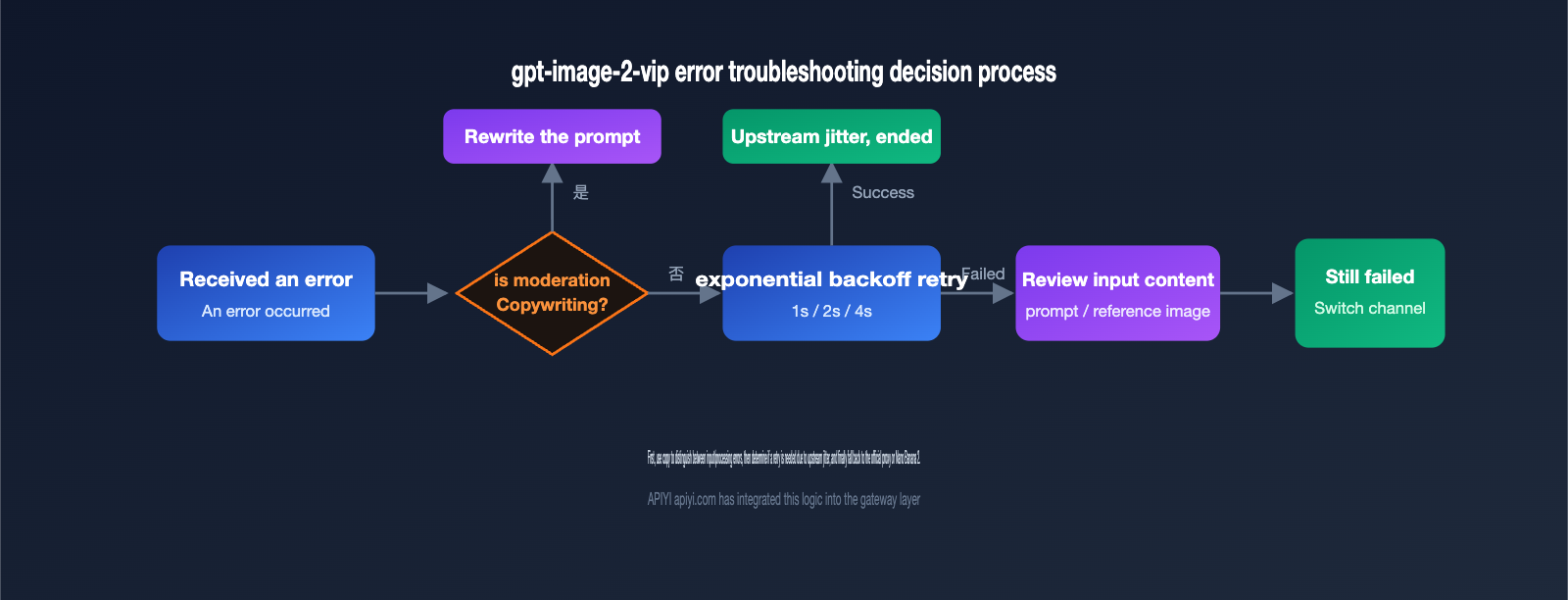
Once you've clarified the causes, you can standardize your troubleshooting process in daily operations using this checklist. The order is intentionally designed to "rule out your own issues first, then judge the upstream, and finally fall back to switching," preventing you from blindly retrying right away.
- Check the error message: Is it
rejected by the safety systemorAn error occurred? If the former, revise the prompt; if the latter, proceed to the next step. - Pre-screen inputs locally: Use
omni-moderation-latestto scan the prompt and reference image to rule out obvious violations. - Exponential backoff retry: Perform 2 to 3 backoff retries for 5xx errors and record the request ID for traceability.
- Downscale verification: Lower the
qualityfrom high to medium and the resolution from 4K to 2K to confirm if the issue is caused by an overly heavy request. - Switch to a stable channel: If none of the above results in stable image generation, switch to the official
gpt-image-2orNano Banana 2as a fallback.
| Troubleshooting Action | Corresponding Cause | Expected Result |
|---|---|---|
| Check error message | Distinguish input vs. processing error | Choose the right fix |
| Local moderation pre-screen | Cause 1 | Intercept violations early |
| Exponential backoff retry | Cause 2 | Overcome upstream jitter |
| Lower quality / resolution | Cause 2 | Reduce single-request pressure |
| Switch to stable channel | Fallback | Ensure success rate |
🎯 Quick Start: If you just want an out-of-the-box, stable calling environment, the APIYI (apiyi.com) platform has already implemented the logic for retries, downscaling, and channel switching at the gateway level. You can seamlessly switch between VIP, official, and Nano Banana 2 channels by simply using a unified
base_url.
Below is a minimal skeleton for calling and retrying, showing how to automatically back off and retry when a processing error is received.
import time
from openai import OpenAI

# base_url is unified via APIYI for easy switching between channels
client = OpenAI(base_url="https://api.apiyi.com/v1", api_key="YOUR_API_KEY")

def generate(prompt, model="gpt-image-2-vip", retries=3):
    for i in range(retries):
        try:
            return client.images.generate(model=model, prompt=prompt, size="2048x2048")
        except Exception as e:
            if i == retries - 1:
                raise
            time.sleep(2 ** i)  # Exponential backoff: 1s, 2s, 4s
IV. Two Reliable Alternatives to gpt-image-2-vip
When the VIP channel becomes unstable due to upstream jitter, there's no point in repeatedly retrying on the same path. Instead, it's better to have fallback channels ready. Here are two proven alternatives tailored to different needs.
Alternative 1: Official-Proxy gpt-image-2 for Stable 4K and High Quality
The first option is to switch to the official-proxy gpt-image-2. "Official-proxy" refers to a channel that mirrors the official native path, offering much higher stability. While it's slightly more expensive than the VIP channel, the trade-off is a significantly higher success rate, especially in scenarios prone to failure like 4K resolution and "high" quality settings.
If your product has strict requirements for image quality—such as e-commerce main images or poster-level output—the extra cost for this stability is usually well worth it. The official-proxy gpt-image-2 supports any resolution, provided that both dimensions are multiples of 16, with a maximum long edge of 3840px (4K) and a total pixel count between 655,360 and 8,294,400.
🎯 Selection Advice: For production scenarios sensitive to stability and high resolution, we recommend prioritizing the official-proxy gpt-image-2 on the APIYI (apiyi.com) platform, reserving the VIP channel for cost-sensitive batch tasks that can tolerate occasional retries.
Alternative 2: Nano Banana 2, the Cost-Effective Pay-As-You-Go Choice
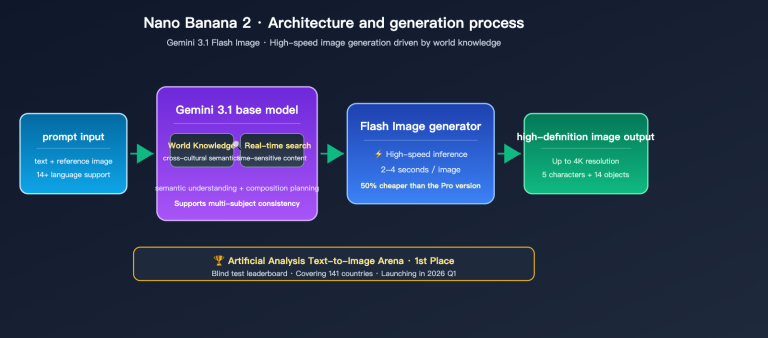
The second option is to guide users to switch to Nano Banana 2, which is Google's gemini-3.1-flash-image model. It follows a pay-as-you-go model, with a per-image cost roughly between $0.03 and $0.05. This is perfect for cost-sensitive scenarios that also require stable, high-concurrency image generation.
Looking at the official resolution tiers, Nano Banana 2 is priced at approximately $0.045 for 0.5K, $0.067 for 1K, $0.101 for 2K, and $0.151 for 4K, with further discounts available via batch processing channels. On third-party gateways, these prices are often leveled out to a flat rate of around $0.05 per image, which simplifies your cost planning.
| Channel | Stability | Price Level | Best Use Case |
|---|---|---|---|
| gpt-image-2-vip | Affected by upstream jitter | Lower | Cost-sensitive, batch tasks with retry tolerance |
| Official-proxy gpt-image-2 | High | Higher | 4K / High quality / Production-grade images |
| Nano Banana 2 (gemini-3.1-flash-image) | High | Pay-as-you-go $0.03-$0.05 | High concurrency, cost-efficiency priority |
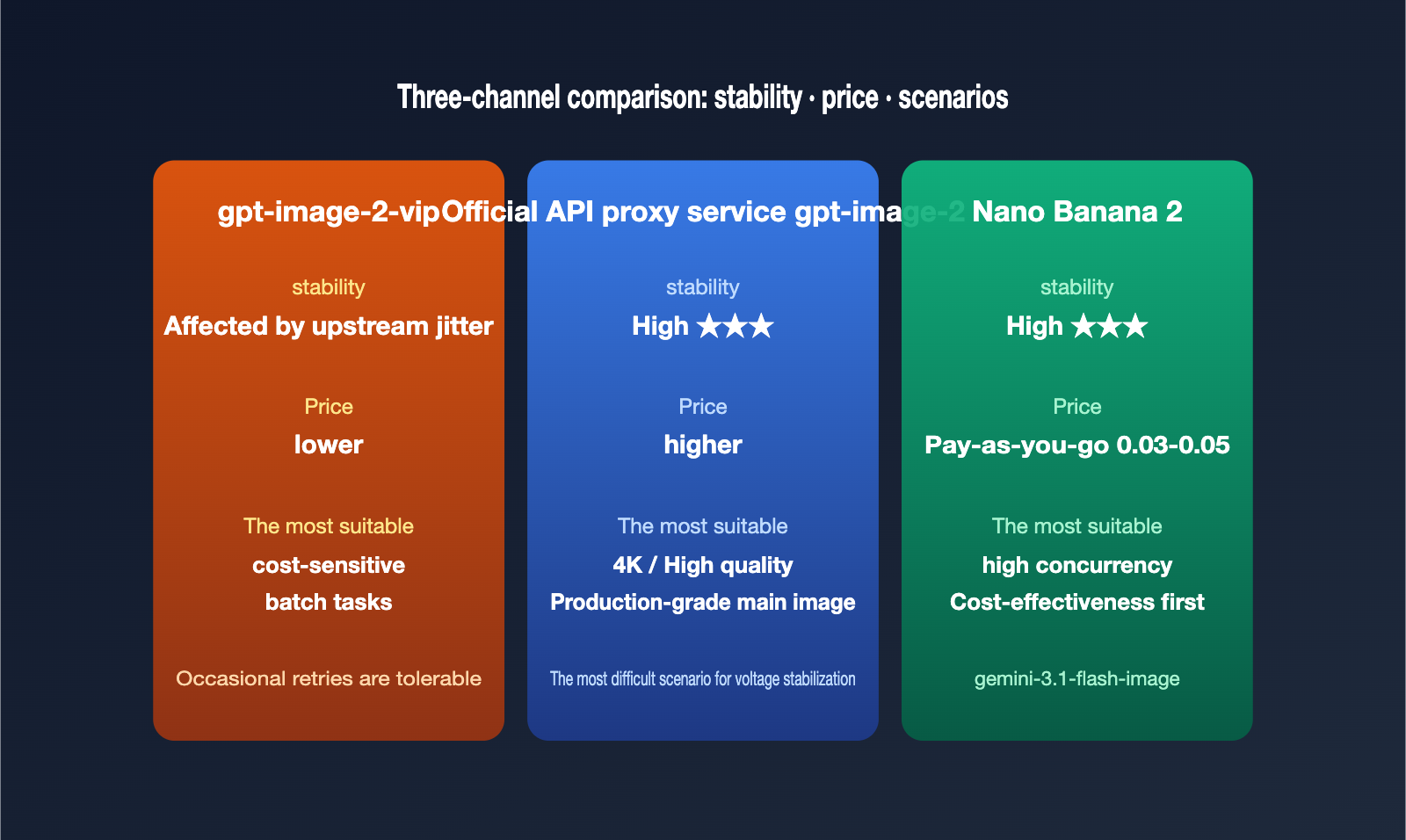
These three channels aren't mutually exclusive. A smarter approach is to combine them: use the VIP channel for daily batch tasks to control costs, route critical high-quality orders through the official-proxy, and use Nano Banana 2 as a fallback for high-concurrency scenarios.
🎯 Combination Advice: On the APIYI (apiyi.com) platform, these three models share the same interface and API key. You can switch between them by simply changing the
modelparameter in your code, without needing to refactor your invocation logic, making it very easy to perform A/B testing and failover.
V. FAQ
Q1: Why did 4K fail often before, but now 2K is also frequently throwing errors?
Because the overall upstream load has increased. Requests with quality="high" go through a four-stage process: "Understand—Plan—Generate—Review." This takes 30 to 50 times longer than "low" quality requests, making them more susceptible to jitter windows as they get heavier. Initially, only the heaviest 4K requests were affected, but as load has increased, 2K requests are now also experiencing frequent issues. We recommend downscaling or switching channels on the APIYI (apiyi.com) platform.
Q2: Are An error occurred and moderation_blocked the same thing?
No. The latter is a 400 input interception, explicitly stating rejected by the safety system; you just need to modify your prompt. The former is a 5xx error during the processing stage, which requires retrying first before checking the input. The remediation steps for these are opposite.
Q3: How many times should I retry?
Generally, 2 to 3 exponential backoff retries (1s, 2s, 4s) are sufficient to distinguish between upstream jitter and input issues. If it still fails after three attempts, it's likely that the input triggered a safety policy, or it's time to decisively switch to the official-proxy or Nano Banana 2 for a fallback.
Q4: Is there a difference in image quality between the official-proxy and VIP channels?
The model capabilities themselves are identical; the differences lie primarily in link stability and success rates under high-resolution/high-quality parameters. When you have strict requirements for 4K and high quality, the official-proxy is more stable.
VI. Summary
The An error occurred while processing your request message from gpt-image-2-vip isn't just some mysterious glitch—it's essentially the intersection of your "input content" and the "upstream status." When troubleshooting, just keep these three rules in mind: first, use text prompts to distinguish between input errors and processing errors; second, use exponential backoff retries to determine if it's an upstream jitter or an actual input issue; and finally, use the official gpt-image-2 or Nano Banana 2 as a stable fallback.
Once you bake this logic into your gateway layer, you'll be able to control both your image generation success rate and your costs simultaneously. If you'd rather skip the engineering overhead of building your own retry mechanisms, downscaling logic, and multi-channel switching, you can head over to APIYI (apiyi.com). You'll get a single interface that manages the VIP, official, and Nano Banana 2 pipelines, allowing you to schedule them flexibly based on your specific use case.
This article was compiled by the APIYI (apiyi.com) technical team. We are committed to tracking the stability and best practices of mainstream image models.