Author’s note: GPT-6.2 Sol keeps the previous generation’s Standard token pricing and improves scores or lowers per-task cost on several public benchmarks. Before upgrading existing systems, you’ll still need to separately test codebase Q&A, complex analysis, and multi-turn conversations.
Bottom line up front: GPT-6.2 Sol’s short-context Standard pricing is exactly the same as GPT-6.1 Sol’s, with higher scores and lower per-task cost in overall benchmarks; but it shows clear score drops on codebase Q&A and a few hard problems. Both are priced at $2, $0.10, and $10 per million tokens for regular input, cached reads, and output, respectively. Artificial Analysis’s Max-tier overall score rose from 55 to 57, and average cost per task fell from $1.27 to $1.01. In the same organization’s coding-agent test, however, the codebase Q&A subscore dropped from 60 to 46, and the Plotly data analysis test fell from a perfect 43/43 to 40/43.
So this upgrade is best rolled out gradually by task type, not as a wholesale replacement. Verifiable code changes, terminal operations, and routine analysis can be pilot-tested first. Codebase Q&A, hard problems involving hidden patterns, and batch processing that relies on Flex need regression tests added first. Also, GPT-6.2’s Responses API has behavior changes around multi-turn conversations and instruction placement, so existing multi-turn apps can’t just swap the model ID.
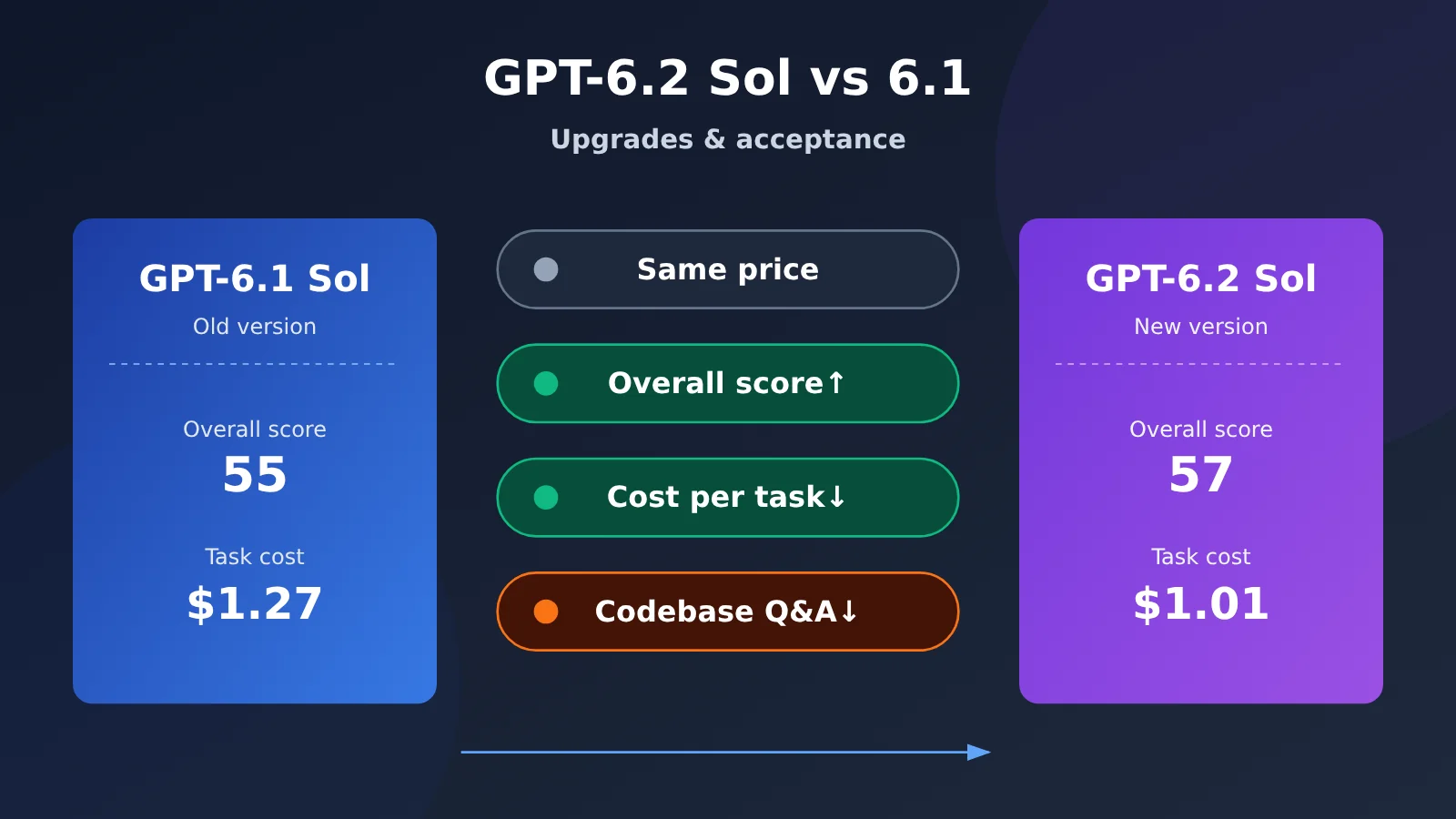
GPT-6.2 Sol vs GPT-6.1 Sol at a Glance
The table below lists only the dimensions that matter for an upgrade decision. Specs and prices come from OpenAI’s official model card, pricing page, and changelog. Prices are in USD per million tokens.
| Comparison dimension | GPT-6.1 Sol | GPT-6.2 Sol | What the difference means |
|---|---|---|---|
| Model ID / release date | gpt-6.1-sol / 2026-09-29 |
gpt-6.2-sol / 2026-11-17 |
The new model just shipped, so it needs observation time |
| Context / max output | 1,050,000 / 128,000 | 1,050,000 / 128,000 | Capacity is unchanged |
| Max input | Not listed separately on the model card | 922,000 | Very long-input tasks need to be checked against the new limit |
| Knowledge cutoff | 2026-04-30 | 2026-06-01 | Pushed back by about a month |
| Short-context Standard pricing | Input $2 / cached read $0.10 / output $10 | Same | The bill is identical for the same token mix |
| Flex processing | Supported | Not supported | Existing Flex users need to switch to another processing mode |
| Background discount windows | Not covered in this material | 2-hour window -30%, 8-hour window -40% | Tasks that can tolerate latency have a new cost-saving option |
| Overall score (AA, Max tier) | 55 | 57 | Slightly stronger overall |
| Codebase Q&A (AA, Codex + Max) | 60 | 46 | A clear regression; needs dedicated acceptance testing |
🚀 Quick comparison: You can switch between the two generations within the same set of endpoints and compare them. APIYI apiyi.com’s public model directory already lists
gpt-6.2-soland notes both the responses and chat entry points, which makes it convenient to run regression comparisons between the old and new versions with the same key.
Suggested reading order: Section 1 of the main text starts with pricing and processing options, because they determine how the bill is calculated. Section 2 compares the gains and losses in public benchmarks, so you can judge which tasks are worth upgrading. Section 3 checks API behavior changes, so you can tell whether existing services can switch over smoothly. Section 4 lays out a task-by-task acceptance plan. If you only care about coding agents, you can jump straight to 2.2 and Section 4.
Terms to know before comparing GPT-6.2 Sol
| Term | Plain-language explanation |
|---|---|
| Standard token pricing | OpenAI’s public pricing under the Standard tier for each million input and output tokens and for different cache usage levels |
| Task cost | The model and tool fees incurred to complete a task; business acceptance testing can also factor in reruns and human review |
| Reasoning tier | A setting that controls the model’s reasoning budget, with common values of Low, Medium, High, Xhigh, and Max; side-by-side tests should use matching tiers |
| GDPval v2 | An OpenAI internal evaluation of complex knowledge work, focused on long-process deliverables drawn from real project types |
| Coding Agent Index | A composite agent metric from Artificial Analysis derived from subitems such as code modification, terminal operations, and codebase Q&A |
| SWE-Atlas-QnA-AA | The codebase Q&A subitem of the above metric, which checks whether the facts needed for an answer are complete |
| Session prefix / cache read | Content at the start of multi-turn requests that stays in the same order; once the service identifies a reusable prefix, the matched portion is billed at the read rate |
1. GPT-6.2 Sol vs GPT-6.1 Sol: Base Specs and Pricing
1.1 GPT-6.2 Sol Specs Largely Carry Over From the Previous Generation
Both generations can be invoked through Responses and Chat Completions, and function calling plus built-in tools take the Responses path. Both accept text and image input, natively output text, and share a context window of 1,050,000 tokens with a maximum output of 128,000 tokens. The 6.2 Sol model card separately lists a maximum input of 922,000 tokens.
There’s a subtle difference in positioning. The 6.1 Sol model page emphasizes handling complex code, computer operation, and professional tasks at lower cost than Astra; the 6.2 Sol model page leans toward everyday code and agentic work at scale. In other words, 6.2 Sol is more explicitly aimed at high-frequency, high-volume scenarios.
1.2 GPT-6.2 Sol Standard Pricing Matches the Previous Generation
Official Standard billing is as follows. Both generations use 272K input tokens per request as the threshold: beyond that, the input and cache rates for the entire request are calculated at 2x, and output at 1.5x.
| Standard billing category | Short context (≤272K) | Long context (>272K) |
|---|---|---|
| Regular input | $2.00 | $4.00 |
| Cache read | $0.10 | $0.20 |
| 30-minute cache write | $2.50 | $5.00 |
| 12-hour cache write | $5.00 | $10.00 |
| Output (includes reasoning tokens) | $10.00 | $15.00 |
The same unit price doesn’t mean the same bill. When completing the same task, 6.2 Sol’s output tokens, number of tool calls, and cache hit behavior can all change, so actual cost has to be calculated per task. Cache writes should be priced at their own full rates, without stacking the regular input price on the same batch of tokens. Total output can be read from Responses’ usage.output_tokens, and reasoning usage is usually listed under the output_tokens_details.reasoning_tokens sub-field.
On domestic invocation: as of 2026-11-20, the publicly listed pricing endpoint for APIYI apiyi.com shows gpt-6.2-sol at the same short-context prices as the official ones, while long-context regular input, cache read, cache write, and output are $3, $0.15, $3.75, and $11.25 respectively. These are publicly posted pricing expressions; actual billing is subject to your account group and the platform’s current configuration.
1.3 Flex vs. the Background Discount Window: Pick Your Trade-off
The change in processing options is the easiest thing to overlook. 6.1 Sol is still on the Flex eligibility list; 6.2 Sol doesn’t support Flex. As a substitute, 6.2 Sol can use the Responses background discount window: for eligible requests, model token rates are 30% below Standard in the 2-hour window and 40% below in the 8-hour window.
If an older system relies on Flex to run offline batch jobs, you’ll need to reselect based on delivery deadlines and access conditions when migrating. Tasks that can tolerate delivery within a few hours are worth evaluating against the background window; tasks that need an immediate response can only be billed at Standard rates.
2. GPT-6.2 Sol vs GPT-6.1 Sol: Progress and Regressions in Public Tests
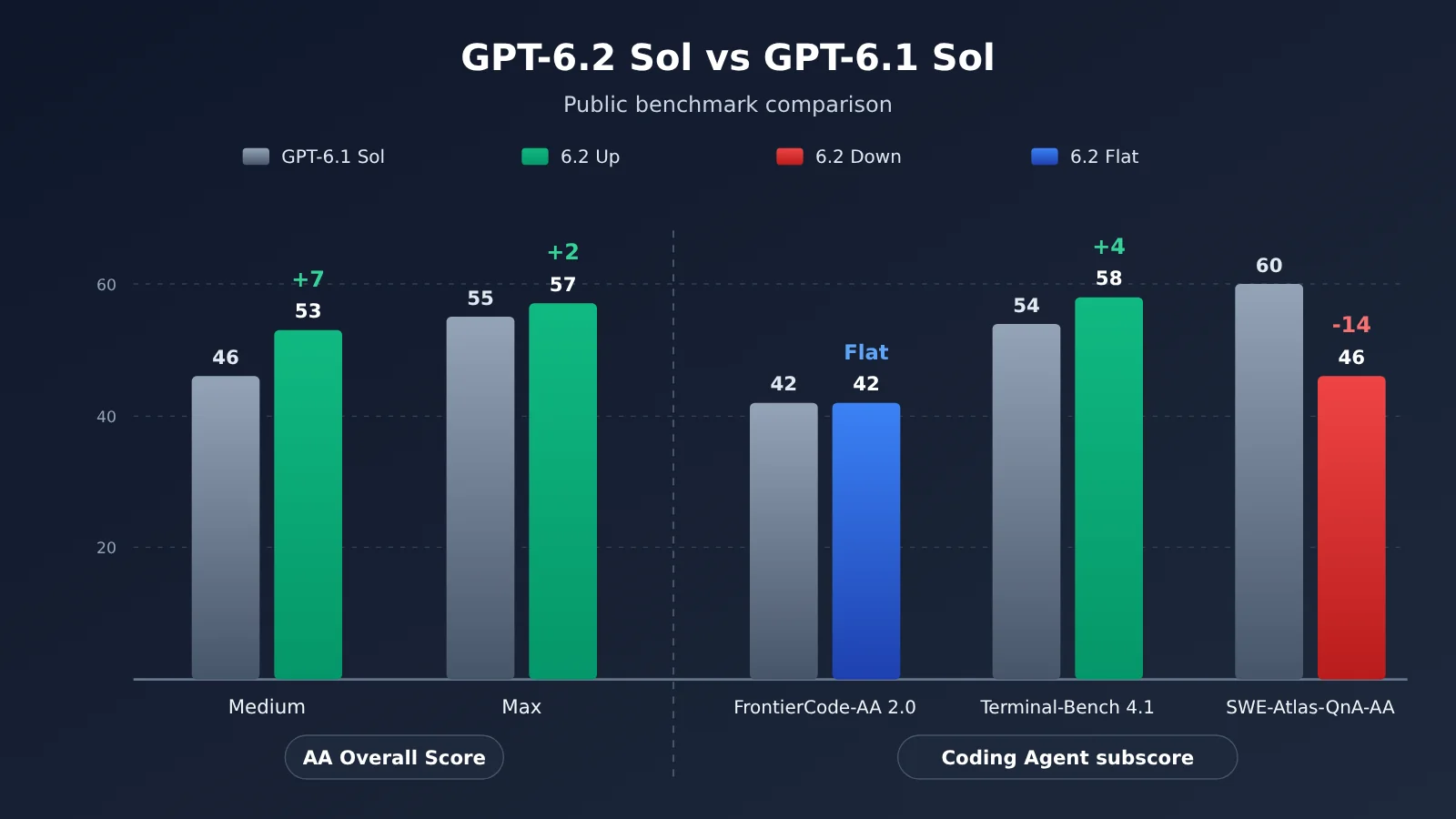
The chart above summarizes third-party public data. Green means 6.2 Sol improved, red means it declined. These numbers come from different organizations and test harnesses, so they’re only suitable for comparison within their respective conditions. If you want to reproduce them on your own tasks, you can call the two model generations separately through APIYI apiyi.com using the same channel and the same tier.
2.1 Knowledge Work and General Capability: GPT-6.2 Sol Improves Steadily
Official self-report: In its release announcement on 2026-11-17, OpenAI said that on the internal benchmark GDPval v2, 6.2 Sol scored 5.3 percentage points higher than 6.1 Sol. GDPval v2 tests multi-step knowledge work in consulting, finance, design, and other fields, and this conclusion only applies to the internal tests OpenAI published. The announcement also includes a line about “22% fewer output tokens”; the comparison there is between GPT-6.2 Astra and GPT-6 Astra, so it doesn’t apply between the two generations of Sol.
Third-party testing: Artificial Analysis’s composite score covers knowledge work, coding, science, and general knowledge. From 6.1 Sol to 6.2 Sol, the Medium tier rose from 46 to 53, and the Max tier from 55 to 57. The average cost per task for the Max tier dropped from $1.27 to $1.01—roughly 20% lower based on the publicly reported rounded figures.
The two sets of data point in the same direction: 6.2 Sol is stronger on general tasks and cheaper per task. It’s worth noting that the gain in the Medium tier (+7) is clearly larger than in the Max tier (+2). For teams that use the medium reasoning tier day to day, this upgrade may feel more noticeable.
2.2 Code Editing, Terminal, and Codebase Q&A: GPT-6.2 Sol Has Its Ups and Downs
In Artificial Analysis’s Coding Agent Index v2.1, both model generations were tested with the Codex harness and the Max reasoning setting, keeping the methodology consistent:
| Metric (Codex + Max) | GPT-6.1 Sol | GPT-6.2 Sol | Change |
|---|---|---|---|
| Coding Agent Index overall | 52 | 49 | -3 |
| FrontierCode-AA 2.0 | 42 | 42 | Flat |
| Terminal-Bench 4.1 | 54 | 58 | +4 |
| SWE-Atlas-QnA-AA (codebase Q&A) | 60 | 46 | -14 |
| Average API cost per task | $1.51 | $1.22 | about -19% |
| Average agent runtime | 21.9 min | 17.5 min | -4.4 min |
The overall score dropped mainly because the codebase Q&A subscore fell by 14 points, which offset a 4-point gain in the terminal subscore, while the code editing subscore stayed flat. The runtime metric excludes environment startup, review, and validation overhead; it reflects only the agent’s own execution time. Also, FrontierCode-AA 2.0 here is Artificial Analysis’s version and shouldn’t be conflated with same-named leaderboards from other organizations.
Plotly’s single-run comparison on DataAnalyticsBench, published on 2026-11-17, offers a reference point for another category of independent tasks. The total score for 6.1 Sol → 6.2 Sol went from 43/43 to 40/43, the round cost dropped from $2.61 to $1.22, and the median per-question latency fell from 17.6 seconds to 10.5 seconds. Tool calls dropped from 258 to 158, and output volume fell from about 70,000 tokens to 45,000 tokens. The three questions 6.2 Sol got wrong were clustered around hidden-pattern questions.
These results come with two caveats. First, the tests ran through OpenRouter and Plotly’s fixed harness, and the costs reflect the channel pricing at the time. Second, each model ran only one round; when Plotly reran other models, it saw swings of up to three questions. So this is better suited to illustrating a pattern: 6.2 Sol takes fewer actions, moves faster, and costs less—but on hard problems that require deeper digging, it may “call it quits too early.”
3. How GPT-6.2 Sol’s API Behavior Affects Existing Services
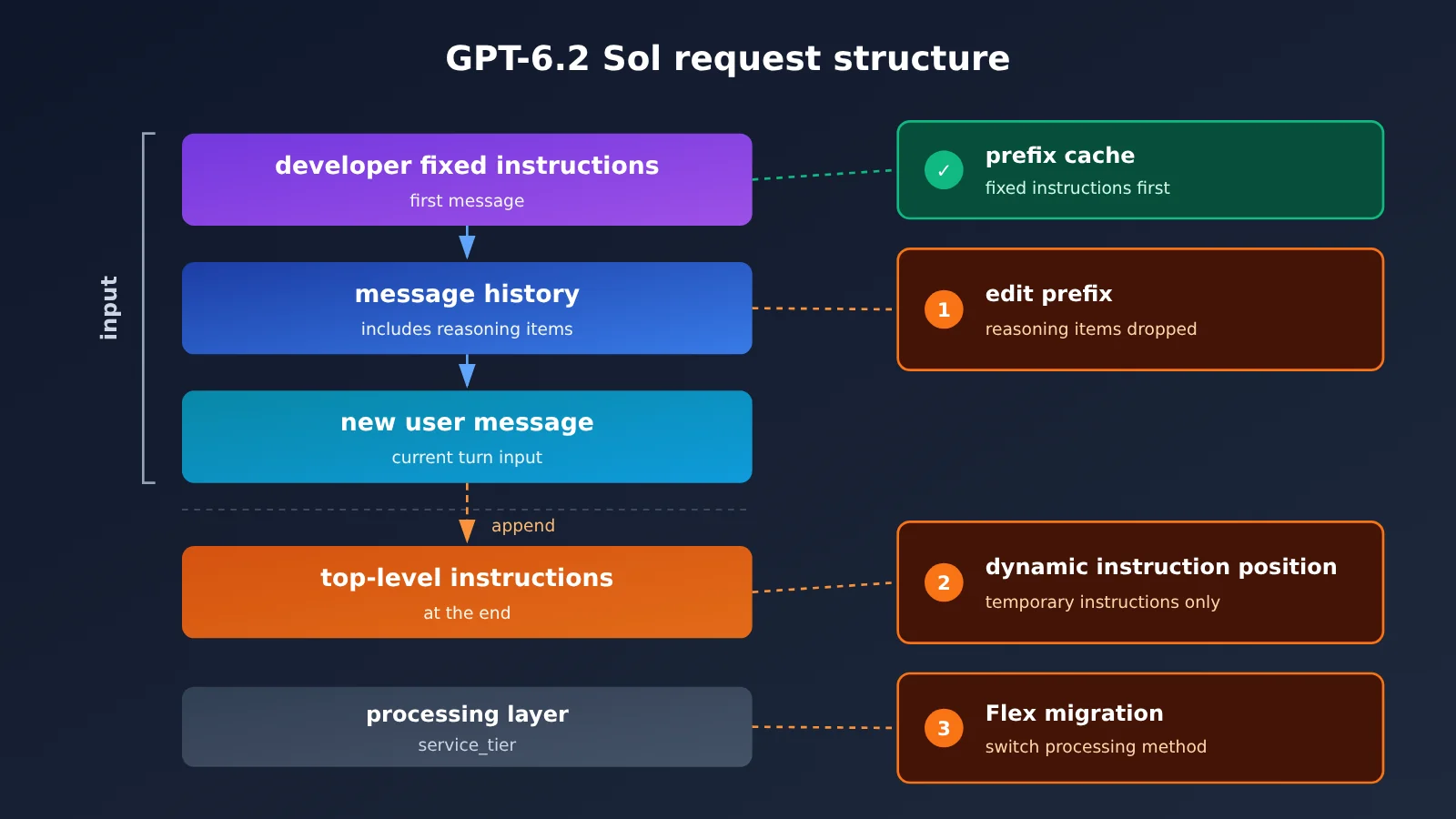
For multi-turn applications already running 6.1 Sol, the risks mostly fall into three areas. The diagram above shows the recommended structure for a GPT-6.2 Responses request. You can validate this structure directly through the responses endpoint at APIYI apiyi.com.
- Session prefix rewriting: When the GPT-6.2 Responses API edits an existing session prefix, switches between certain models, or switches end users or organizations, it drops previous reasoning items. If your system has logic that “rewrites history and then continues the conversation,” verify whether continuation quality and cache hits are affected.
- Instruction placement: GPT-6.2’s top-level
instructionsare appended afterinput. Fixed instructions that you need to reuse and want to hit the cache should go in the firstdevelopermessage ofinput; temporary instructions that change each time can still use top-levelinstructions. - Flex migration: See Section 1.3. Requests that originally used Flex need to select a different processing method.
In addition, neither endpoint accepts the none reasoning effort level. When replacing the model ID, you should also follow the official migration guide to check history rewriting, sampling parameters, reasoning effort, processing tier, and cached data.
3.1 Minimal Example: Calling GPT-6.2 Sol
Here’s a minimal verification using Chat Completions:
from openai import OpenAI

client = OpenAI(
    api_key="YOUR_API_KEY",
    base_url="https://api.apiyi.com/v1"  # APIYI's unified endpoint
)

resp = client.chat.completions.create(
    model="gpt-6.2-sol",
    messages=[{"role": "user", "content": "Explain what a conversation prefix cache is in three sentences."}]
)
print(resp.choices[0].message.content)
View the Responses API old-vs-new comparison code (fixed instructions up front + usage tracking)
from openai import OpenAI

client = OpenAI(
    api_key="YOUR_API_KEY",
    base_url="https://api.apiyi.com/v1"  # Both versions go through the same channel, keeping the comparison fair
)

STABLE_RULES = "You're a codebase assistant. Your answer must list the file paths involved, the callers, and the config switches."

def run(model: str, question: str, effort: str = "medium"):
    resp = client.responses.create(
        model=model,
        reasoning={"effort": effort},   # neither endpoint accepts none
        input=[
            # Put the fixed instructions in the first developer message of input — this helps prefix caching
            {"role": "developer", "content": STABLE_RULES},
            {"role": "user", "content": question},
        ],
        # Temporary instructions can go in the top-level instructions field; they get appended after input
        instructions="For this turn, only answer the parts related to the auth module.",
    )
    usage = resp.usage
    details = getattr(usage, "output_tokens_details", None)
    return {
        "model": model,
        "text": resp.output_text,
        "output_tokens": usage.output_tokens,
        "reasoning_tokens": getattr(details, "reasoning_tokens", None),
    }

for m in ["gpt-6.1-sol", "gpt-6.2-sol"]:
    r = run(m, "Where is the retry logic after a failed login implemented? Which configuration settings affect it?")
    print(r["model"], r["output_tokens"], r["reasoning_tokens"])
    print(r["text"][:300], "\n---")
🎯 Technical tip: When migrating a multi-turn app, keep a set of realistic “prefix unchanged, append-only messages” requests and send them to both generations, then compare the answers and the cached-read usage. APIYI apiyi.com lets you call both generations at the same time, which makes it easy to fold that comparison test into CI.
4. Task-Level Acceptance Testing Before Switching to GPT-6.2 Sol
The plan below is a test design based on the public evidence above—it’s not an official requirement. The core principle: everything except the model stays fixed, including the same API channel, reasoning level, input materials, tool list, timeout settings, and scoring rules, with 6.1 Sol kept as the control group.
| Task type | Trial-run priority | Key evidence | Acceptance criteria |
|---|---|---|---|
| Code modification | Priority trial | FrontierCode-AA 2.0 on par; cost and duration down | Test pass rate no lower than the previous version; cost per accepted deliverable down |
| Terminal / computer use | Priority trial | Terminal-Bench 4.1 +4 | Success rate and end-to-end duration P50, P95 |
| Routine analysis | Priority trial | Composite score up; Plotly duration and cost down | First-round acceptance rate, number of omissions |
| Codebase Q&A | Targeted acceptance | SWE-Atlas-QnA-AA -14 | Coverage of pre-annotated must-answer facts |
| Low-frequency complex analysis / hard cases | Targeted acceptance | Point loss on hidden-pattern questions in Plotly | Cost per accepted deliverable after re-review |
| Multi-turn workflows | Targeted acceptance | Dropped reasoning items; instruction placement changes | Result consistency after replay, history backfill, and failure recovery |
You can proceed with the checklist below:
- Codebase Q&A: For each question, pre-annotate the callers, configuration switches, branch conditions, and file paths that must be covered. Check each item for complete evidence—not just whether the answer “looks right.”
- Record metrics: By task type, record first-round acceptance rate, omissions, rework count, end-to-end duration, and model/tool usage. When you have enough samples, look at both P50 and P95.
- Calculate cost: Estimate cost per accepted deliverable as “total cost during the evaluation ÷ number of tasks that passed acceptance.” Include re-review and rerun costs in the total. 6.2 Sol is cheaper per run, but if rework on hard tasks increases, the accepted cost may actually go up.
- Scale-up decision: Only expand traffic for task types that meet all three thresholds—quality, cost per accepted deliverable, and latency. Those that don’t stay on 6.1 Sol until the next retest.
💰 Cost accounting tip: Unit prices must be the same on the same channel for the comparison to be meaningful. Run both model generations through APIYI apiyi.com with a single API key; bills are recorded separately by model, so you can use them directly to calculate cost per accepted deliverable.
GPT-6.2 Sol vs GPT-6.1 Sol: How to Choose
If your workload is mostly code edits, terminal agents, and run-of-the-mill analysis, 6.2 Sol is the faster, cheaper option at the same price point — switching is worth it. If codebase Q&A and hidden-pattern-style hard problems make up a large share of your traffic, or your business depends on Flex, run the dedicated acceptance test in Section 4 first; until the relevant metrics pass, you can keep routing that portion of traffic to 6.1 Sol. The deciding variable is your task mix: the higher the share of hard cases, the more likely 6.2 Sol’s price and speed advantages get eaten up by rework.
A good first step: grab the free trial quota for new users on APIYI apiyi.com, pick representative samples for each task type, and run a side-by-side comparison — then decide how much to switch based on the results.
References
- OpenAI announcement: GPT-6.2 Astra and Sol release notes plus GDPval v2 conclusions
- Link:
openai.com/index/introducing-gpt-6-2-astra-sol
- Link:
- OpenAI API model cards and pricing: specs, prices, and processing options for both Sol generations
- Link:
developers.openai.com/api/docs/models/gpt-6.2-sol - Link:
developers.openai.com/api/docs/pricing
- Link:
- GPT-6.2 usage guide: Responses behavior changes and migration checklist
- Link:
developers.openai.com/api/docs/guides/latest-model
- Link:
- Artificial Analysis: overall scores and Coding Agent Index sub-scores
- Link:
artificialanalysis.ai/agents/coding-agents/codex
- Link:
- Plotly DataAnalyticsBench: single-round comparison for 6.2 Sol and notes on failed cases
- Link:
plotly.com/blog/gpt-6-2-sol-plotly-data-analytics-bench
- Link:
Author: APIYI Technical Team
Technical discussion: feel free to reach us through the APIYI apiyi.com homepage. More integration docs are available at the docs.apiyi.com documentation center.