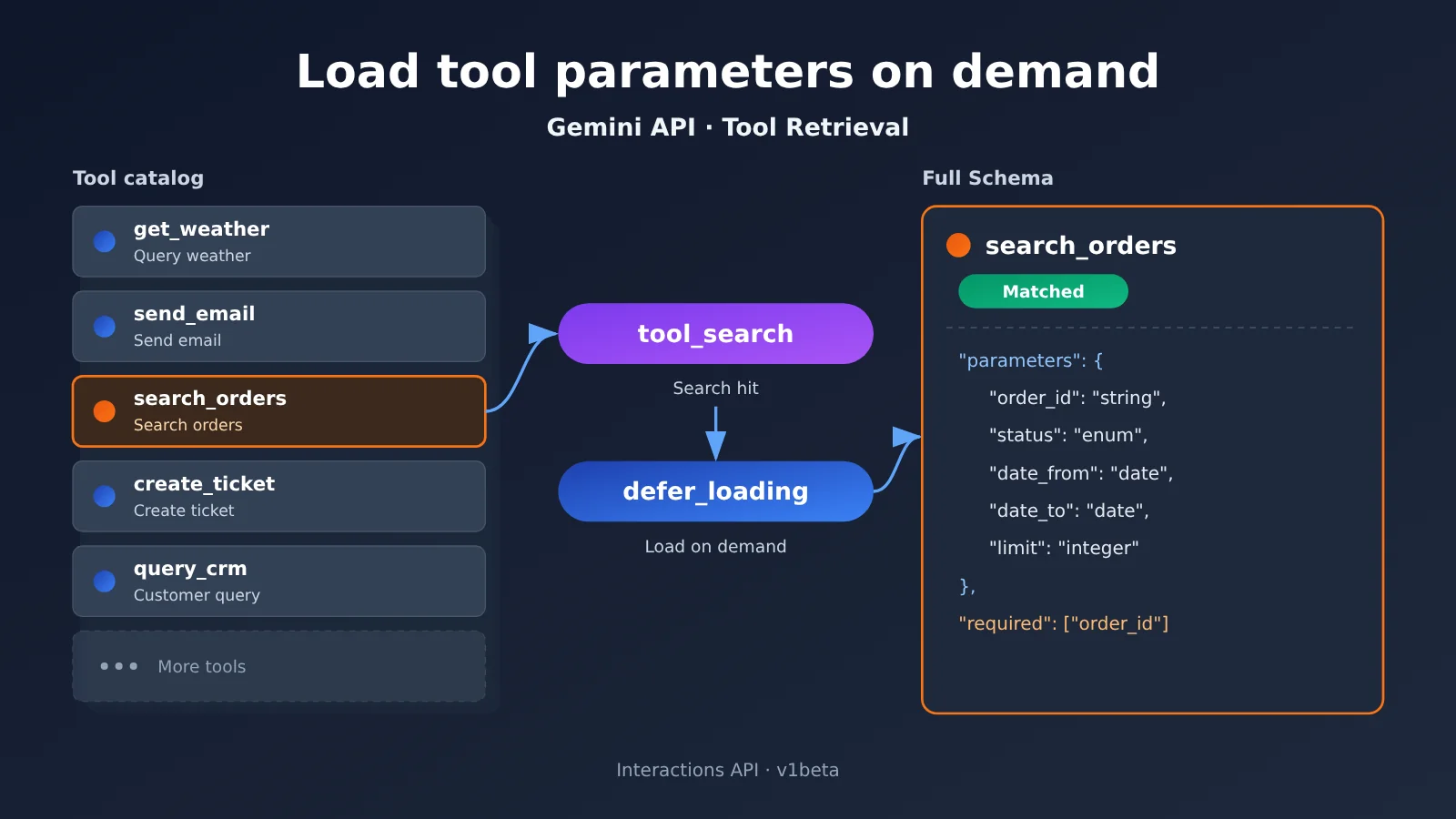
On November 19, 2026, Google launched Tool Retrieval in the Gemini Interactions API as a Preview feature. An agent can now see only each tool’s name and short description, and load the full parameter schema into context only when it actually needs to make a call. The feature mainly addresses the problem of “the more tools you connect, the more context gets eaten up by definitions for tools you aren’t using.” It’s best suited to agents with many tools, where calls cluster around a small set of high-frequency tools and there’s also a long tail of rarely used ones. It’s not something every app should turn on by default and expect to save money.
What will you learn from this article?
- What Tool Retrieval actually changes, and why “developers still have to submit full tool declarations” and “the model doesn’t have to read the full schema up front” can both be true
- The full execution chain from tool registration to
function_call, and how server-side retrieval and client-side retrieval divide the work - The four model IDs that are explicitly supported today, standard pricing, and what “no separate feature fee, but tokens are still billed as usual” means
- Two official illustrative calculations that point in opposite directions: when you save, and when it actually costs more
- Limits to be aware of before integration, and how to decide whether your agent is a good fit
Index: The rest of the article starts with a concept table and a quick impact overview to help you get oriented. The “Objective facts” section covers the release details, how it works, hybrid loading and remote MCP, supported models and cost, and usage limits, all based on Google’s official announcement and developer docs. The “Analysis and judgment” section offers an assessment of suitable use cases, a method for measuring a baseline before migration, and a few common questions; content that involves judgment or prediction is flagged separately.
Concepts to Know First for Gemini API Tool Retrieval
| Concept | Brief explanation |
|---|---|
| Tool Retrieval | Retrieve the tools you need first, then add the full parameter definitions of the matched tools to the model context |
| Interactions API | Gemini’s agent-facing interface that manages interaction history, tool execution steps, and model output; generally available since June 2026 |
| Parameter Schema | A structure describing which parameters a function accepts, what their types are, and which ones are required — usually expressed as JSON Schema |
| Function Calling | The model generates a function name and arguments, the application executes the function, then hands the result back to the model |
tool_search |
The tool type that declares the tool retrieval mechanism; the model uses it to look up and load tool definitions |
defer_loading |
A server-side mode setting that defers a tool’s full parameter definitions until a retrieval hit occurs |
short_description |
A short description of a deferred tool, used by the model to identify it in the initial catalog |
| Remote MCP | Tools provided outside the application by third-party services, connected through the Model Context Protocol |
| Implicit caching | The platform automatically reuses identical context prefixes, and the matched portion is billed at the cached input rate |
Gemini API Tool Retrieval Impact at a Glance
- Developers wiring lots of business tools into an agent: You can stop building your own tool retriever and just let the model read the schemas of dozens or even hundreds of tools on demand. That said, you still have to submit the full tool array on every request, and you’ll need to re-evaluate caching and billing. Before migrating, it’s worth measuring how much space your tool definitions actually take up using your existing Function Calling flow — a unified multi-model interface like APIYI apiyi.com is a quick way to spin up a comparison baseline.
- Product and cost owners: There’s no separate feature fee, but each server-side search triggers additional model inference. Whether you save money depends on tool count, context length, and search frequency — verify it against your billing fields, and don’t just follow the marketing narrative.
- Apps with few tools and stable calls: The official worked example shows that a small tool set combined with a long context actually increases total tokens, so loading tools directly remains the safer choice.
- Teams using agent frameworks: This is a new capability at the model API layer, and frameworks won’t necessarily adopt it right away. Don’t assume the progressive-loading problem at the framework level is already solved.
The Facts: What the Gemini API Tool Retrieval Release Actually Included
Release details and background for Gemini API Tool Retrieval
Google’s official blog published “Introducing Tool Retrieval in the Gemini API” on November 19, 2026. The authors were Lucia Loher, product manager for the Gemini API, and Nora Kassner, research scientist at Google DeepMind. The feature is currently in Preview and only works with the Interactions API; it requires the v1beta version. The older generateContent method doesn’t support it.
Engineering work landed before the announcement. On November 18, Google’s official Python SDK released v3.6.0, and the changelog noted that it added public schemas related to Tool Retrieval and function results. The Go SDK v1.79.0 also included corresponding updates the same day. Looking at the timeline, this was about adding tool discovery and load-on-demand capabilities to the already-GA Interactions API, not launching a new API product.
Developer demand is documented too. On March 18, 2026, a developer filed Issue #2185 in the Python SDK repository, requesting support for defer_loading and tool_search. The reason: once agents connect more than 30 tools, full schemas bloat the context. Google maintainers responded on March 20 and logged it as a feature request. These are demand feedback records, not performance tests.
In one sentence: Tools can be discovered first, and their specific parameters can be read later, only when they need to be called.
How Tool Retrieval Changes the Way Tool Schemas Are Loaded
Under traditional static loading, even if a user only wants to process a single refund, the parameter declarations for dozens of tools—orders, logistics, inventory, CRM, and so on—still enter the context with every inference. Google’s documentation notes that dozens of function declarations can take up tens of thousands of tokens. That eats into the space available for conversation history, and when there are many similar tools, it can also make it harder for the model to choose the right one.
The key to Tool Retrieval is separating three layers:
- API request layer: Developers still submit complete tool definitions as usual, including parameter schemas.
- Model’s initial context: Tools marked
defer_loading: trueappear only as a name plus ashort_description. If no short description is configured, the first sentence of the fulldescriptionis used. - Tool invocation stage: Once a tool is retrieved and matched, the full schema enters the context, and the model uses it to generate a parameterized call.
So when the title says “no longer loading all tool parameters every time,” the accurate meaning is that the model no longer reads all full parameter declarations in advance on every turn—not that developers no longer need to send the full declarations. In server-side mode, the official docs require you to resubmit the complete tools array on every request, even when using previous_interaction_id.
The Tool Retrieval Execution Chain: An Official Refund Example
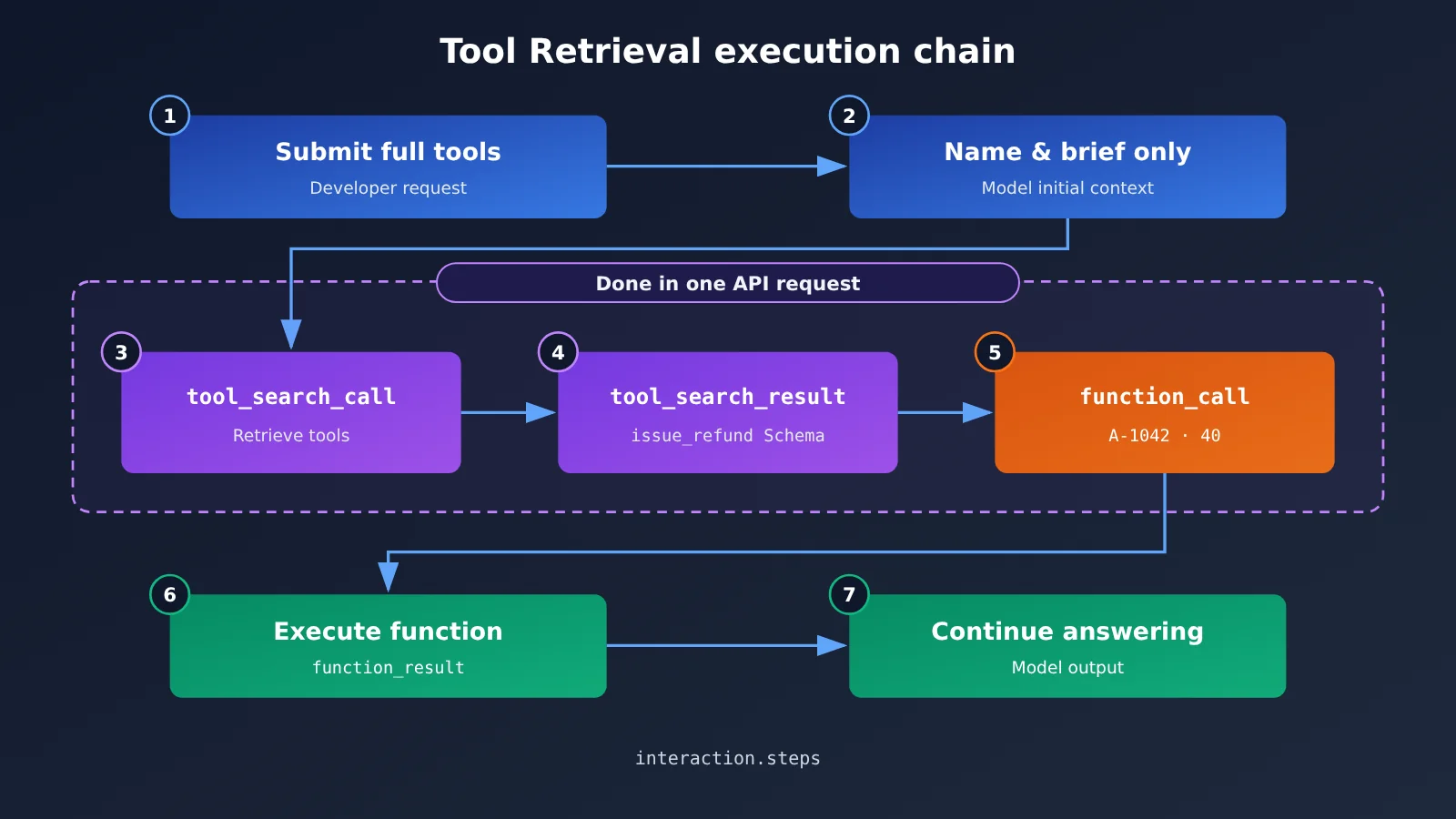
Google’s announcement used an order refund scenario: the item in order A-1042 arrived damaged, the user asks for a $40 refund, and the tool needed is issue_refund. The full server-side retrieval process looks like this:
- Declare
{"type": "tool_search"}in the request, and setdefer_loading: trueon low-frequency tools such asissue_refund. - The model determines from the task that it needs refund capability and issues a
tool_search_call. - The API returns a
tool_search_resultcontaining the full parameter schema forissue_refund. - The model reads the parameter definitions and generates a
function_callwith parametersorder_id: "A-1042"andamount: 40. - The application executes the function and sends back a
function_result; the model uses it to continue completing the task.
Search, loading, and function call generation can all happen within the same external API request, and every step can be seen in interaction.steps. But note: being in the same request doesn’t mean there’s only one internal inference. Each server-side search triggers an additional billable model invocation. Also, this is a demo case and doesn’t represent any refund success-rate statistics.
Below is sample code based on the official docs, connecting directly to the Google endpoint, solely to show the request structure:
from google import genai

client = genai.Client(http_options={"api_version": "v1beta"})

tools = [
    {"type": "tool_search"},
    {
        "type": "function",
        "name": "issue_refund",
        "description": "Refund an order.",
        "short_description": "Refund a customer order.",
        "defer_loading": True,
        "parameters": {
            "type": "object",
            "properties": {
                "order_id": {"type": "string"},
                "amount": {"type": "number"}
            },
            "required": ["order_id", "amount"]
        }
    }
]

interaction = client.interactions.create(
    model="gemini-4-hydrogen",
    input="Refund 40 USD for order A-1042.",
    tools=tools
)
for step in interaction.steps:
    print(step.type)  # tool_search_call / tool_search_result / function_call
The division of responsibilities in Function Calling hasn’t changed. For custom functions, the API only returns a function_call; executing the refund, accessing the database, and handling permissions are still the application’s job. Only when connecting to a remote MCP server does the API make the remote call on your behalf and return mcp_server_tool_call and mcp_server_tool_result.
Hybrid Loading for Tool Retrieval, Remote MCP, and Two Retrieval Modes
Google recommends a hybrid approach: load high-frequency tools directly, and defer low-frequency, specialized long-tail tools. That way, simple tasks don’t need to run a search first, and long-tail capabilities don’t take up context all the time. You can also set an entire remote MCP server to load lazily. For example, add defer_loading: true to a type: "mcp_server" configuration, and the tools exposed by that server will load on demand instead of being declared one by one.
In addition to the server-side mode where Gemini handles retrieval, the official docs also offer a client-side mode: you declare a tool_search with execution: "client", have your own application query the tool registry, then put the matching full tool declarations into function_result.result and return them to the model. Here’s how the two compare:
| Comparison dimension | Server-side retrieval | Client-side retrieval |
|---|---|---|
| Execution location | Gemini API server side (default server) |
Developer application (client) |
| Requires a custom retriever | No | Yes |
| Requires declaring the tool library upfront | Yes | No — new tools can be introduced during the session |
defer_loading |
Applies | Does not apply |
| Extra network round trips | No extra client round trips | One extra round trip per search |
| Permission control | Determined by the tool set declared in the request | Can be combined with your own user-level permission filtering |
| Typical use cases | Large, relatively fixed tool collections | Dynamic tool libraries, multi-tenant setups, enterprise private registries |
In client-side mode, the returned function declarations should be structured objects — don’t convert them into JSON strings. You can’t mix the two modes in the same request, and you can declare at most one tool_search.
Which models does Gemini API Tool Retrieval support, and what’s the pricing?
Google’s announcement is pretty broad—it says Gemini 3.6 and newer models are all supported, including every Gemini 4 model. But as of November 20, the developer docs explicitly list only 4 model IDs. In practice, you should go by the developer docs: setting defer_loading on an unsupported model returns HTTP 400.
| Model ID | Standard input price (USD per million Tokens) | Standard output price (including Thinking) | Notes |
|---|---|---|---|
gemini-4-hydrogen |
$1.50 | $7.50 | Marked as Free Tier |
gemini-4-argon |
$2.00 ($4.00 starting December 1) | $10.00 ($20.00 starting December 1) | No Free Tier |
gemini-3.8-flash |
$0.75 ($1.50 starting January 1, 2027) | $3.75 ($7.50 starting January 1, 2027) | Marked as Free Tier |
gemini-3.6-flash |
$0.75 ($1.50 starting January 1, 2027) | $3.75 ($7.50 starting January 1, 2027) | Marked as Free Tier |
The prices come from the Standard tier on the Google Gemini Developer API pricing page. The actual quotas and rate limits for the Free Tier need to be confirmed per project.
On billing, Google explicitly says Tool Retrieval has no separate feature fee, but that doesn’t mean search is free. The short-description list for deferred tools, the fixed search instructions added when you enable tool_search, the extra reasoning for each server-side retrieval, the full schema that gets loaded, and how it’s retained in later turns—all of these are billed as Tokens at the rates of the model you’re using. When watching costs, pay close attention to the total_tool_use_tokens field, which records the extra model invocation input triggered by server-side search. If you only look at the drop in first-call input Tokens, it’s easy to overestimate the savings.
Google’s Official Token Example Calculations for Tool Retrieval
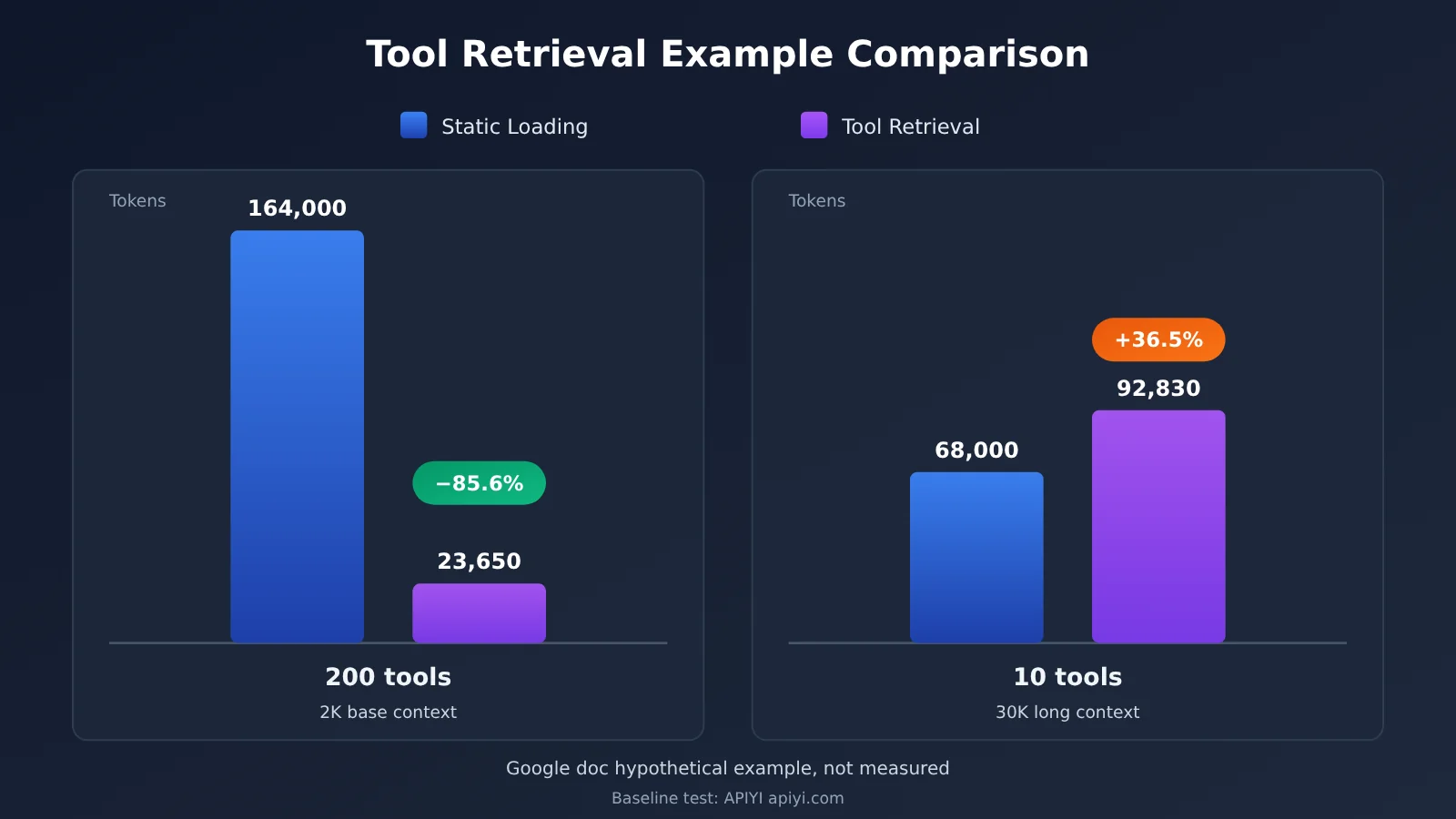
Official early tests show that each deferred tool occupies about 26 tokens on average in the initial catalog. This is an approximation, not a fixed overhead. The documentation also gives two hypothetical example calculations, and the conclusions point in opposite directions:
| Scenario (official assumption) | Static loading of all tools | Tool Retrieval | Change |
|---|---|---|---|
| 200 tools, 400 tokens each, base context 2,000, 2 tools used, 2 requests total | 164,000 | ~23,650 | Reduction of ~85.6% (calculated from the example) |
| 10 tools, 400 tokens each, base context 30,000, 2 tools used, 2 requests total | 68,000 | 92,830 | Increase of ~36.5% (calculated from the example) |
The second example costs more because the server-side search needs an extra inference pass and has to reprocess an already-long context, while the 10 tools themselves don’t take up much space—the schema savings can’t offset the search overhead. Both sets of numbers are hypothetical examples that Google explicitly labels as such; they don’t include output tokens or caching benefits, and they aren’t production benchmarks. As of the date these materials were reviewed, Google has not published measured token savings, latency improvements, or tool-selection accuracy gains for this feature.
On caching, Google says Tool Retrieval supports implicit caching: the full schema doesn’t appear in the initial prefix, so prefixes such as system instructions and the tool catalog are easier to keep stable. But the documentation also cautions that deferred loading makes the initial prompt shorter—requests that previously relied on a large number of schemas to reach the minimum caching threshold may now fall below it.
Current limitations when using Tool Retrieval
These points come from the official docs and are the easiest places to get tripped up during development:
- Loaded tools can’t be unloaded: Once a schema is retrieved, it stays in the current session. If you keep retrieving new tools in a long session, the context will continue to grow.
- Every request resubmits the full tool array: This includes
tool_search, all deferred and non-deferred tools, and the related MCP configuration. You can’t send onlynameandshort_descriptionwhile omittingparameters. - Don’t defer tools explicitly named in system instructions: The model may bypass search and call them directly, leading to errors from missing loaded context.
- Stateless sessions must preserve the full retrieval steps: When you use
store=falseand manage history yourself,tool_search_call,tool_search_result, and theirsignaturemust not be deleted or modified; otherwise, you may get HTTP 400. - Debugging should look at steps: Even when
interaction.statusisn’trequires_action, the result may still contain afunction_callwaiting to be executed. - A miss may return text: When server-side search can’t find a matching tool, it won’t necessarily return a structured error.
Analysis: What Gemini API Tool Retrieval means for Agent development
When Tool Retrieval Makes Sense
The real value of this update is separating two things: “maintaining a complete tool list” and “reading that whole list every round of inference.” The tool library can keep expanding, while only a thin directory lives permanently in the model’s context. For teams that continuously integrate new business systems, this eases the burden of pre-trimming tool sets — and cuts down on the need to dynamically filter tools on the application side each round just to control Tokens, which would otherwise break the cache prefix.
That said, the official worked example already shows the benefits come with conditions. Combined with the official engineering advice, you can use the table below for a quick initial judgment (this is an engineering recommendation for choosing, not a hard numerical threshold):
| Agent type | Tool characteristics | Recommendation |
|---|---|---|
| Customer service, business process assistants | Dozens of tools, a few query-type ones used frequently, low-frequency ones like refunds, approvals, contracts | Load high-frequency tools directly, retrieve the long tail via server-side |
| R&D/ops Agents with multiple MCP servers | Each server has many tools, a single task uses only a small subset | Set defer_loading for the entire MCP server |
| Multi-tenant platforms that expose tools by permission | Tool sets vary by user and workspace | Client-side retrieval, combined with a self-built registry and permission filtering |
| Small assistants | Fewer than ~20 stable tools, most used every round | Keep static loading |
| Long context + frequent search | Very long conversations, often several retrievals per round | Test before deciding; there’s a risk of net cost increase |
Our take: the more “long-tail” the tool invocation distribution, the more Tool Retrieval is worth using. Conversely, if most tools are used every round, lazy loading just adds one extra search inference.
Before You Migrate to Tool Retrieval, Measure What Tool Schemas Actually Cost You
The most reliable basis for deciding whether to migrate is your own business data. Before making the switch, you can use your existing OpenAI-compatible function calling flow to measure the input token gap between two kinds of requests — “all tools” and “only the tools actually in use” — and get the real footprint of your tool schemas. The script below does that baseline measurement; it isn’t Tool Retrieval itself:
import openai

client = openai.OpenAI(
    api_key="YOUR_API_KEY",
    base_url="https://api.apiyi.com/v1"  # APIYI OpenAI-compatible endpoint, used to measure the static-loading baseline
)

def make_tool(name, desc):
    return {"type": "function", "function": {
        "name": name, "description": desc,
        "parameters": {"type": "object",
                       "properties": {"order_id": {"type": "string"}},
                       "required": ["order_id"]}}}

all_tools = [make_tool(f"crm_tool_{i}", f"CRM operation {i}") for i in range(50)]
messages = [{"role": "user", "content": "查询订单 A-1042 的状态"}]

for label, tools in [("全量 50 个工具", all_tools), ("仅 1 个工具", all_tools[:1])]:
    resp = client.chat.completions.create(
        model="your-model-id", messages=messages, tools=tools)
    print(label, "prompt_tokens =", resp.usage.prompt_tokens)
View the full baseline measurement script (batch comparison by tool count)
import json
import openai

client = openai.OpenAI(
    api_key="YOUR_API_KEY",
    base_url="https://api.apiyi.com/v1"  # Measure tool schema overhead across different models via APIYI's unified endpoint
)

def load_tools(path: str) -> list:
    """Read OpenAI-format tool definitions from the business tool registry (JSON file)"""
    with open(path, "r", encoding="utf-8") as f:
        return json.load(f)

def measure(model: str, tools: list, prompt: str) -> int:
    resp = client.chat.completions.create(
        model=model,
        messages=[{"role": "user", "content": prompt}],
        tools=tools if tools else None,
        max_tokens=16,
    )
    return resp.usage.prompt_tokens

def baseline_report(model: str, tools: list, prompt: str, steps=(0, 10, 20, 50, 100)):
    base = measure(model, [], prompt)
    print(f"无工具基础输入: {base} tokens")
    for n in steps:
        if n == 0 or n > len(tools):
            continue
        used = measure(model, tools[:n], prompt)
        print(f"{n:>4} 个工具: {used} tokens, Schema 约占 {used - base} tokens")

if __name__ == "__main__":
    tools = load_tools("tool_registry.json")
    baseline_report("your-model-id", tools, "查询订单 A-1042 的状态")
🎯 Technical recommendation: Before evaluating Tool Retrieval, run the static-loading baseline across several mainstream models with one API key through APIYI apiyi.com, and see exactly how many tokens tool schemas eat up in your requests. Once you have that baseline, turn on
tool_searchin the Gemini Interactions API for a side-by-side comparison, and compare the sum oftotal_input_tokensandtotal_tool_use_tokens.
One thing worth clarifying: Tool Retrieval relies on the v1beta version of the Interactions API and its dedicated fields, while the OpenAI-compatible calls above are only there to measure static-loading overhead. In your comparison tests, keep the model, tool library, task set, context length, and caching conditions identical, then compare total billed cost, end-to-end latency, correct-tool selection rate, and average number of searches — that’s how you attribute the differences to the retrieval strategy. And if you want to see baseline differences across models side by side in the same set of scripts, APIYI apiyi.com’s unified endpoint saves you the trouble of integrating each provider one by one.
Worth Watching Next (Predictive Assessment)
The following are judgments, not confirmed facts.
First, the announcement and developer docs differ on the supported model scope. Whether models such as Gemini 4 Carbon and Gemini 4 Neon will enter the compatibility list is something to watch in documentation updates. Second, “loaded Schemas can’t be unloaded” is an obvious weakness for long-session agents. Whether the GA release offers an unload or eviction mechanism will directly affect how it performs in long tasks. Third, Google ADK users previously reported issues with progressive loading and cache invalidation in Issue #7241. Just because the model API supports a new capability doesn’t mean the framework will adopt it automatically; the pace of framework-level adaptation is worth following.
The idea of loading tool definitions on demand has precedent in the industry; Google is essentially adding it to Gemini’s agent interface. Because interfaces may change during Preview, production integrations should keep a switch to fall back to static loading.
A Few Common Questions About Gemini API Tool Retrieval
Q1: If I enable Tool Retrieval, will the request body get smaller?
No. In server-side mode, each request still submits the full tool array; what gets smaller is the tool footprint in the model’s initial context. If you want to calculate the size of tool definitions in your existing requests first, you can use the script above to measure a baseline through APIYI (apiyi.com).
Q2: Does Google officially say it can save 85%?
There’s no such tested conclusion. 85.6% is extrapolated from a hypothetical example with 200 tools, and the same document also gives a counterexample where token usage increases by about 36.5% for a small tool set.
Q3: Is Tool Retrieval charged?
There’s no separate feature fee, but search instructions, extra reasoning, and loaded Schemas are all billed as tokens at model rates. Budget-sensitive teams can first run small-scale, pay-as-you-go tests of Function Calling costs across different models through APIYI (apiyi.com), then decide the model choice for their agent.
Q4: With Tool Retrieval, do I no longer need to execute functions myself?
No. Custom functions are still executed by the application, which sends results back; Tool Retrieval only finds and loads tool definitions. Only remote MCP tools are called by the API on your behalf.
Tool libraries will keep getting bigger, but each round usually needs only a few of them. Tool Retrieval separates “having all the tools ready” from “grabbing them when needed.” Used well, it can make large agents lighter; used poorly, it may add the cost of an extra reasoning round. As The Analects (Book XV, Duke Ling of Wei) puts it: “A craftsman who wishes to do his work well must first sharpen his tools.” First measure the weight of each “tool” in your hand, then decide how to arrange them.
📚 References
-
Official Google announcement: Introducing Tool Retrieval in the Gemini API (2026-11-19)
- Link:
blog.google/innovation-and-ai/technology/developers-tools/gemini-api-tool-retrieval - Notes: launch details, design goals, the two retrieval modes, and pricing principles
- Link:
-
Google Tool Retrieval developer docs: configuration, limits, billing, and worked examples
- Link:
aistudio.google.com/docs/tool-retrieval - Notes: supported model list, Usage fields, best practices, and common errors
- Link:
-
Gemini Developer API pricing: standard model prices and caching rates
- Link:
aistudio.google.com/docs/pricing - Notes: input and output unit prices per model, plus effective dates
- Link:
-
Interactions API docs: what the interface is for and how execution works
- Link:
aistudio.google.com/docs/interactions-overview - Notes: stateful conversations, the steps structure, and how it differs from generateContent
- Link:
-
Google Python SDK v3.6.0 and Issue #2185: engineering evidence and a record of developer demand
- Link:
github.com/googleapis/python-genai/releases/tag/v3.6.0 - Link:
github.com/googleapis/python-genai/issues/2185 - Notes: public schema updates in the SDK and early community requests
- Link:
Author: APIYI Technical Team
Get in touch: Feel free to reach us through the APIYI apiyi.com homepage — more integration docs are available at the docs.apiyi.com documentation center