Author’s note: This article is for everyday DeepSeek users. It explains how to find the source of a “server busy” error and what temporary alternatives are available.
On the afternoon of November 3, 2026, several users posted in quick succession on the tech community V2EX. Their titles were blunt: “DeepSeek is down” and “Is DeepSeek down yet again?” The posts contained just one familiar message: The server is busy. Please try again later. Several similar posts appeared within minutes, suggesting this wasn’t an isolated issue.
This isn’t an engineering article about writing code. It’s a practical guide for everyday users. Whether you use the website, the app, or a third-party chat client, there are two things you need to do when you see this message: first, figure out whether the problem is on your end, then decide whether to wait or switch.
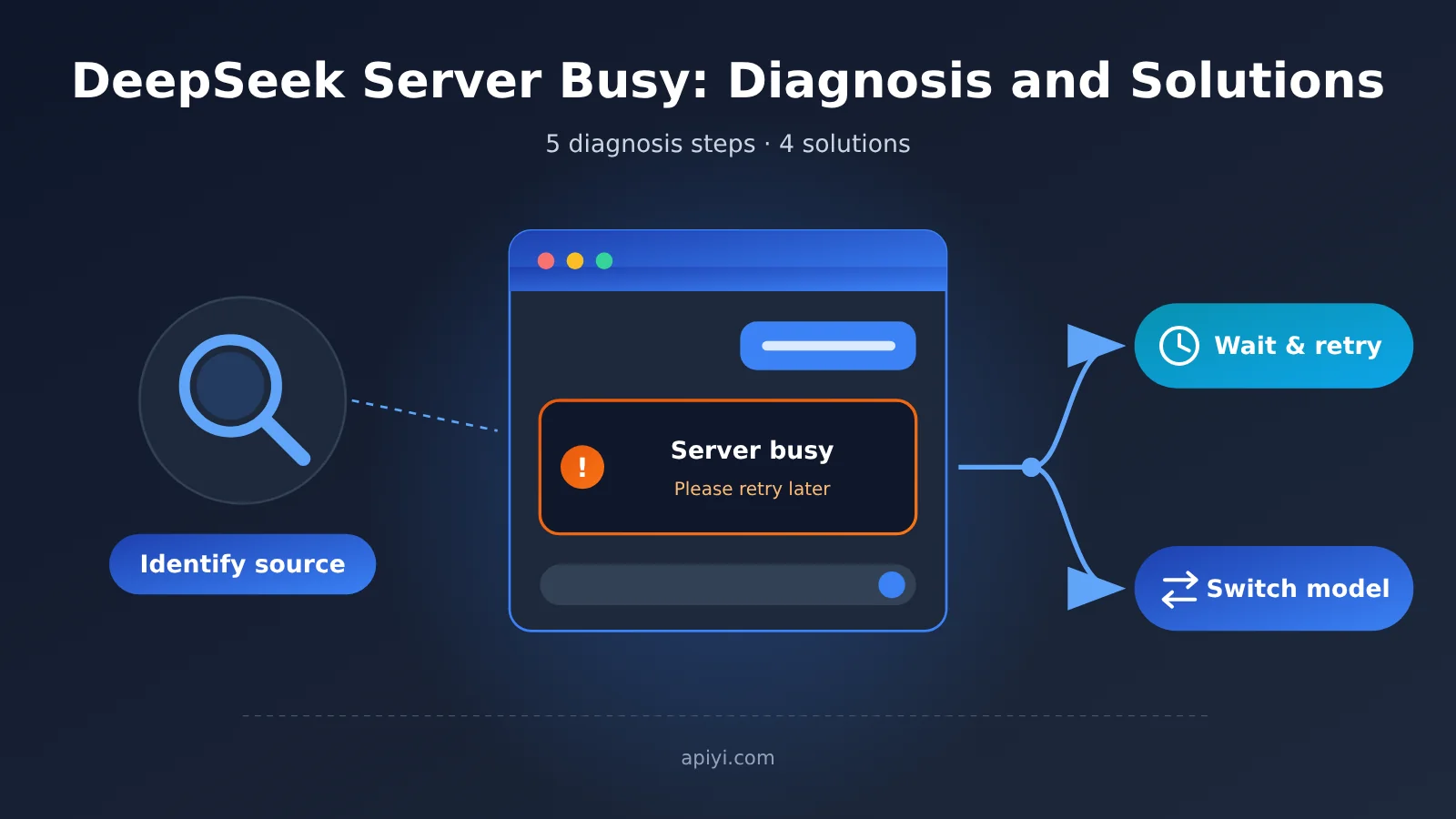
What you’ll learn: This article walks you through 5 steps to quickly identify the source of a DeepSeek server busy error, plus 4 temporary ways to keep your work moving. These include using a multi-model platform like APIYI apiyi.com to switch to a backup model in your client.
DeepSeek Server Busy: Key Takeaways
Before you start troubleshooting, here’s a quick summary of the key points. Bookmark this table so you can refer to it the next time you run into the issue.
| Key point | What it means | Why it matters |
|---|---|---|
| What the message means | “Server is busy” usually points to a server load or availability issue, not a banned account | Helps you avoid repeatedly logging in or clearing your cache in a panic |
| Check the scope first | Figure out whether it’s just you or everyone | Helps you decide whether to troubleshoot or wait |
| Community reports are the quickest signal | Multiple similar posts appearing at the same time suggest a widespread issue | Lets you reach a conclusion within minutes |
| Weigh waiting against switching | Wait for a brief outage; switch models for urgent tasks | Helps you choose based on urgency rather than waiting indefinitely |
| Check the results after switching | Models differ in style, length, and formatting habits | Prevents a drop in the quality of your work |
What Does the DeepSeek Server Busy Message Mean?
“Server is busy, please try again later” generally means the server received your request but can’t handle it at the moment. Common causes include a sudden surge in traffic, server maintenance, or a partial outage. This is different from messages like “Network connection failed” or “Login expired”: a busy-server message is usually unrelated to your device, while the others are more likely to require action on your end.
The community post referenced here only recorded the error message. It didn’t say whether the issue occurred on the website, in the app, or during an API call, and there was no corresponding official announcement. So we won’t draw a firm conclusion about the cause. Instead, we’ll offer an approach you can reuse whenever this happens.
How to Tell a DeepSeek Server Issue From a Local Problem
Many people’s first reaction is to wonder whether their internet connection is down, their account has a problem, or their browser cache is corrupted. Those possibilities do exist, but they usually produce different messages. If other websites open normally and DeepSeek explicitly returns “Server is busy,” your own network is less likely to be the problem.
Third-party clients can make things less clear. If you use DeepSeek through an API in a chat client, the error could come from DeepSeek itself or from the API service, usage quota, or key you’ve configured. In that case, read the full error message and use the steps below to narrow it down.
DeepSeek Server Busy: 5 Steps to Identify the Source
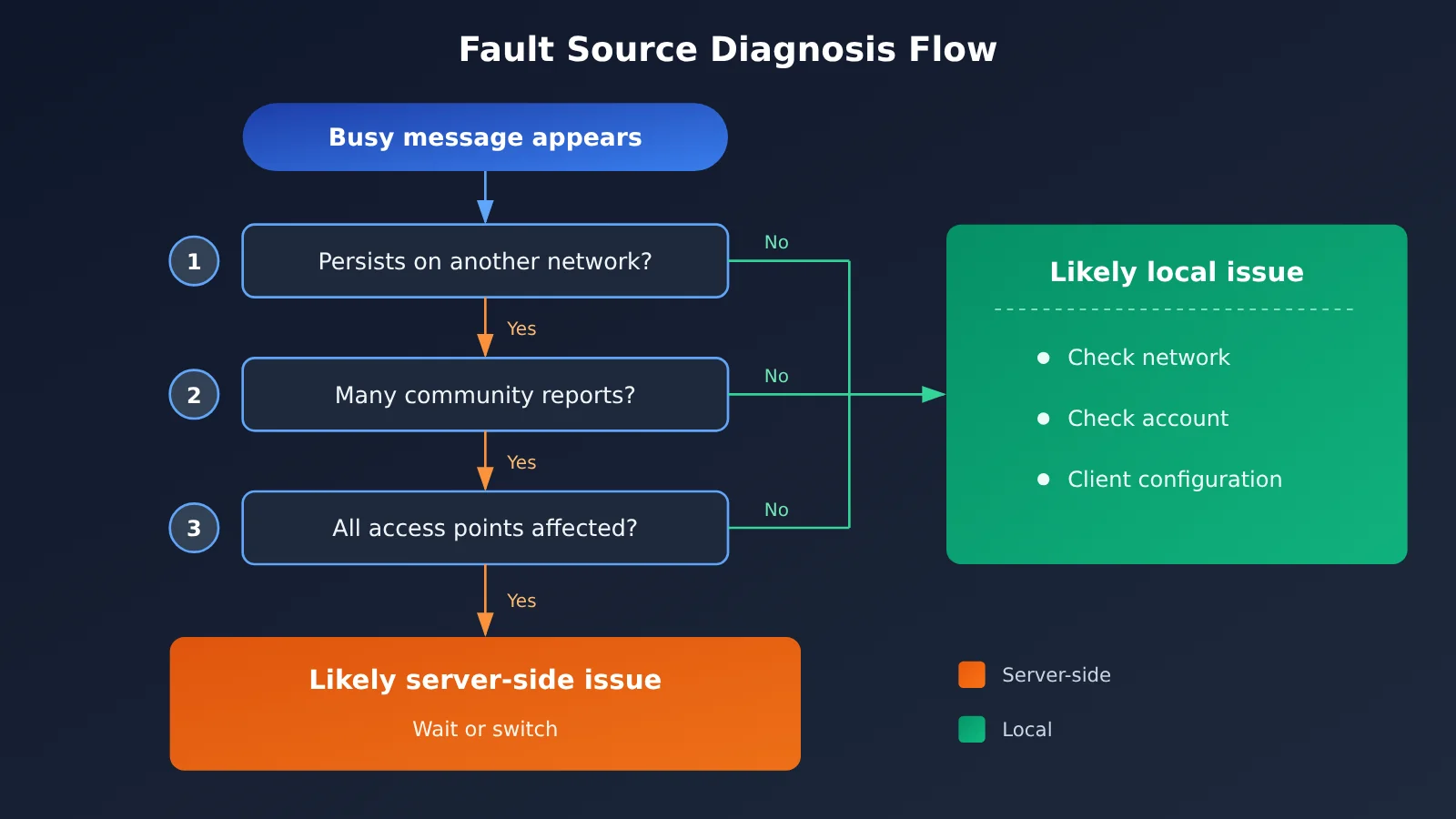
These five steps work from the closest possible cause outward: start with your own devices, then check external sources. Once you’re familiar with the process, it takes just a few minutes.
- Refresh or resend once: Wait a few seconds, then resend the same message. A single retry can often resolve temporary congestion. Don’t keep clicking Send—repeated submissions will only make the queue longer.
- Try another network or device: Switch your phone from Wi-Fi to mobile data, or try both your computer and phone. If every device and network shows the same error, the problem is probably not on your end.
- Compare different access points: If you use the web version, the app, and third-party clients, check them against one another. If only one is having trouble, investigate that access point first—for example, check the client’s API configuration.
- Check community feedback: Search for “DeepSeek” or “server busy” on communities you use, such as V2EX, Weibo, or Jike. Sort by time and look at recent posts. During this incident, several similar posts appeared within minutes on the afternoon of November 3—a clear sign of a widespread issue.
- Watch official channels: Check DeepSeek’s official WeChat account, social media accounts, or status information for an update. Whether the team responds or provides an estimated recovery time can help you decide whether to wait or switch.
Use the table below to quickly identify which situation fits.
| What you observe | More likely cause | Recommended action |
|---|---|---|
| Every device and network reports “server busy” | Server load or outage | Check community reports, then wait or switch models |
| Only one device has a problem | Local network, browser, or app version | Clear the cache, update the app, or try another browser |
| Only a third-party client has a problem; the official website works | Client configuration, key, or quota | Check the API endpoint and key in the client |
| The official website has a problem; third-party clients work | The web service and API service have different statuses | Temporarily use an available access point |
| Lots of community complaints at the same time | Widespread outage | Don’t spend time troubleshooting locally; assess how urgent your task is |
🚀 Quick tip: If you regularly rely on AI for work, set up a backup model in a chat client ahead of time. For example, you can connect APIYI apiyi.com to a client such as Cherry Studio or ChatGPT Next Web and use one key to access multiple popular models. That way, you won’t have to rush to register new accounts when DeepSeek is unavailable.
4 Temporary Workarounds When DeepSeek’s Servers Are Busy
Once you’ve figured out what’s going on, the real question is: “How do I get my work done?” The four methods below are ordered from lowest effort to most preparation. You can combine them to suit how you work.
Method 1: Retry at Intervals Instead of Refreshing Repeatedly
If your task isn’t urgent, the simplest option is to wait. Try again every few minutes rather than hitting send every few seconds. Peak-hour congestion usually eases as traffic drops. Frequent retries waste your time and won’t get you through the queue any faster.
While you’re waiting, try shortening your prompt. Long inputs and requests with large file attachments are more likely to fail when servers are busy. Breaking your question into smaller parts and asking about the essentials first can improve your chances of success.
Method 2: Use Off-Peak Hours and Simplify Requests
A common observation in the community is that busy messages are more likely during peak hours, such as weekday daytime. If your task is flexible—organizing study notes or polishing a non-urgent document, for example—try moving it to a quieter time.
Some chat products also offer reasoning modes that require more computing resources. During busy periods, you can try using the standard mode for simple tasks and save questions that need deeper reasoning until the service recovers. This may reduce the chance of failure, but there’s no guarantee it’ll work.
Method 3: Switch to Another Model in Your Client
If you’re working against a deadline, waiting isn’t a great option. The most practical approach is to temporarily switch to another model and keep going. If you’re already using a multi-model chat client such as Cherry Studio or ChatGPT Next Web, switching usually means selecting a different option from the model dropdown.
These clients don’t provide models themselves, so you’ll need to connect them to an API service. With a multi-model aggregation platform like APIYI at apiyi.com, one API key can give you access to models from multiple providers. You can use DeepSeek day to day and temporarily switch to another model during an outage, while keeping your chat history and familiar prompts in the same client. For setup instructions, including how to enter the API endpoint and which models are available, refer to the APIYI documentation at docs.apiyi.com. Setting names may also vary slightly between clients.
It’s important to note that switching models only bypasses the currently unavailable service—it doesn’t “fix” DeepSeek itself. If DeepSeek’s servers are busy across the board, calls to DeepSeek may be affected regardless of the access channel. The step that makes the difference is switching to another model.
Method 4: Prepare an Offline Fallback Plan
For heavy users, preparing ahead is better than scrambling for an alternative. Keep your frequently used prompts and role descriptions in a document so you can paste them into any tool. If your role relies heavily on AI, you can also agree on a list of backup tools with your team.
The table below helps you weigh waiting against switching.
| Approach | Best for | Advantages | Things to consider |
|---|---|---|---|
| Retry at intervals | Non-urgent tasks when the outage may be brief | No extra cost; output style stays consistent | Recovery time is unpredictable |
| Use during off-peak hours | Tasks with flexible timing | Reduces the chance of encountering a busy service again | Not suitable for urgent tasks |
| Switch to another model | Work with a deadline | Keeps work moving with minimal interruption | Output style and quality may differ |
| Offline fallback plan | Long-term, heavy use | Helps you respond quickly to any outage | Takes time to prepare |
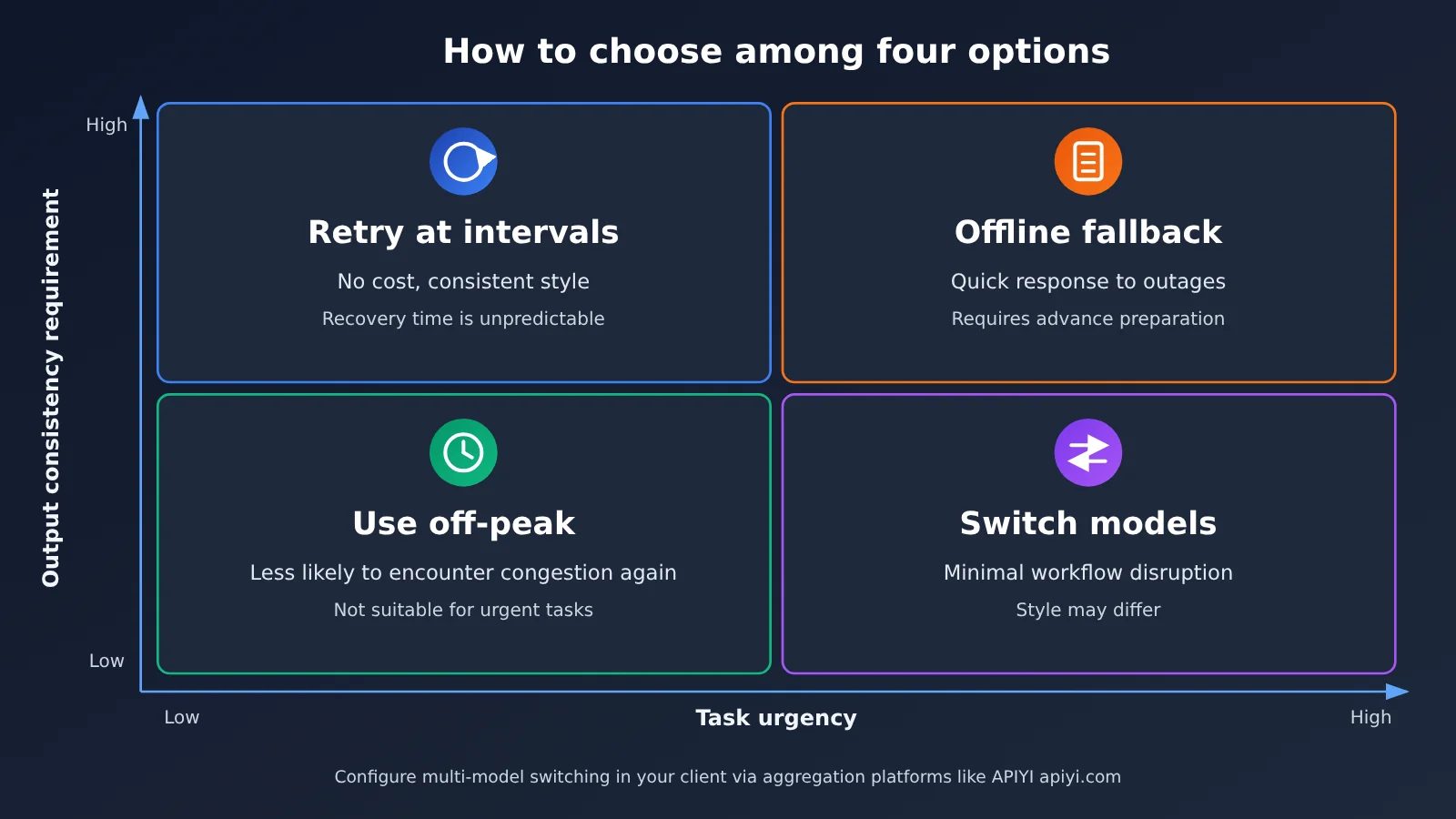
💡 How to choose: Focus on two things: how urgent the task is and how much output style consistency matters to you. If it’s urgent and style isn’t critical, switch models. If it can wait or consistency is essential, wait.
What to Check After Switching Models When DeepSeek’s Server Is Busy
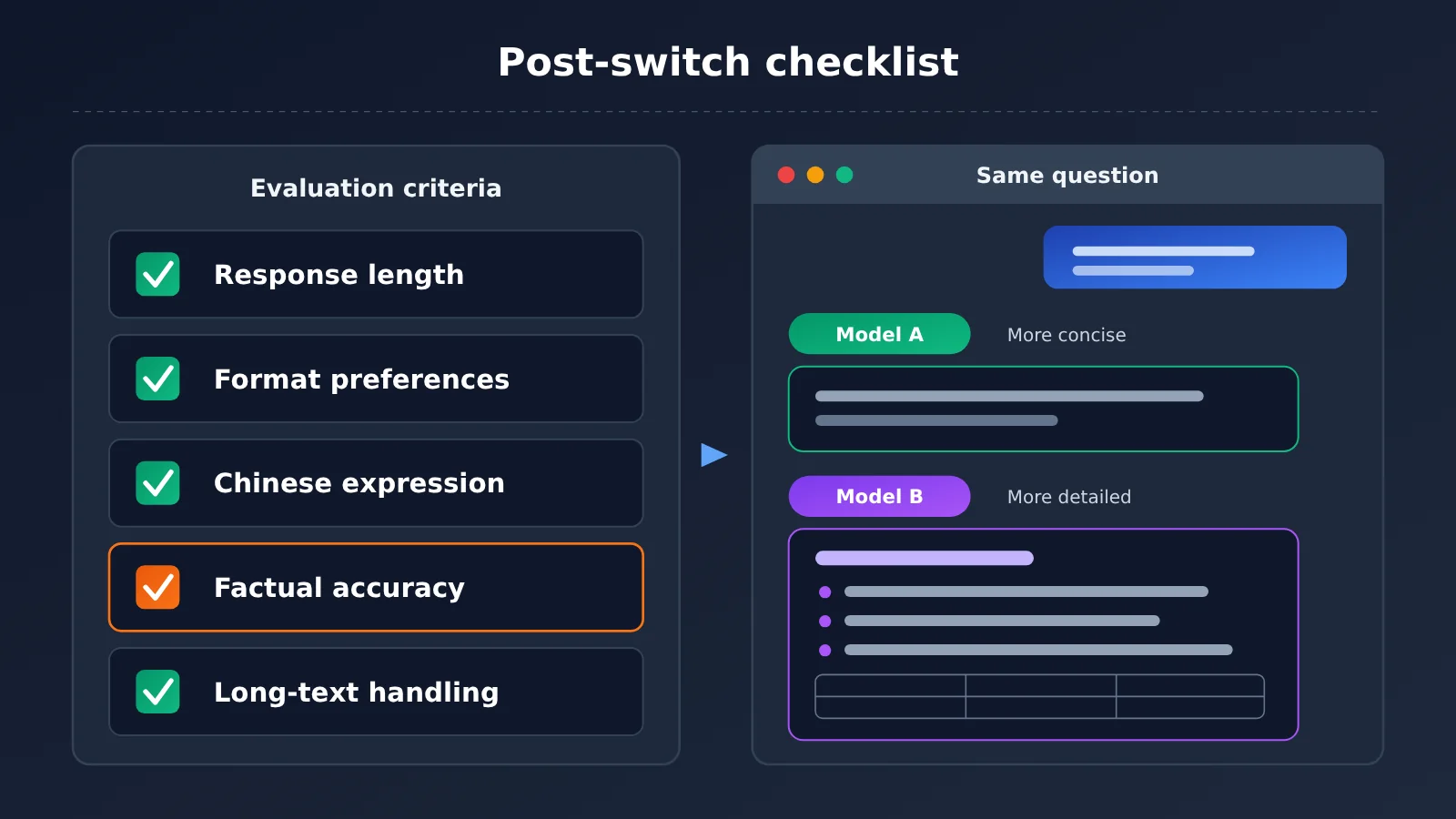
Many people switch models and keep using the same approach, only to find that the answers don’t feel quite right. That’s not surprising: models differ in their training data, default styles, and output habits. Since there’s currently a lack of systematic comparisons for Chinese-language office tasks, this article won’t rank the models. Instead, it highlights a few things worth checking after you switch.
| What to check | Possible differences | What to do |
|---|---|---|
| Answer length | Some models are concise; others are more detailed | Specify the desired word count or length in your prompt |
| Formatting habits | Models use lists, headings, and tables at different rates | Specify the output format you want |
| Chinese expression | Word choice and level of formality may vary | Provide an example for the model to follow |
| Factual accuracy | Models differ in their knowledge of specialized topics and recent information | Always verify critical data yourself |
| Long-document handling | Supported context window lengths vary | Processing long documents in sections is safer |
A simple way to test a backup model is to ask it a question you already know the answer to. Check whether its style and quality are acceptable. For content you’re delivering, such as reports, emails, or code explanations, it’s worth giving the output an extra read after switching models. Pay particular attention to numbers, names, and technical terms.
If you regularly compare models, accessing several through APIYI apiyi.com in the same client can save time. You can ask each model the same question and compare the results before choosing one. It’s much more convenient than copying back and forth between multiple official websites.
Frequently Asked Questions
Q1: What does “DeepSeek server is busy” mean?
It’s a message from the server indicating that your request reached it, but it can’t process the request right now. This often happens during traffic spikes or service disruptions. It’s usually a server-side issue, not a problem with your account or device. Trying again later or switching to another model are both reasonable options.
Q2: How can I tell whether DeepSeek’s server is busy or my internet connection is the problem?
Network problems typically cause pages to fail to load, requests to time out, or connections to fail—and other websites are often affected too. When the server is busy, you can connect normally, but the service explicitly tells you it’s busy. If you get the same message on a different network and device, you can generally rule out a problem with your own connection.
Q3: How long does it usually take for DeepSeek to recover when its server is busy?
There’s no fixed recovery time. It depends on what caused the problem and how quickly the DeepSeek team resolves it. For example, on November 3, 2026, community reports appeared in a short span of time, but the reference materials don’t record an official recovery time. Check official channels for updates rather than relying on speculation.
Q4: How can I check whether everyone is seeing the “DeepSeek server is busy” message?
The fastest way is to search for relevant keywords in your usual online communities and sort the results by time. If several similar posts appear around the same time, the issue is probably widespread. You can also ask colleagues or friends who use DeepSeek. Multiple people encountering the same issue at once is more convincing than a single post.
Q5: How can I switch to another model in my client when DeepSeek’s server is busy?
If you use a multi-model client such as Cherry Studio or ChatGPT Next Web, you can get an API key from APIYI at apiyi.com to access multiple mainstream models. When an issue occurs, simply switch models in the client’s model list. For instructions on entering the API endpoint and details on available models, refer to docs.apiyi.com and your client’s documentation.
Q6: Can calling DeepSeek through a third-party platform avoid the “server is busy” message?
There’s no guarantee. If DeepSeek’s servers are experiencing widespread overload, requests to DeepSeek models may be affected regardless of which service you use. The value of a multi-model platform is that it makes it easy to switch to another model and keep working—it doesn’t fix DeepSeek’s own service issues. It’s important to set expectations accordingly.
Q7: What should I do if I get different results after switching models?
Start by specifying your requirements for length, format, and tone in your prompt. Include a sample if needed. For formal content such as reports and emails, always review the numbers and technical terminology yourself after switching. If the differences are significant and the task isn’t urgent, waiting for DeepSeek to recover and using the original model is also a sensible option.
Key Takeaways for Handling DeepSeek Server Busy Errors
- What it means: A server busy message usually points to server load or an outage, not an account issue.
- How to diagnose it: Retry, switch networks or devices, try another access point, check community reports, and consult official updates.
- Community signals: Multiple similar reports at the same time are a strong sign of a widespread issue.
- When to wait or switch: For non-urgent tasks, retry at intervals or wait until off-peak hours. For urgent tasks, switch models.
- After switching: Check the output’s length, format, wording, and factual accuracy.
- Prepare ahead: Set up a backup model in your client through APIYI apiyi.com to reduce disruption during an outage.
Summary
When DeepSeek reports that its servers are busy, don’t panic or keep refreshing. Work through the problem step by step:
- Check the scope: Switch networks, devices, or access points, and review community reports to determine whether the problem is local or widespread.
- Decide whether to wait or switch: For non-urgent tasks, retry at intervals or wait until off-peak hours. If you’re working to a deadline, switch models.
- Check the results: Different models can vary in style and accuracy, so always review important content yourself.
Outages get resolved, but the cost of interrupted work is real. If you rely heavily on AI for work or study, setting up a backup model in your usual client is a worthwhile habit. With APIYI apiyi.com, you can access multiple models from one client, compare their results day to day, and have another option ready when an outage hits.
📚 References
- V2EX community post: Is DeepSeek down yet again?: Users reported seeing the message “The server is busy. Please try again later” on DeepSeek.
- Link:
v2ex.com/t/1254187 -
Note: Published on November 3, 2026, this post records the original error message.
-
V2EX community post: DeepSeek is down: Another user report from around the same time.
- Link:
v2ex.com/t/1254189 -
Note: Published close to the previous post, this can serve as another community signal that the issue was widespread.
-
APIYI Documentation Center: Instructions for connecting multiple models and configuring clients.
- Link:
docs.apiyi.com - Note: When connecting multiple models in clients such as Cherry Studio and ChatGPT Next Web, follow the configuration steps in the documentation.
Author: APIYI Technical Team
Technical support: If you run into issues configuring multiple models in your client, contact us through the APIYI homepage at apiyi.com. For more resources, visit the documentation center at docs.apiyi.com.